
ddosNull Shield — DDoS & Bot Protection
| 开发者 | ddosnull |
|---|---|
| 更新时间 | 2026年9月28日 20:30 |
| PHP版本: | 7.4 及以上 |
| WordPress版本: | 7.1 |
| 版权: | GPL-2.0+ |
| 版权网址: | 版权信息 |
详情介绍:
- Install the plugin from your WordPress admin
- Click Connect to ddosNull and sign in (or create a free account)
- Protection activates immediately
- AI-driven Layer 7 DDoS protection with automatic IP blocking
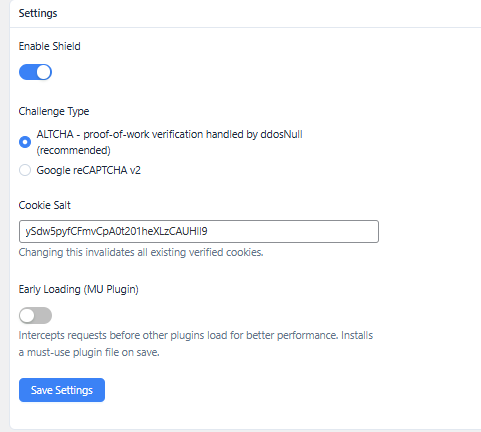
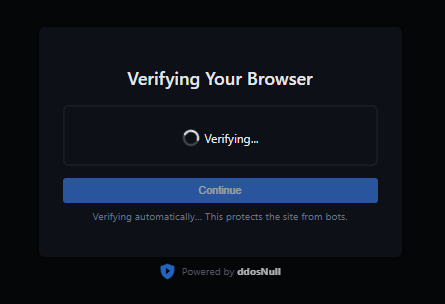
- ALTCHA proof-of-work challenge (resolves silently for most real visitors)
- Google reCAPTCHA v2 support as an alternative challenge
- Checkout protection against carding, card testing, and fake orders for WooCommerce — ddosNull Shield Pro (premium)
- Hard-block mode for confirmed malicious IPs (403 response)
- IPv4 and IPv6 CIDR range support
- URL whitelisting with regex support
- User-agent blacklisting and whitelisting
- IP whitelisting
- Dry Run Mode for zero-risk evaluation
- Cloudflare compatible (reads CF-Connecting-IP header)
- Optional early loading for better performance (opt-in)
- Compatible with any WordPress host — no server access required
安装:
- Upload the
ddosnull-shieldfolder to/wp-content/plugins/, or install it directly from the WordPress plugin directory. - Activate the plugin through the Plugins menu in WordPress.
- Go to ddosNull Shield in the admin sidebar.
- Click Connect to ddosNull and sign in or create a free account.
- Protection activates immediately after connecting.
屏幕截图:
常见问题:
Will this slow down my WordPress site?
No. The plugin intercepts requests before WordPress loads the full page, and all traffic analysis happens on ddosNull's servers — not yours. There is zero performance impact on normal page loads.
Do I need to change my DNS or use a proxy?
No DNS changes, no proxy, no re-routing your traffic. ddosNull Shield works directly inside WordPress. Your DNS, CDN, and existing Cloudflare setup stay exactly as they are.
What if I accidentally block a real customer?
Use Dry Run Mode first. You'll see a report of exactly who would have been blocked before any blocking occurs. ddosNull also uses smart challenges (not hard blocks) for suspicious-but-not-confirmed traffic, so edge cases like VPN users get a quick verification step instead of a flat rejection.
Does this work on shared hosting?
Yes. Because ddosNull Shield works at the PHP/WordPress layer, it runs on any host that supports WordPress plugins — including shared cPanel and Plesk hosting. No server-level access is required.
What happens if ddosNull goes down?
Your WordPress site keeps running normally. The plugin stores the last known block list locally and continues enforcing those rules if the ddosNull cloud is temporarily unreachable. Nothing breaks.
How does the carding and fake order protection work?
Checkout protection against carding, card testing, and fake orders is available with ddosNull Shield Pro, distributed from ddosnull.com. When active, it collects lightweight browser signals on the checkout page — things like screen dimensions, JavaScript environment, and session timing. Orders that arrive too fast, without a real browser, or from known automation tools are blocked before the order is created. Legitimate shoppers experience no friction.
What is the ALTCHA challenge?
ALTCHA is a privacy-friendly proof-of-work challenge that runs silently in the browser. Most real visitors pass it automatically without clicking anything. It requires no Google account and collects no personal data.
Can I use Google reCAPTCHA instead?
Yes. Switch the challenge type to reCAPTCHA v2 in the plugin settings and enter your site key and secret key from Google.
What does Optimize ddosNull do?
Turning on "Optimize ddosNull" lets you choose how early the plugin intercepts a request, for better performance under heavy traffic. "MU Plugin" installs a small must-use plugin file so the check runs before regular plugins load, but after WordPress core itself has booted. "Auto-Prepend" goes further and intercepts before WordPress loads at all — including serving the verification/challenge page — by adding an auto_prepend_file entry to .user.ini or .htaccess; it requires PHP-FPM, CGI/LiteSpeed, or Apache mod_php with a writable .htaccess/.user.ini. Both are opt-in and can be changed at any time from the plugin settings page.
Is there a free trial or money-back guarantee?
Yes. All paid plans include a 30-day money-back guarantee — no questions asked. You can also start on the Free plan (15,000 requests/month) before upgrading. There are no long-term contracts; you can cancel at any time and protection remains active through the end of your current billing period.
Is my customer data private?
Your traffic never passes through ddosNull's servers. The plugin only shares anonymized metadata — IP addresses, request counts, and access log lines — to power threat detection. ddosNull never sees your customers' personal data, payment information, or page content.
更新日志:
- Add integration with the AI Crawler & Scraper Blocker plugin: when both are active, its per-bot block/allow choices are enforced in Shield's gate (including before WordPress loads in Auto-Prepend mode) and take priority over Shield's built-in user-agent lists. Allowed AI bots still go through IP and DDoS checks.
- Fix post-verification redirect sending visitors to the wrong page when the original URL had a doubled slash right after the domain (e.g.
example.com//product/), instead of back to the exact page they requested.
- Add "Auto-Prepend" optimize mode: intercepts a request via
auto_prepend_filebefore WordPress loads at all — including serving the verification/challenge page — for sites on PHP-FPM, CGI/LiteSpeed, or Apache mod_php with a writable.htaccess/.user.ini. The existing "MU Plugin" mode (previously "Early Loading") is still available and remains the default for sites that can't use auto-prepend. - Add a migration so existing "Early Loading" users are moved onto the equivalent new "MU Plugin" optimize mode automatically.
- Count HTTP 429 (bot-verification challenge) hits during a scan instead of discarding them unrecorded, so the scan results page can show how many requests hit the verification challenge during an attack.
- Fix RPM/load admin chart crashing when it received a degenerate data set (a single stat sample, or a flat line where every value is identical).
- Fix built admin.js executing as an unscoped classic script, which could let a minifier-assigned variable name collide with and overwrite WordPress's own
wpglobal object, breaking other admin scripts on the page.
- Cache the parsed IP/CIDR lookup structure instead of re-parsing the raw list on every request, reducing overhead on sites with large IP lists.
- Fix CORS error blocking the ALTCHA verification challenge page when a visitor requests a non-canonical host (e.g. the bare domain when the site's configured URL is the www version). The challenge page's script now loads from the same origin as the page itself instead of the configured site URL.
- Fix silent verification failure: a background AJAX/fetch call (e.g. WooCommerce's wc-ajax variation lookup) that needed a challenge previously returned a broken response with no visible prompt. The interceptor now signals this via an X-DdosNull-Verify header, and a small front-end watcher script forces the visitor through the real challenge page instead of leaving the request silently broken.
- Fix fatal error "Argument 1 passed to ddosnull_shield_sanitize_settings() must be an instance of mixed, array given" on PHP 7.4 sites, caused by using the PHP 8-only
mixedtype declaration.
- Fix fatal error "Cannot redeclare function ddosnull_shield_next_9am()" when activating ddosNull Shield Pro while the free plugin is still active.
- Warn in the plugin dashboard when WP-Cron is disabled (DISABLE_WP_CRON), since the plugin relies on it to send load stats and scan results to the backend server.
- Increase timeout for the periodic load-stats backend request from 10 to 60 seconds to reduce false "backend unreachable" failures on slower connections.
- Block IPs reported in the fake_ua_ips list with a 403, even when their request presents a whitelisted user-agent string (this list is for IPs caught by the backend spoofing a whitelisted UA to evade blocking).
- Fix challenge redirect dropping query-string parameters when the destination URL contains unencoded ampersands (e.g. filter parameters). The full URL is now preserved through the challenge form using a hidden field populated from the raw query string.
- Remove WordPress.org directory assets (banners, icons, screenshots) from plugin zip; these are uploaded separately via SVN.
- Remove branding footer from 403 block page to comply with WordPress.org guidelines.
- Fix Early Loading (MU Plugin) state detection in Pro plugin reading wrong MU file name.
- WordPress.org submission: add icon, banner, and screenshot assets.
- Add == Pricing == section and money-back guarantee info to readme.
- Internationalize all user-facing strings in challenge and block pages with load_plugin_textdomain and generate .pot file.
- Add source reference comment to admin.js.
- Redirect to plugin dashboard on first activation.
- Expand External Services section: document data transmitted to each service and add Terms of Use / Privacy Policy links for all three external endpoints (ddosNull, Google reCAPTCHA, ipify).
- Split plugin into free (Layer-7 DDoS/bot protection) and Pro (adds WooCommerce checkout protection) tiers to comply with WordPress.org remote-feature-gating guidelines.
- Fix early loading toggle always showing as off: detect MU plugin state from file existence rather than the stored setting, which could be missing if the file was installed via a different code path.
- Add protected_urls support: URL patterns (nginx-style regex or plain prefix) that force visitors through the verification challenge unless their IP or user-agent is whitelisted.
- Fix fatal error on sites using early loading: new option-key constants were not defined in the MU plugin loader before intercept.php ran.
- Rebuild admin JS.
- Store ip_list, block_with_403, and whitelisted_ips in separate wp_options entries with a 24-hour object-cache layer; cache is invalidated on each update.
- Store ip_list as a PHP array instead of a newline-delimited string, removing per-request parsing overhead.
- Clear the dynamic block list and disable DDoS mode when the ddosNull backend is unreachable, preventing the ALTCHA challenge from looping indefinitely.
- Improved checkout fraud detection.
- WordPress coding standards: replace parse_url with wp_parse_url, fopen/fclose with WP_Filesystem, unlink with wp_delete_file, rmdir with WP_Filesystem.
- Sanitize and unslash all superglobal reads ($_SERVER, $_COOKIE, $_POST).
- Add nonce verification to altcha and reCAPTCHA challenge form submissions.
- Prefix global variables in uninstall.php and remove unprefixed helper variable in main plugin file.
- Update tested-up-to to WordPress 7.0; align plugin name across header and readme.
- Serve 403 block page from a bundled local template with no external CDN dependencies.
- Fix cron schedule recovery for existing installs affected by the identifier rename in 1.1.15.
- Vendor ALTCHA JS locally, removing cdn.jsdelivr.net dependency.
- Use local plugin icon in admin menu and challenge page instead of remote URL.
- Add GPL-2.0+ license header to plugin file.
- Prefix all identifiers (cookie, transient, cron schedule) to avoid conflicts with other plugins.
- Use WP Filesystem API for must-use plugin file installation.
- Add uninstall.php to clean up settings, transients, and log files on deletion.
- Add opt-in early loading via must-use plugin dropper (toggle in Settings).
- Add readme.txt for WordPress.org submission.
- Add hard block (403) support for blacklisted user agents.
- Revert block_with_403 ordering change from 1.1.12.
- Fix: hard-blocked IPs could bypass the block via whitelisted URLs.
- Checkout protection now gated on a server-signed flag to prevent client-side tampering.
- Add regex support for whitelisted URLs (prefix with
~for case-sensitive,~*for case-insensitive).
- Challenge and block pages now set no-cache headers to prevent caching plugins from storing them.
- Add optional early loading via must-use plugin (opt-in from settings).
- Admin: protection suspended banner with link to dashboard; stats hidden when account limit is reached.
- Full IPv4 and IPv6 CIDR range support for blocked and whitelisted IP lists.
- Add CIDR range support for IP lists.
- Log challenge page hits with HTTP 429 status for accurate scan analysis.
- Fix IP detection to read X-Real-IP header for nginx reverse proxy setups.
- Enable Shield protection by default on fresh installs.