
DebugBundle
| 开发者 |
owenfar
debugbundle |
|---|---|
| 更新时间 | 2026年11月2日 02:01 |
| PHP版本: | 8.2 及以上 |
| WordPress版本: | 7.1 |
| 版权: | GPLv2 or later |
| 版权网址: | 版权信息 |
详情介绍:
DebugBundle helps you understand what went wrong when a WordPress site breaks. Instead of piecing together PHP logs, browser errors, request details, and plugin or theme context by hand, the plugin sends the important debugging evidence to your DebugBundle project.
Use it when you want a clearer answer than "something broke." DebugBundle gives the developer or AI agent fixing the site the backend and visitor-side context around an incident, so they can see what happened, where it happened, and what evidence is available.
DebugBundle is built for agent-first debugging workflows. If you use an AI coding agent, DebugBundle reports give the agent structured incident evidence instead of a vague error message or copied log snippet. That helps the agent investigate plugin, theme, integration, and frontend failures with the same context a developer would need.
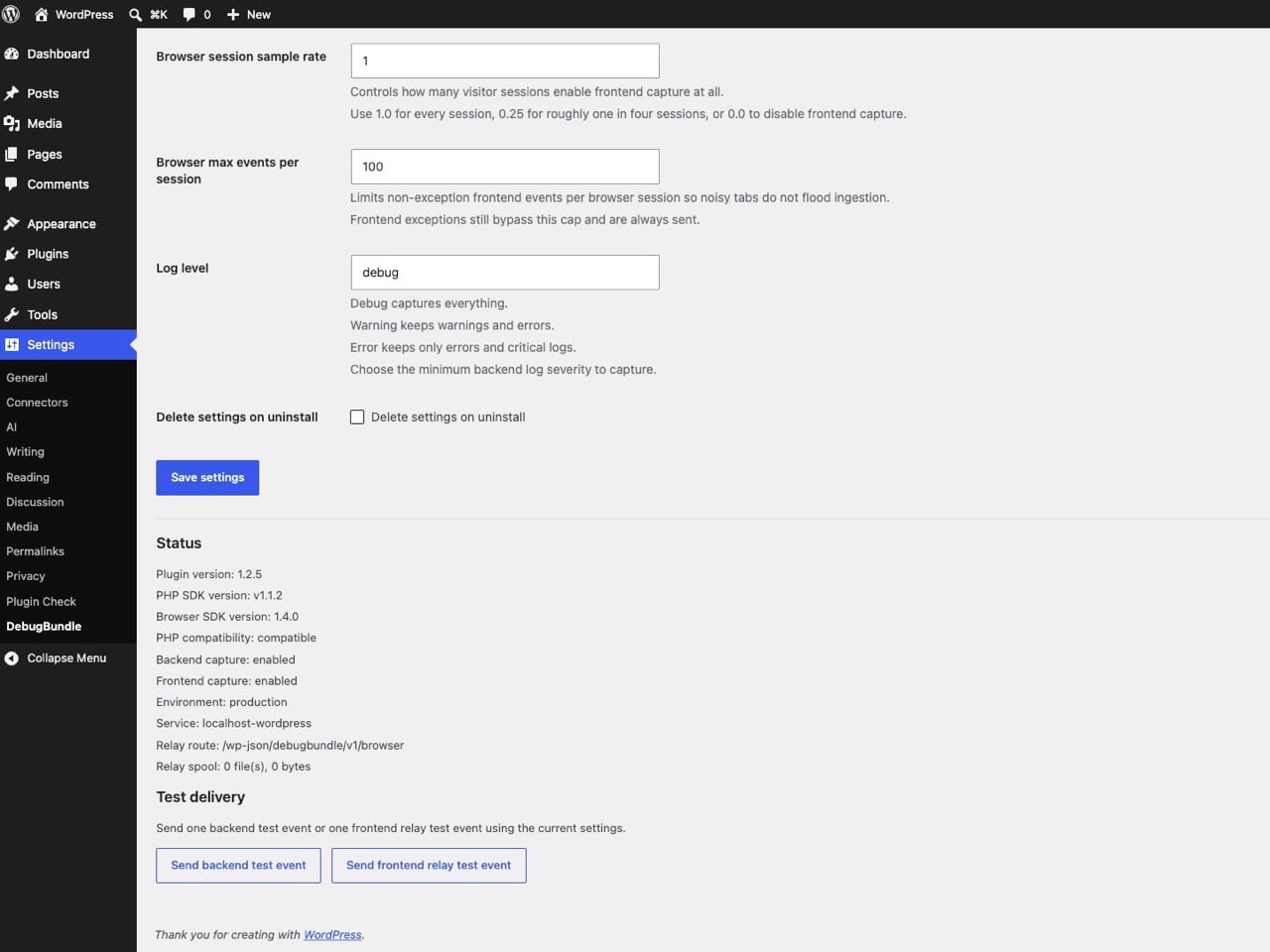
Setup stays simple: install the plugin, paste your DebugBundle project token, and run the built-in test buttons. You do not need Composer, npm, shell access, CDN scripts, or a custom relay setup.
Useful for:
- production PHP errors, fatal errors, and uncaught exceptions
- browser exceptions that visitors hit on public pages
- failed or slow first-party requests seen by the browser
- recent visitor actions and page changes that help explain a frontend error
- WordPress, PHP, service, environment, and SDK version context for developers or AI coding agents
- AI-assisted debugging workflows where an agent needs structured incident evidence instead of copied logs
- PHP errors allowed by error_reporting(), uncaught exceptions, fatal shutdown errors, request metadata, and logs at or above the configured level
- frontend browser exceptions from public pages
- error-only browser breadcrumbs such as clicks, route changes, and first-party request failures
- service, environment, WordPress, PHP, and SDK version context useful for debugging
- backend events are sent server-side through
debugbundle/sdk-php - backend batches do not send during capture; one small best-effort request-end attempt prioritizes exceptions and may briefly occupy a PHP worker or lose events during an outage
- browser events are posted to
/wp-json/debugbundle/v1/browserand forwarded server-side - transient browser relay delivery failures are retried through a bounded local spool
- the browser SDK is served from this plugin package, not from a third-party CDN
- it does not contact DebugBundle until an administrator saves a project token or defines
DEBUGBUNDLE_PROJECT_TOKEN - it does not expose the project token to page JavaScript
- it does not capture
wp-admintraffic by default - it does not add incident browsing, billing, account management, or dashboard features inside WordPress
- it does not let an agent change WordPress settings, content, users, plugins, or themes
安装:
- In WordPress, go to Plugins -> Add New.
- Search for DebugBundle, then install and activate the plugin.
- Open Settings -> DebugBundle.
- Paste your DebugBundle project token and save.
- Use the backend and frontend test-event buttons to verify delivery.
屏幕截图:
常见问题:
Do I need a DebugBundle project?
Yes. The plugin needs a DebugBundle project token before it can send backend or browser incidents.
Does the browser SDK get my project token?
No. The plugin keeps the project token on the server and receives browser events through a same-origin relay route.
Does this capture wp-admin by default?
No. The first release is focused on public-site capture.
Does the plugin contact DebugBundle before I configure it?
No. The plugin requires a saved project token before it can forward backend or browser incidents to DebugBundle.
Can I use this instead of installing the PHP or browser SDK manually?
Yes for normal WordPress sites. The plugin vendors the PHP SDK, bundles the browser SDK, and registers the WordPress REST browser relay for you.
更新日志:
2.1.0
- Bundle PHP 2.1.0 and Browser 3.2.0 with bounded structured evidence, passive browser diagnostics, complete-path relay negotiation and explicit recovery. Existing settings and spool state remain compatible.
- Bundle PHP SDK 2.0.2 so empty exception messages use the throwable class and missing request maps remain valid JSON objects. Existing nonempty messages, filters, privacy protection and browser capture are preserved.
- Bundle PHP SDK 2.0.1 and Browser SDK 3.0.3 with confirmed HTTP delivery and bounded retry handling. Existing settings, relay and spool behavior are preserved.
- Bundle Browser SDK 3.0.2 with corrected lifecycle memory bounds, shared send quotas, and retry/flush handling. PHP capture, settings, and relay routes are unchanged.
- Bundle PHP SDK 2.0.0 and Browser SDK 3.0.0 while keeping the existing settings and relay route.
- Prioritize backend exceptions and make one bounded best-effort request-end delivery attempt instead of sending when a batch fills.
- Refresh remote backend capture policy through WP-Cron and a local visitor-request cache.
- Protect PHP and browser relay telemetry before forwarding and before retry storage with the mandatory privacy baseline.
- Move retry files to a private bounded spool and safely migrate old uploads-spool files in limited batches.
- Bundle PHP SDK 1.5.0 and Browser SDK 2.0.0 while preserving the existing WordPress settings and relay flow.
- Update the bundled browser SDK to 1.8.0 for correct same-origin resource rules and preserved external resource hosts.
- Existing captures remain compatible with Bundle v1.
- Respect PHP error_reporting() and @ suppression through bundled PHP SDK 1.4.1.
- Align the bundled browser SDK at 1.7.2; preserve enabled errors, explicit capture and fatal shutdown handling.
- Update the bundled browser SDK to 1.7.1 to preserve native JavaScript errors, promise rejection reasons and structural breadcrumbs.
- Sanitize browser stack URLs while retaining useful source coordinates and keeping project credentials server-side.
- Refresh the bundled PHP and browser SDKs to their Apache 2.0 releases. The WordPress plugin remains GPL-2.0-or-later.
- Confirm compatibility with WordPress 7.1 and pin the packaged-plugin smoke test to WordPress 7.1.0.
- Add the
debugbundle_before_sendfilter for final backend event filtering or redaction without bypassing the PHP SDK safety contract. - Rebuild the bundled browser SDK on
@debugbundle/sdk-browser1.6.0and raise the PHP SDK requirement todebugbundle/sdk-php^1.3.0. - Enforce per-file backend coverage and validate the assembled plugin ZIP through the full WordPress delivery and relay-spool smoke path.
- Add opt-in AnalyticsBundle browser events to the WordPress REST relay while keeping browser requests credential-free.
- Rebuild the bundled browser SDK on
@debugbundle/sdk-browser1.5.0and raise the PHP SDK requirement todebugbundle/sdk-php^1.1.3.
- Add the WordPress.org submitter to plugin contributors, document the DebugBundle external service with terms and privacy links, and tighten WordPress-native sanitization around request metadata, settings, and remote configuration fetches.
- Rebuild the bundled browser SDK on
@debugbundle/sdk-browser1.4.0so the plugin ships the latest capture-rule suggestion contract and bundle metadata updates across the stable browser SDK line.
- Rebuild the bundled browser SDK on
@debugbundle/sdk-browser1.3.0so the plugin ships the browser fetch-header preservation fix on the current stable JS SDK line.
- Replace the remaining
parse_url()relay-origin parsing calls withwp_parse_url()so the plugin passes current WordPress Plugin Check URL-parsing guidance consistently.
- Rebuild the bundled browser SDK on
@debugbundle/sdk-browser1.2.0so the plugin ships the browserbeforeSendhook, bounded rejection-reason capture, and bot-aware browser noise controls on the stable SDK line.
- Rebuild the bundled browser SDK on
@debugbundle/sdk-browser1.1.0and requiredebugbundle/sdk-php^1.1.0so the plugin ships the path-scoped client-error capture updates across the stable PHP and browser SDK line.
- Rebuild the bundled browser SDK on
@debugbundle/sdk-browser1.0.1so the plugin ships the opaque browser-error enrichment and head-loading defaults together on the stable SDK line.
- Mark the first stable WordPress plugin release after the browser relay, spool, and diagnostics model settled across live smoke coverage.
- Rebuild the bundled browser SDK on
@debugbundle/sdk-browser1.0.0and requiredebugbundle/sdk-php^1.0.0so the plugin ships on the stable SDK line.
- Rebuild the bundled browser SDK on
@debugbundle/sdk-browser0.1.8so the shipped WordPress asset includes the trace-allowlist hardening fix.
- Replace the remaining raw config-fetch error propagation with a stable plugin-owned failure message so WordPress Plugin Check no longer flags the exception path.
- Address WordPress Plugin Check compliance issues around metadata, direct-access guards, WordPress-safe request handling, and filesystem APIs.
- Break long sampling and log-level helper text into stacked description lines so the settings page reads more cleanly.
- Complete browser relay correlation fields before forwarding so frontend events satisfy the current ingestion schema.
- Report the DebugBundle ingestion response for frontend relay deliveries, including accepted and rejected counts.
- Treat ingestion-level rejected events as relay test failures even when the HTTP request itself returned 202.
- Hide the saved project token in a password field on the settings page.
- Clarify sampling and log-level settings with concrete explanations.
- Send a schema-valid frontend relay test event and report relay forwarding errors instead of showing a false success.
- Initial pre-release plugin scaffold.