
DebugZen
| 开发者 | parag44 |
|---|---|
| 更新时间 | 2026年9月8日 23:23 |
| PHP版本: | 7.4 及以上 |
| WordPress版本: | 7.1 |
| 版权: | GPLv2 or later |
| 版权网址: | 版权信息 |
详情介绍:
DebugZen is the ultimate developer tool for WordPress troubleshooting. It gives administrators a powerful, focused dashboard screen for managing WordPress debugging settings and diagnosing fatal errors, warnings, and notices in real time.
If you have ever struggled with finding the
debug.log file, or if you need an intuitive error log viewer right inside your WordPress admin area, DebugZen makes it effortless to monitor your site's health and troubleshoot issues without relying on FTP or SSH.
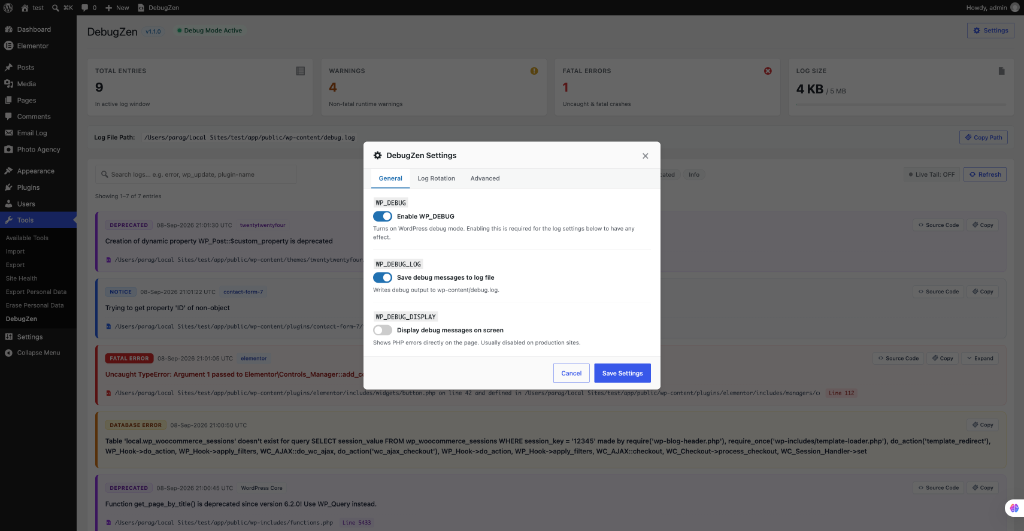
The plugin uses the battle-tested WP Config Transformer library to read, add, and update these constants in wp-config.php:
WP_DEBUGWP_DEBUG_LOGWP_DEBUG_DISPLAY
- Smart Log Grouping: Automatically consolidates repeated identical errors into single cards with occurrence counts and first/last seen timestamps.
- Source Code Context: Expandable preview showing the exact lines of code surrounding an error, complete with line numbers, error highlighting, and a direct "View in Editor" jump action.
- Severity Filtering & Search: Instant debounced search and filtering across Fatal Errors, Warnings, Notices, Deprecations, and stack traces.
- Real-Time Live Tail: High-performance streaming that reads newly appended log bytes using byte offsets without polling full files or exhausting PHP memory.
- Log Rotation & Size Management: Monitor debug log size with visual thresholds, automatic truncation, or timestamped archival rotation.
- Secure Management: Restrict every action to administrators with
manage_options, protected by nonces and server-signed HMAC authentication. - Zero External Dependencies: Operates 100% locally with no telemetry, tracking, or remote CDNs.
vendor/wp-cli/wp-config-transformer/LICENSE.
This plugin does not contact external services, collect telemetry, or load remote executable code.
安装:
- Upload the
debugzenfolder to/wp-content/plugins/, or install the plugin ZIP from Plugins > Add New > Upload Plugin. - If installing from source without the bundled
vendordirectory, runcomposer install --no-dev --optimize-autoloaderinside the plugin directory. - Activate DebugZen through the Plugins screen in WordPress.
- Open Tools > DebugZen.
- Ensure
wp-config.phpis writable before saving changes. Restore restrictive permissions after configuration if required by your hosting environment.
屏幕截图:
常见问题:
Does the plugin directly edit debug constants with string replacement?
No. It uses WP Config Transformer to locate, read, add, and update debug constants safely via AST tokenization.
Why can I not save settings?
The plugin must be able to read and write wp-config.php. File ownership, permissions, or host-level restrictions may prevent changes.
Where is the debug log?
By default, WordPress writes the log to wp-content/debug.log. If WP_DEBUG_LOG contains a custom path, DebugZen uses that path.
How does Source Code Preview stay secure?
Source code inspection is protected by server-signed HMAC tokens, strict path traversal checks, canonical realpath validation confined to the WordPress installation, and explicit blacklists for wp-config.php and dotfiles. Files are never executed.
Does DebugZen send data anywhere?
No. DebugZen has no telemetry, analytics, external API connection, or remote code loading.
更新日志:
1.1.1
- Bumped 'Tested up to' tag to 7.1.
- Major feature release introducing an interactive diagnostic log viewer, smart log grouping, and source code context preview.
- Added Admin Toolbar quick link: Instant access to the DebugZen dashboard from anywhere in WordPress for users with manage_options capability.
- Enhanced Visual Hierarchy: Redesigned log cards with intuitive color-coded severity indicators (Fatal Errors, Warnings, Notices, Deprecated) for quick scanning.
- Added Smart Log Grouping: automatically consolidates repeated identical log entries into a single card with occurrence counts and first/last seen timestamps.
- Added Log Grouping setting under Settings > Advanced (enabled by default) with real-time Live Tail duplicate merging.
- Added Source Code Context preview around reported error lines with lazy loading, line number gutter, and error line highlight.
- Added secure "View in Editor" action opening the WordPress Plugin/Theme file editor directly positioned at the error line.
- Added configurable context window setting (3, 5, 8, 10 lines) in Settings > Advanced.
- Added dedicated log parser recognizing Fatal Errors, Warnings, Notices, Deprecations, and stack traces.
- Added server-side debounced search, severity filtering, and memory-conscious pagination.
- Added high-performance Live Tail with byte-offset tracking to prevent server memory spikes.
- Added Log Size management with visual limit progress indicators and automatic truncation or timestamped rotation.
- Added multi-tab Settings modal for General, Log Rotation, and Advanced options.
- Added clean uninstallation routine (uninstall.php) removing plugin options.
- Added server-signed HMAC authentication and strict path traversal protection for source code preview.
- Added secure Download Log and Copy Path actions.
- Initial release.
- Added secure controls for
WP_DEBUG,WP_DEBUG_LOG, andWP_DEBUG_DISPLAY. - Added a memory-conscious debug-log viewer and secure clear-log action.
- Added WP Config Transformer integration.