
DecoBlocks
| 开发者 | luxsnap |
|---|---|
| 更新时间 | 2026年10月14日 14:18 |
| PHP版本: | 7.4 及以上 |
| WordPress版本: | 7.0 |
| 版权: | GPLv2 or later |
| 版权网址: | 版权信息 |
标签
下载
详情介绍:
Most WordPress posts read like documents. DecoBlocks is built for the posts that should read like you — the ones where a reader stops scrolling, actually feels something, and sticks around.
Plain, information-only writing is easy to skim, easy to summarize, and increasingly easy to replace. What's harder to replace is a post with a real voice behind it — the small human touches (a sticker at just the right moment, a highlighted aside, a speech bubble that sounds like you talking) that no template and no AI-generated draft quite gets right. That's the gap DecoBlocks fills: the same kind of expressive stickers you already use every day in chat apps, brought into your blog posts — a visual rhythm for pacing emotion across a page that WordPress has never quite had.
The practical effect, when it's used well: readers stay on the page longer, they're more likely to comment or come back, and your writing simply feels more like someone's, not something's. DecoBlocks doesn't promise a ranking boost — no plugin honestly can — but posts that keep people reading and coming back are exactly the kind of signal search engines are built to reward.
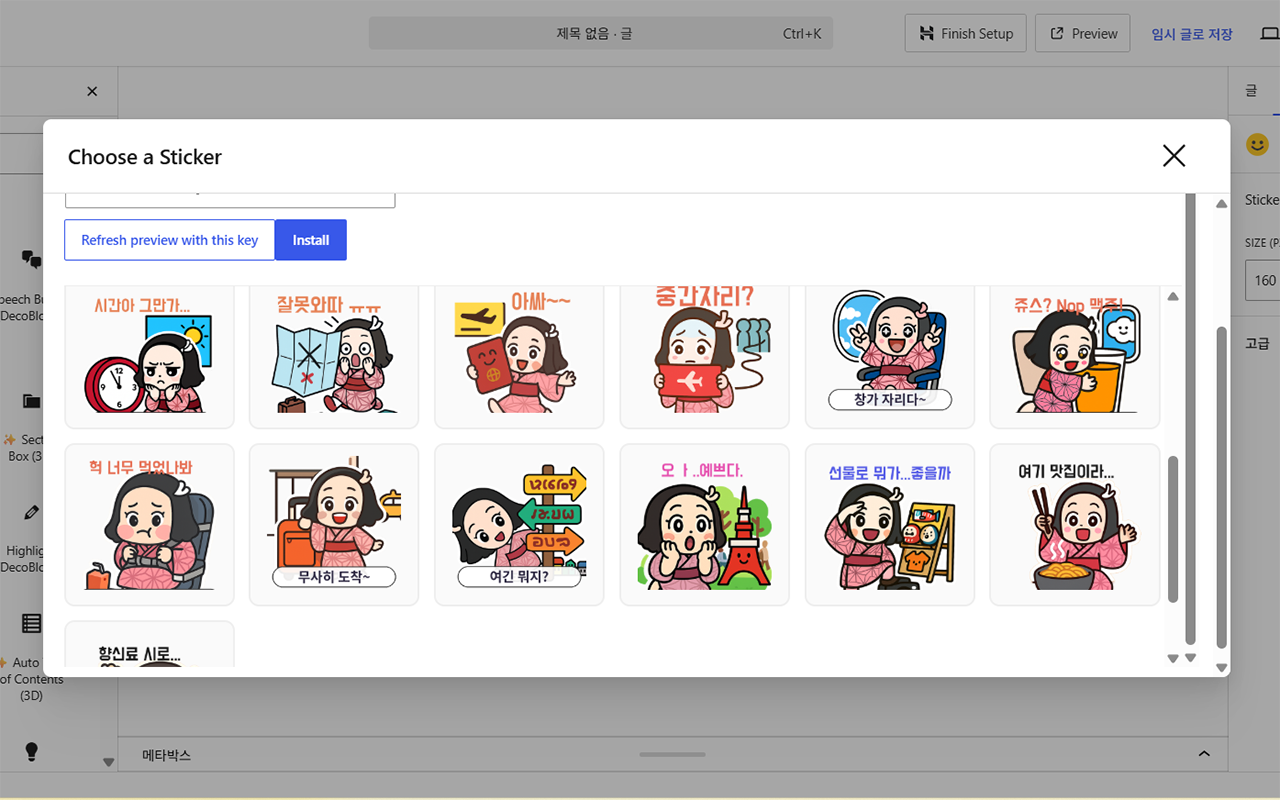
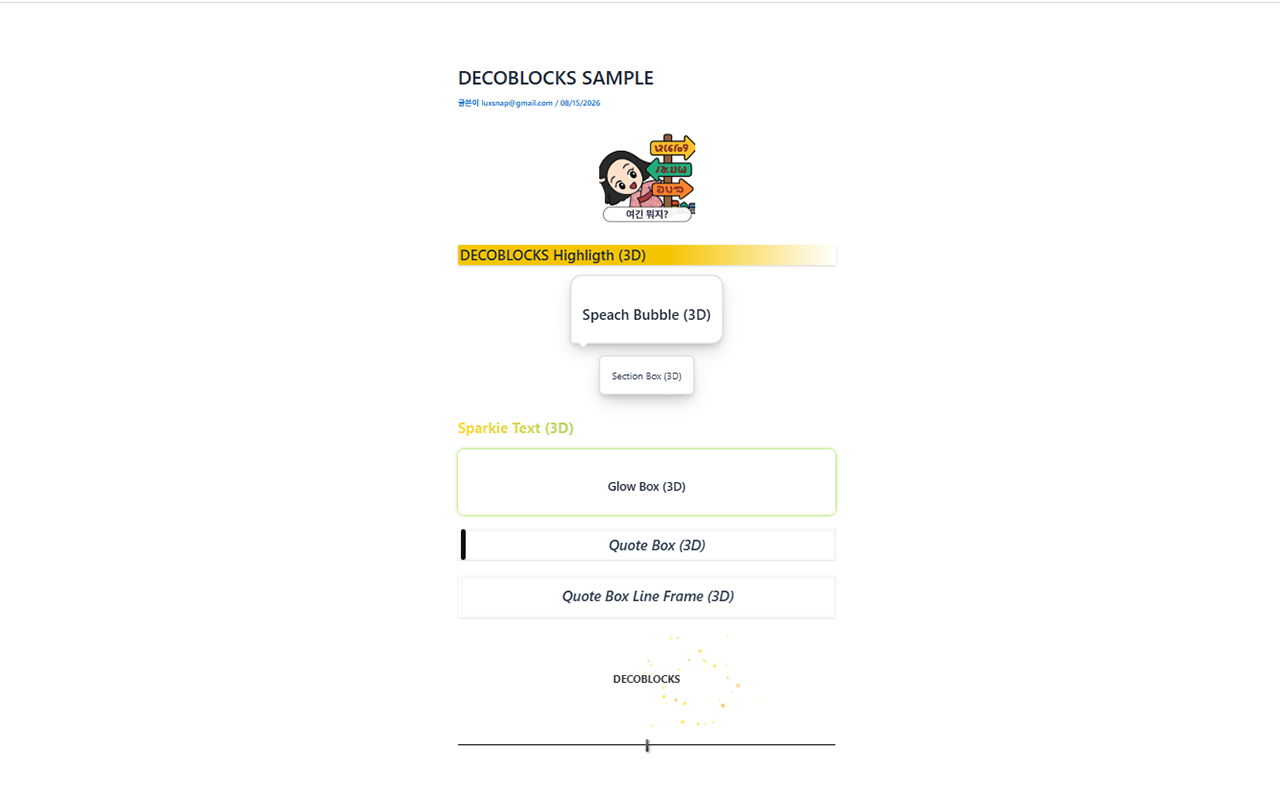
Character stickers are the centerpiece: install packs made by independent illustrators (Insert Sticker block, or the Get from Marketplace tab) and drop them into your posts to punctuate a feeling — surprise, warmth, a laugh — the same way a well-placed sticker does on a personal blog. Alongside them, DecoBlocks gives you a full set of ready-made design blocks — speech bubbles, styled quote boxes, section boxes, custom bullet icons, text highlights, an auto-generated table of contents, glow effects, and an animated firework decoration — all without writing a single line of CSS, as native blocks (Gutenberg) or shortcodes (Classic Editor).
Whether you call it post decoration, blog design, writing decoration, or content styling, DecoBlocks is built to make your posts beautiful, readable, and — most of all — recognizably, humanly yours.
Free Features
- Speech bubble (filled / outline, left/right)
- Section box (solid / shadow / dashed)
- Custom bullet list icons (check / star / heart / arrow / point)
- Text highlight (yellow / green)
- Auto-generated table of contents
- Sparkle text effect
- Glow box (pulse effect)
- Auto-repeating firework decoration (gold / rainbow colors, adjustable particle count and timing)
- Quote block with multiple built-in styles (classic / vertical bar / line frame / big quotation marks / sticky note / corner frame - the last two show a plain, undecorated version for free; the colored, decorated version needs the 3D Style Upgrade)
- Speech bubble Pastel style (plain gray version for free; the colored pastel + avatar image needs the 3D Style Upgrade)
- Glow box Twinkle style (glows the same as Pulse Glow for free; the sparkling star decoration needs the 3D Style Upgrade)
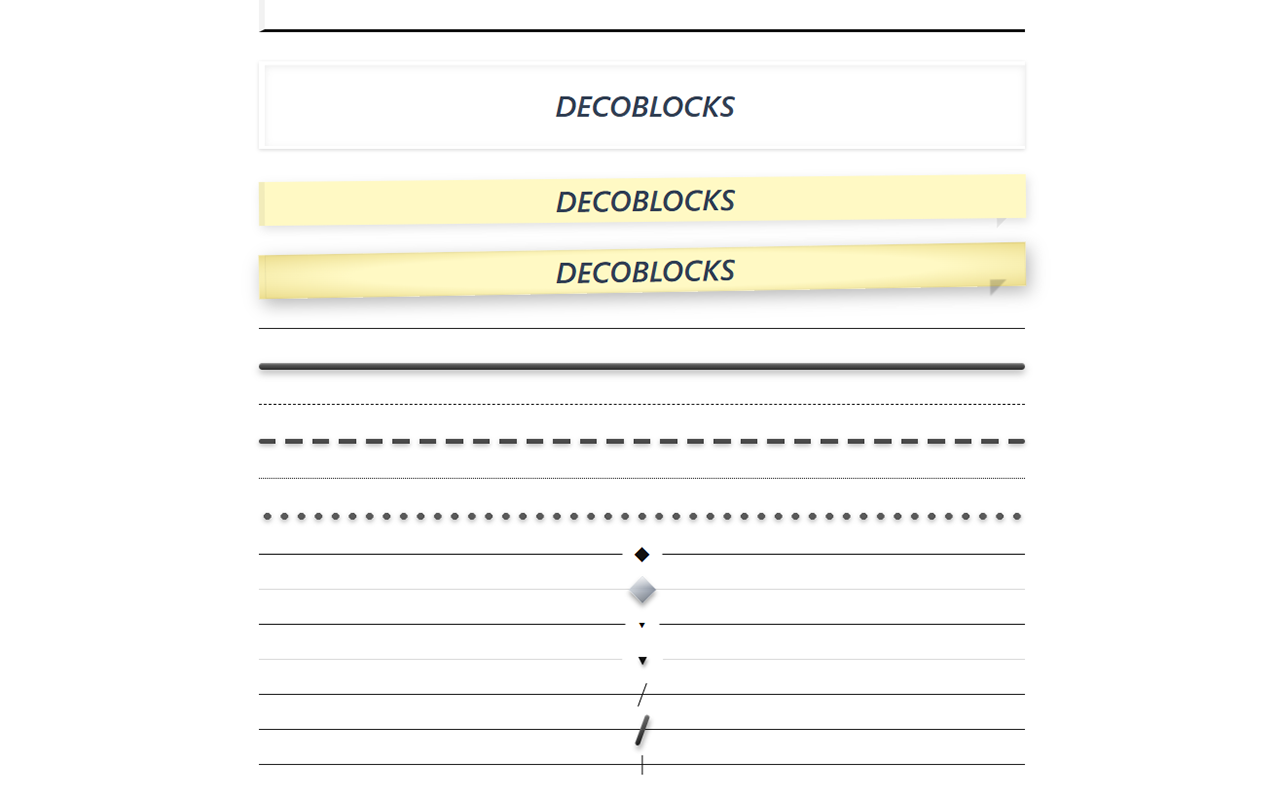
- Divider block with multiple built-in styles (solid / dashed / dotted / diamond / arrow / diagonal slash / tick mark - the last four show a plain, undecorated version for free; the gradient, shadowed version needs the 3D Style Upgrade)
- Custom color palette and the option to hide the "Powered by" credit — both free, no upgrade needed
- Independent heading tag (H2–H6, or plain text) and font size choice on every text block — your choice, whether or not you want it picked up by search engines
- Works in both the Block Editor and the Classic Editor
- Pastel speech bubble style and avatar images
- Sticky-note and corner-frame quote styles
- Diamond / arrow / diagonal-slash / tick-mark divider ornaments
- Multi-color confetti firework bursts
- Rainbow shine text, glowing twinkle-star box, and animated gradient highlight sweep
- Genuine 3D depth effects (shadows, embossing, elevation) layered on top of the styles above
安装:
- Upload the plugin files to
/wp-content/plugins/decoblocks, or install the plugin through the WordPress plugins screen directly. - Activate the plugin through the 'Plugins' screen in WordPress.
- Look for the "DecoBlocks" category in the block inserter, or use the toolbar buttons in the Classic Editor.
屏幕截图:
常见问题:
Does this work with the Classic Editor?
Yes. Every block also has a matching shortcode with a toolbar button and Quicktags button for the Classic Editor.
Will this slow down my site?
No. Styles and scripts are only loaded when needed, and all animations are lightweight, dependency-free JavaScript.
更新日志:
2.44.57
- Fixed: on sites with a dark background (black themes), text inside DecoBlocks effects became unreadable. The Highlight text turned black (browsers color black by default) on a black page, and text inside the white-background cards (Speech Bubble Outline/Soft, Section Box, Glow Box, Table of Contents) took the theme's light text or heading color, so it was white-on-white or gold-on-white. The stylesheet now decides text color itself wherever it paints its own background (dark ink on light cards; the Filled Speech Bubble picks white or black from the fill color; Post-it uses dark ink on the paper color) and lets text on transparent backgrounds (Highlight, Dashed Section Box, most Quote Box styles, Firework caption) follow the site's own text color, so dark sites get light text and light sites get dark text. Highlight color bands become more transparent when the text is light so the text stays readable on them. Selectors are made more specific instead of using !important so a theme's "content h2 { color }" rule no longer overrides them.
- Fixed: the Filled Speech Bubble could show a theme heading color (e.g. dark text on the default #111 fill) even on light sites.
- Colors you choose for effects (bubble fill, box/glow title, sparkle, divider) are unchanged. Note: a dark color such as the default #111111 is still dark on a black page - pick a light color for those effects on black sites.
- Compatibility with multilingual plugins (Polylang and its forks): the bundled Korean/Japanese translations are registered as the translation path, so they are reloaded correctly when the plugin switches the front-end language after WordPress has started.
- Added bundled Korean (ko_KR) and Japanese (ja) translations for all editor and admin strings, including the block editor sidebar (JavaScript). The interface follows the site/user language; language packs from translate.wordpress.org take precedence when installed.
- Fixed: a few block editor strings written with \u escapes (e.g. "Loading…") could not be matched by translation files.
- Added translators comments for strings with placeholders.
- Fixed: when a Quote Box style (Classic/Big Quotation Marks/Vertical Bar/Line Frame/Post-it/Corner Frame) had a source/attribution filled in, the whitespace above the title and the whitespace below the attribution could look unequal even though top and bottom padding are the same number - most often when the title is rendered as a heading tag (H2-H6), because the theme's own default heading margin wasn't always fully cancelled by this stylesheet's margin reset. Both the reset (
.dbk-quote__content > *:first-child/*:last-child) and the attribution's own bottom margin are now!important, so the space above the first line and below the last line is always exactly the box's own padding - the same whether an attribution is filled in or left empty. The 10px gap between the title and the attribution itself is unchanged (that's an intentional inner gap, not the outer top/bottom whitespace this fixes). - Changed: all 6 Quote Box styles' padding increased by 1.5x, by explicit request - Classic 18/34 → 27/51, Big Quotation Marks 20/44/24/52 → 30/66/36/78, Vertical Bar 24/0/24/30 → 36/0/36/45, Line Frame 24/32 → 36/48, Post-it 24/28 → 36/42, Corner Frame 24/28 → 36/42. Corner Frame's 3D padding also scaled the same way (36/40 → 54/60); the matching add-on update ships in 3D Style Upgrade 1.4.2.
- Changed: Quote Box - Vertical Bar (10-3-1/10-3-2) top/bottom padding increased from 8px to 24px, matching Classic/Big Quotation Marks/Post-it - by explicit request, to make the whitespace above/below the text noticeably generous like the other quote styles, not just technically bug-free. Left padding (30px, for the color bar) and right padding (0) are unchanged. Verified live on a published post: the site now loads dbk-frontend.css?ver=2.44.53 and the block's computed top/bottom padding is 24px.
- Verified: confirmed on a real published luxdigest.com post (via the browser's actual computed styles, not just reading the source) that 2.44.51/2.44.52's Post-it, Vertical Bar and Big Quotation Marks padding fixes are correctly live - computed padding matched the CSS exactly (Post-it 24px/28px, Vertical Bar 8px/30px before this release's change, Big Quotation Marks 20px/24px/52px) and the correct plugin/add-on versions were the ones actually loaded. If a site still shows old spacing after updating, it's a caching issue (browser cache or a page-cache plugin/CDN), not a plugin bug - clear the site's page cache and hard-refresh the browser.
- Fixed: 2.44.51's fix for Post-it/Corner Frame's editor-vs-published padding (below) turned out to be incomplete on at least one real site - raising the selector to two classes wasn't always enough to beat the theme's own
blockquotepadding rule, only shrinking the gap instead of closing it. All 6 Quote Box styles' base padding (Classic, Big Quotation Marks, Vertical Bar, Line Frame, Post-it, Corner Frame - 10-1-1/10-2-1/10-3-1/10-4-1/10-5-1/10-6-1) now use!importantinstead, the same technique this stylesheet already used for this exact element's margin and border (see the "10-0" shared rule). This wins regardless of how specific the theme's own selector is. Corner Frame's 3D padding (36px 40px) needs the matching update in the 3D Style Upgrade add-on (1.4.1) so it still overrides Corner Frame's own now-!importantbase padding when 3D is on; Post-it, Classic, Big Quotation Marks, Vertical Bar and Line Frame need no add-on change since the add-on never sets their padding. - Correction: 2.44.51's changelog entry said the 3D Style Upgrade add-on "never sets padding" for Post-it or Corner Frame. That's true for Post-it, but wrong for Corner Frame - the add-on does set a larger 36px 40px padding for Corner Frame's 3D form specifically.
- Fixed: Quote Box - Post-it (10-5-1) and Corner Frame (10-6-1) could show generous padding above/below the text in the editor but noticeably tighter padding on the published page. Both are rendered as a real
<blockquote>tag, and their padding rule used a single-class selector (.dbk-quote--postit/.dbk-quote--corner-frame) - on sites whose theme sets its own padding onblockquotewith a class+tag selector (e.g..entry-content blockquote), that theme rule is more specific and wins on the published page only, since the editor never loads the theme's front-end stylesheet. Raised both selectors to the two-class.dbk-quote.dbk-quote--*form, matching the fix already applied to Classic, Big Quotation Marks, Vertical Bar and Line Frame. This does not affect the 3D Style Upgrade add-on, which never sets padding for these two styles and already uses two-class-or-higher selectors of its own. - Changed: the settings sidebar of Quote Box - Big Quotation Marks (10-2-1/10-2-2), Line Frame (10-4-1/10-4-2), Sticky Note (10-5-1/10-5-2) and Corner Frame (10-6-1/10-6-2) now shows Text tag → Color → Text Align at the top, the same order as Classic and Vertical Bar and every other DecoBlocks block. Font Size stays in its own panel below. No style or output changes.
- Changed: all prices are now shown as "number $" (e.g. "5.99 $") everywhere - sticker pack prices and Buy buttons in the block editor's marketplace tab and in the Classic Editor sticker list now match the 3D Style Upgrade's "2.99 $ / month".
- Changed: the 3D Style Upgrade is now a monthly subscription (2.99 $ / month), so every place in the editor and admin screens that described it as a one-time purchase has been updated - the price buttons now read "2.99 $ / month", and "Purchase Required to Publish", "Buy 3D Style Upgrade", "Already purchased?" and similar wording now say subscribe/subscription. Sticker packs are still one-time purchases and their wording is unchanged.
- Fixed: on My Purchases, a site whose 3D Style Upgrade subscription has ended was told "no license key entered yet" even though the key is already saved. It now says the subscription has ended and that resubscribing turns 3D back on with the same key, with a Resubscribe button.
- No block, style or CSS changes.
- Changed: Speech Bubble (1-1-1) Outline and Pastel styles no longer recolor the text - the chosen color now goes only into the bubble's shape (Outline: border and tail; Pastel: a light tint of the chosen color as the background). Text keeps the theme's default color and can still be changed with the editor's own text color option. Filled is unchanged.
- Changed: Speech Bubble 3D (1-1-2) now casts its shadow toward the bottom-right (top-left light source), tinted with the chosen color, like Section Box 3D.
- Changed: Quote Box - Classic 3D (10-1-2), Vertical Bar 3D (10-3-2, including the bar's own shadow) and Corner Frame 3D (10-6-2) shadows are now tinted with the chosen color. Their depth and position are unchanged.
- Fixed: Quote Box - Big Quotation Marks 3D (10-2-2) now has a bottom-right drop shadow (same values as Post-it 3D), instead of shading that read as coming from the top-left.
- Added: Quote Box - Post-it (10-5-1) and Post-it 3D (10-5-2) now use the chosen color as the note's paper color (a pastel of that color, and for 3D the same diagonal light-to-deeper gradient in that color). With the default color, the existing yellow note is unchanged.
- The matching published-page changes ship in 3D Style Upgrade add-on 1.3.11.
- Changed: Section Box 3D (2-1-2, Solid/Dashed) frame line is now a barely-there 1px line instead of the base style's 2px line in full color. It uses your chosen color at very low opacity - lightest on the top and left (the lit side), slightly stronger on the right and bottom (the shadow side). The colored bottom-right drop shadow from 2.44.45 is unchanged, and the base Section Box (2-1-1) keeps its 2px border. The matching published-page change ships in 3D Style Upgrade add-on 1.3.10.
- Fixed: Section Box 3D (2-1-2) ignored the color you picked. Its shadow was hard-coded black, and the editor preview never passed the
--dbk-box-colorvariable to the block (only the border color), so the shadow and title always used the default black. The 3D shadow is now tinted with your chosen color while keeping the Section Box's own shape: a top-left light source with the shadow cast toward the bottom-right (it does not glow on all sides like the Glow Box). The matching published-page fix ships in 3D Style Upgrade add-on 1.3.9. - Changed: Highlight (4-1-1) colors are now Yellow, Lime and Orange. Green was changed to lime (existing highlights that used green now show as lime automatically - the
color="green"value is kept for compatibility) and Orange was added, in the block editor, on published pages, and in the Classic Editor menu. - Changed: Sidebar order for Speech Bubble (1-1), Section Box (2-1), Highlight (4-1), Sparkle Text (6-1), Glow Box (7-1), Firework Effect (8), Quote Box - Classic (10-1) and Quote Box - Vertical Bar (10-3), including their 3D versions: the "Text tag" (H2-H6) control now comes first, then Color, then Text Align (for blocks that have it), followed by the remaining settings. Font size stays in its own panel below. Other Quote Box styles are unchanged.
- Fixed: Table of Contents (5) now calculates hierarchical numbers - H2 headings are numbered 1, 2, 3 and H3 headings under an H2 are numbered 2-1, 2-2, and so on - and adds them to each item (
data-toc-num). The 3D version's number badges (3D Style Upgrade add-on 1.3.9) now show these numbers instead of numbering every item flatly as 1, 2, 3, 4.
- Fixed: Quote Box - Corner Frame's 3D editor preview (10-6-2) had almost no depth - only a small
filter: drop-shadowthat also blurred a shadow onto the quote text. Its shadow now matches Quote Box - Post-it 3D (10-5-2) exactly, with a consistent top-left light source: a drop shadow cast toward the bottom-right, a highlight along the inner top edge, and soft shading along the inner bottom edge. Only the shadow changed - the corner brackets' shape, thickness, color, position and padding are unchanged. The matching published-page fix ships in 3D Style Upgrade add-on 1.3.8.
- Reverted: Quote Box - Classic's 3D editor preview (10-1-2) is restored exactly to its 2.44.40 styling (shadows and bracket shading), undoing the 2.44.41 and 2.44.42 changes. No other block or style is changed. The black at the bottom ends of the brackets on published pages actually came from the 3D Style Upgrade add-on's own stylesheet, and is fixed there in add-on v1.3.6.
- Fixed: 2.44.41 made Quote Box - Classic's 3D preview (10-1-2) look flat. It drew the bracket lines with
border-image, which this stylesheet deliberately avoids (it renders thinner and blurrier than intended), and it relied only on the existing faint box shadow for depth. Revertedborder-imageand rebuilt the depth with a consistent top-left light source: a white highlight on the top-left edge, plus a short, darker contact shadow and a wider soft shadow cast toward the bottom-right. Each bracket line now also gets its own drop shadow that follows the line shape (not a box-shaped shadow, so the brackets don't look like a second floating layer). The bracket lines still contain no black: the lit faces (top, outer left) use a lighter tint of your chosen color, and the faces away from the light (bottom, outer right) use your exact color.
- Fixed: Quote Box - Classic's 3D preview (10-1-2) mixed 45% black into the bottom edge of each "[ ]" bracket (
border-bottom-color) to fake depth, which made the bottom ends of the brackets look like dirty black stubs - especially visible on the published page. The bracket lines themselves no longer contain any black: they are now drawn as a single-color vertical gradient in your chosen color only (lighter tint at the top fading into your exact color at the bottom). The depth/shading is kept - it still comes from the quote box's existing soft drop shadow, which is unchanged. Bracket shape and thickness are unchanged. The 3D Style Upgrade add-on (paid, separate plugin) needs a matching update if it ships its own copy of this rule for published pages.
- Fixed (performance/reliability): the "Table of Contents" block's render callback was calling
do_blocks()+do_shortcode()on the entire post content a second time, inside the normal single-pass block rendering that WordPress already performs forthe_content. Any post containing a TOC block therefore had every block in it rendered twice on every single frontend page view (no caching across requests), roughly doubling CPU cost for that page and re-running any other plugin'srender_blockfilters twice per request - a likely cause of slow page loads, intermittent errors, and (under concurrent traffic on limited PHP-FPM workers) full site unavailability. The TOC block now uses the same lightweight placeholder mechanism the[decobl_toc]shortcode already used (fill in the actual table of contents once, in thethe_contentfilter, after normal rendering has already finished) - producing the identical table of contents with no extra rendering pass.
- Fixed: Highlight block's 3D variation (4-1-2) showed a different inserter icon ("A" text-color icon) than its own base block (4-1-1, pencil icon), even though they're the same block family (base vs. 3D-addon form) - making them look unrelated in the block inserter list. The 3D variation now reuses the same pencil icon as the base block.
- Fixed: Divider Line's Dashed (11-2-1/11-2-2) and Dotted (11-3-1/11-3-2) styles used the same generic dash ("minus") icon as Solid (11-1-1/11-1-2), so all three looked identical in the block inserter even though they render very differently on the page (Dashed is a thick dashed line, Dotted is a row of round dots). Each style now gets its own custom icon that reflects its actual line pattern, while each style's base/3D-addon pair still shares one unified icon - so all three Divider Line styles are now visually distinguishable from each other, and easy to tell apart from Solid.
- Fixed: Table of Contents (5-1/5-2) items looked like links (hand cursor on hover) but clicking one never actually jumped to that section. The TOC always built links like
#dbk-toc-anchor-0, but nothing ever added a matchingid="dbk-toc-anchor-0"to the actual heading on the page - so every TOC link pointed at a destination that didn't exist anywhere in the page, whether the TOC came from the block or the[decobl_toc]shortcode. Headings now get that id automatically (and if a heading already has its own id - e.g. set manually via the core "HTML anchor" field - that existing id is used instead of overwriting it), so clicking a TOC entry actually scrolls to that section now.
- Fixed: Sparkle Text's block editor preview never actually applied the Speed setting or the chosen Color at all - the editor-only preview code always rendered with a hardcoded empty/fixed class list and never passed your chosen color down to the element, so no matter what you picked for Speed or Color in the sidebar, the editor canvas kept showing a fixed fast animation in the default gold color. This is why the 2.44.36 CSS fix below didn't visibly change anything - the CSS was correct, but the editor was never attaching the classes/color for that CSS to act on in the first place. The published page's own renderer was never affected by this (it already built the classes and color correctly), only the in-editor preview was broken. Fixed the editor preview to actually pass your Speed and Color choices through, for both the base effect and its 3D preview.
- Fixed: Sparkle Text 3D preview (6-1-2) speed control (Slow/Normal/Fast) had no visible effect - the CSS never defined an
animation-durationoverride for the slow/fast classes on the 3D variant (and the base non-3D effect was missing them entirely), so every speed setting played at the same fixed rate. Rewired the animation so the speed setting is actually applied, for both the base effect and its 3D preview. - Changed: Sparkle Text 3D preview's gradient used to spend most of its length on
currentColor(your text's normal color, usually black) with your chosen sparkle color only flashing through briefly - so most of the time it looked like plain dark text with a stray glint, not a colorful effect. Rebuilt the gradient to use your chosen color across its full length, with the white glint passing over it, so the color you picked is what's actually emphasized instead of being drowned out. The 3D Style Upgrade add-on (paid, separate plugin) needs its matching v1.3.5 update installed for this to appear on a licensed, published site - see that plugin's own changelog.
- Fixed: Quote Box - Line Frame's 3D preview (10-4-2) did not actually match what was requested. Earlier revisions to this CSS block (mentioned in code comments as "confirmed after several rounds of real user feedback") replaced the original double-line request with a single thin offset line per side and no shadow - but that history was inaccurate, and the published result did not match what was actually asked for. Rewrote this block correctly: a crisp, evenly-thick double line at both the top and the bottom (built from a hard-stop gradient rather than the native
border-style: double, which cannot always split small widths into equal whole pixels), combined together with a soft drop shadow across the whole quote box, exactly as originally requested. The 3D Style Upgrade add-on (paid, separate plugin) needs its matching v1.3.4 update installed for this to appear on a licensed, published site - see that plugin's own changelog.
- Changed: Quote Box - Corner Frame's 3D editor preview (10-6-2) used to show plain thin brackets in your chosen color with a simple shadow, but the actual 3D Style Upgrade add-on (paid, separate plugin) has always drawn something noticeably more elaborate on a licensed, published post - thicker diagonal-gradient brackets (light tone fading into your chosen color) with a soft drop shadow. That meant the editor preview undersold what a purchase actually delivers. Updated the editor preview to match the add-on's actual output exactly, so what you see while writing is what you get after publishing. Still uses only your chosen color (as a gradient of it, never a different color) - no rendering change for sites without the add-on installed.
- Fixed: Highlight (4-1-1/4-1-2) and Sparkle Text (6-1-1/6-1-2) each render as their own Gutenberg block, and in the editor they visually stack one per line because the block editor wraps every block's preview in its own container
<div>. But their PHP output (the part that actually reaches the published page) only ever returned the bare inline<mark>/<span>element itself, with no such wrapper - so several Highlight or Sparkle blocks placed one after another, which looked like separate lines while editing, collapsed onto a single run-on line once published, since consecutive inline elements with no wrapper flow together regardless of how they were laid out in the editor. Wrapped each block's frontend output in its own<div>(decoblocks/highlight→.dbk-highlight-wrap,decoblocks/sparkle→.dbk-sparkle-wrap) so the published page now stacks them exactly as shown in the editor. The[decobl_highlight]/[decobl_sparkle]Classic Editor shortcodes - which are meant to highlight/sparkle a few words in the middle of a sentence - are untouched and still render inline with no wrapper, since they share the same rendering engine but are invoked separately from the block.
- Added: Glow Box 3D's multi-color rainbow pulse is no longer the only "3D" look. A new "3D Glow Color" dropdown (shown once the 3D preview is turned on) lets you choose between "Use My Color" (default) and "Rainbow". "Use My Color" makes the glow a single-hue neon effect built from whatever color you've picked for the box - pick red, the glow is red; pick purple, the glow is purple - layered at a few different blur/opacity levels for a genuine neon-sign look, instead of always being a fixed multi-color rainbow. If the box's color is left at its default black, the 3D glow falls back to a bright orange instead of a barely-visible black glow. "Rainbow" keeps the existing gold/orange/green cycling glow from 2.44.31 for anyone who prefers it. Also available in the Classic Editor shortcode as
[decobl_glow rainbow3d="1"].
- Fixed: Quote Box - Classic's 3D preview added a whole-element ambient shadow in 2.44.30 to connect the shading through the middle, but each bracket end (
::before/::after) still kept its own separate drop shadow on top of that, so the two brackets visually "floated" one layer above the box beneath them instead of reading as one continuous surface. Removed the brackets' own individual box-shadow - their light/dark top-to-bottom border coloring is enough on its own, layered under the single whole-element shadow, so it now reads as one consistent raised surface end to end. - Redesigned: Glow Box 3D's gold/orange/green glow (2.44.30) only ever changed in brightness, never in color balance - all three color layers grew and shrank together at the exact same ratio, so the closest/brightest gold layer always visually dominated and the whole effect just read as "a fixed yellow glow," not a rainbow. The pulse animation is rebuilt so each color takes a turn being the largest, brightest layer in a rotating sequence (gold → orange → green → back to gold), so the glow now visibly shifts between colors over time instead of only pulsing in intensity. Animation length increased from 2s to 3s so the color shift reads as a smooth transition rather than a flicker.
- Fixed: Quote Box - Classic's 3D preview only shaded the two bracket ends (
::before/::after) - the flat area between them (where the quote text sits) had no shading at all, so the box read as "raised only at both edges, flat in the middle" instead of one continuously lifted shape. Added a soft ambient box-shadow to the element itself (on top of the brackets' own existing shading), so the whole quote box now reads as a single continuously raised surface, brackets included. - Fixed: Quote Box - Vertical Bar's 3D bar still showed a hint of black at its base even after 2.44.27's
color-mix()fix, because the gradient's darkest stop was mixed 60% color / 40% black - dark enough to read as near-black on lower-saturation colors - and the bar's own ambient drop shadow was strong enough to visually blend into that dark end. Lightened the gradient's dark stop to 78% color / 22% black and softened the ambient shadow, so the bar's base now reads as a darker shade of the chosen color instead of black bleeding through. - Changed: Glow Box 3D's rainbow pulse used a pink/purple/teal palette that read as dark and muddy rather than a true "rainbow" glow. Replaced with a brighter gold/orange/green combination (the green matches the plugin's own default accent color for consistency), matching the warmer, brighter palette originally intended for this effect.
- Changed: the block inserter's item names now show this plugin's internal CSS block-reference number instead of the generic "(DecoBlocks)" suffix - e.g. "Speech Bubble (1-1-1)" for the free version and "✨ Speech Bubble (1-1-2, 3D)" for its 3D preview, "Quote Box - Classic (10-1-1)" / "(10-1-2, 3D)", and so on for every block. This is purely a label change for easier reference between the block list and the CSS source (assets/css/dbk-frontend.css is organized under matching numbered comment headers, e.g. "10-1-1"/"10-1-2") - no rendering, styling, or attribute behavior changed. The "Purchase Required to Publish" notice on unlicensed 3D items is unchanged, just now prefixed with its reference number.
- Fixed: Section Box and Glow Box's "Title" field could never actually become a real H2-H6 heading, even though the block's Typography panel let you choose a heading tag for the body content. The title itself was always hard-coded to render as a plain
<div>(in both the PHP renderer and the block editor's own preview), so the Table of Contents block - which scans the page's real HTML for<h2>/<h3>tags - could never pick it up, no matter what a writer intended the title to be. Added a dedicated "Title heading level" dropdown (Default / H2 / H3 / H4 / H5 / H6) that appears once a title is entered, for both Section Box and Glow Box, in the block editor, and wired the same option into the[decobl_box title_tag="h2"]/[decobl_glow title_tag="h2"]Classic Editor shortcodes. Titles marked H2 or H3 are now automatically picked up by the Table of Contents block, exactly like any other H2/H3 in the post. Leaving this at its default keeps rendering a plain, non-heading<div>exactly as before, so already-published posts are unaffected. Also added amargin: 0reset to the title's CSS so switching it to a real heading tag doesn't introduce the browser's default heading margin around it.
- Redesigned: Quote Box - Classic's box-with-a-border shape from 2.44.26 turned out to be visually indistinguishable from Section Box's own plain rectangle. Rebuilt as a pair of classic open bracket shapes ("[" on the left, "]" on the right, each a 3-sided corner stroke) wrapping the quote text instead - a silhouette that doesn't overlap with Section Box, Vertical Bar, or the Big Quotation Marks style. 3D keeps this exact bracket shape and only shades it (lighter top edge, darker bottom edge, soft drop shadow).
- Redesigned: Quote Box - Vertical Bar's 3D preview now also lifts the entire quote box with a soft shadow (the same technique used for Section Box/Classic), in addition to keeping its own bar - previously only the bar itself got extra shading, not the box around it.
- Fixed: Quote Box - Vertical Bar's 3D bar showed a visible black tint mixed into the color whenever a non-default (non-black) quote color was chosen, because the light/shadow effect was built from separate white/black translucent overlay layers stacked on top of the color. Rebuilt using
color-mix()(the same technique already used for the Highlight gradient) so the bar is a single continuous shade of the chosen color, light to dark, with no separate black layer showing through. The bar's outer black ring outline is also removed for the same reason; only an ordinary ambient drop shadow (which is expected to be dark regardless of the element's own color) remains. - Fixed: Glow Box 3D's multi-color pulsing glow was still shown next to the plain single-color border from the free-tier style (which defaults to black), making the two look disconnected. The border is now hidden (made transparent, same box size) whenever the 3D preview is active, so only the glow itself defines the edge.
- Redesigned: Quote Box - Classic's free/base shape was still a single left border, which didn't visually read as a distinct style from Quote Box - Vertical Bar and made the two hard to tell apart at a glance. The base style itself is now a bordered box on all four sides (not just a left edge) - this is an explicit, user-directed change to the free-tier CSS (normally left alone). The 3D preview keeps this exact same box shape and only adds soft light/shadow depth on top of it - no separate accent bar, and no decorative quotation-mark glyphs (removed - they duplicated the dedicated Quotation Marks style and weren't wanted here).
- Fixed: Quote Box - Line Frame's 3D top/bottom lines sat flush against the box's own padding edge, which read as neither clearly attached nor clearly floating ("어정쩡한" was the word used). The lines are now offset 6px outward from the box, giving them visible breathing room from the quote text so they read as a deliberate floating frame instead of an ambiguous half-border.
- Changed: Quote Box - Sticky Note's free/base background was an almost-white pale gray (#F8F7F2) meant to be a deliberately muted placeholder - but it read as "neither colored nor uncolored," an ambiguous half-measure rather than an intentional design choice. Replaced with a clearly visible pastel yellow (#FFF3B0) so the free version unmistakably looks like a sticky note; the 3D preview's richer gradient still builds naturally on top of it.
- Restructured:
dbk-frontend.cssis reorganized into a numbered block scheme (e.g.1-1-1/1-1-2for Speech Bubble's free/3D pair,10-1-1/10-1-2for Quote - Classic's free/3D pair, and so on) so that every element's free-tier CSS sits immediately next to its own 3D CSS, instead of free styles living in one part of the file and all 3D styles being grouped together at the end. This is a structural change only - no CSS class name was renamed (blocks-editor.js's class-name dependencies are untouched), and the free/3D editor-only switch continues to work exactly as before via.editor-styles-wrapper. The goal is to make it structurally harder to accidentally reuse one generic 3D treatment across visually distinct named styles, and to make it obvious, block by block, which CSS is free (editor + published) and which is 3D-preview-only (editor only, until the paid 3D Style Upgrade is installed and licensed). - Redesigned: Quote Box - Classic's 3D preview still read as "Vertical Bar with square corners" because its left border bar was left in place. The 3D-only rule now removes that left bar entirely (the free/base style's border-left is untouched), turns the whole element into an actual bordered box with soft light/shadow depth, and adds a small classic-style opening/closing quotation mark in the top-left and bottom-right corners - so Classic is now visually its own shape, not a variant of Vertical Bar's silhouette.
- Fixed: Quote Box - Line Frame's 3D preview still looked like one thick merged bar even after being reduced to a 3px-tall line in 2.44.23. The actual cause wasn't the height - it was a
box-shadowblur sitting on top of the line that visually spread past its edges and made it read as bulkier than its real height. The blur is removed and the line height is reduced once more (2px), so the top/bottom lines now render as genuinely thin, crisp strokes with the light/dark emboss built into the line itself rather than a shadow around it. - Strengthened: Quote Box - Vertical Bar's 3D preview wasn't reading as dimensional enough, especially against the plugin's default black quote color - the highlight/shadow gradient on the bar was too subtle to notice. Contrast is substantially increased (the same fix already applied to Speech Bubble and Section Box in 2.44.23), and a thin dark outline plus inner edge highlight were added so the bar's own silhouette stays legible even on black.
- Cleanup: removed the
@keyframes dbk-glow-pulseanimation definition and itsprefers-reduced-motionoverride - both became dead code once Glow Box's free-tier pulse/twinkle animation was removed in 2.44.24 (nothing in the stylesheet referenced them anymore).
- Fixed: Speech Bubble 3D's "✨" corner badge was implemented as an
::afterpseudo-element, but the bubble's own speech-bubble tail (.dbk-bubble--left/--right.dbk-bubble--filled/--outline::after) already uses::afterfor its triangle - an element can only have one::after, so the higher-specificity 3D rule completely replaced the tail with the badge instead of the two coexisting. This is what showed up as a stray shape where the tail should be. The badge is removed; the tail is intact again, and the bubble's depth still reads clearly from its shadow/gloss alone. - Redesigned: Section Box and Quote Box - Classic's 3D still wasn't reading as genuine depth - Section Box's hard-edged solid-color double ring looked like "a thick black line," not shading, and Classic's overlaid bar was functionally the same technique as Vertical Bar's own bar (just square instead of round), so the two didn't feel distinct as promised. Both are rebuilt around soft, blurred light/shadow only (a pale near-white glow, a graduated drop shadow, an inset highlight) applied to the entire box, with no hard color ring and no bar element - Classic's own border-left is left completely untouched, and Section Box no longer resembles Vertical Bar's silhouette at all.
- Fixed: Highlight 3D's gradient ran the wrong direction for how a highlighter stroke reads left-to-right, and was tilted off-axis (100deg). It's now a clean 90deg gradient, darker at the left and lightening toward the right.
- Fixed: Glow Box - the base (free) Pulse and Twinkle styles animated even though only the 3D version is supposed to. Both base styles are now static (steady glow, no animation) - only the 3D version pulses.
- Redesigned: Glow Box 3D's rainbow was cycling through one solid hue at a time, which read as "a single color blinking," not "rainbow." It now layers three hues (pink/purple/teal) as simultaneous, overlapping glows that all breathe together, so multiple colors are visibly present at once.
- Fixed: Sticky Note 3D leaned on its color change to signal "3D," but the sticky note's base version is already colored - repeating that the base already has color and 3D should intensify the depth on top of it. Its highlight/shadow layering is now much stronger (a real "the paper is lifting" look) while the color itself stays the same as before.
- Fixed: Speech Bubble and Section Box 3D's light/shadow signal was too subtle to notice at all against the default black color (confirmed by real screenshots showing no visible difference from the base version) - depth shadows and highlights are now much stronger and clearly visible regardless of the color chosen.
- Fixed: Section Box's 3D treatment (a left accent bar) looked almost identical to Quote Box - Vertical Bar's own left bar, making the two indistinguishable in the editor (direct user feedback, twice). Section Box no longer uses a side bar at all - it now gets a raised double-ring frame around its whole border instead, which reads as "a box/frame," not "a bar," so it no longer converges with Vertical Bar's silhouette.
- Fixed: Line Frame's 3D lines were thickened to 5px in 2.44.22 to fix the previous "too thin" bug, but that overshot into a blunt, merged-looking double band instead of the intended "two thin lines" (confirmed by screenshot). Reduced back to 3px (in line with the base version's own weight) while keeping the glossy light/shadow finish.
- Fixed: Glow Box 3D reusing the box's own single configured color (per the "don't invent a new color" rule applied elsewhere) made it nearly invisible whenever that color was the default black, and made it indistinguishable from the base version's own already-existing subtle pulse. Per direct feedback, Glow Box is a deliberate exception to the "reuse existing color" rule - its 3D identity is specifically a colorful, multi-hue pulsing glow (unrelated to the picked border color), which is restored here using
box-shadowonly (not the background-clip trick that caused the corner-banding bug in 2.44.21). - Fixed: Highlight 3D still used a fixed 4-color gradient (yellow/pink/purple/teal) that ignored the "Gradient Color" picked in the sidebar - "a gradient means one color getting lighter or darker, not several unrelated colors side by side" (direct feedback). It's now a genuine single-hue gradient built entirely from the picked
--dbk-highlight-gradient-color(lighter tint to the picked color to a darker shade of the same color, usingcolor-mix(), with a flat-color fallback for older browsers) - no fixed color is used anywhere in it.
- Fixed: Line Frame's 3D version used
border-imagefor the gradient top/bottom lines - it rendered thinner and fainter than the plain base version instead of thicker (a visible regression, confirmed by screenshot).border-imageis no longer used anywhere in this file; Line Frame's 3D lines are now drawn as solid overlaid bars instead, guaranteed to render as intended across browsers. - Fixed: Highlight 3D's gradient start color was hardcoded to
#F5C400in 2.44.21, silently ignoring the sidebar's "Gradient Color" swatch (blocks-editor.jswas already correctly writing the chosen color into--dbk-highlight-gradient-color- only the CSS had stopped reading it). Restored to read that variable, exactly as it worked in 2.44.18. - Fixed: Glow Box 3D's gradient border (
background-clip: padding-box, border-boxtrick) rendered as visibly disconnected color bands at the corners instead of a smooth border, and was nearly invisible in the inserter's small hover-preview thumbnail. Replaced with abox-shadow-based glow in the block's own already-configured color - renders smoothly at any size and is far more visible at thumbnail scale since blur naturally reads better small than a 2px gradient border does. - Redesigned (per direct feedback: "a color change is not what '3D' means - real depth comes from light and shadow, not hue, and it has to stay consistent with whatever color I already picked"): every remaining 3D rule for Speech Bubble, Section Box, Quote Box (all 6 sub-styles), and Divider (all 7 sub-styles) now reads and reuses that element's own existing color variable (
--dbk-bubble-color,--dbk-box-color,--dbk-quote-color,--dbk-divider-color) instead of a fixed decorative palette, and expresses "3D" purely through layered light/shadow (translucent white highlight + translucent black shadow, plus card-elevation drop shadows and embossed text-shadow on glyphs) - never by introducing a new color the user didn't choose. Each of the 6 quote sub-styles and 7 divider sub-styles still gets its own distinct rule built on its own existing element (no two share a rule), per the redesign in 2.44.21, but none of them recolor what the user already set. - Postit's 3D preview now shows the actual intended postit-yellow color and paper sheen directly (not a muted placeholder) - the "free preview, purchase required to publish" model means the editor preview should show the real result in full; only the published/live post is what's gated behind purchase.
- Fixed: the 2.44.20 revert (see below) went too far - reverting
blocks-editor.jswholesale to the 2.44.16 original also undid the Firework Effect icon fix from 2.44.18 (its icon collided with Glow Box's icon, and its 3D-variant icon collided with Sparkle Text's icon). That collision is back to being fixed: both the base and 3D-variant Firework Effect entries use their own dedicated icon again, restored exactly as in 2.44.18. Also restored thewindow.DECOBL_FIREWORK_COLORS.confetti3dpalette hook (editor-only, from 2.44.18) so the Firework Effect's "Multi-Color Burst (3D)" preview actually bursts in real colors instead of silently falling back to gold. - Redesigned: all "3D preview" CSS, from scratch, to fix the actual design complaint behind the 2.44.20 revert - not "no visual difference" (2.44.16), and not "one identical colored frame/bar reused everywhere" (2.44.17-19), but a distinct treatment per block/style that builds on that style's own existing visual element:
- Quote Box (6 styles): Classic's own left border becomes a gradient border; Vertical Bar's own bar gets thicker + gradient + glow; Line Frame's own top/bottom lines become gradient borders; Big Quotation Marks' own "curly quote" glyphs get a gradient fill; Sticky Note gets an actual pastel-yellow tint plus a folded-corner triangle; Corner Frame's own 4 corner brackets get thicker + gradient colors. No two of these six share a CSS rule.
- Divider (7 styles): Solid gets a smooth 3-color gradient bar; Dashed gets thick 3-color repeating dash segments; Dotted gets alternating two-color dots with a slow drift animation; Diamond keeps its own ◆ glyph but fills it with a gradient and fades the line at both ends; Arrow keeps its own glyph with a soft glow and a gentle bounce; Slash's own bar gets thicker + gradient + glow; Tick gets its own bar thickened plus two smaller flanking ticks for a "measurement cluster" look. No two of these seven share a CSS rule or look alike.
- Speech Bubble / Section Box: share one coherent glossy-highlight-plus-depth-shadow treatment (their 3 sub-styles differ only by fill color/border, not by shape, so one physically-consistent "premium" finish is applied consistently rather than each getting an unrelated custom design) plus a small in-bounds sparkle marker.
- Glow Box / Sparkle Text / Custom Bullet List / Highlight keep their existing bespoke 3D classes from 2.44.19 (each was already block-specific, never shared across block types, and was not part of what was reported as looking generic).
- All rules stay under
.editor-styles-wrapper(editor-only, confirmed working) and stay fully inside each element's own box (inset shadows, background-clip: text, border-image, small in-bounds pseudo-elements) - nothing relies on box-shadow/filter bleeding outside the block, which is what the inserter's hover-preview panel was confirmed to clip in 2.44.19.
- Reverted: all "3D preview" CSS/JS added in 2.44.17-2.44.19 (
.dbk-3d-premium,.dbk-glow--rainbow3d,.dbk-sparkle--rainbow3d,.dbk-bullet-list--rainbow3d,.dbk-highlight--gradient3d,.dbk-divider--3d, plus the related firework icon/color additions inblocks-editor.js) has been fully removed.assets/css/dbk-frontend.cssandassets/js/blocks-editor.jsare now byte-for-byte identical to the 2.44.16 originals. - Why: three separate attempts (2.44.17, 2.44.18, 2.44.19) at giving the free plugin's "3D preview" a distinct editor-only look were each visually wrong in a different way (destroyed the base style's own look, a generic colored frame/ring slapped on top regardless of block type, and - worst - one single uniform treatment applied identically across all 7 divider sub-styles, erasing the point of having separate named styles at all). Rather than ship a fourth guess, the older reference file provided (2.44.15) was checked directly: it contains no real 3D visual CSS either - the actual 3D artwork has only ever existed in the separate paid "3D Style Upgrade" add-on, never in this free plugin at any version. Inventing a substitute in the free plugin was the wrong approach from the start, so it has been removed rather than patched again.
- Net effect: 3D preview items in the inserter behave exactly as they did in 2.44.16 - visually identical to their base counterpart in the editor, distinguished only by their name/label and the "purchase required to publish" tooltip. No other file in the plugin was touched (verified by
diff -rqagainst the original upload: onlydbk-frontend.css,blocks-editor.js,decoblocks.phpand this readme differ).
- Fixed: after 2.44.18, real editor screenshots still showed several 3D previews (Speech Bubble, Section Box, Quote Box - all styles, Glow Box) looking the same as their base version. Root cause:
.dbk-3d-premium's corner badge and.dbk-glow--rainbow3d's twinkle-star decorations were positioned with negative offsets (deliberately hanging slightly outside the block's own box, e.g.top: -11px) and their glow used an outwardbox-shadow/filter: drop-shadow(...)- all of which extend past the block's own edges. The inserter's hover-preview panel fits each preview into a small fixed box and very plausibly clips anything that extends past that box's edges, so all of it could be getting silently cut off there even though it renders fine in the full-size editor canvas. Every 3D indicator for these blocks now stays entirely inside the block's own boundary: the border ring and glow are inset box-shadows (which by definition can never render outside the element), and the corner badge/twinkle stars are positioned inside the box instead of overlapping its edge - so nothing here depends on whether the preview panel clips overflowing content.
- Fixed: 2.44.17's fix for the 3D preview classes was itself broken for several blocks, confirmed against real editor screenshots.
.dbk-3d-premium(Speech Bubble, Section Box, and all six Quote Box styles) used abackground-imagegradient-border trick that silently replaced anybackground/background-imagethe underlying style already had - so Quote Box - Sticky Note lost its cream postit color entirely and Quote Box - Corner Frame lost its gradient corner-bracket decoration, both collapsing into a plain white box. Replaced it with a purely additive treatment (afilter: drop-shadow(...)glow plus a small "✨ 3D" corner badge as its own::afterelement) that never touchesbackground,border, orbox-shadowon the block itself, so every style keeps its own real look underneath, whatever it already was. - Fixed: the Highlight 3D preview (
.dbk-highlight--gradient3d) technically used a gradient, but it only faded to transparent in the last 10% of the text width, so on short sample text it read as one flat color - indistinguishable from just picking a different highlight color. It now uses the same highlighter-bar shape as the free Yellow/Green styles (color filling the bottom ~40% of the line) but with the color itself running through the chosen Gradient Color into the brand accent colors across the full width, so it reads as a gradient at a glance. - Fixed: the Firework Effect block's base icon was
lightbulb- identical to the unrelated Glow Box block's icon - while its own "(3D)" variation usedstar-filled, identical to the unrelated Sparkle Text block's icon. Two different blocks shared one icon each, and Firework Effect's own base/3D pair didn't even match each other, so nothing in the inserter's icons reliably told these blocks apart or showed which entries were variations of the same block. Firework Effect now has its own dedicated icon (a small multi-color burst), used identically for both its base and 3D entries.
- Fixed: the "(3D — Purchase Required to Publish)" inserter entries for every 3D-capable block (Speech Bubble, Section Box, Highlight, Sparkle Text, Glow Box, Firework Effect, Custom Bullet List / Checklist, all six Quote Box styles, all seven Divider styles) looked visually identical to their plain counterparts, both in the inserter's hover preview and inside the block itself while editing — even though the JS side was correctly applying the
is3d/3D attribute and its CSS class the whole time. The root cause: this free plugin's own stylesheet never actually defined the classes those 3D toggles switch on (.dbk-3d-premium,.dbk-glow--rainbow3d,.dbk-sparkle--rainbow3d,.dbk-bullet-list--rainbow3d,.dbk-highlight--gradient3d,.dbk-divider--3d) — every one of them was left entirely to the paid 3D Style Upgrade add-on, so without it there was nothing to render any visible difference at all, contradicting the inserter's own tooltip text ("This is a free preview shown in the editor only"). Added a real free-tier preview design (gradient border/glow, rainbow shine, twinkle stars, gradient bullet icon, gradient highlight, gradient divider bar) for every one of these classes, scoped with the.editor-styles-wrapperselector prefix so it only ever renders inside the Block Editor (main canvas and inserter preview alike) and never on the published front-end — sites without the add-on still see exactly the same plain output on the live page as before, preserving the reason to purchase the upgrade. - Fixed: the Firework Effect block's "(3D)" preview (
colors: 'confetti3d') silently fell back to the plain gold burst in the editor, for the same reason —window.DECOBL_FIREWORK_COLORS.confetti3dwas only ever populated by the paid add-on. The block editor script now fills in its own free preview-only rainbow palette forconfetti3d(only when the object doesn't already have one, so it never overrides the real add-on's colors on sites that have it installed). Since this script is only ever loaded on the editor screen (enqueue_block_editor_assets), the published front-end - wheredbk-firework.jsis loaded alone - is completely unaffected and still requires the add-on for a real multi-color burst. - No changes to the block markup, attributes, or PHP render output - only editor-scoped CSS/JS were added, so this only changes what the editor preview looks like, not what's already saved in the database or how it's ever rendered on a published page.
- Fixed: on several blocks (Quote Box - Sticky Note / Corner Frame, Speech Bubble - Pastel, Glow Box - Twinkle, Divider - Diamond/Arrow/Diagonal Slash/Tick Mark), choosing the style itself - independently of the separate "3D Premium Frame" star toggle - silently depended on the paid 3D Style Upgrade add-on's CSS for any visible design. Without the add-on, these styles rendered as either nothing but bare padding or, for the four divider ornament styles, a misplaced/broken-looking decoration, even though nothing was actually wrong - it just looked broken. Each of these now has its own real, complete free-tier design (kept visibly simpler than the paid version, so the upgrade still has a reason to exist) that renders correctly with or without the add-on.
- Fixed: the same styles gave no warning of any kind in the editor when the paid add-on was installed but not licensed (a very common state, since the add-on always shows the true 3D-styled look in the editor regardless of license, by design - see the add-on's own enqueue_editor()) - so the block would look fully decorated while editing but silently fall back to plain on publish, with no explanation anywhere. Every one of these style choices now shows the same clear "🔒 preview only, purchase required to publish" notice already used by the "3D Premium Frame" toggle, whether or not that toggle itself is on.
- No changes to the block markup or existing published post content - only CSS/JS were touched, and PHP output is unchanged, so this only affects future edits/re-renders, not what's already saved in the database.
- Fixed: quote blocks (Classic, Vertical Bar, Line Frame, Big Quotation Marks, Sticky Note, Corner Frame) could render with almost no inner padding and less vertical margin than intended on the published page, even though the Block Editor preview looked correct. Verified directly against a live site (luxdigest.com): each quote block is a real
<blockquote>element, and many themes attach their own default blockquote look with a selector like.entry-content blockquote— one class plus theblockquotetag. That selector's specificity is higher than this plugin's own single-class.dbk-quote--line-frame-style padding rules, and the theme's stylesheet is enqueued after this plugin's, so on ties the theme wins the cascade outright — the plugin's border rules already carried!importantfor exactly this reason (added in an earlier fix), but the padding and outer margin rules did not, so the theme's own blockquote padding (as little as a few pixels) and margin silently replaced the plugin's on the actual published page, while wp-admin's editor screen — not subject to the same theme stylesheet in the same way — kept showing the intended spacing. The base block's margin now carries!important; each style's padding selector was changed to a two-class selector (e.g..dbk-quote.dbk-quote--line-frame) so it outranks the theme's selector on pure specificity without using!important— the latter would have also defeated the 3D Style Upgrade add-on's own (already-working) higher-specificity override for the Corner Frame style, which needed to keep winning exactly as before.
- Fixed: text inside quote/section-box/glow-box/speech-bubble blocks could sit visibly off-center (usually pulled toward the bottom) whenever its heading tag was set to H2-H6 instead of plain text. The plugin's own CSS only zeroed out margins on
<p>children of these blocks, not on heading children — so whatever top/bottom heading margin the active theme happened to use leaked in unevenly on top of the block's own (symmetric) padding. The margin reset now applies to any first/last child element, not just paragraphs, so the block's padding alone determines the spacing regardless of tag or theme. This affects the free plugin only; the 3D Style Upgrade add-on shares the same stylesheet and needed no separate change.
- Fixed: the "Table of Contents" Gutenberg block ignored headings created inside DecoBlocks' own quote/3D-style/box/speech-bubble/glow-box blocks when their title was set to H2/H3 — it only scanned the raw, unrendered post content, and those blocks save no markup at all (they render server-side), so the heading text never existed in that raw content to begin with. The
[decobl_toc]shortcode never had this problem, since it scans the fully rendered page content. The Table of Contents block now scans the same fully rendered content, so both methods behave identically.
- Fixed: the actual root cause of Favorites/pack order not persisting across posts (the save itself was working all along — 2.44.9's report confirmed the server did have the data). Two unrelated parts of the plugin — the block editor's sticker data and the Classic Editor's TinyMCE sticker data — were both writing to the same global JS variable name (
window.DECOBL_STICKERS) on the same admin screen. Whichever one printed second silently overwrote the other, and the Classic Editor's version never carried favorites data, so it wiped out the favorites the block editor had just loaded. The Classic Editor's data now uses its own separate variable name (DECOBL_CLASSIC_STICKERS), so the two no longer collide.
- Added: Favorites and pack-reorder saves now show a clear on-screen result either way — a green banner with the actual count the server confirms it stored, or a red banner with the failure reason — instead of no feedback at all when a save succeeds. This is meant to pin down a persistence report that the 2.44.9/2.44.10 fixes haven't fully resolved: if the green "saved on server" banner appears every time yet the favorite still doesn't show up when you reopen the picker later, the save itself is confirmed working and the cause lies in how that saved value is being served back (most likely a caching plugin/CDN caching the post-edit screen) rather than in the save request.
- Fixed: the "failed to save" notice for Favorites/pack reordering (added in 2.44.9) was a fixed-position banner drawn outside the sticker picker's full-screen modal, which sat behind the modal's own stacking context and was effectively invisible and unreachable. It's now rendered inside the modal itself, at the top of the "Choose a Sticker" window, so it's always visible and can be dismissed with its own close button.
- Fixed: Favorites (⭐) and pack reordering (▲▼) on the "My Packs" tab could silently fail to save — the star or new order would appear to "take" in the moment, then disappear the next time you opened a post. The save request now explicitly carries a REST nonce instead of relying only on the block editor's automatic handling, and a failed save is reverted on screen and reported with a visible notice (plus a detailed error in the browser console) instead of being silently swallowed.
- Fixed: on the "My Packs" tab, a long pack name (e.g. "The adorable look of Soti the kitten") could still spill outside its button — the previous wrapping fix was overridden by WordPress admin's own
white-space: nowrapbutton style. Pack names now wrap inside their button as intended. - Added: a "⭐ Favorites" section at the top of the "My Packs" tab. Star any sticker in any pack you own to pin it there for one-click reuse, without digging through packs.
- Added: you can now reorder your owned packs with ▲▼ buttons in the "My Packs" sidebar — the order you choose is remembered and used every time you open the sticker picker.
- Improved: the "Get from Marketplace" sticker picker now opens as a full-screen modal instead of a small popup, so you have much more room to browse packs.
- Improved: clicking anywhere on a pack card (not just the "View Details" button) opens its full detail view showing every sticker in that pack.
- Added: each pack now shows its product number (e.g. "#0007") next to its title, and the search box matches by product number, designer name, or language (Korean/English/Japanese) in addition to the title.
- Fixed: long pack titles could overflow their card, overlapping the language badge in an unpolished-looking way. Titles now wrap properly inside the card and the badge no longer gets pushed out of place.
- Fixed: the 2.44.5 border/background reset on the Quote block (added to stop themes' own blockquote styling from bleeding in) used a plain, non-
!importantrule. On themes that styleblockquotethrough a higher-specificity selector (e.g..entry-content blockquote), that theme rule could still win over the reset, letting the theme's own default left border (often in the theme's accent color) show through on quote styles that intentionally have no border of their own in the free version, such as "Corner Frame" and "Postit" — making them look like a plain box with a single stray line on the left instead of their designed look. The reset (and each quote style's own border, e.g. "Classic"'s left border and "Line Frame"'s top/bottom lines) is now marked!important, so DecoBlocks' own design always wins regardless of theme specificity. - Fixed: "Corner Frame" with the 3D Style Upgrade active could render as a tiled/striped background instead of its designed corner brackets. Root cause: the free plugin's stylesheet and the 3D add-on's stylesheet both contain a rule of equal CSS specificity that touches the same element (one resets the background, the other draws the corner-bracket background image), and which one wins was decided by an unpredictable factor — whichever plugin's WordPress hook happened to register first on a given page load — rather than always resolving the same way. The add-on's stylesheet now formally declares itself dependent on the free plugin's stylesheet, so WordPress always loads it after the free plugin's CSS, making the add-on's corner-bracket styling win consistently. Requires updating the separate "DecoBlocks 3D Style Upgrade" plugin to 1.2.3+ as well.
- Fixed: with the 3D Style Upgrade active, clicking into a "Highlight" block set to the Gradient Glow (3D) style and typing did not work — the cursor wouldn't land and no text could be entered, while the non-3D Highlight typed normally. Root cause: the 3D style's reveal-in animation used
transform: scaleX()directly on the editable text element itself, which is a known category of browser bug — applyingtransformto acontenteditableelement can break its cursor/click-to-focus handling. The same visual sweep-in effect is now done by animating the background's width instead of usingtransform, which doesn't interfere with editing. Requires updating the separate "DecoBlocks 3D Style Upgrade" plugin to 1.2.3+ as well.
- Fixed (critical, content loss): "Quote Box - Big Quotation Marks" was registered in the block editor and had full CSS, but was missing from the server-side block registration entirely — any published post using this specific quote style rendered completely blank on the frontend (it looked fine while writing, since the editor renders from its own JavaScript regardless of server registration). Now registered server-side like the other 5 quote styles.
- Fixed: Section Box and Glow Box's optional Title, when used without body text (e.g. as a standalone subheading card), left an orphaned bit of whitespace below the title that threw off the box's vertical centering — the box's own padding is symmetric top/bottom, but a leftover margin meant for "title, then body text" stayed even when there was no body text to separate from. The body wrapper is no longer rendered at all when there's no actual content, and the spacing between title and body only applies when both are actually present, so the box now stays evenly centered whether or not body text is used.
- Fixed: DecoBlocks' Quote block is a real
<blockquote>element, which some themes style with their own default border/background — this could silently bleed into a DecoBlocks quote style that doesn't already fill that space itself (most visibly, "Line Frame" could pick up an unwanted extra border from the active theme, on top of its own top/bottom lines). DecoBlocks' Quote block now explicitly resets border/background to a clean slate before applying its own style, so it always renders exactly as designed regardless of the active theme. - Added: Section Box, Glow Box, and every Quote Box style now have a Text Align option (Center / Left) in the block sidebar, in addition to the Classic Editor shortcode equivalent (
align="left"). Left alignment only changes the text alignment inside the block — the block's own padding is untouched, so text never sits flush against the edge. Requires updating the separate "DecoBlocks 3D Style Upgrade" plugin to 1.2.2+ as well (see below).
- Fixed (critical, separate from the 2.44.3 fix below): the 2.44.3 release correctly stopped gating the block editor's 3D preview behind a license — but a second, independent bug meant the block editor's writing canvas (which WordPress 5.9+ renders inside an
<iframe>) was never receiving this plugin's own CSS file at all, on any site, license or no license. The stylesheet loaded successfully (HTTP 200) but was never synced into that iframe, so every block - not just the 3D variants, the plain 2D ones too - appeared completely unstyled while writing (shapes, borders, backgrounds all missing), even though the exact same CSS rendered correctly on the actual published post and in Preview. Every block is now registered with WordPress'sstyleparameter (register_block_type()), which is the officially guaranteed mechanism for syncing a block's CSS into the editor iframe, instead of relying on a plainwp_enqueue_style()call that iframe-based editors can silently ignore. Requires updating the separate "DecoBlocks 3D Style Upgrade" plugin to 1.2.1+ as well, which received the matching fix for its own 3D CSS.
- Fixed: the block editor's "★ Toggle 3D" preview silently required a paid 3D license to show anything at all — the separate "DecoBlocks 3D Style Upgrade" plugin was loading its CSS/JS on the exact same license-gated code path for both the published post AND the writing screen, so even sites with the add-on plugin installed (trial or lapsed license) saw no visual difference between the 2D and 3D versions in the editor, only a lock-icon note. Editor asset loading is now a separate, unconditional path in the add-on plugin — it always shows the real 3D look while writing (this was always the documented intent — see the 2.20.0–2.31.0 entries below), while the published post remains gated to a valid license exactly as before. Requires updating the separate "DecoBlocks 3D Style Upgrade" plugin to 1.2.0+ as well.
- Changed: the 3D Style Upgrade license key is no longer entered on a separate screen under WordPress core's "Settings" menu. It's now entered directly on DecoBlocks → License Keys, in the same card, the same way the sticker pack key already works — paste the key, click Activate, done in one step, no second screen. If the add-on plugin isn't installed yet, this same screen verifies the key and hands you a download link; once you install and activate the add-on, that key activates itself automatically — you never have to type it twice. Requires updating the separate "DecoBlocks 3D Style Upgrade" plugin to 1.2.0+ as well.
- Fixed: in the "Choose a Sticker" marketplace picker, Japanese-only packs were shown with a "KO/EN" language badge instead of "JA". The badge's color/label logic only explicitly handled 'ko' and 'en', silently treating every other value (including 'ja') as the two-language fallback. Replaced with an explicit ko/en/ja/both mapping so each language gets its own badge (and the "both" badge now reads "ALL" instead of the misleading "KO/EN").
- Fixed: the 2.44.0 release accidentally gave "Postit" and "Corner Frame" quote styles full decorative CSS in the free plugin, which conflicted with the separate 3D Style Upgrade plugin's own styling for these same styles (causing a doubled/overlapping corner-frame border) and undermined the distinction between the free and paid look. These two styles are back to a minimal, non-broken-looking padding-only appearance in the free plugin; their actual decorative design remains part of the 3D Style Upgrade.
- Fixed: the "Postit" and "Corner Frame" quote box styles had no dedicated CSS at all (falling back to zero padding), and "Line Frame" only had 4px of horizontal padding — all three now have generous, unambiguous padding on every side. Corner Frame now also has actual corner-bracket decorations matching its name.
- Changed: the "Get from Marketplace" tab is now browse-and-buy only (View Details / Buy) — the license key entry field that duplicated the admin's "License Keys" page has been removed from both editors, since activation only ever happened there anyway. A clearly-styled notice now explains upfront that each pack is purchased individually (no shared cart), so it's clear before checkout rather than a surprise afterward.
- Version bump (no functional change from 2.41.0) to resolve a version numbering mismatch.
- Added: the "My Purchases" page now automatically reconciles the locally-installed pack list against what the marketplace genuinely has a license for, every time the page loads — any pack without a valid license (for example, one that was installed via the 2.40.2 security bug before it was fixed) is now automatically removed, with a notice explaining what was removed and why. Previously, only additions were synced automatically; nothing removed packs that shouldn't be there.
- Fixed (critical, security): the pack-browsing endpoint was made always-open in a previous release so people could preview a pack's full sticker set before buying — but the sticker pack "Install" action was reusing that same always-open endpoint, meaning any paid pack could be installed without a valid license. Installing now goes through a separate, properly-gated endpoint that genuinely requires a valid license for paid packs; browsing/previewing is unaffected. Requires updating the separate marketplace admin plugin (decoblocks-marketplace) as well — if you installed any paid packs without a real license due to this bug, you'll need to deactivate/remove them manually (Sticker Packs → Sticker Pack Licenses on this plugin's settings, or delete the entry from the site's installed-packs list).
- Fixed: "Sync my purchases now" skipped packs that were already present locally, even if they were stuck in the broken state from before the 2.38.2 image-fix (percent-encoded folder names). It now detects that specific stale pattern and forces a proper repair download instead of leaving it broken. Requires updating the separate marketplace admin plugin (decoblocks-marketplace) as well, which now also lets you manually add an activated site to a license (useful for testing or support cases).
- Added: sites that have already purchased sticker packs or the 3D Style Upgrade are now automatically recognized by domain — no license key re-entry needed. This runs automatically when the plugin is activated (covering the "deleted and reinstalled the plugin" case), and can also be triggered manually anytime from a new "Restore Previous Purchases" section on the License Keys page. Requires updating the separate marketplace admin plugin (decoblocks-marketplace) as well.
- Added: a "License History — Reinstall" section on the License Keys page. Every license key ever verified on this site (sticker packs and the 3D Style Upgrade) is now remembered, whether or not it's currently installed — if a pack gets deleted or the 3D plugin file gets lost, you can reinstall/re-download it with one click instead of digging through old purchase emails. Also added a way to paste a 3D Style Upgrade key you haven't used on this site before and get a fresh download link immediately.
- Fixed (critical): sticker packs purchased and installed with a non-ASCII (Korean, Japanese) name downloaded successfully but showed completely broken images and could not be used — the local folder the images were saved to was named using an already-percent-encoded string, which doesn't match the decoded path a browser/webserver looks for. Downloaded images are now stored under the pack's numeric ID instead, which has no such encoding mismatch possible.
- Changed: the sticker picker's tabs are reordered and relabeled for clarity — "My Packs" (what you've actually purchased) now comes first, then "Get from Marketplace", then "3D Styles", with the built-in placeholder stickers moved to a clearly-labeled "Test Samples" tab at the end. Previously, purchased packs were mixed into the same list as development placeholder stickers, which looked like your purchase was being treated as a demo.
- Fixed: hovering over "Buy 3D Style Upgrade" in the block inserter made the screen flicker continuously — the inserter's hover-preview was actually running the block's real code, which opens a purchase popup and removes itself. The block now only does that when genuinely inserted into a post, not during an inserter preview.
- Added: search (by pack title or designer name) and pagination to the "Get from Marketplace" tab in both editors, so browsing stays usable as the number of available packs grows past a single screen. Requires updating the separate marketplace admin plugin (decoblocks-marketplace) as well.
- Fixed: pack detail lookups for non-ASCII (Korean, Japanese) slugs kept failing across multiple attempted encoding fixes. This release replaces slug-based detail lookups entirely with the pack's numeric ID, which has no encoding representation to get wrong in the first place. Requires updating the separate marketplace admin plugin (decoblocks-marketplace) as well.
- Fixed: viewing details for any pack with a non-ASCII (Korean, Japanese, etc.) slug failed, while ASCII-slug packs worked fine — the pack-detail proxy was double URL-encoding the slug (
sanitize_title()already percent-encodes non-Latin slugs; encoding it again turned every%into%25, corrupting it beyond recognition on the marketplace server).
- Changed (marketplace-side design fix): the pack detail/preview view no longer requires a license key to show the full sticker list — browsing a pack to decide whether to buy it should never have been gated. The license key is only checked at actual install/download time, which is the real protection point. Requires updating the separate marketplace admin plugin (decoblocks-marketplace) as well.
- Fixed: viewing a paid pack's details without a valid license key entered showed a completely empty grid instead of falling back to the 8-item preview — an empty result from the server was being treated the same as "fully unlocked with zero stickers" due to a JavaScript truthiness bug (
[]is truthy). The preview + "license required" message now shows consistently for any locked pack, and the full list shows consistently once a valid key is entered.
- Fixed: opening a pack's detail view failed silently for any non-ASCII slug (Korean, Japanese, etc.) because the slug was not URL-encoded before being placed in the REST request path — this made the detail view fall back to the 8-item preview instead of loading the full sticker list.
- Fixed: the 2.37.2 package that was distributed did not actually contain the "detail view fetches full sticker list" fix described in its own changelog — the zip was built from an out-of-date snapshot. This release re-packages the same fix correctly and re-verifies the built zip's contents match the source before distribution.
- Changed: the "Get from Marketplace" tab (both editors) no longer hides packs based on your site's language — the marketplace server now always returns every published pack. Instead, a language section switcher (All / 한국어 / 日本語 / English) lets you narrow the list yourself, and each pack shows a small language badge. This avoids an empty-looking list while each language's pack inventory is still small.
- Fixed (marketplace-side): the "View / Buy" link and pack-detail lookup returned a 404 for any pack with a non-ASCII slug (Korean, Japanese, etc.) — the underlying REST route pattern only accepted English letters/digits/hyphens. Requires updating the separate marketplace admin plugin (decoblocks-marketplace) as well.
- Fixed: a bug in the previous release could corrupt the Classic Editor's sticker picker window layout when switching between its tabs. The picker now closes and reopens a fresh window on every tab switch instead of rewriting the open window's contents in place, which is a more reliable pattern for this editor's older window-management code.
- Changed: "Get from Marketplace" is now the tab shown by default (loading automatically) in both editors' sticker picker, since the bundled sample stickers are placeholder-quality only. The sample tab is now labeled "Sample Packs" and is the secondary option.
- Added: the Classic Editor's sticker picker now has a "Get from Marketplace" tab, matching the Block Editor — browse available packs, or paste a license key to install a pack directly, without switching editors. Previously the Classic Editor only showed already-installed packs with no way to get more.
- Fixed: the entire Classic Editor experience (every TinyMCE toolbar button and every QuickTags text-mode button — Speech Bubble, Section Box, Quote Box, Divider, Highlight, Table of Contents, Sparkle, Glow, Firework, Bullet List, and Insert Sticker, including their 3D variants) was inserting an outdated shortcode tag left over from the 2.36.7 prefix cleanup, so none of these buttons produced any visible output. All of them now insert the correct tag.
- Fixed: the Editor Settings page (branding credit checkbox, color palette) had a form field name left over from before the 2.36.7 menu restructure that no longer matched the registered setting, so saving that page silently did nothing. Settings on this page now save correctly.
- Internal: re-verified every option name, shortcode registration, settings-page form field, admin-post action, and enqueue handle against its registration to make sure no other leftovers were missed.
- Added: Japanese (ja) sites now get sticker pack listings in Japanese from the marketplace, in addition to the existing Korean/English support.
- Changed: the single "DecoBlocks Settings" page has been split into three separate menu items, matching how the marketplace's admin plugin is organized: "📦 My Purchases" (a read-only dashboard showing 3D Style Upgrade status and every sticker pack you own, at a glance — this is now the first thing you see), "🔑 License Keys" (the only place you enter a sticker pack key; the 3D Style Upgrade key is entered on its own separate plugin's page, linked from here), and "⚙️ Editor Settings" (color palette, branding credit — cosmetic settings that were previously shown before purchase status, now moved out of the way).
- Fixed: the "decobl-firework" script was only registered on the published-post frontend, not in the block editor — if the separate "DecoBlocks 3D Style Upgrade" plugin is active, its firework confetti script depends on this handle and was silently failing to load while writing a post. It's now registered in both places.
- Fixed: the 3D Style Upgrade card in DecoBlocks Settings now distinguishes three separate states (license active / plugin installed but not yet licensed / plugin not installed) instead of only two, with a direct link to the separate plugin's own license page in the two "not fully active" states.
- Fixed: every DecoBlocks block (and its 3D variation) now shows an actual hover preview in the block inserter, instead of a "No preview available" placeholder — added an
exampledefinition to all 12 blocks so their real appearance is visible before inserting. (Insert Sticker and Buy 3D Style Upgrade are interactive/action blocks with no fixed visual output, so they show an empty preview rather than a placeholder — that's inherent to how they work, not a bug.)
- Changed: the DecoBlocks 3D Style Upgrade is now a completely separate, independently-installed plugin. This plugin no longer downloads, stores, or enqueues any CSS/JS from a remote server for it — it only detects whether that separate plugin is installed and licensed. The "3D Style License Key" field has been removed from this plugin's settings screen (license activation now happens on the separate plugin's own settings page).
- Fixed: sticker pack image downloads are now validated before being saved — only png/gif/jpg/jpeg/webp files are accepted, the actual file content is verified to be a real image (not just trusting the file extension from the remote URL), and SVG is explicitly rejected (SVG files can contain executable script tags, unlike other image formats).
- Hardened further: removed the "Marketplace Server URL" setting entirely. It served no purpose for regular users (there was never a reason to point it anywhere other than our own marketplace) and was one more thing that could theoretically be tampered with. Every part of the plugin that talks to the marketplace now uses a single fixed address that can't be changed through any setting.
- Fixed: the 3D Style Upgrade CSS/JS download now only ever fetches from a single hardcoded, trusted server address (it can no longer be pointed anywhere else, even by changing plugin settings), requires HTTPS with certificate verification, checks the response's Content-Type header, and rejects the response outright if it contains a PHP execution tag, before anything is written to disk.
- Fixed: removed the last two
dbk_-prefixed shortcode registrations (dbk_stickerand thedbk_*block shortcodes) that were kept as backward-compatible aliases — all shortcodes now use only thedecobl_prefix.
- Fixed: toggling the 3D star button on Speech Bubble, Section Box, Custom Bullet List, Sparkle Text, Glow Box, Quote Box, Divider Line, and Table of Contents previously showed no explanation when the 3D Style Upgrade wasn't purchased yet — it just looked identical to the non-3D version, which could look like a bug. Every 3D-capable block now shows a clear "This is a preview only, purchase required to publish" note (previously this note only existed on the Highlight and Firework blocks).
- Fixed: all style/color/option choices across every block are now always available in the free version (previously some were disabled behind a license check, which is not allowed for plugins hosted on WordPress.org). The DecoBlocks 3D Style Upgrade remains a separate paid add-on, but its CSS/JS now ships only as an external download after purchase, rather than as license-gated code inside this plugin.
- Fixed: all function/class/option names, shortcode tags, and script handles now use a proper 4+ character prefix (decobl_/DECOBL_) to avoid collisions with other plugins/themes. Existing content using the old short shortcode tags (e.g. [dbk_bubble]) keeps working via a backward-compatible alias.
- Fixed: the "Get from Marketplace" sticker tab and pack browsing no longer require any special unlock state — installing a specific paid pack is still gated by that pack's own license key, same as before.
- Fixed: install-pack REST endpoint now requires manage_options (it writes a site-wide option and downloads files), instead of the weaker edit_posts.
- Fixed: removed an unnecessary load of wp-admin/includes/media.php and image.php — no functions from either file were actually used.
- Removed: load_plugin_textdomain() call, unnecessary since WordPress 4.6 for plugins hosted on WordPress.org.
- Removed: bundled .po/.mo/.json translation files from the plugin package — translations are now handled entirely through translate.wordpress.org.
- Fixed: the new heading tag/font size panel (added in 2.35.0) was easy to miss — it appeared collapsed and, for Korean-language sites, showed its label in English ("Typography") since the new strings hadn't been added to the Korean translation file yet. It now opens automatically (matching how core blocks like Paragraph show their Typography section) and is fully translated to Korean when the site/user language is Korean, with the original English text still shown on English-language sites.
- New: every text-content block (Speech Bubble, Section Box, Highlight, Sparkle Text, Glow Box, Firework Effect caption, and all Quote Box styles) now lets you independently choose a real heading tag (H2–H6) or keep it as plain text, plus an independent font size — entirely your call, whether or not you want the text picked up as a heading by search engines. Existing content is unaffected; if you don't touch these new options your posts render exactly as before.
- Changed: the Block Editor's "(3D)" inserter entries now show a clean "✨ [Block Name] (3D)" label with no purchase explanation on sites where the 3D Style Upgrade is already unlocked. Sites that haven't purchased it yet still see the existing "(3D — Purchase Required to Publish)" label and explanation, unchanged.
- Changed: removed the developer-only "Preview Pro Mode" checkbox from Settings — it had no real purchase verification behind it (unlike Sticker Packs and the 3D Style Upgrade, which are both license-checked against the marketplace). The handful of style/color options it used to gate (extra quote & divider styles, expanded bullet icon sets, custom color palette, no-branding footer, configurable firework timing/colors/particles) are now bundled into the already-licensed 3D Style Upgrade add-on instead of being a separately "checked" tier with no real enforcement.
- Changed: "External services" section now links directly to the actual Terms of Service, Privacy Policy, Refund Policy, and Contact pages, instead of the marketplace's homepage
- Fixed: the "Show a small Powered by DecoBlocks credit" option was defaulting to on and could only be turned off in the Pro version — it now defaults to off on both fresh installs and existing sites, and can be freely turned on/off regardless of Free/Pro
- Changed: "Sticker Pack License Key" moved out of the main Save Changes form into its own input + dedicated "Add" button, so adding a pack key no longer re-saves every other setting on the page
- Changed: full visual redesign of the DecoBlocks settings screen — card-based sections, a branded header, colored status indicators, and an "Installed Sticker Packs" chip grid, matching DecoBlocks' visual identity
- Added: "External services" documentation describing exactly what data is sent to the marketplace server and when
- New: DecoBlocks settings screen now has a "Sticker Pack License Key" field — paste a license key from your purchase email and save, and the pack is looked up, downloaded, and installed automatically. No more needing to know which pack a key belongs to or hunting for the right tab in the block editor
- New: settings screen now lists all "Installed Sticker Packs" with their sticker counts, so it's easy to confirm what's already installed
- New: if a 3D Style Upgrade key is accidentally pasted into the new sticker pack field, it's automatically applied to the 3D license field instead of failing with an error
- Note: requires decoblocks-marketplace v4.10.0 or later on the marketplace server for the new lookup-by-key endpoint
- Fixed: the Block Editor "✨ Buy 3D Style Upgrade" inserter item looked the same as every other block (grey outline icon) and, when clicked, left an empty block sitting in the post that had to be manually deleted. It now shows a colorful "3D" icon so it stands out from other items, and clicking it opens a purchase modal immediately (same as Insert Sticker) instead of leaving anything in the post content
- Fixed: the 2.30.0 "Buy 3D Style Upgrade" fix only covered the Classic Editor menu — the Block Editor (Gutenberg) inserter had no equivalent, so the fix was incomplete. Added a matching "✨ Buy 3D Style Upgrade" block, placed right after "Insert Sticker" as the second item in the DecoBlocks block category, same position as the Classic Editor menu
- New: Classic Editor now has an explicit "Buy 3D Style Upgrade" menu item, placed right after "Insert Character Sticker" as the second item, instead of only being reachable indirectly
- Fixed: Classic Editor didn't have access to the marketplace URL at all, so this new button couldn't have worked without it — added the missing localization
- Fixed: classic-editor "Speech Bubble (Right)" inserted with an orange color by default (both 2D and 3D), while "Speech Bubble (Left)" used black — position and color were incorrectly tied together. Both now default to the same black, matching the block editor's behavior; color is an independent choice either way
- Fixed: Table of Contents links had no color set, so they fell back to the browser's default link blue instead of following the site's normal text color — links now inherit the surrounding text color
- Fixed: Speech Bubble used
display: inline-flex, which is inline-level — two bubbles typed on separate lines could end up sitting side-by-side on the same row instead of stacking, in both 2D and 3D. Changed todisplay: flex(block-level) so each bubble always starts on its own line - Fixed: the classic-editor "Insert Firework Effect" menu items (both 2D and 3D) inserted the shortcode with no caption text at all, since the firework's text is a
labelattribute rather than wrapped content — it now inserts a default "Congrats!" label so there's something visible to edit
- New: Highlight's 3D Gradient Glow color is no longer fixed to yellow — a color palette control now appears in the sidebar (and via a new
gradient_colorshortcode attribute) to pick any color, which fades from solid to transparent left-to-right - New: classic-editor 3D menu expanded to a full one-to-one match with the block editor — every Quote Box style (6) and every Divider Line style (7) now has its own separate 3D entry, each explicitly labeled "(3D — Purchase Required to Publish)" so it's clear these require the paid upgrade to actually appear on a published post (this labeling was added to the block editor's inserter titles too, for consistency)
- New: classic editor gained a dedicated "Insert Character Sticker" button and menu item — it previously had no way to insert marketplace stickers at all. Opens a picker showing installed sticker packs; also added a matching [dbk_sticker] shortcode
- Fixed: Quote Box, Section Box, Glow Box, and Table of Contents were left-aligned by default with no way to visually center them — added default center alignment (with a sensible max-width for Section Box/Glow Box so the centering is actually visible). Speech Bubble and Custom Bullet List were left as-is intentionally (bubbles use left/right by design; lists read better left-aligned)
- Fixed: Highlight's 2D colors (yellow/green) had the same CSS specificity bug as the 3D version — background wasn't rendering on the published post. Fixed alongside the 3D fix in the same release
- New: Classic Editor 3D menu — initial pass adding one representative 3D item per block family
- Fixed (best diagnosis, pending live confirmation): the [dbk_highlight] shortcode's output was disappearing entirely on the published page (leaving only plain unstyled text) — WordPress's content security filter (kses) likely doesn't include in its default allowed-tags list, so it silently stripped the tag. Explicitly whitelisted with class/style attributes via wp_kses_allowed_html
- Version bump only (packaging fix)
- Fixed: Custom Bullet List and Table of Contents didn't visually reflect the 3D toggle in the block editor at all (only on the published post) — TOC's editor preview now shows the same double-ring border as the real 3D version, and Bullet List's icons now show the same raised circular badge in the editor
- New: Classic Editor (TinyMCE) support was built long before the 3D system existed and was never updated — the insert-element dropdown had zero 3D options. Added a full "✨ 3D Styles" section covering Speech Bubble, Section Box, Highlight, Custom Bullet List, Table of Contents, Sparkle Text, Glow Box, Firework Effect, Quote Box, and Divider Line, plus matching Quicktags (text-mode) buttons for Box/Highlight/Glow/Divider
- Fixed: none of the classic-editor shortcodes ([dbk_bubble], [dbk_box], [dbk_quote], [dbk_divider], [dbk_bullets], [dbk_toc], [dbk_sparkle], [dbk_glow]) accepted an is3d attribute at all, even though the underlying renderer functions already supported it — shortcodes now properly pass is3d through
- Fixed (verified live on a real site): Highlight's 3D gradient wasn't rendering at all — a base rule (
mark.dbk-highlight { background: none; }) had higher CSS specificity (tag+class) than the 3D variant rule (class only), so it always won regardless of source order and silently cancelled the gradient. The 3D rule's selector is now.dbk-highlight.dbk-highlight--gradient3d(matching specificity, correctly overriding the base rule) - Verified live: postit vignette, TOC double-ring border, and the enlarged Custom Bullet List 3D badge were all re-checked directly on a published post via computed styles and confirmed working as intended
- Fixed: Quote Box "Sticky Note" style's 3D version looked identical to 2D — now has a paper-like vignette gradient, deeper shadow, and a more pronounced folded corner
- Fixed: Table of Contents 3D vs 2D was hard to tell apart — added a visible double-ring border for a clearer layered/embossed feel
- Fixed: Highlight's 3D effect was too subtle to notice at a glance — replaced with an immediately visible left-to-right color gradient (dark yellow fading to light), combined with a subtle shadow for depth
- Fixed: Custom Bullet List's 3D badge was barely different in size from 2D — enlarged significantly and given a visible ring border for a clearer distinction
- Changed: 3D effects completely redesigned — "3D" now means real depth (shadows, embossing, elevation), not rainbow color. The generic gradient-border/rainbow treatment reused across every block has been replaced with bespoke, depth-based effects per block
- Fixed: Custom Bullet List's 3D version looked identical to 2D — icons now get a genuinely raised circular badge with real shadow/bevel
- Fixed: Highlight's 3D version was a static colored box — replaced with a dark highlighter-style mark that animates left-to-right with a real drop shadow underneath
- Fixed: Quote Box 3D looked identical to Section Box 3D (both used the exact same generic effect) — quotes now get a distinct "carved/inset" look, boxes get a "lifted card" look
- Fixed: all 7 Divider Line styles collapsed into the same rainbow bar in 3D mode, destroying their individual shapes — each style now gets its own bespoke 3D treatment (embossed bar, beveled dashes, raised dot beads, a faceted 3D diamond gem, an animated flying-in arrow, a carved diagonal slash, a raised tick mark)
- New: Auto Table of Contents now has a 3D version (elevated card with embossed numbered badges), which it previously lacked entirely
- New: every 3D-capable block (Speech Bubble, Section Box, Custom Bullet List, Highlight, Sparkle Text, Glow Box, Firework Effect, all 6 Quote Box styles, all 7 Divider Line styles) now also appears as a separate "✨ ... (3D)" entry directly in the block inserter list, using WordPress's native block variations — so the 3D option is visible and insertable from the block list itself, not only via the in-canvas toolbar toggle
- New: "✨ 3D Styles" tab added to the sticker picker (alongside Installed Packs / Get from Marketplace) — the highest-traffic screen now directly promotes the 3D upgrade, explains exactly which blocks support it and how to toggle it (the toolbar star button), and links straight to checkout
- New: DBK_DATA now carries the configured marketplace URL so the editor can build a direct purchase link without any extra request
- Fixed: the sticker block rendered left-aligned on the published post despite showing centered in the editor — now centered by default on both, with left/center/right all supported
- Fixed: Custom Bullet List's 3D toggle had no actual CSS effect (attribute/toolbar button existed but the visual was never implemented) — added a genuine rainbow-accent 3D treatment
- Fixed: Quote Box "Classic" and "Big Quotation Marks" used nearly identical quote-mark icons in the block list, despite looking completely different once inserted — icons reassigned so each better matches its real appearance
- Fixed: "Big Quotation Marks" style only had an opening quotation mark, not a closing one — added the matching closing mark
- Changed: quote text is now noticeably larger across all 6 Quote Box styles (it's meant to carry a short "topic title", not body copy)
- Changed: the source/author field for Quote Box is no longer a sidebar-only text field — it's now a small, light, directly-editable text area inside the block itself, right under the quote
- New: the "Get from Marketplace" pack list now shows a notice that items must be purchased individually (no combined cart checkout), due to a Lemon Squeezy platform limitation
- Fixed: Highlight's 3D Gradient Glow was too subtle to notice (a faint underline) — rebuilt as a bold, unmistakable animated gradient background with white text
- Changed: 3D options are no longer hidden inside the sidebar dropdown only — every 3D-capable block now shows a star (★) toolbar button the moment it's selected, so the option is immediately visible instead of "hidden"
- New: 3D Premium versions added to Speech Bubble, Section Box, all 6 Quote Box styles, all 7 Divider Line styles, Glow Box, Sparkle Text, and Custom Bullet List — each gets a distinct, genuinely "fancier" 3D treatment (gradient border + elevated shadow for boxes/bubbles/quotes, animated gradient line for dividers, rainbow pulse for glow box, rainbow shimmer for sparkle text), always previewable in the editor, always gated to a valid 3D license on the published post
- New: "Quote Box - Big Quotation Marks" style added — a real oversized decorative quotation mark (previously only mentioned in a code comment on the Classic style but never actually implemented)
- Improved: the pack detail view (from "View Details") now keeps the title, price, license field, and Install button fixed at the top, with only the sticker grid scrolling below — so packs with many stickers (20-30+) never require scrolling past everything just to reach the Install button
- New: "View Details" button on each marketplace pack card in the sticker picker, opening a large full-size preview of that pack's stickers (with a "Showing X of Y" note if the pack has more stickers than shown) before deciding to install/purchase — similar to browsing a full pack on Naver Blog's sticker panel
- Fixed: quote/divider/checklist block titles (which are assembled dynamically in JS rather than being static strings) were being skipped entirely by the translation build, so they stayed in English even after the earlier i18n fix. They're now included explicitly
- Redesigned the sticker picker into a much larger, near-fullscreen modal (up to 1150px wide) with a responsive grid, so installed-pack stickers and marketplace previews are shown at a genuinely large, clearly readable size (like Naver Blog's sticker panel) instead of tiny thumbnails — sticker names are now shown under each image too
- Fixed: block editor strings (block titles, sticker modal text, etc.) staying in English on Korean sites even with the correct language settings. The automatic JS translation loading (wp_set_script_translations) was unreliable on some server environments; PHP now reads the same translation JSON directly and hands it to the editor via wp_localize_script instead, which is more robust across hosting setups
- New: 3D effect options (firework Multi-Color Burst, highlight Gradient Glow) are now always selectable in the editor as a preview, even without a license — shown with a 🔒 badge and a note explaining that purchase is required for it to appear on the published post. The actual frontend render remains server-side gated regardless of what's selected in the editor
- New: 3D Style Upgrade promo banner (with a direct buy link) shown in Settings when not yet unlocked
- New: DecoBlocks 3D Style Upgrade — a separate paid addon (independent of Free/Pro), unlocked with its own license key (Settings → DecoBlocks 3D Style License Key), verified live against the marketplace
- New: Firework block gets a "✨ Multi-Color Burst (3D)" option when unlocked — multiple simultaneous multi-color bursts with soft gradient-glow particles instead of flat dots
- New: Highlight block gets a "✨ Gradient Glow (3D)" option when unlocked — an animated multi-color gradient underline
- Both 3D effects are enforced server-side in the renderer, not just hidden in the editor — so they can't be unlocked by tampering with saved block attributes without a valid license
- Sticker block icon redesigned as a cute, simplified smiling-face style, filling more of the icon area
- Enlarged the inserter icon further (48px, up from 32px) — the practical maximum within a single inserter grid cell
- Marketplace server URL is now pre-configured out of the box (store.luxdigest.com) — no manual setup required for buyers, though it remains editable in Settings
- Remote pack browsing now sends this site's language (ko/en, derived from get_locale()) to the marketplace, so only packs matching the site's language (or marked "both") are shown
- Marketplace pack cards in the sticker picker now show a KO/EN/KO+EN language badge
- Sticker block moved to the very first position in the inserter (it's the core monetization feature, so it should be the first thing users see)
- Sticker block now uses a larger, full-color custom icon instead of a monochrome dashicon, to stand out from the rest
- Free-tier users now see a clear "This is a Pro feature" lock notice instead of being able to browse/install marketplace packs; the "Installed Packs" tab also shows a banner nudging toward Pro
- Security: removed the development-only "always unlock Pro" hack from both PHP and JS — Pro features are now gated by the real license/settings check again
- Security: sends this site's URL (home_url()) to the marketplace when checking/installing a pack, enabling domain-locked licensing (see DecoBlocks Marketplace 1.1.0)
- Hardening: added blank index.php files to all plugin directories to prevent directory listing
- Major i18n overhaul: all source strings (PHP and JS) are now in English by default, following WordPress convention
- Added a full Korean translation (languages/decoblocks-ko_KR.po/.mo for PHP, and the matching JSON file for JS/Gutenberg strings) — WordPress automatically shows Korean on ko_KR sites and English everywhere else, no plugin settings needed
- Classic Editor (TinyMCE/Quicktags) button labels are now also translatable — previously hardcoded, now pulled from PHP via wp_localize_script so they follow the same site-language switching
- Block titles remain distinctly suffixed with "(DecoBlocks)" in both languages to avoid any confusion with WordPress core blocks of similar names
- New: Marketplace integration. Added a "마켓에서 받기" (Get from Marketplace) tab in the Sticker modal that lists packs from a configurable DecoBlocks Marketplace server and installs them (downloads real image files into this site's uploads folder) with one click
- New: License key field for paid packs, verified against the marketplace server before download
- New: Companion "DecoBlocks Marketplace" plugin (separate zip) to be installed on the seller's own server/subdomain — manages pack uploads, designer/price metadata, and license issuance, and exposes the REST API this plugin talks to
- Removed the Business/Travel/Food/Study emoji bullet-icon category blocks — these were built on a misunderstanding of the sticker feature and are superseded by the real Sticker system
- Kept the basic checklist bullet icons (✅⭐💛➡️📌) as a separate, simple list-marker feature
- New: Sticker insertion block with a pack-tab + thumbnail-grid modal picker (Naver-blog-style sticker panel)
- New: Sticker pack manifest system (DBK_Stickers class) ready to be swapped from sample placeholder art to real designer-licensed packs
- Added 8 original sample stickers across 2 placeholder packs (Basic, Point) purely to validate the picker UX — not final artwork
- Major restructure: Quote (5 styles), Divider (7 styles), and Bullet List icon categories (5 categories) are now separate, individually named blocks in the inserter instead of one block with a dropdown/toolbar sub-selector
- Renamed "Quote" to "Quote Box (인용박스)" and "Divider" to "Divider Line (구분라인)" to avoid name collisions with WordPress core's built-in Quote and Separator blocks
- Pro-only block variants are no longer just visually locked — they don't register/appear at all for free-tier users, removing any confusion about greyed-out or silently-downgraded options
- Section Box and Corner Frame quote style now shrink to fit their content width instead of always stretching full-width
- Added quick style-switcher dropdowns directly in the block toolbar (Divider, Quote, Bullet List icons) so styles can be changed without opening the sidebar
- Divider block now offers 7 styles (solid, dashed, dotted, diamond, arrow, diagonal slash, vertical tick) instead of 5
- Clarified naming conflict with WordPress core's built-in "Separator"/"Quote" blocks that share the same Korean label
- Pro-mode flag is now hardcoded directly in the editor JavaScript (not just PHP) so all style dropdowns and icon sets show regardless of any caching or data-passing issue
- Default bubble style changed from solid Filled to Outline so it no longer defaults to a solid block of color
- Verified all 10 blocks execute their edit() functions without runtime errors in a mock WordPress environment
- Pro features are now force-unlocked during development regardless of saved settings (fixes recurring "locked feature" confusion)
- Fixed speech bubble stretching full-width like a banner instead of hugging its content (display switched to fit-content)
- Added Outline and Pastel (soft) bubble styles, no longer forced to always have a solid fill
- Fixed a bug where existing installs never actually saw Pro-only styles/icons because the new "Preview Pro Mode" setting key didn't exist in already-saved options — now defaults to on until explicitly turned off
- Firework caption is now typed directly inside the block (inline RichText) instead of a sidebar-only field
- Quote styles (classic / vertical-bar / line-frame) all significantly thicker and more visually distinct
- Added a developer-only "Preview Pro Mode" toggle so Pro-only styles/icons can actually be tested before a real licensing system exists
- Quote and Divider blocks now use a visible style dropdown (consistent with all other blocks) instead of the hidden native "Styles" tab
- Refined the vertical-bar quote style with a rounded, properly weighted accent bar
- Rebranded to DecoBlocks
- Unified Quote and Divider components into single blocks with selectable style variations
- Added categorized bullet icon sample sets (business, travel, food, study)
- Grouped all blocks under a dedicated "DecoBlocks" inserter category
- Fixed content loss bug in dynamic blocks (Bubble, Box, Glow Box, Sparkle)
- Redesigned firework effect to auto-repeat instead of requiring a click
- Changed default accent colors from blue to black across components
- Initial release