
Defentry - Smart Security & Login Protection
| 开发者 | jbsabit |
|---|---|
| 更新时间 | 2026年10月17日 09:20 |
| 捐献地址: | 去捐款 |
| PHP版本: | 7.4 及以上 |
| WordPress版本: | 7.1 |
| 版权: | GPLv2 or later |
| 版权网址: | 版权信息 |
详情介绍:
- A privileged user logs in from a device Defentry has never seen.
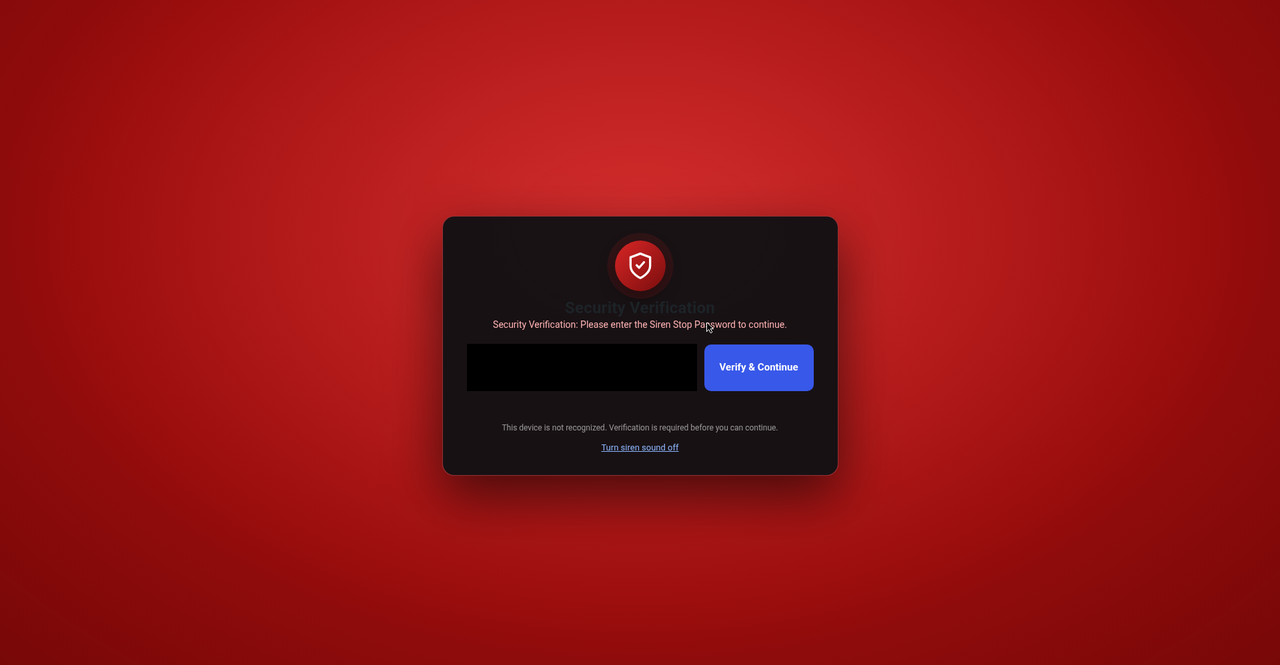
- The dashboard is immediately blocked by the stop-password overlay (with optional siren).
- All other logged-in users get an instant alert banner with one-click Trust, Mute, and Master Admin actions.
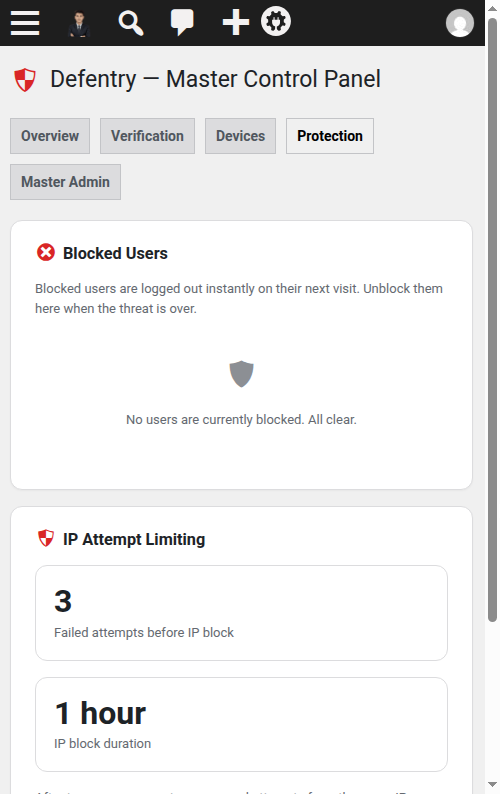
- The correct stop password verifies and permanently trusts the device. Wrong guesses are rate-limited per IP — 3 strikes triggers a temporary IP block.
- New-device verification overlay — unrecognized devices cannot touch wp-admin until the stop password is entered
- Brute-force IP protection — 3 wrong password attempts means a temporary IP block. Detection uses
REMOTE_ADDRonly, so attackers can't dodge it by spoofingX-Forwarded-Forheaders - Siren + broadcast login alerts — an audible siren and alert banner notify every logged-in user the second a new device appears; custom MP3 siren supported, one-click mute
- Master Admin control — one designated administrator owns the security settings and can instantly block suspicious users (blocked users are logged out on the spot)
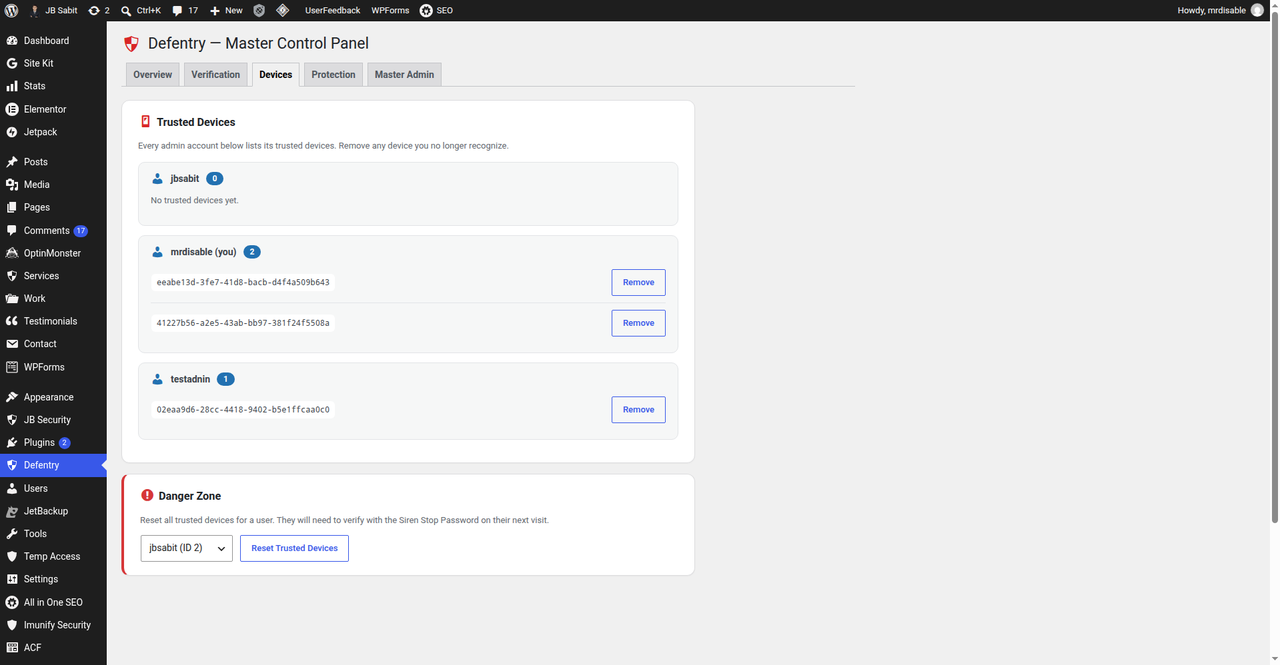
- Trusted device management — view, trust, and remove devices per user, or reset all devices at once
- New-device email alerts — administrators, editors, and authors are emailed once per new device with user, time, IP, and device details
- Hardened admin pages — sends
X-Frame-Options,X-Content-Type-Options, andReferrer-Policyheaders on admin screens
- Agencies and freelancers managing client WordPress sites
- WooCommerce stores and membership sites with multiple staff accounts
- Bloggers and businesses who want to know the instant an unknown device touches their dashboard
- The stop password is hashed with
wp_hash_password()and verified server-side only — never stored in plaintext, never shown in settings, never exposed to the browser - Nonce-protected AJAX, capability checks on every action, sanitized inputs and escaped outputs throughout
- No tracking, no upsells, no bloat — 100% free under the GPL, forever
安装:
- Upload the plugin files to
/wp-content/plugins/defentry/, or install through the WordPress plugins screen. - Activate the plugin.
- A notice will prompt an administrator to select the Master Admin. Pick one and save.
- Open the Defentry menu, turn Status ON, and change the siren stop password (default is
2210— change it immediately to something only you know). - Done. Logins from new devices will now trigger verification.
屏幕截图:
常见问题:
What happens when someone logs in from a new device?
When an administrator, editor, or author logs in from a device Defentry has never seen, the WordPress dashboard is covered by a full-screen overlay asking for the siren stop password — optionally with a siren sound. Every other logged-in user simultaneously sees a red alert banner ("New device login detected") with buttons to trust the device, mute the siren, or take Master Admin action.
How do I trust / verify a new device?
Enter the correct siren stop password on the new device and it is trusted permanently. The Master Admin can also trust any device for any user from the alert banner or from Defentry → Manage Trusted Devices.
Who can block or unblock users?
Only the Master Admin — the one administrator designated in the Defentry settings. This keeps emergency response in a single accountable hand.
What exactly does blocking a user do?
The user is added to the blocklist. On their next dashboard visit they are logged out immediately with a notice, and they cannot use wp-admin again until the Master Admin unblocks them from Defentry → Manage Blocked Users.
I don't hear the siren. Why?
Browsers block audio until you interact with the page (click, scroll, or press a key). The siren starts after your first interaction. You can mute it at any time from the alert banner, or disable/replace it in the Defentry settings.
Can I change the siren sound or turn it off?
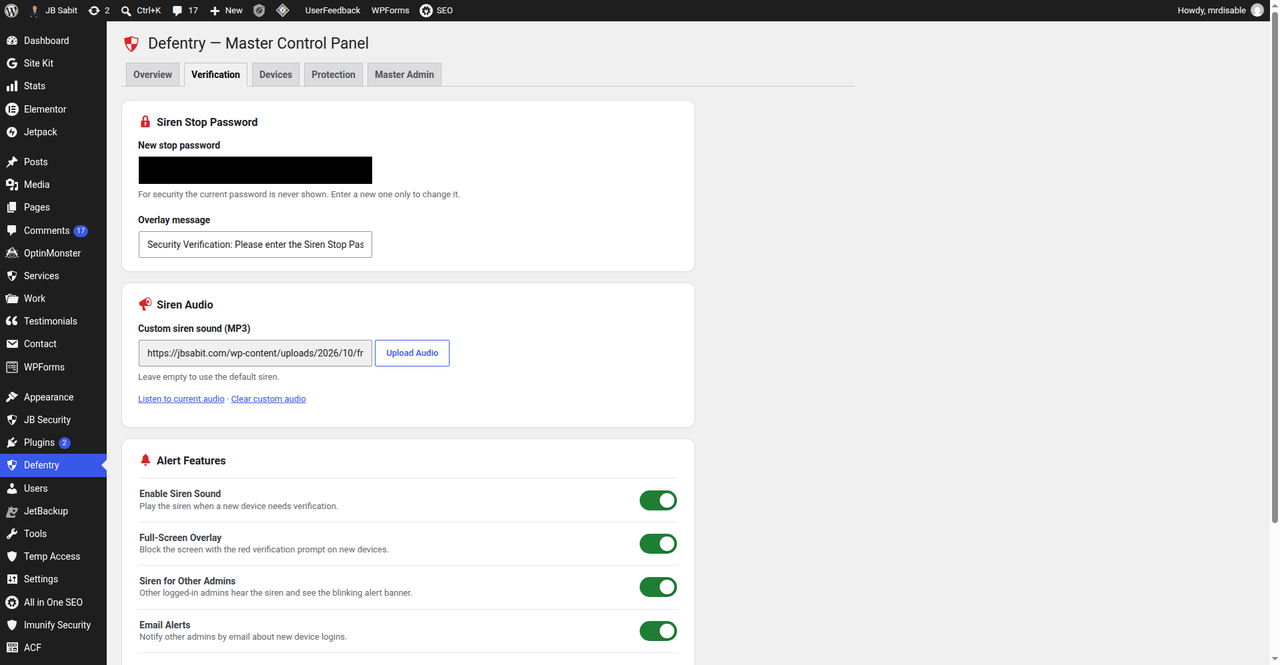
Yes. In the Defentry settings you can enable or disable the siren and upload your own MP3. Leave the upload empty to use the built-in siren.
Which user roles are protected?
Administrators, editors, and authors. Contributors, subscribers, and customers are never interrupted.
I forgot the stop password. How do I get back in?
An administrator with database access can delete the scbr_settings row from the wp_options table — the plugin then resets to the default password 2210 with protection OFF, so you can set a new password. Alternatively, temporarily rename the plugin folder via FTP/cPanel to disable it, then set a new stop password in the settings.
Can an attacker bypass verification by clearing cookies?
No — clearing the cookie generates a brand-new random device ID, which is untrusted by definition, so the overlay appears again. The system fails closed.
Does Defentry replace two-factor authentication (2FA)?
No. Device verification and 2FA stop different attacks — a stolen password alone is useless against Defentry, and a stolen device alone is useless against 2FA. Use both.
Will Defentry slow down my website?
No. Its scripts and styles load only on wp-admin pages, and only when needed. Visitors to your public site are completely unaffected, and the plugin makes no external HTTP requests.
Does it work with caching plugins or Cloudflare?
Yes. Verification happens inside wp-admin, which caching plugins and CDNs don't cache. One honest note: IP-based attempt limiting reads REMOTE_ADDR; behind a reverse proxy or CDN (like Cloudflare) all visitors may share the proxy's IP, so an IP block applies proxy-wide. Device verification itself is unaffected.
Is Defentry compatible with multisite?
Settings are stored per site, not network-wide, and multisite has not been officially tested. It should work per-site; network-wide management isn't included.
What data does Defentry store? Is it private?
Random device IDs (in a browser cookie and per-user metadata), plugin settings (in wp_options), and short-lived transients for login attempts and alerts. Nothing ever leaves your server — no tracking, no telemetry, no third-party calls.
Does it work with custom login pages, social login, or page builders?
Yes. Verification happens inside wp-admin after login, so it works regardless of how the user logged in.
What happens if the Master Admin account is deleted?
Defentry detects the missing Master Admin and prompts an administrator to choose a new one. Protection settings are preserved.
Is Defentry really free?
Yes — 100% free, GPL-licensed, no premium version, no upsells, no locked features.
更新日志:
- Code quality: documented
phpcs:ignorejustifications for the fiveWordPress.Security.NonceVerification.Recommendedwarnings — all are false positives (display-only$_GETreads; every state-changing handler verifies its nonce). No behavior change.
- Redesigned Verification, Devices, Protection, and Master Admin tabs to match the Overview tab: feature toggles instead of checkboxes, device cards per admin, danger-zone reset, blocked-user rows, IP-limit stat tiles, and a Master Admin highlight card.
- FIXED: saving from the Verification or Master Admin tab silently turned protection OFF (status is now only updated by forms that manage it).
- Master-Admin-exclusive control plane: secondary admins no longer see the Defentry menu or dashboard widget once setup is complete. Device verification, alert banners, and the siren still protect every admin account.
- The verification overlay dialog now has its own siren sound toggle, reachable even while the overlay covers the admin notices.
- FIXED: broadcast siren could stay silent on other admins' browsers — the realtime poller now retries audio playback on user interaction (browser autoplay policy), and the "Mute Siren" button is now a toggle: muted users see "Unmute Siren" to re-enable the alert sound.
- FIXED: settings page showed the old unstyled UI when protection was OFF (v2 stylesheet now loads on the settings page and dashboard regardless of status).
- NEW: realtime broadcast poller — other logged-in admins now see and hear the new-device alert within ~25 seconds without reloading the page; the banner auto-clears when the alert ends.
- Warning banner now blinks with a red alarm glow to catch the eye.
- NEW: "Block IP" button on the alert banner (Master Admin) instantly blocks the new device's IP for 1 hour; "Block User" now also instantly blocks the alert IP.
- Banner action buttons (trust/block/mute) now work on every admin page, not just the settings page.
- Red alarm blink animation on the verification overlay backdrop (respects prefers-reduced-motion).
- Complete UI/UX overhaul: tabbed Master Control Panel (Overview, Verification, Devices, Protection, Master Admin) with a status card, protection toggle, and live stat tiles; 3-step first-run setup wizard; redesigned new-device verification overlay (modern card, shield emblem, smooth entrance animation, fully responsive, reduced-motion aware); new "Defentry Security" dashboard widget; polished real-time alert banner. No security-logic changes — all protection behavior is identical to 1.2.x.
- Directory assets finalized: real screenshots from a live site, animated siren icon and cinematic banner.
- Expanded SEO readme: full FAQ (17 questions), credits, and links.
- SEO readme rewrite with real directory screenshots, keyword-rich description and honest feature list.
- Plugin Check clean: silenced direct-DB-query warnings in uninstall.php (caching is meaningless during uninstall) and shortened the readme short description to 150 characters.
- Security: stop password is now hashed with wp_hash_password() and verified server-side only — the hash is never printed to the page and the client-token bypass is removed. Plaintext passwords are never stored or displayed.
- Security: only the device owner or the Master Admin can trust a device for another user.
- Security: IP detection now uses REMOTE_ADDR only (X-Forwarded-For / Client-IP are client-spoofable).
- New-device email/broadcast alerts are sent once per device instead of on every page load.
- Admin menu renamed from "Siren Protector" to "Defentry"; security headers are now actually sent (previously dead code).
- Accessibility: alert banner no longer hard-blinks; animation respects prefers-reduced-motion.
- Added uninstall.php — all options, transients and user meta are removed on uninstall.
- Readme rewritten to describe only features the plugin actually has.
- Changed prefix from
wrstoscbrfor all options, transients, user meta, cookies, and scripts to avoid conflicts with other plugins. - Improved script and style enqueuing to load only on relevant admin pages.
- Added data migration during activation to preserve existing settings and user data.
- Initial release with device-based authentication, siren alerts, master admin control, and IP blocking.