
Deftmind Hookwright - Webhooks, REST API, Data Display & AI Chat
| 开发者 | deftmindlabs |
|---|---|
| 更新时间 | 2026年8月12日 03:04 |
| 捐献地址: | 去捐款 |
| PHP版本: | 7.4 及以上 |
| WordPress版本: | 7.0 |
| 版权: | GPLv2 or later |
| 版权网址: | 版权信息 |
详情介绍:
/thank-you/?order_id=1234, name that parameter and your workflow receives the value directly. One rule replaces a subscription to something that only forwards events for you.
Bring the results back. Point any workflow at the plugin's secure endpoint. Payloads arrive into named channels and appear on any page through shortcodes, as formatted articles, data tables, or live-updating feeds.
Ask, and show the answer. Add a form to any page. Submissions are proxied through your own server to your webhook, and the reply renders in place without a page reload. If your platform cannot answer on the connection the form opened - or the work takes minutes - callback mode hands it a one-time return URL to post the answer back to instead.
Private AI chat, without vendor lock-in. Turn on conversation mode and a form becomes a threaded chat. Each turn sends the running conversation to your workflow, so a retrieval-augmented (RAG) pipeline can answer with context. The intelligence stays in your workflow: no API keys stored in WordPress, any model or vector database, and no third-party chat service in the middle.
Anonymous and ephemeral by design. Visitors need no account. Nothing about a conversation is written to your database; the thread lives in the visitor's browser and is gone on reload. For sites answering sensitive questions, that is a feature, not a limitation.
Works with the form you already have. If your site already uses a form plugin, add a couple of data attributes to its markup and Hookwright handles the round trip without replacing anything.
Built for safety
- Inbound endpoint disabled until you set a shared secret, then verified with a timing-safe comparison.
- Payload content is escaped or sanitised on every path. Markdown is parsed in safe mode and then filtered again through WordPress's own post sanitiser.
- Outbound requests use WordPress's protected HTTP functions, which reject internal and reserved addresses.
- Rate limiting, honeypot spam trapping, size caps and request timeouts on public endpoints.
- Event tracking is off by default, scoped to administrator-configured path rules, checks same-origin browser requests, and requires an explicit consent signal by default. Every event is re-checked against the saved rules on the server, so the rules visible in the page source cannot be edited to send something else.
- Events go only to the webhook URL you set. Nothing reaches the plugin author.
- No cookie is set and no visitor identifier is created. Campaign attribution is kept in the visitor's own browser for the length of their session and is never written to your database.
- Form field values are never collected. The visible text of a clicked element is included, so avoid selectors that wrap text you would not want forwarded.
- Nothing about an event is stored on your site. It is forwarded and forgotten.
- Consent is required by default: tracking begins only once your consent tool signals it. You can turn that requirement off if your jurisdiction and what you collect allow it.
/thank-you/?email=someone@example.com, that address is part of the page URL and will be sent - and on that visitor's next tracked click it appears again as the referrer, because the referrer is simply the page they came from. Two settings control this: a list of query parameters to capture deliberately (empty by default, so nothing is extracted unless you name it), and an option to remove query strings from both the page URL and the referrer URL. Where you can, use an order or customer reference and look the person up on the other side rather than sending an email address anywhere.
Nothing is hashed. Whatever you choose to capture arrives at your webhook readable and stays readable in your workflow tool's execution history. Hashing would not help: an email address can be recovered from its hash by simply trying addresses, so it would remain personal data - and it would no longer be usable for the thing you captured it for. A reference you can look up is the better answer.
You are the data controller for whatever you choose to collect. Disclose it in your privacy policy and obtain consent where the law that applies to you requires it.
Third-party code
This plugin bundles Parsedown 1.7.4 by Emanuil Rusev (https://parsedown.org), used in safe mode to render Markdown. Parsedown is MIT licensed and the full licence text is reproduced in includes/class-hookwright-markdown.php. The class is renamed so it cannot collide with another plugin bundling its own copy; it is otherwise unmodified.
Deftmind Hookwright Pro
An optional add-on that lets your automation act on the site, rather than only feed it. Incoming payloads become real WordPress posts or pages - titles, Markdown bodies, categories, tags and featured images mapped to native fields, including custom post types and custom fields - and the reply your workflow sends back to a form can be saved the same way. It also signs outbound requests, so the receiving end can verify nothing was altered in transit.
Details and download: https://deftmindlabs.com/hookwright/
Documentation: https://deftmindlabs.com/docs-reference/
安装:
- Upload the plugin through Plugins > Add New > Upload, or install from the plugin directory.
- Activate it.
- Open Deftmind Hookwright in the admin menu and configure a webhook URL, an inbound secret, or both.
- Place
[hookwright_display]or[hookwright_form]on a page using a Shortcode block.
屏幕截图:
常见问题:
Do I need a specific automation platform?
No. Anything that can send or receive an HTTP request with JSON works, whether that is a hosted automation service, a self-hosted workflow tool, or your own script.
Does this include an AI?
No, and deliberately so. Hookwright is the interface; your workflow supplies the intelligence. That means no API keys stored in WordPress and no lock-in to one AI vendor.
Are chat conversations stored?
No. The conversation exists only in the visitor's browser for the life of the page. Nothing is written to your database and nothing is sent to the plugin author.
Where do I get help?
Use this plugin's support forum on WordPress.org. It helps to say what you expected, what happened instead, which response handling mode the form uses, and anything listed under Recent send problems on the Settings screen.
How do I report a security issue or a bug?
Email support@deftmindlabs.com. Please report security problems privately rather than in the public forum, and allow time for a fix to ship before disclosing them. This address is for security reports and bug reports only - for help using the plugin, the support forum above is the faster route.
My workflow takes longer than the request timeout
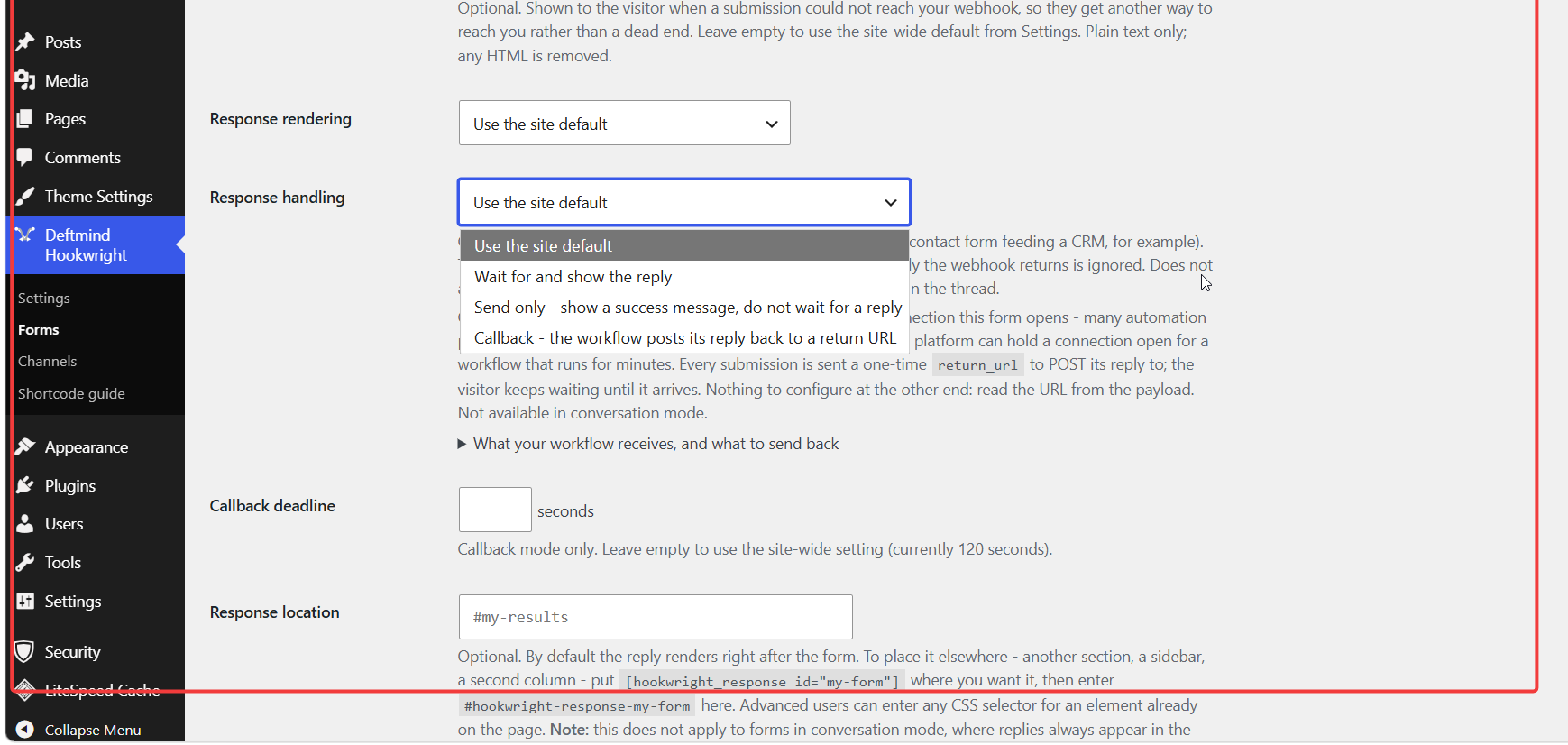
Use Callback response handling. The plugin hands your workflow a one-time return URL in the payload; the workflow accepts the request, does its work, and posts the answer back whenever it is ready. The visitor keeps waiting on the page, and no PHP worker is held open in the meantime.
Can I fire a webhook when someone lands on a page after checkout?
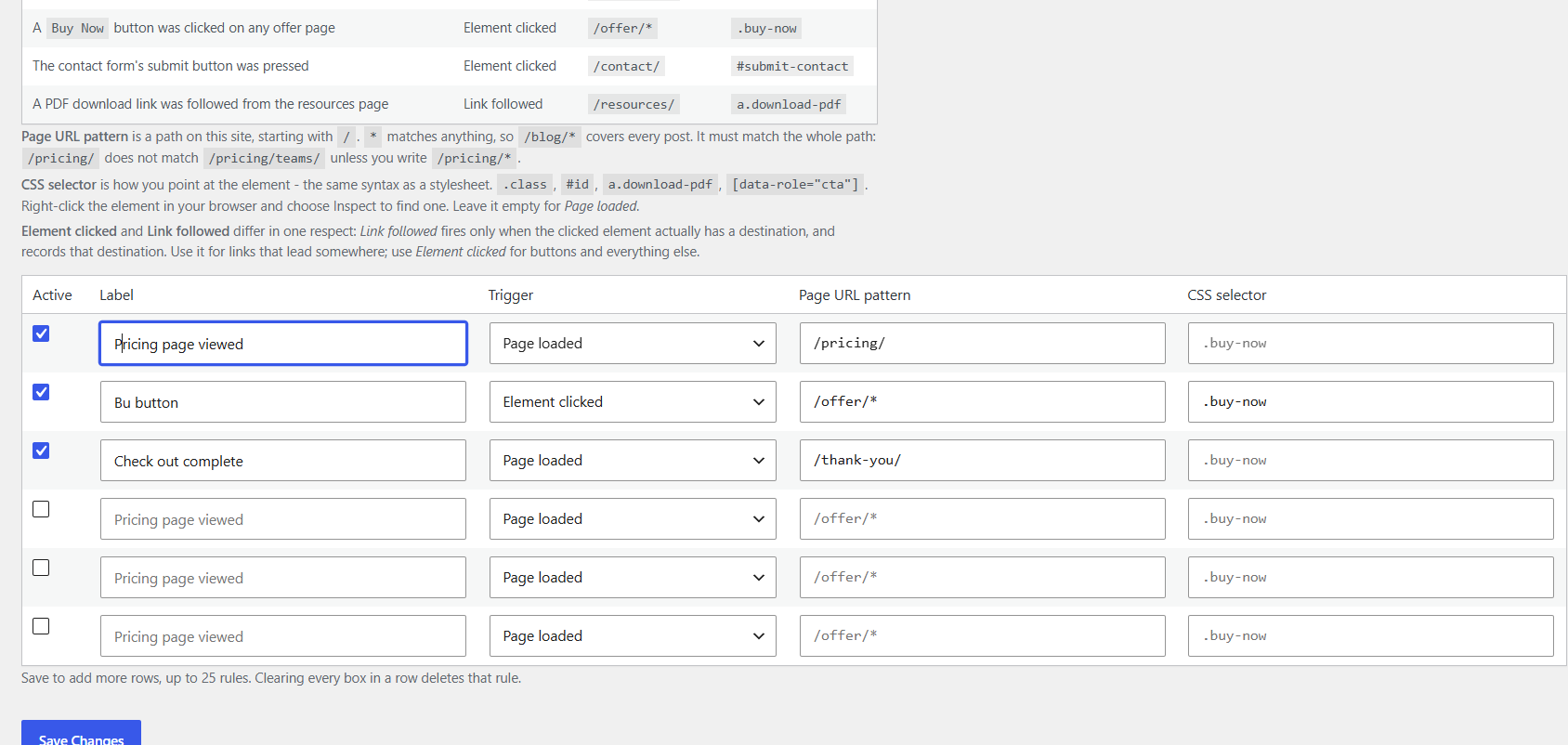
Yes, and that is what the Events screen is for. Under Deftmind Hookwright > Events, add a rule with the trigger Page loaded and the page URL pattern of your landing page, for example /thank-you/. Set your webhook URL at the top of the same screen and enable it.
If the redirect carries data you need, name those parameters in Capture query parameters. A visitor arriving at /thank-you/?order_id=1234 then produces a payload containing "query": { "order_id": "1234" }, which your workflow can act on directly.
Prefer an order or customer reference over an email address or a name. A reference means the personal data stays where it already lives and your workflow looks it up; putting an email address in a URL writes it into your server logs, the visitor's browser history, and your workflow tool's execution logs. If you do capture one, tick the option to remove the query string from the page URL so it is sent once rather than twice, and make sure your privacy policy says so.
I updated the plugin and something looks wrong
Clear your caching plugin and any CDN cache, then reload with a hard refresh (Ctrl+Shift+R or Cmd+Shift+R). Page caches often keep serving old HTML and old JavaScript after an update.
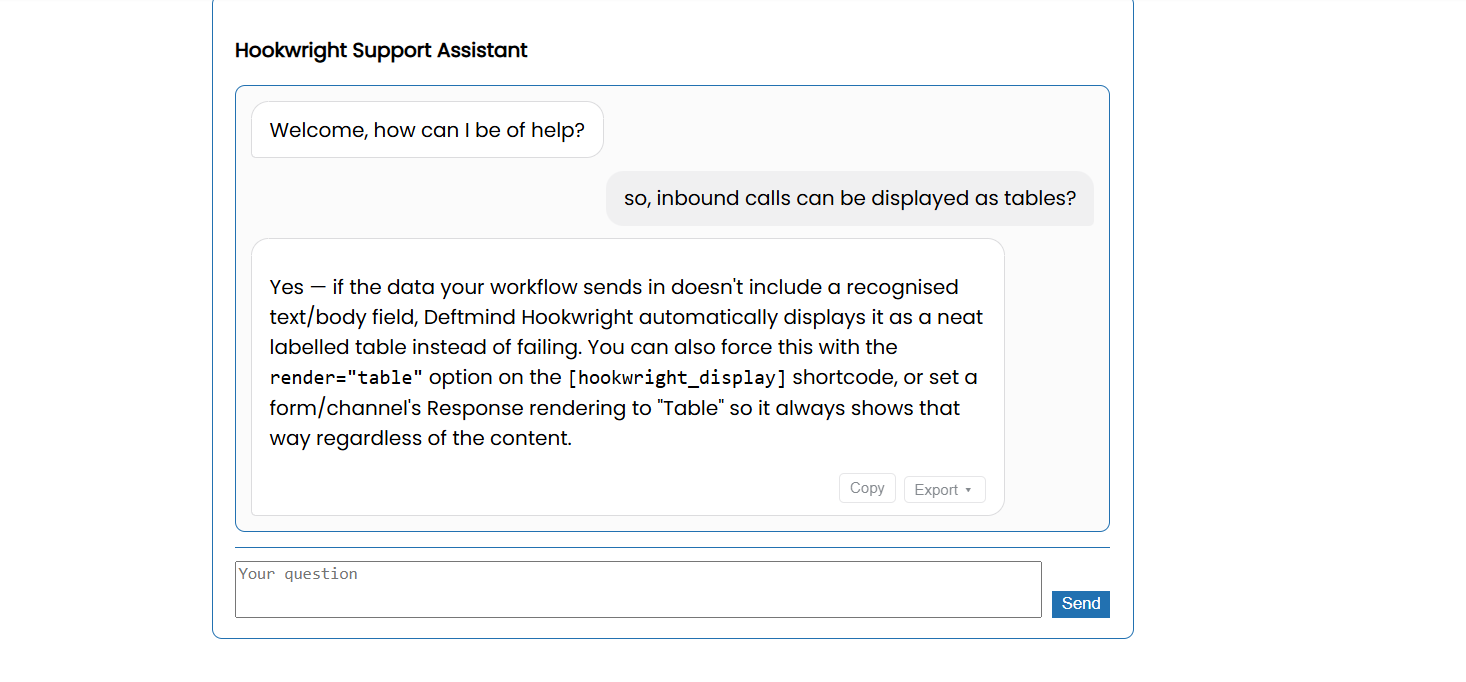
My payload shows as a table instead of formatted text
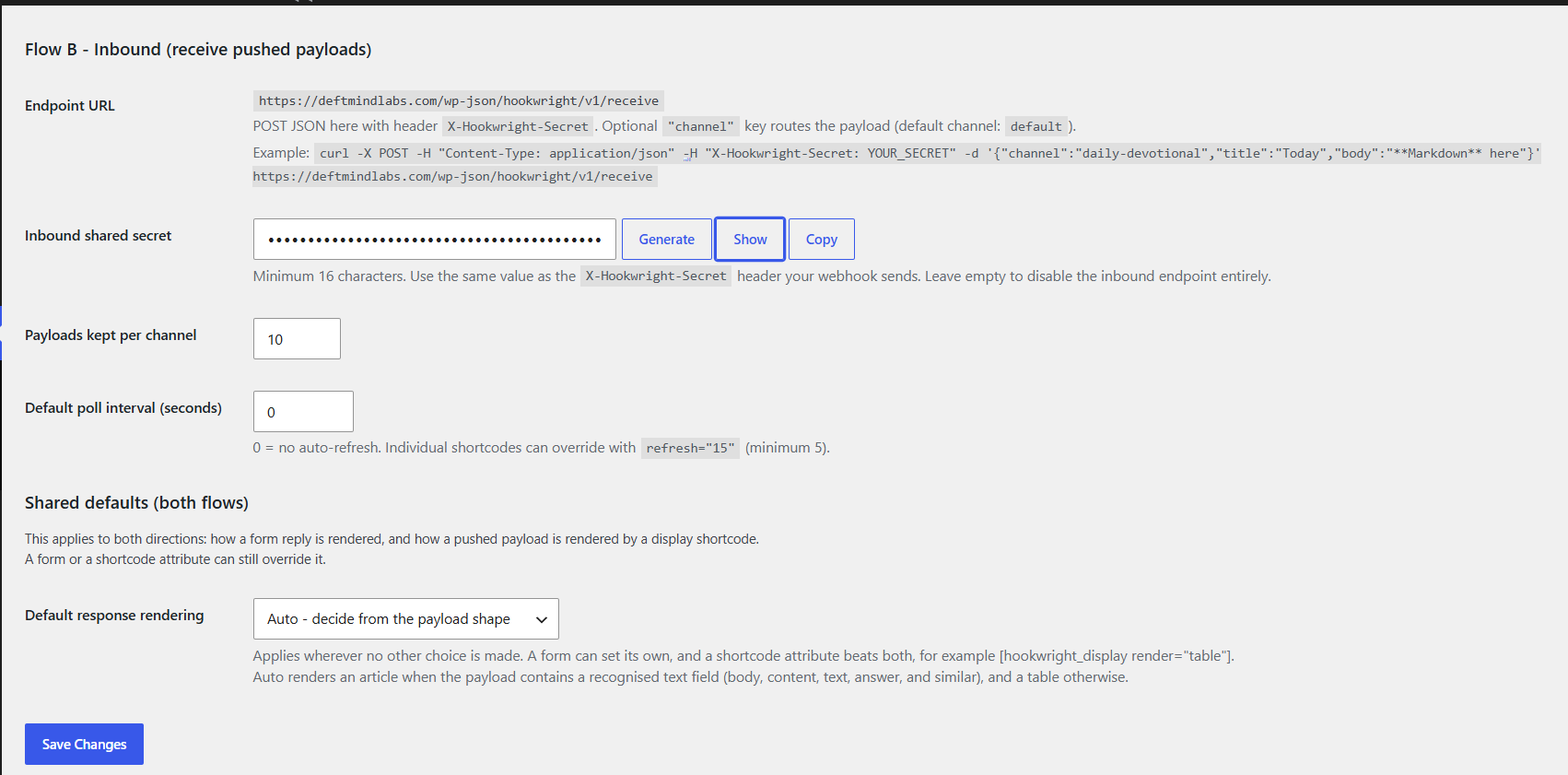
Set the default under Deftmind Hookwright > Settings, choose a mode on the form, or add the attribute directly, for example [hookwright_display render="markdown"]. The shortcode attribute always wins. In auto mode the plugin renders an article when it recognises a text field in the payload and a table otherwise.
Does it work with my automation platform?
Yes. Payload shapes are normalised rather than assumed: wrapper objects such as {"data":{...}} are unwrapped, key names are matched loosely so postTitle and post_title both work, and category or tag lists are accepted as arrays, JSON-encoded strings, arrays of objects, or plain delimited text.
My shortcode shows "No data yet"
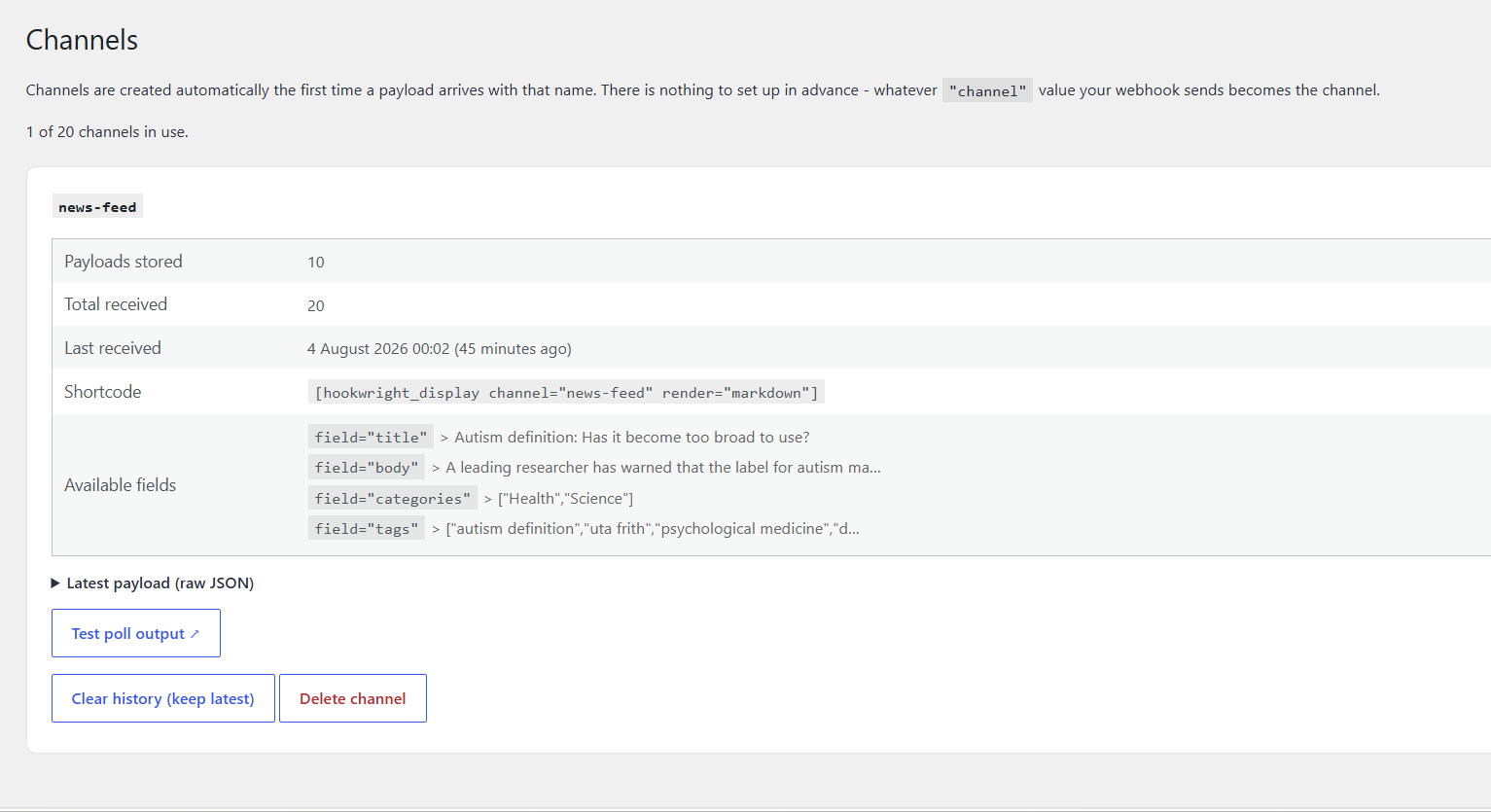
The channel name in the shortcode must match the channel your webhook sends exactly. Check Deftmind Hookwright > Channels for the names actually received, then clear your page cache.
Payload HTML shows as plain text
That is intentional. Raw HTML in a payload is escaped rather than rendered, because payload content is treated as untrusted. Send Markdown instead.
更新日志:
- Five new field types. Dropdowns (
select), radio buttons (radio), a single tick box (checkbox) and a date picker (date) join the existing seven. Dropdowns and radio buttons list their answers on the same line, after a colon:size | Size | select:Small,Medium,Large. Whatever comes back is checked against that list on the server, so a form can only ever forward one of the answers you offered. - Conditional fields. A field can now be shown only when an earlier one was answered a certain way -
note | Why so large? | text | | if:size=Large, or!=for any other answer. A field may only depend on a field listed above it. - The showing and hiding is a courtesy; the server decides. Conditions are worked out again when the submission arrives, from the answers themselves, and never from anything the browser claims it displayed. A field that was not asked for is not required and is not forwarded - so someone who simply does not run the JavaScript gets exactly the same result, and a hidden field cannot be smuggled back in by tampering with the page.
- Conversation mode can now use callback replies. Previously the two could not be combined, because a reply arriving at the return URL had no way to say which bubble it belonged to. Each turn now carries its own
request_id, and the waiting bubble watches for that one reply - so a chat can be answered by a workflow that takes minutes without holding a PHP worker open for the whole time. Theconversationobject still travels in the payload, so your workflow keeps the thread and its history. - Forms saved by an earlier version keep working untouched: with no answers listed and no conditions set, every field behaves exactly as it did before. There is nothing to migrate.
- Fixed: callback mode never worked on sites using the default "Plain" permalink setting. Two URLs were built by joining a query string on with "?", which is correct when permalinks are pretty but produces a URL with two question marks when they are not - WordPress then reads everything after the first one as the route name and answers 404. The
return_urlhanded to your workflow was rejected, and the browser's own check for the reply was too, so the visitor waited out the deadline for an answer that could never be accepted. Both now useadd_query_arg(). - Fixed: the same fault stopped
[hookwright_display]refreshing on those sites, for the same reason - the poll never reached the plugin, so a display withrefresh="10"simply never updated.
- The Server environment panel contradicted itself. It said a service had been found in front the website and that you should tick the box, it later says leave the box off if the two addresses matched. Both readings were on screen at once.
- It now compares the two addresses before advising. The "tick this" wording and the amber highlight are kept for the one case that warrants them - when the forwarded address genuinely differs from the one WordPress sees.
- in this version, finding these headers is not on its own a reason to switch the setting on. Most managed hosts pass them through as a matter of course, so the old wording pointed a lot of people at a setting that would not have helped them and would have made address spoofing easier. The text under the checkbox says so now.
- New: website events. Page loads, clicks on a button or link, and followed links can each fire a webhook. Rules are written in plain terms - which pages, which element - so no JavaScript is involved. Off until you enable it, scoped to the paths you name, and requiring a consent signal by default.
- New: WordPress events. Publishing a post or page, approving a comment, or someone registering can fire the same webhook, with no rules to write. Every event carries a
sourceofbrowserorwordpress, so one workflow can handle both. - A post fires the first time it is published and only the first time. Taking it back to draft and publishing again does not send it twice, an import does not fire one webhook per imported item, autosaves and revisions are ignored, and password-protected posts are never sent. Comments are sent once when approved, whether immediately or later from moderation. Spam is never sent.
- The payload says what happened - id, type, title, link, author, date, categories, tags and a short excerpt. It deliberately does not carry the full post body; a workflow that needs the content can read it from the REST API.
- Capture named query parameters from a landing URL, so a checkout redirecting to
/thank-you/?order_id=1234can drive a workflow directly. Empty by default: nothing is extracted unless you name it, and an option removes query strings from the page and referrer URLs entirely. - Email addresses are off by default in comment and registration events, behind one explicit setting.
- Every submission can cost you money at the other end, and nothing showed how many you were having. Settings gains a per-form daily submission cap, a per-conversation message cap, and a usage table showing today's and this month's figures per form. All caps default to none.
- Over its cap, a form tells the visitor it is unavailable today and shows your usual fallback message. Nothing is sent onward, so a breach costs nothing.
- The largest inbound payload accepted is now a setting rather than a fixed number, defaulting to the same 256 KB as before.
- The request timeout can be set as high as 60 seconds, up from 30. The default is unchanged at 8. If your host stops PHP first, the settings screen warns you before a visitor finds out.
- Added a Stop waiting control to forms and chat, so a visitor gets their form back instead of watching a spinner. It stops the page waiting; it cannot recall a request already sent.
- After 30 seconds the waiting message says the reply is taking longer than usual, so a slow workflow reads as progress rather than as something that has quietly failed.
- Messages from the Settings screen were never displayed. A rejected webhook URL vanished silently, and an inbound secret under 16 characters was refused while the previous one was quietly kept - so you could update your workflow to match a secret this site never stored, and inbound would fail with no explanation anywhere.
- Rate limiting counted every visitor as one behind a reverse proxy or CDN, since they all arrive from the same address. A new Server environment setting reads the real address from your proxy's headers. Off by default.
- Long unbroken strings - URLs, REST paths, shortcodes - no longer force a horizontal scrollbar across a chat thread or a reply.
- Uninstalling now removes the markers written against posts and comments, and per-user notice dismissals.
- New
hookwright:renderedJavaScript event, fired ondocumentonce a reply has rendered, carrying the content element, the export menu, the reply data and the mode. Add-ons extending a reply now have a supported way in instead of searching the page for one.hookwright:responseis unchanged and still fires on the form with the raw data. - New
hookwright_deliveryaction after every outbound request, for add-ons keeping a delivery history. This plugin stores nothing itself. - Both documented in HOOK-API.md.
- First public release.
- Two-way connection to any automation platform: a form sends a visitor's question to your workflow and renders the reply in place, and an authenticated endpoint receives payloads for display.
- Three ways to receive a reply - wait for it, send one way, or Callback, where a workflow that cannot answer on the open connection posts its answer to a one-time return URL instead. Suits platforms that cannot respond to an incoming webhook, and workflows that run for minutes.
- Conversation mode turns a form into a threaded chat, sending the running conversation to your workflow each turn. Nothing is stored on the site.
- Incoming payloads arrive in named channels and display through shortcodes as articles, tables or live-updating feeds.
- Bridge mode adds the same round trip to a form you already have, using data attributes on your own markup.
- Secure by default: the inbound endpoint stays closed until a secret of at least 16 characters is set, outbound URLs are checked against private and reserved ranges, all rendered content is escaped or sanitised, and the plugin contacts nothing but the addresses you configure.