DEL Embed for Bandcamp
| 开发者 |
davidlilja
delplugins |
|---|---|
| 更新时间 | 2026年11月22日 07:16 |
| PHP版本: | 7.4 及以上 |
| WordPress版本: | 7.1 |
| 版权: | GPLv2 or later |
| 版权网址: | 版权信息 |
详情介绍:
[bcwp_bandcamp] shortcode or the block.
Visitors can listen without leaving your site, in a popup or in a player bar at the bottom of the page, and a "Buy on Bandcamp" button is always there. New releases can be imported automatically, and [bcwp_latest] shows your newest release big.
Everything beyond the basic players is optional and off until you turn it on.
Features:
- 8 display modes: big player, small artwork, slim bars, artwork only, cover grids
- Slider: scrolling marquee of album covers with configurable speed, direction, and visible count
- Slideshow: cycling album covers with fade, flip, slide, and blink transitions
- Drag-and-drop reorder in admin
- Theme and link color presets matching Bandcamp's options
- Per-release shortcodes for embedding individual releases
- Gutenberg block with settings for artist, type, order, number of releases, display mode and columns
- One page per artist: show only the releases from one Bandcamp account
- Collections: save a selection of whole accounts and single releases, and show it with one short code
- Automatic import: new releases on your Bandcamp pages are added by themselves
- Popup player: covers can play the release on your site instead of opening Bandcamp
- Player bar: or play it in a bar at the bottom of the page that stays while visitors browse
- Latest release: a big spotlight for your newest release that updates by itself
- Vinyl record effect: a record slides out of the cover and spins
- Format labels: covers show if a release is out on CD, vinyl or cassette, with sold-out formats struck through
- "New" labels, filter buttons for visitors, and shareable links that open one release
- Statistics: see which releases your visitors click, without cookies
- Show your latest releases, a random selection, or only albums or tracks
- Responsive grid layouts with configurable columns
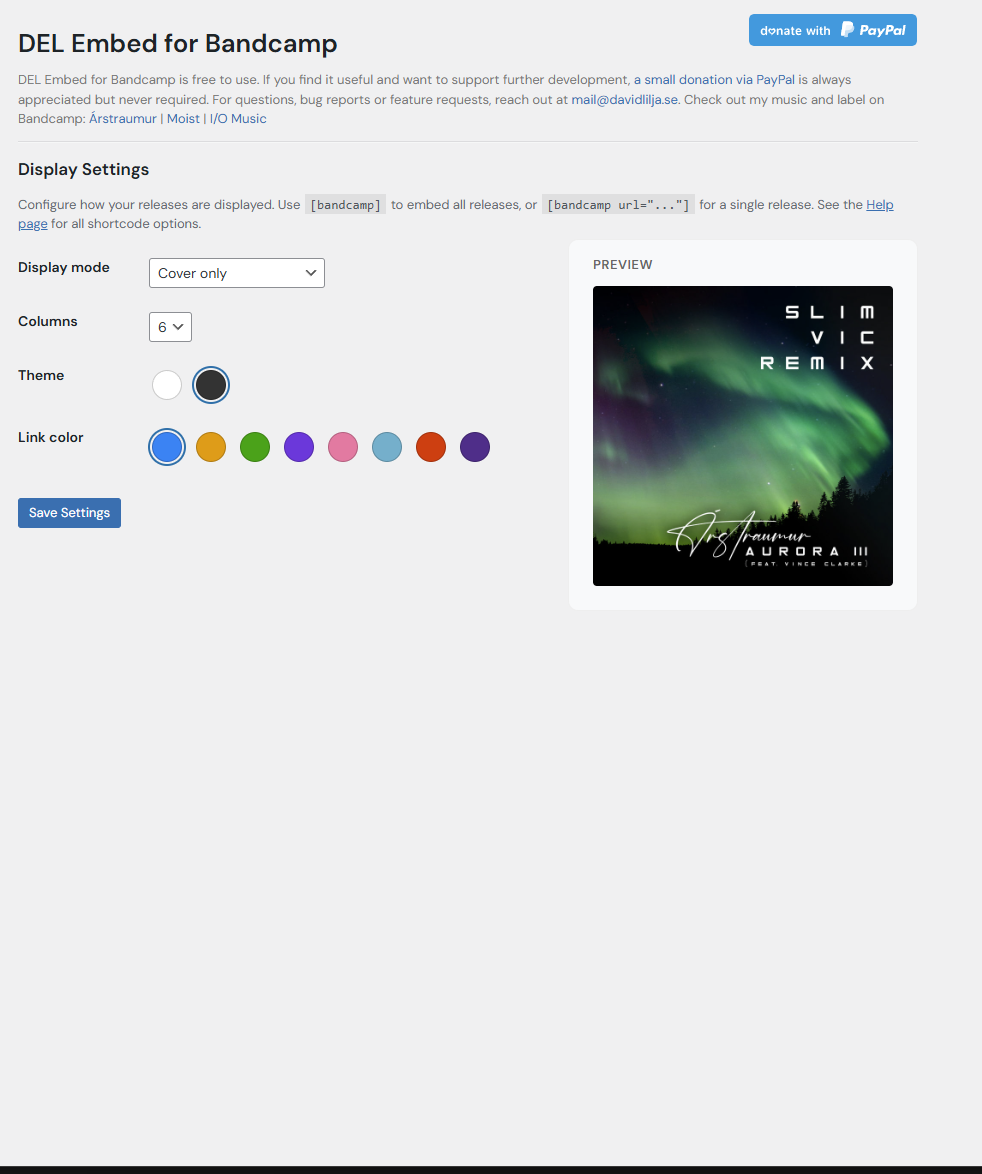
- Live preview in admin for all display modes
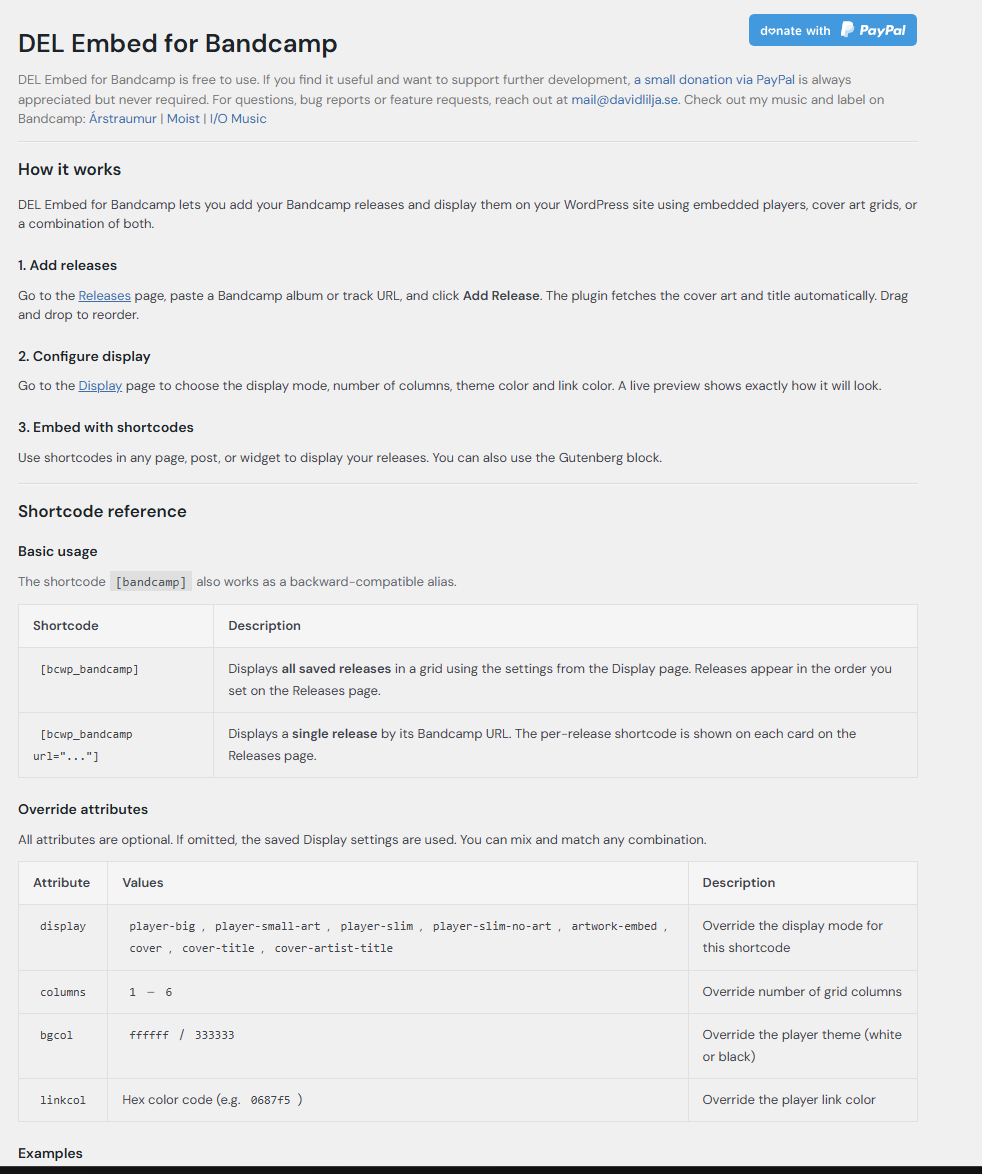
[bcwp_bandcamp]— Display all configured releases[bcwp_bandcamp artist="username"]— Display only the releases from username.bandcamp.com[bcwp_bandcamp limit="4" display="cover"]— Display the first 4 releases as covers[bcwp_bandcamp order="random" type="album"]— Display albums in random order[bcwp_bandcamp display="cover" click="popup"]— Covers that play in a popup on your site[bcwp_bandcamp url="https://artist.bandcamp.com/album/..."]— Display a single release[bcwp_bandcamp collection="live-mix"]— Display a saved collection (DEL Bandcamp > Collections)[bcwp_latest]— Display your newest release big, with title, date and buttons[bcwp_bandcamp display="cover" effect="vinyl" badge="yes" filters="yes"]— Covers with the vinyl record effect, "New" labels and filter buttons[bcwp_bandcamp display="cover" click="bar"]— Covers that play in a bar at the bottom of the page[bcwp_slider]— Display a scrolling slider of album covers[bcwp_slideshow]— Display a slideshow cycling through album covers[bcwp_slider artist="username"]— Slider and slideshow also takeartist,type,order,limitandclick
安装:
- Upload the
del-embed-for-bandcampfolder to/wp-content/plugins/. - Activate the plugin through the 'Plugins' menu in WordPress.
- Go to DEL Bandcamp in the admin menu and add your releases: paste an address, or import them from your artist or label page.
- Use the
[bcwp_bandcamp]shortcode or the Gutenberg block to show your releases. - Optional: on the Display page, choose what a click on a cover does and turn on the extras you want.
屏幕截图:


常见问题:
How do I add a release?
Go to DEL Bandcamp > Releases in your WordPress admin and paste a Bandcamp album or track URL. To add many at once, use "Import all from profile" with your artist or label page and choose which releases to add.
Can I embed a single release?
Yes, use [bcwp_bandcamp url="https://artist.bandcamp.com/album/your-album"] to embed just one release.
Can I show different artists on different pages?
Yes. Add the releases from all accounts on the Releases page, then use [bcwp_bandcamp artist="username"] on each page, where "username" is the first part of the Bandcamp address (username.bandcamp.com). In the block editor, pick the artist in the block settings.
Can I pick exactly which releases show on a page?
Yes, with a collection. Go to DEL Bandcamp > Collections and click "New collection". Tick whole accounts, click covers to leave out or add single releases, save, and click "Copy code". Paste the code on your page. Changes to the collection show on the page right away.
Can new releases be added automatically?
Yes. Turn on Automatic import on the Releases page and add your Bandcamp artist or label pages. Choose how often to check and whether new releases go first or last. Releases you remove are not added again.
I removed releases by mistake. How do I get them back?
Go to DEL Bandcamp > Releases and use "Import all from profile" with the Bandcamp page of the account. You get a list of the releases that are not in your list: tick the ones you want back and click Add. To add one release, paste its address under "Import single release". If you use Automatic import, you can also click "Allow them to be imported again" under the Automatic import settings and then "Check now".
Will version 2.0 change how my site looks?
No. Everything new in 2.0 is off until you turn it on, and your existing shortcodes and blocks give the same result as before. The one thing you will notice: the popup player now has a "Copy link" button next to "Buy on Bandcamp".
How do I show my latest release?
Use [bcwp_latest]. It shows the newest release, by its release date on Bandcamp, with title, artist, date and buttons. Add artist="username" for one Bandcamp account or collection="name" for a collection. With the automatic import turned on, it changes by itself when you release something new.
Can covers show that a release is out on CD, vinyl or cassette?
Yes. Turn on Format labels under Display > Extras, or add formats="yes" to a shortcode. The plugin reads the formats from the release page on Bandcamp once a day. Formats that are sold out are struck through. Only CD, vinyl and cassette are shown, not other merch.
What does the Statistics page count?
Only if you turn it on: how often each release is opened in the popup or the player bar, and how often a visitor clicks through to Bandcamp. The counts are stored on your own site as numbers per release. No visitor data is stored, no cookies are set and nothing is sent to anyone else. Clicks inside Bandcamp's own players cannot be counted.
Can visitors listen without leaving my site?
Yes. On the Display page, set "Clicking a cover" to play in a popup. The popup has a "Buy on Bandcamp" button, so visitors can still buy. You can also choose per shortcode with click="popup" or click="bandcamp".
What display modes are available?
Player (big artwork), Player (small artwork), Slim (with artwork), Slim (no artwork), Artwork only (embed), Cover only, Cover + title, and Cover + artist + title.
更新日志:
- New: A small note on the plugin's own pages asks for a review once you have used the plugin for a while. You can close it for good or postpone it.
- New: Vinyl record effect. A record slides out of the cover and spins when a visitor points at it, and keeps spinning while the release plays. Turn it on under Display > Extras or with
effect="vinyl". - New:
[bcwp_latest]shows your newest release big, with title, artist, release date and buttons. It uses the release date on Bandcamp and updates by itself. - New: "New" label on covers of recent releases, and "Pre-order" for releases that are not out yet. Choose the number of days under Display > Extras, or use
badge="yes". - New: Player bar. Covers can play in a bar at the bottom of the page that stays while visitors scroll and click other covers. Choose it under Display > Clicking a cover, or use
click="bar". - New: The popup and the player bar can take the main color of the cover (Display > Extras > Player colors).
- New: Format labels. Covers show CD, Vinyl and Cassette when a release has them on Bandcamp, and sold-out formats are struck through (Display > Extras, or
formats="yes"). - New: Filter buttons above the releases, so visitors can show only albums, only tracks or one artist, and with format labels on also only CD, vinyl or cassette (Display > Extras, or
filters="yes"). - New: Shareable links. The popup and the player bar have a "Copy link" button, and a page address ending in
#play-album-nameopens that release right away. - New: Statistics page. See how often each release is opened in the player and how often visitors go on to Bandcamp. Off by default, stored on your own site, no cookies.
- New: The block has settings for the hover effect, the "New" label, filter buttons and the player bar. Collections can use the player bar too.
- New: "Import all from profile" now shows a list of the releases it found. Untick the ones you don't want before adding. Releases already in your list are shown separately.
- New: Releases you removed can be imported again. When the automatic import skips removed releases, the Releases page shows how many and an "Allow them to be imported again" button.
- New: Collections. A new Collections page lets you save a selection of releases: whole Bandcamp accounts (also releases added later), minus single releases you leave out, plus single releases from other accounts. Each collection has its own order, number of releases, display mode, columns and cover click. Show it with
[bcwp_bandcamp collection="name"], copied with one click. - New: The block, the slider and the slideshow can show a collection too.
- New: On the Releases page, each release shows which Bandcamp account it comes from.
- New: With releases from more than one account, a menu above the Releases list shows one account at a time, with the ready-made
[bcwp_bandcamp artist="..."]shortcode for that account. - All existing shortcodes and blocks work exactly as before.
- New: Automatic import. The plugin checks your Bandcamp artist or label pages every hour, twice a day, daily or weekly, and adds new releases first or last in your list. Releases you remove are not added again. A "Check now" button checks right away.
- New: Popup player. Covers in the cover modes, the slider and the slideshow can play the release in a popup on your site instead of opening Bandcamp. The popup has a "Buy on Bandcamp" button. Choose on the Display page or per shortcode with
click. - New:
artistattribute shows only the releases from one Bandcamp account, e.g.[bcwp_bandcamp artist="username"]for username.bandcamp.com. Separate several accounts with commas. Use it to make one page per artist. - New:
limit,order(reverseorrandom) andtype(albumortrack) attributes, for example to show your latest releases on the front page. - New:
[bcwp_slider]and[bcwp_slideshow]takeartist,type,order,limitandclick. - New: The Gutenberg block has settings for artist, type, order, number of releases, display mode, columns and cover click.
- Fix: The
display,columns,bgcolandlinkcolshortcode attributes were documented but ignored. They now work. - New: A short thank-you message on the plugin's own pages. It shows once and closes with one click.
- Change: New contact address, david@delplugins.se.
- Fix: "Import all from profile" failed with "No releases found" for many sites. Bandcamp now refuses its root profile pages to many web hosts, so the importer reads /music first.
- Fix: The importer now finds the whole discography. Before, it stopped at the first 16 releases on artist pages.
- Improvement: Clearer import errors. The message says if the page has no public releases, does not exist or was refused by Bandcamp, and lists the HTTP status of each URL tried.
- Change: Requests to Bandcamp identify the plugin by name instead of using a browser-like user-agent.
- Fix: Removed the experimental share-trap overlay introduced in 1.7.0 — it caused leftover styling issues. Bandcamp's built-in share dialog is left as-is.
- Fix: Import all releases now works for Bandcamp label pages (previously only worked for artist pages). The importer tries the root URL first, then falls back to /music, and detects releases linked to other bandcamp.com subdomains.
- New: Slider — scrolling marquee of album covers with configurable speed, direction, visible count, and cover size. Shortcode:
[bcwp_slider]. - New: Slideshow — cycling album covers with fade, flip, slide, and blink transitions. Shortcode:
[bcwp_slideshow]. - New: Live preview in admin for slider and slideshow — updates instantly when changing settings.
- New: Select releases for slider/slideshow from a visual pool with click-to-add and drag-to-reorder.
- Fixed admin CSS not loading on Display and Help pages after menu rename.
- Restored
[bandcamp]shortcode alias for backward compatibility. - Renamed admin menu from "DEL Embed" to "DEL Bandcamp".
- Added screenshots and plugin directory assets.
- All shortcode and block output is now escaped via wp_kses with a strict allowlist.
- Added esc_attr escaping on all inline style attributes.
- Renamed main plugin file to match plugin slug (del-embed-for-bandcamp.php).
- Prefixed shortcode to
[bcwp_bandcamp]. - Added external services documentation for Bandcamp API usage.
- Renamed plugin to "DEL Embed for Bandcamp".
- Replaced inline scripts with properly enqueued JS files.
- Replaced inline SVG styles with direct attributes.
- Fixed contributor username.
- New: Split admin into three pages — Releases, Display, and Help.
- New: Import all releases from a Bandcamp artist/label profile page.
- New: Inline duplicate detection with per-release add/skip choices.
- New: Shared header with PayPal donate button and about text.
- New: Help page with full shortcode reference and display mode documentation.
- Fix: Shortcode display under release cards now shows correctly when added dynamically.
- Improved: Duplicate warnings shown as styled red notice boxes instead of browser dialogs.
- Fix player embeds after Bandcamp oEmbed API change.
- Construct embed URLs from page data when oEmbed is unavailable.
- Fix admin preview not showing player embeds.
- Initial release.
- 8 display modes for Bandcamp embeds.
- Drag-and-drop release management.
- Per-release shortcodes.
- Theme and link color presets.
- Gutenberg block support.