Delete Duplicate Posts
| 开发者 |
cleverplugins
lkoudal freemius |
|---|---|
| 更新时间 | 2026年10月8日 03:48 |
| 捐献地址: | 去捐款 |
| PHP版本: | 7.4 及以上 |
| WordPress版本: | 7.1.1 |
| 版权: | GPLv2 or later |
| 版权网址: | 版权信息 |
标签
下载
4.8.4
4.8.8
4.3
4.8.9
4.1.9.2
4.1.9.3
4.4
4.4.1
4.4.2
4.4.3
4.4.3.1
4.4.4
4.4.5
4.4.6
4.4.7
4.4.8
4.6
4.6.1
4.5
4.1.9
4.9.9
4.7.4
4.7.3
4.8.1
4.8.2
4.9.5
5.0
4.7.9
4.9
4.9.1
4.9.2
4.9.3
4.9.4
4.1.9.1
4.7.6
4.8
4.8.3
4.9.7
4.7
4.7.1
4.7.2
4.7.5
4.6.2
4.7.7
4.7.8
4.8.5
4.8.6
4.8.7
5.1
4.9.6
4.9.8
5.0.1
5.0.2
5.2.2
5.0.3
5.2
5.2.1
详情介绍:
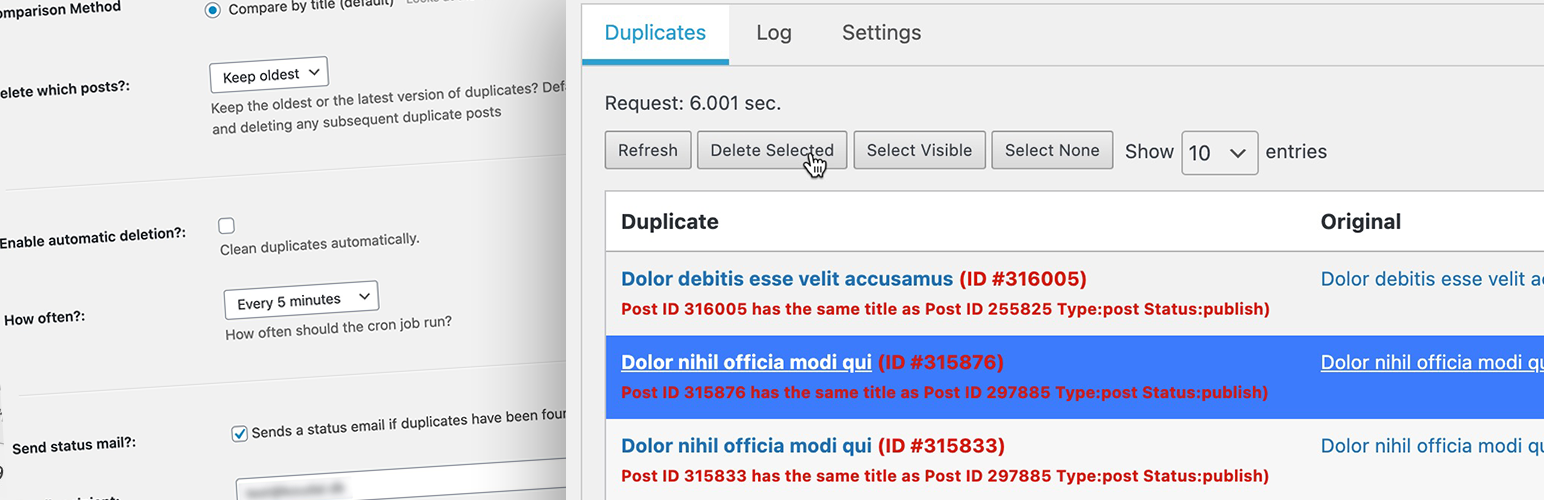
Delete Duplicate Posts helps you declutter your WordPress site by removing duplicate posts along with their metadata. Whether you choose to run the cleanup process manually or set it to operate automatically on a schedule, our plugin ensures a thorough cleanup, improving your website's loading speed and overall performance.
Why Choose Delete Duplicate Posts?
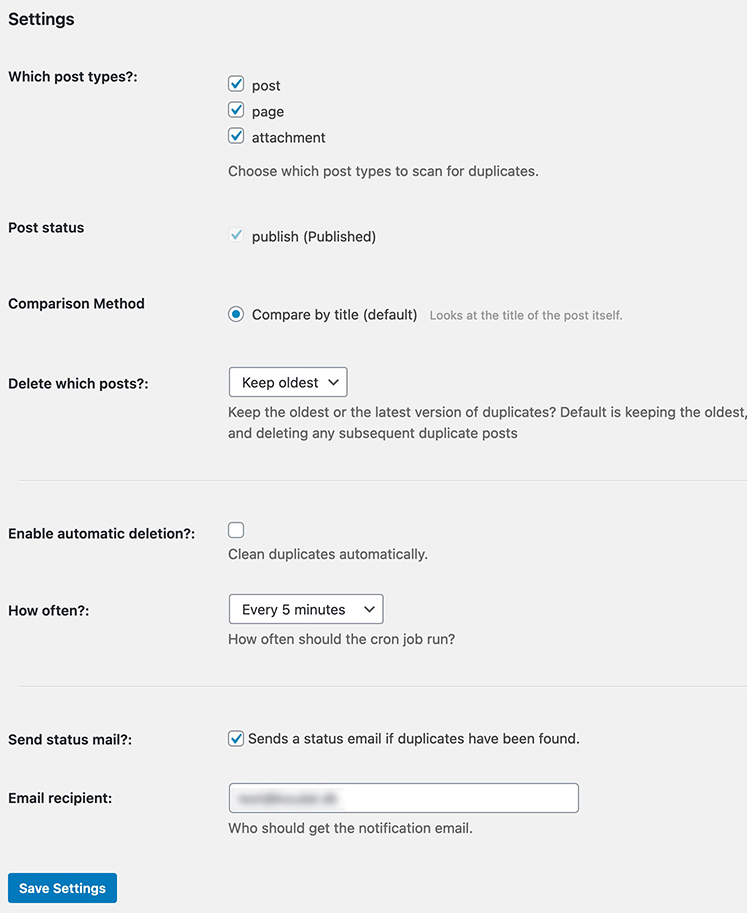
- Comprehensive Cleanup: Not just posts or pages, but also any Custom Post Type you have enabled, along with all related metadata.
- Space Efficiency: By eliminating unnecessary duplicates, it frees up space, facilitating better website performance.
- Scalability: Designed for websites of all sizes, it efficiently manages and optimizes large-scale websites without causing timeouts.
- Review matches before anything is removed, with clear keep vs remove labels.
- Match by post title; choose whether to keep the oldest or newest post.
- Move duplicates to the WordPress trash by default (recoverable).
- Protect specific post IDs so they are never deleted.
- See date and author on each post in a duplicate pair.
- Run cleanup manually, or schedule scans that only report what would be removed—or delete on a schedule when you are ready.
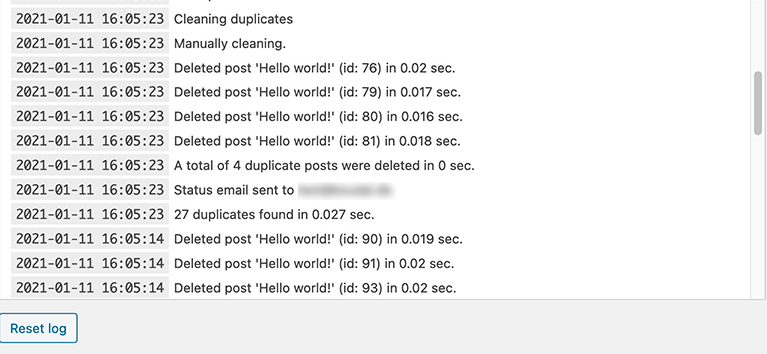
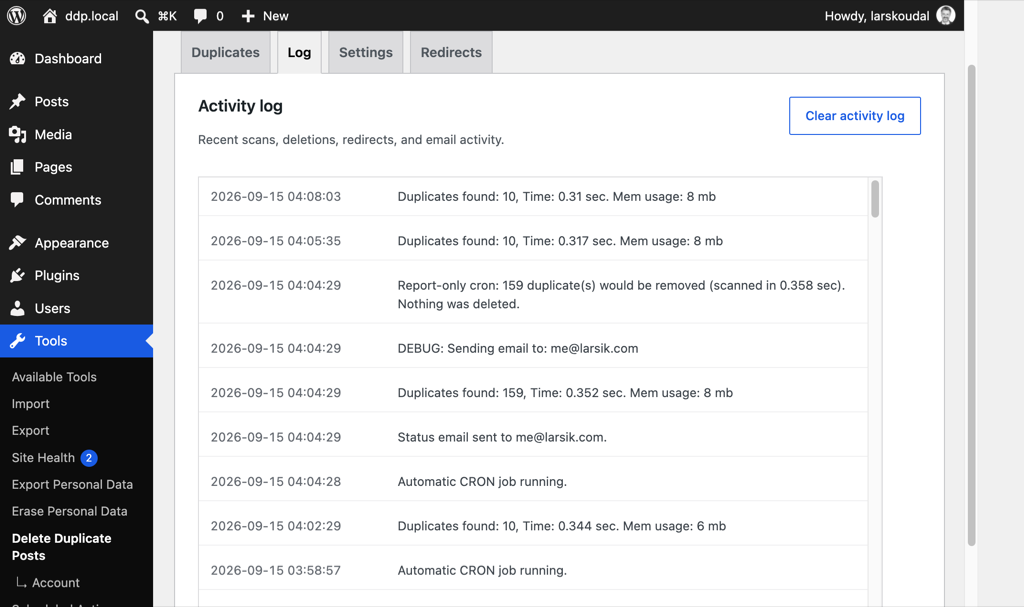
- Optional status emails and a full activity log of what the plugin did.
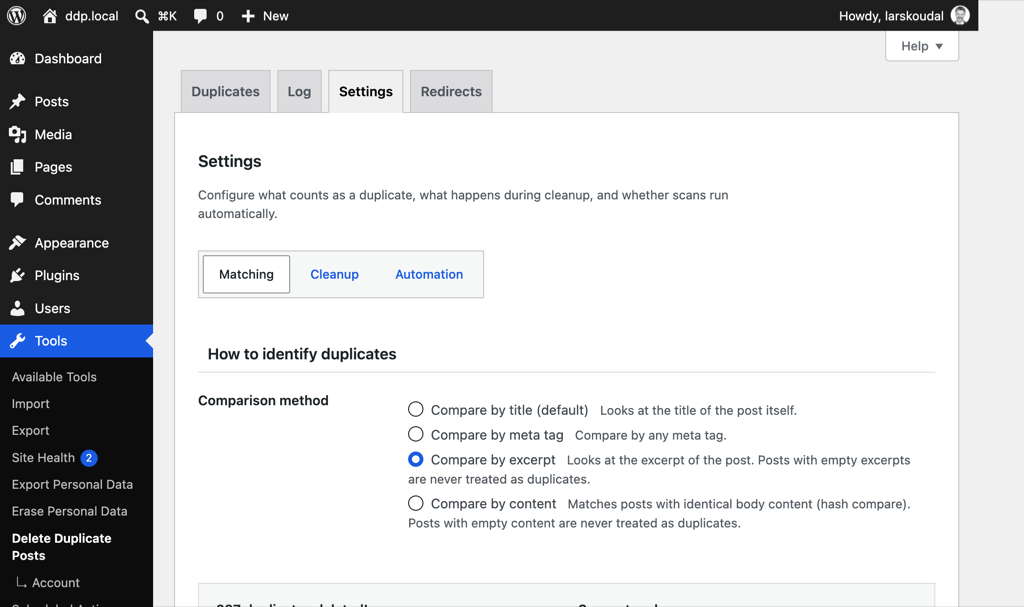
- Find duplicates by identical post content, excerpt, or any custom field—not only titles.
- Include drafts, scheduled, private, and other post statuses in the scan.
- Delete permanently when trash is not enough.
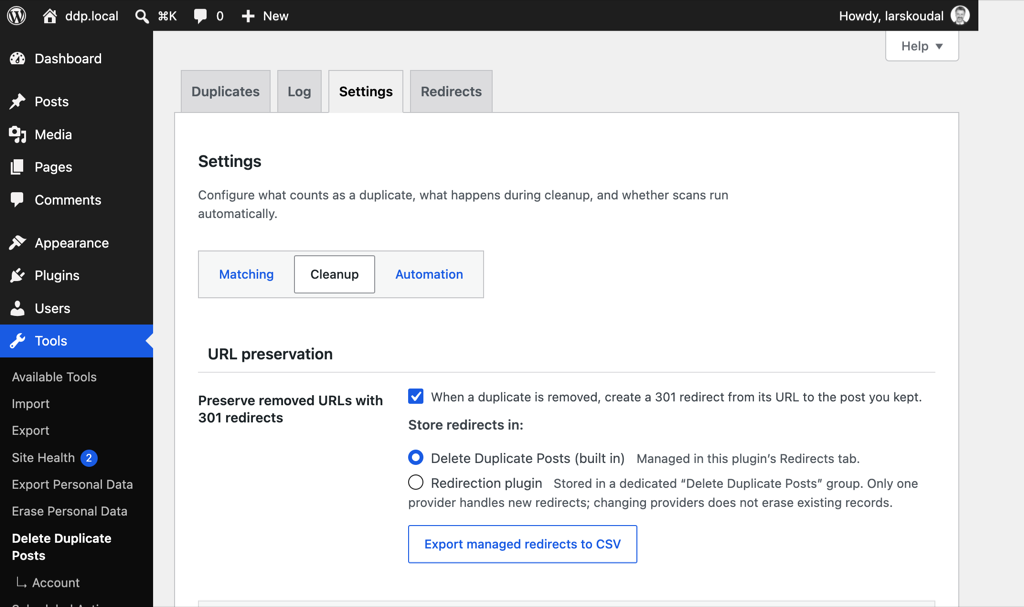
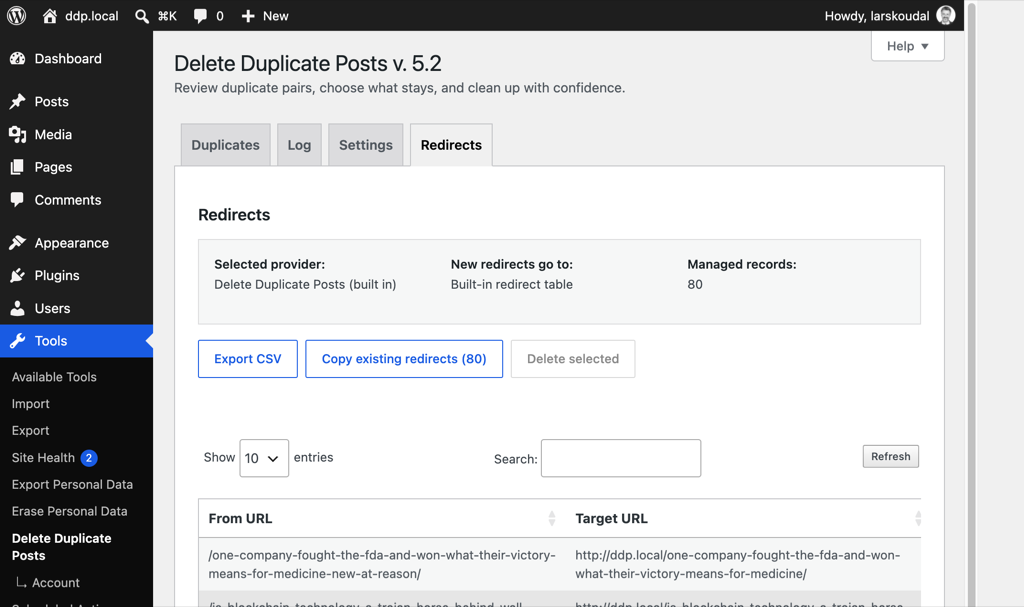
- Preserve removed URLs with 301 redirects using built-in storage or the Redirection plugin. The Redirects tab lists only built-in redirects. When Redirection is selected, new redirects are created in its group and are not listed here.
安装:
- Upload the delete-duplicate-posts folder to the /wp-content/plugins/ directory
- Activate the Delete Duplicate Posts plugin through the \'Plugins\' menu in WordPress
- Use the plugin by going to Tools -> Delete Duplicate Posts
屏幕截图:
常见问题:
Should I take a backup before using this tool?
Yes. Always take a full site backup before deleting posts or pages, even when using trash.
What happens if it deletes something I do not want to delete?
Restore from the backup you took before running the tool. If duplicates were only moved to trash, you can also restore them from the WordPress trash.
What happens when I move built-in redirects into Redirection?
Each built-in redirect is created in the Redirection “Delete Duplicate Posts” group, then removed from this plugin. If that URL is already in the group, it is only removed here. A redirect that fails to move stays in the built-in list. Changing the provider setting does not move or delete existing records by itself. Redirects stored in Redirection are not listed in this plugin.
更新日志:
5.2.2
- 2026-10-07
- Updated Freemius SDK to the latest version.
- 2026-09-23
- Fixed: scan frequency and other settings now stay saved after reload. Custom intervals were reset to hourly, which also made the next scheduled scan time look wrong.
- 2026-09-18
- NEW: optional report-only scheduled scans — cron can log and email what would be removed without deleting. Sites already on automatic deletion keep deleting until they switch.
- NEW: exclude specific post IDs from automatic and manual deletion.
- NEW Pro: find duplicates by identical post content (hash compare); empty content is ignored.
- NEW Pro: added managed 301 redirects with built-in or Redirection storage, safe fallback, and CSV export.
- Improved: moving built-in redirects into the Redirection group removes them from this plugin once Redirection has the URL. Failed moves stay in the built-in list.
- Improved: the Redirects tab lists only built-in redirects. When Redirection is selected, new redirects are created in its group and are not listed here.
- Improved: redesigned duplicate review with explicit matching/keep/removal rules, accessible row selection, selection counts, safer confirmation, clear results, and responsive pair cards.
- Improved: cleaner Settings sub-tabs that match the rest of the admin screen, and the Save settings button now sits below the options.
- Improved: the Redirects table can select every managed redirect at once, including rows on other pages, before deleting them.
- Fixed: the Redirects list no longer stays on the loading indicator.
- Improved: the Security Ninja sidebar matches the product site, and the newsletter is no longer boxed in its own card.
- Improved: removed the debug-logging setting. Scans, deletions, and emails are still written to the activity log.
- Improved: smaller download and install size by removing unused bundled table-library files (about 1.8 MB).
- Improved: unified scheduled preview status with the live Duplicates table and kept report-only scans separate from manual deletion.
- Improved: grouped Settings into focused Matching, Cleanup, Automation, and Support views; presented activity as a bounded WordPress-style table; and made plugin recommendations visible in the sidebar.
- Improved: Redirection integration used the plugin API for create/delete operations and isolated managed redirects in a WordPress-module group.
- Fixed: meta-field duplicate detection now respects “keep oldest/latest” for two-post groups and ignores empty meta values.
- Fixed: manual deletion re-checks that each selected pair still matches before removing posts.
- Fixed: empty duplicate scans now return a zero count instead of an incomplete result payload.
- Security: settings such as keep preference and scan limits only accept known-safe values.
- Security: internal duplicate-lookup SQL is never sent to the browser in admin responses.
- Improved: outbound campaign links were made consistent, and the WordPress.org plugin homepage now points to the product page.
- Tested up to WordPress 7.1.
- Updated Freemius SDK to 2.13.4.
- 2026-06-19
- Improved: redesigned the status notification email with a clean, responsive HTML layout, now sent as multipart with a plain-text fallback so it looks great in every email client.
- Improved: status emails now include a clearer subject line and a run summary — what was removed (by post type), why they matched, the settings used, and whether the run was manual or scheduled.
- NEW Pro: find duplicates by excerpt, useful when posts share a title but have different content. Posts with empty or whitespace-only excerpts (including blank lines/tabs) are never treated as duplicates.
- Improved: the duplicates table now shows the shared excerpt (and the matched meta value) in both columns, with clearer wording; post type and status moved to a hover tooltip for a cleaner layout.
- Security: the Tools screen now requires administrator capability before saving settings, clearing the log or recreating tables, and log entries shown in the admin are escaped so post content can no longer inject HTML or scripts.
- Tested up to WordPress 7.0.
- Updated Freemius SDK to 2.13.2.
- Refactored plugin into modular classes.
- Fixed Freemius premium-only template conditionals.
- Code review and security hardening.
- Fixed all untranslated strings (except marketing related)
- Fixed: automatic duplicate deletion no longer breaks WP-Cron runs.
- Fixed: duplicate scan count now matches the listed results.
- NEW Pro: choose to delete duplicates permanently instead of moving them to trash.
- Improved: Pro settings are clearly marked; free users see what Pro unlocks. Locked Pro options now show as clear upgrade prompts instead of greyed-out, broken-looking checkboxes.
- Improved: Language files improved to ensure translation quality for internal users.
- Fixed: the welcome and review-request notices can now be dismissed and stay hidden (the review notice reappears after 180 days).
- Improved: moved the newsletter signup to the sidebar and switched to a lightweight self-hosted form that loads no third-party scripts (better privacy/GDPR; nothing is sent until you subscribe). Added a required consent checkbox so sign-up is an explicit opt-in.
- Fixed: automatic deletion no longer finds zero duplicates when the "No limit" option is selected.
- NEW: scan and delete duplicate media attachments (matched by title; files removed with the attachment).
- Fixed: changing the automatic deletion interval now reschedules the cron job without toggling the setting off and on.
- Improved: status email and admin notices now distinguish "deleted in this run" from "total deleted since install".
- Fixed: duplicate list pagination now uses a stable sort order so pages do not drop or repeat rows.
- Improved: status email notifications can be sent to multiple comma-separated recipients.
- 2026-03-08
- Maintenance release.
- Fixed PHP notice about translations loading too early (WP 6.7+).
- Fixed incorrect text domains preventing some strings from being translated.
- Fixed SQL error in plugin uninstall cleanup.
- Fixed timer display showing NaN when scanning for duplicates.
- Fixed options not updating correctly after saving settings.
- Updated Freemius SDK to 2.13.0.
- Tested up to WordPress 6.9.1.
- Code cleanup and minor improvements.
- 2025-05-15
- Maintenance release.
- Code optimization.
- Updating 3rd party libraries.
- New version number
- Improved translations in the plugin.
- Added new language translations: Danish (da_DK), German (de_DE), English (en_US), Spanish (es_ES), Finnish (fi_FI), French (fr_FR), Italian (it_IT), Norwegian Bokmål (nb_NO), Dutch (nl_NL), Portuguese - Brazil (pt_BR), Russian (ru_RU), Swedish (sv_SE), and Vietnamese (vi_VN).
- Updated 3rd party libraries - Freemius.
- Advertisements permanently displayed on plugin page. Thank you @secretja for the idea.
- Added row count selection dropdown to duplicate posts and redirects tables.
- Improved error handling for DataTables to display messages in the UI instead of alerts.
- Enhanced user interface for better visibility of table controls.
- Fixed issue with error messages not displaying properly in some scenarios.
- Added row count selection dropdown to duplicate posts and redirects tables.
- Improved error handling for DataTables to display messages in the UI instead of alerts.
- Enhanced user interface for better visibility of table controls.
- Fixed issue with error messages not displaying properly in some scenarios.
- Added detailed error logging to console for easier debugging.
- Resolved DataTables error related to mismatched column data.
- Added a "Refresh" button to the redirects table for easy data reloading.
- Fixed potential database table creation issue affecting DataTables functionality. (If issues persist, use the "Repair plugin data tables" button in the sidebar)
- Finally fixing the ajax datatables error - maybe?
- More bugfixes
- Update Freemius SDK
- Bugfixes
- Many bugfixes and codehardening.
- Improvements to memory usage on some sites with missing MySQL setup.
- Fix for missing function, ddp_fs_uninstall_cleanup() - thank you @dimalifragis for reporting this issue.
- 724,735 downloads
- Warns you if there are no rows selected before clicking "Delete Selected".
- Bugfix buttons not showing up.
- Bugfix cron not always working properly.
- Updated Freemius SDK library.
- NEW: Redesigned interface to reduce clutter.
- Fix for when redirect entry was added.
- Pro - NEW: Redirect management. See, search, select and delete redirects created by Delete Duplicate Posts.
- Pro - Added warning - If "trash" post status is selected, the results will include already deleted posts.
- Removed dependency for PHP 7.2 allowing for websites running older PHP to install.
- Security update - Thank you Huynh Tien Si and Patchstack for reporting this bug. The vulnerability made it possible for a user on your site with contributor level access to delete posts. This has now been fixed by only allowing admins to use the plugin or even access the interface.
- Code refactoring - The plugin now runs faster, loading via AJAX dataTables. This makes individual selection and navigation much easier.
- New: "Why" - A small note next to each duplicate explains why a post is marked as duplicate.
- Tested up to WP 6.4
- Fix bug with 'nav_menu_item' getting removed, thank you Fahad.
- Freemius SDK update to 2.5.10
- Fix a bug
- Verified notices are supposed to show every 180 days.
- Updated 3rd party SDK Freemius to 2.5.8
- Fix bug when creating new site under WordPress Multisite - thank you @artelis
- Fix bug with redirects created not using the correct relative URL.
- Update 3rd party SDK Freemius to 2.5.7
- Tested up to WP 6.2
- FIX: Error message on some installations with custom SDK installed. Updated 3rd party library Freemius. Happens rarely, but please upgrade.
- Big thank you to Angelo for translating! :-)
- Improved: Posts will be deleted immediately or moved to trash if enabled in WordPress.
- Updated Freemius SDK to latest version.
- Updated review reminder interval.
- Updated 3rd party libraries.
- Tested up to WP 6.1.1
- FIX: Limit amount of duplicates to find - reduces server load for large sites with many duplicates.
- FIX: PHP notice about missing redirection database when loading the plugin page.
- FIX: E-mails not getting sent - thank you @helenekh
- Added debug information for email sending in the log.
- Tested up to WP 6.0.3
- Updated 3rd party libraries
- Updated language files for translators
- Add fixes to prevent menu items being deleted in some cases - "nav_menu_item"
- Update Freemius library to v. 2.4.5
- Code improvements so the plugin runs faster overall.
- Updated language files.
- NEW: (Pro only) - Feature: 301 redirects deleted duplicates.
- FIX: Plugin would not show results if the limit was set to "No limit".
- Fix: Reworked JS code - fixing the list of duplicates not loading.
- Improved loading time by fixing a few logic issues in the JavaScript code.
- Added optional debug logging to help pinpoint bugs.
- Updated language file for translations.
- Cleaning up PHP code.
- Trimmed CSS file.
- Fix - Now you can choose how many duplicates to see in the interface.
- Tested with WordPress 6.0.
- Updated language file for translations. = 4.7.6
- New: Free demo - Test how the plugin works, just click and in a few seconds your unique demo site is online. Thank you TasteWP.com :-)
- Security tightening.
- 2021/10/27
- Fix bug with Composer dependencies for PHP less than 7.3
- 2021/10/15
- Fix problem with deleting old log entries in database.
- 2021/09/30
- Fix problem with log database not being created automatically.
- Added button in sidebar to recreate missing database tables.
- 2021/07/21
- Security Hardening
- 2021/07/11
- FIX: Duplicates not always properly detected, thank you for the reporters to help fix this bug :-)
- NEW: Improved and faster lookup of duplicates.
- NEW: See number of posts per post type.
- NEW: See peak memory usage in the log.
- NEW: See combined count by post_status in the log.
- NEW: If there is a problem looking up duplicates in the database (shared servers have limited resources), the problem will be shown in the log.
- Updated language files.
- Tested up to WP 5.8
- 2021/04/14
- Updated 3rd party libraries for PHP 8
- Tested up to WP 5.7
- Minor bugfixes
- 303,187 downloads
- 2020/01/12
- Hotfix - "The plugin generated 15 characters of unexpected output during activation" - Thanks Fabio.
- 2020/01/12
- Beta feature: Limit amount of duplicates to find. On big sites with many duplicates the plugin can time out. This feature allows you to limit the amount of results. This feature is only available for free while being tested. Thank you Fabio.
- Minor text or layout fixes.
- 286,392 downloads
- 2021/01/11
- New: Manually select which duplicates to delete (or use the automatic)
- Fix: WordPress 5.6 jQuery compatibility.
- Fix: Not allowing to disable final post status if only one left. Thank you @nd62.
- Work on improving PHP 8 compatibility.
- Updated 3rd party libraries to latest version. Freemius v. 2.4.1
- 283,070 downloads
- 2020/11/30
- Fix bug with email not sending. Thank you Fatih.
- 272,622 downloads
- 2020/11/09
- Introducing Multisite compatibility
- Updated 3rd party Freemius library to v. 2.4.1
- Tested with WordPress 5.5.3
- 265,176 downloads
- 2020/08/06
- Code cleanup
- Tested with WordPress 5.5
- Updated SDK Freemius to 2.4.0.1
- 250,931 downloads
- 2020/07/06
- Fix - automatically deactivate free version if pro version is activated - Thank you Jordi.
- Fix - Missing link to privacy data.
- Fix - Not correctly identifying original post when comparing with post meta values - Thank you Reinhard.
- New - more details how long a process took is now stored in the log.
- 242,749 downloads
- 2020/06/08
- Code cleanup and security hardening.
- 235,094 downloads
- 2020/05/08
- Removes some debug code, whoopsie.
- 227,615 downloads
- 2020/05/07
- Plugin now looks for duplicates in posts and pages per default, no need to set it after activating plugin.
- Fix: "Error deleting post" showing even if the post was deleted. Thank you Murray :-)
- The log is now updated when list of duplicates is updated.
- 225,725 downloads
- 2020/05/04
- Fixing activation bugs - Thank you @locutus45 and @paul1427
- Fixing code not working with PHP 5.6
- Fixed missing translation strings - Thank you Canny for translating to Korean! :-D
- Added automatic reload when manually deleting duplicates.
- 222,012 downloads
- 2020/05/03
- Fixing bug in install routines
- 219,984 downloads
- 2020/05/02
- Tested up to WP 5.4.1
- Pro: Choose different post stati to look for; publish, draft, scheduled, pending, private and any other custom post status.
- Code improvement, works faster.
- 218,123 downloads
- 2020/04/25
- Rewrote plugin to better handle big sites with lots of duplicate content.
- Fixed automatic deletion (cron job) not working properly on some sites.
- Security fixes and hardening throughout the plugin.
- Log is now AJAX based to help load on big sites.
- Duplicate list now loads via AJAX to help with load on big sites.
- Added inline help - Helpscout
- Updated Freemius 3rd party SDK to 2.3.2
- Added option to upgrade to Pro version.
- Updated language files.
- Removed option to run every minute - Sorry, but not a good idea for many websites and hosting companies do not like it either.
- 213,367 downloads
- Direct link to support forum
- Fixed missing file in 3rd party SDK.
- Fix - the limitation on how many posts were deleted per batch did not always work, it does not.
- PHP notices removed from the log thank you @brianbrown
- Security fix
- Added two more intervals, every minute and every 5 minutes.
- Updated 3rd party script Freemius
- Fixed bugs introduced with updating to WordPress 4.9.1 - Thank you to all who reported the problem.
- Fixed esc_sql() for WordPress 4.8.3
- Fix missing 3rd party scripts.
- Optimized delete routines - Thank you Claire and Vaclav :-) Up to 20-30% faster deleting.
- Added timing functions so you can see how long it takes to delete in the log.
- Permanently delete posts and pages - no longer goes to trash.
- Fix - The log is now shown with latest events at top.
- Updated 3rd party scripts - Freemius update 1.2.1.7.1 to 1.2.2.9
- Updated Freemius SDK.
- Fixing problem with keeping latest or oldests posts.
- Fixed PHP Notification - Logs were not automatically cleaned.
- Fixed missing icon
- Listed freemius as contributer
- Fixing PHP Warning if no post types selected
- Fixed a mistake in Freemius configuration :-/
- Added language .pot file
- Improved Danish translation
- Added Fremius for more usage details - Opt-in
- Fix PHP notices
- Clean up code comments
- Logo now in Retina
- Fixes which kinds of posts that can be cleaned- Thanks Mark - https://cleverplugins.com/support/topic/delete-duplicate-post-of-a-different-post-type/
- Option up from max 250 posts to 500 - Thanks Mark.
- Improved visual style in the table listing.
- Fixes problem with cron job not working properly.
- New: Choose interval for automated cron job to run.
- Adds 3 cron interval 10 min, 15 min and 30 minutes to WordPress.
- Minor PHP Notice fix.
- Code cleaning up
- Added log notes for cron jobs and manual cleaning.
- Added missing screenshots, banners and icons.
- Big rewrite, long overdue, many bugs fixed
- NEW: Choose between post types.
- Optional cron job now runs every hour, not every half hour.
- The log was broken, it has now been fixed.
- Removed unused and old code.
- Improved plugin layout.