
DeploySeal
| 开发者 | deployseal |
|---|---|
| 更新时间 | 2026年11月9日 17:29 |
| PHP版本: | 7.4 及以上 |
| WordPress版本: | 7.1 |
| 版权: | MIT |
| 版权网址: | 版权信息 |
详情介绍:
- A build marker that is true on every deployment. The plugin derives it from your WordPress version and active theme version and, when available, the git commit of the deploy (a SHA file or a
DEPLOYSEAL_BUILDconstant in wp-config.php), so the readiness report can confirm that the build testers used is the build you shipped. No theme file to remember to edit. - One install per site, multisite included. Every site keeps its own environment key and label, with the exact origins to register shown next to the field. Network activation is supported; settings stay per site.
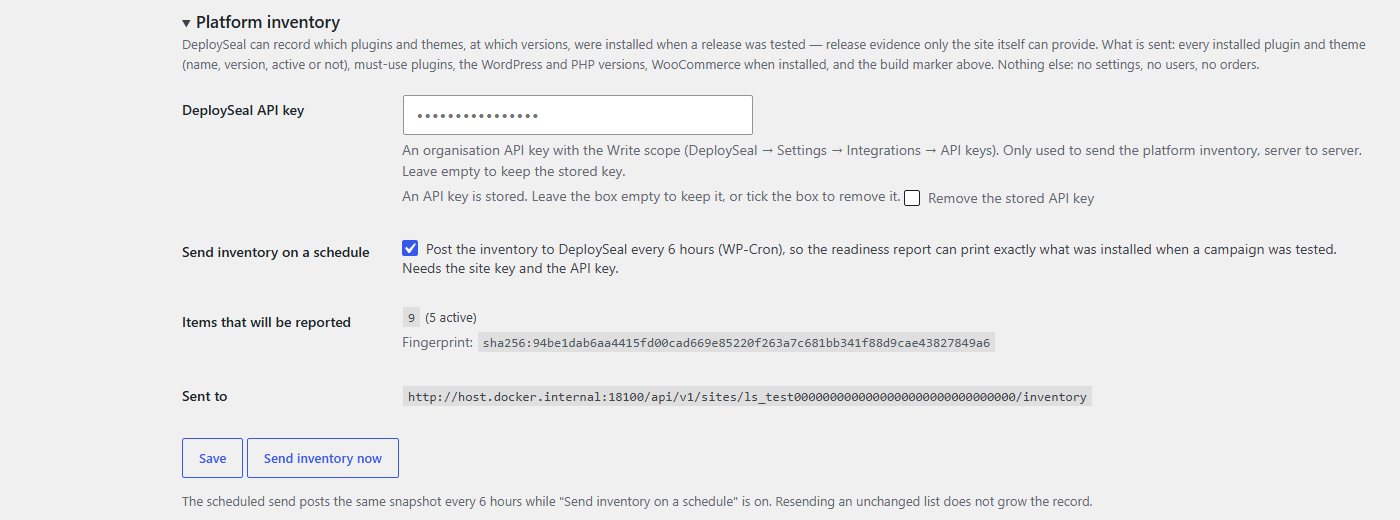
- Platform inventory as evidence (optional). With a DeploySeal API key the plugin reports which plugins and themes, at which versions, were installed when a release was tested — WooCommerce included — and the report shows what changed since the last signed release. Useful for plugin updates and WooCommerce upgrade projects.
- Survives theme updates. The tag is enqueued by the plugin, not written into a theme, and never appears in wp-admin unless you choose that, and never on the login page.
- The widget loader. When the plugin is enabled with a site key, every public page includes
<script src="https://cdn.deployseal.com/ds-widget.js" async>with the site key, the declared environment label, the build marker and the plugin version asdata-ds-*attributes. The visitor's browser downloads the widget from cdn.deployseal.com and sends a heartbeat (site key, page URL with sensitive query parameters removed, page title, environment label, build marker, widget version, installer) to api.deployseal.com on each page load. For invited testers only, the widget also sends the issues, screenshots and session replays they capture. - The platform inventory (optional, off until you add an API key). From your server, never from the browser, the plugin posts the list of installed plugins and themes (name, version, active or not), the WordPress and PHP versions and the build marker to
https://api.deployseal.com/api/v1/sites/{site key}/inventory, when you press "Send inventory now" and, if you turn on "Send inventory on a schedule", every 6 hours.
安装:
- Install through Plugins → Add New (search for "DeploySeal"), or upload
deployseal-1.0.0.zipfrom the GitHub releases through Plugins → Add New → Upload Plugin, then Activate. - In DeploySeal, open your site and create an environment for this WordPress site (for example Staging or Production). Register the origin(s) shown on Settings → DeploySeal under "What this site will send".
- Copy the environment's public key (it starts with
ls_) into Site key, tick Enabled, Save. - Open the site once; the environment shows as Live in DeploySeal. If you had pasted a DeploySeal snippet into the theme or a header plugin, remove it: DeploySeal warns when two install paths are live on one environment.
屏幕截图:
常见问题:
Does it slow my site?
No measurable amount. The plugin adds one async script tag to <head>: the browser downloads the 1 KB loader in parallel without blocking rendering, and the rest of the widget only loads after that. For visitors who are not invited testers the widget stays dormant. On the server, the plugin reads one option per request (and your SHA file, if you configured one). Nothing is added to wp-admin unless you turn that on.
What does it send?
The browser sends a heartbeat per page load (site key, scrubbed page URL, page title, environment label, build marker, widget version and installer) so DeploySeal can show the environment as Live. Invited testers also send the issues they pin, with screenshot and session replay. Only if you add an API key does the server send the platform inventory: installed plugins and themes with their versions, the WordPress and PHP versions and the build marker. No settings, users, customers or orders ever leave the site. See "External services" above.
Does it work with WooCommerce?
Yes. There is nothing WooCommerce-specific to configure: the tag loads on shop, cart and checkout pages like any other page, the plugin declares compatibility with High-Performance Order Storage and the cart and checkout blocks, and the platform inventory records the WooCommerce version and its extensions.
Which build marker will it send?
By default: the DEPLOYSEAL_BUILD constant when wp-config.php defines one; otherwise the WordPress version plus the active theme and its version (7.1.2+twentytwentyfive-1.3), plus the short git SHA when a SHA file your deploy writes can be read (7.1.2+twentytwentyfive-1.3+a1b2c3d). The settings page prints the exact value; copy it verbatim into the campaign's release identifier.
Why does DeploySeal say the environment is Not seen?
Most often the origin: DeploySeal matches scheme://host[:port] exactly, so register every origin the settings page lists. Also check that Enabled is ticked, that the key is the one for this environment, and that a caching plugin has been purged since you enabled the plugin.
Is the site key a secret?
No. It only works from the environment's registered origins, which is why it can sit in your HTML. The API key used for the platform inventory is a secret: the settings page never shows it again once saved.
更新日志:
- Settings page styles moved to a stylesheet enqueued on that screen only; no inline styles. Nothing else changed.
- First release: the contract tag (site key, environment label, build marker,
data-ds-installer="wordpress-plugin/1.0.0") in<head>on the public site; optional in wp-admin; never on the login page. - Build marker from WordPress + theme version, a git SHA file, the
DEPLOYSEAL_BUILDconstant or a manual value. - Platform inventory: "Send inventory now" and a six-hourly WP-Cron send.
- Multisite (per-site settings, network activation) and WooCommerce HPOS compatibility.