
Designed2Use Events
| 开发者 |
designed2use
guy1ncognito |
|---|---|
| 更新时间 | 2026年9月17日 18:04 |
| PHP版本: | 8.1 及以上 |
| WordPress版本: | 7.1 |
| 版权: | GPL-2.0-or-later |
| 版权网址: | 版权信息 |
详情介绍:
- Events and venues as custom post types, with categories and tags
- Frontend Pages for the calendar (
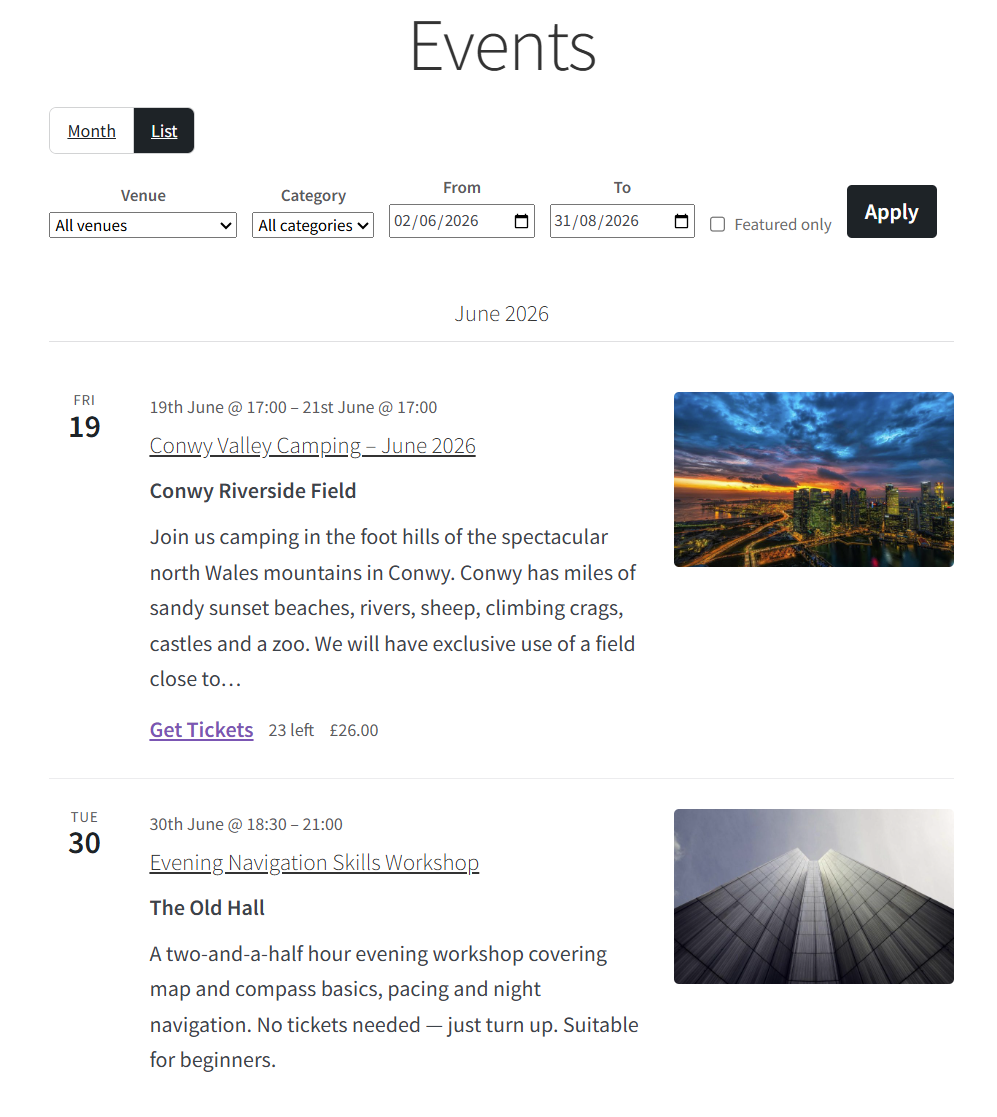
/events/) and the venues archive (/venues/) — created on activation and rendered through your active theme, no template takeover - Month + List calendar views with venue / category / featured filters, prev / next month navigation, and a shareable URL for every state
- Server-rendered first paint plus a vanilla-JS REST-driven view swap — no JS framework, no build step
- Single-event pages with schedule, venue, address and an embedded OpenStreetMap (Leaflet) map
- Single-venue pages with address, map and upcoming events
- Multi-day events span every day they cover in the month view, with a "Through {date}" hint in the list view
- JSON-LD
Eventschema in the document<head>for Rich Results - Per-event
.icsdownload and a subscribable iCal feed (/event/{slug}/feed/ics/) - Theme overrides — copy any template part to
your-theme/designed2use-events/{name}.php - Five free shortcodes (
[d2uevents_calendar],[d2uevents_list],[d2uevents_event],[d2uevents_venues]) and matching server-rendered blocks under an "Events shortcodes" inserter category - REST endpoint
/wp-json/d2uevents/v1/occurrencesfor headless use
- Create a ticket product directly from the event, or link an existing product
- Inline editor on the event admin for name / description / price / per-ticket capacity / sale window — no round-trip to the product editor for the common fields
- Single-cap cascade: per-ticket → event → venue → settings (first set value wins) so an admin can choose where to track capacity
- Sale window with event-end fallback — the form is replaced with a "Tickets go on sale on X" or "Ticket sales have ended" notice as appropriate
- Atomic capacity decrement at order completion — concurrent oversells collapse to exactly one winner; the rejected order is recorded as an order note and a debug-log entry
- Refund-aware capacity release — the same counter the booking incremented is released
- Per-ticket attendee capture (name + email) on the event page — block cart / block checkout / classic cart all show the data, no React build step required
- Cart-aware quantity input — the visitor cannot purchase more tickets than remain
- Block cart / mini-cart quantity is locked at the Store API schema level so attendee mappings cannot be quietly broken from the cart
- HPOS (High-Performance Order Storage) compatible
- Per-event Attendees admin screen with a CSV export of every booking
- WooCommerce privacy-export and erasure integration — attendee personal data flows through the standard "export / erase personal data" tools
- My-account view-order page lets the customer edit attendee details until a configurable cutoff before the event
- Public
d2uevents_action / filter API — a documented contract for third-party developers, not just the free ↔ Pro boundary (docs/hooks.md) - Five shortcodes that mirror every server-rendered block
(
docs/shortcodes.md) - Filterable template loader — every part is overridable from the
active theme (
docs/templates.md) - PSR-4 autoloader, namespaced
D2UEvents\ - WooCommerce ticketing module is fully isolated — nothing outside it references a WooCommerce symbol, so the plugin works without WooCommerce installed at all
- Recurring events — daily, weekly, monthly and custom patterns, with proper series editing.
- Multi-tier tickets — early-bird, standard and VIP pricing tiers, with per-occurrence inventory.
- Registration form builder — collect exactly the attendee information you need.
- QR check-in — scan attendees in at the door from your phone.
- Organizers — give each event an organizer profile with their own details and listings.
- Week, Day and Map views — more ways for visitors to browse what's on.
- Importer — bring your events across from The Events Calendar.
- Automatic updates — licensed, with one-click updates straight from your dashboard.
d2uevents_ API a third-party
add-on would — no privileged access, no patching of free internals. See
designed2use.co.uk/plugins/designed2use-events/.
安装:
- Upload the
designed2use-eventsfolder to/wp-content/plugins/, or install through Plugins → Add New in the dashboard. - Activate the plugin through the Plugins screen.
- The Events calendar Page (
/events/) and the Venues Page (/venues/) are created automatically the first time the plugin activates. If a Page already exists at one of those slugs the plugin adopts it rather than creating a duplicate. - Go to Events → Add New to create your first event. Add venues under Venues → Add New.
- (Optional) Activate WooCommerce to unlock ticketing — the Tickets meta box appears on the event editor.
- Adjust defaults under Events → Settings: page slugs, default capacity, default timezone, map tile URL, attendee edit cutoff and data deletion on uninstall.
屏幕截图:


常见问题:
Does this require WooCommerce?
No. The calendar, venues, single-event / single-venue pages, iCal feeds, blocks, shortcodes and REST endpoint all work without WooCommerce. Activating WooCommerce just switches on the optional ticketing module.
Where does the calendar live?
On a real WordPress Page at the configured calendar slug (default
/events/). The plugin renders its markup through the the_content
filter so the active theme's header, sidebar and footer surround the
calendar — no template takeover, works the same on block and classic
themes.
How do I override a template?
Copy any file from wp-content/plugins/designed2use-events/templates/
to wp-content/themes/your-theme/designed2use-events/ at the same
relative path. The plugin picks up your version automatically. See
docs/templates.md for the full lookup order and the variables each
part receives.
Where do I find the public hook API?
docs/hooks.md in the plugin folder. Every public action and filter
is documented with parameters, since-version and example usage. The
machine-readable source is
src/Extension/HooksRegistry.php.
Can I sell tickets without WooCommerce?
Not in 1.0 — ticketing routes through WooCommerce only.
How is capacity tracked?
When a ticket has its own capacity, that capacity tracks its own counter. Otherwise the event's capacity (which itself cascades from event → venue → settings → unlimited) is what every ticket on that event shares. The cascade picks the first level that has a set value; booked totals decrement that same level so refunds release back to where the booking came from.
What happens at uninstall?
Nothing destructive by default. Events → Settings → Privacy & uninstall has a "delete data on uninstall" opt-in — only when it's on does uninstall remove events, venues, the occurrence table, the ticket-stock table and the settings. Deactivating the plugin never deletes data.
How do I subscribe to an event in a calendar app?
Each event has an "Add to calendar" button that downloads an .ics
file. Subscribers can paste the iCal feed URL
(/event/{slug}/feed/ics/) into Google Calendar or any other
RFC 5545 calendar client — updates flow through automatically.
Does it work with multisite?
The CPT capability mapping follows the WordPress meta-cap rule (plural
primitive caps only, mapped to edit_pages) so super admins keep
access. The plugin has not yet been functionally regression-tested on
multisite — please report any issues.
更新日志:
- Fixed: the block placeholder cards (Event, Events Calendar, Events List, Venues) now load their styles and icons inside the block editor iframe, which WordPress 7.1 always uses.
- Tested up to WordPress 7.1.
- Changed: refreshed the "Designed2Use Events Pro" section of the plugin description to a "Coming Soon" overview of the planned Pro features (recurring events, multi-tier tickets, registration form builder, QR check-in, organizers, week / day / map views, importer, automatic updates). No code or behaviour changes — the free plugin is unchanged and every free feature stays free.
- Changed: every global symbol now uses the longer, more distinct
d2ueventsprefix (functions, hooks, options, post types, meta keys, theD2UEventsnamespace, REST route and blocks) to avoid collisions, per the WordPress.org plugin guidelines. - Removed: the optional one-instance limit on the Events Calendar block — any number of calendar blocks can now be placed on a page. The free plugin has no feature gating of any kind.
- Fixed: a ticket saved without an explicit sale window stored a
0000-00-00 00:00:00zero-date instead of an empty window, which made the event report "Ticket sales for this event have ended" even though the event was in the future. Blank sale windows are now stored as NULL, and any existing zero-date rows are treated as "no window" on read.
- Added:
d2uevents_pre_sync_occurrencesfilter, letting an add-on (e.g. Designed2Use Events Pro) take over occurrence-row management for an event — the foundation for the Pro recurrence engine. - Added:
d2uevents_single_occurrence_limitfilter to control how many upcoming occurrences a single event's date picker offers. - Added: occurrence-table repository helpers for in-place row updates and re-parenting rows between events (so bookings survive a series split).
- Initial release.
- Events, Venues and event categories / tags as custom post types with sortable admin lists.
- Frontend Pages for the calendar and venues archive, created on
activation, rendered through
the_contentso the active theme owns the chrome. - Month + List calendar views with prev / next navigation, venue / category / featured filters and a URL for every state.
- REST endpoint
/wp-json/d2uevents/v1/occurrencesand a server-rendered + client-driven viewport swap. - Four blocks under the "Events shortcodes" inserter category and five shortcodes that mirror them.
- Per-event
.icsdownload and subscribable iCal feed. - JSON-LD
Eventschema in<head>. - Multi-day events span every covered day in month view; "Through" hint in list view.
- Single event and single venue pages with embedded OpenStreetMap (Leaflet) maps.
- "Add to calendar" dropdown on the single event page — Google Calendar, Outlook.com, Yahoo Calendar and Apple Calendar (.ics). Outside-click and Esc both close the menu; Esc returns focus to the trigger.
- Optional WooCommerce ticketing module — Tickets meta box with inline editor, deductive event-cap model (per-ticket capacities reserve from the event pool), sale window with event-end fallback, atomic capacity decrement, refund-aware release, per-ticket attendee capture, HPOS compatibility.
- Per-event "Maximum tickets per user" limit for logged-in customers — enforced on the event page, at add-to-cart and at order completion.
- Per-event Attendees admin screen with CSV export (RFC-4180 + UTF-8 BOM, opens cleanly in Excel).
- WooCommerce privacy export / erasure integration.
- Customer my-account attendee editor with configurable cutoff.
- Email customisations — appended "Your attendees" section on customer order confirmation emails (HTML + plain-text, theme-overridable). Events → Settings → Emails exposes a per-WC-email toggle, custom section heading, optional intro paragraph and column-visibility toggles.
- Full settings page under Events → Settings.
- Calendar grid is keyboard-navigable — arrow keys move focus by
±1 day / ±1 week, Home / End jump to row edges,
PageUp / PageDown paginate months, Enter on a focused cell opens
the first event.
role="grid"+aria-labelon each cell + a screen-reader live region announce view swaps. - Calendar query cached in the object cache (group
d2uevents_calendar) with namespace-version invalidation on every event save, trash, settings save or category change. Two filters (d2uevents_calendar_query_cacheable,d2uevents_calendar_query_cache_ttl) and one action (d2uevents_calendar_query_invalidated) let downstream caches hook the same lifecycle. - CSS custom properties (
--d2u-events-*) for theming — accent, surface, border, state and spacing tokens declared on a:where()selector list so theme overrides win without specificity wars. Documented indocs/templates.mdwith three worked template-override examples. - Toast feedback on the Tickets meta box for every AJAX round-trip (create / link / unlink / delete / save) so success messages survive the list-item DOM swap.
- Friendly empty states — calendar Page with active filters shows "Clear filters" CTA; site-wide empty shows admins a "Create your first event →" prompt; REST-failure path on view-swap offers an inline Try again + "Open server-rendered view" link instead of an auto-redirect.
- Plugin Check clean (zero errors, zero warnings under the wp.org preset).