
DevDome Activity Log: Track WordPress User Activity
| 开发者 | devdome |
|---|---|
| 更新时间 | 2026年10月16日 20:39 |
| PHP版本: | 7.4 及以上 |
| WordPress版本: | 7.1 |
| 版权: | GPLv2 or later |
| 版权网址: | 版权信息 |
详情介绍:
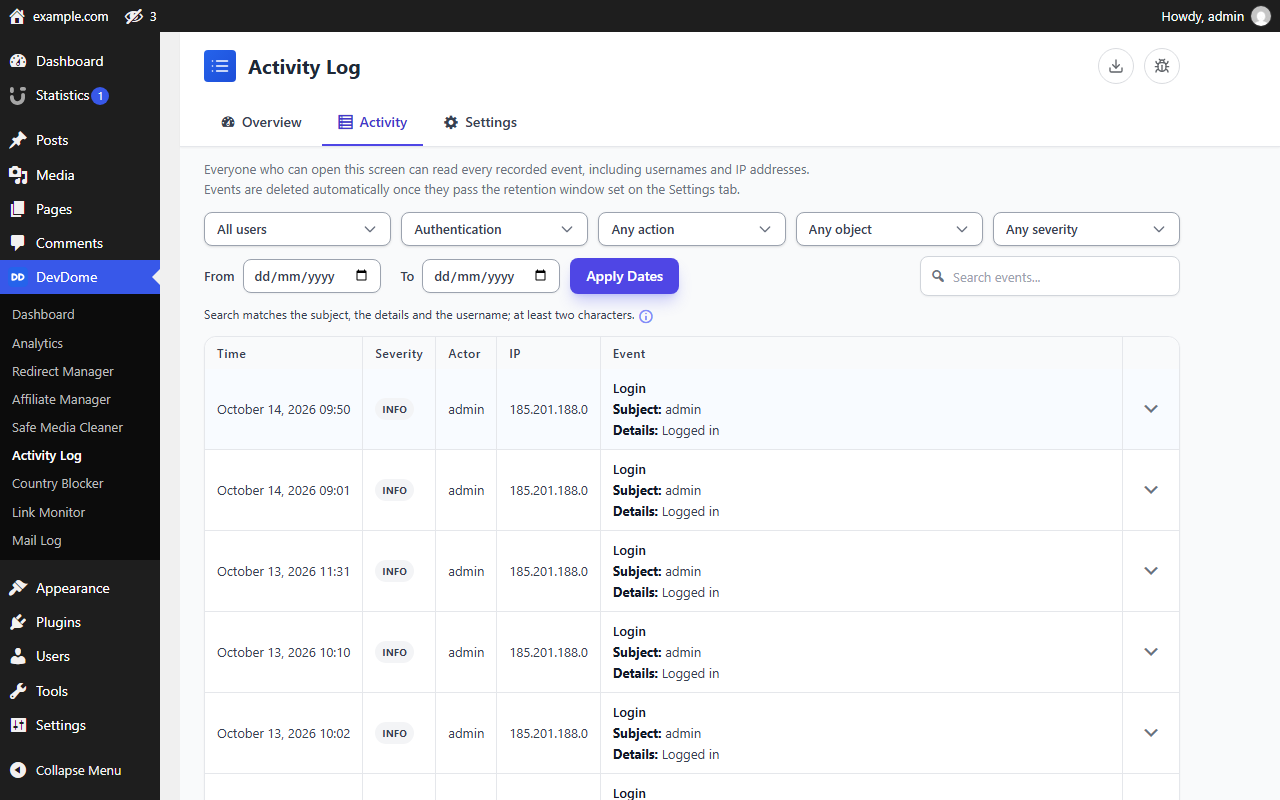
- Authentication: review login history covering logins, logouts, failed login attempts, password reset requests and completed resets. Repeated failed logins and reset requests are counted into one row per source, per attempted account, per hour by a single atomic database statement, so concurrent attempts cannot create duplicate rows or lose increments.
- Users: accounts created and deleted, roles set, added and removed, email changes (both addresses masked) and other profile changes. Passwords are never recorded, only the fact that one changed.
- Content: posts, pages and custom post types created, updated, trashed, restored or deleted, with a summary of what changed. Bodies are compared by hash and never stored.
- Plugins, themes and core: installs, updates (with the previous and new version when it can be observed), activations, deactivations, deletions, theme switches and core updates. A plugin or theme update after which the installed version did not change is recorded as a failed update; when the previous version could not be observed, an update the upgrader reported as failed is recorded as failed too.
- Media and comments: uploads, deletions and comment status changes (approved, spam, trash, restored).
- Settings: changes to a fixed allowlist of nine important options: site title, site URL, home URL, admin email, open registration, default role, permalink structure, the site time zone and the UTC offset (the clock decides what every stored timestamp means).
- The log itself: every change to its own policy with the previous and new value, every CSV export, every retention purge, every personal-data erasure and every storage migration. These records cannot be switched off by the settings they describe.
- Failed logins and reset requests use one
INSERT ... ON DUPLICATE KEY UPDATEstatement against a unique bucket key. The counter is incremented by the database and never read into PHP first. The automated test suite asserts exact totals for 1, 10, 100, 1,000 and 500 synchronized attempts and for rotating usernames against the per-source row cap. - Grouping uses a site-secret keyed fingerprint of the exact client address, so two machines in the same /24 are not merged into one attacker identity, while the stored address is still the truncated form.
- Events are written to a dedicated indexed table, never the options table. The settings tracker checks its allowlist on its first line and returns immediately for every other option.
- Queries are bounded: pages, page size, search length and date range are validated and refused with a clear error rather than run as an unbounded scan. CSV export reads with a keyset cursor inside a snapshot, so a concurrent write cannot duplicate or skip rows, and it does not repeat a
COUNT(*)per page. - Query plans have not been benchmarked on multi-million-row tables; the indexes are chosen by reasoning, and a very large log with a free-text search over the details column will be slow.
devdacti_read, devdacti_export, devdacti_manage, devdacti_purge_log, devdacti_integrity, devdacti_repair, devdacti_view_ip), each with its own filter. They are granted to the administrator role on activation, and any role you grant devdacti_read to can read the log without being able to export or purge it. Administrators hold all seven. Reducing what gets recorded requires an explicit confirmation; every policy change is written in one statement and recorded with its outcome, and a change that could not be stored is recorded as a failure.
Filter, search and export
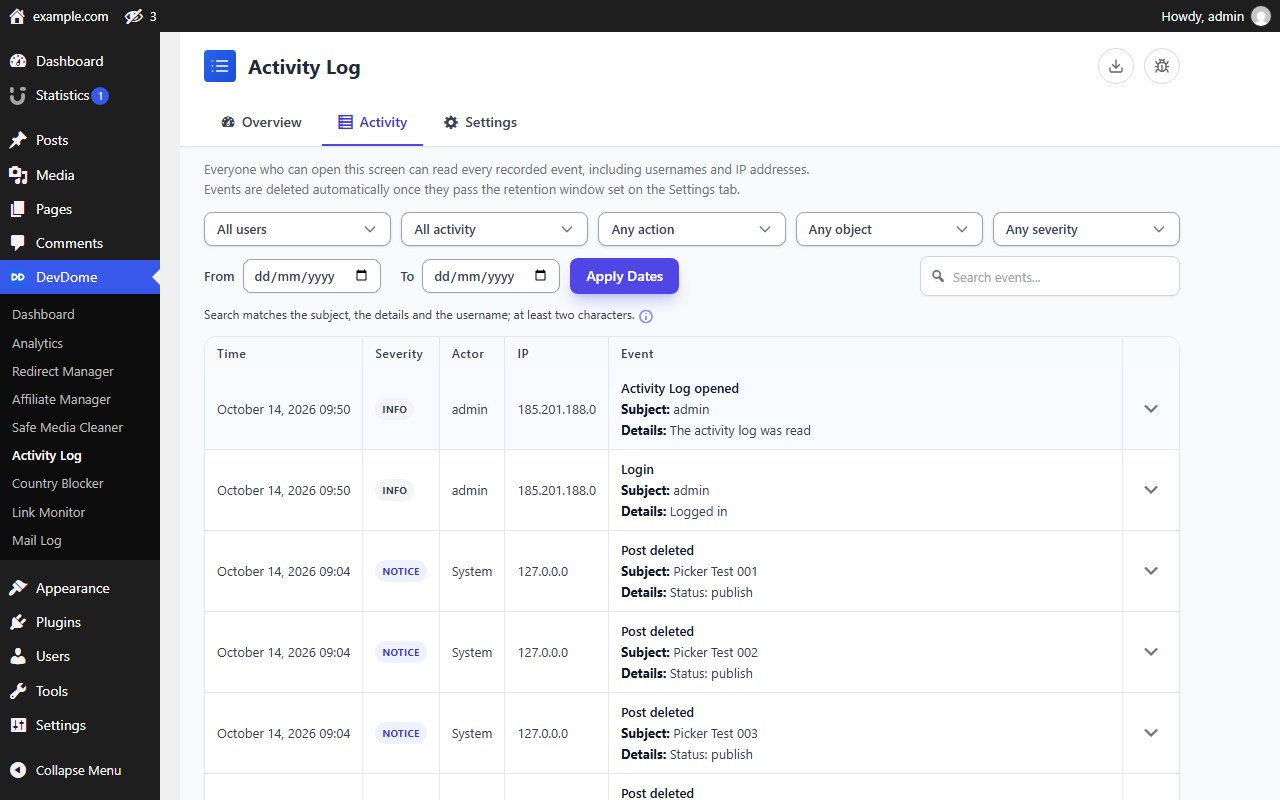
- Filter by user, activity group, individual action, object type, severity and date range, or search the object, details and username columns. Filters are reflected in the URL.
- Export the current filtered view to CSV. Every cell is neutralised against spreadsheet formula execution, including formulas hidden behind leading spaces, tabs, newlines, a byte-order mark or invisible Unicode characters.
- The log is a normal database table. A site administrator or anyone with database access can edit or delete rows in it, and this plugin does not detect that. There is no hash chaining or signed batching, so the log is evidence of what happened on a site you still control, not evidence that survives a compromise of it.
- Event details are stored as a readable sentence rather than a structured, versioned payload. That makes them easy to read and search, and it means a personal-data erasure clears the whole sentence for the account concerned instead of individual fields.
- CSV export is synchronous and capped. Very large exports should be narrowed by date range rather than run in one request; there is no background export job with progress and resume.
- The user filter offers the 200 most recently active accounts and says so; it is not a complete, pageable directory.
- On multisite, events are stored per site and are read per site. There is no network-wide screen that queries every blog at once.
- Query plans have not been benchmarked against multi-million-row tables.
- A personal-data erasure runs as a single pass over the table; on a very large log it can be slow.
安装:
- Upload the plugin to
/wp-content/plugins/and activate it, or install it from the Plugins screen. - Open DevDome Tools → Activity Log. Recording starts immediately with sensible defaults.
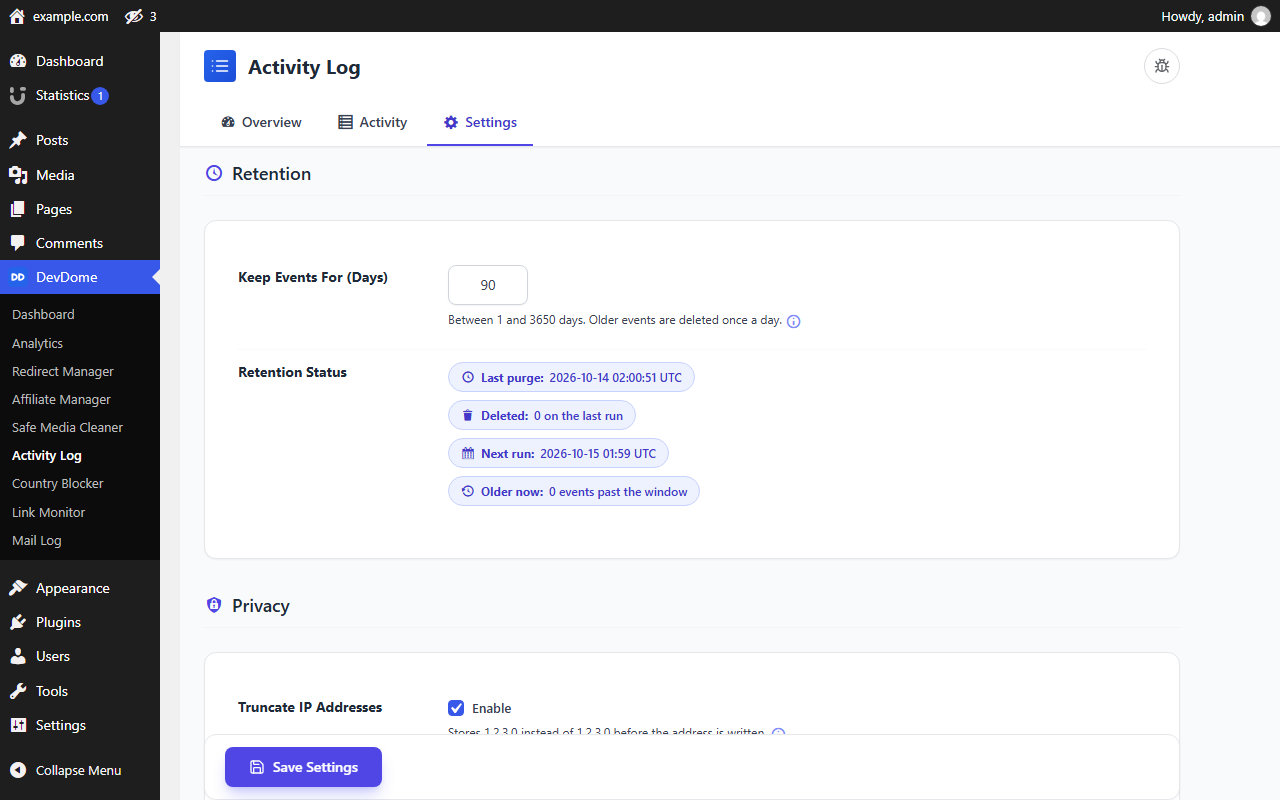
- Use the Settings tab to choose a retention window, configure trusted proxies if your site sits behind one, toggle event groups, and exclude roles or users you do not want logged.
屏幕截图:
常见问题:
Does the plugin touch WordPress updates?
No. It records which plugin, theme or core version was installed or updated, and from which version, by noting the installed versions when an update screen or updater request starts and listening to the completion action (upgrader_process_complete) afterwards. It never changes, delays, blocks or redirects an update, has no update source of its own, and the WordPress.org package updates only from WordPress.org.
Is it really free?
Yes. Every tracker, the dashboard, all filters, retention control and CSV export are free. There are no locked features inside the log.
Does this make my site GDPR compliant?
No plugin can do that. This one stores personal data (usernames, IP addresses, timestamps, behavioural history) and gives you tools that help: IP truncation on by default, secret redaction, email masking, capability-scoped access, a retention window, exclusions, and WordPress exporter/eraser integration. Deciding your lawful basis, notice, retention period and security measures remains your responsibility.
What does it cost in performance?
Each recorded event is one indexed insert; a repeated failed login is one update statement, not a new row. The options tracker checks a nine-name allowlist before doing any work. On a large log, a free-text search over the details column and very deep pagination are the expensive operations, which is why both are bounded and why the search field asks you to pair it with a date range.
Where is the data stored?
In a dedicated table in your own WordPress database. Uninstalling the plugin drops that table and every setting it created.
I am behind Cloudflare or a load balancer. Which IP is recorded?
By default, the address your server saw on the connection. A forwarded header is only believed when you name both the header and the CIDR ranges of your proxies on the Settings tab, and only when the connection itself came from one of those ranges. Without that, anyone able to reach your origin directly could choose the address written into your audit log.
更新日志:
- A dismissible note at the top of the settings page mentions the free DevDome Analytics plugin, with a button that opens the plugin installer (or the Analytics screen when it is already active). Dismiss hides it for good.
- Shared DevDome library 1.7.13: uninstalling the last DevDome plugin also removes the note's dismissal, the update-repair records and the per-user "Report a bug" flag; the visitor-beacon flood guard keeps one short-lived record per address and clears its expired ones itself, and behind Cloudflare it counts per visitor instead of per Cloudflare address.
- Fixed: when the plugin's settings table is missing although the storage was stamped as current (for example after a database restore), the stamp is dropped so the next load rebuilds the tables instead of failing on every request.
- Changed: every markup fragment printed from a variable (the Report this error button, the severity and state badges, the proposed-value attributes) now goes through an escaping function at the point of output, and the admin page is printed directly instead of being buffered and echoed.
- Changed: the directory listing title is the plugin name.
- Added: WordPress Abilities API (6.9+) with eleven abilities (status, settings, filtered events, recent activity, one user's activity, login events with the failed-login picture, plugin / theme / core changes, events worth reviewing, update settings, run purge, repair storage), listed on the WordPress MCP Adapter; every read is recorded like a screen read and every write keeps the screen's capability and confirmation rules.
- Added: a request-wide database guard: a failed query inside a save, purge, repair, page render or ability ends that action with a database error and a "Report this error" button, never with "Saved." or a calm empty screen.
- Changed: the admin screen is the DevDome suite frame: Overview / Activity / Settings tabs that switch instantly, the plugin mark and bug-report button in the header, the Activity list as the dashboard table with the standard pager and the shared filter dropdowns, settings as label and control rows with a short hint and an info icon, and the DevDome Account connect card as the first Settings section while the site is not connected.
- Changed: the Overview opens with a status circle (recording / failed logins above threshold / activity lost), the Settings tab saves through the suite's sticky Save button with a pending-changes counter, result banners disappear on the next action, and the manual purge is confirmed by typing DELETE.
- Security: reading, exporting, configuring, purging, viewing diagnostics, repairing storage and seeing full IP addresses are now seven separate, real capabilities granted to the administrator role on activation. The old
devdacti_capabilityfilter now scopes reading only. - Security: the storage redactor also removes quoted JSON credentials ("password":"...") and PEM key blocks, and every ability answer passes the same redactor, including map keys and error data, so no credential, e-mail address or server path reaches an agent.
- Fixed: a failed dashboard count is reported as a database error instead of being cached as zero for five minutes; a personal-data export or erasure that cannot read or write the log is returned to the requester as an error, never as a completed request; every erasure statement is checked and the account's rows stay findable for a retry until the last one.
- Fixed: granting a role to an account that had none is recorded, and a further role added in the same request as a role change is its own event; policy changes are written in one statement (all or nothing) and the forwarded-header choice is part of the recorded policy; the failed-login picture in get-login-events is summed over the whole window; the storage schema is stamped only after both tables, every index and the unique bucket key were verified.
- Security: the self-hosted update check is pinned to
api.devdome.com, validates the manifest (slug, version shape, bounded fields) before using any of it, and verifies the downloaded package against the checksum the manifest publishes, refusing to install it on a mismatch. - Security: the update check sends a fixed user agent instead of WordPress' default one, which would otherwise carry the site URL and WordPress version.
- Security: every Activity Log policy change is written in one statement and recorded with actor, previous value and new value (a failed write is recorded as a failure with the attempted values), and changes that reduce coverage require an explicit confirmation.
- Security: authentication, user and plugin-lifecycle events are protected by default and cannot be hidden by disabling a group or excluding an actor. Records about the log itself can never be suppressed.
- Security: forwarded client-IP headers are only trusted when the connection comes from a configured trusted-proxy CIDR. The old global boolean allowed a direct client to forge the recorded IP and bypass flood grouping.
- Fixed: exclusions now consider every role a user holds, not just the first. A user with a secondary excluded role was still being logged.
- Fixed:
add_user_roleandremove_user_roleare recorded; they previously produced no event at all. One role change now leaves one row: WordPress fires all three role hooks for a single change, and the add/remove pair is dropped when the authoritative record already describes it. - Fixed: the health check now verifies the table's indexes and storage schema version, not only its columns. A table that lost its unique bucket index reported itself healthy while every repeated event it aggregated was counted more than once.
- Fixed: a personal-data erasure also clears the free-text details and the display name on that account's records, and the exporter now returns the same records the eraser acts on.
- Fixed: a password reset requested with an unprintable identifier is recorded instead of silently producing nothing.
- Fixed: if the overflow fold-in for a rotating-username flood fails, the failure is recorded instead of losing the attempt silently.
- Fixed: truncating a multibyte value on a host WITH mbstring can no longer store a broken code point (only the mbstring-absent path was protected).
- Fixed: a failed retention continuation, a failed export snapshot and a failed personal-data read are all reported instead of appearing as "nothing to do".
- Added: a confirmed, capability-gated storage repair that re-applies the schema and records itself.
- Added: changes to the site's timezone are recorded: they change what every stored timestamp means.
- Fixed: a completed password reset no longer records the target account as the actor who performed it, and a failed login no longer records the attempted username as an actor.
- Added: actor type, request channel, request correlation ID, transport peer IP, outcome, severity and site ID on every record, with a storage migration that runs on a normal plugin update.
- Added: email changes are their own action, with both addresses masked; credential-shaped values are redacted before storage.
- Added: WordPress personal-data exporter and eraser. Erasure pseudonymises rather than deletes, and says so.
- Added: retention accepts any window from 1 to 3650 days, reports last run, rows deleted, backlog and next run, continues a large backlog instead of stalling, and offers a confirmed manual purge with a preview.
- Added: multisite blogs created after network activation are provisioned automatically; network deactivation clears the purge schedule on every site.
- Changed: REST queries validate dates, ranges, pages, page size, search length and filter values, and return a 400 with a message instead of an empty page.
- Changed: CSV export reads with a keyset cursor inside a snapshot, runs no per-page
COUNT(*), records itself in the log, and neutralises formulas hidden behind whitespace, control characters, a BOM or invisible Unicode. - Changed: the Activity list has a live region, distinct loading, empty and error states (every error with Try Again and Report this error), superseded (not suppressed) in-flight requests, filters and page reflected in the URL, and browser Back restoring the previous view.
- Changed: reading the log is itself recorded, once per reader per hour rather than once per request.
- Changed: severity is reserved for privilege and evidence changes. Creating an account, granting a secondary role and a completed password reset are recorded as worth reviewing rather than critical, so the review feed stays readable.
- Changed: the stylesheet adds visible focus outlines, a forced-colors (high contrast) mode with a non-colour severity cue, and right-to-left support; machine values such as the request channel and severity are shown as translated words.
- Changed: the bundled stylesheet is fully scoped to the plugin root, so it no longer restyles the surrounding WordPress admin.
- Changed: failed logins are counted, not diagnosed. Site health only moves past a stated threshold and no longer calls a single failure a brute-force attack.
- Changed: the self-hosted update check requires HTTPS, bounds redirects, refuses a non-HTTPS package, and the readme disclosure now matches the request the code actually makes.
- Removed: the production-targeting browser smoke workflow, replaced by a local test that refuses to run without a disposable-environment marker.
- Documentation: a published coverage list, a factual privacy description, a performance envelope and the administrator threat boundary replace the previous unqualified completeness, compliance and performance claims.
- Fixed: the account-connection shim no longer deletes DevDome Analytics' connection stamp (it now only removes a stamp it wrote itself).
- Initial release: authentication, content, plugin/theme/core, user, media, comment and settings tracking; hourly failed-login aggregation; filterable log with CSV export; retention purge; IP anonymization on by default; dashboard with critical-activity feed.