DevDome Analytics: Bot Traffic vs Human Traffic Website Statistics
| 开发者 | devdome |
|---|---|
| 更新时间 | 2026年10月16日 20:38 |
| PHP版本: | 7.4 及以上 |
| WordPress版本: | 7.1 |
| 版权: | GPLv2 or later |
| 版权网址: | 版权信息 |
详情介绍:
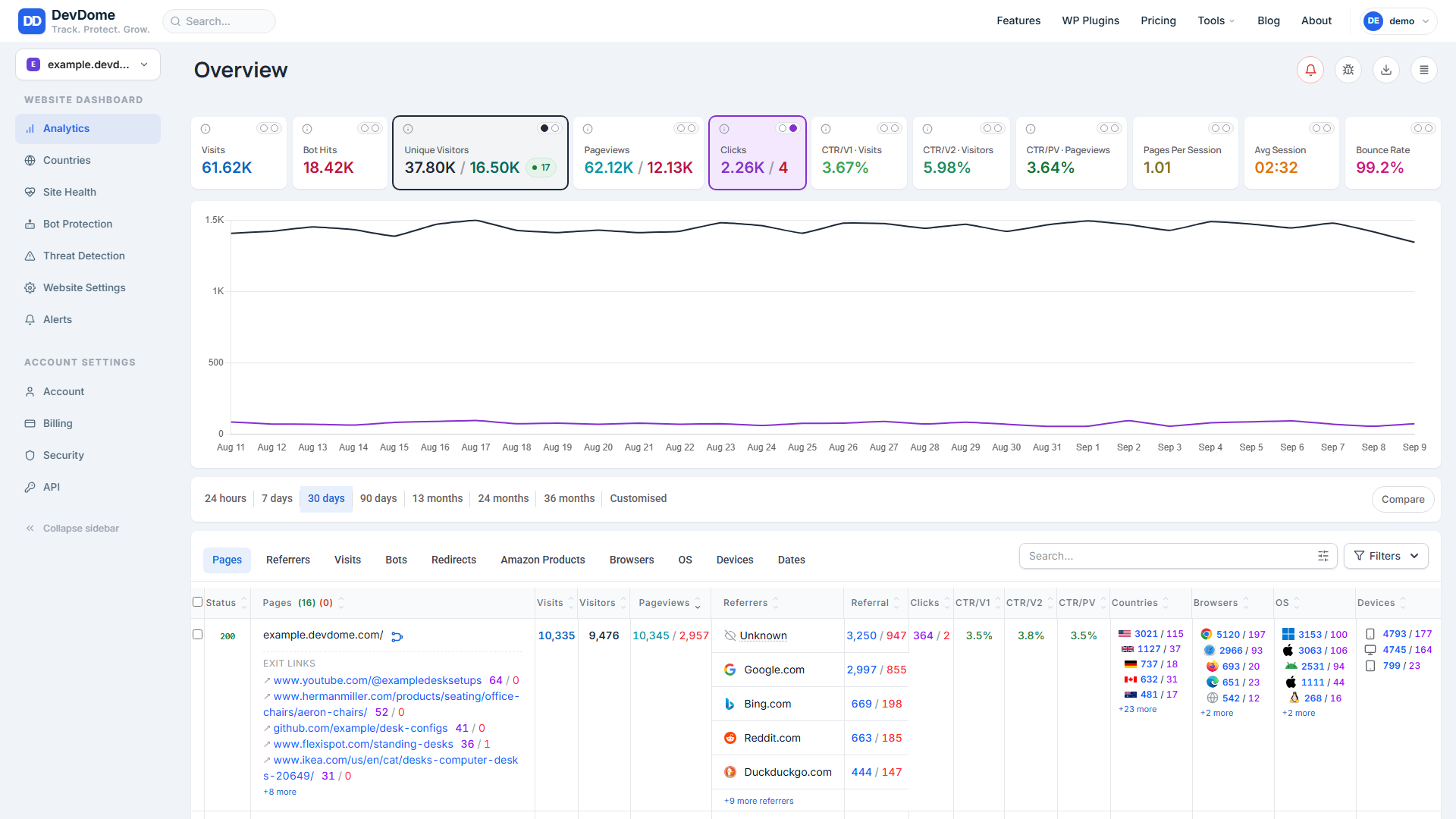
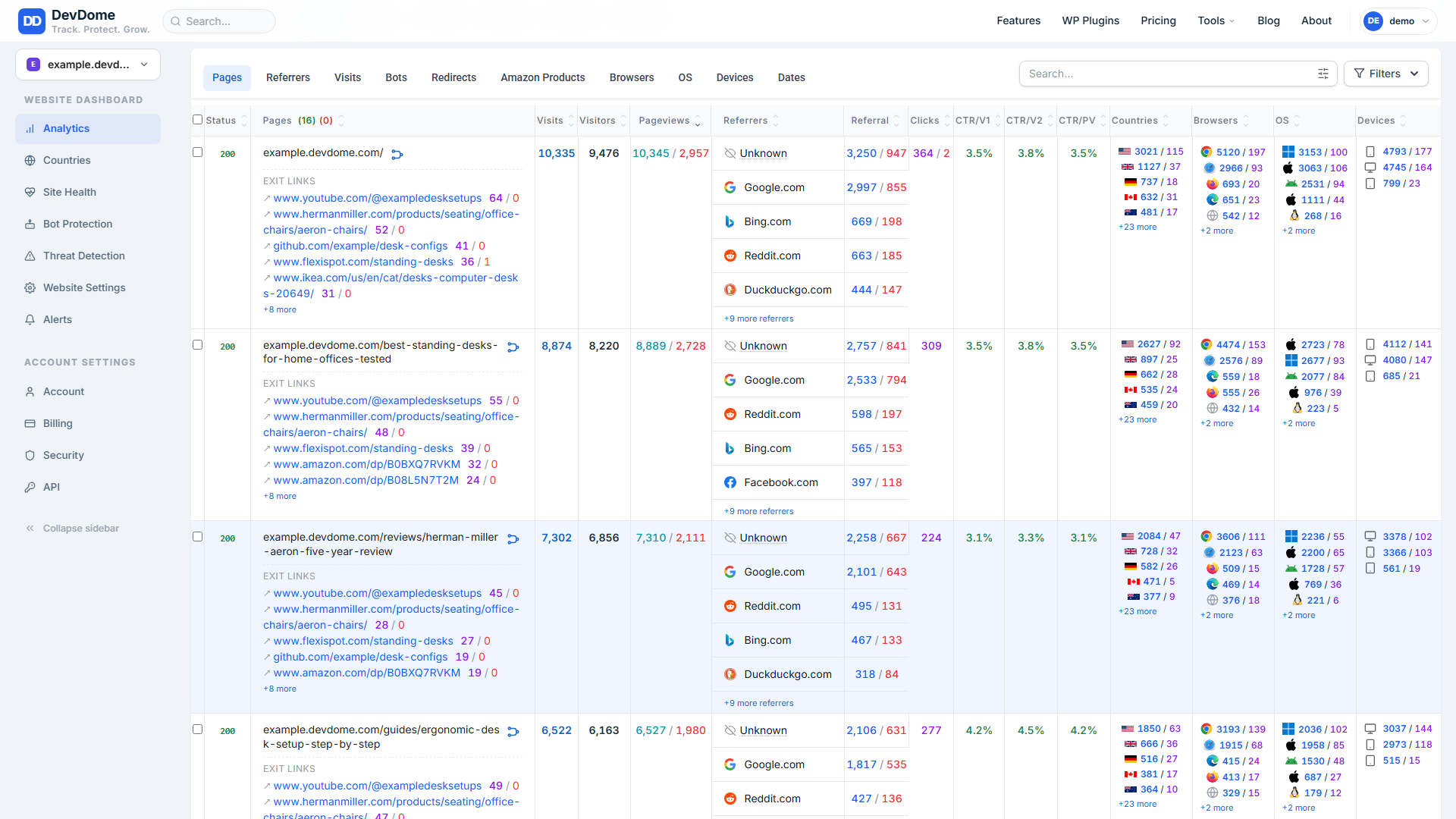
- Visitors, unique visitors, live visitors, pageviews and sessions.
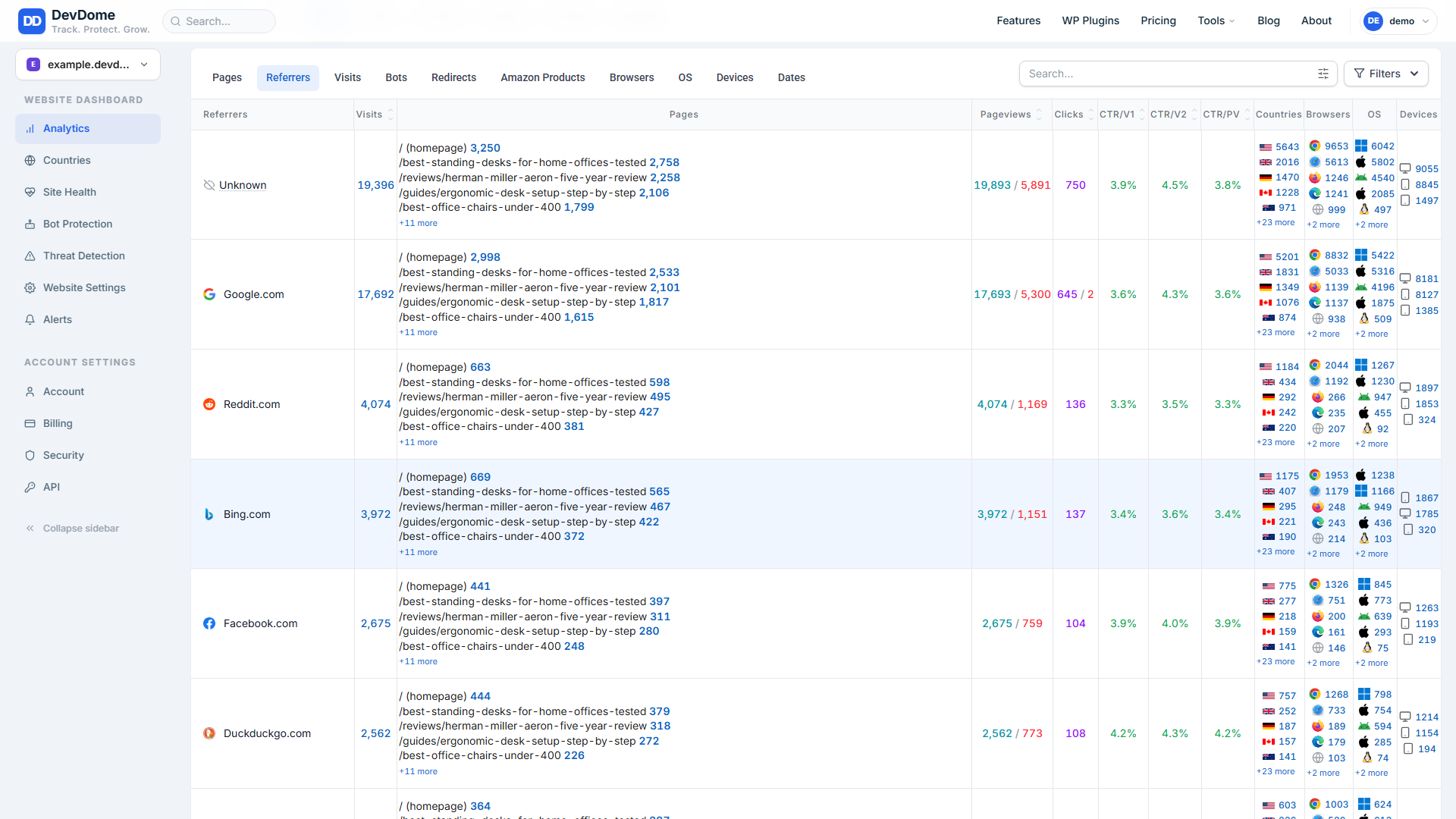
- Top pages, traffic sources and referrers.
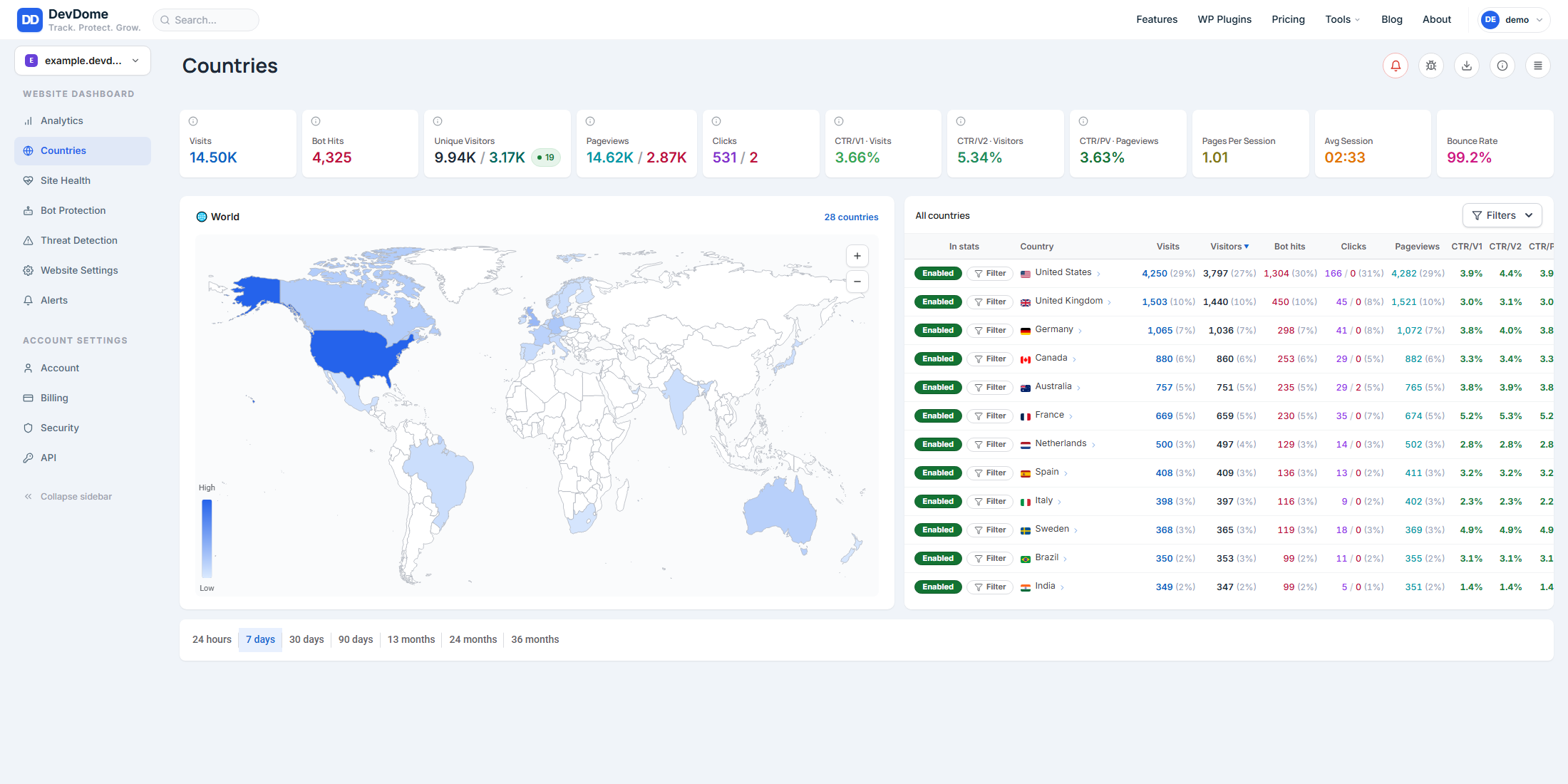
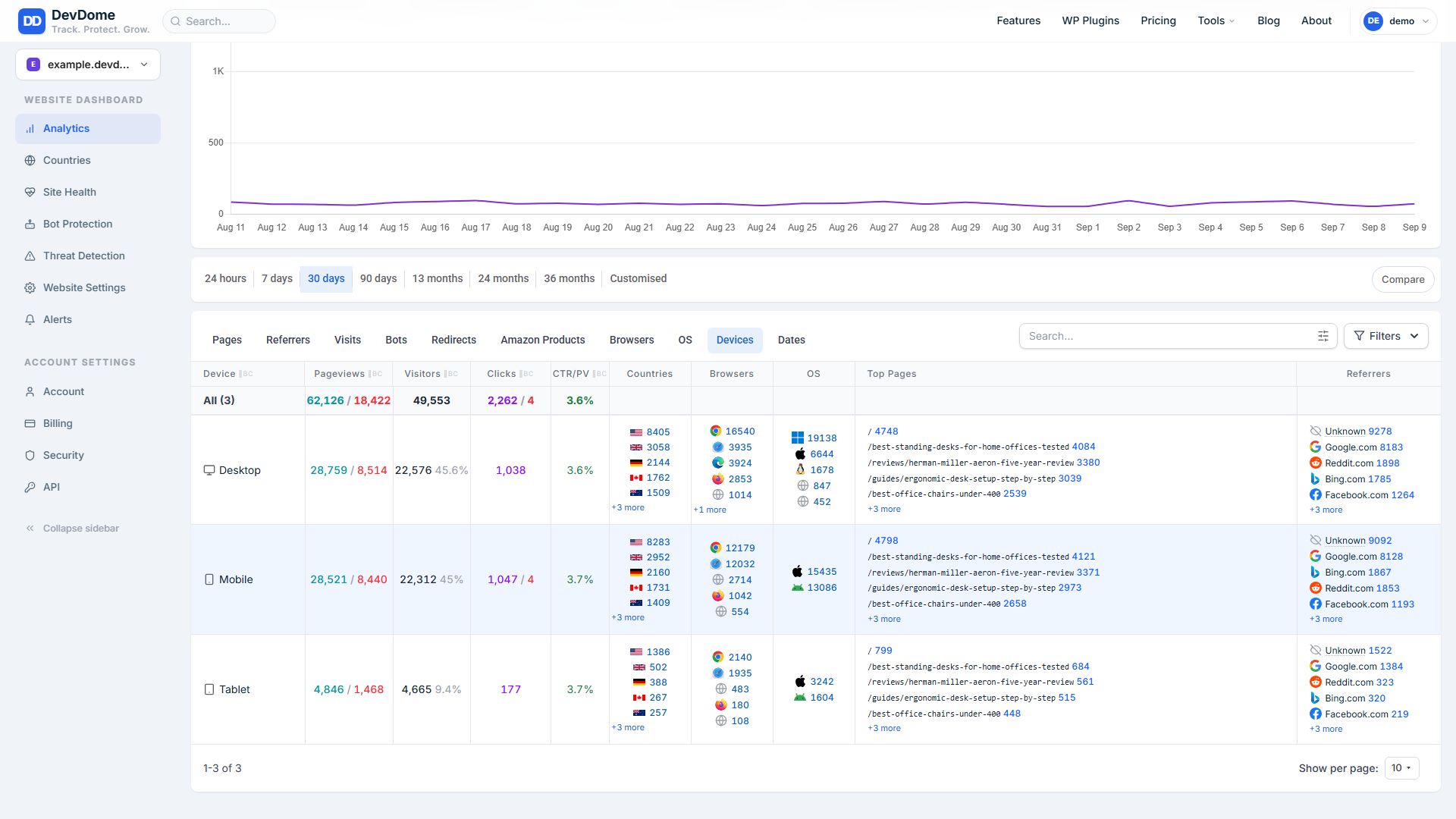
- Countries, devices, operating systems and browsers.
- Outbound link clicks, bot hits, AI crawlers and AI referral traffic.
- Pages per visit, session duration and bounce rate.
- Affiliate and product links.
- Partner websites.
- Social profiles and other external destinations.
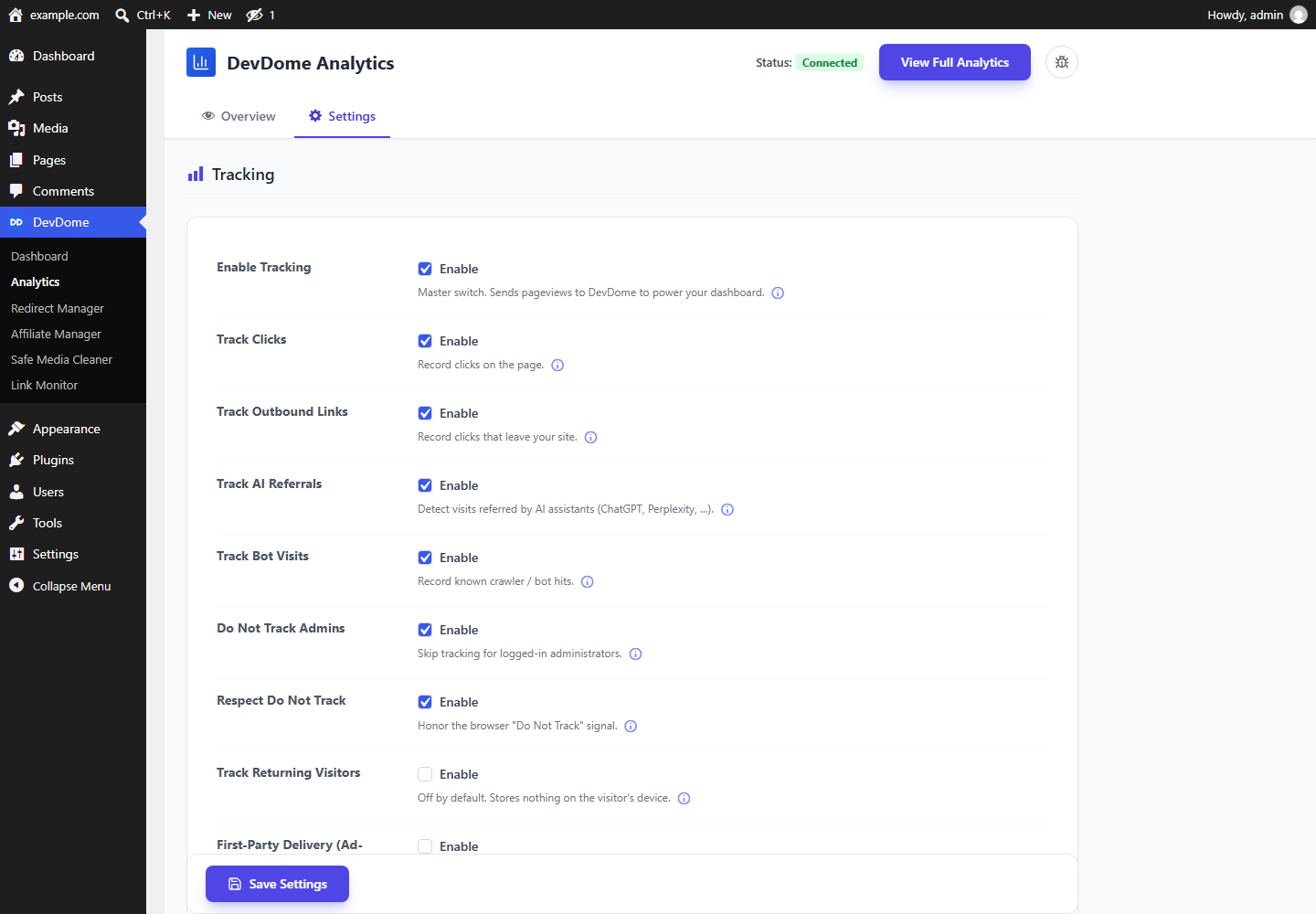
- Enable Tracking is the master switch.
- Track Returning Visitors controls recognition across days.
- Track Clicks and Track Outbound Links control click collection.
- Track AI Referrals controls AI referral identification.
- Track Bot Visits controls bot and crawler reporting.
- Connection status and traffic numbers for the last 1, 7 or 30 days, matching the dashboard.
- Reading and updating every tracking setting.
- Testing the connection and obtaining the one-click connect link.
- Disconnecting and resetting data.
安装:
- Install and activate the plugin from Plugins > Add New.
- Open DevDome > Analytics.
- Select Connect Via DevDome Account and approve the link on devdome.com.
- Review the Settings tab and enable only the tracking features you want.
屏幕截图:
常见问题:
Do I need a DevDome account?
Yes. DevDome Analytics connects WordPress to the hosted DevDome Analytics service, where analytics events are processed and full reports are displayed. A free plan is available. No visitor data is collected until you connect the site.
Does it remove all bot traffic from visitor reports?
It detects known bots and AI crawlers and reports them separately from human visitors. Unknown, new or deliberately disguised bots may not always be identifiable.
Is anything sent before I connect?
No visitor data is sent. Before the site is connected, the tracking script is not added and no analytics events are sent. Opening the plugin's own screen can send a connection-status check containing only this site's domain and secret token. This lets a site already connected on devdome.com appear connected here without another connect step. The DevDome Dashboard also requests the plugin catalog, sending only the bundled core version. An error report is sent only if you press "Report this error". External services lists these requests and the connection requests you deliberately initiate.
Does visitor tracking set cookies?
General traffic tracking is cookieless on new installations. Returning-visitor tracking is optional and disabled by default. Outbound-link tracking keeps its random IDs in memory only while Track Returning Visitors is off. With it on, they are stored like the page tracker's IDs. See "What is stored on my site and on a visitor's device?" below for details.
Can I exclude myself and my team?
Yes. Logged-in administrators are excluded by default through Do Not Track Admins, and new installations also exclude the Editor role. You can exclude any additional WordPress role.
Will it slow down my site?
The tracking script loads asynchronously and does not block page rendering. The plugin does not write analytics events to your WordPress database.
Does it work with caching plugins?
Yes. The tracking snippet is the same for every visitor, so it works with full-page caching. Connecting or disconnecting also clears common page caches so the change is applied.
Which crawlers can it report?
The current detection list includes GPTBot, ChatGPT-User, ClaudeBot, PerplexityBot, Google-Extended, Bytespider, CCBot, Googlebot, bingbot, Slurp, DuckDuckBot, Baiduspider, YandexBot, AhrefsBot, SemrushBot, MJ12bot, DotBot and Screaming Frog. The plugin reports detected crawlers; it does not block them.
What happens when I disconnect?
Tracking stops immediately. You can also delete the site's hosted analytics data when disconnecting or by selecting Reset Analytics. Data that remains inactive is deleted automatically after 90 days.
Does it support WordPress multisite?
Yes. Settings and the connection are per site: each site is connected from its own Analytics screen. On a subdomain or mapped-domain network, each site has its own Site ID and reports. On a subdirectory network, every site shares the main site's domain and therefore one Site ID, one secret token and one report. Connecting or disconnecting on a subdirectory network requires a network administrator.
Where do I see site stats and who is online?
The WordPress Overview tab shows key metrics, including live visitors. This shows how many visitors are active, without identifying their WordPress accounts. Full traffic, referral, click, location, device and crawler reports are available in your DevDome account.
What is stored on my site and on a visitor's device?
What is stored on your site. Roughly thirty option rows hold the tracking switches, service addresses, this site's ID and secret token, your Account ID and account email, and the connection timestamp. For First-Party Delivery, they also hold the switch and the randomized path and file names generated for this site. On a site DevDome set up itself, they also hold the relay credential DevDome issued to it. When First-Party Delivery is on, two JavaScript files are placed under your uploads folder: the tracking script and bundled bot detector, both copied from the plugin's own package. Both are removed at uninstall using the names the plugin stored. One more row can appear after a plugin update on a host where the plugin folder belonged to another system user. The shared DevDome core copies the folder so WordPress can update it, keeps the old folder hidden under a dot name in wp-content/plugins because the web server cannot delete it, and records its fingerprint in one option row so DevDome Malware Scanner recognises it. That hidden folder loads nothing; your server administrator can remove it. The fingerprint option row is not removed at uninstall in this version. There are no custom tables, post meta, user meta or stored analytics events. Short-lived transients hold:
- A connect handle for 10 minutes.
- The cached bot-visit figure for 1 hour.
- The cached First-Party Delivery plan answer for a day.
- Flood counters for
/dd-eand First-Party relay endpoints for 2 minutes, keyed by an MD5 hash of the visitor's IP address.
/dd-e, only while connected, accepts the outbound-click beacon described in External services. It answers empty to everything else, requires the browser's own same-site Origin header, ignores requests from excluded roles, is rate limited per IP address and stores nothing.- The First-Party Delivery relay, only while that switch is on, uses a randomized path unique to your site. It accepts the tracking events described in External services under the same rules and stores nothing. Its own per-IP limit runs when the site has a persistent object cache; without one, the DevDome service's per-site limit applies.
/.well-known/devdome-analytics.txt, only while connected, returns one short line of fixed text so DevDome can confirm the plugin is installed on the connected domain./.well-known/devdome-connect-proof.txtreturns a one-way SHA-256 fingerprint of this site's secret token, never the token itself, so DevDome can confirm during connection that the request came from this site.
/dd-e stops relaying, and the domain-verification file is no longer served.
To delete data already collected by DevDome, press Reset Analytics or tick "Also delete my data on DevDome" while disconnecting. Otherwise, DevDome deletes it automatically after 90 days of inactivity.
On your own site, there is no analytics data to clean up beyond the option rows listed above. The plugin creates no tables and stores no analytics data locally.
更新日志:
- Shared DevDome library 1.7.13: uninstalling the last DevDome plugin also removes the note's dismissal, the update-repair records and the per-user "Report a bug" flag; the visitor-beacon flood guard keeps one short-lived record per address and clears its expired ones itself, and behind Cloudflare it counts per visitor instead of per Cloudflare address.
- Shared DevDome library 1.7.12: a Cloudflare visitor address header is trusted only when the connection itself comes from a Cloudflare address, so a forged header from anywhere else is ignored.
- Shared DevDome library 1.7.11: on a subdirectory multisite, a site mapped to its own domain is its own site and no longer shares the network's connection.
- The outbound-click relay's flood guard keeps one short-lived record per visitor address and clears its expired ones itself. It used to write a new record every minute per address, which sat in the database until the daily cleanup.
- Shared DevDome library 1.7.10: the DevDome dashboard prints its icons through wp_kses.
- Listing text: new title, short description and introduction.
- Shared DevDome library 1.7.8: the one-time Report a bug hint is recorded through a nonce-checked request instead of on a page view.
- Shared DevDome library 1.7.9: the DevDome dashboard lists only real problems (a feature that is off, paused or not connected is no longer an issue) and no longer says Not monitored.
- DevDome dashboard: Analytics not connected or tracking paused are no longer listed as issues. Shorter Connect card text.
- Listing text updated: title, short description, tags and introduction.
- Shared DevDome library 1.7.7: the first time you open any DevDome plugin screen, a small one-time hint points at the Report a bug button. It is shown once per user across all DevDome plugins.
- Bundled DevDome library 1.7.6: if you connect a DevDome account from the DevDome Tools dashboard, the Connect card now says exactly what is shared, including the list of active DevDome plugins and their versions. Sites that were already connected, and sites that never connect, send nothing new. See External services.
- Listing text rewritten: new title, short description, tags and a restructured description. No change to how the plugin works.
- Updates now work when the plugin folder belongs to another system user (shared DevDome core 1.7.4): a folder installed from a root shell or by an AI agent used to fail every update; the plugin now repairs the folder ownership itself when it can, and says exactly what to run when it cannot.
- Fixed: the tracker's inline configuration (Do Not Track, cookieless, click and outbound switches) never reached the tracking script on WordPress sites; the script tag filter dropped it. Every switch now applies.
- AI referrals: visits arriving from ChatGPT, Perplexity, Claude, Gemini, Copilot and similar assistants are labelled as AI referrals on the dashboard while "Track AI Referrals" is on.
- First-Party Delivery now serves the bot detector from your own domain too (bundled FingerprintJS BotD, MIT); Reset Analytics works (the service side answers it).
- Privacy: the redirect tag carries the path only (never a query string), Global Privacy Control is honoured everywhere Do Not Track is, the outbound-click detector stores nothing on the device in cookieless mode, secrets in error text are redacted before any cut.
- "Report this error" on every error banner sends the error text and context to DevDome support with one click.
- Database guard: every failed query is recorded, no write follows a failed read, every option write is read back; settings saves and the connect handshake report exactly what landed.
- Connect: the handshake fails closed, keeps its retry link until the connection is stored, and the shared library (1.7.1) never reports "not connected" after a failed database read.
- Abilities: start-connect and settings changes that collect more data need confirm: true; read abilities never call home; every ability answers a database error when a query failed.
- Multisite: uninstall cleans every site of a network; fresh subsites get the privacy defaults.
- WordPress Abilities API (WordPress 6.9 and newer): 8 abilities for AI agents and MCP clients through the official WordPress MCP Adapter: get-status, get-stats (1, 7 or 30 days), get-settings, test-connection, update-settings (read back before reported), start-connect (returns the approve link), disconnect and reset-data (both require confirm: true and are annotated destructive). Every write goes through the same handler as the screen. Agent output never carries e-mail addresses or the site token.
- Disconnect now checks the account server's answer and says when the site could not be unlinked remotely.
- Security review fixes: a disconnect stays a disconnect even when the account server could not be told (no silent re-link); the master tracking switch and the Do Not Track signal are enforced at every sending point, including beacons from pages cached earlier and bot reporting; the click switches are honoured by the first-party tracker copy; settings saves report what was actually stored; an agent must confirm before a change that collects more visitor data; the generated first-party script is never written or deleted through a symbolic link; the relay credential is removed on uninstall when Delete data on uninstall is enabled; the site-search term disclosure was added to the readme.
- The stats endpoint accepts 1 to 365 days only; agent error messages pass through the same redaction as results; the install notes no longer mention a manual Account ID step.
- Settings: every switch now shows a one line hint with an info icon holding the full explanation of what is sent and what turning it off changes, the same layout as DevDome Malware Scanner.
- DevDome Dashboard: installing another DevDome plugin from the dashboard no longer activates it, you activate it yourself from its card. Output escaping tightened.
- DevDome Dashboard: plugin list, descriptions, logos and versions now come from devdome.com, one-click install of DevDome plugins from WordPress.org, Docs link and Fix buttons, Activate stays on the dashboard.
- First-Party Delivery is honest about why it is unavailable: while the site is not connected the switch is disabled with a Connect button above it, and on the Free plan it shows "Included in the Pro plan and above" instead of switching itself back off. Plan changes now reach the screen within minutes.
- The manual Account ID connect option was removed. Connecting is always the one-click, signed-in flow.
- Disconnecting from the plugin now also unlinks the site on DevDome servers and clears every cached account detail, so every DevDome plugin on the site agrees immediately.
- The DevDome Dashboard (suite hub) was redesigned: cleaner cards, your account email and plan on the overview, and update buttons shown only when an update really exists.
- One button system across the suite: the same Connect button and the same Save Settings button in every DevDome plugin.
- New bug-report button in the page header.
- New: First-Party Delivery, an optional ad-block-resistant mode (off by default, included in the DevDome Pro plan and above). The tracking script is served from your own domain and events relay through your own site server-side with randomized per-site names, so ordinary blockers of third-party analytics domains cannot drop them. Bypasses most, not all, blockers. Every relayed field is validated and sanitized, identity always comes from the plugin's own settings, and the relay accepts only same-site browser requests.
- Connecting works again for fresh installs: the plugin serves a one-way fingerprint of its site token at
/.well-known/devdome-connect-proof.txt, which the DevDome service verifies against your site before accepting the connection. No token, secret, or visitor data is exposed by it. - One connection, both sides: a site connected through the devdome.com dashboard now shows as connected in wp-admin by itself, and if the site is removed or its token rotated on the dashboard, the plugin flips to disconnected with a clear notice instead of staying green while calls fail. A local Disconnect always sticks.
- Fixed: the Overview tiles never loaded on sites using plain permalinks (the WordPress default). They now show the same numbers as the DevDome dashboard everywhere, and an unavailable answer leaves the placeholders instead of showing zeros.
- First-Party Delivery hardening: forwarded visitor IP and country headers are trusted only when the connection they arrived on vouches for them; events relay correctly on subdirectory and subdirectory-multisite installs; relayed forwards no longer block the visitor's request; in-app (social webview) visits keep their traffic source; the served script copy is refreshed only when its content really changed; and the
/dd-eclick endpoint requires the browser's own same-site Origin header too. - The tracking script used for First-Party Delivery ships inside the plugin package and is copied, never downloaded, into your uploads folder.
- Turning First-Party Delivery on requires a real answer from the plan check; an unreachable service or a rejected credential no longer enables it, and a rejected credential switches it off with a notice instead of silently losing events.
- Toggling First-Party Delivery clears common page caches so cached pages stop beaconing to a stale endpoint.
- The daily refresh event is removed on plugin deactivation, and uninstalling always cleans up the cron event and the generated script file.
- The plan check sends the site token in a request header instead of the URL.
- New optional First-Party Delivery mode (off by default, included in the DevDome Pro plan and above): the tracking script is served from your own domain and events are relayed through your site server-side, using randomized names unique to your site, so ordinary ad blockers that block third-party analytics domains cannot drop them. Bypasses most, not all, blockers. Every relayed field is validated and sanitized before forwarding, identity always comes from the plugin's own settings, and the forward authenticates with your site token. All other tracking is unchanged on every plan.
- Unified DevDome suite icons and updated the suite hub with one-click installs for WordPress.org plugins.
- No request is made to DevDome before you act: the one-click connect link is now requested only when you press "Connect Via DevDome Account", and the account check no longer runs until a connection has been started or completed. Off by default, opt-in by a button press.
- The connect screen now says exactly what connecting sends before you press the button.
- Every field of the relayed outbound-click event is individually validated and sanitized before it is forwarded, and the site and account identifiers in it now always come from the plugin's own settings, never from the request body.
- Request paths and IP addresses read from server variables are sanitized where they are read.
- First release on WordPress.org.
- The admin screen's styles and behaviour now load as enqueued files instead of inline blocks.
- The tracking snippet is enqueued too: the plugin no longer writes script tags into the page markup. Outbound-click counting is unchanged, including on sites where a blocker stops the tracker file from loading.
- Internal rename: every function, class, constant, option and transient the plugin owns now carries its own identifier prefix. Existing settings and your DevDome connection are carried across automatically.
- Fixed a fatal error that could break wp-admin on sites running several DevDome plugins when this one loaded first.