
DevDome Redirect Manager: Link Rotator, Geo Redirect & 302 Redirect
| 开发者 | devdome |
|---|---|
| 更新时间 | 2026年10月16日 20:37 |
| PHP版本: | 7.4 及以上 |
| WordPress版本: | 7.1 |
| 版权: | GPLv2 or later |
| 版权网址: | 版权信息 |
详情介绍:
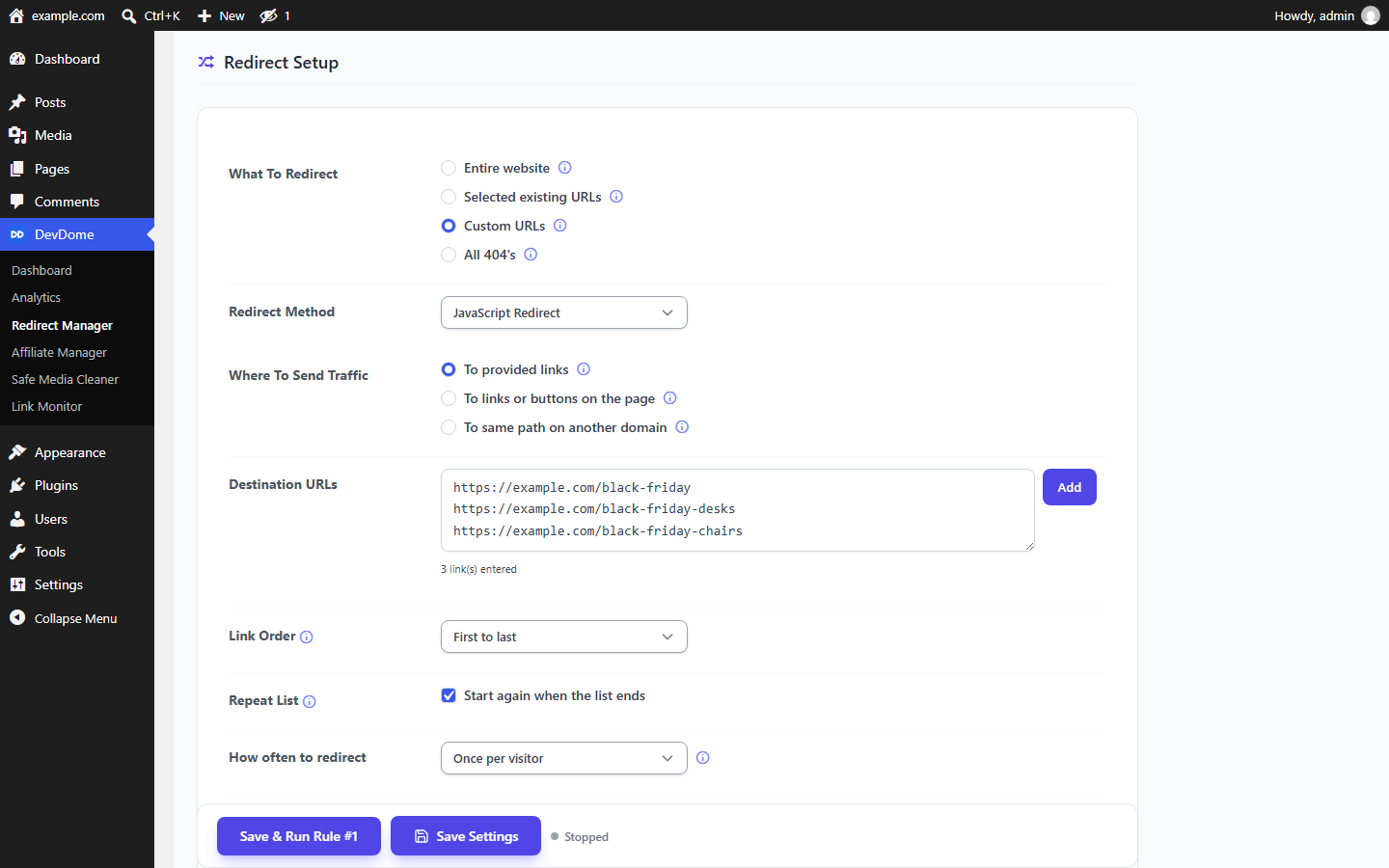
- Entire website - runs on every public page for a website redirect.
- Selected existing URLs - search Categories, Pages and Posts with a live picker. Selected items appear as chips with per-item hit counts; drag them to set priority for the "found" mode.
- Custom URLs - enter exact paths, one per line, such as
/blog/or/blog/best-headphones/, whether the page exists or not. A trailing slash matches that page and everything under it. - All 404's - runs on every not-found page to catch dead links. For a 404 to homepage rule, set your homepage as the destination.
- Referring websites - match listed websites against the browser's referrer. A domain such as reddit.com covers that site and its subdomains; a word such as reddit matches referring addresses containing it. Without UTM source matching, visits with no referrer or an internal referrer do not match. "Only on selected pages" restricts the rule to chosen categories, pages or posts.
?utm_source=reddit.com and ?utm_source=reddit match. Anyone can set this label; it does not verify origin.
Redirect Method and URL forwarding
Choose JavaScript Redirect, 301 Permanent, 302 Temporary, 307 Temporary, 308 Permanent or Meta Refresh per rule: a 301 redirect for permanent redirection, a 302 redirect for temporary URL forwarding. New-tab opening and client-side delays need JavaScript; server and meta methods open in the same tab.
Under Where To Send Traffic, choose:
- To provided links - enter one or more destination URLs.
- To links or buttons on the page - enter a fragment such as
amazon.comto find a matching link/button already on the page. You can target the N-th match. - To same path on another domain - preserve the visitor's path and query for a domain redirect. For example,
yoursite.com/post/123becomesotherdomain.com/post/123.
- Open Link In - Same Tab or New Tab. New Tab requires JavaScript.
- Same Tab Link Delay - instant or a random delay in seconds within a range.
- Redirect On Click - wait for a click/tap anywhere before redirecting.
- After Click Delay - wait a random time up to 4 seconds after the click.
- New Tab Link Delay - instant or a random delay before the new tab is armed; it opens on the visitor's next real click, because browsers block tabs that open by themselves.
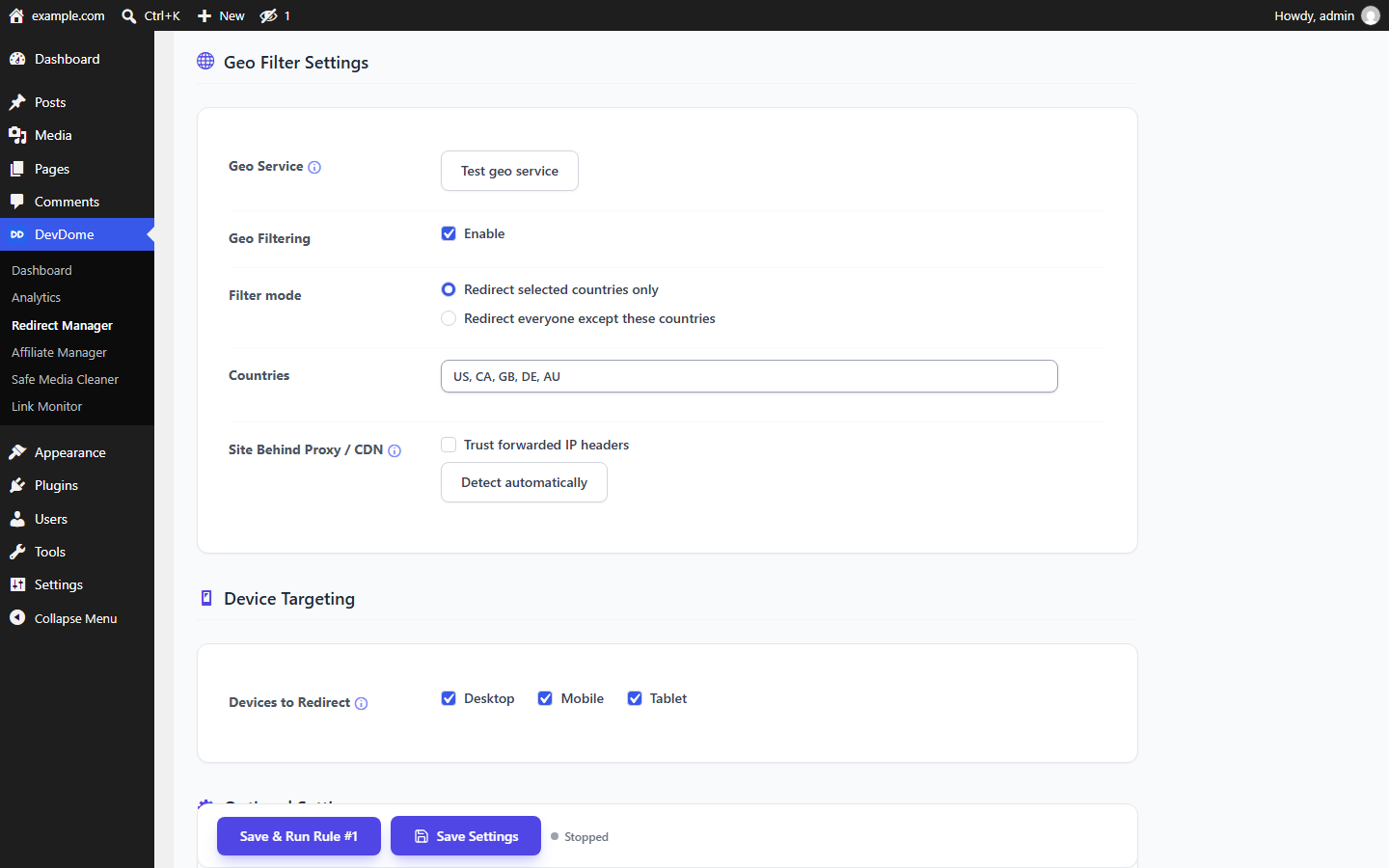
- Test geo service - check that the service is reachable from your server.
- Geo Filtering - enable or disable the country filter; off by default.
- Filter mode - redirect only listed countries or everyone except them. An unresolved country is not redirected by an "except listed" rule.
- Site Behind Proxy / CDN - behind Cloudflare or another proxy, enable "Trust forwarded IP headers" to use the real visitor IP. The forwarded header counts only when the connection comes from a Cloudflare or private proxy address. "Detect automatically" ticks the box for you.
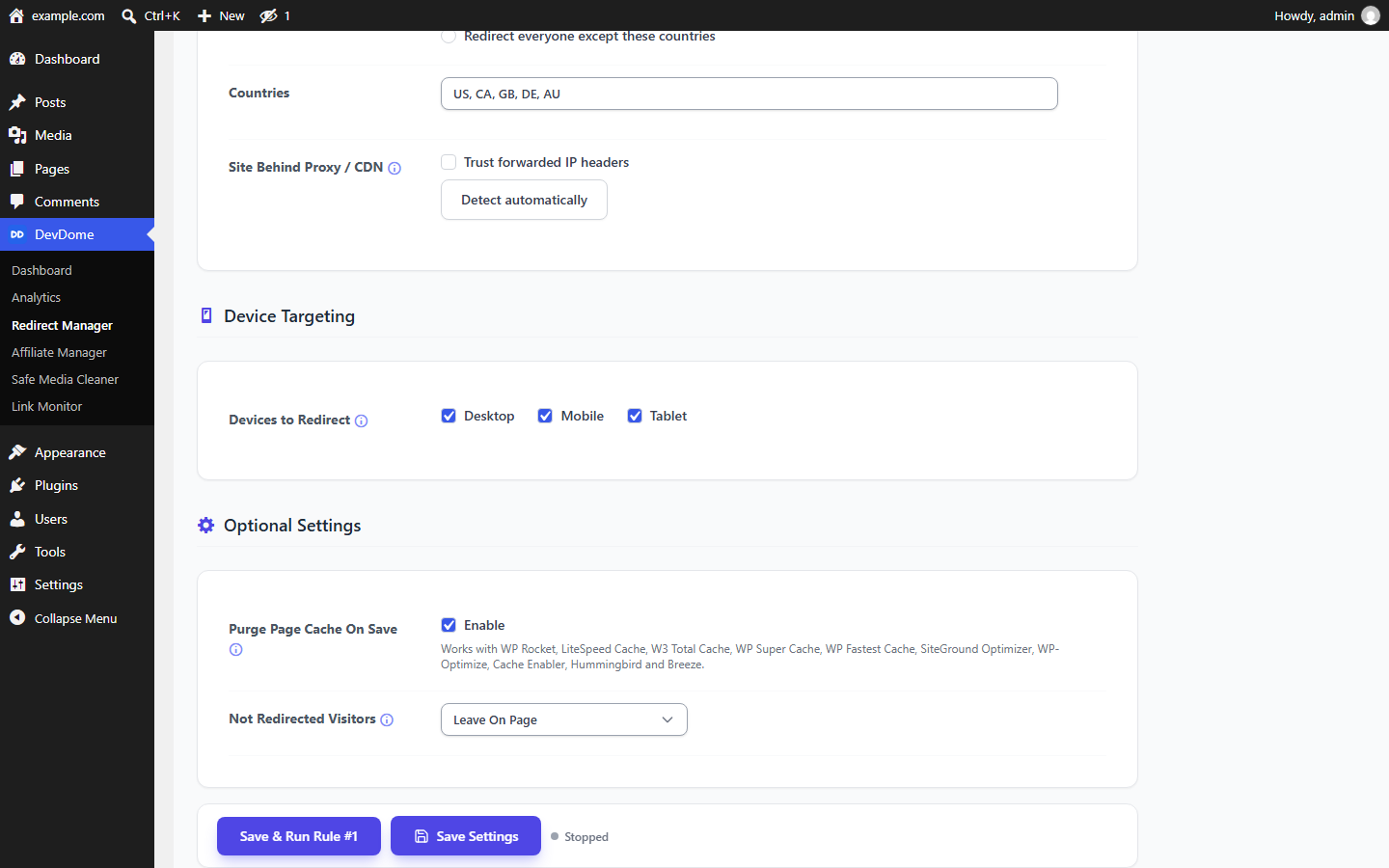
- Devices to Redirect - select Desktop, Mobile or Tablet. For a mobile redirect, check Mobile; other devices follow Not Redirected Visitors.
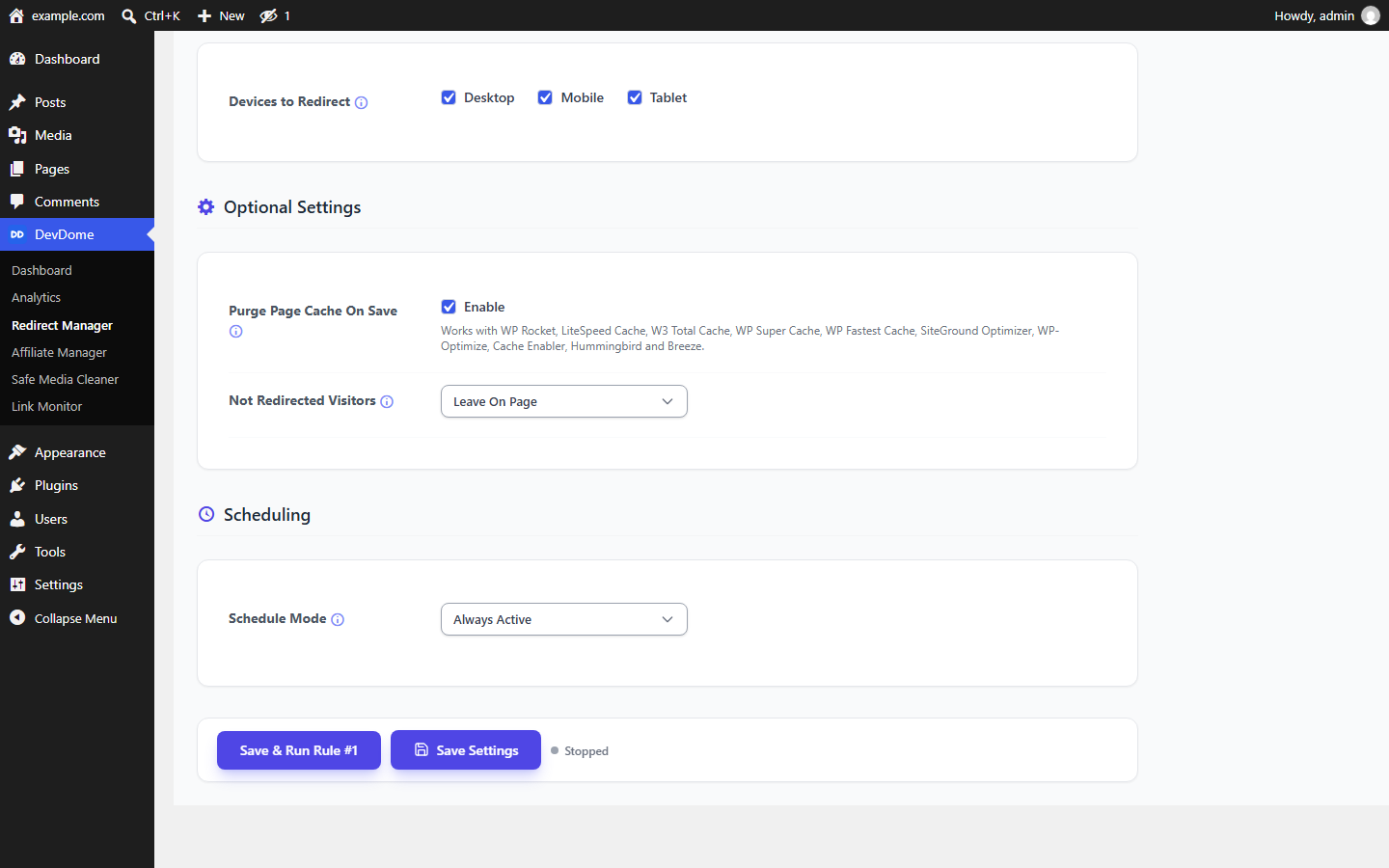
- Purge Page Cache On Save - clear cached copies of targeted pages when saving/running a rule so it takes effect immediately. Supports WP Rocket, LiteSpeed Cache, W3 Total Cache, WP Super Cache, WP Fastest Cache, SiteGround Optimizer, WP-Optimize, Cache Enabler, Hummingbird and Breeze.
- Not Redirected Visitors - Leave On Page or Send To Bypass Link, using a URL you choose.
- Schedule Mode - Always Active or Custom Schedule, with a run time, selected weekdays and up to three specific time windows.
- Excluded IP Addresses - one IPv4 or IPv6 address or CIDR range per line.
- Excluded Browser Strings - skip User-Agent strings containing listed text, ignoring case. Entries under 5 characters are not saved.
- Excluded User Roles - skip logged-in users with a ticked role.
- Noindex Header - every address the running rule targets answers X-Robots-Tag: noindex, nofollow, to crawlers and visitors alike, before anyone is redirected.
- Robots.txt Disallow - lists the rule's Custom URLs or Selected existing URLs in the virtual robots.txt. Stops crawling, not indexing; no file is written.
- Report To DevDome Analytics - reports each redirect to your DevDome Analytics dashboard; see External services.
- Save & Run starts a rule; Stop stops it. Live status shows Running/Stopped, run time and time left.
- Save Settings saves without changing run state. Return to Default resets the current rule.
- Reset Stats clears the current rule's statistics and rotation position, not today's daily-limit count.
- Export downloads every rule as JSON, without statistics or run state. Import replaces every rule on the site; imported rules arrive stopped.
devdredi_redirect_targetfilters destinations for provided links and same-path redirects.devdredi_pass_bind_addressfilters the address a Visitor Check pass is bound to, for example a network range.devdredi_redirectedfires on redirect events. Neither confirms arrival at the destination.
安装:
- Upload the plugin to
/wp-content/plugins/(or install it from the Plugins screen) and activate it. - Open Tools -> DevDome Redirect Manager (the DevDome Tools menu).
- Pick what to redirect, choose a redirect method and where to send traffic, then set any targeting, timing and schedule you need.
- Click Save & Run to start the rule. Use Save Settings to save changes without changing the run state.
屏幕截图:
常见问题:
Does the redirect work without JavaScript, and why is "New Tab" greyed out or reverting to "Same Tab"?
Choose 301, 302, 307, 308 or Meta Refresh to redirect without JavaScript. These methods always open in the same tab, so New Tab is unavailable. JavaScript is required for Visitor Check, new-tab opening, "wait for a click" and client-side delays. On fully cached pages, Referring websites and Only visitors arriving from outside rules also use JavaScript to detect the landing.
My redirect does not fire immediately after saving. Why?
A caching plugin or server cache may still serve a stored copy of the page. Keep "Purge Page Cache On Save" enabled so targeted pages are cleared when you save or run the rule.
Can I run more than one rule at the same time?
Yes. Rules are independent and ordered by priority. For each request, the highest-priority running rule that matches handles it.
What does "Once per visitor" mean?
The visitor is redirected only the first time, then left on the page on later visits until you reset the rule's statistics. Choose "After a delay" to make the redirect available again after a set time. Visitors are identified by IP or IP + browser/device.
Does the plugin recognise every bot, and what should I switch on if bots inflate affiliate or ad clicks?
No. "Don't redirect known bots" skips requests matching local checks, but bots with unrecognised browser identifiers can still be redirected. Visitor Check compares the IP address and browser between two requests; it does not prove that a visitor is human. Keep "Don't redirect known bots" enabled. For supported JavaScript redirects, try Visitor Check. Consider Outdated Browsers if excluding older browsers suits your audience. These settings can reduce some automated redirects, but cannot prevent direct visits to the destination or guarantee valid clicks.
Will Visitor Check slow real visitors down?
It adds one request to your site before opening the destination, so some extra loading time is possible. There is no CAPTCHA. A visitor using the same IP address and browser continues automatically if the pass is still valid.
What happens if a visitor's network changes?
If the IP address or browser identifier changes between loading the page and returning the pass, the redirect is refused. The visitor sees an expired-link message asking them to go back and open the page again. This can happen to real visitors switching networks.
What happens when the daily limit is reached?
Further visitors handled by that rule stay on the page or go to its bypass link. A new daily allowance becomes available at midnight in the site's timezone, subject to the rule's schedule. Resetting statistics does not reset today's allowance.
Does the geo filter send any data off my site?
Country lookups send visitor IP addresses to the geo service when Geo Filtering is enabled. "Test geo service" also contacts that service. The plugin catalog and optional account connection have separate external requests. See External services for details. Visitor Check, Outdated Browsers, Daily Redirect Limit, UTM source matching and Hide From Search run locally. Report To DevDome Analytics sends data only when ticked on a rule.
How do I stop being redirected on my own site?
Edit each rule that could redirect you. Under Optional Settings, tick "Don't redirect users with these roles", tick your role, such as Administrator or Editor, then save. This applies only while logged in. To skip redirects while logged out too, tick "Don't redirect these IP addresses or ranges" and add your public IPv4 or IPv6 address, one address or CIDR range per line. Update the entry if your public address changes. Everyone sharing a listed address is also skipped. Matching visits stay on the page, never go to the bypass link and are counted with skipped bots instead of visitors. Cached pages may still contain a redirect, so clear the page cache after saving if needed.
How do I move my rules to another site?
Use Export to download a JSON file of all rules, then Import on the other site. Imported rules arrive stopped, so you can review them before starting.
How do I set up 301 redirects when I change domain, change URL or change permalink?
For the redirect part of a site migration, choose "To same path on another domain" to use domain forwarding while preserving paths and queries. Configure 301 redirects for a permanent move. After you change URL paths or change permalink settings in WordPress, enter the old paths under Custom URLs and provide their new destinations. This sets up a link redirect from an old address; it does not change permalink settings or move your site's files and database.
更新日志:
- A dismissible note at the top of the settings page mentions the free DevDome Analytics plugin, with a button that opens the plugin installer (or the Analytics screen when it is already active). Dismiss hides it for good.
- Shared DevDome library 1.7.13: uninstalling the last DevDome plugin also removes the note's dismissal, the update-repair records and the per-user "Report a bug" flag; the visitor-beacon flood guard keeps one short-lived record per address and clears its expired ones itself, and behind Cloudflare it counts per visitor instead of per Cloudflare address.
- External services lists the "Report this error" button and what it sends.
- Link rotation keeps its position for the newest 20,000 visitors of a rule and forgets the oldest, so a busy rotation rule no longer grows one database record without limit.
- Resetting a rule's statistics also removes that rule's stored "Open on every Nth visitor" records, which the reset had already made unusable but left in the database for up to a year.
- The Selected existing URLs picker lists up to 100 pages or posts before you type (was 30, so a site with more pages could not see the ones past the cut) and says "Showing 100 of 530. Type to find more." when there are more. Typing part of a title or address finds any page, as before.
- Visitor statistics and the once-per-visitor redirect count now identify a visitor by the trusted client address (behind Cloudflare or a trusted proxy) instead of the raw connection address, and the agent rule details mask secret values in the selected referrer pages like they do for sources and destinations.
- New per-rule Hide From Search controls under Optional Settings, both off by default: a Noindex Header sent on every address the rule targets before the plugin decides who is redirected, and a Robots.txt Disallow block for the rule's Custom URLs or Selected existing URLs in the virtual robots.txt. Also available to AI agents as
search_noindexandsearch_disallow. - New per-rule Report To DevDome Analytics switch, off by default: each redirect is reported to your DevDome Analytics dashboard and a destination that is another site of your account gets an opaque ?d= token. Needs a connected DevDome account; what is sent is listed under External services. Agents:
analytics_report, confirmation required to turn it on. - Trust forwarded IP headers now believes a forwarded header only when the connection comes from a Cloudflare address or a private or loopback reverse proxy; a direct visitor can no longer hand the plugin another address.
- Saving a rule is all or nothing: every row is copied before the first write and put back when a write fails, so visitors never meet a half-changed running rule. Return to Default acts only on the rule the screen shows.
- A database query that fails during an action (saving, importing, rule actions, agent abilities) now ends in an error instead of a success message, and no further write follows it. Reset Stats reports a rotation position it could not clear.
- Import checks every value against the same choices and ranges the settings screen enforces and refuses the file otherwise. Agent exports mask credentials and secret-looking values in destination URLs and email addresses; the wp-admin Export file is unchanged. The cache purge ability reports how many caching plugins received the purge.
- Shared DevDome library 1.7.11: on a subdirectory multisite, a site mapped to its own domain is its own site and no longer shares the network's connection.
- Shared DevDome library 1.7.12: a Cloudflare visitor address header is trusted only when the connection itself comes from a Cloudflare address, so a forged header from anywhere else is ignored.
- Shared DevDome library 1.7.10: the one-time Report a bug hint is recorded through a nonce-checked request instead of on a page view; the DevDome dashboard lists only real problems and prints its icons through the WordPress escaping functions.
- The redirect scripts and the rule list are printed through the WordPress escaping functions, with no escaping exceptions left (WordPress.org review rule). The scripts themselves are unchanged.
- Listing text updated: title, short description, tags and introduction.
- New per-rule exclusions under Optional Settings, each with its own checkbox and off by default: IP addresses and CIDR ranges (IPv4 and IPv6), browser strings (User-Agent), and logged-in WordPress user roles.
- Excluded visitors see the page as usual, are not sent to the bypass link and are counted with the skipped bots instead of visitors.
- Browser string exclusions match any listed text, ignoring upper and lower case. IP and browser string exclusions depend on the visitor continuing to match; role exclusions apply only while logged in, and cached pages may still be served.
- The rule settings are also available to AI agents as
skip_ips,skip_user_agentsandskip_roles. - For developers: new
devdredi_pass_bind_addressfilter for the address a Visitor Check pass is bound to. - Bundled DevDome library 1.7.6: the optional Connect card now says exactly what a connected site shares, including the list of active DevDome plugins. Sites already connected send nothing new. See External services.
- New "Require the same IP address to continue" checkbox (Visitor Check, off by default): a JavaScript redirect to a provided or transit destination continues only from the IP address and browser that opened the page. The destination no longer appears in the page; a single-use pass does, checked on your own site. A pass that comes back from another address is not redirected and is counted with the skipped bots.
- New "Don't redirect outdated browsers" checkbox (off by default): desktop Chrome below version 125 (Edge is checked through its Chrome version) and Firefox below version 125, except versions 109 and 115, see the page as usual and are counted with the skipped bots.
- New "Daily Redirect Limit" (off by default): the rule stops redirecting for the day once the limit is reached and starts again at midnight, site time. The limit is picked each day between two numbers; the same number twice is a fixed limit. Visitors over the limit stay on the page or go to the bypass link.
- New "Also match the link's UTM source" checkbox for Referring websites (off by default): the rule also fires for a tagged link such as ?utm_source=reddit.com, for sources that send no referrer.
- The DevDome dashboard tile and digest now also show Bots Skipped across all rules.
- All of these are also available to AI agents as the
visitor_check,skip_old_browsers,daily_limit_enabled,daily_limit_min,daily_limit_maxandreferrer_utm_scanrule fields. Switchingvisitor_checkorskip_old_browsersoff needsconfirm: true. - For developers: new
devdredi_redirect_targetfilter anddevdredi_redirectedaction. - Reworded the Known Bots texts: the switch keeps automated traffic out of your redirects and statistics.
- Fixed: country targeting redirected nobody. The plugin asked the DevDome geo service through a call reserved for connected accounts and always got no country back; it now uses the open lookup, so allow and block country lists work again on every site.
- New "Only visitors arriving from outside" checkbox under What To Redirect (every scope except Referring websites, which already works this way): the rule redirects a visitor who lands on the page from another website or with no referrer at all, and leaves a visitor who moves between pages of this site on the page. Works on cached pages through the same small footer script as Referring websites. The create-redirect and update-redirect abilities accept outside_only and get-redirect returns it.
- New "Don't redirect known bots" checkbox under How Often To Redirect, on by default: crawlers, monitors and scrapers see the page as usual and are never redirected, so automated traffic stays out of your redirects and statistics. Skipped bots are not counted as visitors and appear as Bots Skipped in the rule statistics. The create-redirect and update-redirect abilities accept skip_bots and get-redirect returns it together with bots_skipped.
- What To Redirect: every option now carries a one-line hint under it, so the choice is clear without opening the info icon.
- New "What To Redirect" option: Referring websites. The rule runs only for visitors who arrive from the websites you list, one per line: a domain (reddit.com) covers that site and its subdomains, a word (reddit) covers every referring site whose address contains it. Works on cached pages through a small footer script. Tick Only on selected pages to redirect them only on the categories, pages or posts you pick. The websites are entered like the other lists: type, Add, remove one by one. The create-redirect and update-redirect abilities accept what = referring_sites with the list in from and the pages in referrer_pages.
- Picking a category under URLs To Redirect now redirects every post in it and in its subcategories, and picking a product category or the shop archive redirects every product in it. Before, only the category's own archive pages were redirected. On sites with plain permalinks a picked category or page no longer matches every page of the site.
- Fixed: on sites with plain permalinks the "Selected existing URLs" picker found nothing (its search request was built with a second question mark and answered 404).
- The URLs To Redirect picker now lists every grouping of the site under Categories: blog categories and tags, WooCommerce product categories, brands and tags, custom taxonomies and the shop archive (a shop whose product base is /product-reviews/ appears there). It finds a title, a slug, a path or a full address, a hyphen no longer ends the suggestions, matches from the other tabs show up too, marked Page, Post or Category, and the Posts tab also finds single WooCommerce products and other public content. The search-content ability returns the same results.
- Updates now work when the plugin folder belongs to another system user, for example after an install from a root shell or by an AI agent. Before, the update failed with Retry update, or an uploaded zip kept the old version (shared DevDome core 1.7.2).
- Connect fix (shared DevDome core 1.6.6): the connect claim now waits up to 30 seconds and keeps the handshake for 20 minutes so a refresh retries it, the DevDome hub shows why a connect failed with a Try again link, and the verify file is served through a query form for hosts that answer /.well-known/ before WordPress.
- WordPress Abilities API support (WordPress 6.9+): fifteen abilities for AI agents and MCP clients covering every feature: list-redirects, get-redirect-details, get-redirect-stats, find-404-redirect-candidates, search-site-content, get-geo-status, export-redirects, create-redirect (full option set), update-redirect, set-redirect-state, duplicate-redirect, reorder-redirects, delete-redirect, reset-redirect-stats, purge-redirect-cache.
- Settings: every option now shows a one line hint under the control, with the info icon holding the full explanation, the same layout as DevDome Malware Scanner.
- DevDome Dashboard: installing another DevDome plugin from the dashboard no longer activates it, you activate it yourself from its card. Output escaping tightened.
- DevDome Dashboard: plugin list, descriptions, logos and versions now come from devdome.com, one-click install of DevDome plugins from WordPress.org, Docs link and Fix buttons, Activate stays on the dashboard.
- Updated the bundled DevDome suite core: redesigned DevDome Dashboard with cleaner cards, your account email and plan on the overview, and update buttons shown only when an update really exists.
- One button system across the suite: the same Connect button and the same Save Settings button in every DevDome plugin.
- Every output buffer used to build the page scripts is now opened and closed inside a single function, so it can never be left open.
- Removed two manually fired activation/deactivation hook calls from the internal version check.
- The suite hub no longer installs or activates any plugin: its installer is removed from this build and the DevDome screen links out to the plugin's page instead.
- Removed the crawler-specific serving, search-engine hiding, referrer targeting, referrer stripping, back-button and daily-cap code paths entirely, along with the log-cleanup routine.
- The settings screen's styles and scripts are now enqueued instead of being written into the page, so caching and optimisation plugins can handle them properly.
- Importing a settings file now accepts only known settings and cleans every value for the type it stores; switching the rule you are editing is protected like every other action.
- Every feature is now free and unlimited: the rule limit and the Pro locks on geo targeting, device targeting and scheduling are gone.
- Internal identifier rename to a unique plugin prefix (WordPress.org requirement). Existing rules, statistics and settings are carried over automatically by a one-time migration on self-hosted builds.
- Unified DevDome suite icons and suite hub. Older entries: see changelog.txt in the plugin folder.