
Developersd Firewall Manager
| 开发者 |
developersd
sudipdebnath |
|---|---|
| 更新时间 | 2026年8月13日 06:00 |
| PHP版本: | 7.4 及以上 |
| WordPress版本: | 7.0.4 |
| 版权: | GPLv2 or later |
| 版权网址: | 版权信息 |
详情介绍:
Developersd Firewall Manager is a lightweight tool that connects to your GoDaddy (Sucuri) website firewall API and lets you manage it from wp-admin instead of switching to a separate dashboard.
Features
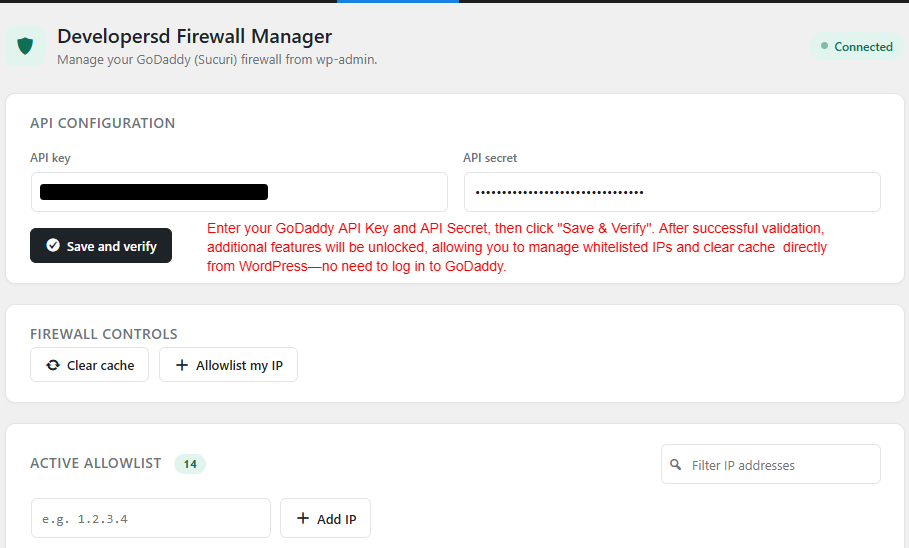
- Connect using your firewall API key and secret
- Clear the CDN cache with one click
- Allowlist your current IP address automatically
- Add or remove IP addresses from the firewall's allowlist
- View your active allowlist in real time, with no page reloads
安装:
- Upload the plugin files to the
/wp-content/plugins/developersd-firewall-managerdirectory, or install the plugin through the WordPress plugins screen directly. - Activate the plugin through the 'Plugins' screen in WordPress.
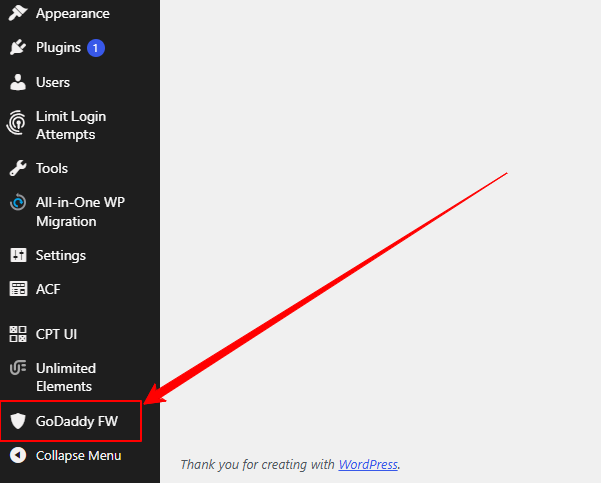
- Go to the GoDaddy FW menu in your WordPress admin sidebar.
- Enter your firewall API key and secret, then click Save and verify.
屏幕截图:
常见问题:
Where do I find my API key and secret?
These are provided by GoDaddy (or Sucuri) in your website firewall dashboard settings.
Why does removing an IP sometimes take a few seconds?
The plugin tries a few different methods to remove the IP and checks the real firewall state after each attempt, rather than trusting a single request. This takes a little longer but avoids reporting a false success.
Does this plugin store my API credentials anywhere else?
No. Your API key and secret are stored only in your WordPress site's options table and are used solely to communicate with the firewall API.
更新日志:
1.0.2
- Split the cache and IP-allowlisting controls into separate boxes.
- The allowlist box now shows your detected current IP address.
- Added a "Settings" link on the Plugins list page.
- Documented the external service this plugin connects to.
- Replaced the public-IP lookup with server-side detection (no third-party call).
- Renamed internal function/class/option prefixes to be more unique.
- Initial public release.