
SiteAgent for Aura
| 开发者 | benkalsky |
|---|---|
| 更新时间 | 2026年9月30日 04:27 |
| PHP版本: | 7.4 及以上 |
| WordPress版本: | 7.1 |
| 版权: | GPLv2 or later |
| 版权网址: | 版权信息 |
标签
下载
详情介绍:
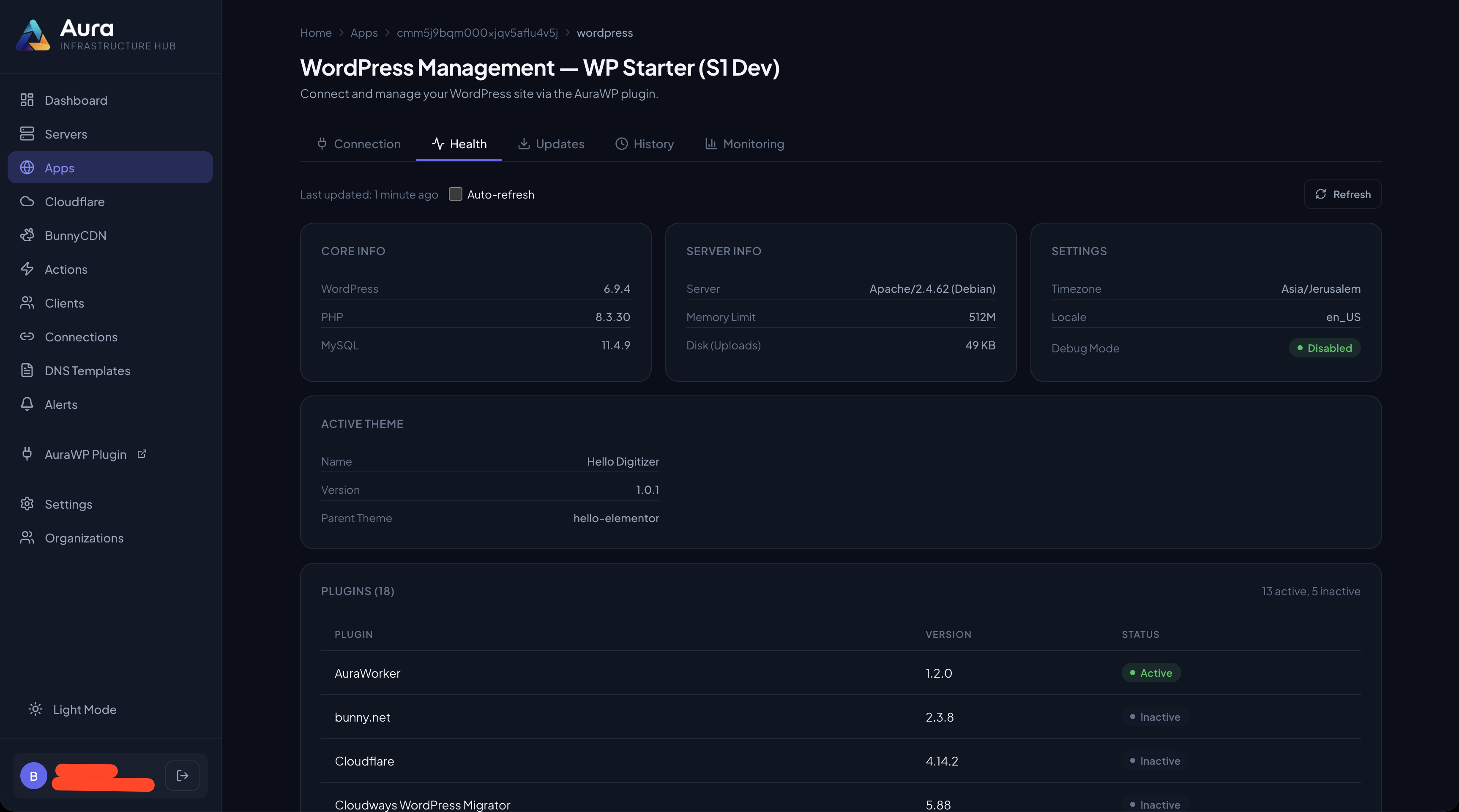
- Monitor site health — See WordPress version, PHP version, installed plugins & themes, database info, and disk usage in real time.
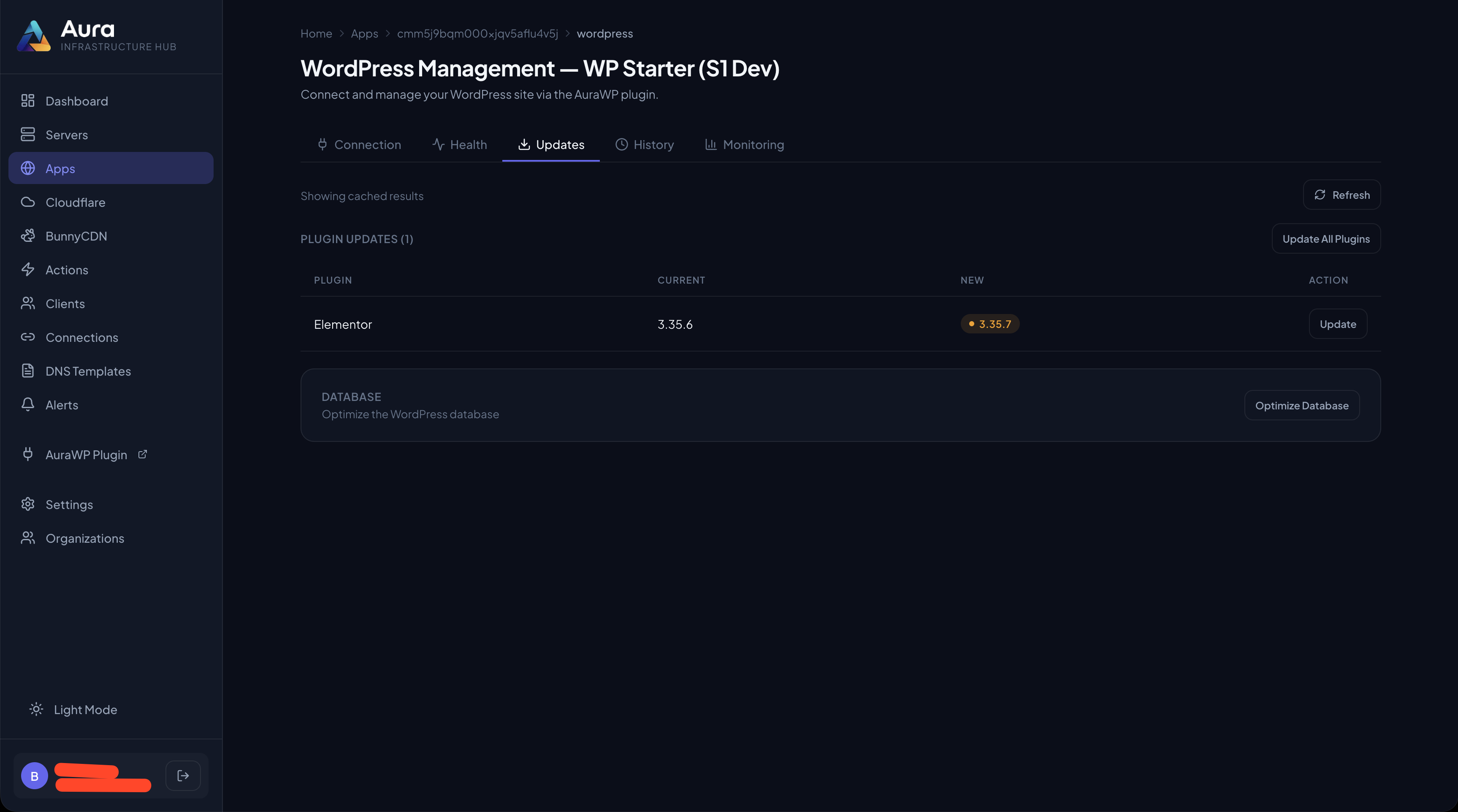
- Update plugins, themes & core remotely — Push updates to any connected site from the Aura dashboard, no wp-admin login.
- Safe batch updates with auto-rollback — Run chunked updates with health checks; if an update breaks the site, the plugin restores the previous version automatically.
- Per-plugin rollback — Every update is zip-snapshotted first; restore any plugin to its last good state on demand.
- Bulk translation & database upgrades — Update all language packs and run WordPress database migrations remotely.
- One-click connect (magic link) — Connect a site to Aura straight from wp-admin — no manual token copy/paste.
- AI-agent ready (27 MCP tools) — Exposes machine-readable, JSON-schema tools for AI-driven management, including SEO/accessibility/performance/broken-link auditors, on-site SEO-meta read/write (Rank Math, Yoast, SEOPress), and Gutenberg block read/edit. Read tools run on demand; mutating tools are approval-gated through Aura, and every call is audited.
- Zero frontend impact — The plugin only registers REST API endpoints. No scripts, no styles, no database queries on visitor-facing page loads.
- WordPress Application Password — Standard WordPress auth with capability checks (
manage_options/update_*). Only authorized administrators can trigger actions. - Hashed Site Token — A per-site token sent via the
X-Aura-Tokenheader. Only a SHA-256 hash is stored (never the raw token), compared timing-safely. Tokens from older versions migrate to a hash automatically. - Brute-force throttling — Repeated bad-token attempts from an IP are blocked.
- Signed magic-link connect — The onboarding callback is HMAC-signed with a one-time secret and timestamp, so the token exchange can't be hijacked or replayed.
- IP / Domain allowlist (optional) — Restrict API access to your Aura instance, with Cloudflare and reverse-proxy header support.
/wp-json/aura/v1/:
GET /status— Full site health reportGET /updates— Check available updates (core, plugins, themes, translations)POST /update/core//update/plugin//update/theme//update/translations— Apply updatesPOST /update/database— Run WordPress database upgradesPOST /connect— Magic-link token exchange (public, HMAC-signed, 10-minute expiry)
/wp-json/aura/v2/:
GET /health— HTTP, PHP fatal, white-screen and DB connectivity checksPOST /update/batch— Chunked batch updates with auto-rollback on health failurePOST /rollback/{plugin}— Restore a plugin from its most recent backupPOST /rules— Receive Aura's signed operator ruleset; carryingunbind: trueit ends this site's binding instead
403 aura_site_unbound and reads keep working; the disconnect answer carries
cleanup_complete and leftovers (what the site still holds), and GET /status
reports unbound until the site is reconnected or the remaining Aura data is removed
from the settings screen.
MCP tools under /wp-json/aura/mcp/:
POST /tools/list/POST /tools/execute— Enumerate and run AI-agent toolsGET /context— Full site context for AI decision-making
get_site_context— WordPress/PHP/theme/plugin/disk/performance snapshot with detected issuesget_database_info— Database size, largest tables, autoloaded-options weight, expired transientsscan_security— Scored security posture (file-edit lockdown, debug exposure, SSL, default admin/prefix, open registration, PHP version)scan_seo— SEO posture (search-engine visibility, permalinks, XML sitemap, site title) plus a sampled content audit (thin content, missing excerpts/featured images)scan_a11y— Accessibility audit over sampled content (images missing alt text, non-descriptive link text, heading structure, document language)perf_check— Performance posture (persistent object cache, OPcache, page-cache plugin, PHP version, autoload weight, active plugin count, memory limit)scan_broken_links— Link triage over a content sample with no outbound HTTP (empty/anchor-only links, dev/staging hosts, unresolved internal links)list_users— Users with roles and post counts, administrators flagged (never returns secrets)check_health— Live health gate: HTTP status, PHP fatals, white-screen, database connectivityscan_error_log— Tails and severity-groups the error log, surfacing recent fatalscheck_vulnerabilities— Plugin update-currency check against WordPress.org (a version check, not a vulnerability/CVE feed; covers wp.org-hosted plugins)check_core_checksums— Core-file integrity against the official WordPress.org checksum manifest (modified/missing/unexpected files, fetched over HTTPS only)scan_executable_files— Uploads-directory observations: PHP/executable files, .htaccess overrides, and symlinks (reported, never followed)audit_admin_accounts— Privileged-account facts: administrators with recency, admin capabilities outside the role, application-password counts, multisite super adminsaudit_cron— Bounded WP-Cron inventory with sub-60-second-schedule and unresolved-callback fact-flagsaudit_mcp_exposure— Which other MCP servers are registered on this site, and how many abilities pass the discovery rule such a server applies (abilities are registered site-wide, not per-plugin, so a server resolving targets from that registry picks up mutating ones outside SiteAgent's approval path). The counts describe the abilities, not what any server currently serves. Reports only; changes nothingaudit_agent_code— Executable code an AI agent authored or can author on this site: Angie code snippets (recorded, agent-authored, live per environment), the SiteAgent Power Pack's execute-php / file-write / wp-cli flags, and third-party exec stores. Counts and presence only; never file contents, never a verdict. Reports only; changes nothingaudit_rules— Whether a signed operator ruleset is present and how old it is, 24h block/warn counts, expired-but-listed rules, and the enforcement points in this build. Reports only; changes nothingget_seo_meta— Read a post/page's SEO title, description, and focus keyword from the active SEO plugin (Rank Math, Yoast, or SEOPress)list_page_blocks— Read a page's Gutenberg block structure (block names, attributes, nesting)snapshot_get— Retrieve a stored snapshot of page content (reversible write metadata)
elementor_replay_ability— Executes an approved held Elementor write (destructive, requires Aura approval): claims the hold, re-judges it against the current ruleset, and runs the original Elementor mutation as the user who askedupdate_plugin_safely— Backup, update, health-check, auto-rollback on failureclear_caches— Flush object/opcode caches and detected page-cache pluginscleanup_transients— Remove expired transients to reduce autoload bloatcleanup_orphaned_assets— Find and remove unused media (dry-run by default)backup_plugins— Zip-snapshot one or all active plugins as a rollback safety netset_seo_meta— Write a post/page's SEO title / description / focus keyword on the active SEO plugin (Rank Math, Yoast, or SEOPress) — on-site, so it works even when a WAF blocks the plugin's own REST endpointupdate_page_block— Update a Gutenberg block's content or attributes (snapshot-first, reversible)create_page_from_blocks— Create a new page from a Gutenberg block spec (draft-first)
read_file— read a text file from inside wp-content (jailed; refuses wp-config.php).db_query— a single read-only SQL statement (SELECT / SHOW / EXPLAIN), row-capped.write_file— write a file inside wp-content, snapshot-first so it can be rolled back.run_wp_cli— run an allowlisted WP-CLI command, with no shell and no metacharacters.execute_php— run a PHP snippet against the full WordPress API.
- Off until you arm them. The write and code tools do nothing until the site owner sets an explicit constant in
wp-config.phpfor each one. Installing the Power Pack alone enables no writes and no code execution. - Human approval, cryptographically enforced. Once the site holds Aura's approval key (provisioned when you connect the site), each of these calls requires a single-use, signed grant bound to that exact tool and its exact parameters — one only the Aura dashboard can mint, after a human approves the action. A leaked Site Token cannot run them. (Until a site has that key, the gate is dormant — so connect the site from Aura before arming anything.)
- Reversible where it can be. File writes are snapshotted first, so there's a previous state to restore.
execute_php is powerful by design. The controls are the constant you set, the human who approves the call, and the audit trail — not a promise that arbitrary code is safe.
Learn more at my-aura.app/siteagent.
About Aura
Aura is a full-stack operations dashboard by Digitizer that brings servers, applications, DNS zones, and CDN pull zones from Cloudways, Hostinger VPS, Cloudflare, and Bunny.net into a single unified interface.
SiteAgent extends that reach into every WordPress installation — so you can manage your entire infrastructure, including WordPress sites, from one place.
Free to Use
The plugin is completely free and open source (GPLv2+). You need a free or paid Aura account to connect your sites. Sign up at my-aura.app.
Links
安装:
- Go to Plugins → Add New in your WordPress admin.
- Search for SiteAgent.
- Click Install Now, then Activate.
- Navigate to Settings → SiteAgent.
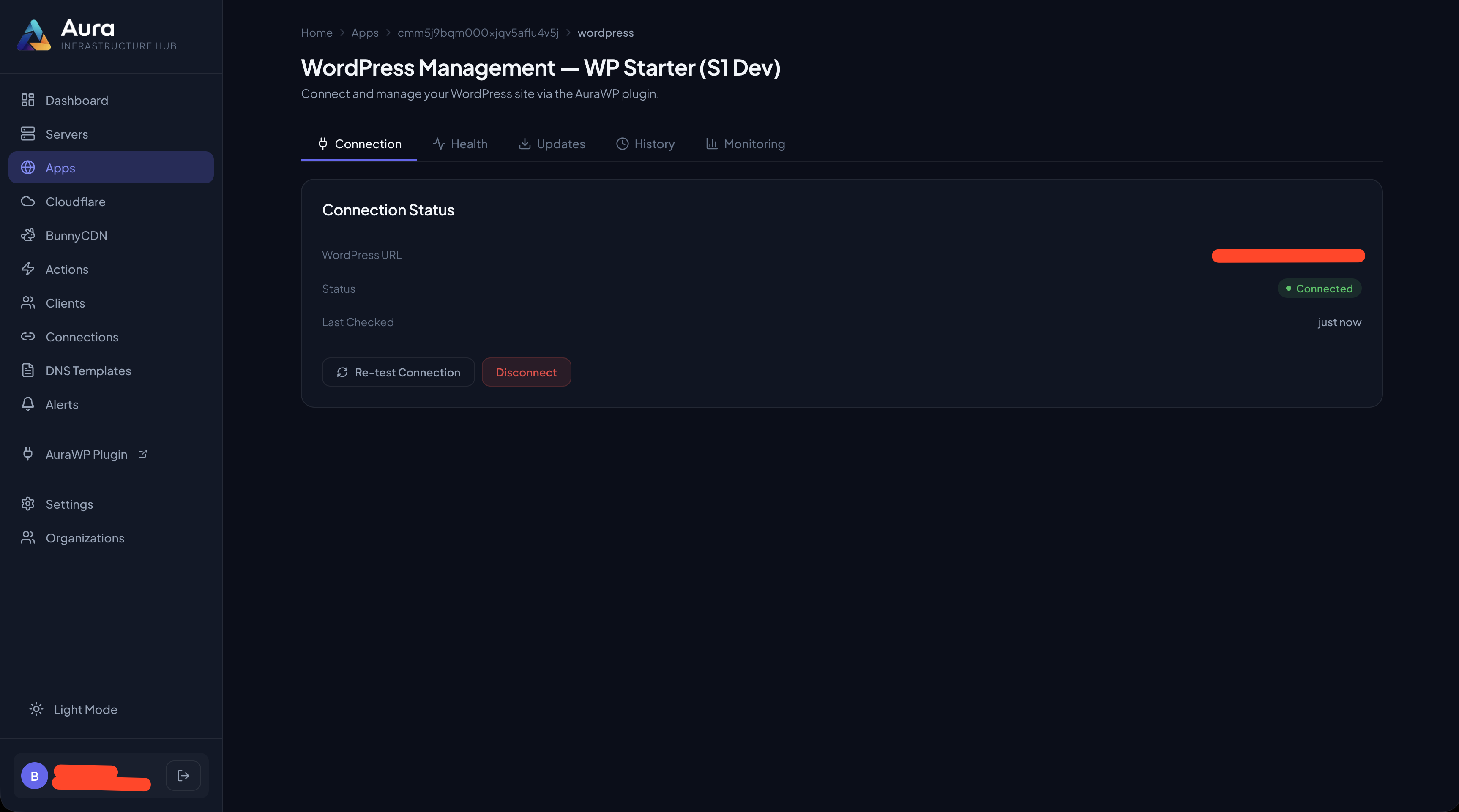
- Click Connect to Aura for one-click magic-link onboarding — or copy the Site Token (shown once) and paste it into your Aura dashboard manually.
wp plugin install digitizer-site-worker --activate
Manual Upload
- Download the plugin ZIP from WordPress.org.
- Go to Plugins → Add New → Upload Plugin.
- Upload the ZIP and click Install Now, then Activate.
- Navigate to Settings → SiteAgent to connect or get your Site Token.
屏幕截图:


常见问题:
Do I need an Aura account?
Yes, you need an Aura account to connect your WordPress sites. Aura offers a free tier that includes up to 3 WordPress sites. Sign up at my-aura.app.
Is this plugin safe to use?
Yes. The plugin uses defence-in-depth: WordPress Application Passwords (the same standard mechanism used by the block editor), a per-site token stored only as a SHA-256 hash and verified timing-safely, per-IP brute-force throttling, an HMAC-signed onboarding handshake, and an optional IP/domain allowlist. No data is transmitted unless a request is made by your Aura instance.
How do I enable the approval gate for write actions?
SiteAgent can require a per-action, cryptographically signed approval before it runs a state-changing MCP tool (cleanups, cache flushes, SEO writes, safe plugin updates run through the tool interface). Once enabled, each such write must carry a single-use signature that only the Aura dashboard can mint, after a human approves the action — so a leaked Site Token cannot run those tools on its own. This gate turns on automatically once the site holds Aura's approval key, which is provisioned securely during connection. If you installed or updated the plugin but have not reconnected the site since, the gate is dormant and the site runs in the standard token-only mode. To activate it, simply reconnect the site from your Aura dashboard — no reinstall is needed. Note: the approval gate currently covers the MCP tool path. Core, plugin, and theme updates performed over the plugin's direct REST update endpoints are still authorized by the Site Token alone (the standard site-management model), so treat the Site Token as a sensitive credential regardless. Grant coverage for those update endpoints is on the roadmap.
Does it slow down my site?
No. The plugin registers only REST API endpoints. It does not load any code, scripts, or database queries on frontend page loads. Your visitors experience zero impact.
What WordPress versions are supported?
WordPress 6.2 or higher is required. This is needed for full Application Password support. The plugin has been tested up to WordPress 7.1.
What PHP versions are supported?
PHP 7.4 or higher. PHP 8.0+ is recommended.
Can I restrict which IP addresses can access the API?
Yes. The plugin supports an optional IP whitelist. If configured, only requests from the specified IP addresses will be accepted. Cloudflare and reverse proxy headers (CF-Connecting-IP, X-Forwarded-For, X-Real-IP) are fully supported for IP detection.
Does this work with WordPress multisite?
The plugin is designed for single WordPress installations. Multisite support is not currently available but is on the roadmap.
Where is the Site Token stored?
Only a SHA-256 hash of the Site Token is stored, in the WordPress option aura_worker_site_token — the raw token is never persisted. It is generated on first activation and shown once so you can copy it; the Aura dashboard keeps the only raw copy. Tokens created by older versions are upgraded to a hash automatically on first use.
Can I regenerate the Site Token?
Yes. Use Regenerate Token on the Settings → SiteAgent page. The new token is shown once. Regenerating invalidates the old token and disconnects the site from Aura until you reconnect with the new one.
How do I disconnect a site from Aura?
Remove the site from your Aura dashboard, or deactivate or delete the plugin. If you deactivate the plugin, the REST API endpoints are unregistered and Aura can no longer communicate with the site. Since 2.13.0, disconnecting from the Aura dashboard happens in two phases. The site is marked disconnected immediately and refuses every change from that moment on — reads keep working — and Aura then has it revoke the Application Password it minted, clear the stored ruleset and gateway key, and finally delete the site token. If the site was mid-disconnect when it lost contact, it finishes the job by itself on its next page load.
Aura disconnected my site but something is left behind — what do I do?
Open Settings → SiteAgent. A disconnected site says so ("Disconnected by Aura at …") and offers Remove remaining Aura data, which revokes what is left and clears the disconnect record — but only once everything it names, the site token included, is proven gone. If it tells you it cannot say which user holds an Application Password, revoke it under Users → Profile → Application Passwords and try again. Reconnecting the site to Aura also clears the record, after settling what the previous connection still owed.
Does Aura store my wp-admin credentials?
No. Aura uses WordPress Application Passwords, not your main admin password. Application Passwords are scoped specifically for REST API access and can be revoked at any time from Users → Your Profile in wp-admin.
Is the plugin open source?
Yes. SiteAgent is open source under the GPLv2 or later license. The source code is available on GitHub.
更新日志:
- Fix: updating a plugin through Aura no longer leaves it deactivated. WordPress switches a plugin off while it updates it, and only its own admin screen switches it back on; SiteAgent now turns an active plugin back on after the update, whether the update worked or failed. An inactive plugin stays inactive.
- SiteAgent no longer updates itself through the generic plugin update, which could switch it off and cut Aura off from the site. It updates itself only through its own protected self-update.
- A failed update now reports WordPress's actual reason instead of "No update available", and an update that is not on offer is reported as such rather than as an error. The update list is refreshed once before updating when the plugin is missing from it.
- Operator rules about custom CSS now also cover Elementor's publish-document when publishing would take a pending autosave live, since that autosave can carry CSS no rule has seen. A publish with no autosave is unaffected. If an autosave appears while a call is being approved or run, the call is stopped and can be retried, or it publishes without that autosave, which stays waiting for the next publish. No new settings.
- New: an install ledger. Every plugin and theme install or update is recorded with how it arrived (wp-admin, REST, WP-CLI, cron, a WordPress auto-update, or SiteAgent itself), which user and application password, and where the package came from, so Aura can flag packages an AI agent installed. It only observes; it never blocks an install. Nothing to configure.
- Privacy: each record keeps the user ID, the application password's name (never the password) and the REST route. While the plugin is active, records older than 90 days (or beyond the latest 200 installs) are deleted; a deactivated plugin cannot delete anything, so they stay until its first cleanup after reactivation (the daily clean-up, an audit or the next install) or until it is uninstalled. Records are not autoloaded and are deleted when the plugin is uninstalled.
- The Aura approval queue now shows whether an operator rule would block or warn about an Elementor design change made through the elementor-mcp plugin (1.38.0 or later), before anyone approves it. Nothing runs when the queue asks. No new settings.
- Rules can now target custom CSS: a rule of type
custom_cssblocks, warns about or allows writes that change a page's, an element's or the site kit's custom CSS, on one page or everywhere. Blocking is cautious: a write that might carry CSS counts. Allowing is strict: only a write the plugin can prove does nothing but set CSS is let through. No new settings; a ruleset without such rules behaves exactly as before.
- A third-party sandbox directory that is a link to a missing or unreachable location is now reported as a link, not as "no sandbox here". The audit checks for a link before it looks at what the link points to. Read-only; nothing changes on the site.
audit_agent_codenow counts what is in a third-party agent tool's sandbox store (wp-content/emcp-sandbox):third_party.emcp_sandboxgainsactive(the plugin is loaded) andstore— how many files, how many with an executable extension, and the newest modification date. Until now an empty directory and one holding forty PHP files looked the same to a fleet audit. Counts only: no file is opened and no file name leaves the site. Links are never followed; a sandbox directory that is itself a link is reported as such and not walked. A directory that cannot be read is reported as unreadable, never as empty. Read-only, no settings, nothing changes on the site.
audit_mcp_exposure'selementor.governorblock reportsproxy_refused_30d— how many times in the last 30 days the door governor turned an authenticated non-browser caller (an Application Password or bearer identity: an agent) away from Elementor's editor proxy (403 aura_door_proxy_closed, 2.19.0). Anonymous requests get the same 403 but are not counted, so no unauthenticated traffic can write to the site. Same hourly buckets andcounters_as_ofcutoff as the four existing counters;nullwhen the count could not be read.
- Security: Elementor's editor-internal MCP proxy (
elementor/v1/mcp-proxy) is closed to anything but a browser session while the Aura door governor is active — an Application Password or bearer client is answered403 aura_door_proxy_closedand pointed at the governed/elementor/mcpdoor. Six of the eleven governed Elementor writes were reachable there past the governor since 2.16.0; the editor's own Global Classes / Variables UI is unaffected. - Security: the door governor's route matchers are case-insensitive, as WordPress's REST dispatcher is — a mixed-case spelling of a governed route no longer walks past the transport closer.
audit_mcp_exposure'selementorblock now reports Elementor 4.3.0-beta3's kill switch on the token door (switch: theelementor_mcp_enabledoption, absent means off) and which vendored WP MCP adapter andelementor-mcp-composercopies actually resolve on the site (adapter,composer: version and ABSPATH-relative path).
- Security: an empty port after a webhook host (
https://hooks.zapier.com:/hooks/...,hooks.zapier.com:/...) is now read as a URL parser reads it, so such URLs are redacted in plain text too — the case 2.18.3 listed as a known limit. A colon followed by anything but a port and a slash is still not a port.
- Security: redaction now reads a URL the way a browser's URL parser does. A backslash used as the path separator under http, https, ws, wss, ftp or a protocol-relative prefix (
https://hooks.zapier.com\hooks\catch\1/…, also percent- or HTML-encoded) is redacted whole, including the part after the first backslash that earlier releases left in place. - Security: hostname characters a URL parser normalises away (fullwidth and mathematical letters, the ideographic full stop, zero-width and soft-hyphen characters — Unicode 18.0.0's IDNA mapping table) are mapped before matching, so
hooks.zapier.comandhooks。zapier.comare redacted likehooks.zapier.com. - A URL parser's userinfo (
a@b@host, an encoded slash or backslash inside it) and an empty port (host:/) are read as the parser reads them in the backslash and encoded forms above; a plainhttps://host:/pathwith nothing encoded is still matched by the older rule that wants a port digit (tracked as #121). - Redacting a very large field with millions of words now takes about three times the field's size in memory instead of eighteen.
- Kept as they are: a backslash after a bare host with no scheme, Windows and UNC paths,
file:URLs.
- Security: redaction now decodes HTML references (including the double encoding WordPress itself produces on save and render), percent escapes and JSON escapes before looking for webhook URLs, so encoded or double-encoded Make, Zapier, Slack, Discord, IFTTT or Telegram hook URLs are now redacted.
- The whole encoded word is replaced, not just the part that decoded into a match.
- An encoded word whose host only looks like a webhook host is redacted too.
- More than four encoding layers are replaced as a field.
- Security: receiver URLs are now redacted even when their
/,:or@are percent-encoded or HTML-escaped, including numeric character references left without a trailing semicolon. Before this, an encoded Make, Zapier, Slack, Discord, IFTTT or Telegram hook URL could reach an agent unredacted. - The redaction walk now runs under a total node budget, so a self-referencing payload no longer runs until the request times out; a snapshot payload that exhausts the budget is withheld as
payload: null, payload_redacted: trueinstead. - The gateway's early placeholder/grant check now only fires for a caller the IP/Origin allowlist and token throttle would already admit, so a throttled or disallowed caller no longer learns whether its token was right.
- A legacy plaintext token is migrated before an MCP-path grant is verified.
- Security: known webhook endpoints no longer leave the site in a REST response an AI agent reads — Aura's gateway tools, an MCP client using an Application Password, or any logged-in non-browser caller. Make, Zapier, Slack, Discord, IFTTT and Telegram hook URLs, and Elementor Pro form webhooks on any host, are replaced with
aura-redacted:v1:<kind>, including inside Elementor page data and snapshot payloads. People in wp-admin, public visitors and Aura's own system calls see the real values. - An agent write that carries a redacted placeholder is refused (
aura_redacted_placeholder): leave that field out and the stored value is kept. - Aura's own page snapshots stay complete: a signed header proves the read is Aura's (
aura_unredacted_grant_invalidwhen it does not verify). audit_rulesreportsredacted_24handplaceholder_refused_24h;/statusreportsredaction.
- Plugin updates: on a host where PHP may not write or delete
.phpfiles (WP Engine is the proven case), every Aura-driven plugin change — the self-update, a single or batch plugin update,update_plugin_safely— is refused before anything is touched, withcode: aura_php_writes_blocked(oraura_upgrade_dir_unwritablewhenwp-content/upgradecannot be written at all). Such a host failed every update at unpack, and the restore that followed deleted the plugin's non-PHP files: SiteAgent's ownreadme.txt, and a plugin's CSS, JS and images. The check creates and removes a temporary file, and runs only when WordPress writes files directly. - Restore: a restore checks that it can finish — PHP can write
.phpfiles in the plugins directory, and every directory of the plugin is writable — before it deletes anything; otherwise it answersstage: preflightand leaves the directory untouched. A failed install that changed no file is no longer restored at all (restore_skipped: unchanged). /statusreports the host's last recorded answer ashost: { php_writes, checked_at }, so Aura can stop sending updates to such a site.update_plugin_safelyreturns the refusal's code and message (it lost both before).
- Self-update: a package that carries the version already running is refused before anything changes. The verified download is inspected in place, the plugin is not backed up, and no install runs. Before this, a same-version request backed the plugin up, reinstalled over the live directory, refused and restored — and on one host lost
readme.txton every run. The refusal answerscode: aura_self_update_same_version. An archive that cannot be read falls through to the previous path. - Self-update: when the post-install version check fails, the message now says what the evidence supports. A verified package with a different version means the upgrader did not replace the plugin directory (
aura_self_update_not_replaced); without that proof both causes are named (aura_self_update_version_unchanged). - Self-update: a restore that cannot finish reports which stage failed (
clearorextract), and the message says what is on disk. A failed clear can remove some files before it stops, so the directory is no longer described as untouched.
- Snapshots: an
overwrite_file()record now stores the sha256 of the content it wrote (replaced_with_sha256), and restoring that record puts the old bytes back ONLY while the file still holds exactly what the write left there. A file edited since is refused untouched (aura_file_changed_since); a file already holding the old bytes answersalreadyand is not rewritten; a record taken without that hash — a directPOST /aura/v2/snapshot, or a Power Pack older than 0.2.5 — is refused as unfenced (aura_snapshot_unfenced), because nothing proves what it would be writing over. - Snapshots: every engine write to a path records a
write_seq, taken under that path's lock and strictly increasing per target, so two writes to one file can be ordered after the fact — Aura rolls a run back in that order. - Snapshots: a file restore that cannot act says why with a code instead of a bare failure —
aura_file_changed_since,aura_snapshot_unfenced,aura_snapshot_voided(the create's rollback record is gone) andaura_path_locked(another write to the path is in progress) — each answered as an HTTP 409 refusal rather than a 500. Restoring a created file that is already gone answersalready.
- Snapshots: every engine write to a path —
create_file(), the newoverwrite_file(), and the restore of a created file — runs under a per-path lock, so two agent writes racing one new file can no longer interleave in the same inode (a concurrent in-place overwrite passed the inode check). After a publish the target must hash to the recorded content, else the record is voided asinterruptedand the staged bytes kept. - Snapshots:
overwrite_file()replaces an existing file the way the engine creates one — old bytes snapshotted, new content staged beside the target with its own mode, then renamed over it: a reader sees the old file or the new, never a truncated one, and a short write touches nothing. The Power Pack'swrite_fileadopts it in 0.2.5. - Snapshots: on a host without
flock()the record and path locks aremkdir()directories (atomic everywhere; a lock older than five minutes is a crashed holder and is broken) instead of running unlocked, which let a stage sweep retire the record of a publish that then completed. - Snapshots: without
link(), an executable created file that was edited since is verified in place and left where it is onfile_changed_since— the claim by rename came first and the put-back refused exec bits, stranding the edited file under its.aura-restore-*name. - Snapshots:
delete()removes the record's lock file with the record.
- Snapshots:
create_file()publishes withoutlink(). Most managed hosts putlink()indisable_functionsfor web PHP (Cloudways does), and 2.17.0 refused every new-file create there (unsupported_filesystem). Withoutlink()the target is now claimed with an exclusive create — it refuses an existing path and returns an inode this call owns — and the bytes are written into that handle; ownership is checked by inode after the write, so nothing that took the path meanwhile is ever overwritten. What this mode gives up is the empty-to-complete jump: a reader in the milliseconds of the write can see the file grow. A short write leaves the entry empty, never truncated content. Restoring a created file that was edited since puts it back the same way instead of leaving it aside under its.aura-restore-*name. A publish interrupted mid-write is reconciled by the stage sweep: the record is voided and markedinterrupted, the file is never deleted by a restore.create_file()answerspublished: link | write. audit_agent_code:power_pack.create_publishsays how a create lands on this host (linkorwrite).
- New read-only tool
audit_agent_code: executable code an AI agent authored or can author on this site — Angie code snippets (recorded, agent-authored, and which are live in the environment the loader includes, correlated per snippet directory in both environments), the SiteAgent Power Pack's execute-php / file-write / wp-cli flags, and third-party exec stores (EMCP Pro sandbox, Atarim exec abilities). Counts and presence only; never file contents, never a verdict. Bounded (200 directory entries per environment,coverage.truncated),nullfor anything unreadable,{ error }per subtree. - Snapshots:
create_file()creates a NEW file with the engine owning the whole create — staged beside the target under a non-PHP name, recorded, then published withlink()(atomic, no-clobber) — so no target ever exists without its record and no partial content is ever visible. Restoring the record claims the path with an atomic rename, verifies the claimed file, and removes it only while its bytes still match; a file edited since is put back and refused (file_changed_since), never deleted. The Power Pack'swrite_fileadopts it in 0.2.4. - Tool metadata lists an empty parameter map as
{}rather than[](SA#83). - Generic SiteAgent mutations (batch entry, generic single update, generic rollback) renew the self-update lease between phases and heartbeat it from inside the upgrader's own sub-phases, so a slow download, unpack or install is never seized as stale, and a lost lease stops the entry rather than racing its successor (SA#80).
- Every Aura-driven mutation of SiteAgent's own files — self-update, generic single update, the batch entry, the guarded rollback — refuses on a multisite network with
aura_self_update_multisite_unsupported: the update lock is per site while the plugin directory is shared (SA#79). Other plugins are unaffected. - A rule-blocked call now says to scope the rule out of the site with
sites, or release it.
/status's door fragment carriesobservation, a per-site door-version witness bumped atomically by every door-state mutation (never by a mere poll) and clock-floored so a restored backup can never reissue a value it already served, so Aura can order overlapping polls by the site's own witness instead of request timestamps;elementor.governorreports the current value. The observation witness requires InnoDB for wp_options and 64-bit PHP; without them ordering falls back to Aura's own request order for that site (elementor.governorreports why viaobservation_unsupported:engineorphp32)./statusalso acceptsdoor_observation_seen— Aura's own last accepted observation, echoed back — so the site can bump its witness forward, clock-floored, when a restore rewound its own copy behind Aura's. Accepted for ANY non-negative integer the site's own witness could ever report (no magnitude ceiling — the witness only counts up); honoured only within a fixed headroom below the class ceiling, silently ignored (200, no bump, no error) above it.elementor.governorreportscounters_as_ofbeside the four_30drolling counters, whichobservationdoes not cover; the counters themselves areint|null.interrupted/running/heldarenull, not[], when their own queue could not be read, andobservationis withheld entirely whenever any read behind the fragment was unreadable.- New
door_write_unsupportedreasonreconnect_guard_unavailable: a governed write refuses outright on a$wpdbreplacement that cannot disable reconnects, rather than risk a mutation replaying on a session this plugin no longer controls. - Door writes report a
committedtri-state (true/false/ unknown) and answer a retryable 503 withmay_have_run: truewhenever a commit cannot be proven — claims, holds, acks, and rotations alike;replay()now forwardsclaim()'s own error instead of a generic one. - Hold references and pending log-row reservations are derived from the request's own identity, so a retry after an ambiguous commit finds and reuses its own prior write instead of risking a duplicate.
/statusdoor fragment andaudit_mcp_exposure'selementor.governorcarrybinding, the site's current binding generation, so Aura can label a departed client's door-log entries without inferring the generation from the rows.
- Elementor MCP door governance: every write through Elementor >= 4.3's official MCP server is held for approval in Aura unless an operator
allowrule covers it;blockrefuses; every write that runs is snapshotted first on the site and recorded in a per-site door log Aura drains. New toolselementor_replay_ability,snapshot_get; new routes/aura/v1/door/reject,/aura/v1/door/ack;/statuscarriesdoor;audit_mcp_exposurecarrieselementor.governor. Rules gain thealloweffect and thedesign_system/page_createtargets.
- audit_mcp_exposure reports an
elementorblock: Elementor >= 4.3's official MCP module state, everyelementor_mcp_consentrow, everyElementor MCP…Application Password across all users (full detail), and the other Application Passwords of edit_posts users as counts. Every list is bounded (50 / 50 / 200) with a truncation flag beside it; no usermeta value over 256 KB is decoded; a scan that fails is reported as{ error }in its place, never as an empty list. Read-only. - aura_worker_app_password_list() accepts an optional byte bound, enforced in the same statement that returns the value.
- Feature: a self-update can now undo itself. Before installing, SiteAgent
archives its current build — best-effort: a site without ZipArchive or with
an unwritable backup directory still updates, and the result says
backed_up: falseso the caller knows this one had no way back. After installing, SiteAgent asks the new build to prove it came up. The proof is written by the build itself: a boot beacon recorded the first time the new code serves a request, and a fatal beacon recorded by a shutdown guard when the new code dies while loading. A build whose own records say it broke is rolled back to the archived one, and compiled copies are asked out of the opcode cache (best-effort — a host that restrictsopcache_invalidate()may serve the old compiled code until its cache revalidates). The result reports exactly what happened (backed_up,verified,rolled_back). When neither record appears, the update stands and says it was not verified, never guessed. - Feature: one SiteAgent mutation at a time. Every path that can replace SiteAgent's own files — the self-update, the generic plugin update, a batch entry, the rollback endpoint — runs under a single per-site claim: taken by a conditional insert, seizable only after its holder has gone silent for ten minutes (a request that dies never releases), and released only by its owner. The self-update additionally renews the claim between its phases, so a slow step costs the lease nothing once the next phase begins. An overlapping request is answered "in progress" and touches nothing.
- Hardening: backups follow a symlink only while its target stays inside the plugin folder — a link pointing out of the tree makes the backup report itself incomplete instead of copying unrelated files into an archive. Restores never delete through a symlink, root or child, and refuse to run at all when a link cannot be removed. A package carrying the version already running is refused, because its boot records could not be told apart from the old build's. Backup filenames carry a per-operation suffix, so two backups started in the same second never overwrite each other.
- WordPress.org truncates a Changelog over 5,000 words, and this plugin's history is longer than that. The entries for 2.13.0 and every release before it were moved out of this file verbatim and are kept in full at: https://github.com/Digitizers/SiteAgent/blob/main/docs/changelog-archive.md