
DineKit – Restaurant Menu, Online Ordering, Table Reservations & POS
| 开发者 | weblevelup |
|---|---|
| 更新时间 | 2026年8月8日 02:56 |
| PHP版本: | 7.4 及以上 |
| WordPress版本: | 7.0 |
| 版权: | GPLv2 or later |
| 版权网址: | 版权信息 |
详情介绍:
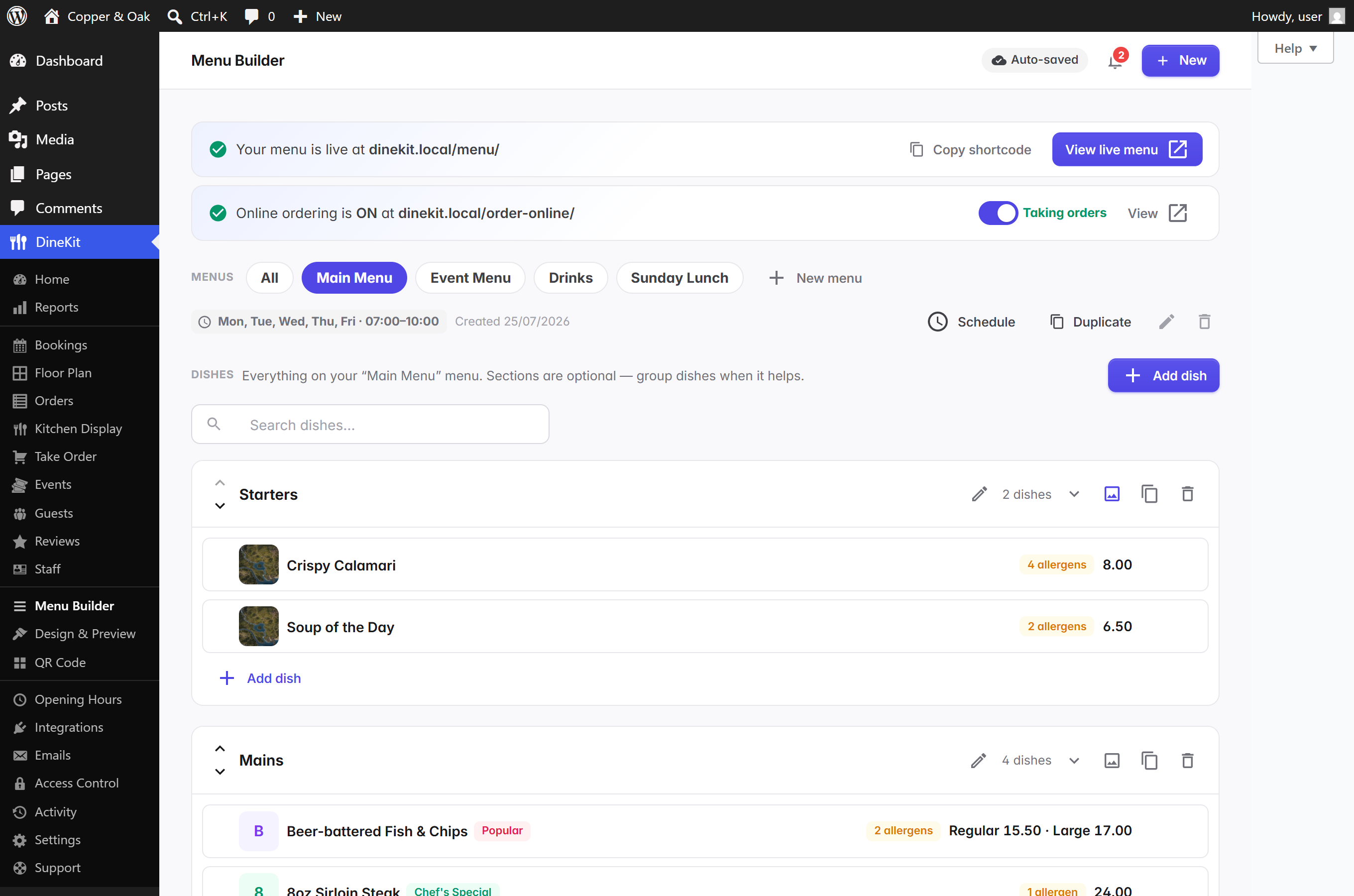
- Menu builder — menus (Lunch, Dinner, Drinks…), sections and dishes with photos, badges and multiple prices; drag-and-drop ordering with autosave.
- Seven designer templates, one click apart — each built for a venue type: Signature (the modern default), Maison for fine dining, Counter for fast-casual, Noir for evening menus and bars, Bistro, Fresh for cafés and brunch, Mono for minimalists. The Fraunces display font ships inside the plugin — no external font services.
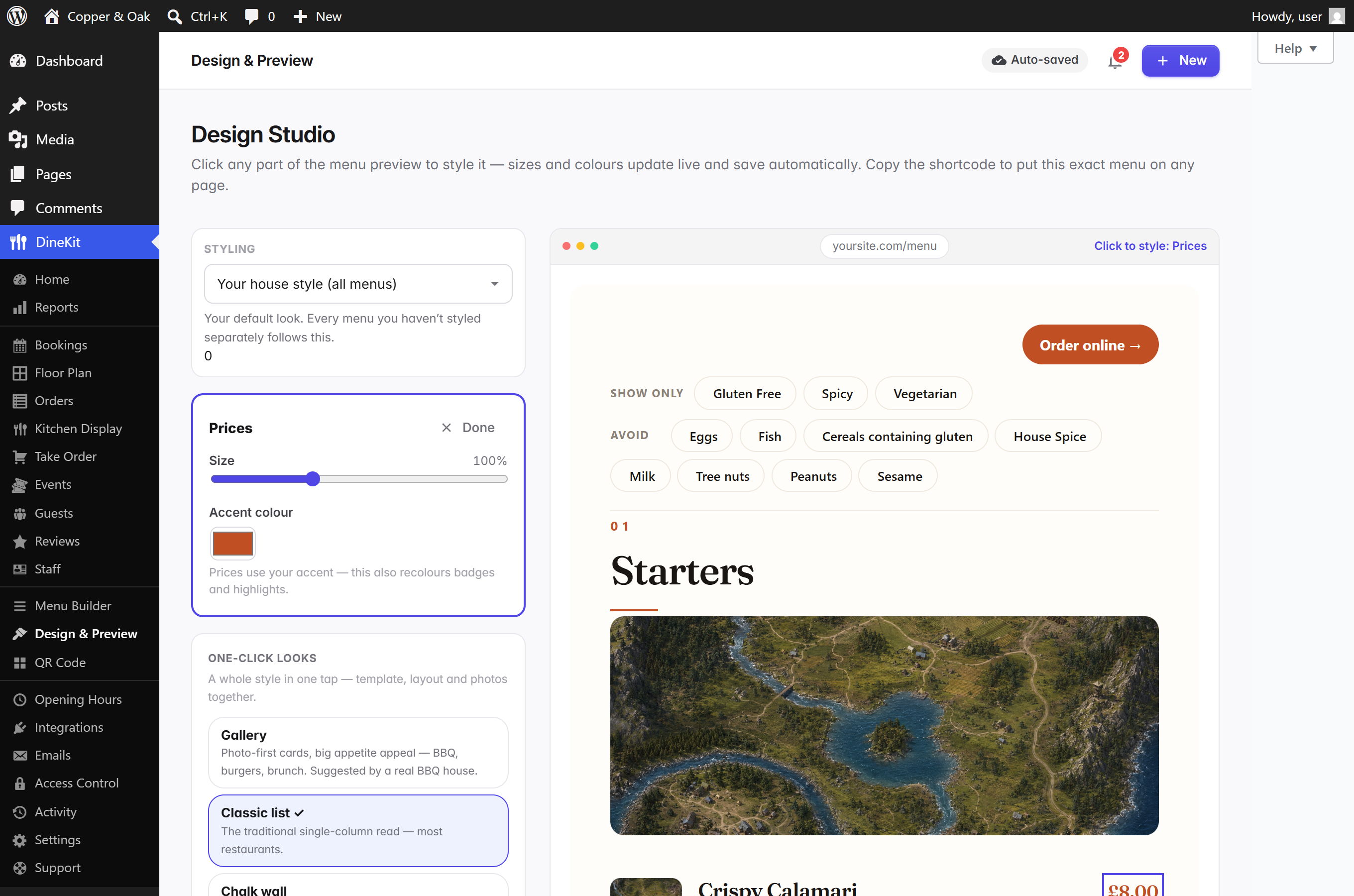
- Design Studio — click any part of the live menu preview to style exactly that element: per-element text sizes, colours and corner rounding, updating live as you drag. Your accent colour carries over to the Order Online page automatically, so everything matches your brand.
- UK-14 allergens built in — the 14 regulated allergens pre-loaded with icons, tooltips, sub-sources (e.g. "cereals containing gluten → wheat, barley") and a printable matrix (Natasha's Law friendly), plus your own custom allergens and dietary labels. Declare "may contain" traces separately — quieter badges on the menu, ± in the matrix, and diners avoiding an allergen also avoid traces of it.
- Bulk-edit in a spreadsheet — export the whole menu to CSV, tweak prices and dishes in Excel or Google Sheets, re-import to update everything at once (never duplicates).
- Costs, margins & calories — record a dish's cost to make and see its gross-profit margin (kept private), and show calories on the public menu for UK calorie-labelling.
- QR table cards and A4 posters that open your live menu on a phone, and Menu / MenuItem / LocalBusiness schema.org output for SEO.
- Opening hours with holiday overrides and a live "open now" status.
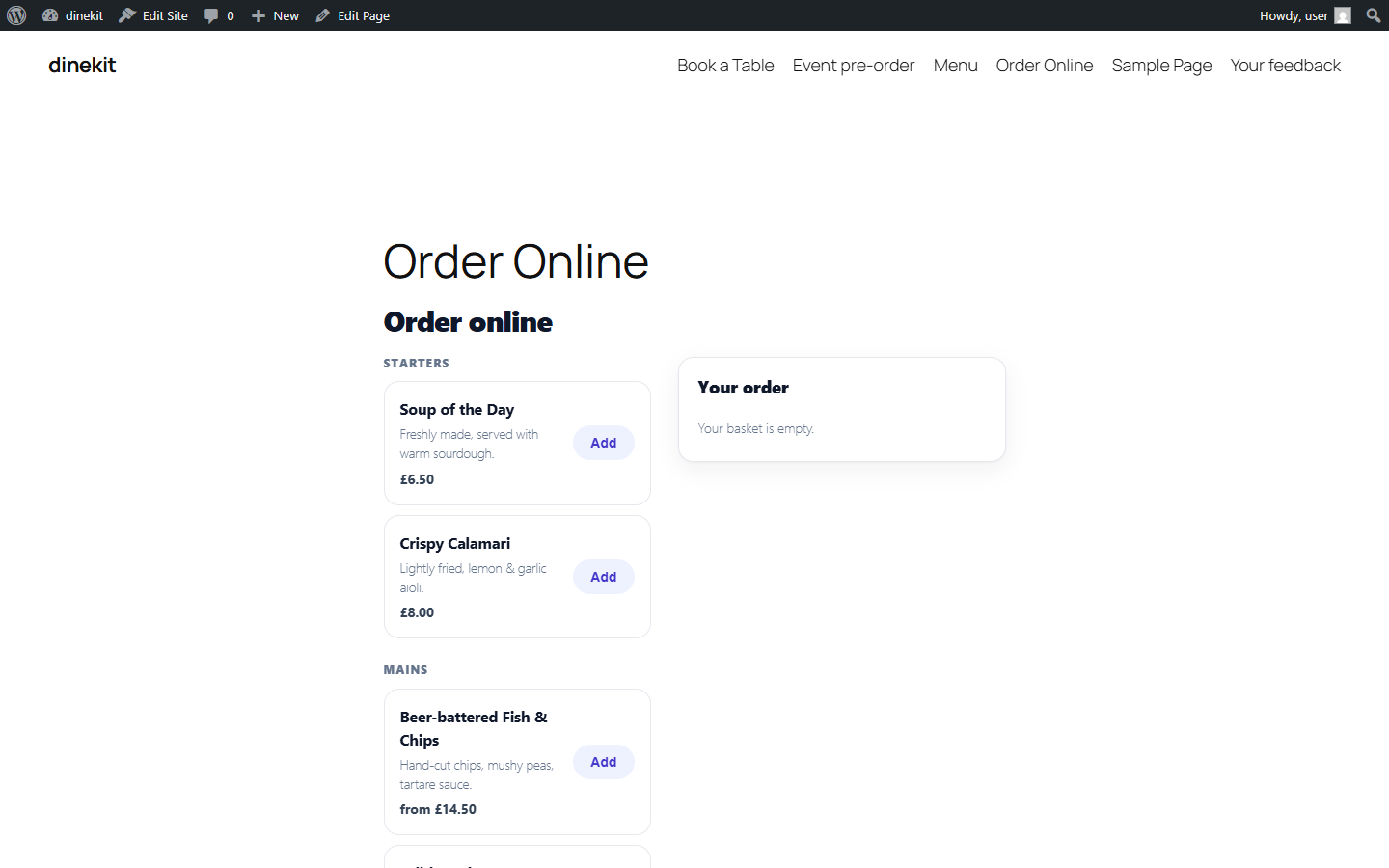
- Takeaway, collection and delivery ordering with a diner-facing menu, dish customizations (removable ingredients, choose-your-options with prices) and an accept / hold / refund workflow that only captures payment when you accept.
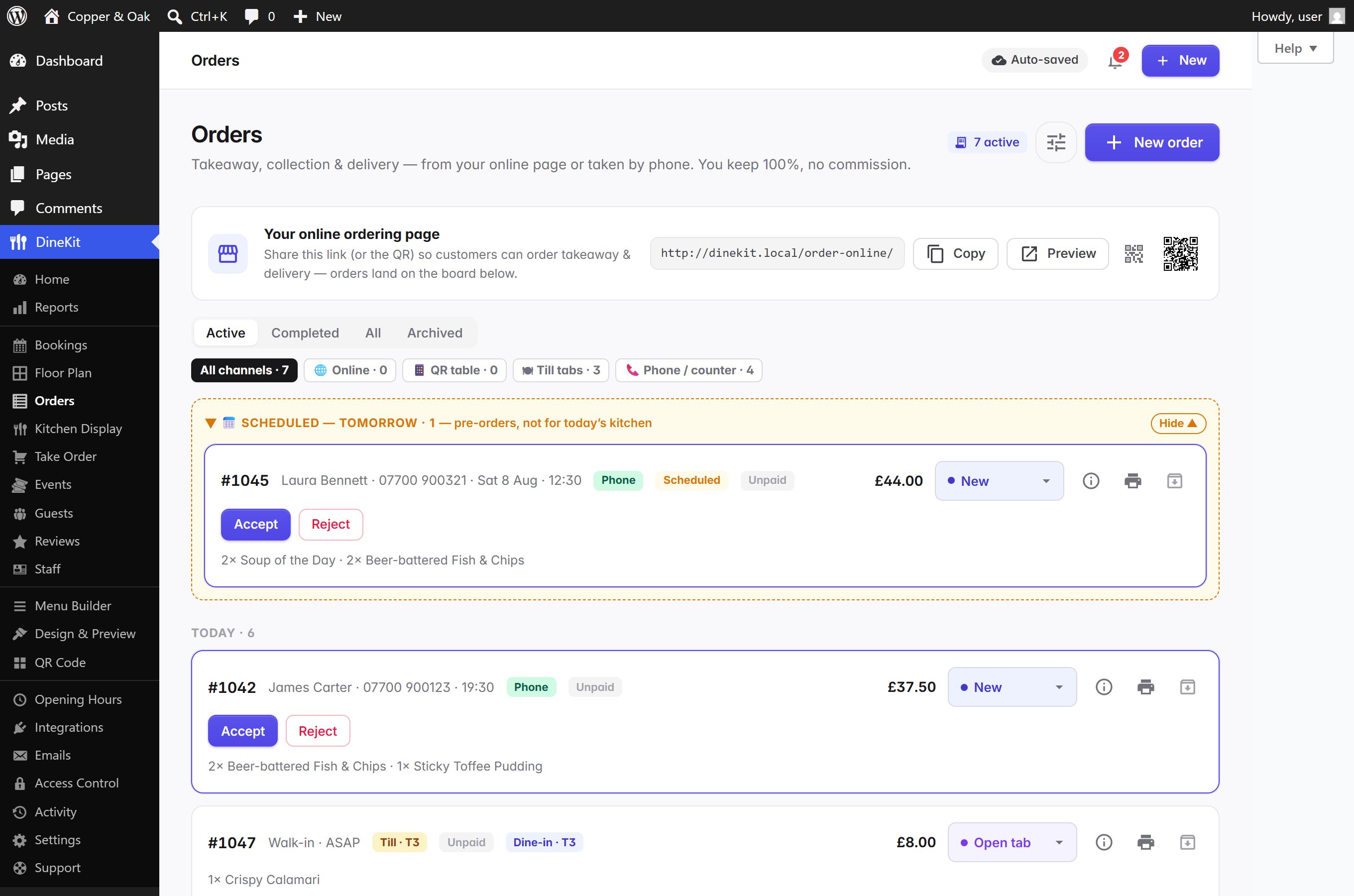
- A live orders board — new orders appear by themselves (no refreshing) with a count in the browser tab; every order carries a "where's it from" badge with a channel filter; history is day-scoped and searchable by date; phone orders are keyed in on a fast POS-style pad.
- Pre-orders days ahead — optionally let diners order for later in the week: a Day picker at checkout, only your real opening hours offered, kitchen capacity respected per day, and scheduled orders held in their own group until you accept.
- Per-slot capacity — cap how many online orders each time slot can take so a rush never swamps the pass; full slots grey out in the diner's picker.
- Contactless QR "order at the table" so diners order from their phone — straight onto that table's tab, or pay-upfront.
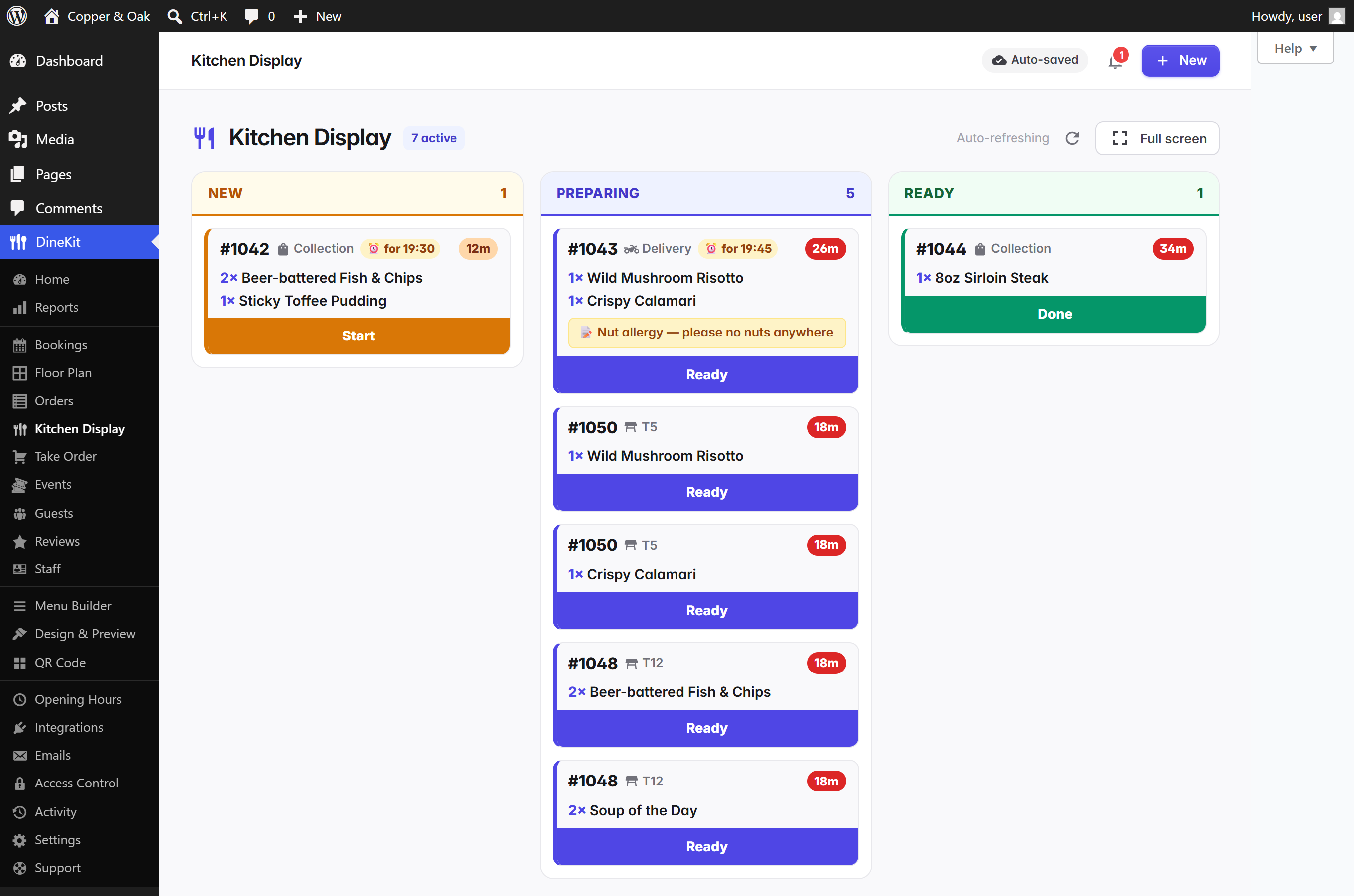
- Kitchen Display (KDS) — a live New → Preparing → Ready board for the kitchen, with per-ticket timers, item lists and notes, one-tap advance and a full-screen mode for any tablet or kitchen TV.
- Kitchen & bar ticket routing — printable tickets per station, or emailed directly to a kitchen printer on accept.
- 86 a dish in one tap — sold-out dishes stay on the menu (SEO-safe) marked unavailable and can't be ordered anywhere.
- Branded, editable email templates for order and booking notifications, with a live preview.
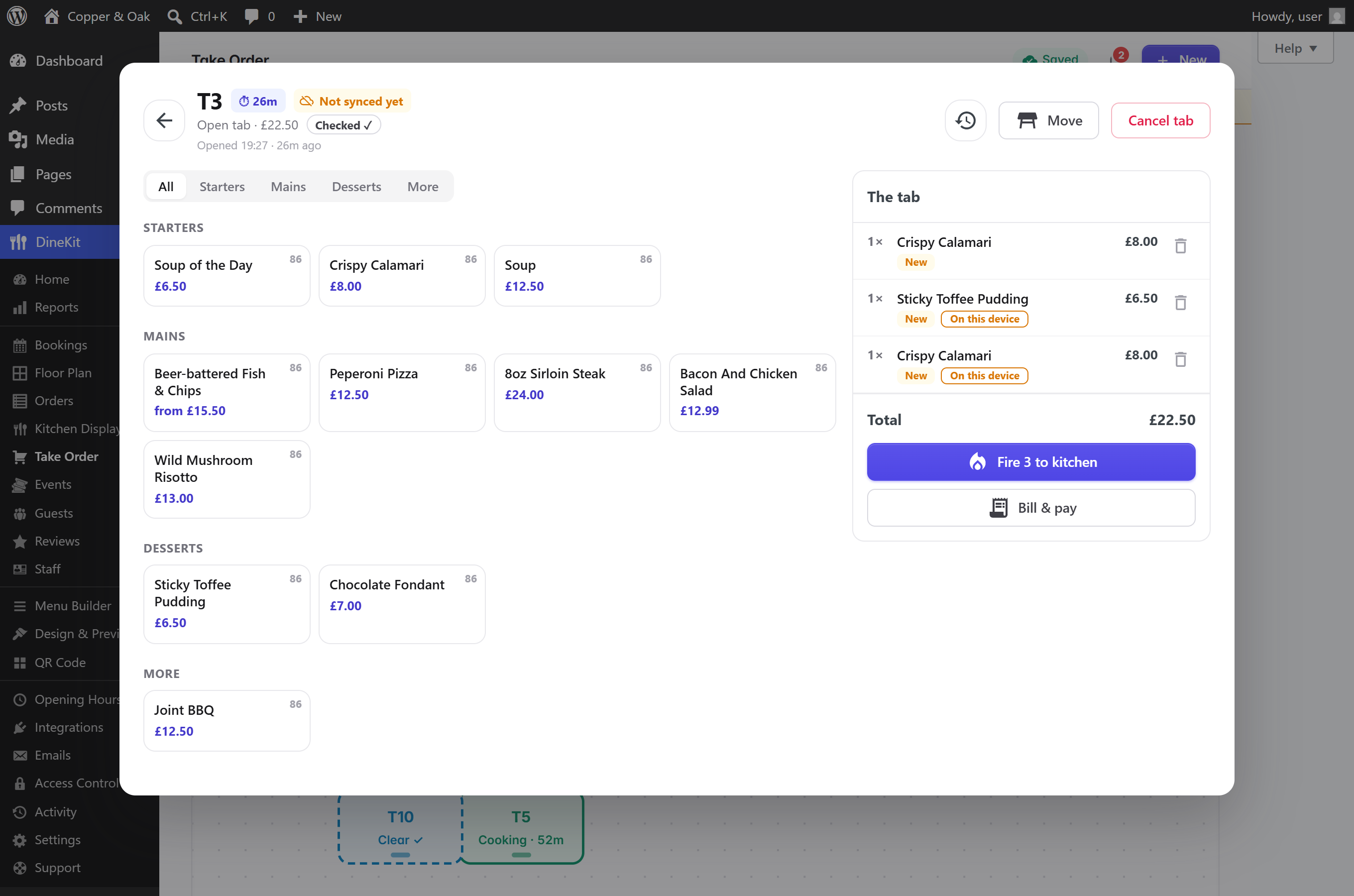
- A real POS for dine-in service, in any browser on any tablet — no proprietary hardware, nothing to lease.
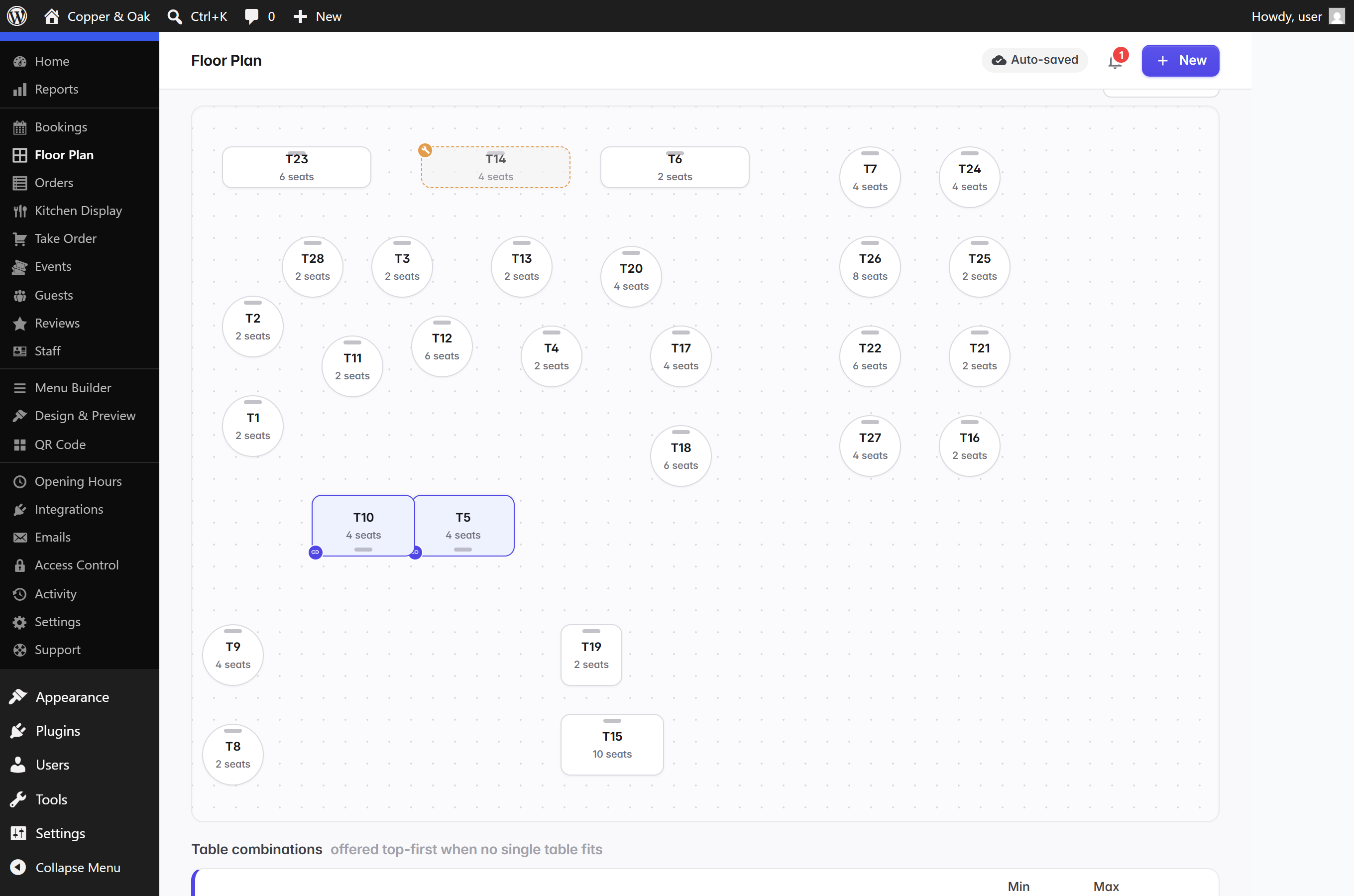
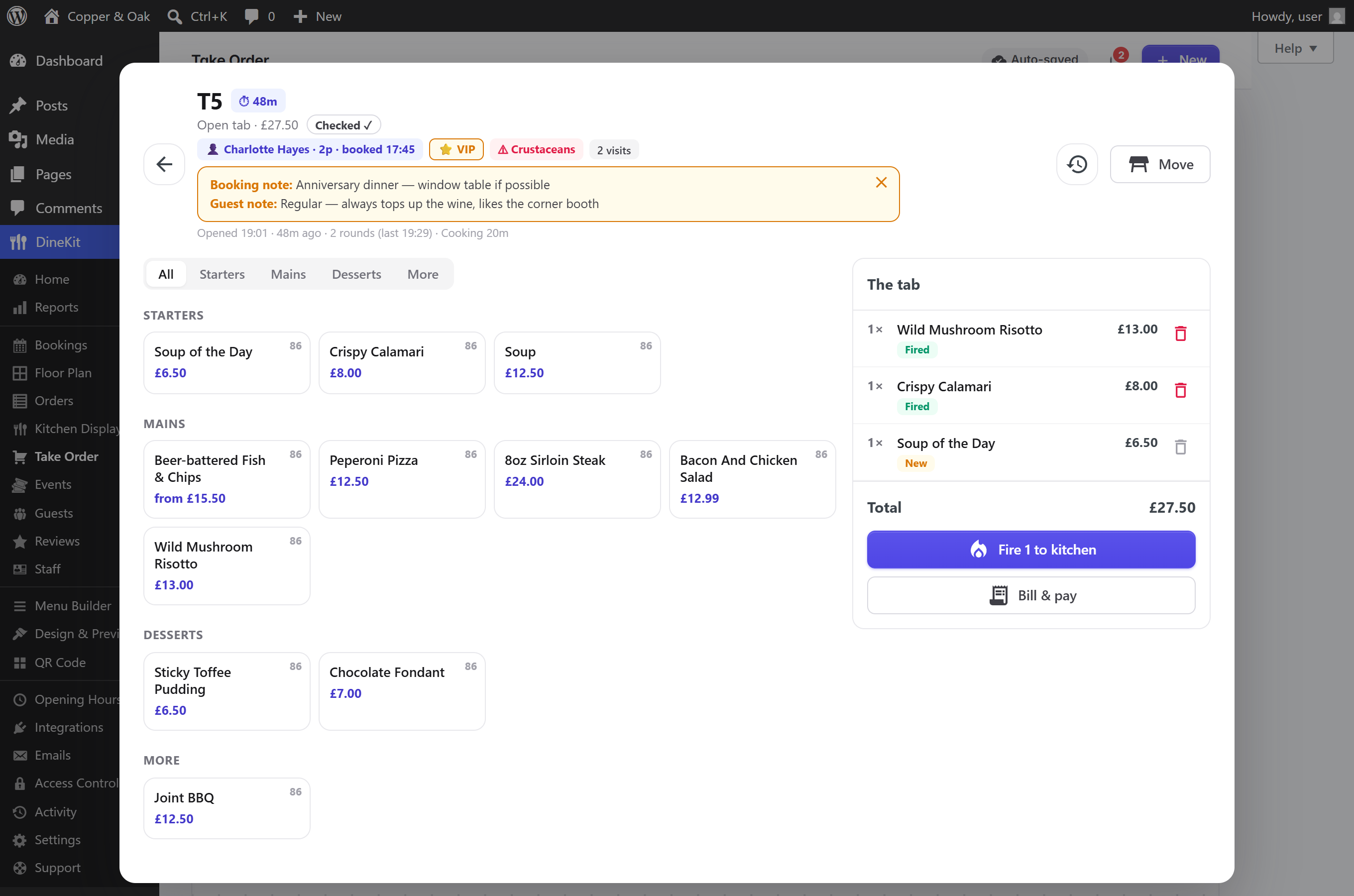
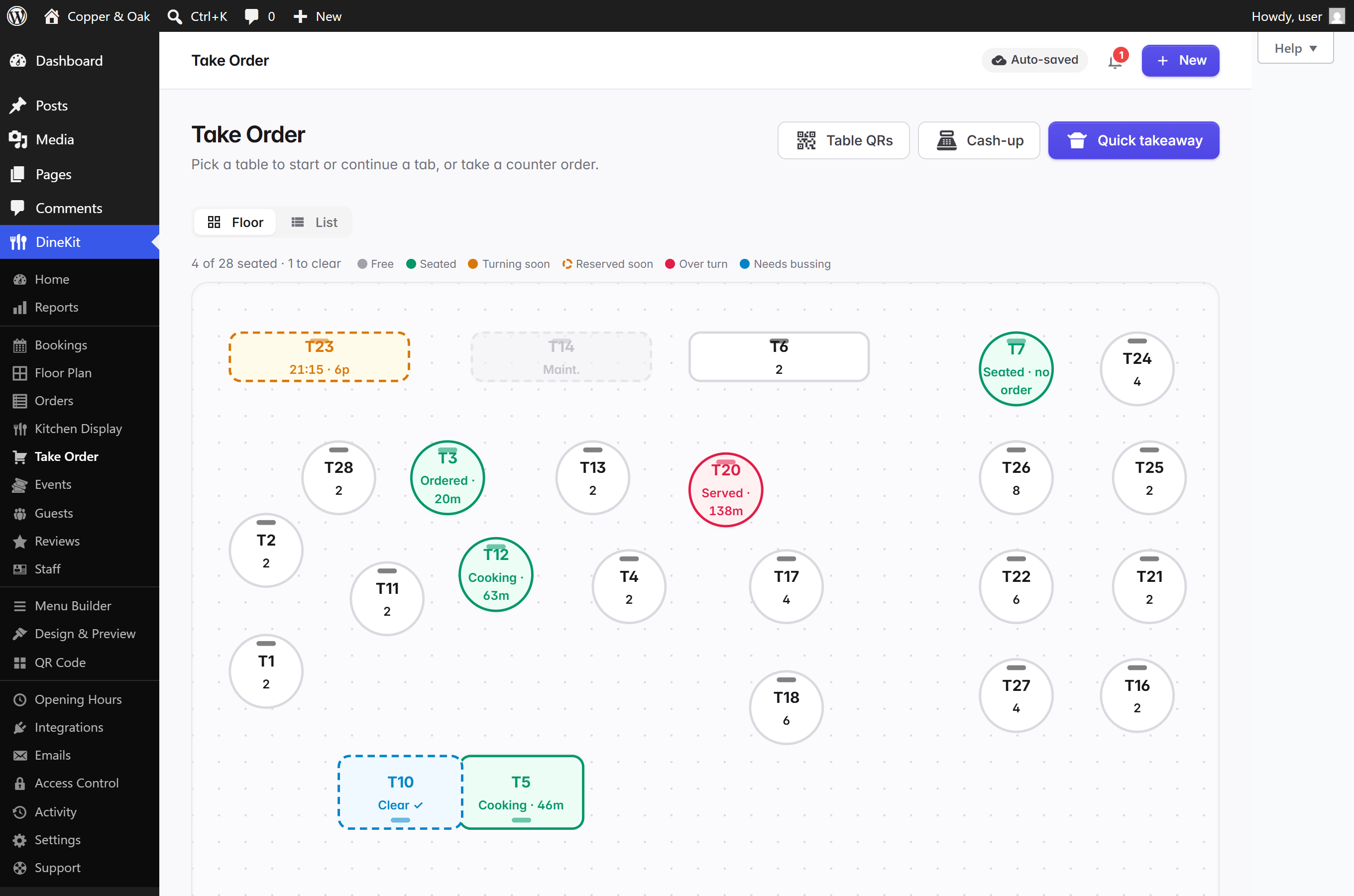
- Live floor plan that reads your diary — Take Order opens on your real room layout: every table colour-coded by how long it's been seated (green → amber → red against your turn time) with its stage (Seated → Ordered → Cooking → Served), parties seated from the bookings diary lit before they've even ordered, reserved-soon warnings on free tables ("free until 22:00"), and settled tables flagged for clearing. Starting an order on a free table books the walk-in into the diary automatically — every screen tells the same story.
- The till knows the guest — open a table and see who's sitting there: name, VIP flag, allergies, and their standing notes ("always tops up the wine"), pulled from the same guest record the diary uses.
- Tabs with coursing — build each table's order and fire courses in rounds; firing confirms exactly what's being sent and takes a ticket note ("allergy at seat 2") that shows on the Kitchen Display and prints on station tickets.
- Bill splitting — evenly, by item, or partial payments; service charge and tips.
- Every tender — cash with change calculation, card via a Stripe smart reader, pay-by-QR from the guest's phone, vouchers and comps; manager-gated voids.
- Mistakes are fixable — pressed voucher but meant cash? Wrong amount? A manager can change a payment's method in place, remove a mis-keyed payment (the tab reopens to settle correctly) or reopen a tab settled by accident — every amend logged, so the books always tally.
- Keeps working when the internet drops — carry on opening tables, adding rounds, firing to the kitchen and taking cash through an outage. Everything is held on the tablet and syncs itself the moment you're back, with nothing lost and nothing charged twice.
- Cash-up with opening float and X/Z reports at close.
- Loyalty built in — members earn points on spend and redeem them as a bill discount.
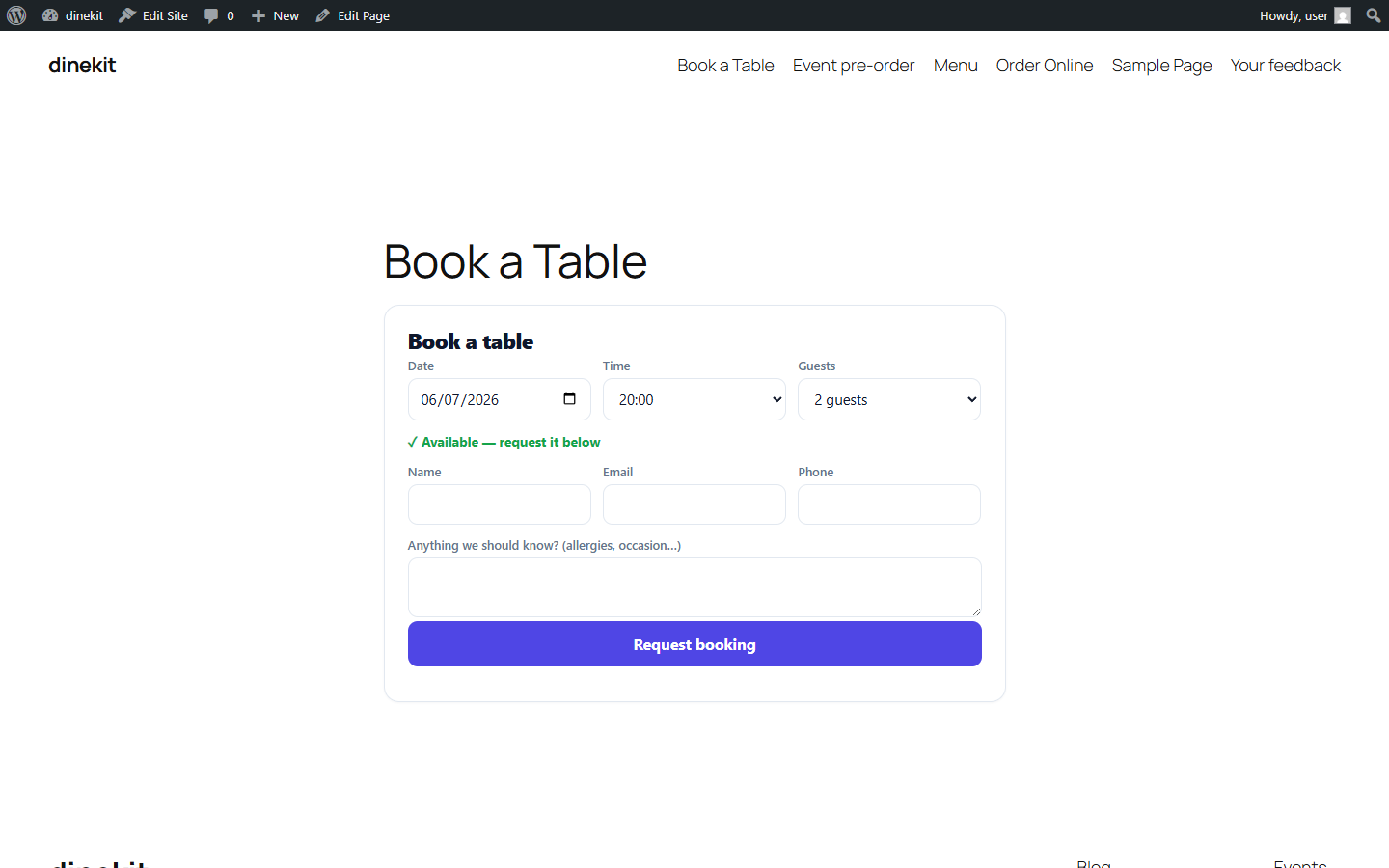
- Commission-free table reservations — take bookings on a drag-and-drop floor plan with joinable tables, via a public reservation form (block +
[dinekit_booking]shortcode) with live availability, waitlist and covers-per-hour pacing, deposits, and a booking diary with email notifications and printable slips. Repeat no-shows get a red flag so you can ask for a deposit. - Full-width service timeline — the whole service at a glance with a live "now" line and the past greyed out; drag a booking exactly where you want it, click to seat or edit. Walk-ins are a one-tap popup with the best-fit table pre-selected.
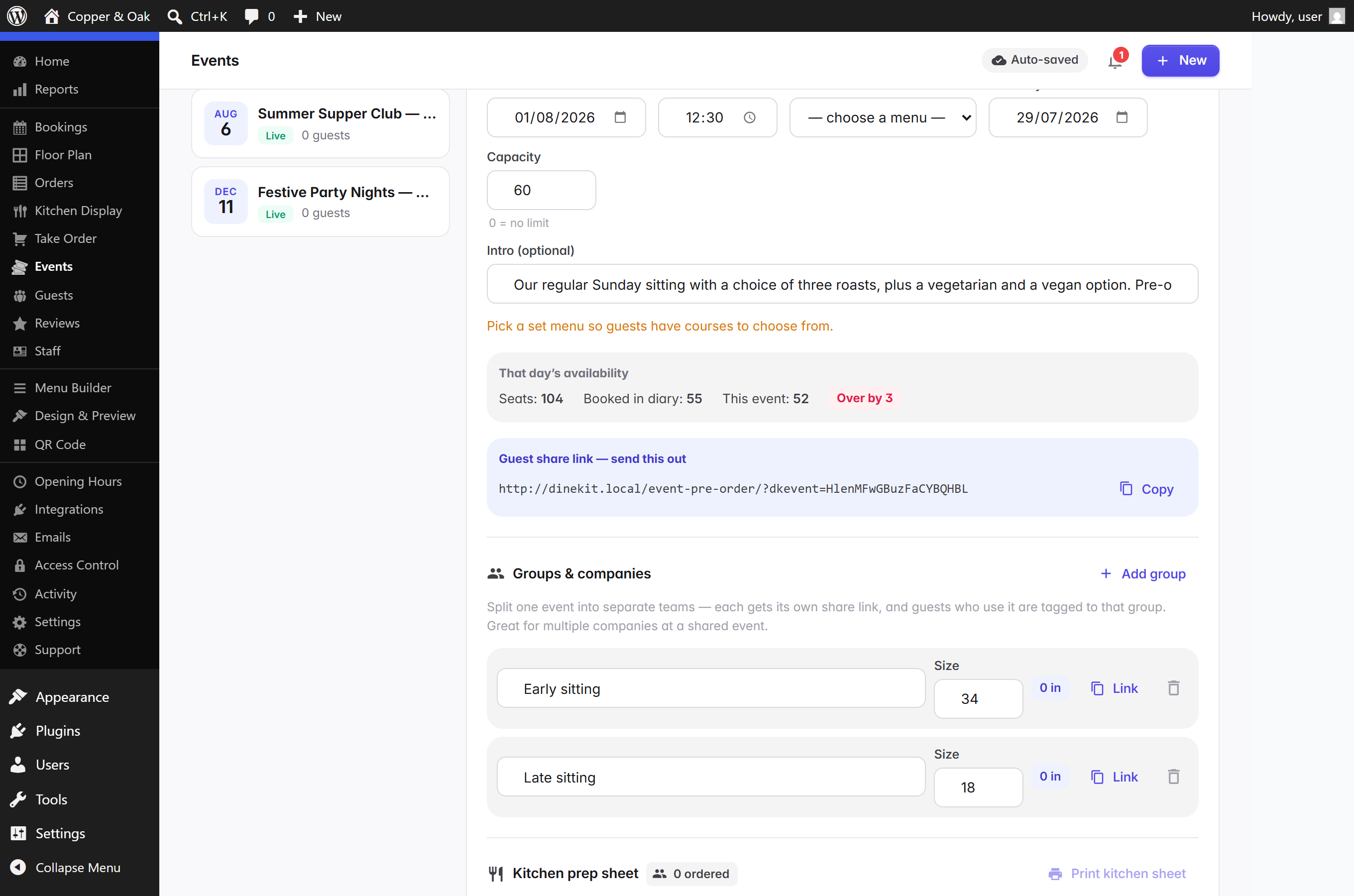
- Set-menu events with per-guest pre-orders via a share link — guests choose their courses and flag allergens; the kitchen gets a consolidated prep sheet.
- Card payments with your own Stripe keys (encrypted at rest) — booking deposits, order payments and at-the-table card-present payments via Stripe smart readers, with Apple Pay and Google Pay. You keep 100%.
- Unified guest CRM — one profile per guest across bookings, orders and loyalty: lifetime spend, visits, average order, allergies, VIP flag, service notes and past no-shows — shown on the Guests screen, on every booking, and at the till.
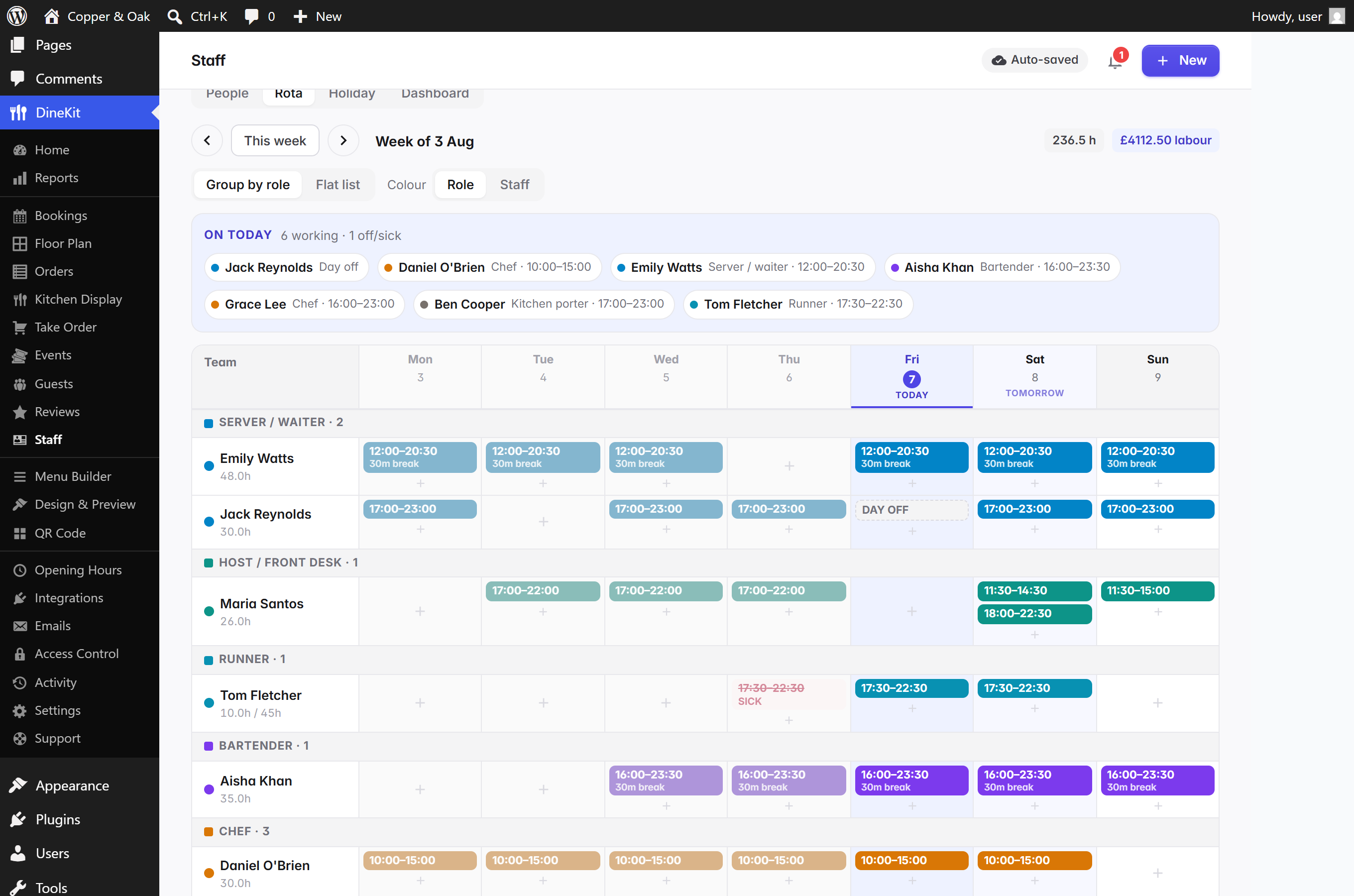
- Staff rota & labour — build the week's rota in colour-coded role bands: split shifts, automatic unpaid-break deduction, day-off and sick markers, holiday requests approved right on the rota, contracted-hours warnings and a live labour-cost total. Today and tomorrow highlight themselves; copying a day copies the whole day.
- Text messages via your own Twilio (beta) — booking confirmations, automatic reminders, "your table is ready" and "order ready for collection"; bring your own Twilio account, pay their raw prices, every switch off by default (see External Services). Write your own message wording with placeholders like {name} and {time}, with a live preview; on a paid Twilio account, UK venues can send from their restaurant's name instead of buying a number.
- Staff logins with a role-to-permission matrix and an activity/audit log, plus review-request emails to win diners back.
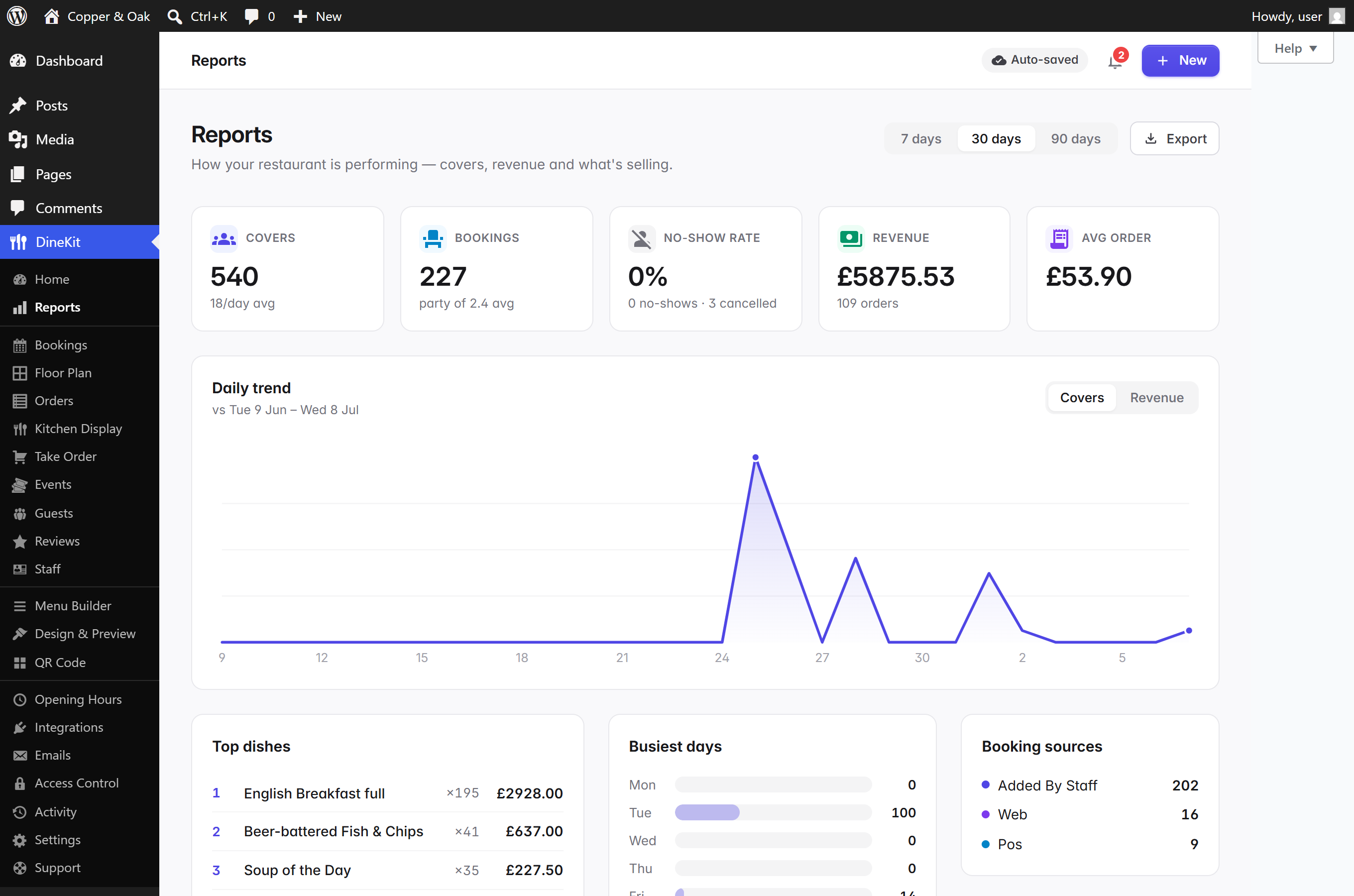
- Reports — covers, revenue, best-selling dishes and no-show rate, with CSV export.
- GDPR-ready — WordPress's Export / Erase Personal Data tools cover everything DineKit stores, with anonymised financial records kept for your accounts.
- Direct support from your dashboard — message the DineKit team without leaving WordPress (optional; see External Services).
屏幕截图:
常见问题:
Does DineKit need WooCommerce?
No. DineKit has zero dependencies.
Is it really free? What's the catch?
Everything listed above is free — the menus, ordering, bookings, the POS, loyalty, all of it. There is no feature-gating and DineKit never takes a cut of your sales. The only cost that exists anywhere is Stripe's own standard card-processing fee if you enable card payments, and that goes to Stripe, not us.
Do I need special hardware for the POS?
No. Take Order runs in any browser on any tablet, laptop or phone. For card-present payments you can add any standard Stripe smart reader (bought outright from Stripe — no leases), and kitchen tickets can print via your browser or be emailed straight to a kitchen printer.
Does DineKit take table reservations?
Yes — commission-free table reservations with live availability, deposits, a waitlist and a booking diary. Diners book from a form on your own site (block or shortcode); no third-party reservation platform, no per-cover fees, and the guest list stays yours.
Does it work with my theme?
Yes. Menu output is self-contained with its own scoped styles, and works on both block and classic themes.
How do diners see the menu?
Add the DineKit Menu block (or the [dinekit_menu] shortcode) to any page. You can also print a QR code for your tables that opens the menu on a phone.
Can diners order and pay at the table?
Yes. Print DineKit's QR table cards — diners scan, order from their phone, and their order fires straight to the kitchen on that table's tab (or they pay up front, your choice).
Who owns my data?
You do. Everything — menus, bookings, orders, guests — lives in your own WordPress database on your own hosting. There's no external account holding your customer list, and no vendor that can freeze your funds or your data.
How do I get support?
Right from your dashboard: DineKit → Support messages our team directly and replies land back in the same screen (and your inbox). Prefer not to? The wordpress.org support forum works too — we watch both.
更新日志:
- Fix: restyling no longer wipes your settings — changing anything in the Design Studio could silently reset your currency to £ and blank your restaurant address. Saving one setting now leaves every other setting exactly as it was. (Reported by a live venue — thank you, John.)
- New: DineKit now lives in the normal WordPress menu — hover it in the sidebar and every screen is there, with icons, one click from anywhere in WordPress. Inside wp-admin the app no longer draws its own second menu; what you see follows your role and business type.
- New: every menu can carry its own look — Lunch as a clean list, Christmas as a dark poster — while unstyled menus keep following your house style. The Design Studio opens with a picker: your house style, or one menu.
- New: click a section photo in the Design Studio and choose Short banner, Standard or Full image — a huge photo no longer swallows the menu.
- New: colour by badge — click a badge in the Design Studio and Seasonal, Must try and friends each get their own tone instead of all wearing the accent. On every template, including the dark ones.
- New: a pressable Save & close in the dish and team-member windows, for anyone who doesn't trust a form without one — it saves anything half-typed immediately, then closes. The team-member window also gains the Saving/Saved indicator.
- Fix: in the photo card grid, the photo now fills the top of its card edge to edge on every template, and card text sets a little tighter.
- Fix: you can change your order on a phone — checkout lines now carry minus/plus and Remove at every screen size, totals update as you tap, and what you typed into the form stays put.
- Fix: letters typed into a price box now say so ("Numbers only — like 8.50") instead of quietly vanishing on reload.
- Fix: the save message no longer shows twice on Settings — the pill in the top bar is the one voice.
- Fix: the review-request consent wording you set in Reviews now actually appears on the booking form, at the moment the email is collected — the way UK soft opt-in is supposed to work.
- New: a blank menu now starts you off instead of staring back — one screen with three ways in: add your first dish, set up Starters/Mains/Desserts in one tap, or import a spreadsheet. Search, the spreadsheet tools and the section adder stay out of the way until you have something to manage.
- New: "Add dish" follows you down a long menu — a small bar with your dish count and the button, which retires when you scroll back to the top.
- New: renaming a section is finally obvious — every group shows a pencil next to its dish count; tap it (or the name) and the field opens ready to type. Enter or clicking away saves, Esc cancels.
- New: the group of dishes that aren't in a section is now called "Your dishes" (or "Other dishes" once you have sections) instead of "Unsectioned", and it explains that naming it turns it into a real section.
- New: the dish window tells you when it's saved — "Saving..." while your typing goes in, then "Saved - safe to close". No more guessing whether you can shut it.
- New: a hello when you install — twenty minutes after switching DineKit on, your site sends you one short note from the person who builds it, with a direct address to reply to if anything doesn't work or your venue needs something DineKit doesn't do yet. One email, once, never on a staging or local copy.
- New: deactivating DineKit asks why, in one optional dialog, with an offer of help on the answers we can do something about. Nothing is sent unless you choose an answer and press send - skipping sends nothing at all, and it's anonymous unless you ask to be contacted.
- Fix: adding a dish and closing the window without typing anything no longer leaves a nameless dish on your menu and your public page - it's simply binned. Anything you did enter is still archived, never destroyed.
- Fix: sections say "3 dishes" and "Add dish" instead of "items", so the wording matches everywhere.
- New: sections can carry a photo and a video — a new photo/video button on each section in the Menu Builder puts a banner image, a short video (YouTube, Vimeo or an uploaded file), or both under that section's heading on your public menu. Suggested by a real venue running their menu on DineKit.
- New: one-click looks in the Design Studio — a preset applies a whole style in one tap (template, layout and photos together). Launching with Gallery (photo-first cards for BBQ, burgers and brunch), Classic list, and Chalk wall; more get added as real venues suggest them.
- New: the menu spreadsheet round-trip is now lossless — the CSV export gains ID, Published and Image URL columns and includes hidden seasonal dishes; the import matches dishes by ID (renames work), updates hidden dishes in place instead of duplicating them, can show/hide dishes in bulk via the Published column, and sets dish photos from image links. Importing never deletes anything.
- New: naming the "Unsectioned" group turns it into a real section — click its name in the Menu Builder, type "Starters", and it becomes a proper section with those dishes moved in.
- Fixed: dropping a dish into a section that belongs to a menu now also puts the dish on that menu — previously the menu (and its public page) could look empty until you separately ticked the menu inside the dish editor.
- Fixed: choosing 1, 2 or 3 columns did nothing on the photo-card grid — explicit column counts now apply (and still collapse politely on phones).
- Fixed: menu cards hardened against page-builder styling — on sites using Bricks, Elementor and similar builders, the card grid could lose its row spacing and the dish photo could drift from the card's top edge.
- New: the Design Studio — Design & Preview became a visual editor: click any part of the live menu preview (a section title, a dish name, a price) and style exactly that element from the panel beside it. Per-element text sizes are new, every matching element lights up so you can see what you're changing, and edits appear instantly without the preview reloading.
- New: seven menu looks, each a real use case, one click apart — every template got a designer's pass and a clear job: Signature (modern restaurants, the new default for fresh installs), Maison for fine dining and tasting menus, Counter for fast-casual, Noir for evening menus and cocktail bars, Bistro for pub classics, Fresh for cafés and brunch, Mono for minimalists. The Fraunces display font ships inside the plugin. Existing venues keep whatever template they chose.
- New: the dietary filter grew up — picking filters reads unmistakably (green tick fill for "show only", red cross fill for "avoid"), a live "Showing 8 of 14 dishes" counter answers what filtering did, and the compact dropdown style is now a proper multi-select with allergen icons (avoid milk and nuts at once), count badges and one-tap clear.
- New: Order Online wears your brand — the ordering page picks up your accent colour and corner rounding from the Design Studio automatically (your template's accent if you haven't set one), so the reading menu and ordering page finally match.
- New: write your own text messages (SMS still beta) — every SMS trigger has a "Customise message" editor showing exactly what guests receive, with placeholders like {name}, {venue} and {time}, a live preview and a counter that warns when you cross one text's worth of characters. On a paid Twilio account, UK venues can send from their restaurant's name — no phone number needed. Twilio's cryptic setup errors now explain themselves in plain English, and the in-app guide was rewritten from a real cold-start run through Twilio's current console.
- Fixed: deleting a menu section could white-screen the admin — fixed, deleting a section now asks first (its dishes stay, just ungrouped), and any future crash shows a friendly reload card instead of a blank page.
- Fixed: venues with "&" in their name were sending texts reading "&" — now decoded everywhere.
- Fixed: the opening-hours widget used to hard-code dark text and vanish on dark backgrounds — it now takes its colour from the surrounding theme.
- New: unified guest book — every guest's bookings, orders and loyalty in one place: lifetime spend, visits and average order on the Guests screen, and opening a booking shows floor staff who's walking in (VIP, allergies, visits, spend, past no-shows). The guest follows you to the till too: the order pad shows who's at the table, their allergies and their standing notes ("always tops up the wine").
- New: pre-orders — let diners order for later in the week: a Day picker on checkout (you choose how many days ahead; off by default), only real opening hours offered, kitchen capacity respected per day. Scheduled orders arrive held for your approval, sit in their own collapsible group on the Orders board, and only join the kitchen screen a configurable lead time before their slot.
- New: the Orders board is live — new orders appear by themselves with a note and a count in the browser tab; history is day-scoped and searchable by date; phone orders are taken on a POS-style pad; every order carries a "where's it from" badge with a channel filter.
- New: one venue, one read — booking statuses wear the same colours on every screen; the Take Order floor shows parties seated from the diary, warns when a free table is reserved soon ("free until 22:00"), starting an order on a free table books the walk-in into the diary automatically, and settling the bill completes it. The service timeline gains a live "now" line with the past greyed out, and drag-to-move bookings lands exactly where you drop.
- New: till fix-ups managers actually need — tap a settled tab in History to change a payment method ("pressed voucher, meant cash"), remove a mis-keyed amount (the tab reopens so it can be settled correctly) or reopen it outright; a "Cancel tab" escape hatch unwinds an accidentally opened table; clearing a settled table shows the last bill first. Every amend is permission-gated and written to the order's history.
- New: firing to the kitchen now confirms exactly what's being sent and takes a ticket note ("allergy at seat 2 — no nuts") that shows on the Kitchen Display and prints on station tickets.
- New: rota upgrades — the shift drawer edits a whole day (split shifts as stacked time blocks with overlap warnings; one save copies the whole day to other days), unpaid breaks deducted automatically on long shifts, day-off and sick markers, and the week grid highlights today and tomorrow with past days greyed.
- New: text messages through your own Twilio (beta) — booking confirmations, automatic reminders, "your table is ready" and "order ready for collection". Bring your own Twilio account (keys stored encrypted, step-by-step setup guide included), pay Twilio's raw prices, and every switch is off by default. Labelled beta while field-testing completes.
- New: "may contain" allergen labelling — declare cross-contamination traces separately from ingredients; quieter badges on every menu style, ± in the printable matrix, and diners avoiding an allergen also avoid dishes with traces of it.
- New: privacy and polish — WordPress's Export / Erase Personal Data tools now cover everything DineKit stores (erasure keeps anonymised financial records for your accounts); the translation template ships; your venue type (café, pub, bakery…) tells search engines the specific schema type; activating the plugin lands you straight in DineKit; and the "+ New" button takes a booking or seats a walk-in as a popup over whatever screen you're on.
- Fixed: a white-screen crash when typing in the booking popup (WordPress's emoji script clashing with the app); special characters (£, é, curly quotes) silently corrupted in order data; settled tables missing their "needs clearing" state or staying "seated" on the floor; and the floor now self-heals overnight — tabs and bookings forgotten on previous days close themselves.
- New: keep serving when the internet drops — the till carries on working through an outage. Open a table, add rounds, fire to the kitchen and settle up in cash exactly as normal; everything is held safely on the tablet, marked "on this device", and posts itself to your books the moment you reconnect. Nothing is lost and nothing is charged twice, even if the connection died halfway through sending. A banner shows how many changes are still waiting, so nobody closes the tablet too early. Card, voucher and comp payments are switched off while you're offline, because those need a live authorisation.
- New: bulk-edit your menu in a spreadsheet — export your whole menu to CSV, tweak prices, descriptions and dishes in Excel or Google Sheets, and re-import to update everything at once. Dishes are matched by name within each section, so re-importing updates your menu rather than duplicating it.
- New: cap orders per time slot — set how many online orders the kitchen can take in each time slot so a rush doesn't swamp the pass. Slots that are already full are greyed out in the diner's time picker, so they choose a time you can actually cook instead of being turned away at the last step.
- New: spot repeat no-shows — a guest who has failed to turn up before now gets a red flag on their booking in the diary and on their card in Guests, so you can decide whether to ask for a deposit.
- Fixed: settling a bill now flags the table as needing bussing on the floor plan. It previously never did, so a table you'd just taken payment for didn't show as needing clearing. Any payment type — cash, card, reader, voucher or comp — now marks it, and tapping the table clears it as designed.
- Fixed: buttons and toggles no longer overflow the screen edge on a phone.
- New: the staff rota now groups by role — chefs, servers, bar and so on each get their own colour-coded band, so a busy week reads at a glance (switch back to a flat list any time).
- New: build the rota faster — open a shift and copy its times onto any other days for that person in one go.
- New: approve holiday right on the rota — pending time-off requests show above the grid with one-tap Approve / Decline, and an approved day immediately flags any shift that clashes with it.
- New: contracted-hours guard — give a team member their contracted weekly hours and the rota shows each person's scheduled total, turning red when you've rota'd them over contract.
- New: menu text size — a Compact / Normal / Large / X-large control scales your whole public menu's text for wall screens or phones.
- New: choose how the menu filter and allergens display — filter as compact dropdowns instead of chips, and show each dish's allergens as icons, full text, or short codes.
- Fixed: menu colours now apply consistently on every layout. The Chalkboard layout used to force its own dark palette and ignore your colour pickers (a background change did nothing); now every layout takes its colours from the chosen template plus your overrides, so the swatches always match what diners see.
- New: Take Order now opens on your live floor plan — the exact room layout you built in Floor Plan, colour-coded live (green just seated, amber nearing your table-turn time, red over it) with a timer on every occupied table, so you can see who's in, how long they've been sat and which tables are free to seat next. It scales to fit a phone, a tablet or a big screen.
- New: Know which tables need clearing — once a bill is settled the table shows "needs bussing" on the floor; tap it when it's wiped down to mark it ready to seat again.
- New: Tapping a table opens the order pad as a pop-up over the floor and closes straight back to it — a fast, till-like flow instead of jumping to a separate screen and back.
- New: Live table timers on the open tab — how long it's been open, when it opened, how many rounds have gone to the kitchen and how long the current one's been cooking (or how long service took).
- New: A table's order history — a history button shows that table's previous settled bills (date, items, how they paid, total; tap one to see the items), so you can answer "what did they have last time?" on the spot.
- New: Live on-table timers in the booking diary too — a seated party's timer turns amber as it nears your turn time and red once it's over, so tables that need turning stand out at a glance.
- Improved: The order pad's course tabs now filter the menu to that section (Starters, Mains, Desserts…), and a tab's timeline (opened / fired / served / time-to-serve) shows right on the order screen.
- New: Install DineKit as an app on any phone or tablet — it runs from a home-screen icon, separate from wp-admin, keeps loading through a dropped connection, and many tablets stay in sync automatically (an order or booking made on one appears on the others within seconds).
- New: Kitchen Display now handles coursing properly — each round you fire is its own ticket that moves through New → Preparing → Ready on its own, so firing mains later never disturbs the starters that are already cooking, and only the new items show.
- New: Dish costs, margins & calories — record a dish's cost to see its gross-profit margin (kept private), and show calories on the public menu for UK calorie labelling.
- New: Allergen sub-sources (Natasha's Law) — pick "cereals containing gluten" then choose wheat/barley/rye…, or "tree nuts" → almond/hazelnut/walnut…; the menu then reads "cereals containing gluten (wheat, barley)". Add your own custom allergens too; the 14 legal allergens stay protected.
- New: Partial refunds — refund a whole order or tick just the items that were sent back; card via Stripe, cash recorded.
- New: Set your own service charge % right on the bill (saved as your default), and when you split, each person tips their own share.
- New: Set-menu events — edit a guest's pre-order (name, course, company) after they've submitted.
- Improved: One booking panel — click a reservation to mark arrived/seated, no-show or completed, move the table/time, add notes or cancel, all in one place; manage several bookings at once; walk-ins auto-seat at the best free table.
- Improved: Mark a dish unavailable (86) from the dish editor, prices show your currency symbol as you type, the dish editor is grouped into tidy collapsible sections, and editors open as large centered pop-ups.
- Fixed: taking a Card, Voucher or Comp payment no longer opens a stray print tab or crashes the till.
- Fixed: orders fired from Take Order now appear on the Kitchen Display, and a table's bill stays open and payable at the till until you actually settle it (the kitchen marking it done no longer closes it).
- Fixed: the event pre-order link no longer auto-picks a dish — each guest actively chooses per course.
- Fixed: walk-ins respect your covers-per-hour cap, staff are archived (restorable) instead of hard-deleted, and various confirmations are now proper on-screen dialogs.
- New: Kitchen Display. A live kitchen board that shows incoming orders as they move through New → Preparing → Ready, with a timer on every ticket, clear item lists and kitchen notes, and one tap to move an order along. It auto-refreshes and has a full-screen mode, so you can run it on any tablet or a kitchen TV.
- New: attach screenshots to your support messages. Paste an image straight into the Support screen (or pick a file) and it's added to your request — so you can show us the problem, not just describe it. Images are saved to your own site's media library; we only receive the link.
- New: set your country and restaurant address in Settings. DineKit now speaks your local language for addresses — "ZIP code" and "State" in the US, "Postcode" and "County" in the UK, "Postal code" elsewhere — across the dashboard and your delivery form.
- Better local SEO worldwide: your address now feeds Google-friendly LocalBusiness structured data (street, town/city, postal code, region and country).
- Fix: menu prices now report your real currency to search engines. Previously the menu's structured data always said GBP, even for non-UK restaurants.
- New: a notification bell in the top bar, on every screen, shows what needs your attention right now — orders to accept, bookings to confirm, your waitlist and pending holiday requests — and each one is a single click straight to where you deal with it. It only shows things you have permission to action.
- Support conversations now open at the newest message, so you don't have to scroll to see the latest reply.
- Long support threads stay light — only the most recent messages load, with a "Show earlier messages" button for the rest.
- Emoji in support messages now display correctly.
- Fix: replies from the support team now appear in your Support screen straight away. On some hosts a cache could hold an older copy of the conversation, so a reply looked like it hadn't arrived — support replies are now always fetched fresh.
- New: Support — message the DineKit team straight from your dashboard. No account or key needed: type your name, email and question; replies land back in the same screen (and your inbox). Track all your requests, reply, and mark them solved without leaving WordPress. Optional — the wordpress.org forum works too, and nothing is ever sent in the background.
- New: a "Common fixes" panel on the Support screen answers the most frequent questions (QR 404s, missing emails, Stripe test mode…) in under a minute, before you even need to ask.
- New: after your first accepted order or confirmed booking, DineKit asks (once, politely) whether you'd leave a review — fully dismissible, and "no thanks" means never again.
- Housekeeping: the review-request schedule is now cleaned up when the plugin is deactivated or uninstalled.
- Floor plan: deleting a zone now asks first and lets you move its tables to another zone (or remove them) — and if any of those tables have upcoming bookings, you can reassign each one to a free table before it goes.
- Nothing is lost: deleted zones and tables now live in a new "History" tab on the floor plan, restorable with one click.
- Joined tables are colour-matched on the plan so you can see your table groupings at a glance; a table shared by two joins blends both colours.
- Tables show a small orientation marker, so you can tell which way one faces after rotating it.
- Fixes: the "Out of service" toggle now responds wherever you click it; moving a table to another zone updates the plan straight away; the rotate button lines up with the zone selector; and the min/max party boxes are tidier.
- Smoother onboarding: the setup wizard now walks you through your opening hours, and you can skip ahead and pick up the rest from your dashboard whenever you like.
- Menu, ordering and booking pages are created as drafts for you to review and publish — with a clear "review & publish" prompt, and a checklist that only ticks a page off once it's actually live.
- Dishes are never lost: removing a dish now archives it (kept for your past orders and reports) and you can restore it any time — with a heads-up if it's on an order the kitchen is cooking right now.
- Online ordering follows your opening hours: orders are only taken while you're open, with an optional "last orders" cut-off before closing time.
- Table bookings read your opening hours directly, so your service times live in one place.
- Polish: tidier fields inside pop-out panels, your cursor stays put while typing, and assorted small performance improvements.
- Release-pipeline fix only — no plugin changes. Superseded by 1.2.2, which carries this line's content.
- Release-pipeline fix only — no plugin changes. Superseded by 1.2.2, which carries this line's content.
- Commission-free online ordering — takeaway, collection and delivery, with a diner-facing menu, dish customizations, and printable kitchen/bar tickets.
- Contactless QR "order at the table".
- Commission-free table bookings: drag-and-drop floor plan with joinable tables, a public booking form (block + [dinekit_booking] shortcode) with live availability, waitlist, covers-per-hour pacing and deposits.
- Booking diary with statuses, email notifications, and printable reservation slips.
- Set-menu events with per-guest pre-orders via a share link — guests choose their courses and flag allergens; the kitchen gets a consolidated prep sheet you can print.
- Card payments with your own Stripe keys (encrypted at rest) — booking deposits and order payments, Apple Pay and Google Pay. You keep 100%.
- Guest CRM: repeat diners with the allergies they've told you about, carried across every visit.
- Staff logins with a role-to-permission matrix and an activity/audit log; review-request emails to win diners back.
- Dynamic dish customizations (removable ingredients + choose-your-options with prices), six menu templates and colour theming.
- First public release.
- Menu builder with menus, sections and items — photos, badges and multiple prices per item, drag-and-drop ordering, inline editing with autosave.
- UK-14 regulated allergens pre-loaded with icons, tooltips and a printable allergen matrix (Natasha's Law friendly).
- Dietary labels (vegan, vegetarian, gluten free, halal, spicy — and your own).
- DineKit Menu block and [dinekit_menu] shortcode with three layouts (list, card grid, chalkboard) and 1–4 column options.
- Design & Preview screen to choose a style and copy the shortcode.
- Print-ready QR table cards and A4 posters that open your menu on a phone.
- Opening hours with holiday overrides and a live open/closed status.
- Menu, MenuItem and LocalBusiness schema.org output for SEO.
- Works with block and classic themes. No dependencies.