Dispatchable Order Verification for WooCommerce
| 开发者 | dispatchwp |
|---|---|
| 更新时间 | 2026年9月30日 23:48 |
| PHP版本: | 8.1 及以上 |
| WordPress版本: | 7.1 |
| 版权: | GPLv2 or later |
| 版权网址: | 版权信息 |
详情介绍:
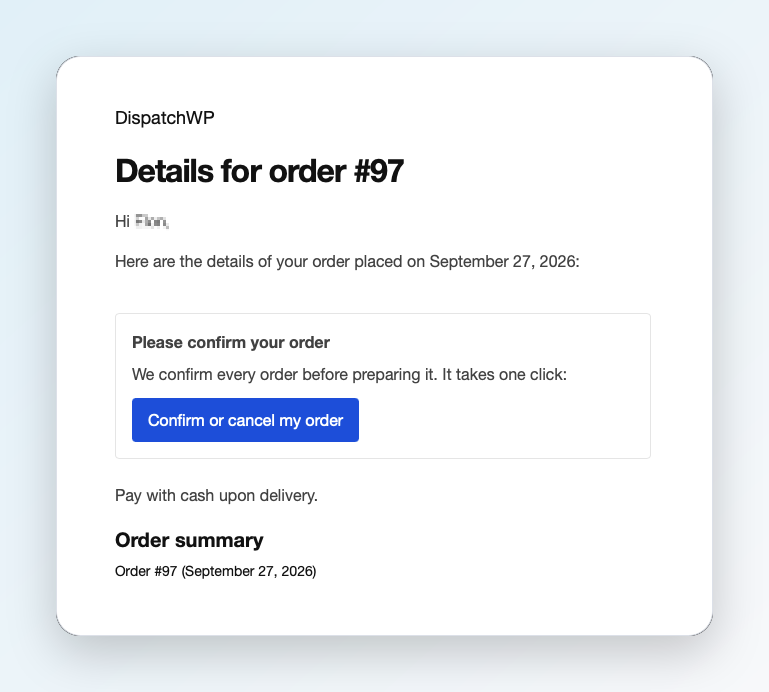
- Orders that need confirmation get a "Please confirm your order" box in the order emails WooCommerce already sends the customer, and on the order-received page. The plugin sends no emails of its own.
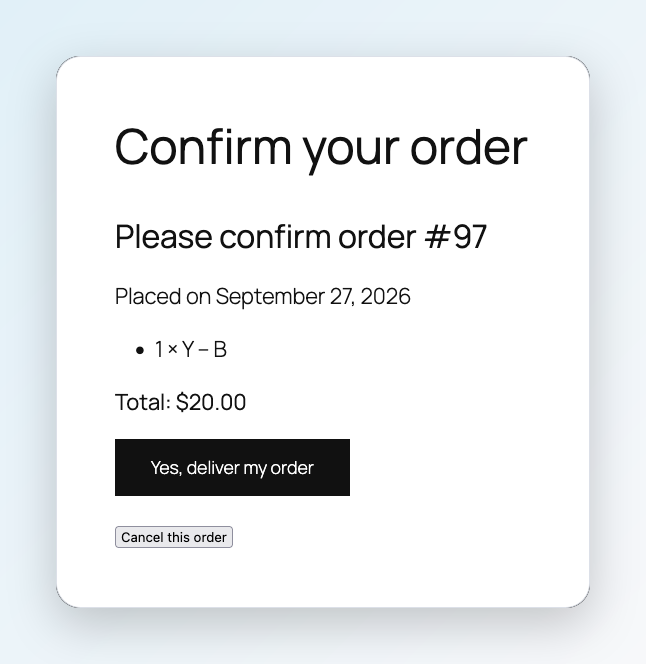
- The link opens a "Confirm your order" page on your own site (created automatically) with the order summary and two buttons: "Yes, deliver my order" and "Cancel this order".
- The customer's answer is recorded on the order. It never cancels or moves the order: you decide what happens next.
- Opening the link changes nothing. Only pressing a button does, so email security scanners that open every link can't confirm orders nobody looked at.
- Links belong to one order, are stored only as a scrambled (hashed) code, and expire after 7 days. Repeated invalid attempts are blocked for a while.
- Tap the customer's phone number to call, then record what happened: Confirmed, No answer (with an unanswered-call counter), Wrong number, or Customer cancelled.
- WhatsApp button: opens WhatsApp with your own message template, pre-filled with the customer's name, order and a fresh confirmation link. You press Send yourself. It doesn't need any WhatsApp plugin or account setup.
- Resend email: sends WooCommerce's own "Order details" email, which includes the confirmation link.
- Short private notes on each order.
- Work through selected orders one at a time.
- A second view lists orders the customer declined or you couldn't reach, so you can decide whether to cancel.
- "Mark confirmed & move to Processing" and "Cancel as unconfirmed" (with a reason and an optional note) on each order, in the queue, and as bulk actions on the Orders list. Cancelling goes through WooCommerce, which restores stock as usual.
- Optional: start new Cash on delivery orders that need confirmation "On hold", so nothing that runs on "Processing" (fulfilment, shipping messages) starts until you confirm. Off by default. WooCommerce's "On hold" email for these orders is reworded so it doesn't mention payment.
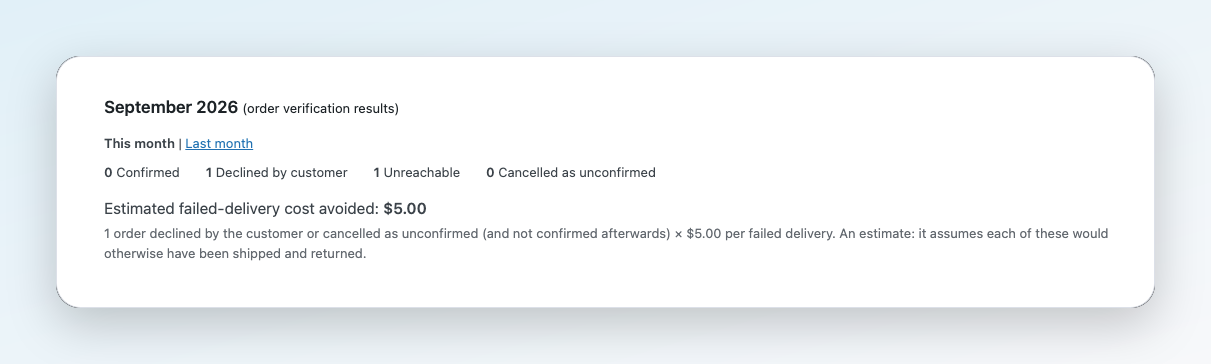
- Monthly results at the top of the queue: orders confirmed, declined by the customer, unreachable, and cancelled as unconfirmed, for this month or last month.
- Enter your average cost of a failed delivery once to see "Estimated failed-delivery cost avoided", always labelled as an estimate and shown with its formula.
- An activity log of every confirmation, call and cancellation: who did what, when, and how. Search it by order number and filter it by type.
- A short setup wizard (three skippable steps) after installation. Cash on delivery orders are covered by default, so it works even if you skip it.
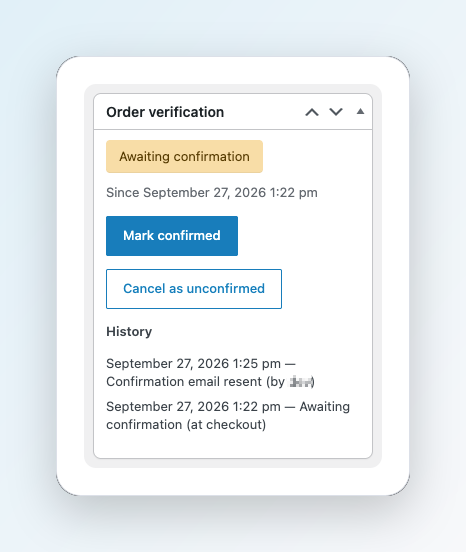
- A "Verification" column and filter on the Orders list, and an "Order verification" panel with the full history on each order.
- A Status tab that checks what order verification depends on: checkout type, the confirmation page, the activity log table, the checkout phone field, orders waiting more than 3 days and more. The same checks appear in WooCommerce > Status > System status for support.
- Classic and block-based checkout, and the block order-confirmation page.
- High-performance order storage (HPOS) and the classic posts storage.
- Classic email templates and WooCommerce's block email editor.
- Automatic confirmation request and reminder emails for orders waiting for confirmation
- Automatic order status when the customer confirms, declines or doesn't answer in time. By default, orders nobody answers are put on hold for review; cancelling them is your choice
- Customer history on each order: how the same customer's other orders ended
- A blocklist of phone numbers, emails, email domains and IP addresses, refused at checkout (classic and block checkout) or held for review
- Duplicate order detection
- Clear risk rules: trusted repeat customers skip confirmation, high-risk orders are held for review, and each order shows which signals fired
- Verification analytics: savings net of email costs, how and how fast customers answer, and CSV export
安装:
- Install and activate WooCommerce.
- In WordPress, go to Plugins > Add New, search for "Dispatchable Order Verification", then install and activate it. Or upload the plugin zip under Plugins > Add New > Upload Plugin.
- Follow the "Set up order verification" notice (three short steps), or open WooCommerce > Settings > Order verification.
- New Cash on delivery orders now appear in WooCommerce > Confirmation queue.
屏幕截图:
常见问题:
Is there a full setup guide?
Yes. See the Setup Guide. It walks through installation, every setting and screen, and the most common problems and how to fix them.
Does it send messages or cancel orders by itself?
No. The confirmation link is added to emails WooCommerce already sends. WhatsApp messages open in WhatsApp for you to send. Orders are only confirmed, moved or cancelled when someone clicks a button: the customer on the confirmation page, or you in wp-admin. If you'd like the requests, reminders and outcomes handled automatically, that's what Pro adds.
What happens when a customer taps "Cancel this order"?
The order is marked "Declined by customer" and appears in the queue's "Declined or unreachable" view. It is not cancelled automatically. You choose whether to cancel it (stock is restored) or call the customer first.
Which orders need confirmation?
By default, new Cash on delivery orders placed through your checkout. You can choose other payment methods and set a minimum order total under WooCommerce > Settings > Order verification. Orders created in wp-admin and orders placed before you installed the plugin are not affected.
Does it change my checkout?
No. Customers check out exactly as before. Confirmation happens after the order is placed.
Will it stop my fulfilment or shipping plugins?
Only if you turn on "Start new Cash on delivery orders On hold". Then those orders stay On hold until you confirm them. With it off (the default), your order flow doesn't change.
Do I need the WhatsApp Business API?
No. The WhatsApp button uses WhatsApp's standard click-to-chat link, and you press Send yourself.
Does it work with the block checkout and HPOS?
Yes, with both, and with the classic checkout and posts storage as well.
What does it store, and where?
Each tracked order's verification status, its history (answers, call outcomes, who did what), your team's notes, and scrambled confirmation-link codes. It is all in your own database, with the order and in one table of its own. Nothing is sent anywhere. Deleting the plugin removes its settings, table, page and order data.
更新日志:
- Added a link to the full Setup Guide in the description and the FAQ.
- Added the plugin's homepage link (Plugin URI).
- Added information about Dispatchable Order Verification Pro: a short "Want it automatic?" section at the end of the settings tab, and two dismissible notes on the Confirmation queue that appear only when they're relevant (a busy queue, or orders that waited more than a day this month). Developers can turn all of it off with the
dispatchwp_verify_show_pro_promptsfilter.
- First release: customer confirmation links, the Confirmation queue, merchant confirm and cancel actions, optional On hold start for Cash on delivery orders, monthly results, the activity log, a setup wizard and a Status tab.