Display During Conditional Shortcode
| 开发者 | gserafini |
|---|---|
| 更新时间 | 2026年2月6日 09:24 |
| 捐献地址: | 去捐款 |
| PHP版本: | 5.0 及以上 |
| WordPress版本: | 6.9 |
| 版权: | GPLv2 or later |
| 版权网址: | 版权信息 |
详情介绍:
[display_during end_day_time="June 27, 2018 10:00 am" message="Sorry, this content no longer available."]CONTENT_TO_DISPLAY[/display_during] into any post or page to conditionally display whatever is inside of the shortcode. The message parameter you specify will display if the start and end time parameters are not currently valid.
All shortcode parameters:
[display_during start_day_time="Sun 8:00 am" end_day_time="Mon 8:00 pm" timezone_location="America/Denver" message="Sorry, this content is not currently available."]CONTENT_TO_DISPLAY[/display_during]
start_day_time- OPTIONAL - What day/time or time of day should the contents start being displayed?end_day_time- OPTIONAL - What day/time or time of day should the content of the shortcode stop being displayed? If omitted andstart_day_timeis provided, content will be shown permanently after the start time.timezone_location- OPTIONAL - The timezone uses by default whatever is set for the site in Settings > General. You can use this optional parameter to specify a different timezone location. Uses the standard PHP timezones
安装:
- Search for "Display During Conditional Shortcode"
- Click the "Install Now" link
- Click "Activate Plugin"
- Unzip the ZIP file and drop the folder straight into your wp-content/plugins directory.
- Activate the plugin through the 'Plugins' menu in WordPress.
- Insert your
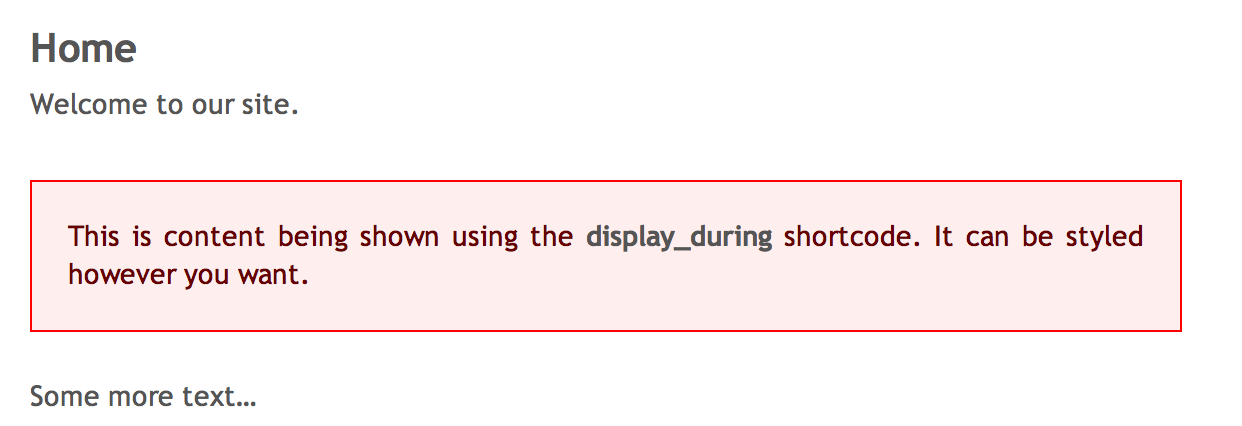
[display_during end_day_time="June 27, 2018 10:00 am" message="Sorry, this content no longer available."]CONTENT_TO_DISPLAY[/display_during]shortcode and insert the content you want to display where CONTENT_TO_DISPLAY is and put the message to display if the time isn't valid in the message parameter. - Publish and view post or page to see output.
屏幕截图:

常见问题:
What about showing something on a recurring schedule?
It’s easy to display content based on a recurring time.
Example: display content every day at a set time, from 9:00 AM to 5:00 PM:
[display_during start_day_time=“Today 9:00 am" end_day_time=“Today 5:00 pm" message=""]CONTENT_TO_DISPLAY[/display_during]
Example: Display content during a 24 hour period each week, starting Sunday night and ending Monday night:
[display_during start_day_time=“Sun 8:00 am" end_day_time=“Mon 8:00 am" message=""]CONTENT_TO_DISPLAY[/display_during]
What are valid time settings for start_day_time and end_day_time?
The plugin uses PHP's strtotime() function to decipher start and end times. You can specify either a specific start and end date (i.e. June 27, 2018 10:00 am) or you can also specify a start and end time as days of the week (i.e. start_day_time="Sun 8:00 am" and end_day_time="Mon 8:00 pm". This second method will display content starting Sunday at 8:00 am and stop displaying it the day after (Monday) at 8:00 pm. You can also use Today in place of a day if that makes sense for your application.
Either start_day_time or end_day_time (or both) must be provided. If start_day_time is omitted, now is used and end_day_time determines when to stop displaying the content. If end_day_time is omitted, content will be shown permanently after the start_day_time.
Can I show content only after a certain date?
Yes! Use start_day_time without end_day_time to show content permanently after a date:
[display_during start_day_time="June 1, 2026 8:00 am" message="Coming soon!"]CONTENT_TO_DISPLAY[/display_during]
Can I use either Visual or Text mode?
Yes. Both are supported, although if you're entering HTML / CSS as the content, you may want to edit the page using Text mode.
Is support available?
Yes, use the contact form on the ShareThePractice.org website.
更新日志:
- Feature: Support start_day_time without end_day_time to show content permanently after a date
- end_day_time is no longer required when start_day_time is provided
- Security: Sanitize all shortcode attributes with sanitize_text_field() and wp_kses_post()
- Security: Validate timezone against timezone_identifiers_list() before use
- Improvement: Rewrite date handling using DateTime/DateTimeZone objects instead of date_default_timezone_set()
- Improvement: Add try/catch for invalid date/time strings in shortcode attributes
- Coding standards: Full PHPCS WordPress-Extra compliance
- 07 Dec 2017 - Bug fix to reset timezone back to whatever it was before the shortcode runs (use requested timezone only for the date calculations, then put it back like we found it). This fixes an issue where code following the execution of the shortcode would then inherit the timezone set by the plugin.
- Public release of plugin to WordPress repository. Hello World! :)
- Initial version of plugin, internal release only