
DiviOps Agent
| 开发者 | diviops |
|---|---|
| 更新时间 | 2026年11月1日 16:31 |
| PHP版本: | 7.4 及以上 |
| WordPress版本: | 7.1 |
| 版权: | GPLv2 or later |
| 版权网址: | 版权信息 |
详情介绍:
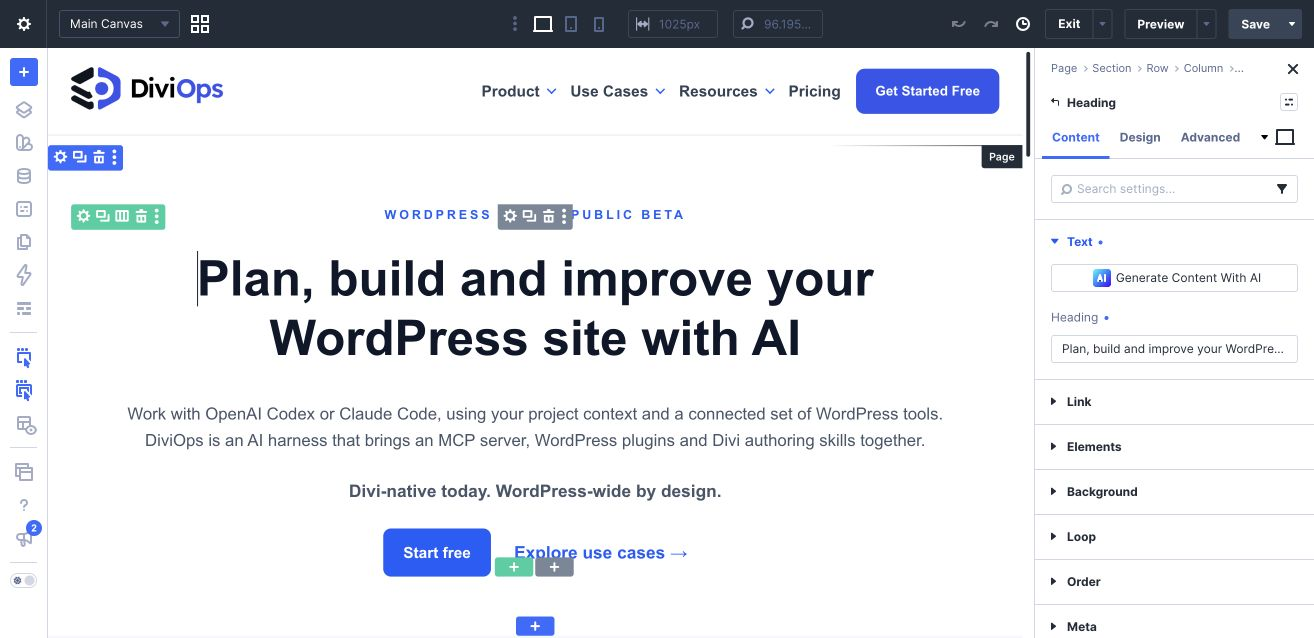
- Build and update native Divi pages that remain editable in the Visual Builder.
- Inspect module schemas and validate block structures before applying supported changes.
- Reuse your design system: inspect presets and variables, and compose supported group presets into module presets.
- Reduce preset clutter: preview an exact selection of unused presets for removal, with fresh reference checks before applying the change.
- Refine supported page backgrounds and manage named blocks of site-wide Custom CSS while preserving unrelated settings.
- Review and update a page's SEO title and description with supported Rank Math or The SEO Framework setups, including supported recovery and operation-outcome checks.
- Work with supported Divi Library and Theme Builder operations.
- Inspect site capabilities, diagnose the connected setup and use supported guarded layout restores. Layout snapshots are not full-site backups.
@diviops/mcp-server package, which is published through npm. Depending on your installation method, npx or npm may download that package from the npm registry. The MCP server then connects to your WordPress site with WordPress Application Password authentication.
Relevant external service:
- Service: npm registry, used to distribute
@diviops/mcp-server - Package: https://www.npmjs.com/package/@diviops/mcp-server
- Terms: https://www.npmjs.com/policies/terms
安装:
- Install DiviOps Agent from Plugins > Add New, or upload
diviops-agent.zip. - Activate DiviOps Agent and confirm Divi 5 is active on the site.
- Create a WordPress Application Password from Users > Profile > Application Passwords.
- Configure the separately installed DiviOps MCP server in your compatible AI client with your site URL, WordPress username and Application Password.
- Follow the setup guide to add the DiviOps authoring skills where supported, then ask your agent to inspect the site's capabilities before editing.
屏幕截图:
常见问题:
Can I use Codex or Claude?
Yes. The DiviOps MCP server connects compatible clients including Codex, Claude Code and Claude Desktop to this plugin. Client configuration and client access are separate from the WordPress plugin.
Does this plugin work without the MCP server?
The plugin can be installed and its dashboard inspected independently, but the AI workflow requires the separately installed MCP server and a compatible AI client.
Does this plugin require Divi?
Yes. DiviOps Agent targets Divi 5 today. Authenticated requests return a divi_unavailable error when Divi is not active.
Can I still edit the result in Divi?
Native Divi modules remain editable in the Visual Builder. Review your agent's output on staging, including responsive layouts, before publishing.
How are permissions handled?
All endpoints require WordPress Application Password authentication. Read endpoints generally require edit_posts, write endpoints generally require edit_pages, and administrative surfaces such as preset and variable management require manage_options. Content creation and status changes additionally require the mapped create/publish capabilities for the affected post type.
Is every DiviOps MCP tool included in this Free plugin?
No. Free includes the core site-authoring bridge described above. Selected advanced workflows require separate Pro components. The MCP server checks the capability handshake for the connected site.
更新日志:
- Reports nonempty module updates whose requested values are already stored as no-ops, without another write, cache invalidation or snapshot.
- Reports recovery as restored only when restoration is verified; an unverified restore remains a failed write. Existing permission, validation and recovery safeguards remain unchanged.
- This is a reporting correction. The historical distinct-value persistence discrepancy remains unresolved; no additional native or client qualification is claimed.
- Adds a First steps dashboard section for connecting an AI client, loading the authoring skills and reviewing a first native Divi page.
- Keeps connection and skill setup in the AI client; the dashboard does not claim an active MCP connection or completed onboarding. Existing permissions and provider version gates are unchanged.
- Adds permission-checked inspection of four literal Rank Math storage keys for one editable page, separate from computed SEO and inherited defaults.
- Distinguishes missing from empty values and refuses duplicate, oversized or unsupported storage without a partial result. Serialized values remain untrusted text, not recovery evidence or retry permission.
- Preserves existing exact-version gates for semantic reads, previews, writes and recovery. No automatic fallback or override; SCF and TSF behavior is unchanged.
- Pair with MCP 1.5.74 and restart/reconnect the client. Bounded native inspector checks passed with Rank Math 1.0.280 on WordPress 7.1, PHP 8.3.35 and Divi 5.13.1; other versions and environments are not covered by that native result.
- Displays the optional Free companion as DiviOps Visuals in the addon card, keeping its existing installation identity.
- Preserves existing capabilities, permissions and recovery behavior. The label change does not install or update the companion.
- Centralizes exact reviewed Rank Math and SCF version support and reports why a provider is unavailable, distinguishing unreviewed versions from inactive identity or missing APIs/setup.
- Aligns bounded verification evidence for Rank Math 1.0.279/1.0.280 and SCF 6.9.4/6.9.5. These are the existing supported sets; no future-version range or bypass is added.
- Preserves permission, checksum, version-drift and recovery guards. Provider-backed reads and previews remain blocked on unreviewed versions. TSF behavior is unchanged.
- Exact-set preset cleanup now accepts present SQL NULL metadata as known-empty evidence without changing stored values. Missing fields, invalid identities, references, defaults, stale checksums and scan limits still refuse.
- Includes source-reviewed support for SCF 6.9.5 and Rank Math 1.0.280 alongside the existing supported versions. Rank Math recovery remains bound to its original provider version; cross-version restore stops for inspection.
- Adds persistent conditional recovery for supported The SEO Framework title and description edits, preserving existing indexing behavior.
- Adds exact operation-outcome lookup for TSF and Rank Math text changes. Single-page authoring, validation and recovery remain Free; uncertain outcomes and conflicting later edits stop instead of being overwritten.
- Native saves, frontend text, conditional recovery and interruption checks passed for TSF 5.1.4 and Rank Math 1.0.279 in the Classic editor on WordPress 7.1, PHP 8.3 and Divi 5.13.1. Other provider versions/editors and process-death recovery are outside this qualification.
- Adds Rank Math 1.0.279 page SEO title and meta description read, set and clear, with plain-text validation, preview, fresh-checksum writes and typed recovery.
- Preserves exact absent, empty and template originals during restore; existing canonical/noindex recovery records retain later text changes. Refresh checksums after upgrading.
- Native Classic editor save/reopen, frontend output, clear/default fallback, exact recovery and permission/default-drift guards passed on WordPress 7.1, PHP 8.3 and Divi 5.13.1. Other provider versions and block-editor behavior are outside this qualification.
- Adds The SEO Framework 5.1.4 canonical URL set/clear and noindex set/reset-to-default for pages, with previews, fresh indexing checksums and typed operation recovery. Other robots directives retain their inheritance.
- Preserves absent numeric provider defaults during writes and refreshes the provider sitemap after updates and restores. TSF retains custom canonical URLs under noindex while suppressing generated canonical output.
- Native Classic editor save/reopen, exact empty/zero/force-index recovery, frontend output, sitemap restoration, homepage precedence and permission/default-drift guards were verified on WordPress 7.1, PHP 8.3 and Divi 5.13.1. Other TSF versions and block-editor behavior are outside this qualification. Existing title/description operations remain unchanged.
- Adds Rank Math 1.0.279 canonical URL and noindex tools for pages, with previews, fresh-checksum writes and typed recovery snapshots. Preserves other robots directives and refreshes the provider sitemap after updates and restores.
- Requires completed Rank Math setup and page/metadata permissions. Update Free Agent and MCP together, then restart the MCP server. Rank Math suppresses canonical output on noindex pages; external caches may require separate refresh.
- Native Classic editor save/reopen, frontend output, primed sitemap exclusion/restoration and recovery were verified on WordPress 7.1, PHP 8.3 and Divi 5.13.1. Block editor and other Rank Math versions are outside this qualification. The SEO Framework continues to support title/description only.
- Adds named site-wide Custom CSS blocks with previews, fresh-checksum writes and seven-day recovery snapshots. Preserves unrelated CSS and theme options; restores use the dedicated CSS tool.
- Initialize or reconcile through Divi > Theme Options > General > Custom CSS, save visibly, then read again. Missing or divergent storage is refused; no automatic repair. CSS support is bounded and scoped to the active theme.
- Pair with MCP 1.5.68 and restart the server. Native editing, frontend rendering, recovery and child-theme isolation were verified on WordPress 7.1, PHP 8.3 and Divi 5.13.1.
- Variable scans now report incompatible legacy non-color IDs, whether they are defined, and their known page/preset references. Scan coverage and truncation are explicit. Existing orphan and unused classifications are unchanged. Native page-usage detection is not proof of successful frontend rendering.
- Existing mixed-case or underscore IDs still need reviewed replacement variables and reference updates. No variable is renamed or deleted automatically; zero known references does not establish that deletion is safe.
- Pair with MCP 1.5.65.
- Read and update page-wide Content Area and Section backgrounds on ordinary Divi pages. Supports previews, literal colors, transparency and clearing to native defaults, with checksum checks and preservation of unrelated page data. Explicit per-section backgrounds remain intact.
- Pair with MCP 1.5.64. Native checks covered WordPress 7.1, PHP 8.3 and Divi 5.13.1; public builder remains 1.4.11.
- Supports registered third-party Divi modules in module read/update/move, Theme Builder block insertion and runtime schema discovery. Namespaced extension identifiers are preserved; unrelated WordPress blocks remain refused and the native schema dump remains native-only.
- Use MCP 1.5.63 with Free Agent 1.5.36 for the complete correction. Native checks covered FluentCart Store Logo, not every extension or version. Public builder remains 1.4.11.
- Identifies the first failing post or metadata row when exact-set preset deletion cannot establish complete reference evidence. Diagnostics include valid record IDs and a bounded failure reason without exposing stored content. Preview and apply keep the same deletion safeguards; no content is repaired automatically.
- Links empty header/footer inputs to the active enabled default template’s existing layouts when creating a Theme Builder template, preserving region enabled states. Preview and apply report resolved sources. Missing defaults use explicit native-theme fallback; invalid inheritance is refused before changes. Existing templates are not automatically repaired.
- Initializes Builder enablement and page-compatibility metadata on newly saved Divi Library items. Existing library items are not automatically repaired; content, layout type and scope behavior are unchanged.
- Rejects plain strings at button.innerContent.desktop.value across Divi modules, including Contact Form and Login, with the existing button_innercontent_string error. Valid text objects and standalone Button styling checks are unchanged.
- Preserves header, body and footer layouts referenced by other templates when trashing or permanently deleting a Theme Builder template. Preview and apply report retained layouts; failed reference checks stop before changes. Unshared layout cleanup is unchanged.
- Adds native group-preset composition to module preset create/update and exposes stored links in inspection. Omitted links are preserved; an explicit empty map clears them. Use MCP 1.5.58 and reconnect to refresh capabilities.
- Clarifies heading warnings: choose explicit levels according to document hierarchy. Typography and warning detection are unchanged.
- Generates lowercase IDs for new non-color design variables compatible with Divi's detector; refuses invalid supplied IDs instead of silently renaming them.
- Leaves existing variable IDs and references untouched. Existing permissions and compatibility requirements are unchanged.
- Repairs explicit-index updates of canonical empty native Text modules; empty update requests remain no-ops.
- Marks Inspector consumer coverage unavailable when reads fail or omit requested posts. Partial results do not imply a complete scan or safe deletion.
- Existing capabilities and compatibility requirements are unchanged.
- Adds real preset-deletion previews and guarded exact-ID set deletion with a required registry checksum and fresh bounded reference checks. Legacy single-ID deletion retains its default-only guard; exact-set checks cannot be bypassed with force.
- Preserves literal pseudo-escapes inside native Code content strings while sharing serialization checks between validation and writes. JSON and block delimiters must remain valid.
- Preserves valid empty page content in uncached reads instead of treating it as unavailable, including guarded write readback.
- Adds optional bounded page-content reads with UTF-8-safe chunks and a full-content checksum required for continuation. Content drift refuses continuation rather than mixing versions.
- Updated MCP servers check the precise bounded-read capability before fetching a page from an older plugin. Default reads, authentication, permissions, writes and compatibility requirements are unchanged.
- Bounds returned chunks, not upstream memory use: each request still reads and hashes the full content. This is not a snapshot service or a guarantee for every client.
- Adds a read-only Design System dashboard for existing presets, variables and sampled consumers, with explicit partial coverage and unresolved references.
- Exposes direct variable-reference IDs in preset inspection. Zero references do not mean safe to delete; stored settings are not computed styles.
- Accounts for supported preset-provided container layout settings in validation warnings, preserving inline precedence and unresolved-reference warnings. Write behavior and compatibility requirements are unchanged.
- Corrects the Setup Guide book icon's vertical alignment in the DiviOps dashboard on WordPress 7.1.
- Presentation only; existing behavior and compatibility requirements remain unchanged.
- Adds basic Free updates for one existing SCF 6.9.4 top-level text field, with preview by default, expected-state checks and persisted readback.
- No atomic CAS, SCF snapshot rollback or full native-form equivalence; existing Divi bindings/design are not authored.
- Shows unloaded optional add-ons as Not active and places read-only snapshot history after the component overview, collapsed by default with its count visible.
- Adds internal protected-restore support: capture the current layout before restoration, verify the recovery point against the actual after-state, and allow at most one bounded recovery attempt on failure.
- Keeps basic snapshot inspection and guarded restore Free. Direct Free restore behavior is unchanged; this adds no public tool, restore UI or full-site backup.
- Refreshes the scoped native WordPress admin dashboard with a clearer installed-component overview and expandable read-only snapshot metadata.
- Preserves existing access and compatibility requirements. Displayed status does not verify MCP connectivity; snapshots are not full-site backups.
- Supports standard WordPress Posts alongside Pages through the existing status endpoint.
- Preserves mapped edit and applicable publish permission checks before dry-run plans and no-op responses. Custom post types and attachments remain unsupported; scheduling is not expanded.
- Fixes native module updates that were refused when WordPress canonically escaped HTML inside unchanged module attributes.
- Uses the existing canonical serializer for the selected module while preserving strict content integrity, backups and rollback behavior.
- Adds bounded source/target evidence and prerequisite checks for an existing native staff-detail Theme Builder body through the cross_env_staff_body_evidence capability.
- Keeps inspection and preflight Free; applying the reviewed body design requires Pro staff-body support. Target records, field definitions and template assignments are not created or changed.
- Bridges changed Pro body writes to the existing Free recovery store; dry-run and already-converged requests create no snapshots. This is not general body migration or arbitrary custom-field mapping.
- Adds optional body layout content to the existing Theme Builder template-creation operation, including the new body's ID and template link.
- Checks body create/publish permissions and combined layout-content limits before dry-run planning or writes, using the existing core sanitization path.
- Advertises body support through the precise tb_template_create_body capability. Updated MCP clients refuse nonempty body requests against older plugins; omitted or empty body content preserves existing behavior.
- Creates the requested layout without a global Theme Builder save or unrelated legacy-template cleanup.
- Adds an optional exact-checksum guard to full-content page updates, including a fresh pre-write read that refuses concurrent page drift before mutation.
- Advertises exact-checksum enforcement separately from the legacy unconditional writer so clients can gate checksum-dependent workflows through the capability handshake.
- Enables receipt-owned Pro workflows to bind reviewed page content to the guarded Free write path while preserving legacy behavior when the optional checksum is omitted.
- Restores the advertised PHP 7.4+ compatibility by moving constants out of traits, preventing fatal activation errors on PHP 7.4 through 8.1.
- Preserves the existing Divi Post Filter compatibility repair and authoring input limits without changing their behavior.
- Adds cumulative input, block, nesting and string limits before full-content dry-run plans or writes, including combined Theme Builder layouts.
- Keeps native-first authoring with intentional custom HTML and preserves existing permissions, sanitization and operation-specific backup/readback safeguards.
- Confirms compatibility with WordPress 7.1 and updates the WordPress.org compatibility metadata.
- Keeps the MCP server, capabilities, REST behavior, and Free/Pro boundary unchanged from 1.5.12.
- Repairs the exact affected Divi 5.10/5.11 Post Filter product-price permission callback while preserving its route-specific nonce and editor authority boundary.
- Preserves exact upload-path provenance for reviewed cross-environment media matching, including custom upload locations and root-level files.
- Rejects ignored legacy Link-module attribute paths and fails closed when the canonical SEO provider plugin directory is unavailable.
- Adds stronger handshake and target-identity evidence for connected MCP health diagnostics while preserving the existing direct MCP and WordPress REST workflows.
- Enforces request-aware create and publish permissions before page status plans or mutations, including fixed-publish Canvas, Divi Library, and Theme Builder creation paths.
- Hardens access to Divi-owned global variable and preset registries without changing their storage keys or behavior.
- Adds provider discovery plus guarded get, set, and clear operations for explicit The SEO Framework title and description metadata on one editable post.
- Adds dry-run, checksum drift refusal, exact no-op, provider readback, lifecycle/cache evidence, and request-local rollback verification for supported metadata changes.
- Keeps the SEO surface semantic and explicit-metadata-only: generic postmeta and automatic Divi, dynamic-content, or Theme Builder description extraction are not included.
- Extends read-only cross-environment source and target evidence to existing Theme Builder headers and footers when the connected capability supports footer evidence.
- Adds metadata-only local storage sequence evidence so Pro retention workflows can order same-second rollback snapshots safely without exposing stored payloads.
- Keeps basic one-site snapshot capture, list, get, delete, dashboard inspection, and guarded restore in Free.
- Adds a guarded preset-registry doctor for diagnosing and repairing duplicate or stale preset registry entries.
- Improves nested module moves with a parser-backed fallback when direct block parsing cannot preserve the requested placement.
- Rejects foreign CSS variable references recursively across supported Divi content and design writers.
- Adds guarded rollback snapshots for Divi content writes, including snapshot list/get/delete surfaces and restore support with checksum drift checks.
- Adds dashboard-ready rollback snapshot inspection data for operator review before restore.
- Keeps restore operations protected by readback verification and cache invalidation evidence.
- Adds typed WordPress menu tools for creating menus, adding page/custom-link items, reading normalized menu trees, and assigning registered theme locations through the DiviOps capability handshake.
- Adds safer FluentCart 1.5 Advanced Variations read support for attribute metadata inspection while continuing to refuse unsupported write shapes.
- Adds read-only post taxonomy term inspection through the sanctioned WP-CLI fallback path.
- Adds richer DiviOps preflight metadata for the MCP server, including plugin version records used by
diviops_meta_info. - Keeps authenticated DiviOps REST endpoints and capability handshake support aligned with the current MCP server release.
- Keeps
Stable tagaligned with the plugin header version.