
DokumentenPilot - Delivery Notes, Quotes & Credit Notes for WooCommerce
| 开发者 |
lernmitki
moduldeck |
|---|---|
| 更新时间 | 2026年4月16日 02:34 |
| PHP版本: | 8.0 及以上 |
| WordPress版本: | 6.9 |
| 版权: | GPLv2 or later |
| 版权网址: | 版权信息 |
详情介绍:
- Delivery Notes – Including partial delivery notes: select which items and quantities are shipped per parcel, and DokumentenPilot tracks the delivery status automatically
- Quotes / Estimates – Create quotes, generate a PDF, send it to the customer, and convert it to a WooCommerce order with one click
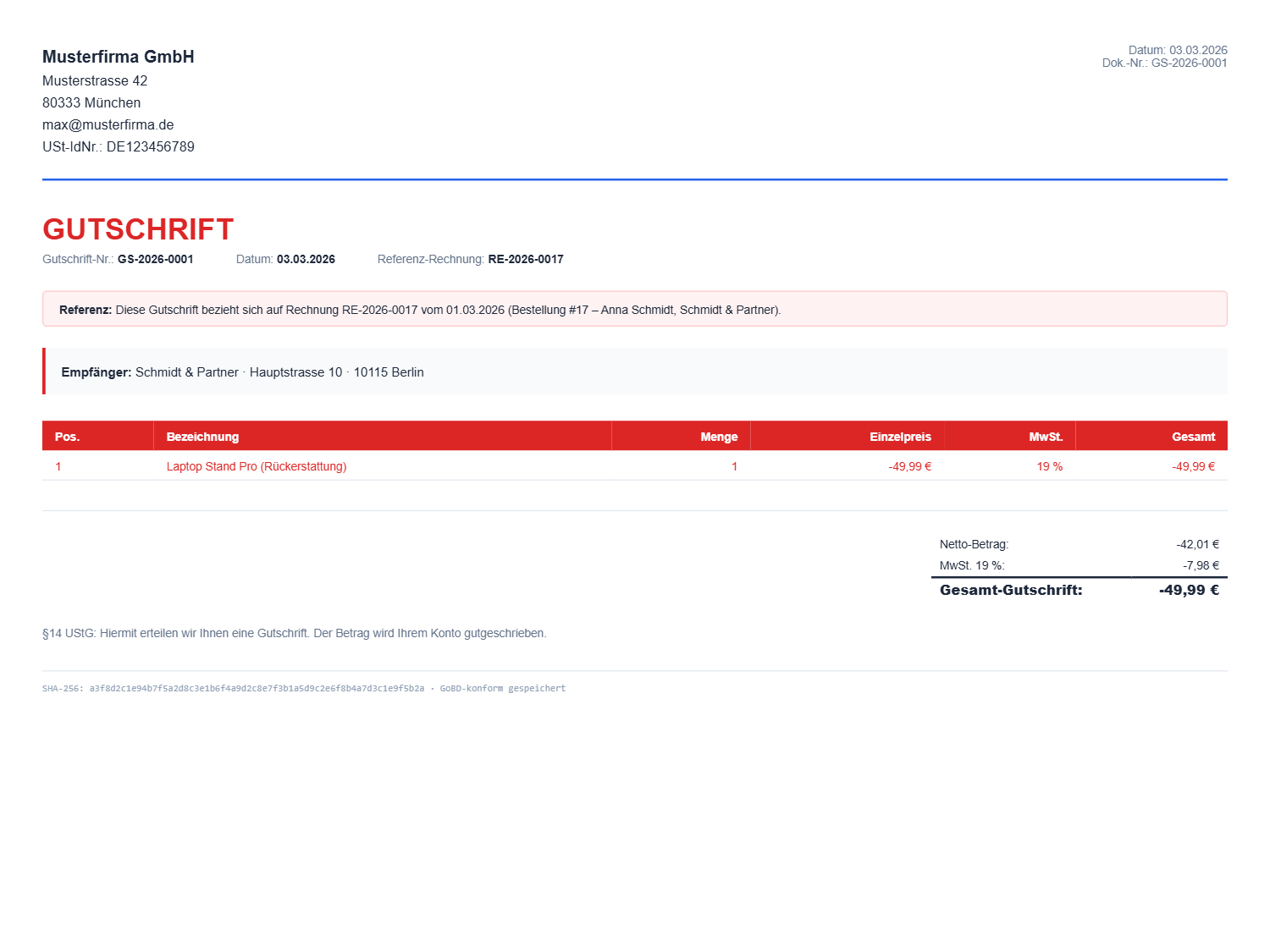
- Credit Notes – §14 UStG-compliant with negative amounts and invoice reference
- Proforma Invoices – For customs and advance payments
- Packing Slips – Warehouse-optimized with large font, checkboxes and order number in large print
- Create a quote in the admin area (add products from the catalogue or enter line items manually)
- Generate a PDF and send it to the customer by email
- On acceptance: convert to a WooCommerce order with one click
- All further documents (delivery note, packing slip) are generated automatically
- Partial delivery notes – Per-shipment PDFs with position-accurate tracking
- Quote → Order – Full B2B workflow: create → send PDF → convert with one click
- Legally compliant credit notes – §14 UStG, with negative amounts and invoice reference
- RechnungsPilot integration – Shares company data, logo and colour automatically
- Automatic generation – Triggered by order status changes or refunds
- PDF email attachments – Automatically attached to WooCommerce emails
- Customer download – Available in the "My Account" area
- ZIP export – All documents with SHA-256 integrity log
- HPOS compatible – Supports WooCommerce High Performance Order Storage
- Small business mode – §19 UStG (Kleinunternehmer)
- Made in Germany – Built for the DACH market
- PDF engine: dompdf
- Thread-safe document numbers (race condition safe)
- SHA-256 hashes for integrity verification
- Security: nonce verification, capability checks, path traversal protection
安装:
- Upload the plugin to the
/wp-content/plugins/directory or install it through the WordPress plugin installer - Activate the plugin through the "Plugins" menu in WordPress
- The setup wizard starts automatically – follow it to configure your company data
- Done! Documents will be generated automatically from now on.
- Company data (name, address, tax numbers)
- Logo and primary colour
- Small business (Kleinunternehmer) setting
- Invoice number reference in credit notes
屏幕截图:



常见问题:
Do I need RechnungsPilot?
No. DokumentenPilot works completely standalone. If RechnungsPilot is installed, company data is shared automatically – this saves you entering it twice.
What are partial delivery notes?
When shipping an order in multiple parcels, you can create a separate delivery note per shipment. You select which items in which quantities are being shipped – DokumentenPilot automatically tracks the delivery status.
How does quote conversion work?
You create a quote in the admin area, add items (from the WooCommerce product catalogue or manually), generate a PDF and send it to the customer. When the customer accepts, you convert the quote to a WooCommerce order with one click.
Is the plugin GoBD compliant?
DokumentenPilot uses gapless document numbers and calculates SHA-256 hashes for all PDFs. The audit log can be exported. GoBD-compliant invoicing is handled by RechnungsPilot.
Does it work with HPOS?
Yes, DokumentenPilot is fully compatible with WooCommerce High Performance Order Storage.
更新日志:
- Initial release
- 5 document types: delivery note, credit note, proforma, quote, packing slip
- Partial delivery notes with position-accurate tracking
- Quote system with full lifecycle and one-click conversion
- Legally compliant credit notes (§14 UStG)
- Proforma invoices for customs and advance payments
- Warehouse-optimised packing slips with checkboxes and large order number
- Automatic generation on order status change
- PDF attachment to WooCommerce emails
- Customer download in "My Account"
- ZIP export with SHA-256 audit log
- RechnungsPilot integration (company data, colour, logo)
- Setup Wizard (2 or 3 steps)
- HPOS compatibility
- Small business regulation (§19 UStG)