DominoPilot – AI Live Chat Assistant for Free
| 开发者 | dominopress |
|---|---|
| 更新时间 | 2026年8月12日 02:43 |
| PHP版本: | 7.4 及以上 |
| WordPress版本: | 7.0 |
| 版权: | GPLv2 or later |
| 版权网址: | 版权信息 |
详情介绍:
If you are looking for a live chat WordPress plugin free to set up, DominoPilot is the ultimate solution. This WordPress live chat plugin transforms how you interact with visitors by using advanced AI and RAG (Retrieval-Augmented Generation) technology. Whether you are wondering how to add live chat to a wordpress website or need reliable wp live chat support, our assistant scans your content on-the-fly to provide accurate, helpful answers.
Easily add live chat to your website and benefit from a live chat WordPress experience that understands your store. It is the perfect way to add live chat to WordPress sites running WooCommerce, ensuring your customers get instant help with a live chat WordPress plugin that actually knows your products.
Key Features:
- Bring Your Own AI: Connect instantly to Google Gemini, OpenRouter (giving you access to hundreds of free and premium models), or any Custom OpenAI-compatible API endpoint.
- Smart Store Integration: A live chat WordPress free feature that scans WooCommerce products to answer price and availability queries with direct Markdown links.
- Site-Aware Responses: High-quality wp live chat support based on your specific posts and pages.
- Custom Knowledgebase: Inject custom company rules, return policies, or FAQs directly into the AI's brain.
- Data Source Control: Choose whether the AI answers from your Knowledgebase, Site Content, or both!
- Modern Chat UI: Beautiful frontend widget with markdown parsing (bold, italics, lists, links), an online status indicator, and a sleek animated typing indicator.
- Customizable Aesthetics: Edit the AI name, avatar, welcome message, and brand colors from a premium, modern settings dashboard.
- Services Used: Depending on your choice, the plugin securely sends visitor chat messages to Google Gemini, OpenRouter, or a Custom API URL.
- Data Sharing: Visitor chat prompts and limited website context (such as matched product descriptions or your knowledgebase) are sent to the external API provider for processing.
- Privacy Policy: Please refer to the Privacy Policy of the AI provider you choose to connect (e.g., Google, OpenRouter, or your Custom provider).
安装:
- Upload the
dominopilot-aifolder to the/wp-content/plugins/directory. - Activate the plugin through the 'Plugins' menu in WordPress.
- Go to the "DominoPilot" menu in your admin dashboard.
- Navigate to the AI Configuration tab and enter your API Key (e.g., Gemini or OpenRouter).
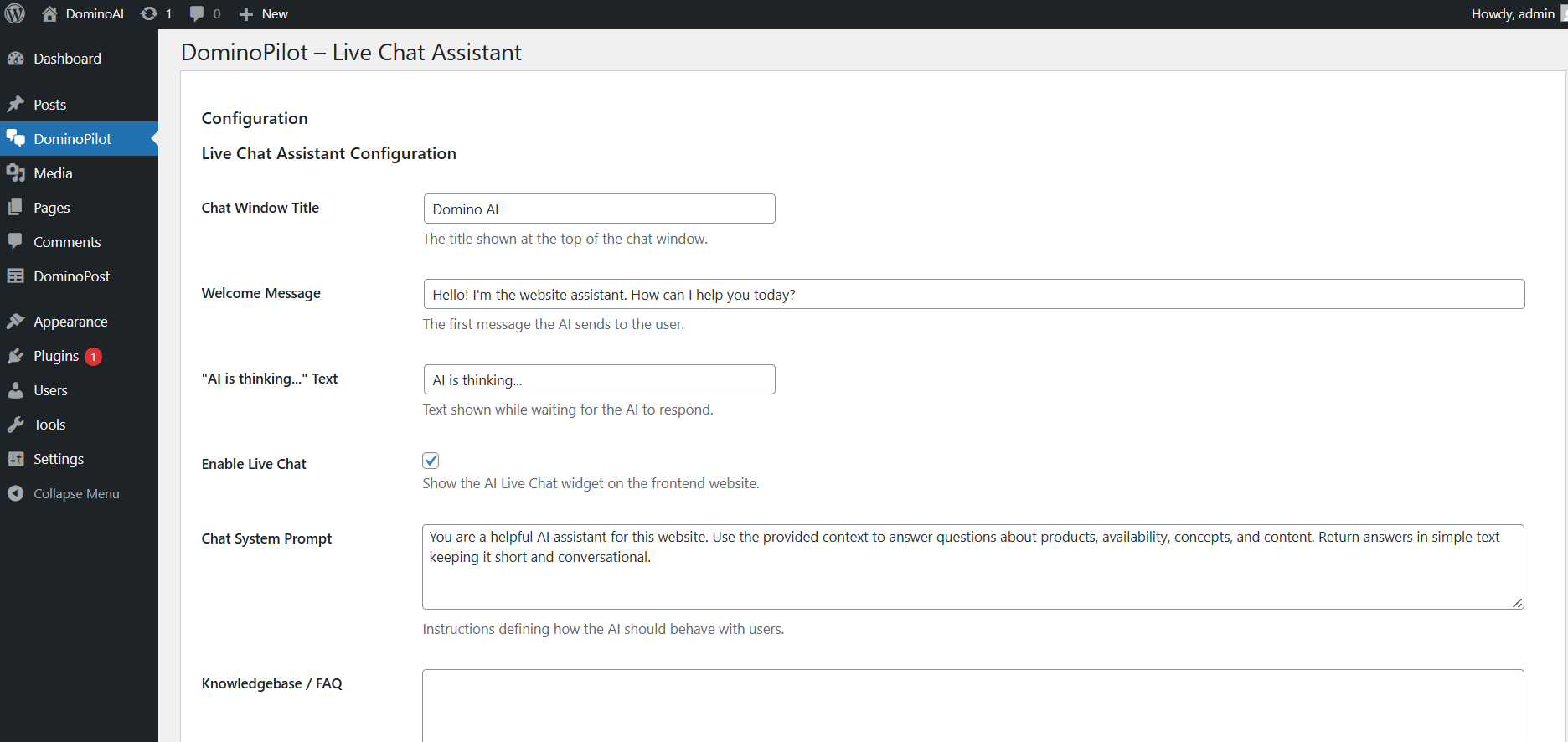
- Go to the Chat Settings tab, customize your widget, and toggle "Enable Live Chat" on.
屏幕截图:
常见问题:
Do I need to provide my own API key?
Yes. You can use free models via OpenRouter (like Nvidia Nemotron or Cohere) or Google's Gemini API. You simply paste your key into the AI Configuration tab.
Does this work with WooCommerce?
Yes. The AI automatically scans your WooCommerce product database when a user asks a question, providing details such as price, availability, and a direct link to the product.
Can I customize the chat widget?
Absolutely. You can customize the chat window title, AI assistant name, avatar, initial welcome message, and the primary brand color from the modern settings page.
Can I restrict what the AI knows?
Yes! The new "Data Source" setting lets you restrict the AI to only answer from your custom Knowledgebase, only from your WordPress Posts/Products, or both.
更新日志:
1.4.0
- Completely modernized the admin settings UI for a premium, SaaS-like experience.
- Added Data Source Control to toggle between Knowledgebase and Site Content.
- Integrated an advanced Markdown parser into the frontend chat widget for rich text formatting.
- Added an "Online" status indicator and animated typing dots to the chat UI.
- Refactored the entire plugin architecture into modular class files for better performance.
- Updated default OpenRouter models to feature powerful free-tier options (Nvidia Nemotron, Poolside Laguna).
- Added strict API key validation before allowing Live Chat activation.
- Introduced Premium Tabbed Settings Interface.
- Added "Custom AI Connect" tab with roadmap teasers.
- Significantly improved content search intelligence with keyword-based fallback.
- Added Knowledgebase / FAQ support for custom site data injection.
- Increased contextual memory for both WooCommerce products and blog posts.
- Transformed plugin into an AI Live Chat Assistant.
- Added dynamic WooCommerce product and post scanning context.
- Added customizable chat UI text settings.
- Initial release.