
Dotance Website Feedback
| 开发者 | dotance |
|---|---|
| 更新时间 | 2026年10月4日 07:32 |
| PHP版本: | 7.4 及以上 |
| WordPress版本: | 7.1 |
| 版权: | GPLv2 or later |
| 版权网址: | 版权信息 |
详情介绍:
- One link for the whole site (or one section, or just the home page). No login, no sign-up.
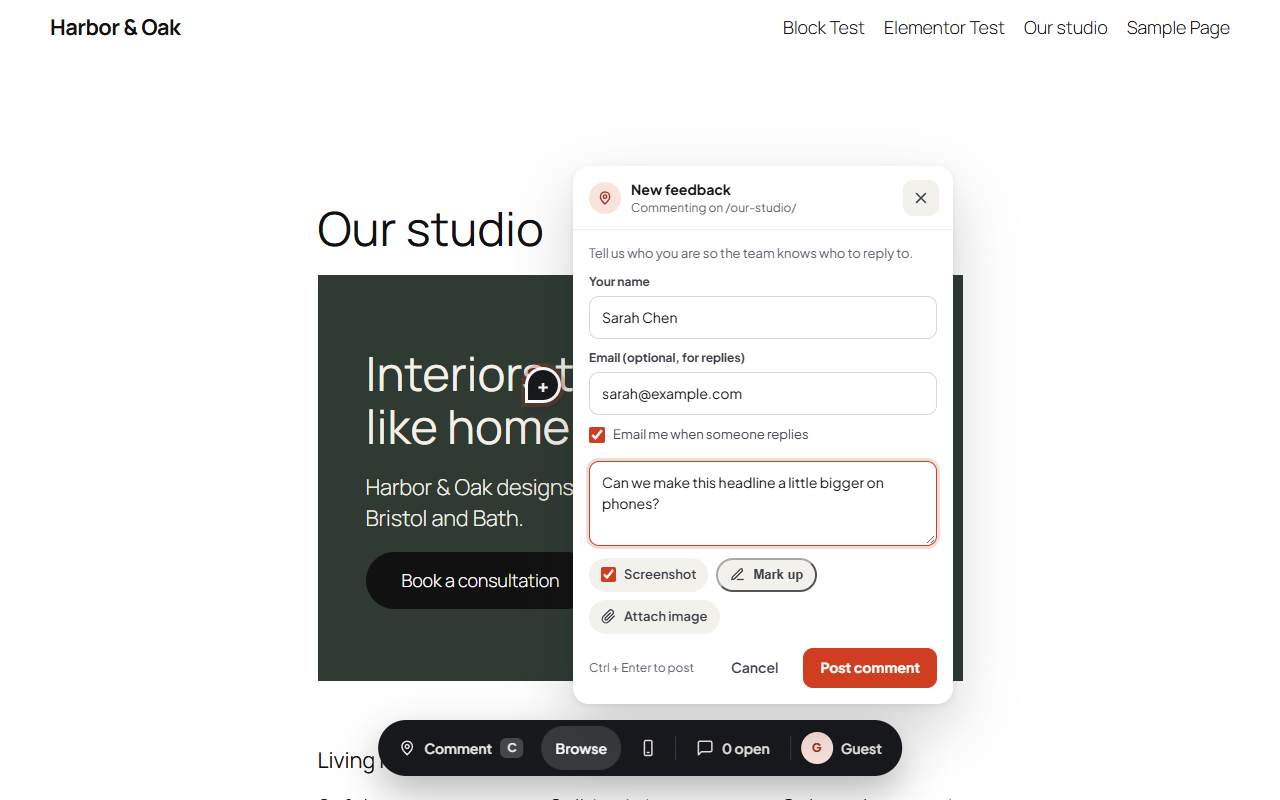
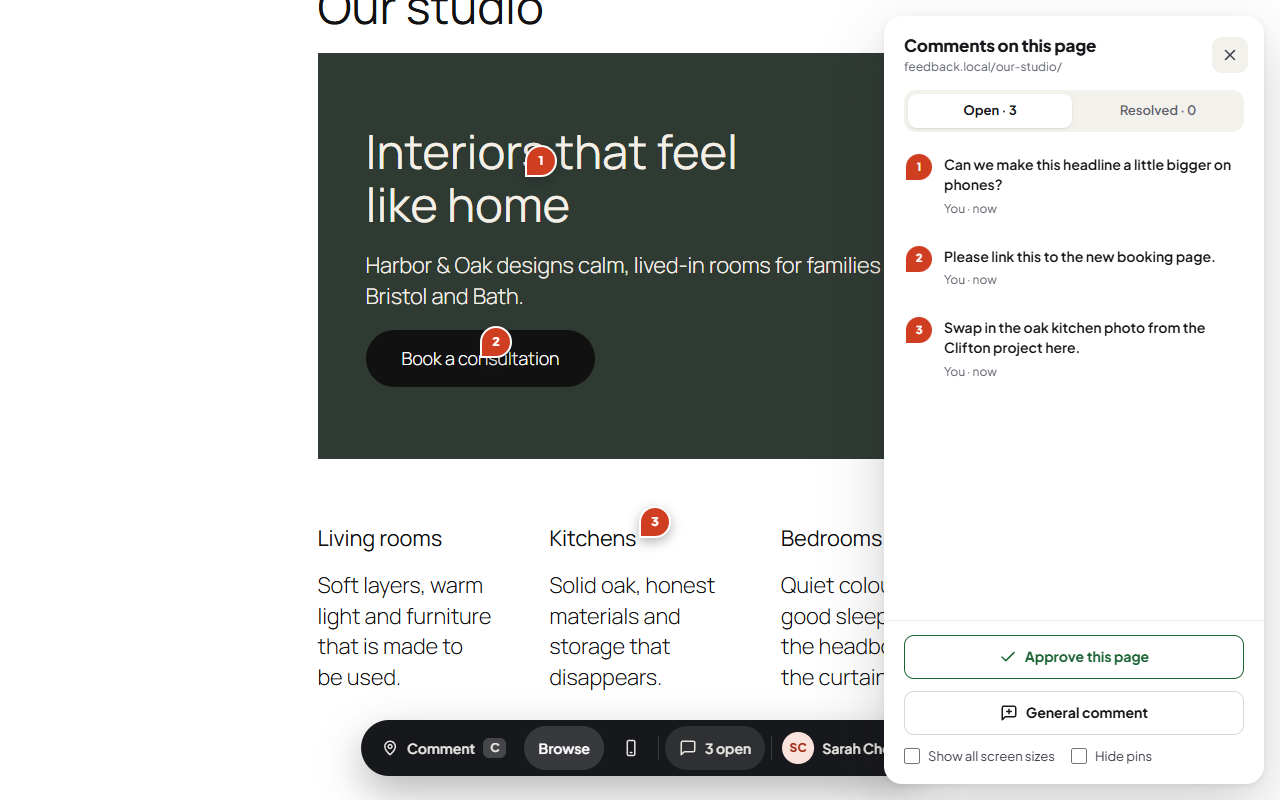
- Click anything to comment. A pin sticks to that element, even after the page changes a little.
- Automatic screenshot of what they saw, which they can mark up with a box, an arrow or a pen.
- Phone and tablet preview from the toolbar. Comments made there are saved for that screen size.
- Approve a page with one click when it is ready.
- Email replies with a one-click link back to the comment, and a one-click unsubscribe.
- Inbox with every comment, its screenshot, browser, system and window size.
- Reply or leave an internal note only your team sees; @mention a teammate to email them.
- Status, priority and assignee, bulk actions, filters, search and CSV export.
- Review links you can copy again any time, limit to part of the site, give an end date, or revoke instantly.
- Page picker: type a page name and pick it. Drafts show too.
- Draft pages: clients with a link can review a page before it is published; nobody else can see it.
- Works behind maintenance mode: the link still opens while Elementor, SeedProd, LightStart (WP Maintenance Mode), Maintenance by WebFactory or Hostinger's coming-soon mode is on.
- Approvals screen listing which pages were approved, by whom and when.
- Clean emails from your site's name, batched so twenty pins are one email.
- Logged-in team members press C on any page to comment. No link needed.
- Adds nothing to your pages for normal visitors. The overlay only loads for your team and for people holding a review link.
- Works with page caches (it clears LiteSpeed, WP Rocket, W3 Total Cache and WP Super Cache when a link goes live) and with Elementor and the block editor.
- Screenshots are made in the visitor's browser and stored privately on your site. Nothing is sent to a third party.
- Personal-data export and erase are built in, with an optional automatic clean-up of resolved feedback.
安装:
- Install and activate the plugin.
- Go to Feedback → Review links, pick the pages the link covers and press Create link.
- Copy the link and send it to your client.
- Their comments arrive in Feedback → Inbox. You also get an email.
屏幕截图:


常见问题:
Do my clients need an account?
No. The review link is all they need. They type their name the first time they comment.
Does it slow down my site?
No. Visitors without a review link get the exact same page as before. The overlay loads only for your team and for link holders.
Where are screenshots stored?
In a private folder in your uploads directory. They are only shown through the plugin, to people allowed to see that comment.
Can clients see each other's comments?
You choose per link: everyone with the link sees all comments on a page, or each person sees only their own.
Can clients review a page that is not published yet?
Yes. Pick the draft in the page picker when you create the link. Only people holding that link can open it; everyone else still gets "not found".
What happens when I revoke a link?
It stops working at once. The feedback left through it stays in your inbox.
Why are emails not arriving?
Emails go out about two minutes after the first update, in one batch. If they land in spam, send WordPress email through an SMTP service; any SMTP plugin works with this plugin.
更新日志:
- Phones: the comment-mode hint says "Tap" (no Esc key), sits above the toolbar instead of over the page header, the stray divider at the end of the toolbar is gone, and the device-preview button is hidden on phones.
- A one-time, dismissible card on the Inbox asks for a WordPress.org review after 10 comments are resolved. "Maybe later" hides it for 30 days; "Already did" or leaving a review hides it for good. Only managers see it.
- WordPress Playground live preview: the plugin page can now open a demo site with sample feedback.
- The Dotance logo in the Feedback screens animates once when a screen opens (arc draws, ring pulses; off for reduced motion).
- The daily clean-up is scheduled on init instead of while plugins load (no early-translation notices from other plugins).
- Admin HTML from the plugin's own helpers is escaped with wp_kses() at output.
- First public release.
- New "How to use" screen under Feedback.
- Fixed: the dashed hover box could stay on the page after a comment was placed.
- Full readme; Plugin Check fixes (translation plurals, escaping notes).
- Dotance logo in the admin bar too.
- Clients can review draft (and scheduled) pages through a review link before they go live; nobody else can see them.
- Review links keep working while Elementor, SeedProd, LightStart (WP Maintenance Mode), Maintenance by WebFactory or Hostinger coming-soon mode is on.
- Phone and tablet preview from the toolbar; comments made there are saved for that screen size.
- Page approval: clients approve a page from the comments panel; the team gets an email and an Approvals screen.
- Mark up the screenshot with a box, an arrow or a pen before sending.
- @mention a teammate in a reply or internal note to email them.
- Dotance logo in the admin menu and the Feedback screens; author shown as Dotance.
- Redesigned notification emails: branded HTML with a plain-text copy, page names instead of paths, clear subjects, buttons instead of raw links.
- Emails are sent from the site name instead of "WordPress" (unless another plugin sets a sender).
- Emails go out 2 minutes after the first update instead of 5.
- Review links: page picker. Type part of a page name and pick it; "Whole site" is always first, and every page, post or product shows whether it is published, a draft, scheduled or private.
- Review links can cover only the home page ("Home page only"), or a page and the pages under it.
- Your brand colour is darkened a little when needed so text on buttons and pins always meets WCAG AA contrast.
- Review links: revoked and expired links can now be deleted from the list. Feedback left through them stays in the inbox.
- REST: DELETE /links/{id}?force=true removes a link for good; new action dotfb_link_deleted.
- Inbox: after "Select all", tick "Select all N items, not just this page" to change or delete every item in the current view at once (up to 2,000 per click).
- Inbox: tick items (or Select all) and mark them open / in progress / resolved or delete them in one go.
- Inbox: show 20, 50 or 100 items per page.
- Review links: the "Clients see" choices had no inner spacing; fixed.
- New look: a dark bottom toolbar (Comment / Browse / comments), redesigned comment box, thread and side panel on the website.
- New wp-admin app: inbox with the list and the selected feedback side by side, review links as cards, settings in cards, a first-run guide.
- One-click Resolve / Reopen, reply or internal note toggle.
- Default colour is now #D03E22 and the toolbar sits bottom centre (left and right still available).
- Bundled Plus Jakarta Sans (OFL) so the interface looks the same on every site.
- Security hardening after an independent review: images never cacheable, strict pin locators, no client-to-client emails, host-only cookies, guest reads need the overlay header, email links void after erasure or an email change.
- Managers can delete feedback. Compatibility with page caches and JS optimizers (Autoptimize, WP Rocket, LiteSpeed, Perfmatters, SiteGround, Jetpack Boost, Cloudflare).
- Email notifications, batched: one email per person per five minutes. New feedback and client replies reach the team; replies reach the client; nobody is told about their own action; internal notes never reach clients.
- Email links sign the client back in for 14 days; every client email has a one-click unsubscribe.
- Tools → Export / Erase Personal Data support, and suggested privacy-policy text.
- Optional retention: delete resolved feedback after N days.
- Uninstall removes everything only when "Delete all feedback" is ticked in Settings.
- Feedback menu in wp-admin with an unresolved-count bubble: inbox with status views, filters, search, bulk status and CSV export.
- Feedback screen: screenshot, conversation, replies and internal notes, status / priority / assignee, browser and screen details.
- Review links screen: create, copy again, revoke.
- Settings: who can leave and manage feedback, button position and colour, notification recipients, retention, delete data on uninstall.
- Admin bar: Feedback count, "Comment on this page" and "Open inbox".
- Screenshots: what the visitor sees is captured when they click, with the pin marked, and stored privately on your site. A failed capture never stops the feedback.
- Image attachments (PNG, JPEG, WebP up to 5 MB), private storage served only to people who may see the thread.
- Browser and operating system recorded with each piece of feedback.
- Front-end overlay: launcher, panel, comment mode, pins anchored to page elements, composer, threads, general comments, deep links, screen-size bands. Adds nothing to pages unless a review link is active or a team member is logged in.
- Database tables, capabilities, REST API (dotfb/v1), review links and guest rate limits.
- Plugin skeleton.