
DSGN Accessibility Audit and Statement
| 开发者 | dsgncc |
|---|---|
| 更新时间 | 2026年7月16日 17:29 |
| PHP版本: | 7.4 及以上 |
| WordPress版本: | 7.0 |
| 版权: | GPL-2.0-or-later |
| 版权网址: | 版权信息 |
详情介绍:
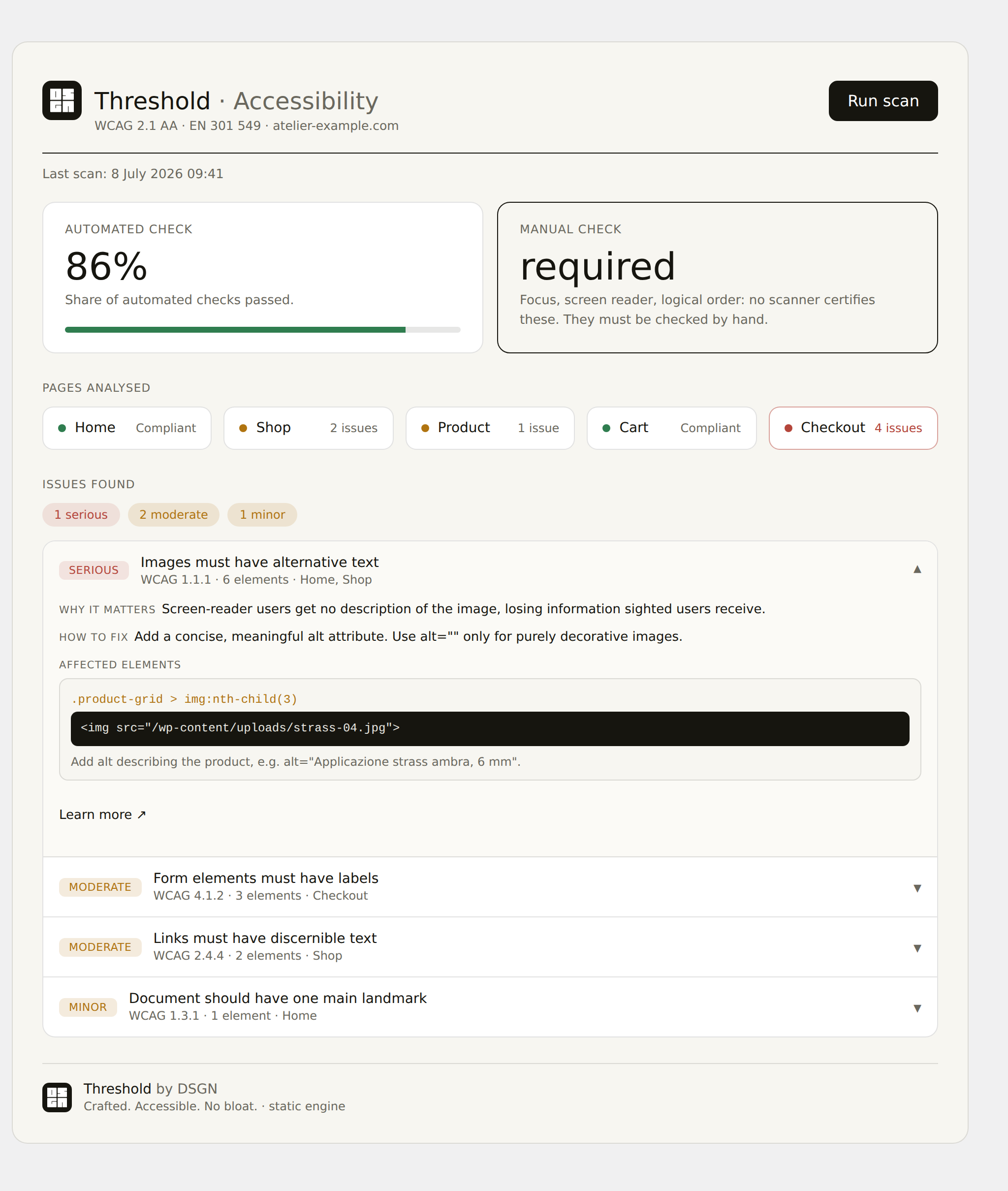
- Audits your site with a server-side analyzer and shows, in a clean dashboard, which WCAG 2.1 AA criteria are not met.
- Gives visitors a panel with preferences the site genuinely honours: text size and spacing, link highlighting, high contrast, negative colours, pausing motion, reducing animations, disabling autoplay audio and video, read-aloud (browser speech), a visible keyboard focus and a bigger cursor.
- Generates the Accessibility Statement and provides a feedback mechanism to report barriers — both required under the European Accessibility Act.
- Text size — 1.4.4 Resize Text
- Text spacing — 1.4.12 Text Spacing
- Highlight links — 1.4.1 Use of Color
- Pause motion — 2.2.2 Pause, Stop, Hide
- Reduce animations — prefers-reduced-motion
- Disable autoplay audio/video — 1.4.2 Audio Control
安装:
- Upload the
thresholdfolder to/wp-content/plugins/, or install the plugin from the WordPress Plugins screen. - Activate it. The public "Accessibility Statement" page is created automatically.
- Go to Accessibility → Settings to enter your organisation details and choose the panel controls.
- Go to Accessibility → Dashboard and press Run scan.
屏幕截图:


常见问题:
Does this plugin make my site EAA-compliant?
No, and beware of anyone who promises that. No automated tool makes a site compliant: conformance depends on how the site is built. It shows you what to fix, lets you expose real preferences, and generates the required documentation.
Does the panel modify my site?
Only when a visitor asks it to, and only with standard preferences the site genuinely honours (e.g. enlarging text or pausing a carousel). No cosmetic "filter" is applied.
Does scanning send data to external servers?
No. The static engine runs on your own server and the browser engine runs in your own browser. The plugin makes no external connections of its own — no third-party fonts, no analytics, no phone-home.
Is the bundled axe-core library minified?
Yes. The plugin bundles axe-core (by Deque Systems) for the optional in-browser scan. It is licensed under the Mozilla Public License 2.0; the licence is included in assets/js/vendor/, and the unminified source is available at https://github.com/dequelabs/axe-core .
更新日志:
- Fixed: the DSGN mark in the panel footer rendered at full size on some sites. The 0.7.6 isolation reset overrode the image's HTML width/height attributes; icon sizes are now set explicitly in CSS.
- Fixed: bundled translations (including Italian) were never loaded, so the panel stayed in English on non-English sites. The plugin now registers its /languages directory on init. Translations from translate.wordpress.org still take precedence when available.
- Style isolation: the front-end panel is now hardened against theme "bleed". An ID-scoped reset plus higher-specificity rules prevent host themes (e.g. those styling all buttons/links globally) from overriding the panel's typography, controls and spacing. No change to the accessibility effects applied to the site.
- Listed on WordPress.org as "DSGN Accessibility Audit and Statement"; the on-site panel keeps the "Threshold by DSGN" name.
- Text domain aligned to the plugin slug.
- Removed the manual load_plugin_textdomain() call (WordPress.org loads translations automatically).
- Code-standards cleanups for the plugin directory review.
- Panel footer back to dark with the white logo and a bit more padding.
- Removed the divider under "Report a barrier".
- Custom black document icon for the Accessibility Statement link.
- Panel footer now uses the real DSGN logo (PNG), is lighter and links to dsgngroup.it.
- Admin credit links to dsgngroup.it.
- New setting to hide the DSGN credit from the panel footer (on by default; admin always keeps it).
- Fixed the brand mark not showing in the panel footer (now white on the dark footer).
- Removed the mark from the Accessibility Statement title (it was misaligned).
- Lighter, editorial admin design (no more dark background).
- Much fuller Accessibility Statement (EAA / EN 301 549 sections: non-accessible content, preparation, enforcement) with an optional known-limitations field.
- Brand mark is now an inline SVG everywhere (no raster image to break).
- Text spacing reworked as a reliable per-element stepper.
- Fixed the panel breaking when High contrast was toggled.
- New Negative colours preference.
- New visitor aids: read aloud (browser speech), keyboard focus highlight (2.4.7), bigger cursor.
- Redesigned dark admin interface.
- "Learn more" links now point to the official W3C WAI Understanding pages.
- Removed the external headless engine option (static or browser only).
- Actionable audit: each issue now explains what it is, why it matters, how to fix it, and shows the affected element with a code snippet and a "Learn more" link.
- Issues are grouped by rule across pages, with a severity summary.
- Browser-engine results are localised (Italian) via axe-core locales.
- The admin no longer loads external fonts either (system font stack everywhere).
- Text size now resizes text reliably even on px-based themes (Elementor etc.).
- Text spacing no longer affects icon fonts or the panel itself.
- New High contrast comfort preference.
- Browser engine now injects axe-core into the page being scanned (fixes empty/0% results); a page that cannot be read is reported as an error, never as "compliant".
- Front-end no longer loads external fonts (Google Fonts): the panel uses a system font stack. Zero external requests on the front-end, better privacy and performance.
- New browser engine: runs axe-core in the admin's browser to cover colour contrast (1.4.3) and JavaScript-rendered content, with no external service.
- Three scan engines selectable in Settings: static (server), browser, external headless.
- Server-side scanning: new static engine (no browser) plus an optional external headless engine. axe-core is no longer bundled.
- Weekly scheduled scan via WP-Cron.
- Full English and Italian translations.
- First version: front-end panel, accessibility scan, Accessibility Statement, feedback mechanism.