
Duplicate Post - duplicate pages, copy content, clone posts
| 开发者 | rbplugins |
|---|---|
| 更新时间 | 2026年9月25日 15:07 |
| PHP版本: | 3.1 及以上 |
| WordPress版本: | 7.1 |
| 版权: | GPLv2 or later |
详情介绍:
📄 Details | 🚀 Get PRO Version | 📖 Documentation
Duplicate Post RB is a powerful yet lightweight plugin that allows you to duplicate posts, duplicate pages, and clone custom post types in WordPress.\
Whether you want to copy posts, clone pages, or generate multiple content variations, this plugin provides flexible and professional tools for content duplication.
Unlike basic duplicate post tools, Duplicate Post RB gives you full control over what exactly gets copied, including content, title, slug, featured image, taxonomies, templates, metadata, and more. This makes it ideal for websites with structured content, landing pages, learning systems, and large editorial workflows.
The new version introduces advanced duplication logic with configuration profiles and WP-CLI support - making Duplicate Post RB suitable for editors, agencies, and developers who need full control over how content is copied.
Duplicate Post RB now offers both profile-based duplication logic and global plugin settings, making it suitable for editors, administrators, agencies, and developers working with complex WordPress setups.
⭐ What's New?
- New global option: All Post Meta You can now copy all post meta fields at once using a single global switch. This significantly simplifies duplication when working with complex posts, custom fields, and third-party plugins.
- Improved Custom Post Types support\ Enhanced support for duplicating custom post types, including those registered by themes and plugins, with more consistent behavior across different setups.
- Full Advanced Custom Fields (ACF) integration\ Added full support for ACF, including custom fields, field groups, post types, and taxonomies, ensuring complete and accurate duplication of structured data.
- Import and Export for duplication profiles\ You can now export and import duplication profiles, making it easier to reuse configurations across multiple projects and environments.
- Custom profile buttons in post/page list\ Added the ability to create profile-based custom buttons, allowing one-click duplication with predefined settings directly from the posts and pages list.
- Improved integrations support\ Better handling of third-party plugins and extended compatibility with complex WordPress setups.
- Fixed and improved Custom Taxonomies support Custom taxonomies are now copied more reliably and consistently across different post types and duplication scenarios.
- Stability fixes for duplication options Improved handling of Featured Image, Attachments, Categories, Taxonomies, and related options to ensure predictable results when duplicating posts and pages.
- New Copy button in the Gutenberg editor Duplicate posts directly from the block editor with a dedicated Copy button, no need to leave the editor or switch views.
- New duplication history widget in editors A new History widget is now available inside both the Gutenberg editor and the Classic Editor, showing:
- source post/page
- duplication date and time
- used duplication profile
- Duplicate any post, page, or custom post type
- Clone items instantly or create a new draft
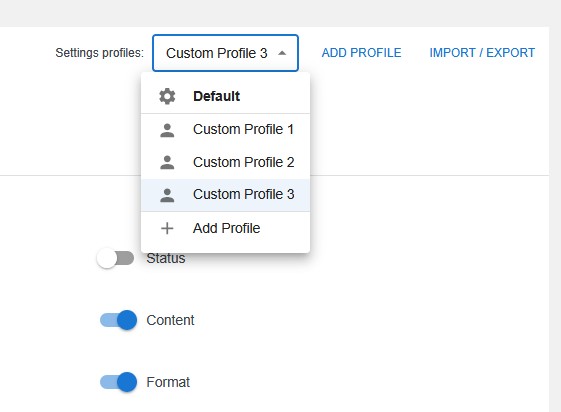
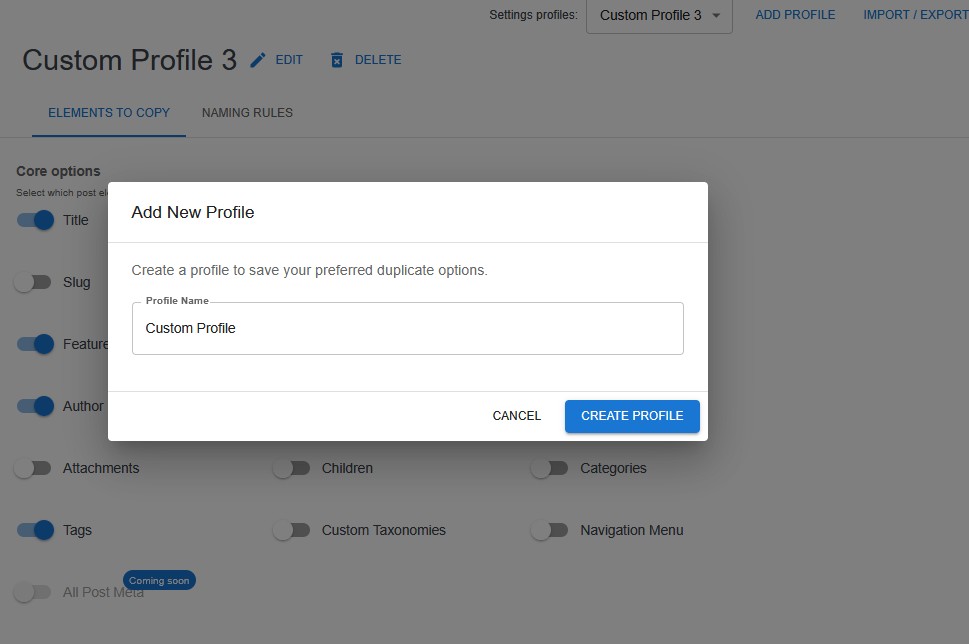
- Profiles for fully customizable duplication settings
- Choose which elements to copy (title, content, featured image, templates, taxonomies, etc.)
- Smart naming rules with placeholders:
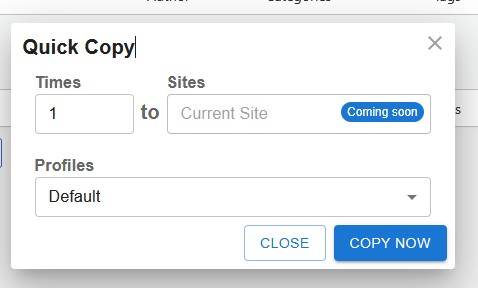
[Counter][CurrentDate][CurrentTime]- Quick Copy Popup with options:
- number of copies
- profile selection
- site selection (multisite support coming soon)
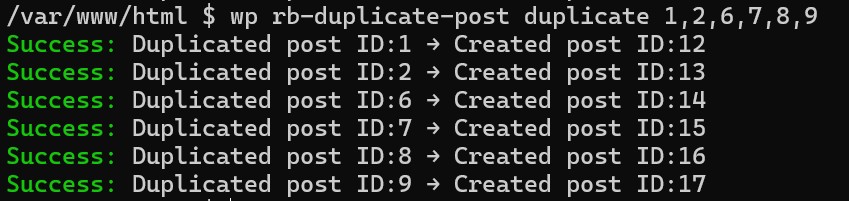
- WP-CLI support for automation and bulk duplication
- Clean UI, lightweight code, compatible with Classic and Gutenberg editors
- All post meta duplication
- Duplication history
- Duplication source
wp rb-duplicate-post duplicate 1,2,6,7,8,9
Duplicate posts using a specific profile. Use any saved duplication profile to control which fields and metadata are copied:
wp rb-duplicate-post duplicate "123,456" --profile=1
List available profiles:
wp rb-duplicate-post profiles
This allows server administrators, agencies, and developers to duplicate posts programmatically without using the WordPress dashboard.
🧩 Configuration Profiles
Profiles let you save different duplication behaviors - for example:
- SEO-friendly copy with prefix
- Exact clone with all meta fields
- Minimal copy with custom taxonomies only
安装:
- Upload the plugin files to
/wp-content/plugins/duplicate-post-rb/ - Activate the plugin through the Plugins menu
- Go to Posts / All Posts or Pages / All Pages
- Hover an item and click Clone or New Draft
- (Optional) Configure Profiles in the plugin settings
- (Optional) Use WP-CLI commands for automation
屏幕截图:
![Naming Rules – create naming formats using [Counter], [CurrentDate], [CurrentTime].](https://cdn.jsdelivr.net/wp/duplicate-post-rb/assets/screenshot-4.jpg)
常见问题:
Does Duplicate Post RB support duplicating pages and custom post types?
Yes. You can duplicate posts, pages, and any custom post type registered as public.
What are Duplication Profiles?
Profiles allow you to save custom duplication settings:
- which elements to copy
- naming format
- counter rules
- date/time formatting
- template and taxonomy behavior You can create multiple profiles and choose one before duplication.
Can I use WP-CLI to duplicate posts?
Yes! Example:
wp rb-duplicate-post duplicate 10,22,45
List profiles:
wp rb-duplicate-post profiles
Which elements can be copied?
Everything you need:
- Title
- Content
- Status
- Date
- Excerpt
- Slug
- Template
- Featured image
- Author
- Taxonomies
- Categories
- Tags
- Menu order
- Password
- Format
- Attachments
- Children
- Navigation menu
- All Post Meta
Does the plugin support multisite?
Basic support is available. Advanced multisite duplication (cross-site copying) is coming soon.
Can I change how duplicated posts are named?
Yes. Use prefix, suffix and placeholders:
[Counter] [CurrentDate] [CurrentTime]
Is the plugin lightweight?
Yes. It's optimized for speed and does not affect admin performance.
更新日志:
1.6.8 (25-09-2026)
- Improved: SEO fields are now copied when duplicating posts
- New: Added support for Yoast SEO
- Improved: Added compatibility with WordPress 7.1
- Improved: Custom Profile buttons functionality updated
- New: Added ability to specify a template source post/page for Custom Profile
- New: new items copy content from the selected template
- Wordpress 7.0 compatibility
- Added full Advanced Custom Fields (ACF) integration (fields, field groups, post types, taxonomies)
- Improved support for custom post types across different plugins and themes
- Added import/export functionality for duplication profiles
- Added profile-based custom buttons in post/page lists
- Added option to exclude specific custom post types from duplication
- Added option to duplicate content without confirmation (instant copy)
- Improved integration handling for third-party plugins
- Updated duplication dialog with a refreshed and more user-friendly interface
- Added new field to define the number of copies to create
- Updated import/export functionality for duplication profiles
- Added global All Post Meta option for copying all post meta at once
- Fixed and improved Custom Taxonomies duplication
- Improved stability of duplication options (Featured Image, Attachments, Categories, Taxonomies)
- Added new Copy button in the Gutenberg editor
- Added duplication history widget for Gutenberg and Classic editors
- Added source post and duplication profile details for duplicated posts
- Updated Gutenberg block with new configuration options
- Added in-block duplication settings for Gutenberg editor
- Fixed UI issues in the admin settings section
- Fixed access control and permissions handling in global settings
- Added new global Settings section for managing duplication behavior and access
- Added user role permissions for content duplication
- Added controls to manage where Copy/Duplicate actions are displayed in the admin UI
- Added duplication support directly inside the editor and Gutenberg
- Improved admin UI structure and navigation
- Wordpress 6.9 compatibility
- Fixed the Profiles menu display in the admin section
- Added new WP-CLI command with full profile support
- Added hierarchy copy for parent/child pages
- Implemented bulk duplication option in bulk list actions
- Initial release of the advanced Duplicate Post RB
- Added duplication profiles
- Added flexible copy-element settings
- Added naming rules with placeholders
- Added Quick Copy modal window
- Added WP-CLI integration
- Improved clone & new draft logic
- Optimized performance and UI
- Duplicate post RB - Wordpress 6.8 compatibility
- Duplicate post RB - Wordpress 6.7 compatibility
- Duplicate post RB - Wordpress 6.5 compatibility
- Duplicate post RB - Wordpress 6.2 compatibility
- Changed default plugin options settings, changed description
- Duplicate post RB - Wordpress 6.1 compatibility
- Duplicate post RB - Wordpress 6.0 compatibility
- Duplicate post RB - Wordpress 5.9 compatibility
- Added new menu options.
- First release of the Duplicate Post plugin.