
ShapedGallery – Photo Gallery, Image Gallery, Video Gallery & Lightbox
| 开发者 |
shapedplugin
rubel_miah |
|---|---|
| 更新时间 | 2026年10月21日 21:20 |
| PHP版本: | 8.1 及以上 |
| WordPress版本: | 7.1 |
| 版权: | GPL-2.0-or-later |
| 版权网址: | 版权信息 |
详情介绍:
- Videos from your Media Library
- External videos by URL
- YouTube videos
<dialog> element, so it's fast and accessible:
- Zoom and pan on desktop, pinch and swipe on phones and tablets
- Image counter
- Keyboard navigation with arrow keys, and Escape to close
- Loads only on pages where a gallery opens it
- Titles and descriptions pulled from each image's title, caption or description
- Classic or overlay caption styles with full typography control
- Border, rounded corners and box shadow for each image, in Normal and Hover states
- Choose the image size: thumbnail, medium, large or full
- Default or random image order
- Click action per gallery: open the lightbox, follow a link, or do nothing
- Server-rendered, search-engine-friendly gallery markup
- Lazy loading for images
- Gallery output caching with an adjustable timeout and one-click cache clearing
- Scripts and styles load only on pages that need them
- Ajax Load More button to split big galleries into smaller chunks
- Elementor
- Divi
- Bricks
- Oxygen
- Beaver Builder
- WPBakery
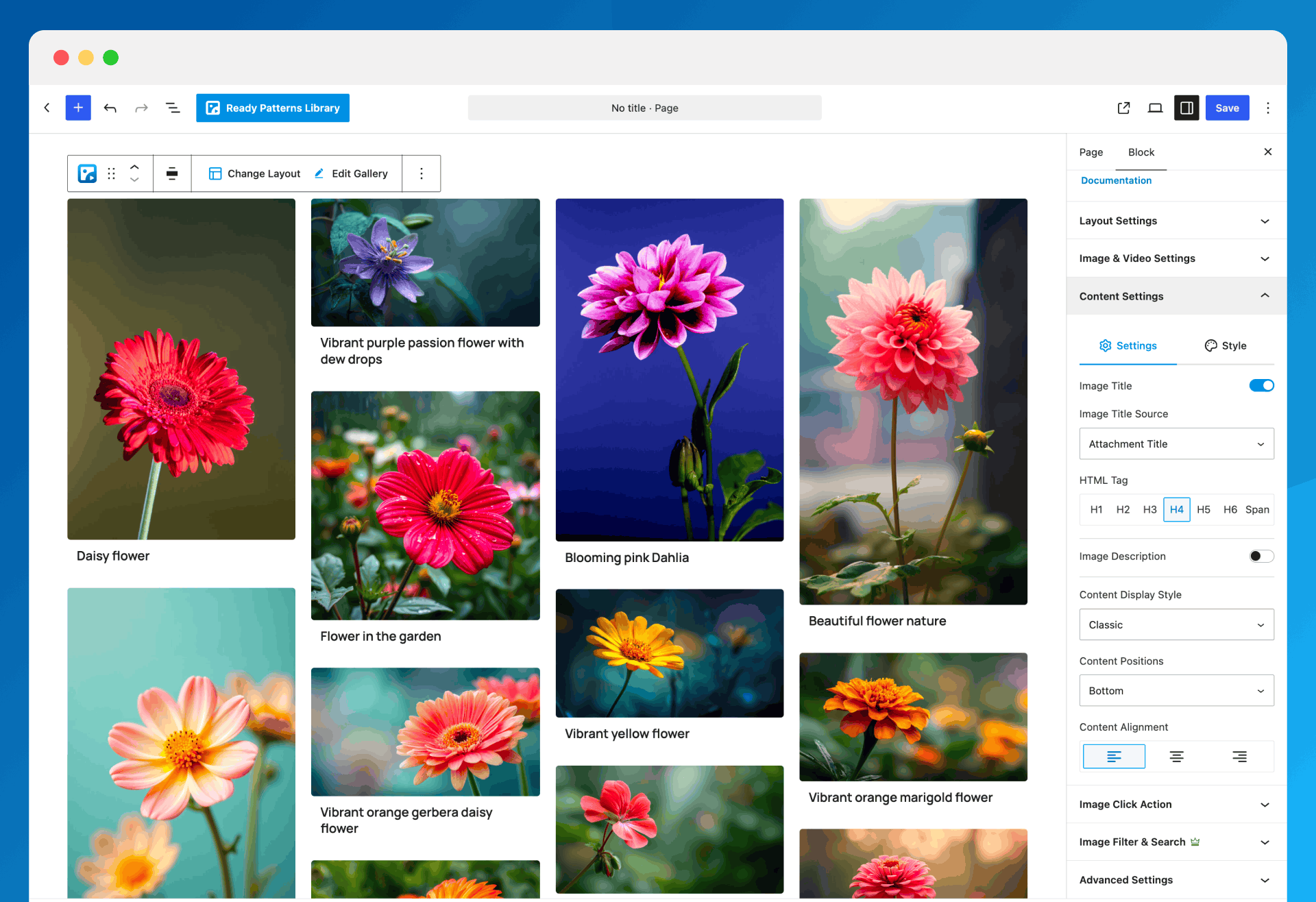
- Visual gallery layout picker with live preview
- Justified, grid and masonry gallery layouts
- Responsive columns and spacing for desktop, tablet and mobile
- Ready Patterns library with one-click insert
- Image and video galleries from the Media Library
- External images and videos by URL, plus YouTube videos
- Built-in lightbox with zoom, pinch, swipe and keyboard support
- Video Play Mode: play videos inline in the tile or in a popup player
- Image Custom URL – link any image to a page, product or external website
- Ajax pagination with a customizable Load More button
- Image titles and descriptions with typography controls
- Per-image border, radius and shadow for Normal and Hover states
- Hide a gallery on desktop, tablet or mobile
- Public, private and password-protected galleries
- Lazy-loaded images and gallery caching
- Saved Galleries dashboard with search, copy shortcode, duplicate and bulk actions
- Turn modules (Lightbox, Image Custom URL, Ready Patterns) on or off site-wide
- Multisite support
- Translation-ready and accessible, with full keyboard support
安装:
- WordPress 6.8 or later
- PHP 8.1 or later
- In your dashboard, go to Plugins → Add New.
- Search for ShapedGallery.
- Click Install Now, then Activate.
- Download the plugin zip.
- Go to Plugins → Add New → Upload Plugin, choose the zip and click Install Now — or upload the unzipped
easy-lightbox-wpfolder to/wp-content/plugins/. - Activate the plugin through the Plugins screen.
- Go to ShapedGallery → Dashboard and click Create New Gallery — or click Use Ready Patterns to start from a design.
- Alternatively, add the ShapedGallery block to any post or page.
- Pick a layout, add your images and videos, and publish.
- To show a saved gallery elsewhere, copy its shortcode —
[shaped_gallery id="123"]— from Saved Galleries.
屏幕截图:



常见问题:
What is ShapedGallery?
A photo and video gallery builder for WordPress. It creates responsive justified, grid and masonry galleries from your Media Library, with a visual layout picker, Ready Patterns and a built-in lightbox.
Do I have to use the block editor?
To build a gallery, yes — the editor is WordPress's own, on a hidden gallery post type. To place one, no: every saved gallery has a permanent shortcode you can use in any editor, page builder, widget or template.
Will editing a gallery update it everywhere?
Yes. A page embeds a reference to the gallery, never a copy, so there is no re-sync step.
Can I add videos?
Yes: videos from your Media Library, external videos by URL, and YouTube videos. They play right in the gallery tile, or in a popup player if you set Video Play Mode to Popup.
Is it mobile-friendly?
Yes. Every layout is responsive, with separate desktop, tablet and mobile values for columns and spacing, and the lightbox supports pinch-to-zoom and swipe.
Can I password-protect a gallery?
Yes. Each gallery can be public, password-protected or private.
Does the lightbox load on every page?
No. The viewer is a separate bundle, requested only by a page with a gallery whose click action actually opens it. (The one exception is a site upgraded from Easy Lightbox, where the compatibility mode keeps the old site-wide lightbox working.)
Which page builders are supported?
Elementor, Divi, WPBakery, Oxygen, Beaver Builder and Bricks each have a dedicated element. Elementor is on by default; enable the others in ShapedGallery → Settings → Integrations. Anywhere else, use the gallery's shortcode.
I used Easy Lightbox. Will my site break?
No. Existing litebox links, image sets and the automatic lightbox on WordPress's [gallery] shortcode keep working through a compatibility mode that is switched on automatically for upgraded sites. Nothing on your site changes until you choose to build a gallery.
更新日志:
- New: Video Popup plays videos in a focused, accessible player.
- Improvement: Redesigned Ready Patterns preview for faster browsing.
- Improvement: Settings panels open one at a time for a cleaner sidebar.
- Improvement: Editor shows only the first page with Ajax Pagination, matching the frontend.
- Improvement: Font Style shows only weights your font supports.
- Improvement: Ready Patterns keep their curated order.
- Change: Lightbox shows images only; videos follow Video Play Mode.
- Change: Description Source defaults to the attachment description.
- Fix: Zero gap was showing as 20px in the editor.
- Fix: Masonry columns overflowing the editor.
- Fix: Stray
alignclass when Alignment is None. - Fix: Tooltips hidden behind module drawers.
- Security: YouTube embed URLs restricted to YouTube's own hosts.
- New: Upload progress per batch in the Upload tab.
- New: Details panel for images and videos added by link.
- New: Pro layouts, video sources and options shown as locked previews.
- Change: Title Source defaults to the attachment caption.
- Fix: Stalled external links never timing out.
- Fix: YouTube Shorts sized as landscape.
- Fix: Missing fonts falling back to the browser default.
- Fix: Random order not shown in the editor.
- Fix: Details panel showing items from another source.
- Fix: Rounded corners lost under Classic captions.
- Fix: Dashboard navigation scrolling out of view.
- New: Responsive justified, grid and masonry photo and video galleries from your Media Library, with a visual layout picker.
- New: Ready Patterns — a library of ready-made gallery designs.
- New: A rebuilt lightbox viewer with zoom, pan, pinch and swipe and full keyboard operation, on the browser's own
<dialog>element. - New: Page-builder elements for Elementor, Divi, WPBakery, Oxygen, Beaver Builder and Bricks.
- New: Ajax pagination, gallery visibility, Image Custom URL and per-image styling.
- Fix: Lightbox could open as an unclosable overlay when the clicked element had no image or media link.
- Fix: YouTube videos failed to load because of a retired embed endpoint.
- Fix: Vimeo videos were requested over HTTP and blocked on HTTPS sites.
- Fix: Removed deprecated jQuery calls that relied on jQuery Migrate being present.
- Fix: Keyboard handling no longer removes keyup handlers registered by other plugins or the theme.
- Tested: WordPress 7.1.2 compatibility.
- Tested: WordPress 6.8 compatibility.
- Tested: WordPress 6.4.2 compatibility.
- Tested: WordPress 6.0 compatibility.
- Fix: Loading scripts from unauthenticated sources on SSL server.
- First Release