
Easy Search Replace – Find & Replace Text/HTML/URLs, Remove Footer Credit
| 开发者 | easywpstuff |
|---|---|
| 更新时间 | 2026年8月12日 22:43 |
| PHP版本: | 7.2 及以上 |
| WordPress版本: | 7.0 |
| 版权: | GPLv2 or later |
| 版权网址: | 版权信息 |
详情介绍:
- Post Types (Posts, Pages, WooCommerce Products, any CPT)
- Specific Post IDs (comma separated)
- Exact URLs (one per line)
- Remove footer credit — delete or replace any theme footer text, copyright notice, or "Powered by" link.
- Replace company names — rebranding? Update every mention of your old name site-wide in seconds.
- Fix old links — swap broken URLs, redirect HTTP → HTTPS links, or update moved resources.
- WooCommerce text changes — rename "Add to cart" buttons, change checkout labels, or translate WooCommerce strings without code.
- Hide plugin or theme branding — remove "Built with Elementor", "Jetpack stats", or any injected text.
- Conditional content — show different text to logged-in users, mobile visitors, or during specific date ranges (Pro).
安装:
- Download the plugin ZIP from WordPress.org.
- In WP Admin, go to Plugins → Add New → Upload Plugin.
- Upload the ZIP, click Install Now, then Activate.
- Go to Settings → Easy Search Replace to add your first rule.
屏幕截图:
常见问题:
Does this modify my database or theme files?
No. All replacements happen in the output buffer at runtime. Your posts, pages, and theme files stay completely untouched. Disable the plugin and everything reverts instantly.
How is Easy Search Replace different from Better Search Replace?
Better Search Replace and similar tools rewrite your database — a permanent, one-time bulk change. Easy Search Replace works differently: it replaces text on your site's output in real time and never touches the database. So every rule is instantly reversible (just toggle it off), safe to experiment with, and can do things a database tool can't — like targeting by CSS selector, user role, device, or schedule. Use a database tool for permanent migrations; use Easy Search Replace for safe, ongoing, conditional replacements.
Can I remove theme footer credits?
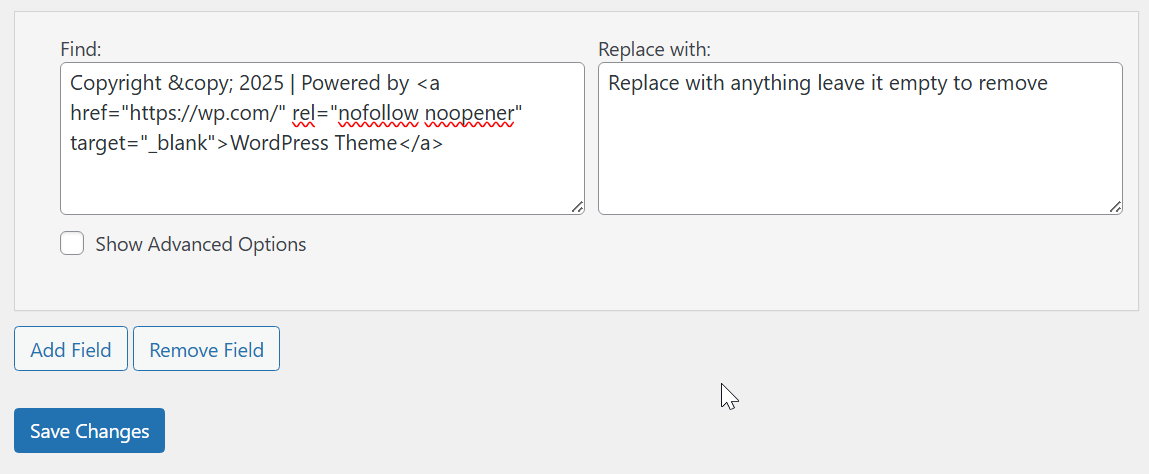
Yes. Put the exact footer text in Find, leave Replace empty. With Pro, you can also use a CSS selector (e.g., .footer-credit, .site-info) to target only the footer element — so identical text elsewhere on your page stays untouched.
Can I remove "Powered by WordPress"?
Yes. Set "Powered by WordPress" as the Find text and leave Replace empty. It works with any theme. If your theme wraps it in a specific class, use that as a CSS selector in Pro for even more precision.
Will it work with page builders like Elementor, Divi, or WPBakery?
Yes. The plugin works on the final rendered HTML output, so it's fully compatible with Elementor, Divi, WPBakery, Beaver Builder, Bricks, GeneratePress, Kadence, and any theme or builder that produces standard HTML.
Does it work with WooCommerce?
Yes. You can replace WooCommerce-generated text like button labels, checkout fields, product descriptions, or any front-end string. For example, change "Add to cart" to "Buy now" globally or only on specific product pages using Post ID targeting.
Will it work with caching plugins?
Yes. Clear your cache after adding or updating rules so the cached version picks up the new replacements. Compatible with WP Super Cache, W3 Total Cache, LiteSpeed Cache, WP Rocket, and others.
Do scheduled, role, or device rules work with page caching?
Yes, with Pro's Cache-Aware Mode. Because a cached page is served to everyone, conditional rules could otherwise show the wrong version to some visitors. Cache-Aware Mode automatically keeps affected pages out of the cache (or simply warns you — your choice) and purges known caches — WP Rocket, LiteSpeed, and others — whenever you change a rule.
What about CDN caching (Cloudflare, etc.)?
Same principle — purge your CDN cache after making changes. Once the cache refreshes, your replacements appear normally. The plugin itself adds negligible overhead.
Performance impact?
Minimal. Plain text replacements add just a few milliseconds. DOM parsing only kicks in if you use CSS selector-based rules (Pro). With page caching enabled, the replaced output is cached like any normal page, so returning visitors have zero extra processing.
Does it support regex?
Yes — regex is available in the Pro version. Patterns use smart defaults: . matches newlines (dotall mode) and patterns are UTF-8 aware, so common HTML patterns work out of the box. Useful for replacing complex HTML structures, cleaning up shortcode remnants, or pattern-based URL rewrites.
Can I test a regular expression before I use it?
Yes, with Pro. The built-in Regex Tester lets you write a pattern and see exactly what it matches on sample text, right inside the plugin — so you can get it right before it ever touches your live site.
Can I use this to translate or change WooCommerce / plugin text?
Yes. Any text that appears in your site's HTML output can be replaced. This makes it a lightweight alternative to translation plugins when you just need to change a few strings — like renaming "Cart" to "Bag" or changing "Reviews" to "Testimonials".
Can I schedule a replacement to run only during certain dates or times?
Yes, with Pro. The Schedule feature lets you set a date range, time of day, and specific weekdays. Useful for holiday banners, event countdowns, sale announcements, or any content that should appear only during a specific window.
Can I show different content to logged-in users vs guests?
Yes, with Pro. The Audience section lets you target by login state, specific user roles, or device type (desktop, mobile, tablet).
What happens to my rules if I deactivate Pro?
Your rules are fully preserved. Pro-only fields (regex, CSS selector, schedule, audience, etc.) stop being applied but remain saved. Reactivate Pro later and everything picks up where you left off — nothing is deleted.
Does it work on multisite?
Yes. The plugin can be activated network-wide or on individual sites. Pro licenses are per-site.
Can I export my rules and import them on another site?
Yes, with Pro. Export as JSON (full fidelity) or CSV (spreadsheet-friendly). Import on any other site running Easy Search Replace Pro. Great for agency workflows or migrating rules across staging and production.
Can I sync rules between sites automatically?
Yes, with Pro. Beyond JSON/CSV export, Rule Sync lets you pull rules directly from one site into another using a secure sync key — ideal for agencies keeping staging and production, or a whole fleet of sites, in step.
Can I preview a rule before it goes live?
Yes, with Pro. Live Preview runs any rule — even one you haven't saved yet — against any page on your site and shows the exact number of matches, so you can confirm it works before publishing.
How do I know if a rule is actually being used?
Yes — turn on Rule Analytics (Pro) and the Analytics tab shows how many times each rule has matched. It's the easy way to find rules that never fire so you can fix or remove them.
Are there ready-made rules I can start from?
Yes, with Pro. The Recipe Library offers one-click templates for common tasks — remove "Powered by WordPress", rename WooCommerce buttons, force HTTPS, and more. Each recipe is added as a disabled rule so you can review and tweak it before switching it on.
I don't know CSS — can I still target a specific element?
Yes, with Pro. The Visual Selector Picker lets you click an element on your own site and the plugin fills in the correct CSS selector for you — no dev tools or CSS knowledge needed.
What happens when I reach 10 rules on the free version?
The free version supports up to 10 rules. Upgrade to Pro to remove the limit entirely. If you already had more than 10 rules from an earlier version, they all keep working — nothing is removed.
Where can I find full documentation?
Visit Easy search replace docs for detailed guides, examples, and troubleshooting.
更新日志:
- NEW (Pro): "Everywhere except" selector mode — apply a rule to the whole page while protecting the content inside elements matching a CSS selector (the inverse of "only inside this selector").
- NEW (Pro): "Match text between two markers" can now do a scoped find & replace — put text in the "Find" box and only that text is replaced inside each marked block, instead of replacing the whole block. Leave "Find" empty for the original whole-block behavior.
- NEW (Pro): Visual Selector Picker now has an address bar — load and pick elements from any page on your site, not just the homepage.
- Fixed: "Skip these HTML tags" now protects nestable tags (e.g. div, code) correctly — previously protection stopped at the first closing tag, leaving the rest of a nested block exposed.
- Fixed: saving rules, importing, adding a recipe, or syncing now redirect after saving, so a browser refresh can no longer re-submit and duplicate rules (post/redirect/get).
- Improved: Rule Analytics writes are deferred to after the page is sent and are batched through the object cache when one is present — far less database overhead on high-traffic sites.
- NEW: "Don't match if page contains" safety switch is now available on every rule (free).
- NEW selector engine built on the WordPress HTML API (WP 6.5+) — dramatically lower memory use and faster pages when CSS selector targeting is active; automatic fallback on older WordPress.
- NEW (Pro): Live Preview — test rules (even unsaved ones) against any page and see match counts before saving.
- NEW (Pro): Rule Analytics tab, Recipe Library, Regex Tester, Rule Sync between sites, Visual Selector Picker, admin Debug Badge.
- NEW (Pro): Cache-Aware Mode — scheduled/role/device rules now work correctly with page caching, and known page caches are purged automatically when rules change.
- Improved: saving rules no longer resets the "Skip these HTML tags" setting.
- Improved: rule exports now include every field (between-markers rules survive the round trip), and CSV files with multi-line content import correctly.
- Improved: regex rules are validated when you save, with clear warnings for invalid or dangerously slow patterns; patterns like plain words are no longer silently skipped.
- Improved: case-insensitive matching now works with accented and non-Latin text.
- Improved: XML sitemaps and feeds are never touched by replacements.
- Fixed: scheduled rules now respect the site timezone for start and end dates.
- Free version now supports up to 10 rules; installs that already have more keep all of them.
- New: Privacy section in readme
- Improved: Tracking data now includes plugin identifier for multi-plugin support
- Fixed Minor issues
- NEW: Pro tier — regex, CSS selector targeting, scheduled rules, user role / logged-in / device targeting, exclusion rules, import / export with bulk CSV import.
- NEW: Enable/disable toggle on every rule without deleting it.
- NEW: Redesigned admin with tabs — Rules, Import / Export, Settings — and a sticky "How it works" sidebar.
- NEW: "Skip HTML tags" setting — protect contents inside
<script>,<style>,<code>, or any custom tag from replacement. - NEW: "Don't match if page contains" safety switch — add a marker to skip rules on specific pages.
- NEW: "Match text between two markers" (Pro) — a no-regex way to replace content between two HTML snippets.
- IMPROVED: Regex now matches across newlines by default (dotall mode), so patterns like
<div>.*text.*</div>work on multi-line HTML. - IMPROVED: Save/error notices now appear as floating toasts instead of stacking above the form.
- IMPROVED: Buffer filter now skips feeds, REST, and admin-AJAX requests for better performance.
- SECURITY: Defense-in-depth capability checks added to all POST handlers.
- SECURITY: Sanitize and unslash
$_SERVER['REQUEST_URI']when resolving the current URL for rule matching. - SECURITY: Explicit
isset()+is_array()checks on all$_POSTaccess; stop mutating the$_POSTsuperglobal. - SECURITY: Validate post-ID input as integers; validate URL lines via
esc_url_raw. - SECURITY: Use
get_current_screen()hook-suffix matching instead of$_GET['page']to enqueue admin assets. - Dev: Refactored into class-based architecture (rule engine, schema, licensing gate, Pro feature classes) with backward-compatible data migration from 1.x.
- Dev: Introduced
ESRN_VERSION,ESRN_PLUGIN_DIR,ESRN_PLUGIN_URL,ESRN_PLUGIN_BASENAME, andESRN_OPTION_KEYconstants. - COMPAT: Existing users who had CSS selector for free are automatically grandfathered — no action needed.
- Minor issues fixed.
- Bug fixes.
- Fixed advanced options bug.
- Added targeting by Post Types, Post IDs, and URLs.
- Added Ignore Case option.
- Improved footer credit removal workflow.
- Better performance: single-pass DOM parsing when needed.
- UI polish and multiple-rule flow.
- Minor fixes.
- Fixed search function issues.
- Initial release: front-end search and replace with optional CSS selector.