
Text Replace - Find and Replace WordPress Strings
| 开发者 | shsajalchowdhury |
|---|---|
| 更新时间 | 2026年9月28日 00:14 |
| PHP版本: | 7.4 及以上 |
| WordPress版本: | 7.1 |
| 版权: | GPLv2 or later |
| 版权网址: | 版权信息 |
详情介绍:
- No Code Editing Required - Find and replace text without touching theme or plugin files
- Update-Safe - Your string replacements survive theme and plugin updates
- Performance Optimized - Single database query per page load with intelligent caching
- Text Domain Filtering - Target specific plugins, themes, or apply changes globally
- Priority Control - Manage the order of multiple text replacements
- Bulk Operations - Enable, disable, or delete multiple replacements at once
- Import/Export - Transfer configurations between sites easily
- Cache Compatible - Works with WP Rocket, W3 Total Cache, WP Super Cache, and more
- Changing WooCommerce "Add to Cart" to "Buy Now"
- Customizing Contact Form 7 button labels
- Replacing WordPress admin bar text
- Modifying theme-specific strings
- Personalizing plugin messages
- Translating or localizing specific phrases
- A/B testing different button labels
安装:
- Log in to your WordPress admin panel
- Navigate to Plugins > Add New
- Search for "Text Replace"
- Click Install Now and then Activate
- Go to Text Replace in your admin menu to start adding replacements
- Download the plugin ZIP file
- Log in to your WordPress admin panel
- Navigate to Plugins > Add New > Upload Plugin
- Choose the ZIP file and click Install Now
- Click Activate Plugin
- Go to Text Replace in your admin menu to start adding replacements
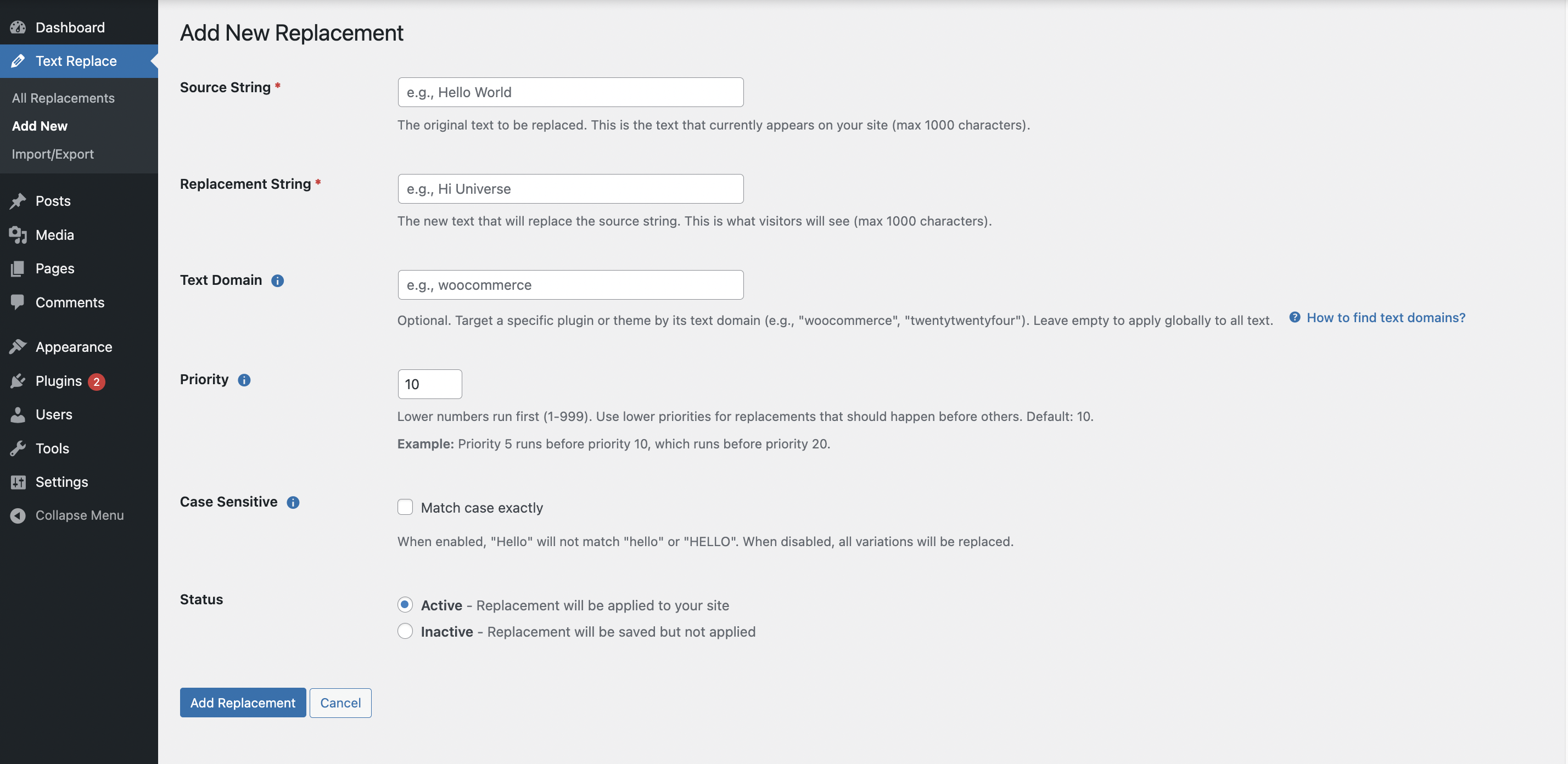
- Navigate to Text Replace > Add New in your WordPress admin
- Enter the Source String (text you want to replace)
- Enter the Replacement String (new text)
- Optionally specify a Text Domain to target a specific plugin or theme
- Set Priority if you have multiple related replacements
- Choose Case Sensitive matching if needed
- Set status to Active
- Click Save Replacement
- Clear your site cache if using a caching plugin
- Visit your site to see the changes
屏幕截图:
常见问题:
Will this work with my theme?
Yes! Text Replace works with any WordPress theme by hooking into WordPress's translation system (gettext filter).
Will this work with WooCommerce?
Absolutely! It's perfect for customizing WooCommerce text like "Add to Cart", "Proceed to Checkout", and more. Just use "woocommerce" as the text domain to target only WooCommerce strings.
Does this affect site performance?
Minimal impact. The plugin uses intelligent caching and executes only one database query per page load. Active replacements are cached for 24 hours, so there's virtually no performance impact.
What happens when I update my theme or plugins?
Your text replacements remain intact! Since you're not modifying source files, updates won't affect your customizations. This is one of the main benefits of using Text Replace.
Can I replace HTML?
The plugin is designed for text replacement. While it can replace simple HTML, it's recommended to use it for plain text strings to avoid breaking markup.
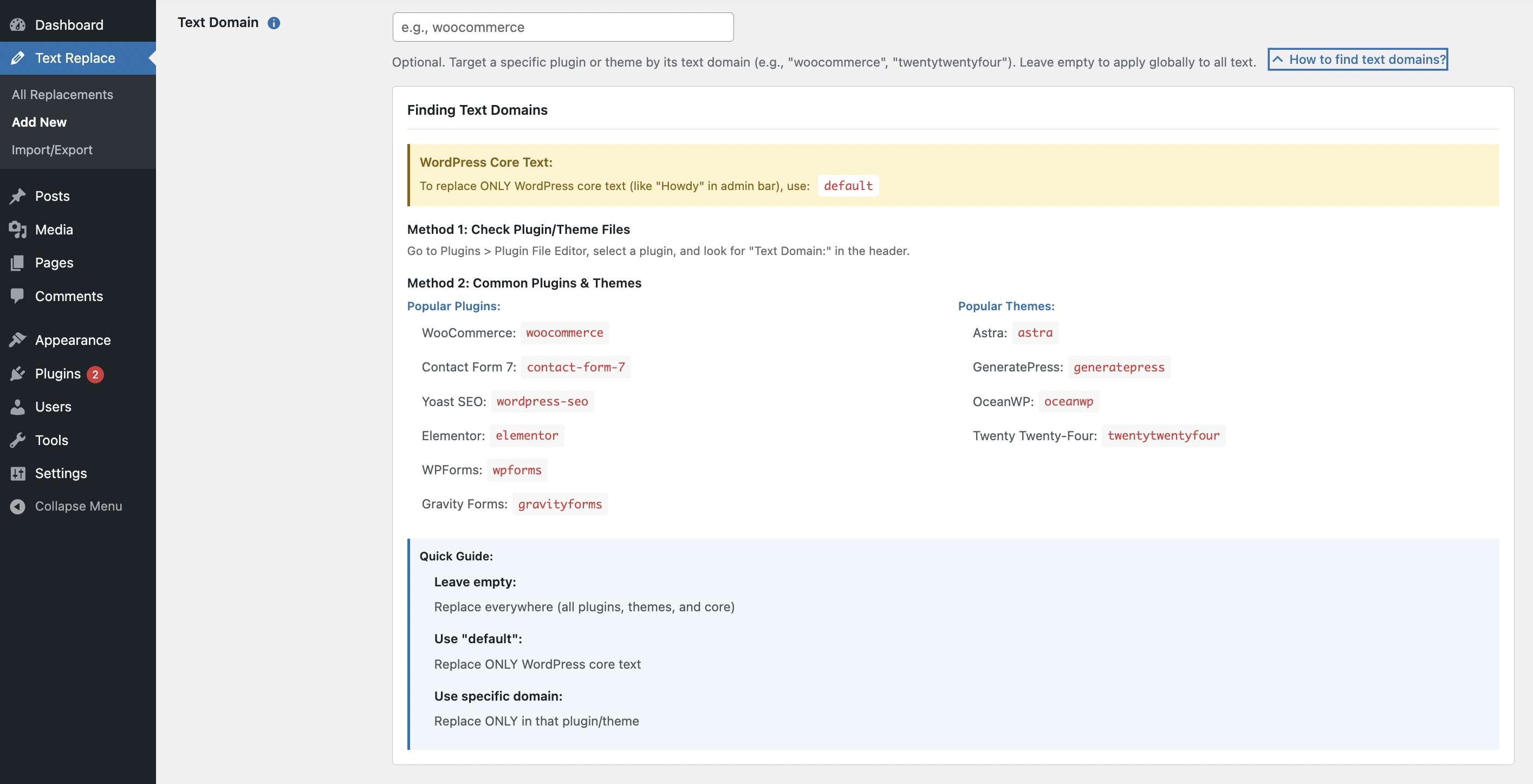
How do I find a plugin's text domain?
Check the plugin's main file header for the "Text Domain" field, or look in the plugin's translation files (.po/.pot files). Common examples:
- WooCommerce:
woocommerce - Contact Form 7:
contact-form-7 - Yoast SEO:
wordpress-seo - Elementor:
elementorSee the "How to Find Text Domain for Any Plugin" section above for detailed instructions.
What's the maximum number of replacements?
There is no hard limit on the number of replacements. The plugin is optimized to handle unlimited replacements efficiently with intelligent caching.
Can I use regular expressions?
Not in the current version. The plugin uses simple string matching for reliability and performance. Regular expressions may be added in a future version.
Why aren't my replacements appearing?
Check these common issues:
- Verify the replacement is Active (toggle switch is on)
- Check if you specified a Text Domain - try leaving it empty for global replacement
- Clear your site's cache (plugin cache and any caching plugins)
- Verify the source string matches exactly (check case sensitivity setting)
- Make sure the text you're trying to replace is actually generated by WordPress, not hardcoded in templates
- Check if another plugin or code is overriding the text after your replacement
How do I clear the cache?
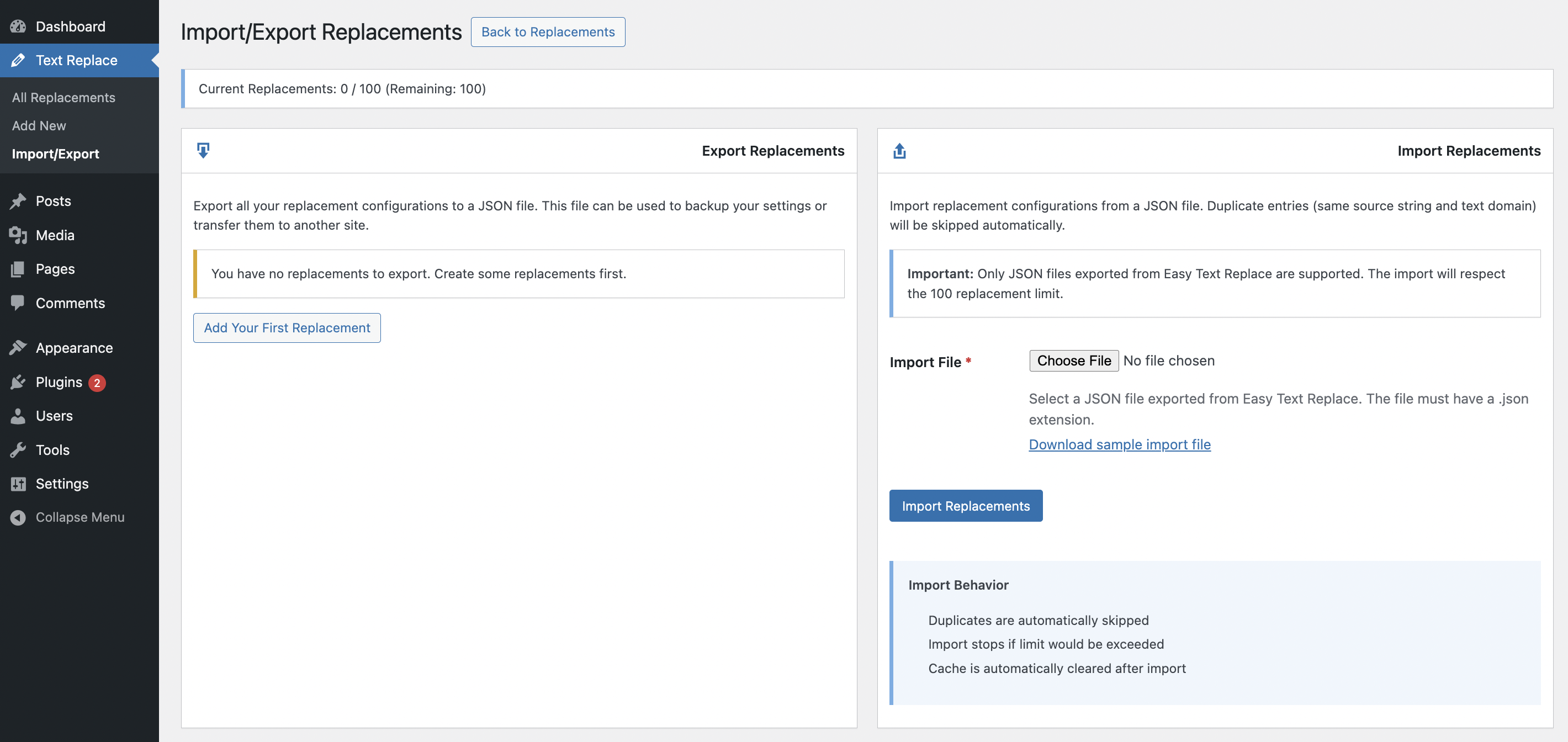
- Go to Text Replace > Import/Export
- Click the Clear Cache button
- Also clear your caching plugin's cache if you use one (WP Rocket, W3 Total Cache, etc.)
Can I export and import replacements?
Yes! Go to Text Replace > Import/Export to export all replacements to a JSON file or import from a previously exported file. This is perfect for transferring configurations between sites or creating backups.
Does this work with multilingual plugins?
Yes, Text Replace works alongside multilingual plugins like WPML and Polylang. The replacements are applied after translation, so they won't interfere with your multilingual setup.
How do I prevent replacing text in other plugins?
Use the Text Domain field to target specific plugins or themes. For example, if you only want to replace text in WooCommerce, enter "woocommerce" as the text domain. This prevents unintended replacements elsewhere on your site.
Can I temporarily disable a replacement?
Yes! Click the status toggle in the replacements list to switch between Active and Inactive without deleting the replacement. Perfect for testing and seasonal changes.
What if I have multiple replacements that affect each other?
Use the Priority field to control the order. Lower numbers (e.g., 1, 5) apply before higher numbers (e.g., 10, 20). This ensures replacements happen in the correct sequence.
Is this compatible with page builders?
Yes! Text Replace works with Elementor, Beaver Builder, Divi, and other page builders. By default it changes text that passes through WordPress's translation system. To also change the actual words you type into your pages (including Divi page body content), enable Content Replacement mode under Text Replace > Settings.
How do I replace the actual content on my pages (for example with Divi)?
- Go to Text Replace > Settings and enable "Replace text inside rendered page content"
- Go to Text Replace > Add New
- Enter the Source String (the text as it appears on your page) and the Replacement String (your new text)
- Leave the Text Domain empty (global) — only global replacements apply to rendered content
- Set status to Active and save
- Clear your site cache, then visit the page
Can I replace text in custom post types?
Yes, as long as the text is generated through WordPress's translation system (gettext), it can be replaced regardless of post type.
Will this work with Gutenberg blocks?
Yes! Text Replace works with Gutenberg editor and block content, as long as the text is dynamically generated. Hardcoded text in block templates may not be affected.
Can I replace text in plugin notifications?
Yes! Use the plugin's text domain to target specific plugin notifications. This is useful for customizing admin notices, update messages, and error messages.
Does this work with WordPress multisite?
Yes, Text Replace works on WordPress multisite installations. Each site in the network has its own set of replacements. You can use import/export to share configurations across sites.
How do I know if a replacement is working?
- Make sure the replacement is set to Active
- Clear all caches (plugin + site cache)
- Log out and view your site in an incognito browser window
- Search for the source text on the page - it should be replaced
- Check browser inspector to verify the text in the HTML source
更新日志:
- Fixed: Fatal error (TypeError) on pages where another plugin passes null to a translation function — reported with GeoDirectory empty category search results
- Updated: Tested up to WordPress 7.1
- New: Case Sensitive column on the All Replacements page — toggle between Enabled and Disabled inline, without opening the edit screen
- New: Status filter tabs with live counts (All / Active / Inactive) above the replacements table; counts respect the current search term
- Fixed: Search on the All Replacements page never filtered results (the search form submitted via POST while the list read GET). Search results are now shareable URLs and pagination matches the filtered results
- Fixed: Inline status toggle, AJAX delete, and clear-cache actions failed with a security error since 1.0.0 due to a mismatch between the created and verified nonce actions
- Fixed: Status label showed "Inactive" regardless of the actual state after an inline status toggle
- Fixed: Table layout broke on smaller screens — the Case Sensitive and Status columns were crushed and their headers wrapped letter-per-letter
- Fixed: Bulk selection now works even when the site's admin JavaScript fails to load (missing core assets, optimization plugins breaking wp-includes scripts)
- Fixed: Export downloads corrupted with admin HTML markup, which prevented exported files from being imported
- Changed: Import now updates existing replacements that share the same source string and text domain (instead of skipping them), so editing an export and re-importing applies the changes; new entries are added and identical entries are skipped
- Changed: Removed the misleading replacement-limit notices on the Import/Export page, since replacements are unlimited
- Fixed: JSON import rejecting valid JSON files (including exported backups) with an "Invalid file type" error
- Fixed: Bundled sample import file failing validation due to an incorrect key name
- Maintenance release confirming continued compatibility with WordPress 7.0
- No functional changes
- Added: Content Replacement mode — optionally replace text inside rendered page content (post body, titles, excerpts, widgets), ideal for page builders like Divi, Elementor and the block editor. Off by default; enable under Text Replace > Settings. Only global (no text domain) replacements apply to content, and markup, code, scripts, URLs and attributes are never modified.
- Update: Compatibility improvements
- Added: Bulk delete functionality - delete multiple replacements at once
- Improved: Cleaner admin interface by removing replacement count notice
- Enhanced: Better user experience with streamlined replacement management
- Update: Compatibility
- Updated: Tested up to WordPress 6.9
- Improved: Removed replacement limit - now supports unlimited text replacements
- Enhanced: One-click cache clearing from Import/Export page
- Optimized: Better performance with large numbers of string replacements
- Added: Improved compatibility with WooCommerce 9.x
- Fixed: Text domain filtering for edge cases
- Fixed: Minor bug fixes and improvements
- Updated: Enhanced security checks for text replacement operations
- Improved: Better handling of special characters in find and replace strings
- Initial release
- String replacement functionality with text domain filtering
- Priority ordering system for multiple text replacements
- Case-sensitive and case-insensitive matching
- Enable/disable toggle for individual replacements
- Bulk operations (enable, disable, delete multiple replacements)
- Import/export functionality with JSON format
- Performance optimization with intelligent caching
- WordPress coding standards compliance
- Security hardening with nonce verification and capability checks
- Integration with WordPress gettext system for reliable text replacement