
Editant
| 开发者 | editant |
|---|---|
| 更新时间 | 2026年5月26日 02:51 |
| PHP版本: | 8.1 及以上 |
| WordPress版本: | 7.0 |
| 版权: | GPLv2 or later |
| 版权网址: | 版权信息 |
详情介绍:
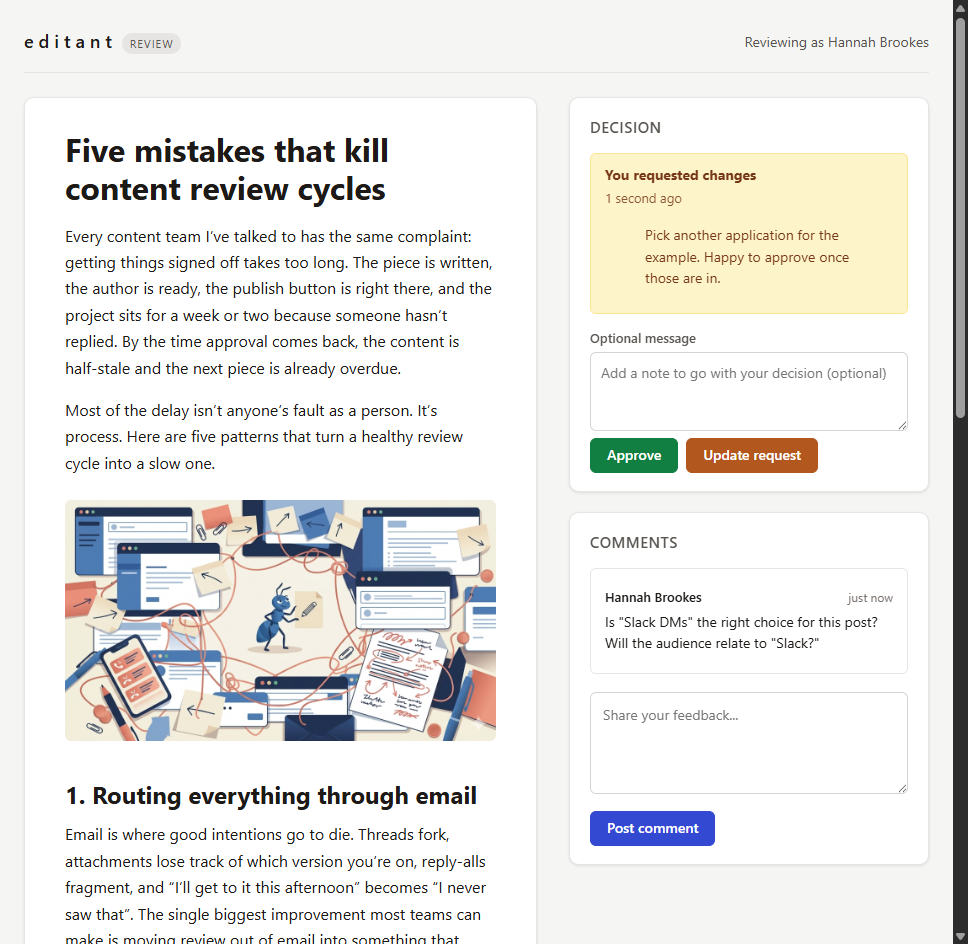
- Tokenised preview links for any public post type, with configurable expiry and one-click revocation.
- Login-free reviewer access via secure 256-bit tokens, stored hashed.
- Threaded comments - reviewers and authors can reply within threads.
- Optional reviewer identity capture: anonymous, name only, or name plus email.
- Block editor sidebar showing live comment threads alongside the content you're editing, with auto-refresh and manual refresh.
- Admin dashboard listing every active link with reviewer counts, decisions, and last activity.
- Approve and Request Changes decisions, recorded with full history.
- Email notifications for new comments, replies, and decisions.
- Configurable defaults for new links, email sender, and rate limits via the Settings page.
- Custom post type support out of the box.
- Full RTL language support across reviewer page, sidebar, and dashboard.
- Translation-ready, with a
.potfile shipped. - GDPR data exporter and eraser hooked into WordPress core privacy tools.
安装:
- Upload the plugin to your
/wp-content/plugins/directory, or install via Plugins -> Add New. - Activate Editant through the Plugins menu.
- Open any post, page, or supported custom post type in the block editor, click the Editant icon in the sidebar, and generate a review link.
- Copy the link and send it to your reviewer.
- WordPress 6.6 or later
- PHP 8.1 or later
- MySQL 5.7+ or MariaDB 10.4+
- Pretty permalinks enabled (Settings -> Permalinks set to anything other than "Plain")
- The WordPress block editor (Gutenberg). The Classic Editor plugin is not supported.
屏幕截图:


常见问题:
Do reviewers need a WordPress account?
No. Reviewers click the link you send them and access the preview directly. You can optionally require them to enter a name, or a name plus email, before they can comment.
What content can I send for review?
Posts, pages, and any public custom post type. Each is handled the same way - generate a link, share it, collect feedback and decisions.
Can I revoke a link after sharing it?
Yes. From the dashboard, open the link and click Revoke. The token is invalidated immediately and any subsequent access returns a 404.
What happens when a link expires?
The link returns a 404. You can regenerate it (which produces a fresh token and soft-revokes the old one) or extend the expiry from the dashboard.
My reviewer link returns "Page not found". What's wrong?
This is almost always a WordPress rewrite-rules cache that has not picked up Editant's review URLs yet. Go to Settings -> Permalinks, do not change anything, and click Save Changes. That regenerates the rewrite rules and the review URLs become routable. This can happen the first time you activate Editant, or after changing your permalink structure. Editant tries to refresh rewrite rules automatically on activation, but on some hosts the refresh does not always stick. The same fix applies if the symptom returns later. Also confirm that Settings -> Permalinks is not set to "Plain". Editant requires pretty permalinks; any of the other settings (Post name, Day and name, etc.) is fine.
Does this work with custom post types?
Yes. Editant supports any public custom post type registered with show_in_rest and public set to true.
Is reviewer data sent anywhere outside my site?
No. Comments, decisions, and reviewer details are stored in your WordPress database. IP addresses and user agents are hashed before storage with a per-site salt.
Can I customise the preview page styling?
The reviewer preview page ships with neutral, self-contained styles. Custom branding, brand colours, logos, and UI-based styling controls for the reviewer page are planned as part of Editant Pro.
For developers, the preview renderer also exposes filter hooks (editant_template_path for full template overrides, and editant_preview_html_head / editant_preview_html_footer for injecting custom markup into the page head and footer) that allow theme-side customisation. See the plugin source for usage.
Does Editant work with the Classic Editor?
No. Editant is a block editor plugin. The sidebar where you create and manage review links registers against the WordPress block editor (Gutenberg). If you use the Classic Editor plugin, or have classic mode enabled on a per-post basis, the Editant sidebar will not appear on those posts.
How do I uninstall completely?
Deactivate and delete the plugin from the Plugins page. Editant's uninstall.php removes the four custom database tables (editant_links, editant_reviewers, editant_comments, editant_approvals), the per-site hash salt, the plugin settings, and the registered capabilities.
Is this multisite-compatible?
Yes. Each subsite gets its own set of tables and links. Network activation is supported.
更新日志:
- New: Settings page now exposes configurable defaults for new review links (expiry, reviewer identification), email sender (name, address), and per-IP rate limits (read, write). Each field includes an inline tooltip. Empty email fields fall back to the WordPress default.
- New: "Editant Pro features" preview on the Settings page lists the access controls, signed approvals, retention policies, and integrations coming in Editant Pro.
- Changed: Tested up to WordPress 7.0.
- Changed: Editor sidebar icon refreshed to use the Editant brand silhouette, disambiguating it from WordPress 7.0's new Notes feature.
- Internal: improved validation feedback on the Settings page; the "Application tokens" section is hidden when no extension subscribes.
- New: Eight extension hooks for Editant Pro and other Editant extensions.
editant/comment/render_chromedecorates comment HTML.editant/decision/recordedlets subscribers observe approve / changes-requested events.editant/link/validate_settingsextends link-settings validation.editant/reviewer/kindsregisters new reviewer kinds.editant/admin/token_issuance_panelplugs UI into the Settings page.editant/event/dispatchis an audit-log event bus.editant/publish/gate_checklets extensions veto publishes.editant/activator/setup_blogruns alongside Free Core's per-blog setup. - New: Settings admin page (Editant -> Settings) as a slot host for application-token UI. Capability: manage_options.
- Internal: legacy
editant_link_settings_validatefilter replaced witheditant/link/validate_settings(errors-array contract). No user-facing change. - Internal: service-method signatures gained an
int $actorUserIdparameter where the actor identity wasn't already passed in (LinkService::revoke,LinkService::updateSettings,LinkService::updateExpiry,CommentService::setStatus,CommentService::setThreadStatus). Internal API; no behaviour change for end users.
- Security: admin REST endpoints now require the relevant Editant capability (
editant_view_linksfor reads,editant_manage_linksfor writes) in addition to the existing per-postedit_postcheck. Closes a gap where users grantededit_postby a third-party plugin or custom role could reach Editant link data without holding the Editant capabilities. Shipped to WordPress.org directly via SVN in response to plugin review feedback on the 0.9.2 submission.
- Security: explicit boundary sanitisation added across the reviewer-facing public endpoints (identity capture, comments, decisions).
- Removed the "Powered by Editant" attribution from the reviewer preview page.
- Source code for the bundled JavaScript and CSS now ships with the plugin under
assets/src/, alongside the build configuration (composer.json,package.json,webpack.config.js). - Documentation: added a Development section to the readme covering source layout and rebuild steps. Clarified the preview-page customisation filter hooks available to theme developers.
- Editor sidebar now appears on Pages and any public custom post type, not just Posts (migrated from
@wordpress/edit-postto@wordpress/editor). - Admin menu promoted from a submenu under Posts to a top-level menu item.
- Menu icon is now theme-aware: the SVG silhouette recolours per WordPress admin colour scheme.
- Permanently deleting a post now also removes its associated Editant links, reviewers, comments, and decisions.
- User-facing labels in the admin dashboard made post-type-neutral ("item", "title", "content" rather than "post").
- Documentation: clarified that Editant requires the block editor and that the Classic Editor plugin is not supported.
- Documentation: added FAQ entry covering the rewrite-rules refresh required when reviewer links return 404 immediately after install.
- Internal: repository interface layer introduced across the four data-path repositories; multisite-aware activator dispatcher.
- Tokenised preview links with configurable expiry, revocation, and regeneration.
- Login-free access; optional name or name + email identity capture.
- Threaded comments and approve / request changes decisions.
- Block editor sidebar with live thread updates (auto-refresh and manual refresh).
- Reply to reviewer comments from inside the editor.
- Admin list view with link counts, reviewer activity, and decision summaries.
- Per-item detail view showing all links, threads, and decisions on one screen.
- Email notifications via
wp_mailfor new comments, replies, and decisions.
- Full RTL support across reviewer page, sidebar, and dashboard.
- All user-facing strings translatable;
.potfile shipped.
- Tokens generated with
random_bytes(32); stored as SHA-256 hashes only. - Per-site hash salt for IP, email, and user agent fingerprints.
- Rate limiting on all public endpoints.
- GDPR personal data exporter and eraser registered with WordPress core privacy tools.
X-Robots-Tag: noindex, nofollow, noarchiveandCache-Control: no-storeon every preview response.
- PHPUnit suite covering domain values, services, repositories, and privacy classes.
- Playwright end-to-end test for the reviewer happy path.