
eInvoice Validator for VAMPIRE PHP
| 开发者 | naranili |
|---|---|
| 更新时间 | 2026年11月21日 01:29 |
| PHP版本: | 8.2 及以上 |
| WordPress版本: | 7.1 |
| 版权: | GPLv2 or later |
| 版权网址: | 版权信息 |
详情介绍:
- XRechnung 3.0.2 ( UBL Invoice, UBL CreditNote and CII, including Extension and CVD )
- The EN 16931 core rules for UBL and CII
- Peppol BIS Billing 3.0.21, Invoice and CreditNote
- Factur-X / ZUGFeRD 2.5.2 in the profiles EN16931 and EXTENDED
- Drag & drop upload of XML invoices and of ZUGFeRD / Factur-X PDFs. The invoice XML is taken out of the PDF in the visitor's browser, so only the XML reaches the server.
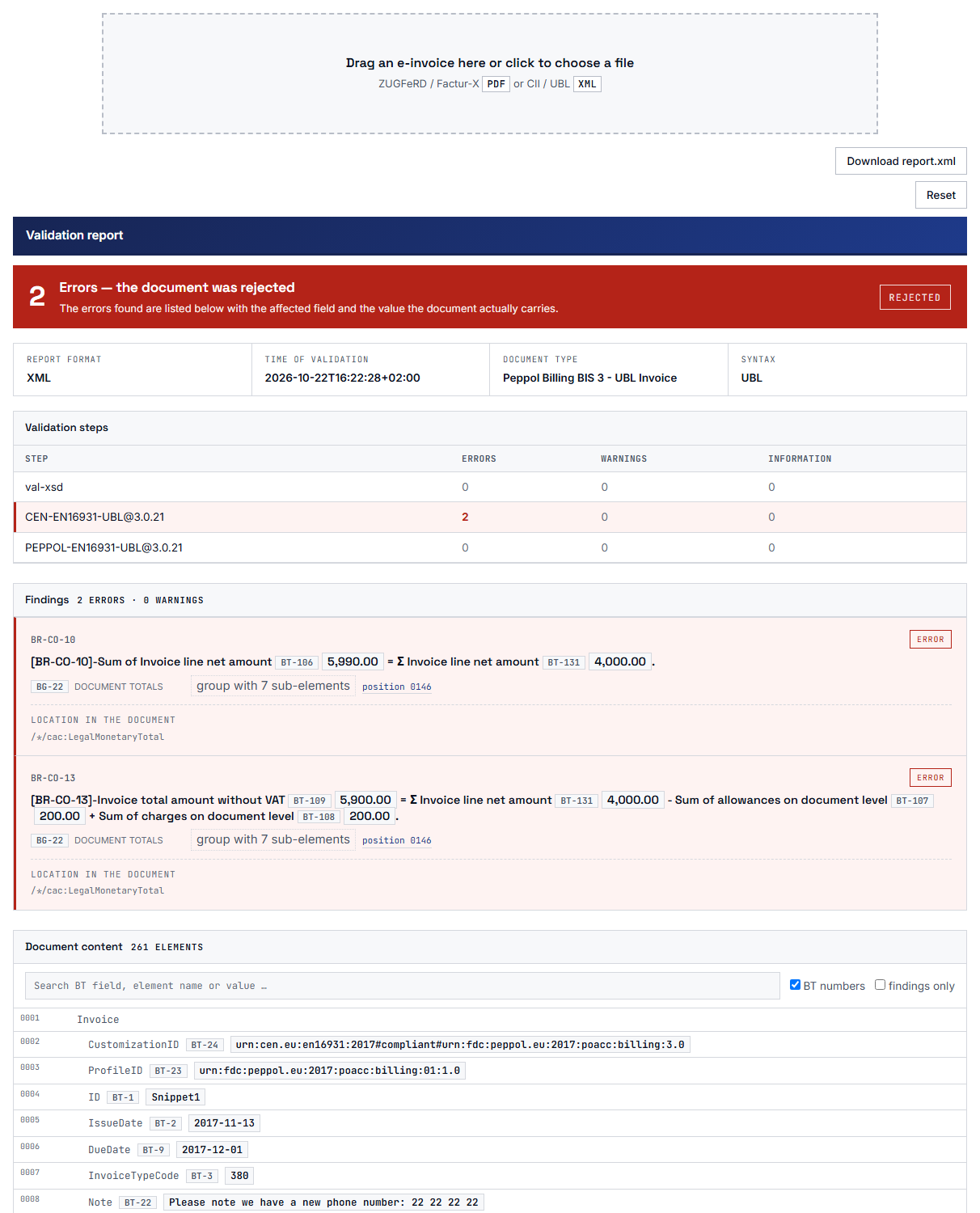
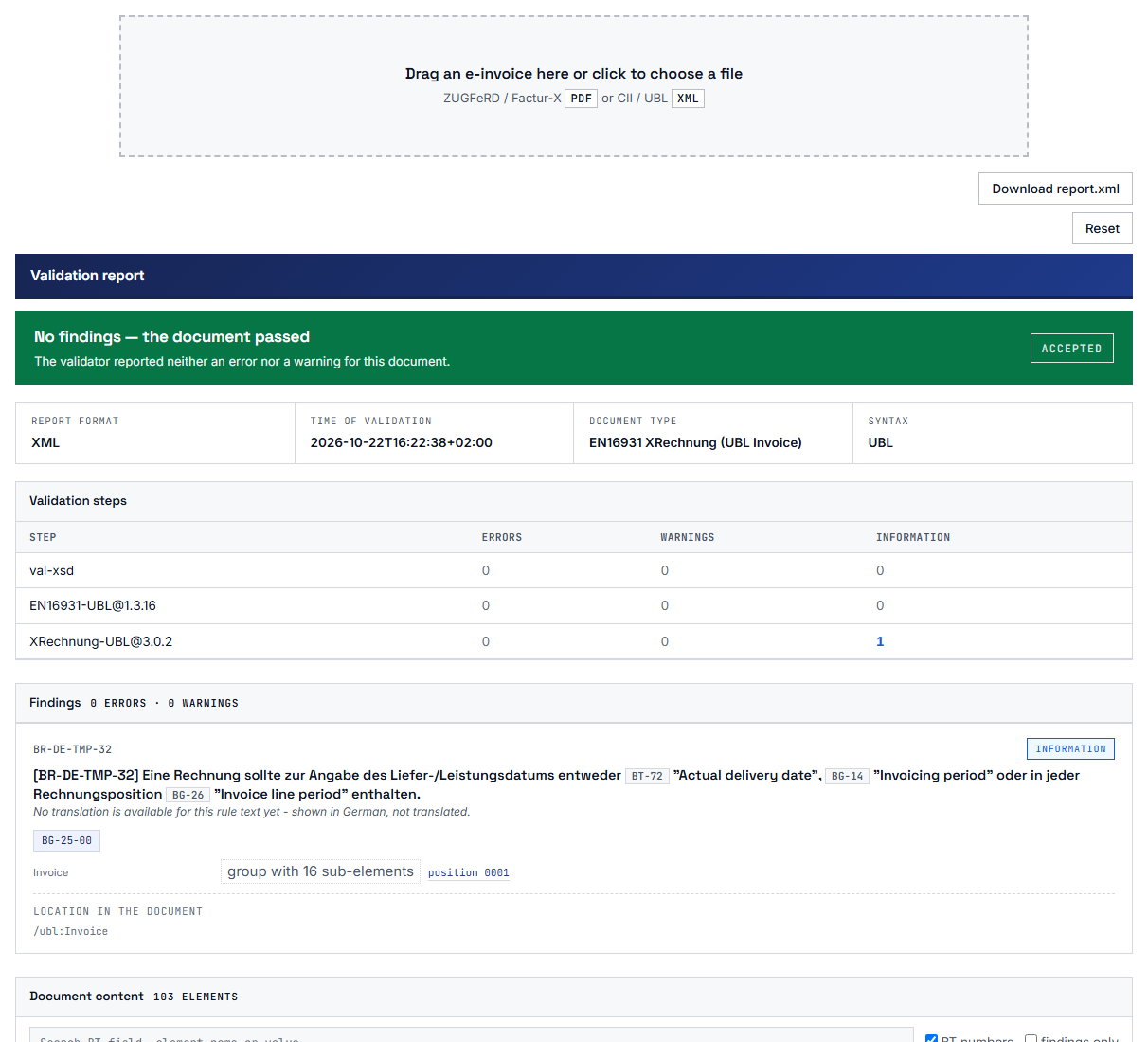
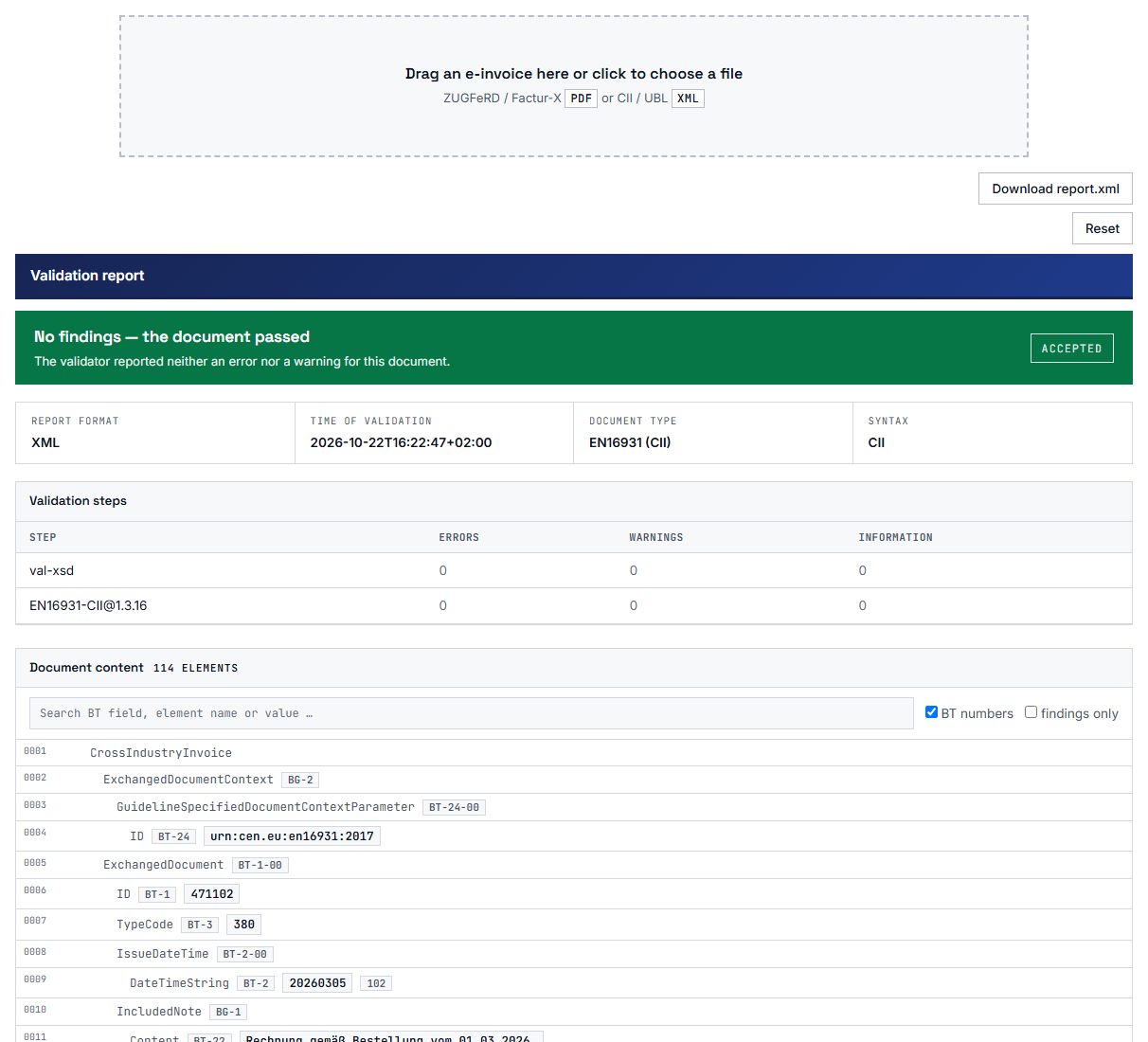
- A readable report: result, validation steps, every finding explained in plain language with the affected field, and a field-by-field view of the invoice.
- Report download in the report format of the KoSIT validator, and a REST route
POST /wp-json/einvoice/v1/validate-php. - Positive test report on request: the report lists every rule checked with its result, including the satisfied ones.
- Check against every edition on request: ZUGFeRD and Factur-X invoices are checked against each edition of their format, and a table shows the result per edition.
- Rule packages and rule profiles: new rule sets can be installed as a ZIP file without replacing the plugin, and own rule profiles from the Rule Studio can be added to the official rules.
- Upload defences: size limit, a daily upload limit per role with its own row for guests, nonce-based protection with a fresh nonce for cached pages, and no lasting copy of the invoice.
vendor/invoicepress/vampire-php/NOTICE names origin, rights holder and licence of every rule package, and the licence texts lie beside it.
Source code and build
The scripts in assets/js/ whose names end in .bundle.js are built with esbuild from the ES modules in assets/js/source/, which ship with the plugin. assets/js/source/BUILD.txt explains how to rebuild them, and assets/js/source/build.mjs does it with one command; with the esbuild version named there the result is byte-identical to the shipped files. The data table assets/js/source/src/model/en16931-versions.json is written by the generator assets/js/source/tools/build-en16931-structure.mjs, which is included as well.
The translation tables i18n/de.json.js and i18n/fr.json.js are generated from languages/einvoice-validator-for-vampire-de_DE.po and languages/einvoice-validator-for-vampire-fr_FR.po. Each table holds the msgid and msgstr pairs that the scripts use.
The folder assets/js/pdfjs/ holds Mozilla pdf.js 6.3.289 unchanged, under the Apache License 2.0 with its licence text next to the files. Its source code is at https://github.com/mozilla/pdf.js.
安装:
- Install the plugin through the WordPress plugins screen, or upload the plugin folder to
/wp-content/plugins/. - Activate the plugin through the "Plugins" screen.
- Open eInvoice Validator -> VAMPIRE and look at the section "Systemcheck". It shows whether PHP version, extensions and memory are sufficient.
- Add the shortcode
[sppv_validator]to any page or post.
屏幕截图:
常见问题:
Do I need Java or another plugin?
No. The validation engine is written in PHP and included. The plugin needs PHP 8.2 or newer with the extensions dom, libxml and bcmath; 256 MB of memory are recommended.
Is the uploaded invoice stored anywhere?
No. The invoice is checked during the request and not kept. The plugin stores no invoices and no reports.
Which formats are not checked?
The ZUGFeRD profiles MINIMUM, BASIC WL and BASIC are checked only with the setting "Check against every edition". The national variants of Romania, Portugal, Belgium, Serbia, Italy, Croatia and Turkey are not included; such an invoice gets "No result" with the reason.
How long does a check take?
The time grows with the number of invoice lines. Measured on the development server, an invoice with 1,000 lines takes about 40 seconds and 174 MB of memory.
Can I limit how many invoices a visitor may upload?
Yes. The settings page has a table "Daily uploads per role", with a row for guests; 0 means no access.
Can a visitor check many invoices at once?
Yes. Next to "Single check" the page has the tab "Batch check": a visitor drops many invoices, a folder or a ZIP file, the browser sends them to the site one by one, and an overview lists the verdict of every file, with filters, sorting, a CSV download and a printable summary. A click on a row shows the report of that invoice. Every invoice counts against the daily upload limit like a single check, and the batch stops when the limit is reached. A page that should offer the single check only uses [sppv_validator batch="no"].
更新日志:
- The two download buttons of the rule report on the viewer page show their text in the language of the site.
- If files of the plugin are missing or incomplete after an upload, the plugin stays off with a notice in the admin area instead of stopping the whole website.
- Maintenance release without visible changes.
- The button "Validate with VAMPIRE" in the eInvoice Viewer now comes from this plugin and needs the viewer 3.0.0; update the viewer first. An app can enter this website as the source of its check ( /wp-json/einvoice/v1/validate/vampire ). Visitors may use that address within the daily uploads per role, and every check there counts against them.
- A finding that points at a group, such as the seller or an invoice line, no longer shows the note on the number of its sub-elements.
- With the add-on VAMPIRE JS and the eInvoice Viewer 2.40.0 or later, the button "Validate with VAMPIRE" in the viewer checks the invoice in the browser as well; the invoice does not leave the computer.
- New: the batch check. Visitors check many invoices at once, from a folder, a ZIP file or a selection of files, and get an overview with filters, sorting, a CSV download and a printable summary.
- A rule that cannot be evaluated for an invoice no longer stops the check; the report lists it as not evaluable.
- The explanation of a rule now shows the sum, or the right value, for a field that occurs several times, instead of the value of its first occurrence.
- The explanation of a finding now shows the values the rule actually compared, also for fields its text does not name; under BR-CO-13, for example, the sum of the line net amounts (BT-106) appears next to the total without VAT.
- The EN 16931 rules follow release 1.3.17. Rule BR-CO-09 deliberately keeps accepting the Greek VAT prefix EL, as its rule text allows, and every report says so.
- In the invoice view of the report, a hint on a row of the totals stands on its own line below the amount instead of pushing the amount out of the table.
- The settings page is now under the menu entry "eInvoice Validator" in wp-admin, no longer under Settings. An old address is sent on.
- In the eInvoice Viewer from version 2.38.0 the report appears in a tab of its own.
- New: with the paid add-on "VAMPIRE JS" active, the validator page checks the invoice in the visitor's browser and shows the same report; the invoice is then not sent to the site.
- New: "Download report.html" saves the HTML report the engine writes, unchanged, next to report.xml.
- Wording: the report and its notes now speak of the "result" of a check.
- With the check against every edition switched on, the report below the table and the downloaded report.xml are those of the edition the table chose, for ZUGFeRD and Factur-X.
- The report, its buttons and messages follow the design kit chosen for the eInvoice tools, including a kit of your own.
- The note under the report no longer claims that the tool does not validate anything itself.
- A note of the level "information" appears blue in the document view, no longer like an error.
- The plugin is free and licensed under the GPL, version 2 or later; it comes through wordpress.org.
- New rule packages are installed as a ZIP file, without a shop account.
- New design "Kit S" on the settings page: the validator in the colours of the specialPress websites.
- The daily upload limit can now be set per role, with its own row for guests; 0 means no access.
- The eInvoice Viewer 2.35.0 shows a button "Validate with VAMPIRE" that checks the invoice on display with this plugin.
- New: rule profiles from the Rule Studio can be installed on the settings page; their findings appear in the report with the profile's name.
- Answers appear in the language of the page, also for logged-in users whose profile language differs.
- New setting "Positive check report": the report lists every rule with its result, also the satisfied ones, and can be downloaded and printed.
- New setting "Check against all editions": ZUGFeRD and Factur-X invoices are checked from the newest edition downwards, and a table shows the result per edition.
- An invoice that names an edition the rule package does not contain yet, such as XRechnung 4.0, now gets "No result" with the reason instead of "Rejected".
- New rule packages can be uploaded as a ZIP from your shop account.
- The invoice view no longer marks an IBAN with wrong check digits; the validation report is not affected.
- The package now names the origin and licence of every rule set and contains the licence texts.
- The note above the marked fields now says exactly what the viewer checks.
- The bundled translations now also appear when the plugin is network-activated and on older WordPress versions.
- The hint under the drop zone and all other text without a font of its own now use the font of the selected design kit instead of the theme's font.
- The invoice view marks fields that break a rule following from the invoice itself, with a translated note below each field.
- Rules of ZUGFeRD / Factur-X EXTENDED and EXTENDED-CTC-FR are now explained only with the Extended Profiles add-on; without it, such a finding shows the validator's rule id and message.
- Long CII invoices are checked much faster; 400 invoice lines now take about a third of the previous time.
- With the reverse proxy setting switched on, the daily limit now counts the address the proxy added, not the one a visitor can send along themselves.
- New: the design kit of the validator can be chosen under Settings → E-Invoice Validator VAMPIRE. The choice applies to all eInvoice tools on the site, and Kit H remains the default.
- A finding about an attachment of the invoice now names that attachment.
- Maintenance release without visible changes.
- The validation report is now shown in the same view as the Validation Explorer, with a plain-language explanation and the affected field for each finding.
- Notes about a report that could only be read in part now appear in the language of the site.
- The settings menu entry is now called “E-Invoice Validator VAMPIRE”.
- The upload area and the report look the same as in the other e-invoice tools.
- The upload area and the report take on the look of the other e-invoice tools.
5.900,00 EUR and 01.12.2017, English 5,900.00 EUR and 2017-12-01, French 5 900,00 EUR.
Where a text is missing in the selected language, the English one is shown together with a note
saying so.
1.2.0
The shortcode is [sppv_validator], carrying this plugin's own prefix. No other plugin can claim
the same name.
Before 1.2.0
Development versions that were never shipped.