
Elzo Forms
| 开发者 | elzoforms |
|---|---|
| 更新时间 | 2026年10月23日 23:13 |
| PHP版本: | 7.4 及以上 |
| WordPress版本: | 7.1 |
| 版权: | GPLv2 or later |
| 版权网址: | 版权信息 |
详情介绍:
- Upload one or multiple files.
- Set file size, file count, and allowed file type limits.
- Upload large files using chunked uploads.
- Save submissions in the WordPress admin.
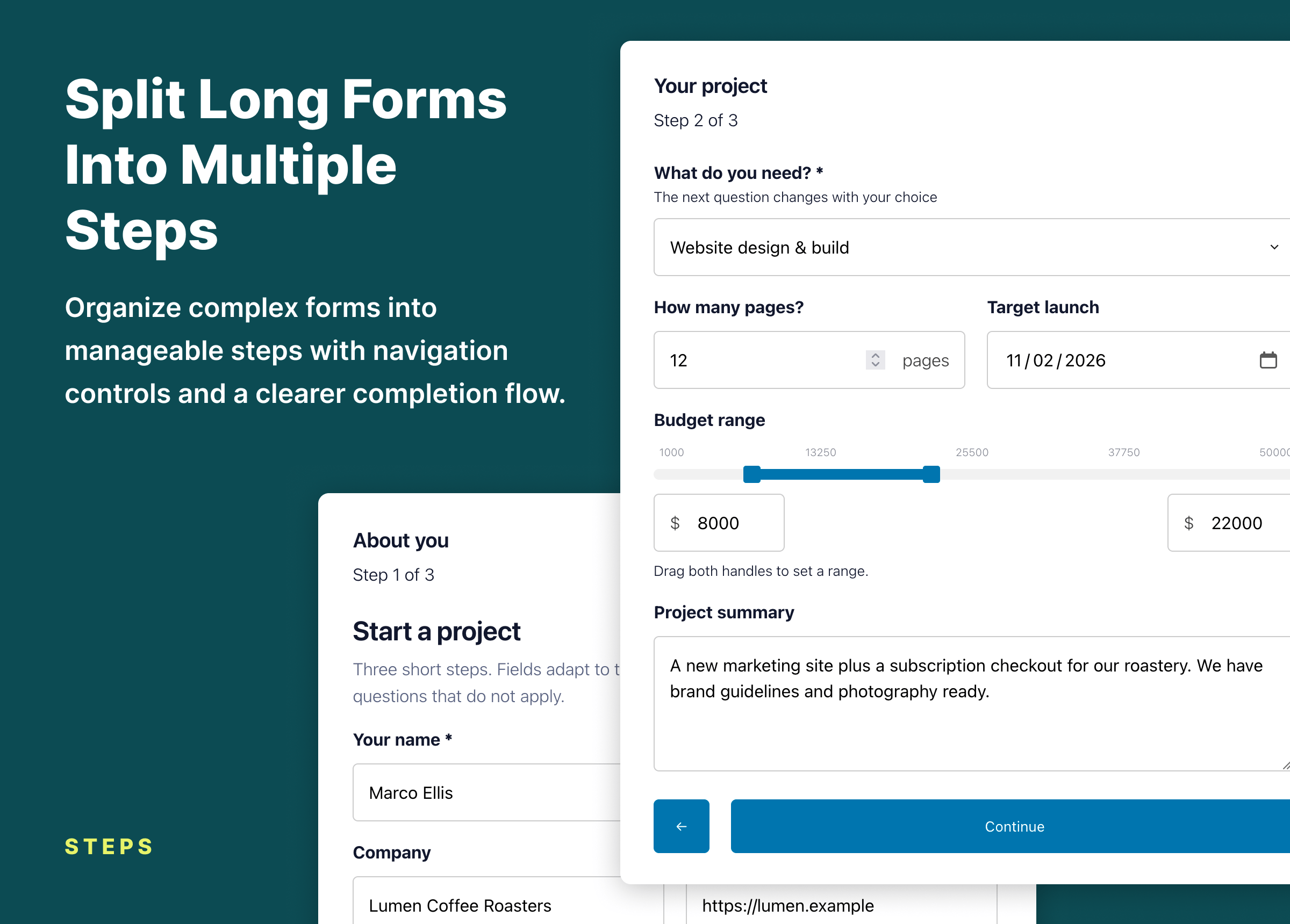
- Build multi-step forms.
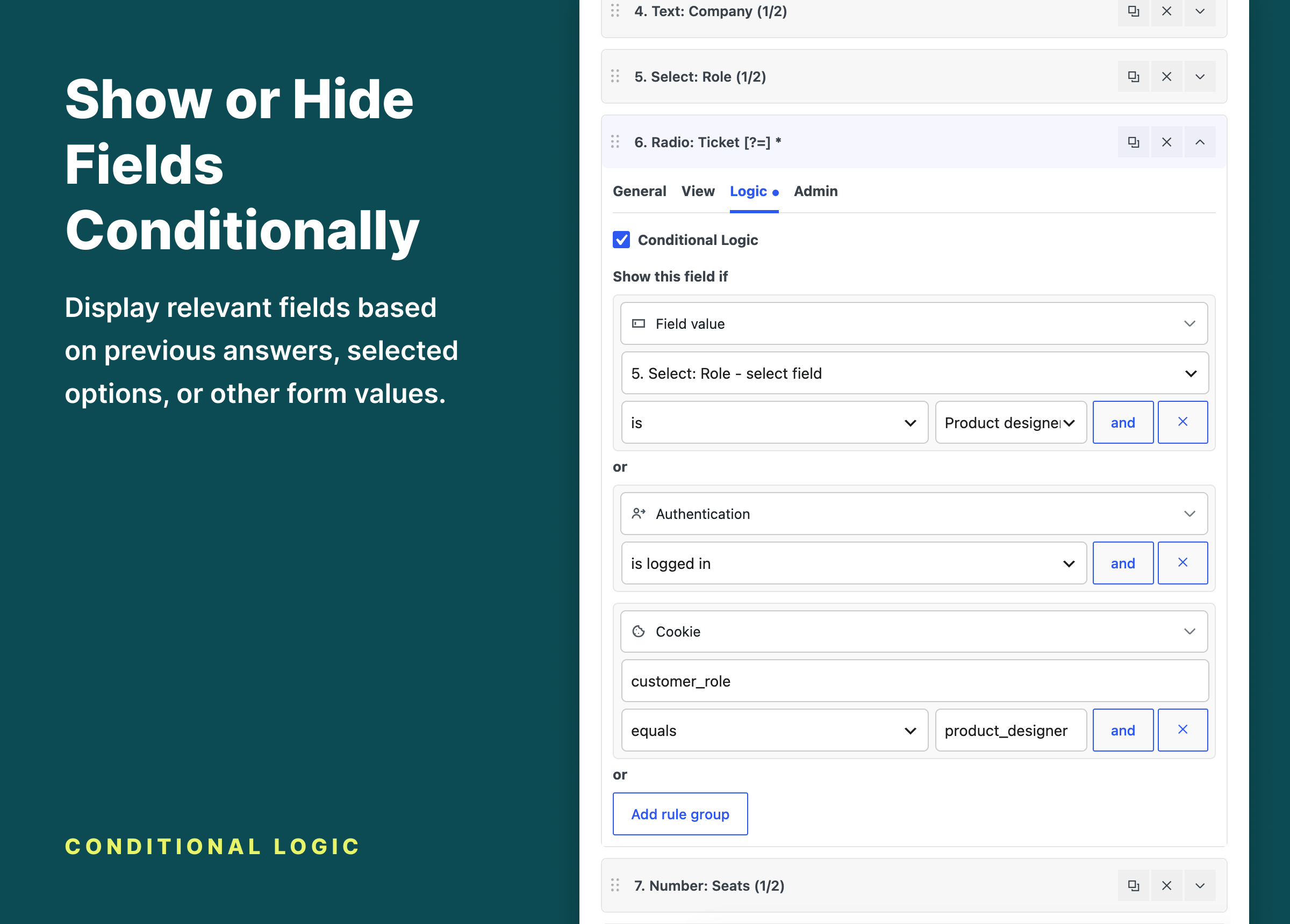
- Show or hide fields with conditional logic.
- Send configurable email notifications.
- Send a confirmation email to the person who submitted the form.
- Redirect visitors or display a custom success message.
- Protect forms from spam without requiring CAPTCHA.
- Add forms with a native Gutenberg block or shortcode.
- Visual form builder inside the WordPress admin.
- Searchable field picker for quickly finding and adding fields.
- Keyboard-friendly field selection with search, arrow navigation, and Enter to add.
- Field types: text, textarea, select, checkbox, radio, range, file upload, hidden, content, and button.
- Text fields also cover email, telephone, URL, number, date, time, and password input, with matching validation.
- Responsive field widths (full, 1/2, 1/3, 1/4) for multi-column layouts.
- Multi-step forms with configurable step navigation text.
- Conditional field visibility based on field values, visitor login state, or page context.
- Native Elzo Form block with an editor preview and width and alignment settings; the shortcode supports the same layout options.
- Single or multiple file uploads.
- Minimum and maximum file count controls.
- Maximum upload size.
- Allowed file type restrictions.
- Chunked uploads for large files.
- Executable file types such as
.phpand.phtmlare rejected.
- Submitted field values.
- Uploaded files.
- Submission time.
- Visitor information.
- The page the form was submitted from.
- Values entered in other fields.
- Whether the visitor is logged in or logged out.
- The page or post where the form appears.
- Submissions are stored in the WordPress admin with submitted values, uploaded files, and visitor details.
- Email notifications with configurable recipients, subject, and message text.
- Confirmation emails to the submitter with a personalized subject and message, an optional copy of the answers, and a per-address sending limit.
- AJAX or standard form submissions.
- Custom success message or redirect after a successful submission.
- File uploads with size limits, file count limits, allowed file type checks, and chunked uploads for large files.
- Minimum time before a form can be submitted.
- Minimum interval between submissions.
- Blocked IP addresses.
- Blocked words.
- Blocked submissions can be discarded or kept and marked as spam for review.
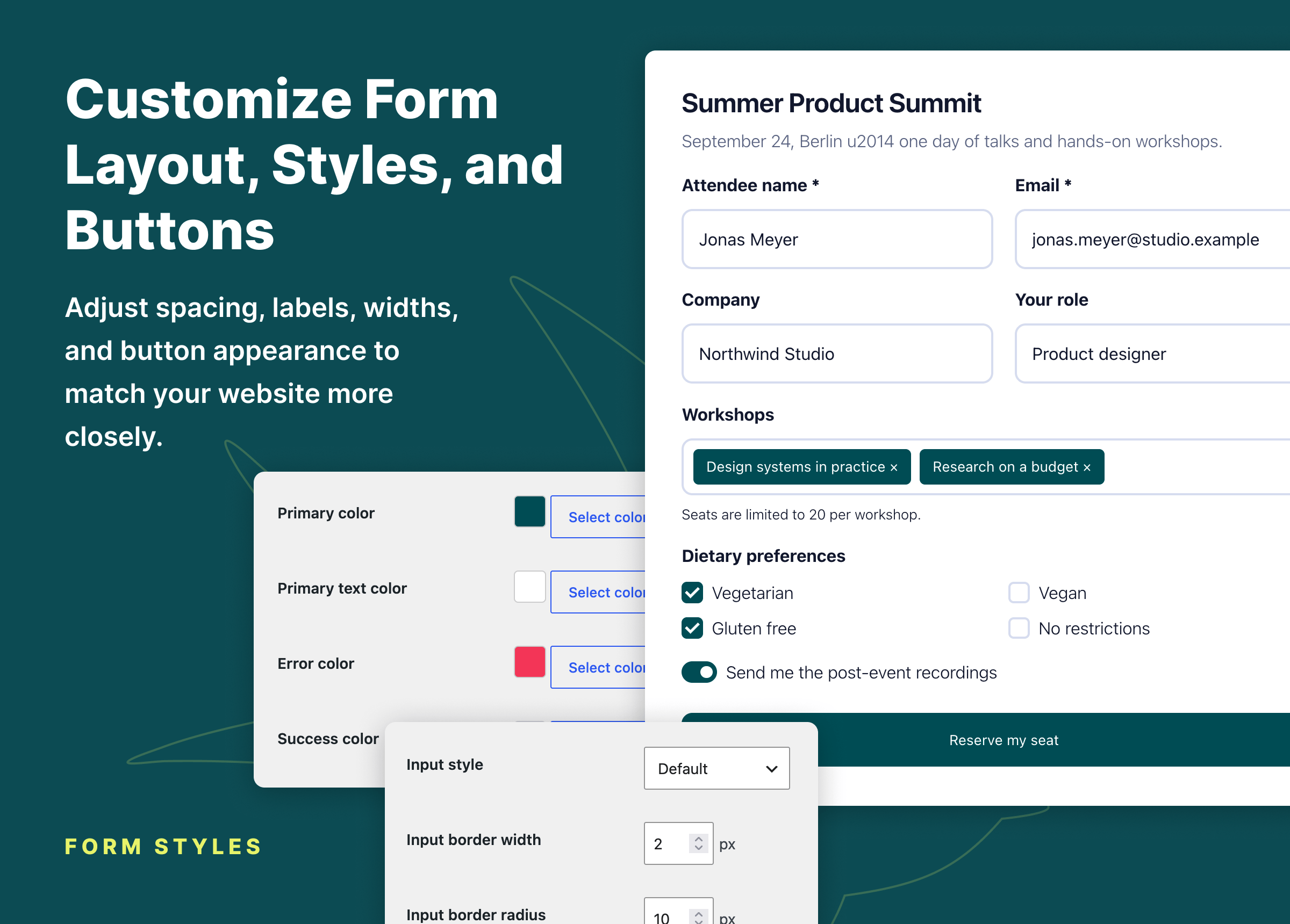
- Global and per-form settings for form behavior, texts, and styling.
- Email styles: your logo or brand name in the header, its size and alignment, and the colors of the background, content, text, borders, links, and button, with a preview.
- Template overrides from an
elzo-formsdirectory in your theme. - Hooks and filters for custom field types, validation, and submission handling.
- Optional read-only JSON form sources, so developers can ship forms with a theme or plugin and keep them under version control.
安装:
- Install Elzo Forms from the WordPress.org plugin directory, or upload the
elzo-formsfolder to/wp-content/plugins/. - Activate the plugin through the Plugins screen in WordPress.
- Go to Forms > Add New in the WordPress admin.
- Add fields, configure form settings, and publish the form.
- Add the Elzo Form block and select your form. You can also use a shortcode such as
[elzo_form id="123"].
屏幕截图:


常见问题:
What is included in the free version?
The free plugin includes built-in field types, multiple file uploads, stored submissions, multi-step forms, core conditional logic, email notifications, styling controls, spam protection, the native Gutenberg block, developer hooks, template overrides, and JSON form sources. PRO adds post-submission automations and additional conditional logic types.
How do I display a form on my site?
Add the Elzo Form block in the block editor and choose a form from the selector.
In the classic editor or a shortcode-enabled widget area, use:
[elzo_form id="123"]
You can also pass layout options:
[elzo_form id="123" max_width="600px" form_align="center" text_align="left"]
Does it work with the block editor?
Yes. Add the native Elzo Form block, then choose a form in the block. The editor displays a non-interactive preview using the same rendering engine as the frontend. The block's layout controls can set a maximum width and form and text alignment. Shortcodes remain supported in the classic editor, widget areas, and theme templates.
Can I place the same form more than once on a page?
Yes. Each rendered instance receives unique HTML IDs, while field names and the submitted data structure stay unchanged.
Where are submissions stored?
Submissions are stored on your site as Elzo Forms submission records and can be opened from Forms > Submissions in the WordPress admin.
Are stored submissions available in the free version?
Yes. Stored submissions are included in Elzo Forms free.
Can I receive email notifications?
Yes. Enable email notifications in the form settings and configure the recipient address, subject, and message text.
Can the person who submitted the form receive a confirmation email?
Yes. Turn on the confirmation email in the form settings. It is sent to the Email field of the form, or to the logged-in user, with the subject and message you configure. The submission screen shows whether each confirmation was sent.
Can visitors upload multiple files?
Yes. Multiple file uploads are included in the free plugin.
The file field supports minimum and maximum file counts, upload size limits, allowed file types, and chunked uploads for large files. Executable file types such as .php and .phtml are rejected.
Does the free plugin include conditional logic?
Yes. Field visibility can depend on the values of other fields, whether the visitor is logged in, and the page the form is displayed on. Additional condition types are available in Elzo Forms PRO.
Are multi-step forms available in the free version?
Yes. Multi-step forms and configurable step navigation are included in Elzo Forms free.
Is Google reCAPTCHA required?
No. Elzo Forms includes built-in spam controls that do not require Google reCAPTCHA or any other CAPTCHA service. Google reCAPTCHA v3 is optional. Elzo Forms does not load the Google reCAPTCHA API or verify submissions with Google unless the reCAPTCHA module is enabled and configured with API keys.
Does Elzo Forms support Cloudflare Turnstile?
Yes. An optional Cloudflare Turnstile module is included. It stays disabled until you enable it and enter the site key and secret key of your Turnstile widget.
Does the plugin send data to third-party services?
No, not by default. Submissions are processed on your WordPress site. The optional anti-spam modules connect to their third-party services only after you enable and configure them. See the Third-party Services section for details.
Where does Elzo Forms store files?
All generated files are stored below the site-specific directory returned by wp_upload_dir().
Files uploaded through a form go to elzo-forms/user-uploads, and generated CSS goes to elzo-forms/assets.
What happens when I delete the plugin?
Your forms, submissions, uploaded files, and settings are kept. Deleting Elzo Forms does not remove them, so you can reinstall the plugin without losing data. Remove the forms and submissions yourself first if you want the data gone.
Can developers customize the output?
Yes. Themes can override plugin templates from a theme elzo-forms directory, and WordPress hooks and filters cover custom field types, validation, and submission handling.
A filter can also register read-only JSON form sources. Elzo Forms never creates or modifies those JSON files; it only reads forms from the paths a developer configures.
更新日志:
- Added a confirmation email to the person who submitted the form, with its own subject and message, an optional copy of the answers, and the result of each attempt on the submission screen.
- Added email styles: a logo or brand name, header alignment and colors for the notification and confirmation emails, with a live preview.
- Added an optional Cloudflare Turnstile spam protection module.
- Added a visual editor for the options of Select, Radio and Checkbox fields. Option labels can now contain colons.
- Added support for the WordPress Abilities API on WordPress 6.9 and later, so AI assistants and MCP clients can work with forms and submissions under the same permissions as in the admin.
- Fixed forms ignoring spam protection keys entered under Forms > Settings > Modules after the form had been saved, and keeping old keys after the global keys were changed.
- Fixed the Modules tab of a form showing the secret keys of the spam protection modules to every user who can edit forms.
- The Modules tab of a form now uses the global value for every setting left empty or set to Default, and can turn a setting that is on site-wide off for one form.
- Fixed the Standard form submission type, which still sent forms in the background. A Standard form now reloads the page and shows the result, and every form also works in a browser without JavaScript instead of showing a raw response.
- Forms with Cloudflare Turnstile or Google reCAPTCHA now tell visitors without JavaScript that the security check needs it, instead of filing their submission as spam.
- Fixed the page source of a form containing all of its settings, such as notification recipients and blocked words.
- Fixed the Default Value of Checkbox fields not ticking the options in advance.
- Fixed the success message staying hidden when the form is hidden after submission and messages are shown inside the form.
- Fixed the Error submit message and Required field message texts having no effect.
- Fixed the Default option of Form alert type naming a different value than the one the form uses.
- Fixed paragraphs of the notification message running together in HTML emails.
- Fixed importing a form joining the lines of its notification subject and message.
- The notification email now uses dark grey text and grey small print by default. Themes that override form.php, field-types/field-checkbox.php or the email templates with copies from an earlier version should copy them again: older copies miss the fixes above and the email styles.
- Added import and export tools for forms and submissions.
- Added form duplication from the forms list and editor.
- Added a date range filter to the submissions list.
- Added a Reply-To address for email notifications with Smart Tag support.
- New submissions can now remain unread until they are opened.
- Improved how field values are displayed in the submission editor and notification emails.
- Improved the Variables editor and picker across form settings.
- Improved the conditional logic layout and type picker.
- Fixed duplicate field types appearing in field selectors.
- Fixed generated HTML IDs conflicting when the same form appears more than once on a page.
- Fixed multi-step forms leaving the last step after an inline success message.
- Fixed the Default option of form settings showing a different value than the one the form actually uses.
- Email notifications are now on by default for forms that follow the default setting. Sites that already saved their global form settings keep the choice stored there.
- Changed the generated HTML IDs of form fields to include the form, so each copy of a form on a page has its own. Update custom CSS or JavaScript that selects fields by their old IDs.
- Added the native Elzo Form block with form selection and an editor preview.
- Added width and alignment settings to the Elzo Form block.
- Added a searchable, keyboard-friendly field picker.
- Added conditions on how many files were uploaded or how many options were selected.
- Page and post type conditions now pick content from your site instead of asking for IDs or slugs.
- Date, Time, Number, URL, Email, and Phone fields are now validated on the server as well as in the browser.
- Improved field type selection and switching.
- Improved the conditional logic type interface.
- Improved form builder usability, reliability, and compatibility.
- Fixed uploaded files staying on the server after their submission was deleted.
- Fixed file upload security: uploads are accepted only in order, and removing a file deletes it right away.
- Fixed conditions based on a file field not reacting to uploads until the form was submitted.
- Fixed conditions seeing only the first choice of a multiple select.
- Fixed a form cleared after submission keeping uploaded files, slider values, and its last step.
- Fixed file uploads when previewing an unpublished form.
- Fixed password fields changing some characters of the password on save.
- Fixed saving a form removing conditions whose type is temporarily unavailable.
- Fixed the max_width and text_align shortcode attributes accepting extra CSS.
- Fixed the Forms menu showing "Add New Post" on WordPress 6.5 and 6.6.
- Fixed form and submission meta box titles not being translatable.
- Initial public release for WordPress.org.
- Added the form builder, core field types, multi-step forms, AJAX and standard submissions, submissions storage, email notifications, redirects, file uploads, conditional field visibility, spam controls, optional Google reCAPTCHA v3 and Akismet protection, template overrides, and read-only JSON form sources.