
Entry Digest for Gravity Forms
| 开发者 | Shaun3180 |
|---|---|
| 更新时间 | 2026年7月11日 08:46 |
| PHP版本: | 7.4 及以上 |
| WordPress版本: | 7.0 |
| 版权: | GPLv2 or later |
| 版权网址: | 版权信息 |
详情介绍:
- A summary block with the new-entry count and reporting period.
- An inline entry table showing the fields you choose, formatted for easy reading on desktop and mobile.
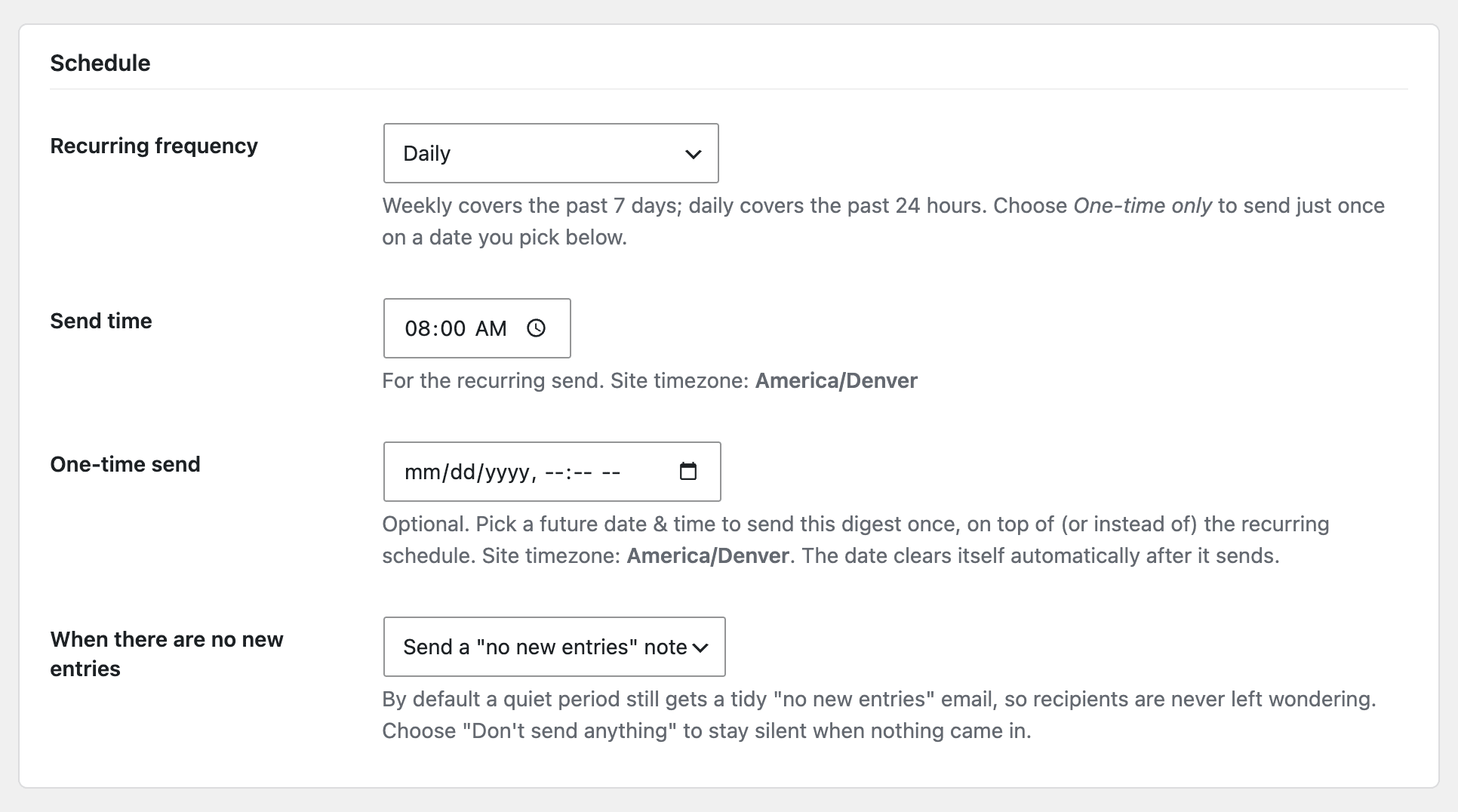
- Daily or weekly scheduling, sent at the time and on the day you pick, in your site's timezone.
- One-time sends - schedule a digest for a specific future date and time, on its own or alongside a recurring schedule, with a custom lookback window.
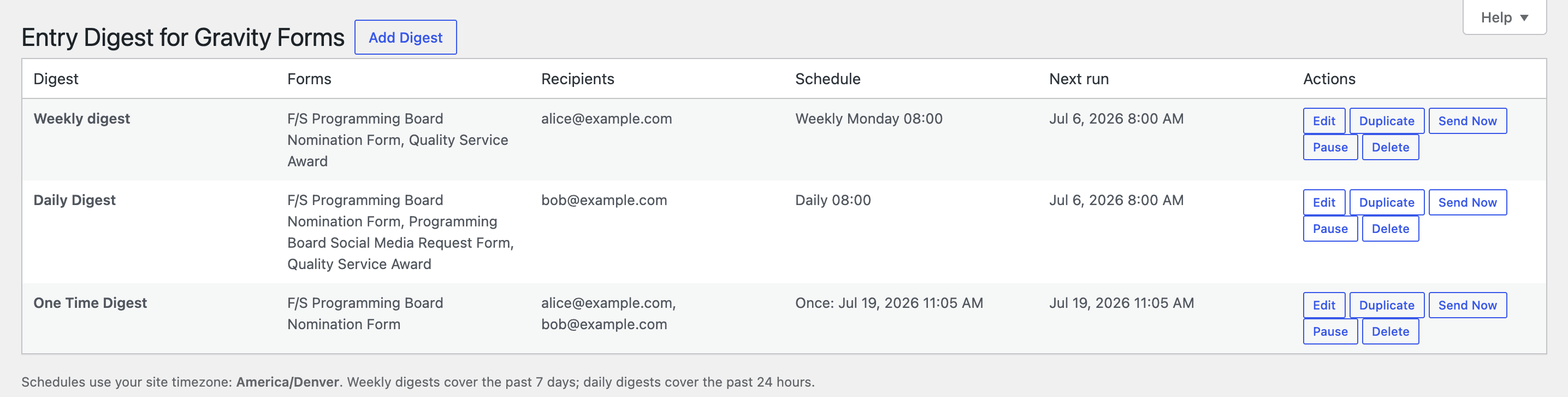
- A "Send Now" button to preview a digest on demand.
- A test send that previews a digest to any address you choose without contacting the real recipient list.
- A send log showing recent digest runs - when they fired, how many entries, and delivery status - for easy debugging and peace of mind.
- Pause/Resume any digest with one click - stop its scheduled sends without deleting it or losing its settings.
- Graceful quiet periods - when no entries arrived you can either receive a tidy "no new entries" note (the default, so you're never left wondering) or choose to stay silent, per digest.
- Unlimited digests - create as many as you need.
- One or more forms per digest - cover a single form or roll several forms into one combined email.
- Daily or weekly delivery on a chosen day/time, and/or a one-time send on a future date you pick.
- Configurable lookback window for one-time sends.
- Configurable quiet-period behavior: send a "no new entries" note or stay silent, per digest.
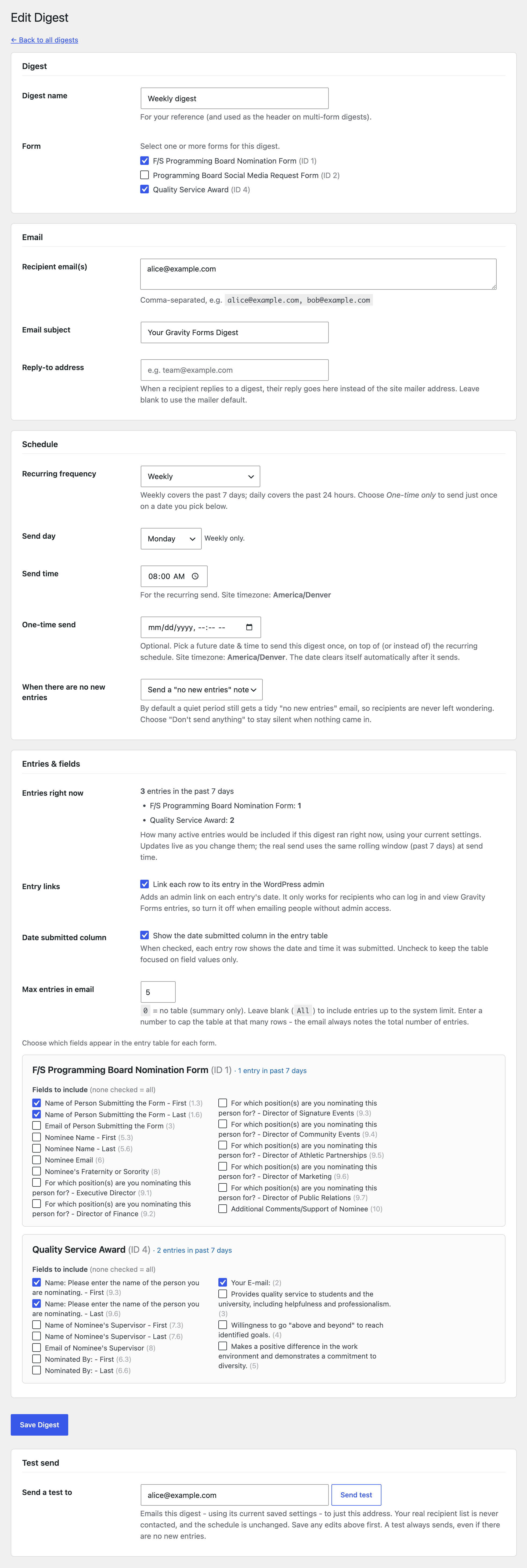
- Per-field selection for the entry table.
- Max entries in email - cap the inline table at a chosen number of rows, or set it to 0 for a summary-only email; the email always notes the total entry count.
- Live entry-count preview as you build a digest.
- Summary block with entry count and date range.
- "Send Now" button to preview a digest on demand.
- Test send to any address - preview a digest to yourself without emailing the real recipients.
- Send log of the most recent runs (the last 10) with entry counts and delivery status.
- Pause/Resume toggle per digest - suspend scheduled sends without deleting the digest.
- Scheduler health check - a clear admin notice if a scheduled digest is overdue, so you find out when WP-Cron isn't firing instead of wondering why an email never arrived.
- Clean, branded HTML email that renders well across mail clients, with a plain-text alternative included automatically.
- Plain-text fallback - every digest is sent as multipart (HTML plus a plain-text version), which improves deliverability and works in text-only mail clients and with screen readers.
- CSV and Excel (.xlsx) attachments of the full period's entries - the email shows the summary, the attachment carries the complete dataset.
- Conditional filtering - include only entries that match your rules (for example "Status is Complete" or "Budget greater than 1000").
- Per-recipient and role-based routing - send each form's entries to the right person or to every user in a chosen WordPress role.
- Custom email branding - your logo, accent color, and a white-label footer.
- Priority email support.
wp_mail() configuration. The plugin only reads the Gravity Forms entries you tell it to include.
屏幕截图:

常见问题:
Does this require Gravity Forms?
Yes. Entry Digest reads entries through the Gravity Forms API, so Gravity Forms must be installed and active for digests to send. If Gravity Forms is inactive, the plugin's settings remain available under Tools so your configuration is never lost.
Where do I find the settings?
Under Forms › Entry Digest in the WordPress admin (the Gravity Forms menu). If Gravity Forms isn't active, the page appears under Tools › Entry Digest instead.
When are digests sent?
Digests run on WP-Cron at the day/time you choose, in your site's timezone. Weekly digests cover the previous 7 days; daily digests cover the previous 24 hours. Note that WP-Cron fires on site traffic, so a very low-traffic site may benefit from a real server cron job.
Can I send a digest just once on a specific date?
Yes. Each digest has an optional one-time send field: pick a future date and time and the digest goes out once, then the date clears itself automatically. You can use it on its own (choose "One-time only") or in addition to a daily/weekly schedule. A separate lookback setting controls how far back the one-time send reaches for entries, and defaults to everything since the form was created.
What happens when no new entries came in?
By default the digest still sends a tidy "no new entries" note so recipients know it ran and nothing was missed. If you'd rather stay silent during quiet periods, set that digest's "When there are no new entries" option to "Don't send anything."
Can I preview a digest without waiting for the schedule?
Yes. Each digest has a Send Now button that builds and emails it immediately.
Can I temporarily stop a digest without deleting it?
Yes. Each digest on the list has a Pause button. Pausing keeps all of its settings but removes it from the schedule, so no automatic sends go out until you press Resume. Paused digests are clearly marked, and "Send Now" and test sends still work on them if you want to send manually while paused.
Can I send a test to myself without emailing everyone?
Yes. Open a saved digest in the editor and use the Test send field (it defaults to your own admin email). It builds the digest from that digest's current saved settings and sends it only to the address you enter - your real recipient list is never contacted and the schedule is unchanged. A test always sends, even during a quiet period, so you can see exactly what recipients would get.
How do I tell whether my digests are actually running?
The digest list screen shows a Recent sends table: each scheduled, one-time, "Send Now," or test send is logged with its time, entry count, recipients, type, and delivery status. "Sent" means the email was handed to your site's mailer (not a guarantee of inbox delivery); "Failed" or "No recipients" flag problems to look into. You can clear the log at any time.
Why didn't my digest arrive?
Digests use your site's wp_mail() setup. If other WordPress emails aren't being delivered, a transactional email/SMTP plugin usually resolves it. The plugin logs delivery problems to your PHP error log, and the Recent sends table on the digest list shows the status of each recent run.
If the scheduler itself isn't firing - common on very low-traffic sites, or when WP-Cron is disabled without a real server cron to replace it - the digest list shows a warning when a scheduled send is overdue, with guidance on how to fix it.
How many digests can I create?
As many as you like - there is no limit on the number of digests, and each digest can cover one form or several combined into a single email. Role-based recipient routing, conditional filtering, CSV/Excel attachments, and custom branding are available through the optional Pro add-on sold separately at addasitebuilders.com.
更新日志:
- Hardening: the schedule column on the digest list is now output through wp_kses_post() rather than an escaping-check suppression.
- Output the entry-table cell value through wp_kses_post() instead of suppressing the escaping check, so every cell is explicitly escaped on output.
- The "Max entries in email" setting is now a free, core feature again - it appears directly in the digest editor, so any user can cap the inline table (or set 0 for a summary-only email). No feature is gated behind the add-on.
- Send-log retention is a plain, filterable default (
edfgf_log_max) and is no longer presented as an add-on feature. - Hardening: all submitted editor values are sanitized the moment they are read (before any filter receives them), and the contextual-help screen check now sanitizes its request input.
- The "Max entries in email" setting has moved to the Pro add-on, where it pairs naturally with the CSV/Excel attachment feature (setting the cap to 0 suppresses the email table entirely, leaving the full dataset in the attachment). The underlying behavior in the email renderer is unchanged - existing digests with this value already set will continue to work. Free users without Pro active use the standard system limit as before.
- Developer: new
edfgf_editor_entries_optionsaction fires inside the Entries & fields section table so add-ons can inject additional<tr>controls there.
- Updated the optional "Entry Digest Pro" description panel to reflect current add-on features, including form and field ordering, email preview, notification controls, and the expanded email branding options.
- Improved: email column order now follows your selected-field order, so add-ons (and future options) can control how columns are arranged.
- Developer: new
edfgf_editor_reorderablefilter lets the Pro add-on present the form and field lists in a reorderable layout. No change for the free plugin on its own.
- New: Date submitted column - an editor toggle to show or hide the "Submitted" date/time column in the entry table, so you can keep the digest focused on field values when you don't need timestamps.
- Improved: when entry links are enabled but the Date submitted column is hidden, each row's admin link now attaches to the first field column instead of disappearing, so every row stays clickable.
- Developer: new email-rendering filters -
edfgf_email_font_family,edfgf_email_header_text_color,edfgf_email_footer_bg, andedfgf_email_footer_text- let the Pro add-on (and other extensions) customize the email's typography and header/footer colors.
- New: Reply-to address — each digest can now have an optional Reply-To email address. When a recipient replies to a digest, their reply goes to that address instead of the site mailer default. Leave it blank to keep the existing behavior.
- New: Duplicate digest — a Duplicate button on the digest list creates an instant copy of any digest, opens it in the editor ready to rename, and starts it unpaused with a clean schedule (no inherited one-time date).
- Maintenance: standardized every internal identifier (functions, classes of options, hooks, constants, AJAX actions, admin page slug, CSS classes, and script handles) under a single distinct plugin prefix to eliminate any chance of collision with other plugins. No change to features or behavior.
- Translations are now provided through translate.wordpress.org. The bundled locale .po/.mo files were removed and the translation template (.pot) refreshed for the current strings, so locale coverage stays current automatically without shipping stale catalogs.
- Code quality: the optional Pro upsell panel now loads its styles from an enqueued stylesheet (admin/css/pro-panel.css) using CSS classes instead of inline style attributes, and its dismiss action reads the nonce/AJAX URL from data attributes. No change to what the panel shows or does.
- Fixed on-screen text: the free send log keeps the most recent 10 sends by default (filterable via
edfgf_log_max). The Features list and Pro upsell wording now match the actual default of ten.
- Multi-form digests are now a free, core feature: a single digest can combine entries from several forms into one email, selectable directly in the editor. Nothing is locked or gated.
- The optional Pro add-on now focuses on CSV/Excel attachments, conditional filtering, per-recipient and role-based routing, custom branding, and extended send-log history.
- No data changes - existing digests keep working exactly as before.
- Compliance: all admin JavaScript is now loaded through the standard wp_enqueue_script()/wp_localize_script() APIs - the remaining inline
<script>blocks (overdue-cron notice and Pro panel) and inlineonsubmitconfirmations were moved into properly enqueued files, loaded only on the screens that use them and with the WordPress 6.3deferstrategy. - Compliance: renamed the admin page slug to a plugin-prefixed
edfgf-entry-digestso it cannot collide with another plugin's menu. - Uninstall now also removes the plugin's per-user dismissal meta, leaving nothing behind.
- The form selector's single/multiple mode is now filterable, and core processes whatever forms a digest holds. No change to the default single-form experience.
- Security: escaped all admin-screen output (schedule labels and admin notices) per the WordPress output-escaping guidelines.
- Core digests cover a single form; removed the optional multi-form extension hook from the plugin core.
- Added a dismissible "Entry Digest Pro" panel at the bottom of the digest screen describing the optional add-on. It is informational only - nothing in this plugin is gated or disabled, and it hides itself when the add-on is active.
- Code quality: unified internal constant prefixes to resolve Plugin Check naming warnings.
- After saving a digest you are returned to its editor, so the test-send field is available right away (post/redirect/get).
- Improvement: Scheduler health check now surfaces on the main dashboard. The overdue-digest warning now appears as a dismissible admin notice on the WordPress dashboard as well as the digest list page - so you're alerted the moment you log in, not only when you visit the digest screen. The notice is shown to admins only, dismissible, and re-surfaces after 7 days if the problem persists.
- New: Plain-text fallback - digests are now sent as multipart email (HTML plus an automatically generated plain-text version), improving deliverability and accessibility for text-only clients and screen readers.
- Change: the send log now retains the most recent 5 sends by default (filterable via
edfgf_log_max). The optional Pro add-on adds a configurable, extended history.
- New: Scheduler health check - the digest list shows a warning when a scheduled send is overdue, which usually means WP-Cron isn't firing (a low-traffic site, or WP-Cron disabled without a working server cron). The message adapts to your setup and links to guidance. No warning is shown for a healthy scheduler.
- New: Pause/Resume toggle on the digest list. Pausing keeps a digest's settings but removes it from the schedule (no automatic sends) until you resume it; paused digests are clearly marked and can still be sent manually via "Send Now" or a test send.
- New: Test send - preview any saved digest to an address of your choice (defaults to your admin email) without contacting the real recipient list or changing the schedule. Always sends, even during a quiet period.
- New: Send log - a "Recent sends" table on the digest list shows recent scheduled, one-time, "Send Now," and test sends with their time, entry count, recipients, type, and delivery status. Clearable at any time.
- Unlimited single-form digests are now fully free - no feature is locked, time-limited, or gated.
- Advanced features (multi-form aggregation, role recipients, conditional filtering, CSV/Excel attachments) moved to an optional Pro add-on distributed separately at addasitebuilders.com; the add-on hooks in only if installed.
- Editor JavaScript is now properly enqueued (no inline scripts).
- Internal cleanup: removed bundled monetization SDK.
- Now translation-ready: every user-facing string is internationalized (text domain
entry-digest-for-gravity-forms). - Bundled translations for Spanish, Chinese (Simplified), German, French, Italian, Portuguese (Brazil), Russian, and Japanese, plus a .pot template for further translation.
- One-time scheduling: send a digest on a specific future date/time, on its own or alongside a daily/weekly schedule. The date clears itself after sending.
- Configurable lookback window for one-time sends, defaulting to "everything since the form was created."
- Configurable quiet-period behavior: choose per digest whether a zero-entry period sends a "no new entries" note or stays silent.
- Multi-digest architecture with per-digest scheduling.
- Per-form field selection and (Pro) conditional filtering and role/recipient routing.
- CSV and Excel attachment support (Pro).
- Automatic migration from the earlier single-config format.
- Initial release: single scheduled digest with summary block and entry table, daily/weekly delivery.