
Erdo Client Preview
| 开发者 | erdincbulat |
|---|---|
| 更新时间 | 2026年8月27日 21:43 |
| PHP版本: | 7.4 及以上 |
| WordPress版本: | 7.1 |
| 版权: | GPLv2 or later |
| 版权网址: | 版权信息 |
详情介绍:
- Magic links — a private, password-free URL per person that bypasses the gate
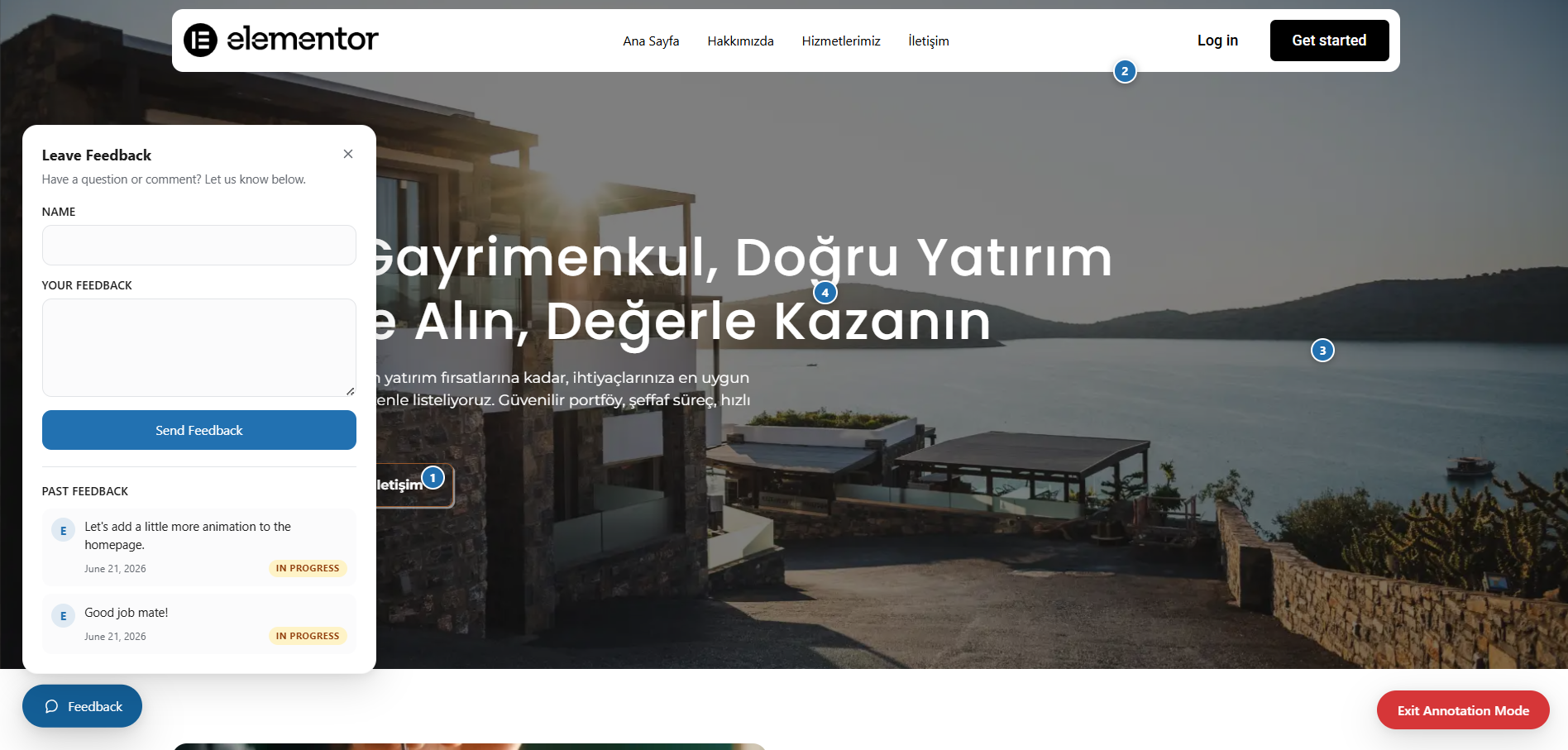
- Visitor feedback — clients leave messages directly on the page they're viewing, no email back-and-forth
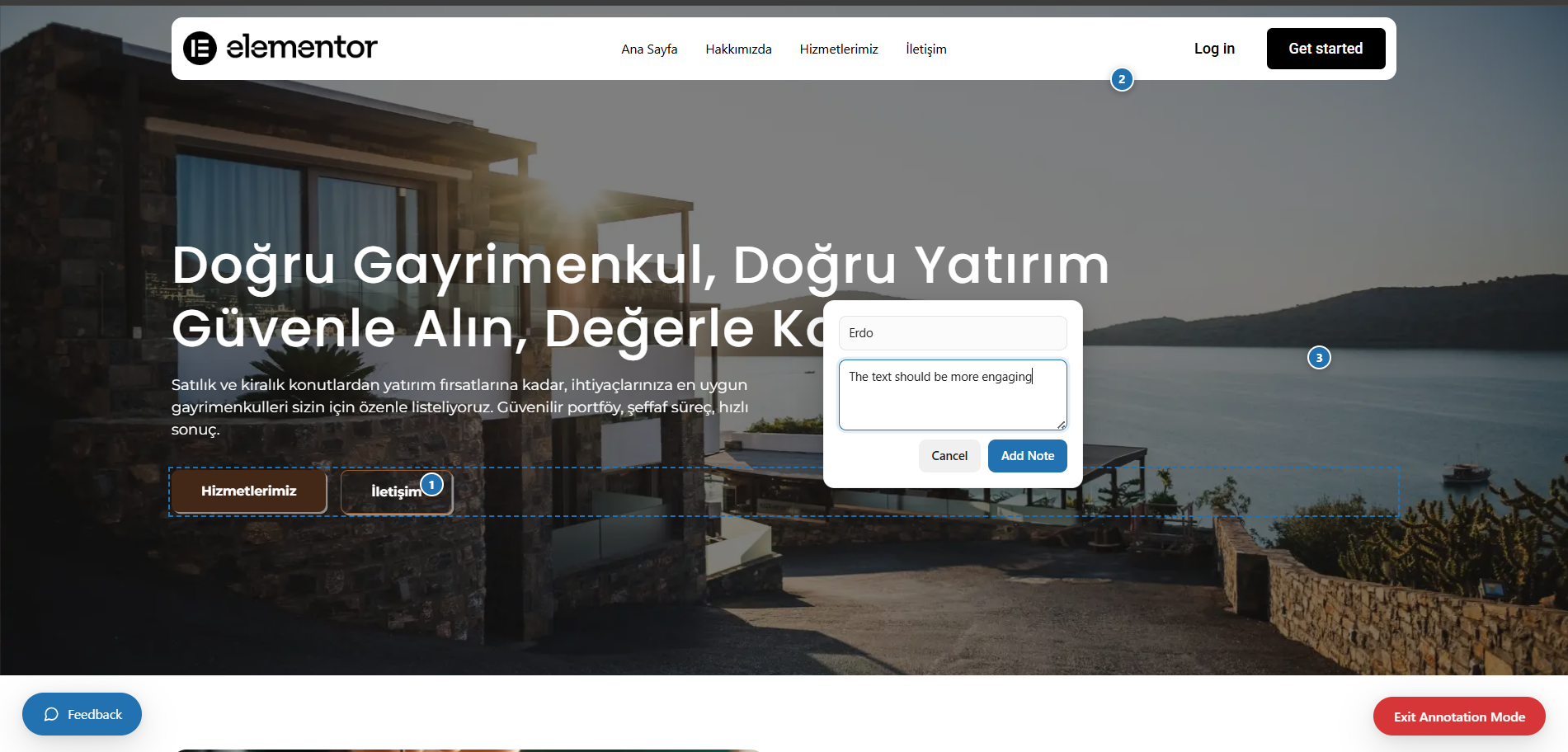
- Live annotations — clients click any element on the site and pin an exact note about it, like a built-in design-review tool
- Label each link — know exactly who has access (e.g. "John - Client", "Anna - Designer")
- Individual expiry — 24 hours, 48 hours, 7 days, 30 days, or never
- Per-link redirect URL — send each visitor to a specific page after bypass
- Revoke a single link without affecting others
- Usage counter and access history — see how many times, and when, each link was used
- Email notification — get alerted the moment a link is used, with the visitor's IP and timestamp (optional, off by default)
- 32-character cryptographic tokens, stored only as HMAC-SHA256 hashes — the raw token is never saved in the database, and the bypass cookie is signed,
HttpOnly, and verified withhash_equals()to prevent timing attacks
- Reply from the admin — answer directly from the Feedback tab; the visitor sees your reply automatically next time they check
- "Past Feedback" history — visitors see their own previous messages and status (in progress / completed)
- Email alerts — get notified the moment new feedback comes in
- Bulk actions — select multiple entries to mark as completed or delete at once
- Persistent pins for admins — every note left on a page shows up automatically as a numbered pin the next time you (the admin) visit that page, logged in, no special "view" link needed
- Click a pin to reply — answer directly in the same details popup the visitor sees
- Status tracking — mark notes as in progress or completed
- Email alerts — get notified the moment a new annotation is submitted
- Bulk actions — select multiple notes to mark as completed or delete at once
Retry-After header calculated dynamically from your countdown timer — the correct signal for search engine crawlers to return later without penalising your rankings.
Coming Soon Mode (HTTP 200)
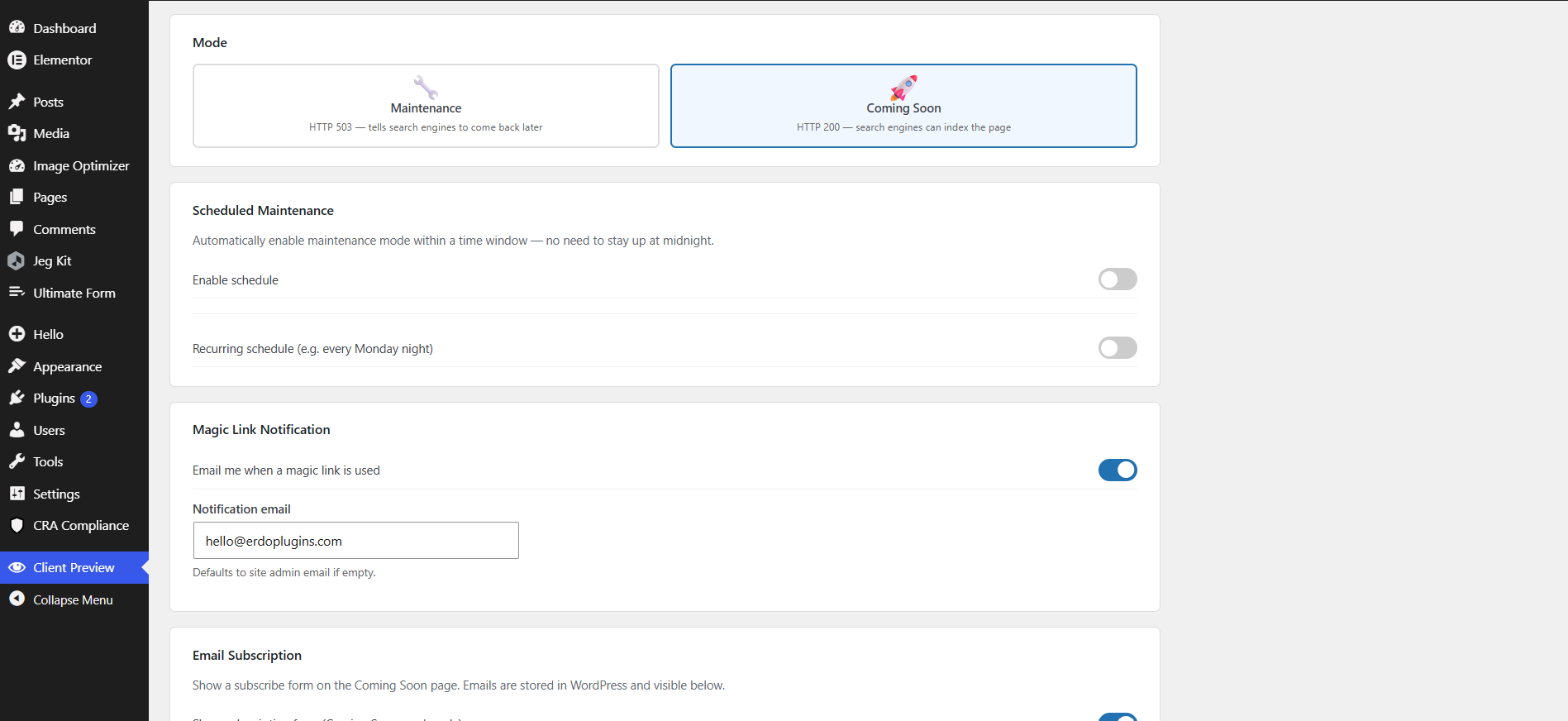
For new site launches. Returns HTTP 200 so search engines can discover and index the page, building domain authority before you go live. Pair it with the built-in email subscription form to grow your audience from day one — no Mailchimp, no API keys, everything stored in WordPress.
Scheduled Activation
Set a start and end date for your under construction window, or set up a recurring weekly schedule (e.g. every night between 2 AM and 4 AM for routine maintenance) and let WordPress handle it automatically. If the server's WP-Cron fails to fire, a real-time fallback evaluates the schedule on every request — the site is never accidentally left open or stuck behind the page.
Customizable Page
- Upload your logo
- Background color, text color, and accent color with a visual color picker
- Full-screen background image with automatic dark overlay
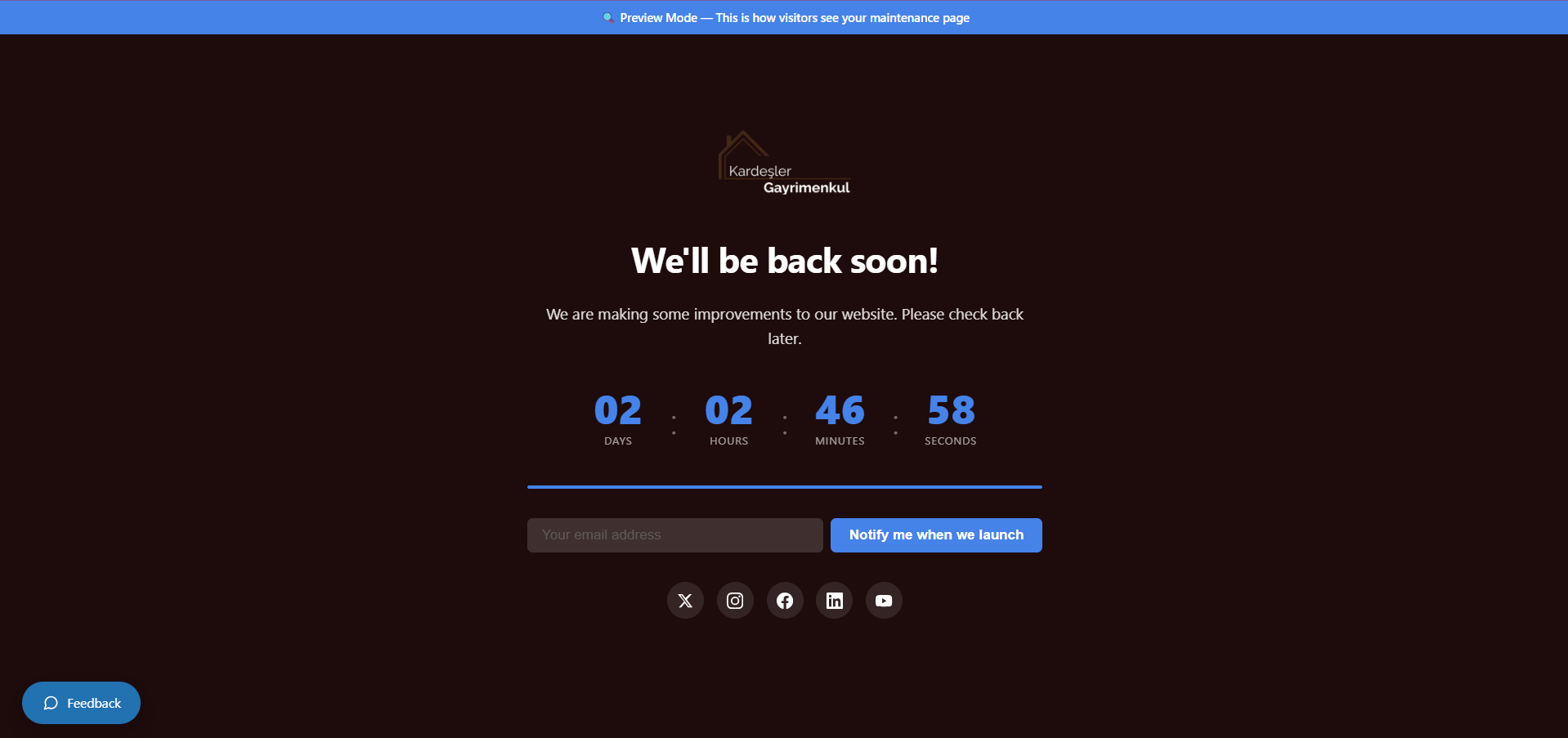
- Animated countdown timer with progress bar (uses site timezone)
- Live visitor counter — show how many people are waiting for launch
- Social links: X/Twitter, Instagram, Facebook, LinkedIn, YouTube
- IP Whitelist — bypass the coming soon / under construction page for specific IP addresses; your current IP is auto-detected with one-click add
- Admin bypass — logged-in administrators always see the live site (configurable)
- Page & post type exclusions — keep specific pages, posts, or entire post types publicly accessible while the rest of the site is gated
- Developer-safe — XML-RPC, REST API, WP-Cron, WP-CLI, and wp-login.php are always bypassed; your background tasks and API integrations are never blocked
- Admin bar status indicator — red/green dot visible on every page
- One-click toggle directly from the admin bar
- Live preview button — see exactly what visitors see without disabling the page
安装:
- Upload the
erdo-client-previewfolder to/wp-content/plugins/ - Activate through the Plugins menu
- Go to Client Preview in the admin menu
- Choose Maintenance or Coming Soon mode and enable
- Generate a magic link and share it with your client
屏幕截图:
常见问题:
How does the magic link bypass work?
When you generate a magic link, a unique 32-character cryptographic token is created. The raw token is never stored — only its HMAC-SHA256 hash is saved in the database. When a visitor clicks the link, Erdo Client Preview verifies the token using hash_equals() and sets a signed, HttpOnly cookie in their browser. From that point, they can navigate the entire live site without clicking the link again. The cookie lasts 24 hours.
Can I have multiple magic links?
Yes. Create as many as you need — one per person, per project, or per purpose. Each has its own label, optional expiry date, optional redirect URL, and usage counter. Revoke a single link without affecting others. Optionally receive an email notification each time a specific link is used.
Can I send each magic link visitor to a different page?
Yes. Set a Redirect URL when creating a magic link. Visitors are sent to that page after the bypass cookie is set. Leave it blank to redirect to the homepage. Useful for directing clients to the exact page you want them to review.
Can clients leave feedback on the page they're reviewing?
Yes. Enable the Visitor Feedback widget and anyone viewing the coming soon page — or a client browsing the live site via a magic link — can leave a message without an account. You can reply from the Feedback tab, and the visitor sees your reply automatically. You'll optionally get an email the moment new feedback comes in.
Can a client point at exactly what they want changed on the live site?
Yes, with Visual Annotation Mode. Magic-link visitors can click any element on the live site and pin a note directly on it — like a built-in design-review tool. As the admin, you see a persistent numbered pin for every note whenever you visit that page, click it to read the note, and reply directly.
How is this different from just sharing a staging link or a password?
A staging URL or shared password gives everyone the same level of access and tells you nothing about who's actually looking. Magic links are per-person, expire on your terms, and can be revoked individually. On top of that, the visitor can leave feedback or pin an annotation directly on what they're reviewing — something a plain staging link or password screen can't do.
Will administrators be blocked from their own site?
No. Logged-in administrators always see the live site by default. You can turn this off and use the built-in Preview button to verify the page safely — the preview opens with HTTP 200 and is only visible to logged-in admins.
Will a coming soon or under construction page hurt my SEO?
No, as long as you use the right mode. In Maintenance Mode, the page returns HTTP 503 with a Retry-After header calculated from your countdown timer — the correct and recommended signal for search engine crawlers, indicating a temporary outage so Google returns later instead of treating it as a permanent removal.
In Coming Soon Mode, the page returns HTTP 200, so search engines can index it normally and start building domain authority before launch.
What if I get locked out while the site is gated?
The Emergency Rescue URL in settings is a secret link you save in your password manager. Visiting it from any browser disables the coming soon / under construction page instantly — no login required. If you lose the URL, regenerate it from within settings.
Can I collect email addresses while the site is under construction?
Yes. Enable the subscription form under Email Subscription settings and set the mode to Coming Soon. Subscribers are saved directly to WordPress — no Mailchimp, no API keys needed. View and export the list from the settings panel.
Can I schedule maintenance or under construction mode in advance?
Yes, two ways. Set a one-time start and end date/time under Scheduled Maintenance for a single window (e.g. a weekend migration), or set up a recurring weekly schedule (e.g. every night between 2 AM and 4 AM) under Recurring Schedule. WordPress cron activates and deactivates the page automatically; the manual toggle always takes priority, and a real-time fallback checks the window on every request if cron fails.
Can I keep some pages publicly visible while the rest of the site is gated?
Yes. Use Page & Post Type Exclusions to list specific URL paths or entire post types (for example a public portfolio or a privacy policy page) that stay accessible to everyone, even while the coming soon / maintenance page is active for the rest of the site.
Can I remove "Erdo Client Preview" branding and use my own agency name?
Yes. The White Label setting lets you replace "Erdo Client Preview" with your own agency name and logo throughout the settings page and admin menu — useful if you manage the site on behalf of a client.
Does this work with Elementor, Divi, or other page builders?
Yes. The coming soon / maintenance page is standalone and loads none of your theme's page builder scripts. Magic link visitors see the full live site, including all page builder content.
Does this work on WordPress Multisite?
The plugin is designed and tested for single-site installations. Multisite compatibility has not been verified.
What data does this plugin store, and is it removed on uninstall?
Erdo Client Preview stores magic link tokens (hashed, never raw), settings, email subscribers, visitor feedback, and annotations in your WordPress database — nothing is sent to a third-party server. Uninstalling the plugin through the WordPress admin removes all of its database tables and options automatically.
更新日志:
- Added: Import/Export Settings — download your configuration as a JSON file and re-import it on another site, useful for agencies rolling out the same setup across multiple client sites. The emergency rescue key is never exported and can't be overwritten by an import.
- Added: A Site Health check flags AUTH_KEY/SECURE_AUTH_KEY when missing, empty, left at the default placeholder, or identical to each other — magic link tokens and the bypass cookie are signed with these, so a weak key quietly weakens that protection.
- Security: The visitor feedback form now has a honeypot field and per-IP rate limiting (a short cooldown plus a rolling hourly cap) on both the REST and no-JS submission paths — previously the only anti-abuse measure was a nonce, which a script can read from the page and replay.
- Changed: Tested up to WordPress 7.1.
- Changed: Renamed from "Erdo DevGate" to "Erdo Client Preview" (slug: erdo-client-preview)
- Removed: Custom CSS field — WordPress.org no longer permits plugins to accept arbitrary user-supplied CSS
- Changed: Maintenance page styles and the countdown script are now loaded via
wp_enqueue_style()/wp_enqueue_script()instead of inline<style>/<script>tags - Security: Annotation status lookups now require the same magic-link/admin access check as submitting and listing annotations
- Security: Feedback status lookups now require a per-item token instead of a bare, guessable id, preventing enumeration of other visitors' feedback and admin replies
- Added: Visitor feedback widget on the coming soon / maintenance page — visitors can leave a message without an account
- Added: Feedback widget on the live site for magic-link visitors, so clients and reviewers can leave feedback while previewing
- Added: "Past Feedback" — visitors see their own previously submitted messages and status updates (in progress / completed)
- Added: "Feedback" tab in settings to review, reply to, mark as completed, and delete submitted feedback
- Added: Admin replies to feedback are shown to the visitor under "Past Feedback"
- Added: Magic link access history — see when each link was last used, and from which IP
- Added: Email notification to the site admin when new feedback is submitted
- Added: Enable/disable toggle for the feedback widget
- Added: Visual annotation mode on the live site — magic-link visitors can click any element on a page and pin a note directly on it
- Added: "Annotations" tab in settings to review, reply to, mark as completed, and delete submitted notes
- Added: Admin replies to annotations are shown to the visitor in the pin's details popup
- Added: Email notification to the site admin when a new annotation is submitted
- Added: Enable/disable toggle for visual annotations
- Added: Administrators automatically see a persistent numbered pin for every note left on any page (just like the reviewer who left it); click any pin to see its details
- Added: "View Notes on Site" button in the Annotations tab opens the live site so admins can browse the pin overlay
- Added: Bulk actions in the Feedback and Annotations tabs — select multiple entries to delete, mark as completed, or mark as in progress at once
- Changed: Plugin settings moved from Settings → Erdo Client Preview to a dedicated "Client Preview" item in the WordPress admin menu
- Added: Scheduled maintenance — set a date range and WordPress cron handles activation and deactivation automatically; real-time fallback if cron fails
- Added: Coming Soon mode (HTTP 200) alongside Maintenance mode (HTTP 503) — switchable from settings
- Added: Email subscription form for Coming Soon mode — subscribers stored in WordPress, no third-party service needed
- Added: Subscriber list in settings panel
- Added: Email notification when a magic link is used (visitor IP, timestamp, view count)
- Added: Per-link redirect URL — each magic link can send the visitor to a different page
- Added: Custom CSS field for advanced maintenance page styling
- Added: Full-screen background image with automatic dark overlay
- Added: Social links on coming soon / maintenance page (X/Twitter, Instagram, Facebook, LinkedIn, YouTube)
- Added: Emergency rescue URL — disables maintenance instantly from any browser if locked out
- Added: Preview maintenance page button — see visitor view without disabling maintenance
- Added: Admin bar one-click toggle and status indicator
- Fixed: Countdown timer now respects site timezone correctly
- Fixed: Timezone handling uses WordPress timezone throughout
- Initial release — coming soon / maintenance page with cryptographic magic link bypass, IP whitelist, admin bypass, HTTP 503/200 modes, countdown timer, and emergency rescue URL.