
Erdo Image Optimizer: Compress & Convert to WebP/AVIF (SEO Audit, Alt Text, Lazy Load)
| 开发者 | erdincbulat |
|---|---|
| 更新时间 | 2026年6月17日 18:07 |
| PHP版本: | 7.4 及以上 |
| WordPress版本: | 7.0 |
| 版权: | GPLv2 or later |
| 版权网址: | 版权信息 |
详情介绍:
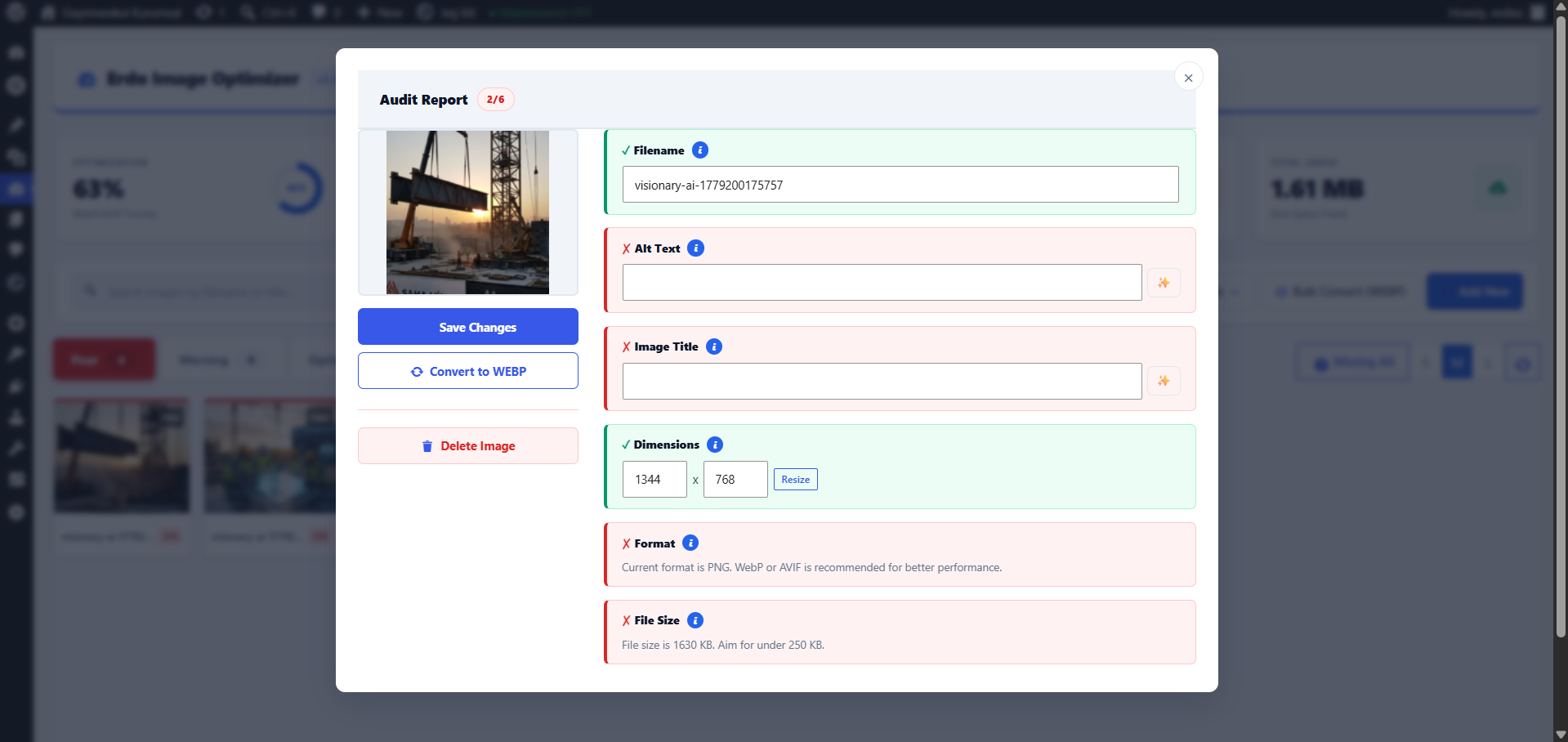
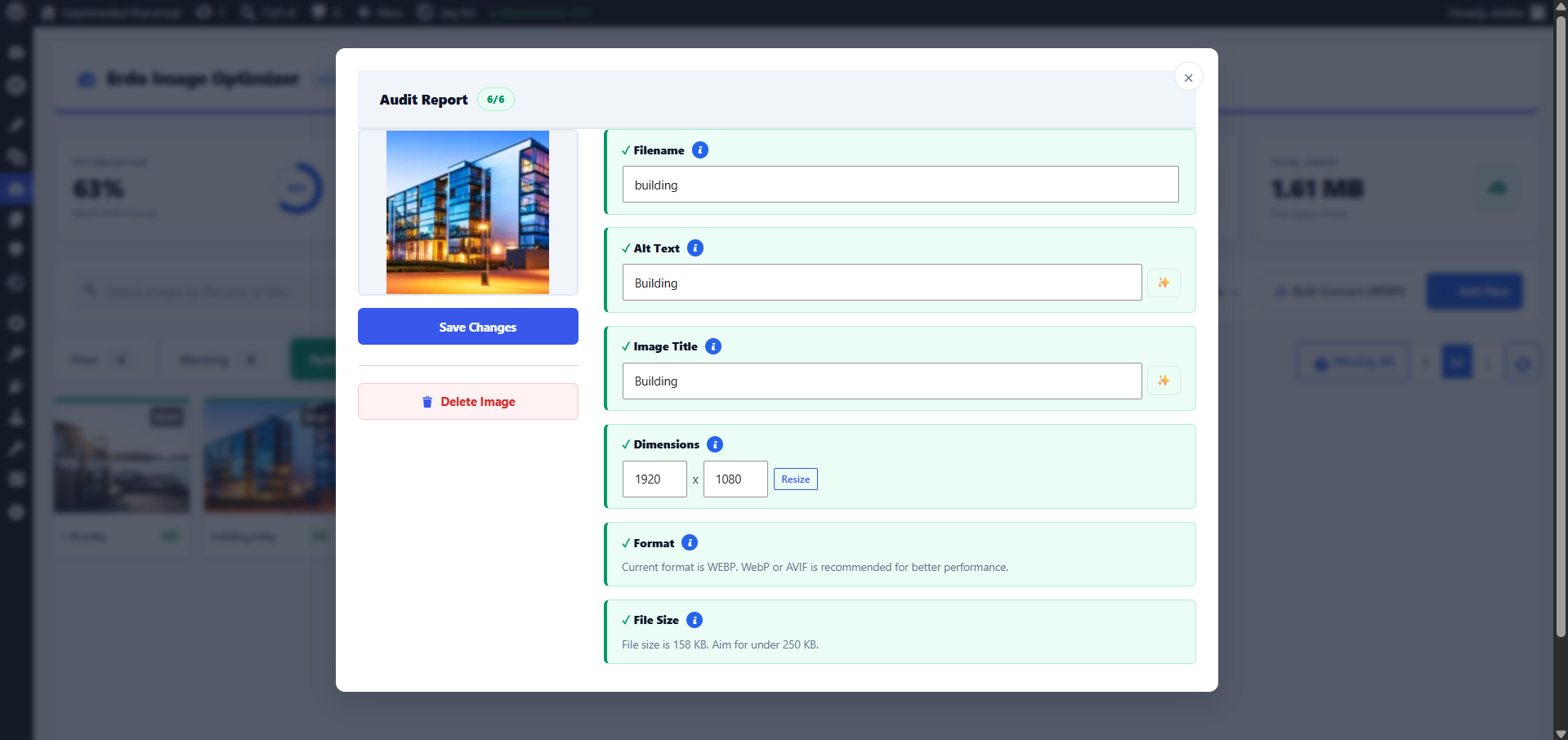
- Image SEO Audit (6 Points): Every image gets a score from 0 to 6 based on alt text, filename quality, title, contextual relevance, dimensions, and format. Fix failing criteria with one click — no guesswork.
- WebP & AVIF Converter: One-click conversion from JPEG, PNG, GIF, and HEIC/HEIF to WebP or AVIF. Smart Quality mode automatically finds the smallest file size that still looks great.
- Bulk Alt Text Generation: Automatically generate descriptive alt text from filenames for every image missing it. Fix hundreds of images in seconds — critical for accessibility and image SEO.
- Filename Sanitizer: Transforms messy uploads like
IMG_1234 (copy).JPGinto SEO-friendlyprofessional-web-design.webpat upload time. Bulk-rename existing images with automatic database reference updates. - Unused Media Cleanup: Scans your entire library to find images that appear nowhere on your site. Free up disk space and stop confusing search crawlers with orphaned files.
- Lazy Loading & WebP Serving: Inject
loading="lazy"into content images automatically. Serve WebP to compatible browsers via.htaccessrewrite (Apache) or PHP<picture>fallback (all servers). - Background Queue & WP-CLI: Bulk-convert thousands of images via WP-Cron — close the browser tab and let it run. Full CLI support:
wp erdo convert,audit,restore,stats,clean-cache. - BunnyCDN & REST API: Upload converted images directly to BunnyCDN storage. Headless access via
/wp-json/erdo/v1/statsand/wp-json/erdo/v1/auditREST endpoints.
- One-click WebP and AVIF conversion with original backup and one-click restore
- HEIC/HEIF (iPhone photos) conversion to WebP/AVIF via Imagick
- Smart Quality mode — automatically finds the smallest file size that still looks great
- Lossless mode for zero-quality-loss compression
- Max Upload Width — automatically resize oversized images before conversion
- EXIF metadata stripper — reduce file weight and protect photographer privacy
- GIF, JPEG, PNG, HEIC → WebP/AVIF in one click
- Image SEO Auditor with 6-point health score for every image in your library
- Bulk Alt Text — generate alt text from filenames for all images missing it
- Automatic filename sanitization on upload (removes spaces, special chars, uppercase)
- Bulk rename all existing filenames with automatic database reference update
- SEO Audit CSV export — download a full spreadsheet for reporting
- Missing Alt Text filter — focus the dashboard on images that need fixing
- Lazy loading (
loading="lazy") injected into content, thumbnails, and gallery images - WebP serving via
.htaccessrewrite (Apache) or PHP<picture>element rewriter - BunnyCDN integration — upload converted images directly to CDN storage
- Background Queue — bulk convert via WP-Cron, browser tab can be closed
- REST API:
/wp-json/erdo/v1/statsand/wp-json/erdo/v1/auditendpoints - WP-CLI commands:
wp erdo convert,audit,restore,stats,clean-cache - Dashboard widget — key stats visible from wp-admin home
- Before/After comparison slider — drag to compare original vs optimized
- Right-click context menu on every image card
- Grid size selector (Small / Medium / Large) with localStorage persistence
- SVG upload support with automatic XSS sanitization for administrators
- Multisite / network admin support
- Modern, clean dashboard with format badge and SEO score on every card
安装:
- Upload the
erdo-image-optimizerfolder to the/wp-content/plugins/directory, or install directly from the WordPress Plugin Directory. - Activate the plugin through the Plugins menu in WordPress.
- Click Image Optimizer in your sidebar to run your first SEO audit.
屏幕截图:
常见问题:
Is this just another image compression plugin?
No. Compression is only one part of what we do. The core feature is the Image SEO Auditor, which grades every image in your media library on 6 SEO criteria: filename quality, alt text presence, title quality, contextual relevance, missing dimensions, and usage status. Most plugins never touch any of this.
How do I reduce image file size in WordPress without losing quality?
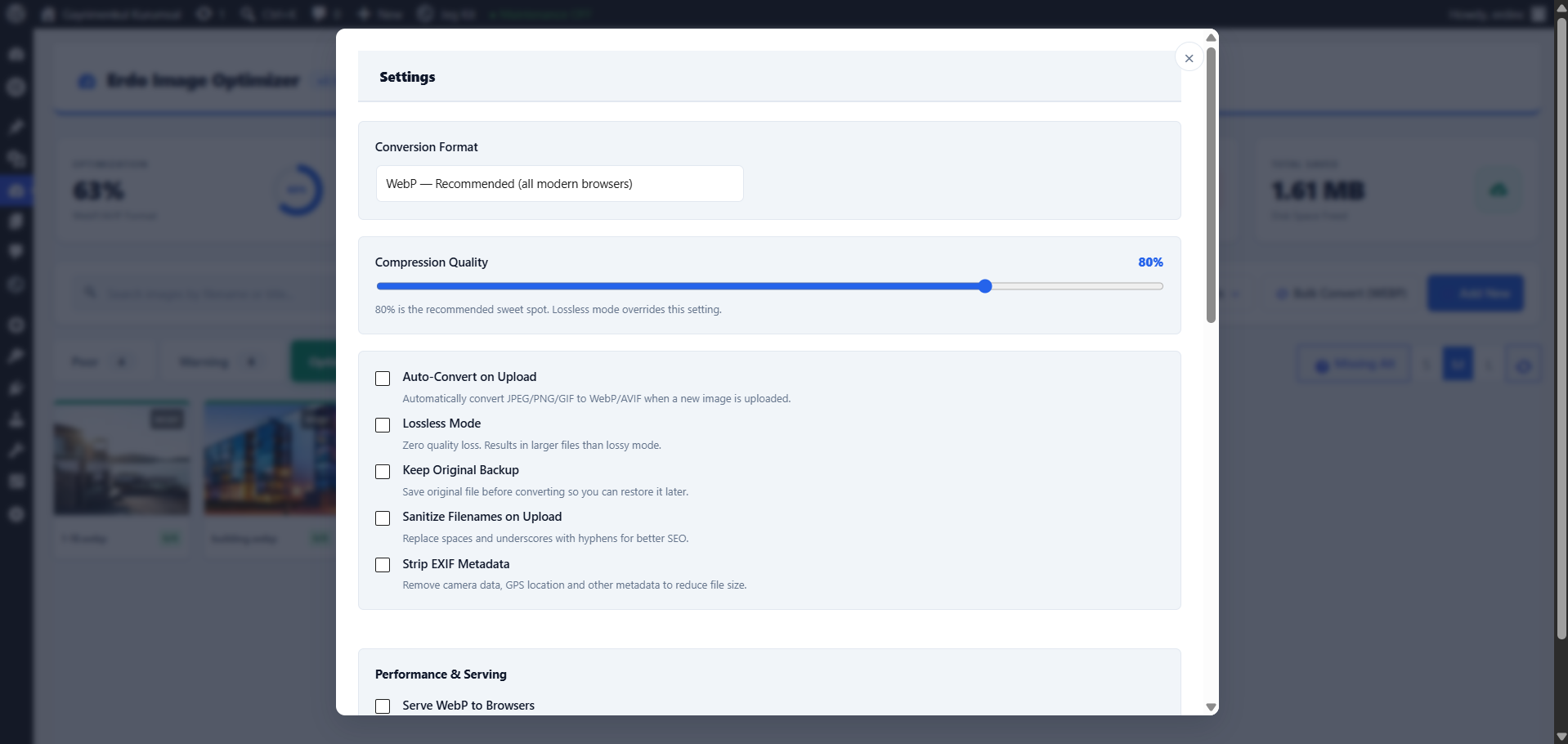
Use Erdo's Smart Quality mode. It automatically finds the lowest compression level where visual quality is still preserved, then converts your image to WebP or AVIF — both of which deliver 30-80% smaller file sizes compared to JPEG or PNG. You can also enable lossless mode for zero quality loss.
What is the difference between WebP and AVIF?
Both are modern image formats far smaller than JPEG or PNG. WebP offers broad browser support (all major browsers since 2020) and fast encoding. AVIF is newer and typically 20-30% smaller than WebP at the same visual quality, but requires PHP's GD library compiled with libavif support. Erdo supports both — pick the one that fits your server and audience.
How do I add alt text to all my WordPress images at once?
Use the Bulk Alt Text feature in the dashboard. Erdo scans every image missing alt text and automatically generates descriptive alt text from its filename. You can review and edit before saving. For images with meaningful filenames like blue-running-shoes.jpg, the generated alt text is immediately usable.
How do I convert all images to WebP in WordPress?
Go to Erdo's dashboard, click Bulk Convert, choose WebP as the target format, and start the queue. Conversion runs in the background via WP-Cron — you can close the browser tab and let it finish. For large libraries (1,000+ images), the WP-CLI command wp erdo convert is the fastest option.
What makes the SEO Auditor different from other plugins?
Most "SEO" image plugins only check for missing alt text. Erdo's auditor checks 6 distinct criteria and gives each image a score from 0 to 6 with specific reasons for any deductions. You get an actionable list, not a vague percentage.
How do I serve WebP images in WordPress?
Erdo handles WebP delivery automatically. On Apache servers, it writes .htaccess rewrite rules that transparently serve WebP versions to compatible browsers with zero code changes. On NGINX or other servers, it falls back to a PHP <picture> element rewriter that wraps your images with WebP source tags — no server configuration needed.
Will my original images be lost after conversion?
Never. Every original is automatically backed up to an _erdo_backup/ subfolder before conversion. You can restore any image to its original with a single click from the dashboard.
Does it work with all hosting providers?
Yes. WebP delivery works via .htaccess rewrite rules on Apache hosts. For NGINX or other servers, the plugin automatically falls back to a PHP-based <picture> element rewriter — no server configuration required.
Can I convert my entire existing media library?
Yes. Use the Bulk Convert feature from the dashboard. Processing runs in the background via WP-Cron, so you can close the browser tab and let it finish. For large libraries, the WP-CLI command wp erdo convert is recommended.
How do I find unused images in WordPress and delete them?
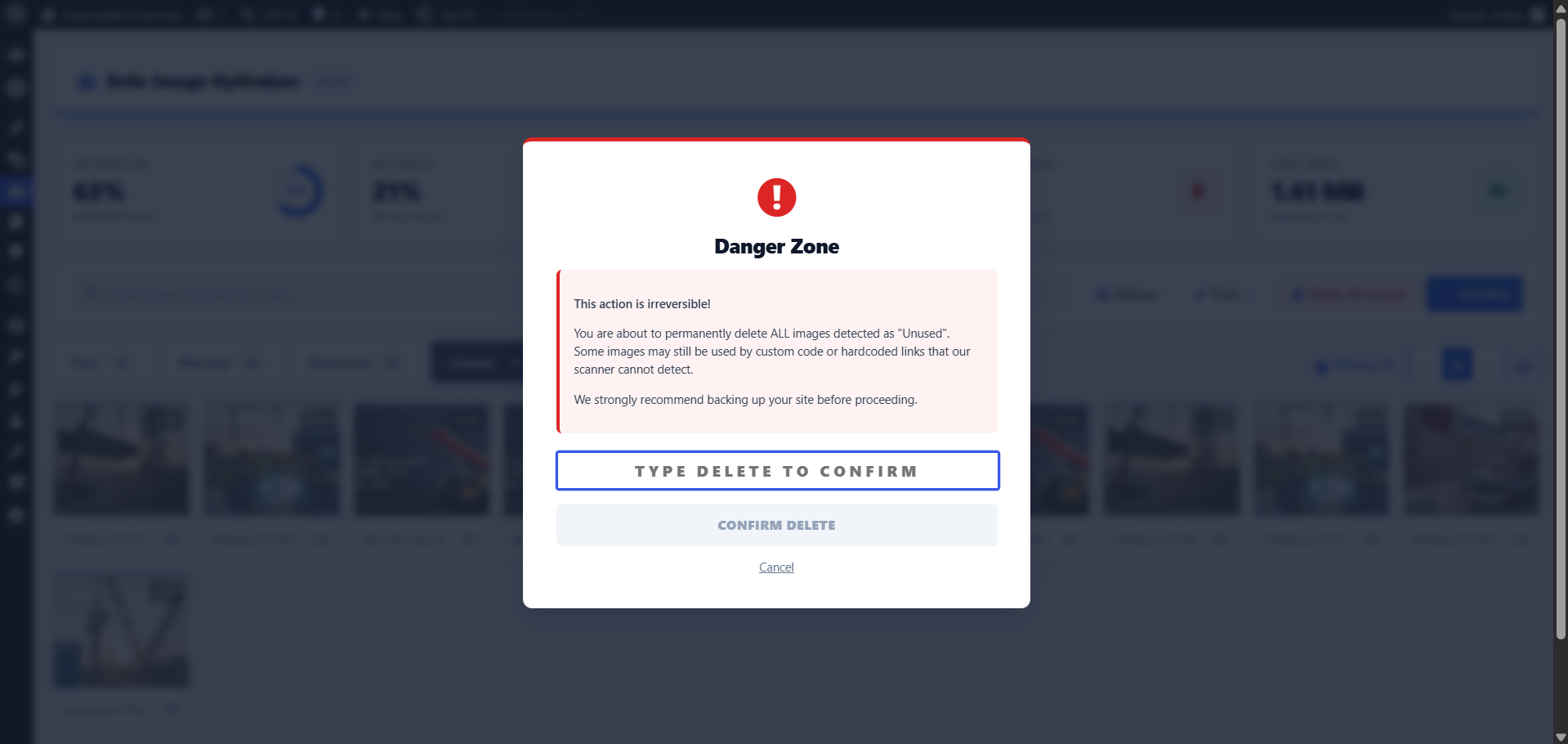
Open the Unused Media tab in Erdo's dashboard. The plugin scans every image in your media library against all posts, pages, and ACF fields. Any image that appears nowhere on your site is flagged as unused. You can review the list and delete in bulk — freeing disk space and removing orphaned files that confuse search crawlers.
Does the filename sanitizer affect images I have already uploaded?
The automatic sanitizer applies to new uploads only. For existing images with messy filenames like IMG_1234 (copy).JPG, use the Bulk Rename feature in the dashboard — it renames files on disk, updates all database references, and prevents broken links automatically.
Does it support AVIF?
Yes. AVIF conversion is available in addition to WebP. AVIF typically produces 20-30% smaller files than WebP at the same visual quality. AVIF encoding requires PHP's GD library compiled with libavif support, which most modern hosts provide.
Does it support HEIC and HEIF images from iPhones?
Yes. Erdo can convert HEIC/HEIF photos (the default format on newer iPhones) to WebP or AVIF via PHP's Imagick extension. This requires Imagick to be installed on your server — most managed WordPress hosts include it by default.
Is it compatible with WordPress Multisite?
Yes. A dedicated Network Admin settings page lets you define default quality and format across all sites in the network.
Does it have a REST API?
Yes. Erdo exposes two REST endpoints: /wp-json/erdo/v1/stats returns optimization statistics (total images, conversion rate, space saved) and /wp-json/erdo/v1/audit returns the full SEO audit results. Both are useful for headless WordPress setups or custom reporting dashboards.
Does it integrate with a CDN?
Yes. Erdo includes a BunnyCDN integration that automatically uploads converted images to your BunnyCDN storage zone. Configure your Storage Zone name, API key, and hostname in the Settings tab to enable it.
更新日志:
- NEW: Bulk rename — sanitize all image filenames on disk with automatic database reference update.
- NEW: Auto Alt Text — generate alt text from filename in bulk for all images missing it.
- NEW: SEO Audit CSV export — download a full spreadsheet of every image's score, status, format, and alt text.
- NEW: HEIC/HEIF conversion support — convert iPhone photos to WebP/AVIF (requires Imagick).
- NEW: Before/After comparison slider — visually compare original vs optimized image side by side.
- NEW: Dashboard widget — see key stats (total images, optimization rate, space saved) directly from wp-admin home.
- NEW: BunnyCDN integration — automatically upload converted images to a BunnyCDN storage zone.
- NEW: REST API — /wp-json/erdo/v1/stats and /wp-json/erdo/v1/audit endpoints for headless workflows.
- NEW: Right-click context menu on image cards (View Details, Convert, Fix Filename, Delete).
- NEW: Grid size selector — switch card view between Small, Medium, and Large.
- NEW: Missing Alt filter — instantly hide all images that already have alt text to focus on what needs fixing.
- NEW: Filename preview — shows the sanitized version of a filename before you save.
- IMPROVED: Toolbar redesigned with a Tools dropdown — cleaner layout, less visual clutter.
- IMPROVED: Modal sidebar buttons now have clear visual hierarchy (primary, secondary, tool, danger).
- IMPROVED: Format badge (WebP, PNG, JPEG…) and SEO score badge shown directly on every image card.
- IMPROVED: Before/After slider now supports touch drag and correct clip-path technique.
- FIXED: Plugin Check — zero errors or warnings confirmed.
- Confirmed compatibility with WordPress 7.0 and its new Modern admin theme.
- Requires PHP: minimum remains 7.4 (aligned with WordPress 7.0 requirements).
- NEW: WebP Serving — .htaccess rewrite (Apache) and PHP picture element rewriter for transparent WebP delivery.
- NEW: Max Upload Width — automatically resize oversized images on upload before conversion.
- NEW: Background Queue — bulk convert via WP-Cron; browser tab can be closed during processing.
- NEW: WP-CLI commands — wp erdo convert, audit, restore, stats, clean-cache.
- NEW: Smart Quality — automatically finds the lowest quality that still looks good.
- NEW: Lazy Loading — adds loading="lazy" to content images for faster initial page load.
- NEW: SVG Support — allows SVG uploads with automatic XSS sanitization for administrators.
- NEW: Multisite — basic network admin settings page.
- NEW: Original Backup & Restore — keep originals in _erdo_backup/ and restore with one click.
- NEW: GIF support in WebP/AVIF conversion.
- FIXED: restore_original() now correctly prevents re-conversion via hook removal.
- FIXED: ajax_get_unused_list() now uses bulk_analyze() — 3000 queries → 5 queries.
- IMPROVED: All SEO audit rules refined (title hyphens OK, digit filenames OK, width=0 neutral).
- IMPROVED: Plugin Check clean — no errors or warnings.
- Renamed plugin to "Erdo Image Optimizer" for better brand identity.
- Added AVIF format support for superior compression.
- Added automatic filename sanitization feature for technical SEO.
- Added EXIF metadata removal option.
- Improved AJAX loading and database query performance.
- Security updates for official Plugin Check compatibility.