
Custom Login Page
| 开发者 | nmtnguyen56 |
|---|---|
| 更新时间 | 2026年4月22日 14:34 |
| 捐献地址: | 去捐款 |
| PHP版本: | 7.2 及以上 |
| WordPress版本: | 6.9 |
| 版权: | GPLv2 or later |
| 版权网址: | 版权信息 |
详情介绍:
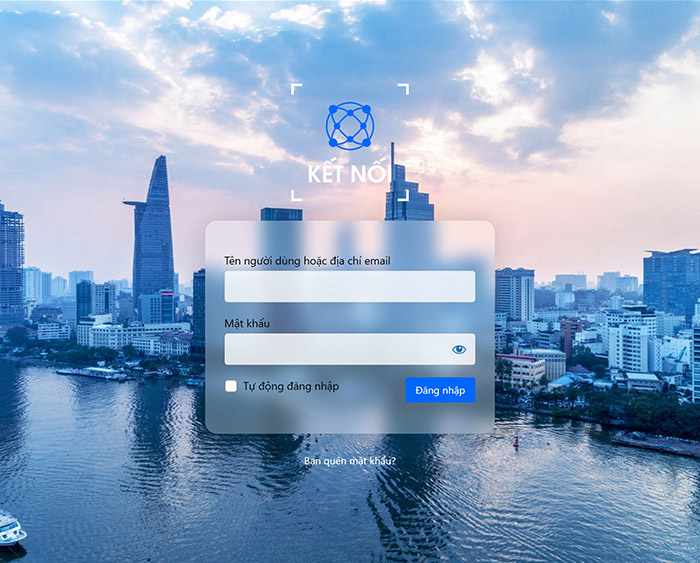
- Customize the Login Logo:
- Upload your own logo.
- Set a custom URL for the logo link (defaults to your site's homepage).
- Define a specific height for your logo.
- The width is automatically calculated based on the height, which helps prevent image distortion, maintain the correct aspect ratio, and ensure the link area is not exceeded.
- Format Login Page Content:
- Set a custom background image for the entire page.
- Choose a fallback background color if not using an image.
- Customize the Login Form:
- Change the form's background color and adjust its opacity.
- Set a custom border width, color (with opacity), and border radius for the form.
- Modify the text color for labels and input fields.
- Customize link colors (normal and hover states).
- Format Login Button:
- Change the background color and text color for the login button (normal and hover states).
- Hide Elements:
- Option to hide the "Privacy Policy" link.
- Option to hide the language switcher (if present).
- Option to hide the "Back to [Site Name]" link.
- User-Friendly Settings Page:
- Easy-to-use interface under "Settings" > "Custom Login Page".
- Uses the WordPress Media Uploader for image selection.
- Includes a color picker for easy color selection.
- AJAX-powered settings saving for a smooth experience.
- Reset to default options available.
- Lightweight and Secure:
- Clean code following WordPress standards.
- Properly sanitizes all inputs and escapes outputs.
- Translation Ready: This plugin is ready for translation.
- A
.pot(Portable Object Template) file namederr-custom-login-page.potis included in thelanguages/folder. Translators can use this file to create new language packs. - The text domain used is
err-custom-login-page.
安装:
- Via WordPress Plugin Uploader:
-
Download the plugin ZIP file (
err-custom-login-page.zip). - In your WordPress admin panel, go to
Plugins>Add New. - Click
Upload Pluginat the top. - Click
Choose Fileand select the downloaded ZIP file. - Click
Install Now. - Activate the plugin through the 'Plugins' menu in WordPress.
- Via FTP:
-
Download the plugin ZIP file (
err-custom-login-page.zip). - Extract the ZIP file. You will get a folder named
err-custom-login-page. - Upload the
err-custom-login-pagefolder to the/wp-content/plugins/directory on your server. - Activate the plugin through the 'Plugins' menu in WordPress.
- Configuration:
- After activation, navigate to
Settings>Custom Login Pagein your WordPress admin panel to customize the login page.
屏幕截图:
常见问题:
Where can I configure the plugin?
You can find the settings page under Settings > Custom Login Page in your WordPress admin dashboard.
How do I select an image for the logo or background?
The plugin uses the native WordPress Media Uploader. In the settings page, click the "Select image" button next to the respective field. You can then choose an existing image from your Media Library or upload a new one.
What happens if I don't set a body background image?
If no body background image is selected, the "Body Background Color (Fallback)" will be used. If that is also not set, it will default to the standard WordPress login page background color.
Can I reset the settings to default?
Yes, on the plugin's settings page, there is a "Reset All Options to Default" button. Be careful, as this action is irreversible.
Is the plugin translation ready?
Yes, the plugin is translation ready. The text domain is err-custom-login-page. A Vietnamese translation is already included. You can create your own translations using tools like Poedit.
My logo looks stretched or too small. How can I fix this?
Try adjusting the "Logo Height (px)" setting. If you leave it blank, the plugin will try to size it automatically based on the image dimensions, but for best results, provide a logo that is appropriately sized for a login page and then fine-tune with the height setting if needed. Using a PNG with a transparent background is recommended for logos.
更新日志:
- Initial public release.
- Feature: Customize login page logo, logo URL and logo height.
- Feature: Customize body background image and color.
- Feature: Customize login form background color, opacity, border (width, color, opacity, radius).
- Feature: Customize form text color, input text color, link colors (normal & hover).
- Feature: Customize login button background and text colors (normal & hover).
- Feature: Options to hide privacy policy link, language switcher and "back to site" link.
- Feature: AJAX settings save and reset to default functionality.
- Feature: Added Vietnamese translation.