
Error Sniffing Pug - Tells you what broke
| 开发者 | service2client |
|---|---|
| 更新时间 | 2026年8月18日 23:35 |
| 捐献地址: | 去捐款 |
| PHP版本: | 7.0 及以上 |
| WordPress版本: | 7.0 |
| 版权: | GPLv2 or later |
| 版权网址: | 版权信息 |
详情介绍:
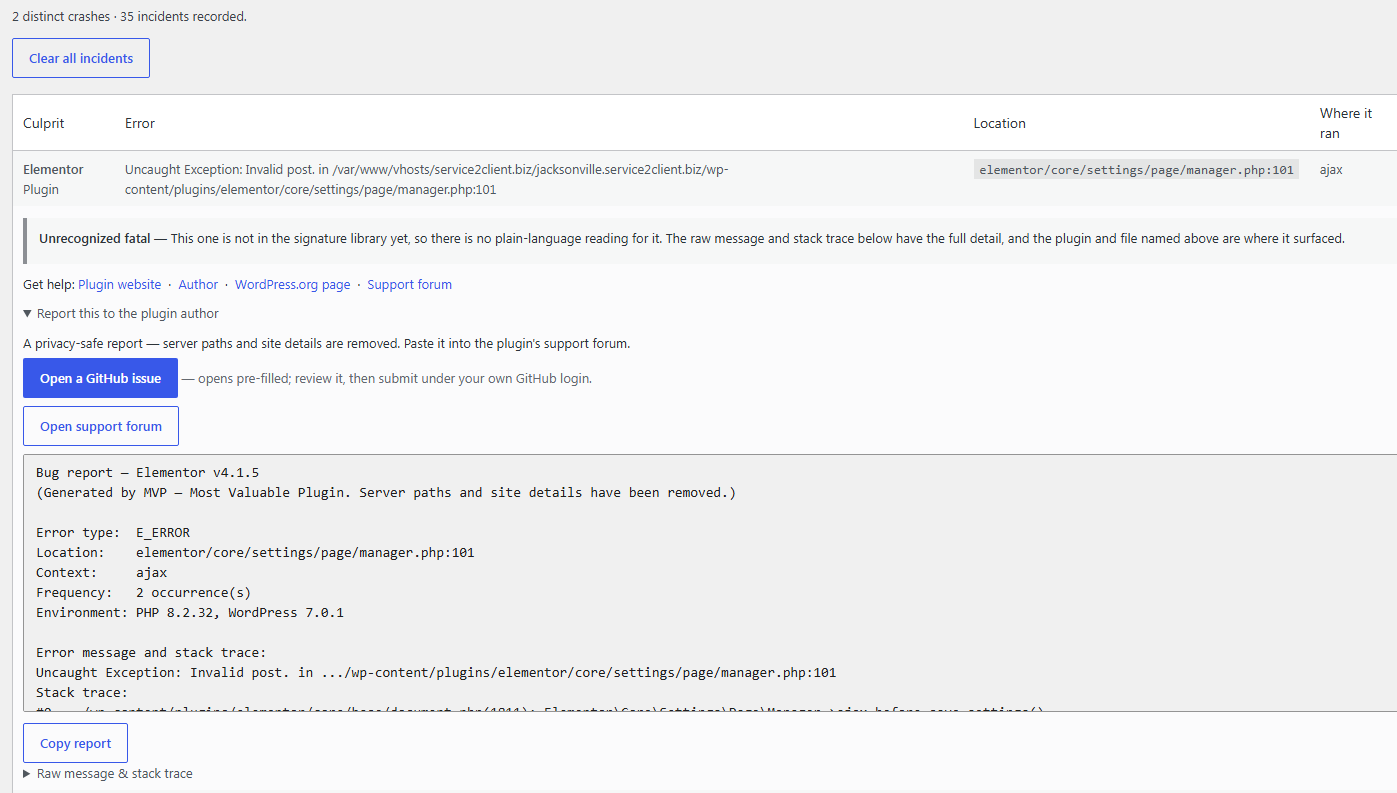
- A plain-language diagnosis. Pug recognizes common fatal patterns — an undefined function or method, calling a method on null, a class that can't be found, "cannot redeclare", out of memory, max execution time, parse errors, a missing file, a type error, and more — and explains in one sentence what actually went wrong. When it doesn't recognize the pattern, it says so honestly rather than guessing.
- The culprit, named. Pug maps the crash back to the specific plugin, must-use plugin, or theme whose code was running, so you're not guessing which of thirty plugins to suspect.
- A crash-notification email. Point Pug at an address and it emails you when a new fatal is captured — the plugin involved, the plain-language reason, and where it happened — so you learn about problems without watching a dashboard. Email is sent shortly after the crash from a safe context, never during the crash itself.
- A privacy-safe bug report. For any crash, Pug produces a copy-ready report for the responsible plugin's support forum, with absolute paths, your home directory, and your site's address stripped out. Pug never transmits it — you copy and paste it yourself.
- An after-crash admin notice. The next time you open wp-admin after a fatal is captured, Pug shows a dismissible notice linking straight to the report — so you find out even if you aren't watching a dashboard, and even if email isn't configured.
- A conflict scanner. On demand, Pug scans your active plugins for functions or classes declared by more than one of them — the "cannot redeclare" landmine — and names both sides before it bites you.
wp-content/fatal-error-handler.php, which core loads earlier than any plugin — that is what lets Pug see a fatal that happens before normal plugins have even loaded. It subclasses core's handler and then hands control straight back to WordPress, so Recovery Mode and the recovery email keep working exactly as they do without Pug. Deactivating the plugin removes the drop-in and stops capture; deleting the plugin removes everything.
What Pug does not do
- It does not send your crash details to us or to any third party. Diagnosis happens on your own server, and the bug report is copy-and-paste, not an automatic upload.
- It does not modify or delete your posts, pages, or any content. It reads nothing from your database except its own settings.
- It does not run its analysis during a crash beyond recording the incident — no network calls, no heavy work on the error path.
安装:
- Upload the
error-sniffing-pugfolder to/wp-content/plugins/, or install the ZIP through Plugins → Add New → Upload. - Activate the plugin. On activation Pug installs its capture drop-in at
wp-content/fatal-error-handler.php. - Visit Tools → Pug Crash Reports to see captured fatals, and Tools → Pug Settings to set a notification email, write custom messages, or run the conflict scanner.
wp-content to be writable so it can install its drop-in. If it can't, it will tell you in the admin and fall back to WordPress' default behavior.屏幕截图:
常见问题:
Will this slow down my site?
No. Pug does its work on the admin side and on the error path only. On a normal page load it does almost nothing; the diagnosis, help links, and reports are all generated when you open a crash report, not on every request.
What are the extra files in wp-content?
fatal-error-handler.php is Pug's capture drop-in, installed on activation. It is a standard WordPress drop-in location — the only path from which core will load a custom fatal handler. Pug installs, updates, and removes it for you, and will never overwrite one that belongs to another plugin.
What if another plugin already uses the fatal-error-handler drop-in?
Only one fatal-error-handler.php can exist. If another plugin got there first, Pug will not overwrite it, and Pug's capture will not run. Pug tells you this in the admin so you can decide which one to keep.
Does it work on older PHP?
Pug supports PHP 7.0 and newer. On PHP older than 7.0 it deactivates its own code quietly rather than causing errors.
Is my crash data sent anywhere automatically?
No. Diagnosis is done locally. The bug report for a plugin author is copy-and-paste — you send it, Pug doesn't. The notification email goes only to the address you configure, through your own site's mail.
How do I find out when a crash happens?
Two ways, both private to you: point Pug at a notification email and it writes to you shortly after a fatal is captured, and the next time you open wp-admin Pug shows a dismissible notice linking to the report. Nothing is ever shown to your visitors.
更新日志:
- Removed the "Hosting provider list" (managed messages) feature and the external call it made to the vendor API. Per-plugin crash notes are managed through the built-in Custom Messages, which already export and import as JSON.
- Fixed the Custom Messages export action, which pointed at an outdated hook name.
- Removed the optional custom crash screen (and its
php-error.phpdrop-in). You now learn about a captured fatal through the crash-notification email and a new dismissible admin notice that links to the report. - Incident data is stored under
wp_upload_dir()(protected from direct access) instead of a folder inwp-content. - All internal names use the
esniffprefix; the admin script is enqueued through the standard API; local file reads go throughWP_Filesystem; theme paths resolve viaget_theme_root().
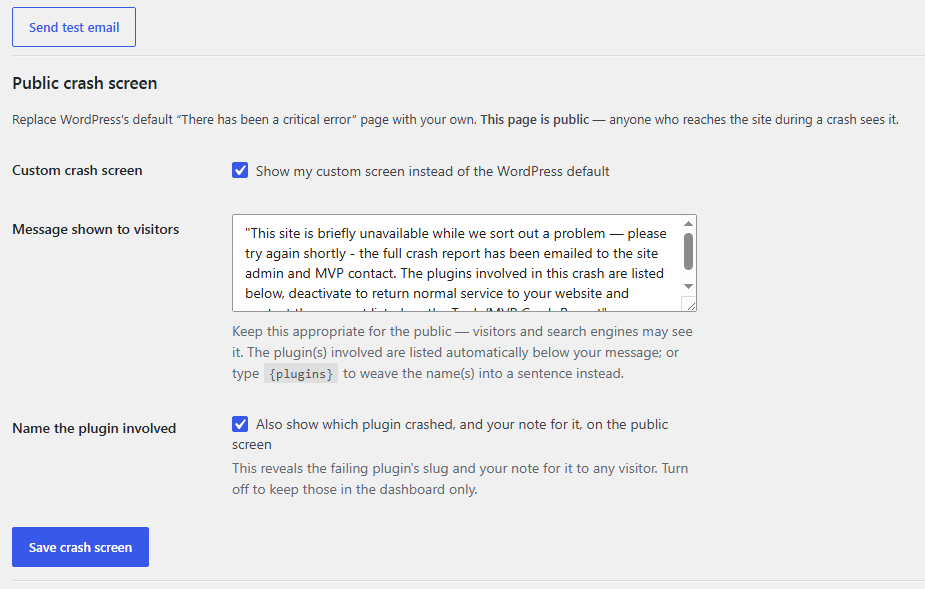
- Custom public crash screen with an admin-authored message, the plugin(s) involved (by display name), and your per-plugin note. Installed as a
php-error.phpdrop-in only while enabled. - Optional
{plugins}token to weave plugin names into your message inline. - Plain-language diagnosis engine and privacy-safe author bug report.
- Crash-notification email with the diagnosis and location.
- Function/class conflict scanner.
- Proper plugin lifecycle: drop-in installed on activation, removed on deactivation, full cleanup on uninstall, and daily incident retention.