ErrorLyze - Error Logger & AI Debugger
| 开发者 | dante0206 |
|---|---|
| 更新时间 | 2026年2月24日 03:25 |
| PHP版本: | 7.4 及以上 |
| WordPress版本: | 6.9 |
| 版权: | GPLv2 or later |
| 版权网址: | 版权信息 |
详情介绍:
- Automatic PHP Error Logging - Captures errors, warnings, and notices in real-time
- AI Error Analysis - Get detailed fix instructions powered by artificial intelligence
- Dashboard Widget - Monitor error statistics from your WordPress admin
- Email Alerts - Instant notifications when critical errors occur
- Smart Filtering - Filter errors by severity (critical, high, warning), category, or search terms
- Export Functionality - Export error logs in CSV (Excel) or JSON format
- Automatic Cleanup - Auto-delete old resolved errors to keep database clean
- Error Search - Quickly find specific errors with full-text search
- Copy to Clipboard - Easily copy error messages for research or sharing
- Mark as Resolved - Track which errors you've fixed
- WordPress developers debugging plugin and theme issues
- Site administrators monitoring production site health
- Development agencies managing multiple client sites
- DevOps teams tracking PHP errors and warnings
- Anyone wanting a cleaner, error-free WordPress site
- Install and activate ErrorLyze
- Errors are automatically captured and logged
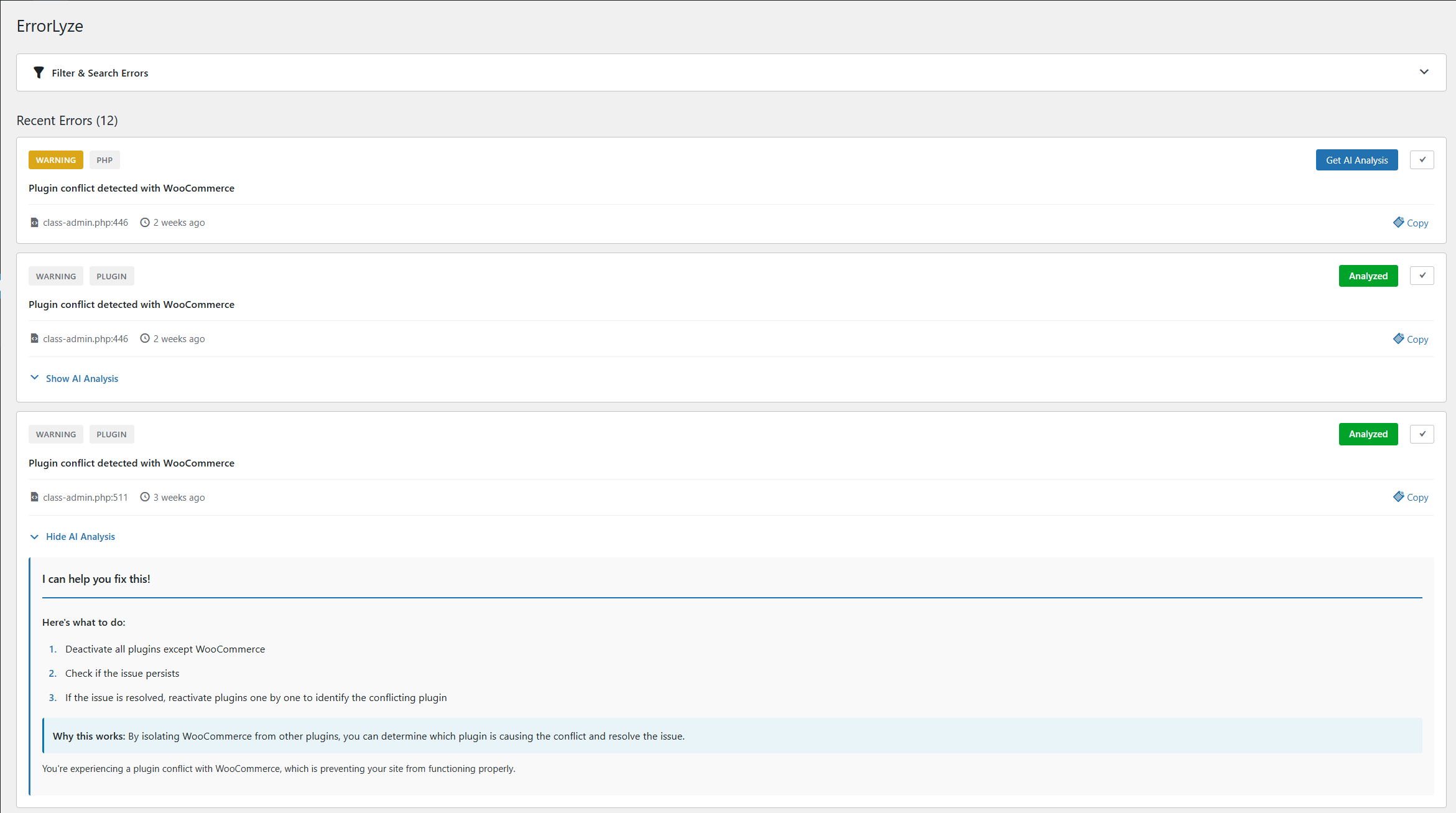
- View all errors in a clean, organized dashboard
- Click "Get AI Analysis" for intelligent fix recommendations
- Follow step-by-step instructions to resolve issues
- Mark errors as resolved to track your progress
- Optional: Enable email alerts for critical errors
- Zero Configuration - Works immediately after activation
- Privacy-Focused - Error data stays in your database
- Developer-Friendly - Clean interface, powerful filtering
- AI-Assisted - Smart recommendations save debugging time
- Lightweight - Minimal performance impact
- Free to Use - No paid tiers or upgrade prompts
安装:
- Log in to your WordPress admin panel
- Go to Plugins > Add New
- Search for "ErrorLyze"
- Click "Install Now" and then "Activate"
- Visit ErrorLyze in your admin menu to view errors
- Download the plugin ZIP file
- Log in to your WordPress admin panel
- Go to Plugins > Add New > Upload Plugin
- Choose the ZIP file and click "Install Now"
- Click "Activate Plugin"
- Visit ErrorLyze in your admin menu
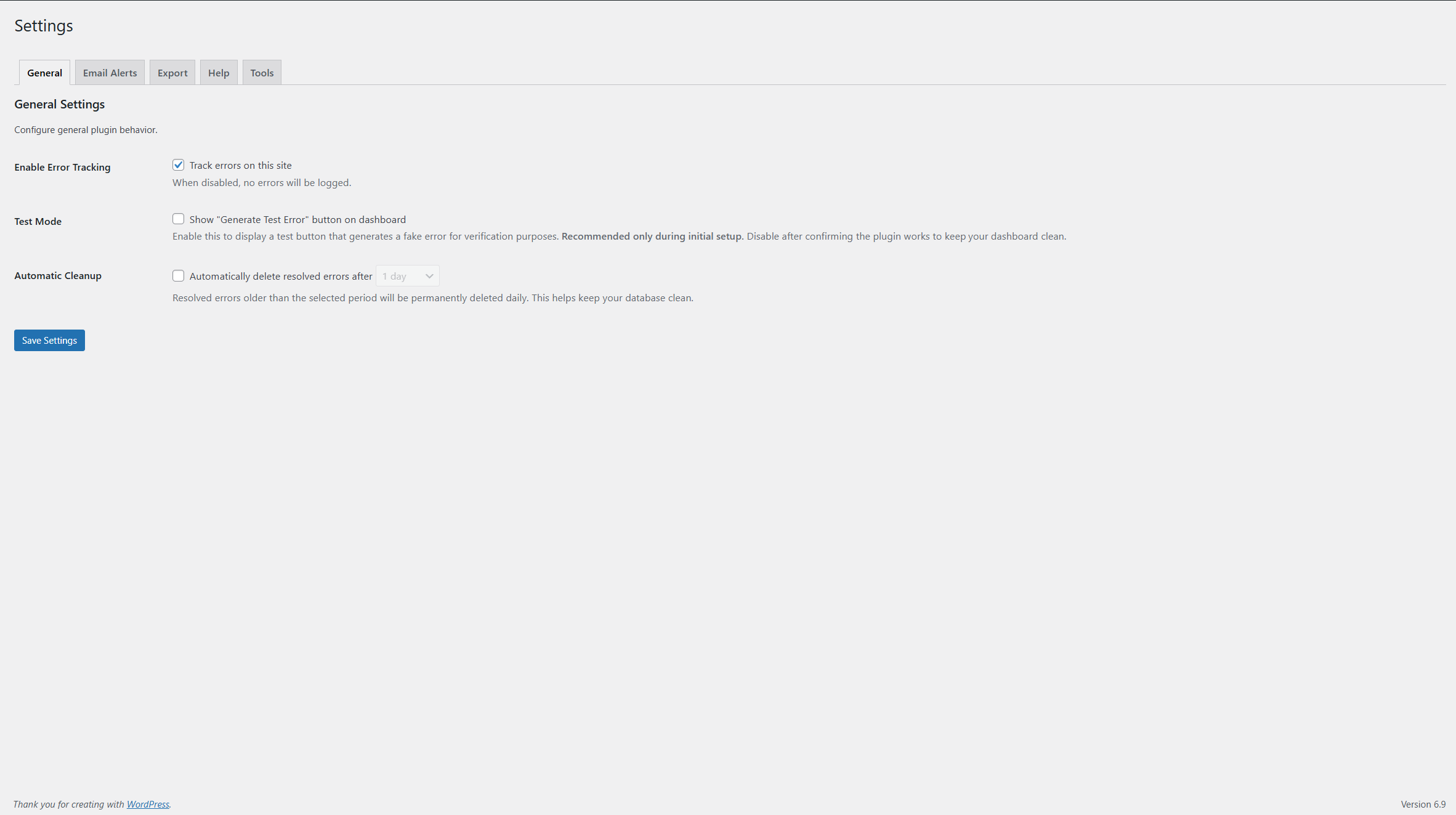
- Settings > General - Enable test mode, configure auto-cleanup
- Settings > Email Alerts - Set up notifications for critical errors
屏幕截图:
常见问题:
Will this plugin slow down my WordPress site?
No. ErrorLyze only logs errors locally in your database. The AI analysis is optional and only runs when you manually click "Get AI Analysis" - it never runs automatically.
How does AI error analysis work?
When you click "Get AI Analysis" on an error, the plugin sends the error message to our external AI service (api.errly.nl). The AI analyzes the error and returns step-by-step fix instructions. This service is provided free of charge with limited availability.
What if AI analysis is temporarily unavailable?
All core features work independently of the AI service. You can still:
- View all error logs
- Search and filter errors
- Export error logs to CSV/JSON
- Receive email alerts
- Mark errors as resolved
- Copy error messages for manual research
Can I use this plugin on multiple WordPress sites?
Yes! Each site tracks its errors independently. Install ErrorLyze on as many sites as you need.
Is my error data secure and private?
Yes. All error data is stored in your WordPress database. Only error messages (no sensitive data like passwords, credentials, or personal information) are sent for AI analysis via encrypted HTTPS connection. See the External Services section for full details.
Do I need to configure anything after installation?
No. The plugin works out of the box. However, you can optionally:
- Enable email alerts in Settings > Email Alerts
- Configure auto-cleanup in Settings > General
- Enable test mode to generate sample errors
Can I export error logs?
Yes! Go to Settings > Export and choose CSV (for Excel/Google Sheets) or JSON format. You can optionally include or exclude resolved errors and AI analysis in your export.
How do email alerts work?
Enable email alerts in Settings > Email Alerts. You'll receive HTML-formatted emails when errors occur. You can set a severity threshold (critical only, high severity, or all errors).
What is auto-cleanup?
Auto-cleanup automatically deletes old resolved errors to keep your database clean. You can set the retention period: 1 day, 7 days, 30 days, or 180 days. Cleanup runs daily via WordPress cron.
Can I test if the plugin is working?
Yes! Enable "Test Mode" in Settings > General. This adds a "Generate Test Error" button to your dashboard. Click it to create a sample error and verify ErrorLyze is capturing errors correctly. Disable test mode after testing to keep your dashboard clean.
Does this work with WordPress multisite?
Each site in a multisite network tracks errors independently. The plugin works on multisite but is not network-activated.
What PHP errors does ErrorLyze capture?
ErrorLyze captures all PHP error types:
- Fatal Errors (E_ERROR)
- Warnings (E_WARNING)
- Notices (E_NOTICE)
- Deprecated function warnings (E_DEPRECATED)
- User-triggered errors (E_USER_ERROR, E_USER_WARNING, E_USER_NOTICE)
更新日志:
- Fixed plugin display name (removed "WordPress" per directory guidelines)
- No functional changes
- Improved SEO optimization for better plugin discoverability
- Enhanced readme descriptions and tags
- Better search rankings for WordPress error debugging
- No functional changes - documentation update only
- Initial release
- Automatic error detection and logging
- AI-powered error analysis with fix recommendations
- Dashboard widget with real-time error statistics
- Email alerts for critical errors
- Export to CSV and JSON formats
- Automatic cleanup of old resolved errors
- Show/hide resolved errors
- Search and filter functionality
- Copy error messages to clipboard
- Mark errors as resolved
- Test mode for verification