
Export All URLs
| 开发者 | Atlas_Gondal |
|---|---|
| 更新时间 | 2026年6月25日 13:37 |
| 捐献地址: | 去捐款 |
| PHP版本: | 5.4 及以上 |
| WordPress版本: | 7.0 |
| 版权: | GPLv2 or later |
| 版权网址: | 版权信息 |
详情介绍:
- ID
- Title
- URL
- Status
- Categories
- Category URLs
- Tags
- Tag URLs
- Author
- Published Date
- Modified Date
- Word Count
- Excerpt
- Featured Image URL
- Comment Count
- Slug
- Post Type
- Language (WPML / Polylang)
- Translation URLs (WPML / Polylang)
安装:
- Visit 'Plugins > Add New'
- Search for 'Export All URLs'
- Activate Export All URLs from your Plugins page.
- Download Export All URLs.
- Unzip plugin.
- Upload the 'Export All URLs' directory to your '/wp-content/plugins/' directory, using your favorite method (ftp, sftp, scp, etc...)
- Activate Export All URLs from your Plugins page.
- Go to Tools > Export All URLs.
- On the Export tab, choose a post type and tick the fields you want (or use a preset such as "SEO basics").
- Optionally filter by post status, author or date range, and set advanced options (exclude domain, post range, file name, language).
- Click "Download" to get a CSV or JSON file, or "Display Here" to view the results in a paginated table.
- Open the Snapshots tab and click "Take snapshot".
- Later, use "Latest vs live site" (or compare any two snapshots) to see what was added, removed or changed.
- Download the differences as CSV or JSON if you need them.
- In the Admin Panel, go to "Plugins" and deactivate the plugin.
- Click "Delete" on the Plugins page. This removes the plugin files and its snapshot tables automatically.
屏幕截图:
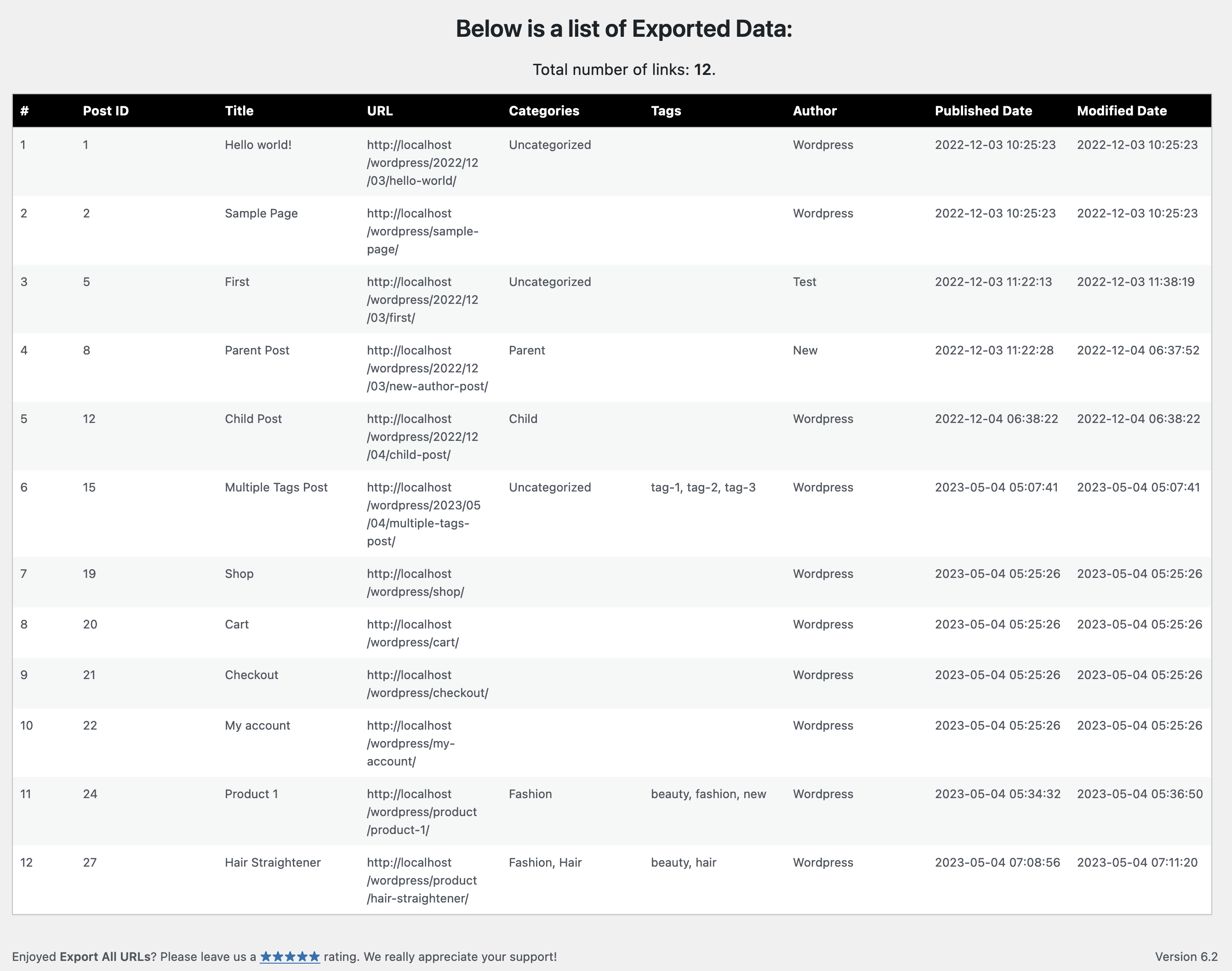


常见问题:
What data can I export?
For every post, page or custom post type you can export the Post ID, Title, URL, Status, Categories and Category URLs, Tags and Tag URLs, Author, Published and Modified dates, Word Count, Excerpt, Featured Image URL, Comment Count, Slug, Post Type, and (on multilingual sites) the Language and Translation URLs. Choose exactly the columns you want using the grouped checkboxes and quick-select presets.
Can I export to JSON as well as CSV?
Yes. You can download the data as a CSV file, download it as JSON, or display it in a paginated table right inside the dashboard.
What is the Snapshots feature?
A snapshot records a lightweight fingerprint (a hash, not a copy) of every post, page and custom post type on your site. Later you can compare two snapshots, or compare your latest snapshot against the live site, to see exactly what was added, removed or modified - including which posts changed in title, content, status, author, slug, taxonomy, custom fields or featured image.
How can I tell if my site was changed or compromised?
Take a snapshot when everything looks correct, then run "Latest vs live site" whenever you want to check. Newly published pages and author or status changes are highlighted as "Notable", because those are common signs of injected or unauthorized content. The differences can be downloaded as CSV or JSON.
Does it work with custom post types and WooCommerce?
Yes. Both the export and the snapshots cover all public post types - including WooCommerce products and any other custom post type - not just posts and pages.
Does it support multilingual sites (WPML / Polylang)?
Yes. The export has a "Languages" option to export all languages or just the default one, regardless of the language selected in the admin bar, and can add Language and Translation URL columns. Snapshots always capture every language.
Will it work on a large site without timing out?
The export and snapshot operations read posts in batches and stream results out as they go, so memory stays bounded no matter how many posts you have. Snapshots use keyset pagination and prime caches in bulk to stay fast on large tables. You can also export a specific post range to keep each request small.
Is the exported CSV safe to open in Excel?
Yes. Cell values that begin with =, +, - or @ are neutralized, so a malicious value cannot run as a spreadsheet formula when the file is opened.
Does the plugin modify the database?
The export feature does not touch the database. The optional Snapshots feature stores hashed fingerprints in two custom tables so it can detect changes over time; those tables are removed automatically when you uninstall the plugin.
Which PHP and WordPress versions are required?
PHP 5.4 or higher and WordPress 3.6 or higher. The plugin has been tested up to current versions. WordPress itself recommends PHP version 7.4 or greater.
更新日志:
- New - Snapshots: fingerprint your whole site and compare two snapshots to see what was added, removed or changed - with new pages and author/status changes flagged as possible signs of a compromise. Export diffs to CSV or JSON.
- New - export Word Count, Excerpt, Featured Image URL, Comment Count, Slug and Post Type
- New - multilingual support (WPML / Polylang): export all languages or just the default, plus optional Language and Translation URL columns
- New - JSON download format, alongside CSV and on-screen display
- New - field picker grouped into collapsible sections with quick-select presets; remembers your last selection
- New - on-screen results table now shows every row with pagination and a "Results per page" selector
- New - bundled translations for German, French, Russian, Japanese, Urdu and Pakistani Punjabi; the whole interface is now translatable (POT included)
- Improvement - exports run in batches to prevent timeouts and memory errors on large sites
- Improvement - rewritten on a modular architecture, still PHP 5.4 compatible
- Improvement - the form preserves your inputs and keeps the relevant sections expanded after submit
- Improvement - tidied the support sidebar
- Improvement - CSV and JSON downloads stream straight to the browser, leaving nothing behind in wp-content/uploads
- Security - CSV formula-injection protection
- Security - hardened output escaping, nonce verification and input sanitization across all screens
- Compatibility - resolved WordPress Coding Standards / Plugin Check issues
- Fix - restored genuine PHP 5.4 compatibility
- Improvement - strengthened csv file name to prevent unauthorized discovery
- Compatibility - tested with Wordpress 6.9.1
- New - additional export fields added (status, category urls, tag urls)
- New - allows multiple post status selection
- Improvement - few backend refinements to improve performance
- Compatibility - tested with Wordpress 6.7.1
- Compatibility - test with Wordpress 6.7-alpha-58656
- Added - support for the translation
- Compatibility - tested with WordPress 6.4
- Improvement - better organization and several code refinements
- Fixed - reflected cross-site scripting vulnerability
- Compatibility - tested with WordPress 6.2.2
- New - additional export fields added (tags, author, published, and modified date)
- New - option to retain selected options (no reset to default upon exporting)
- Improvement - backend code refinement
- Compatibility - minor adjustments for PHP 8.1 compatibility
- Compatibility - tested with WordPress 6.2
- Added - additional verification for file removal to patch a security issue
- Compatibility - tested with wordpress 6.0.1
- Added - overall security and stability improvements
- Compatibility - tested with wordpress 5.9.2
- Fixed - patched a security vulnerability
- Removed - file path customization option
- Compatibility - tested with wordpress 5.9.1 & PHP 8.1
- Added - option to remove woo commerce extra attributes from categories
- Tweak - bit of formatting adjustments
- Added - some default settings
- Compatibility - tested with wordpress 5.4.2
- Added - export post IDs
- Added - exclude domain URL
- Added - complete support of custom post type categories
- Tweak - small dashboard design improvements
- Added - enables user to delete the file once downloaded
- Compatibility - wordpress 5.4 and php 7.3
- Tweak - migrated under tools options, instead of settings
- Added - displays total number of links
- Added - new easy ways to report problem or bug
- Fixed - conflict with "Security Header" & "Elementor" plugin
- Fixed - typo on settings page
- Added - extra verification checks
- Added - filter data by date range
- Tweak - some general activation improvements
- Compatibility - tested with 5.1.1
- Added - allow users to customize file path and file name
- Fixed - grammatical mistake
- Compatibility - tested with 4.9.7
- Added - filter data by author
- Added - specify post range for extraction
- Added - generates random file name
- Compatibility - tested with 4.9.2
- Fixed - variable initialization errors
- Compatibility - tested with 4.9
- Added - support for selecting post status
- Compatibility - tested with 4.7.5
- Fixed - fatal error bug fixed
- Compatibility - tested with wordpress 4.7.2
- Fixed - categories export, (only first category was exporting)
- Compatibility - tested with wordpress 4.7
- Added - support for wordpress 4.6.1
- Fixed - special character exporting for Polish Language
- Added - support for exporting title and categories
- initial release