
WC Extra Amount On Checkout
| 开发者 | WPSuperiors |
|---|---|
| 更新时间 | 2021年5月30日 12:25 |
| PHP版本: | 3.0.1 及以上 |
| WordPress版本: | 5.7.1 |
| 版权: | GPLv2 or later |
| 版权网址: | 版权信息 |
详情介绍:
WC extra amount on checkout plugin auto apply extra amount on woocommerce checkout based on different payment gateway, shipping locations, product category, product type, and individual product.
✤ Work Flow ✤
❶ Admin enter Name / Label / Title in text format.
❷ Admin enter the amount in positive integer format.
❸ Admin chooses the amount applied as either a percentage of cart value or a fixed amount.
❹ Admin chooses the applicability (Individual Product, Product Category, Product Type, Shipping Location, Payment Gateway) of applying the amount.
❺ At checkout page based on previous #4 point, the defined amount will be added in terms of #3 point.
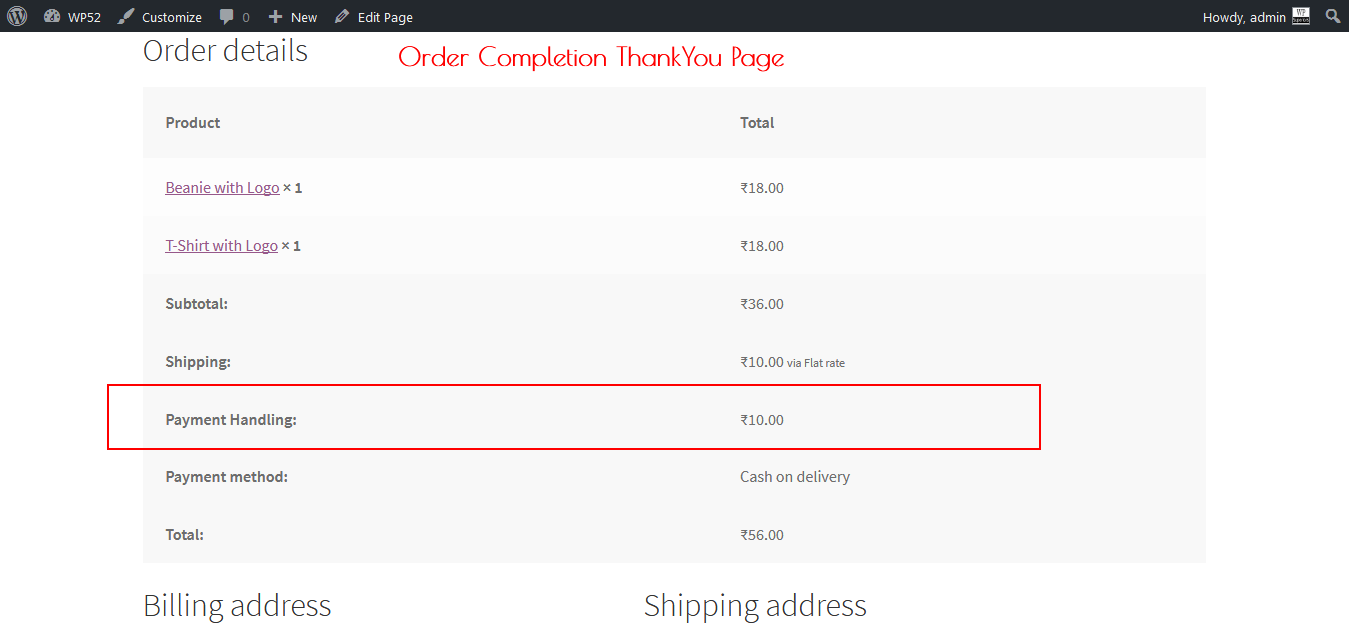
❻ The record will be saved into the database, and visibility into the User order email, User order details at My Account, and Admin edit order details page, Admin order notification email.
✤ Free( BASIC ) version ✤
🔸 Automatically apply the predefined amount into the order. 🔸 The amount can be a percentage of the order total or fixed. 🔸 The record can be visible at the order details page of User as well as Admin. 🔸 The unlimited number of the extra amount can be created/edited/deleted. 🔸 The amount can be apllied in case of individual product exists on the cart. 🔸 100% admin manageable. 🔸 No theme and plugin incompatibility.DEMO Frontend Checkout Page Backend Settings Page ✤ Premium version ✤
ALL THE FREE VERSION FEATURES INCLUDING BELOW, The amount can be applied in the below cases. 🔸 Based on Individual Product. 🔸 Based on Product Category (unlimited number of categories accepted). 🔸 Based on Product Type (Simple, Variable, Downloadable, Grouped, Subscription). 🔸 Based on Shipping Location (Country, State, City, ZIP/PostCode). 🔸 Based on Payment Gateway (PayPal, Stripe, Authorize.NET, and others available in WooCommerce). 🔸 Premium priority support.
安装:
Minimum Requirements
- WooCommerce 2.5 requires WordPress 4.1+
- WooCommerce 2.6 requires WordPress 4.4+
- Upload the plugin files to the
/wp-content/plugins/directory, or install the plugin through the WordPress plugins screen directly. - Activate the plugin through the 'Plugins' screen in WordPress
- Goto WooCommerce->Extra Amount On Checkout, and play with settings.
屏幕截图:
更新日志:
30th May, 2021 : 1.1.0
- WooCommerce comaptibility check with name change. 17th March, 2021 : 1.0.9
- WooCommerce compatibilty check. 28th Feb, 2021 : 1.0.8
- WooCommerce compatiliby check and fixation.
- WordPress compatibility update. 29th Nov, 2020 : 1.0.7
- Minor bug fixation.
- WooCommerce 4.7.1 compatibility. 12h Sept, 2020 : 1.0.6
- WooCommerce 4.5.1 compatiability. 06th Sept, 2020 : 1.0.5
- WooCommerce 4.4.1 compatiability. 12th July, 2020 : 1.0.4
- WooCommerce 4.3.0 compatiability. 9th May, 2020 : 1.0.3
- WooCommerce 4.1.0 compatiability.
- Minor bug fixation. 22nd Mar, 2020 : 1.0.2
- WooCommerce 4.0.1 comaptiability. 3rd Nov, 2019 : 1.0.0
- First Upload.