Extrnd Block Slider
| 开发者 | sulaimandauda |
|---|---|
| 更新时间 | 2026年4月10日 01:45 |
| PHP版本: | 8.1 及以上 |
| WordPress版本: | 6.9 |
| 版权: | GPL-2.0-or-later |
| 版权网址: | 版权信息 |
详情介绍:
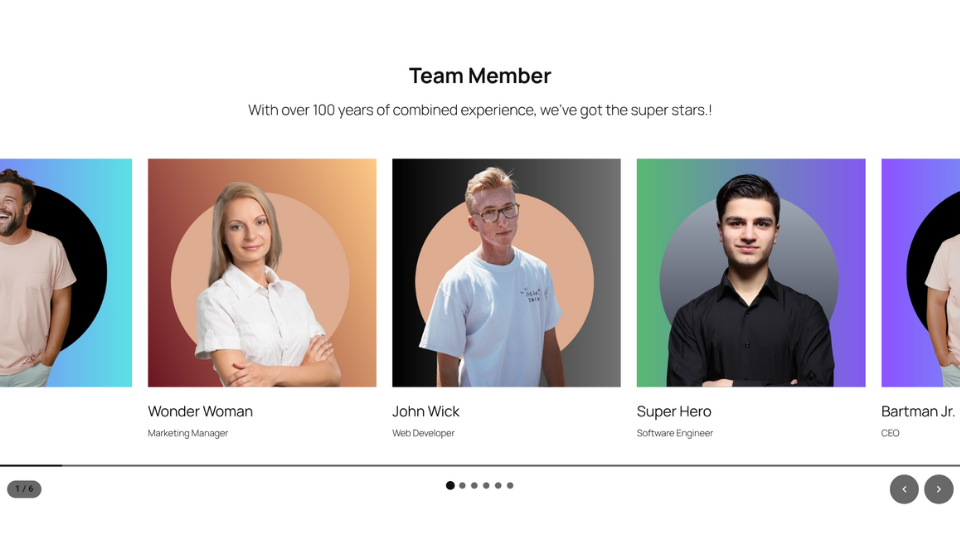
Extrnd Block Slider adds a slider block for the WordPress editor with responsive layout controls, navigation options, and accessible frontend output. It uses the Embla Carousel library for touch-friendly scrolling and does not require jQuery.
Key Features:
- Small frontend assets — streamlined JavaScript and CSS for frontend rendering
- Zero jQuery — no jQuery dependency, not even transitively
- Gutenberg native — configure everything inside the block editor, no admin pages
- 9 presets — Default, Hero, Gallery, Cards, Testimonials, Fullscreen, Logo Carousel, Coverflow, Fade
- 6 transition effects — Slide, Fade, Scale, Parallax, Coverflow, Flip with smooth scroll-based animations
- 5 arrow styles — Default, Rounded, Minimal, Outline, Circle
- 5 arrow positions — Sides, Bottom Right, Bottom Left, Bottom Center, Outside
- 5 pagination styles — Dots, Lines, Dashes, Numbers, Outline
- 3 pagination positions — Bottom, Right, Left
- Progress bar — thin scroll-based progress indicator
- Slide counter — shows current/total slide count (e.g. 1 / 5)
- Navigation colours — customise arrow background, arrow icon, dot, and active dot colours
- Responsive breakpoints — desktop, tablet (≤ 1024 px), and mobile (≤ 768 px) slides per view
- Settings & Styles tabs — organised into Settings (Preset, Layout, Playback) and Styles (Effects, Navigation, Colors) tabs
- Accessible — full keyboard navigation, screen reader announcements, reduced motion support
- Developer friendly — PHP filter (
extrnd_block_slider_options) and JS hooks (extrndSlider.options,extrndSlider.init,extrndSlider.slideChange) - Block transforms — convert Gallery, Group, or multi-selected blocks to/from Slider
- Lazy initialisation — sliders below the fold only initialise when scrolled into view
- Dynamic rendering — PHP render callback ensures future-proof output with zero block validation errors
- Default — standard full-width slider
- Hero — 80 vh feature banner with fade transition
- Gallery — multi-slide with 16 px gap
- Cards — 3 visible slides with 24 px gap
- Testimonials — centred single testimonial
- Fullscreen — edge-to-edge 100 dvh
- Logo Carousel — continuous-scroll brand logos
- Coverflow — 3D coverflow effect
- Fade — crossfade transitions
安装:
- Upload the
extrnd-block-sliderfolder to/wp-content/plugins/ - Activate the plugin through the Plugins menu in WordPress
- In the block editor, add an "Extrnd Slider" block
- Add Slide blocks inside the slider
- Configure settings in the block sidebar panel
屏幕截图:

常见问题:
Does this require jQuery?
No. Extrnd Block Slider has no jQuery dependency. It uses the Embla Carousel library for slider behaviour.
Can I use this with Full Site Editing?
Yes. Extrnd Block Slider is compatible with the WordPress Site Editor and block themes.
How do I customise slider options programmatically?
Use the PHP filter extrnd_block_slider_options or the JavaScript filter extrndSlider.options via @wordpress/hooks.
Does it work without JavaScript?
Yes. Without JavaScript, slides stack vertically and navigation elements are hidden via CSS.
更新日志:
1.1.0
- Live preview mode in the block editor now renders a real slider instance in the editor (slide and fade effects)
- Editor preview accurately reflects loop, speed, slides-per-view, and spacing settings
- Initial release
- 9 presets: Default, Hero, Gallery, Cards, Testimonials, Fullscreen, Logo Carousel, Coverflow, Fade
- 6 transition effects: Slide, Fade, Scale, Parallax, Coverflow, Flip with smooth scroll-based animations
- 5 arrow styles: Default, Rounded, Minimal, Outline, Circle
- 5 arrow positions: Sides, Bottom Right, Bottom Left, Bottom Center, Outside
- 5 pagination styles: Dots, Lines, Dashes, Numbers, Outline
- 3 pagination positions: Bottom, Right, Left
- Progress bar for scroll-based progress indication
- Slide counter showing current/total slide count
- Navigation colour controls (arrow background, arrow icon, dot colour, active dot colour)
- Responsive breakpoints (desktop, tablet, mobile)
- Settings & Styles tab organisation in the block editor
- Block transforms: Gallery, Group, multi-block to/from Slider
- Block patterns: Hero Slider, Testimonial Carousel, Logo Carousel
- Slide visibility toggle (hide on frontend)
- Developer hooks: PHP filters and JS actions
- Full keyboard and screen reader accessibility
- Lazy IntersectionObserver initialisation
- No-JS progressive enhancement