FA WP Admin Menu Icons
详情介绍:
View on GitHub for better documentation
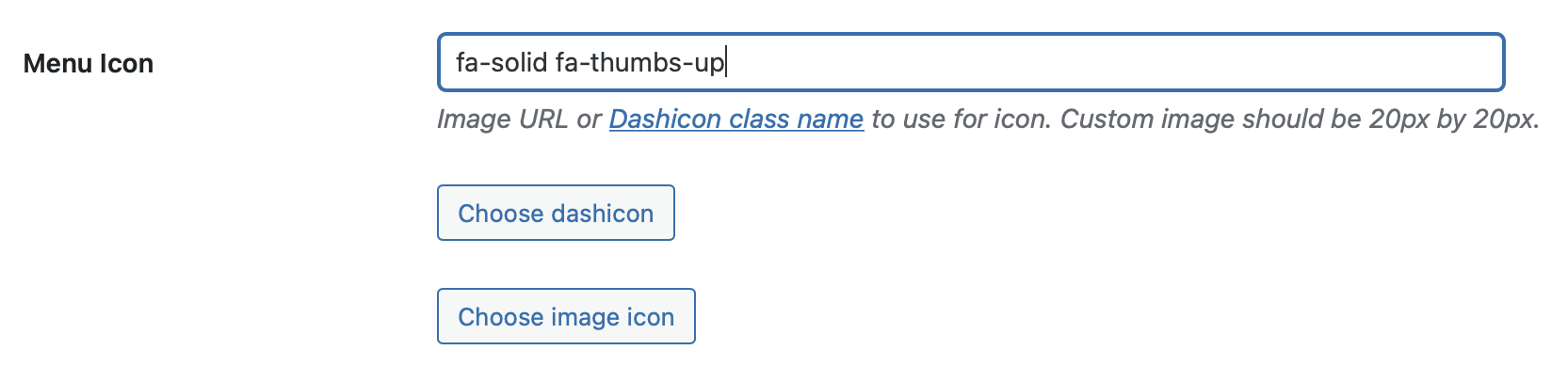
FA WP Admin Menu Icons allows you to use Font Awesome icons for WordPress custom post types and custom menu pages by passing the Font Awesome class string, just like using Font Awesome on the front end
Here's an example:
register_post_type( 'custom_post_type', [
//...
'menu_icon' => 'fa-solid fa-thumbs-up',
//...
] );
安装:
WordPress Admin Dashboard
In your WordPress Admin Dashboard, go to Plugins > Add New, search for 'fa wp admin menu icons', then click Install Now
Read more about automatic plugin installation with the WordPress Admin Dashboard
WP-CLI
Install with WP-CLI by running the following command:
wp plugin install fa-wp-admin-menu-icons --activate
Install with Composer
- Follow the setup instructions for WordPress Packagist
- Require
wpackagist-plugin/fa-wp-admin-menu-icons
屏幕截图:
更新日志:
9.0.0
Changed
- Upgrade Font Awesome from v6.6.0 to v7.0.0
- Upgrade Font Awesome from v6.5.2 to v6.6.0
- Upgrade Font Awesome from v6.5.1 to v6.5.2
- Decreased icon size to be more similar to Dashicons
- Require PHP v8.1 in readme.txt
- Upgrade Font Awesome from v6.5.0 to v6.5.1
- Upgrade Font Awesome from v6.4.0 to v6.5.0
- Require PHP v8.1+
- Upgrade Font Awesome to v6.4.0
- Upgrade Font Awesome to v6.3.0
- Require PHP v8.0+
- Support for Font Awesome v4 icons
Fawpami\\faVersionfilter
- Require PHP v7.4+
- Test with WordPress v5.9
- Upgrade Font Awesome to v5.15.4
- Test with WordPress v5.8.1
- Upgrade Font Awesome to v5.15.1
- Test with WordPress v5.5.3
- Drop support for PHP v7.2
- Test with WordPress v5.2.1
- Upgrade Font Awesome to v5.13.0
- Support for EOL PHP versions
- Restore support for EOL PHP versions because it's a breaking change
- Upgrade Font Awesome to v5.12.1
- Support for EOL PHP versions
- Update Font Awesome from v5.9.0 to v5.11.2
- Test with WordPress v5.2.1
- Add support for PHP v7.3
- Update Font Awesome from v5.6.0 to v5.9.0
- Update Font Awesome from v5.5.0 to v5.6.0
- Update Font Awesome from v5.4.2 to v5.5.0
- Update Font Awesome from v5.4.1 to v5.4.2
- Update Font Awesome from v5.3.1 to v5.4.1
- Update Font Awesome from v5.2.0 to v5.3.1
- Update Font Awesome from v5.1.0 to v5.2.0
- Initialize the plugin earlier in the WP lifecycle
- Tested with WordPress v4.9.6
- Update Font Awesome from v5.0.13 to v5.1.0
- Update Font Awesome from v5.0.12 to v5.0.13
- Update Font Awesome from v5.0.11 to v5.0.12
- Update Font Awesome from v5.0.10 to v5.0.11
- Update Font Awesome from v5.0.9 to v5.0.10
- Update README.txt changelog
- Bump Font Awesome version from 5.0.8 to 5.0.9
- Fix styles action
- Add support for Font Awesome versions. Icons are now cached with their Font Awesome version so they can be updated when the Font Awesome version changes.
- Add links to changelog
- Add links to readme badges
- Integrate Travis and Code Climate test coverage
- Instead of storing all icons in the plugin, get them remotely, as needed, and cache them in the database for future use
- Make hooks code DRYer
- Stop using static methods, to make testing easier
- Make icons smaller so they look better next to Dashicons
- Update Font Awesome shims
- Add CC BY 4.0 attribution in
icons/README.mdto adhere to Font Awesome license
- Fix old syntax in readme examples
- Add missing 'Usage' section to
README.txt
- Add unit tests
- Upgrade to Font Awesome 5 icons and class syntax
- Use PSR instead of WordPress for code style
- Deprecate use of Font Awesome 4 class syntax
- Format code
- Remove caveat from documentation because it no longer applies
- Add more icons
- Fix undefined index
- Add icons to
icons/. The directory was empty on the WordPress plugin repository.