
FancyBox for WordPress
| 开发者 | silkalns |
|---|---|
| 更新时间 | 2026年11月9日 19:37 |
| PHP版本: | 7.4 及以上 |
| WordPress版本: | 7.1 |
| 版权: | GPLv3 or later |
| 版权网址: | 版权信息 |
标签
下载
详情介绍:
- Click any linked image to open it in an overlay, with the rest of the page dimmed behind it
- Arrow keys, on-screen arrows, swipe on touch devices, and Escape to close
- Zoom, slideshow, thumbnail strip and full-screen controls in the toolbar
- Captions taken from the image title, the block editor's caption, or a
data-captionattribute - Galleries grouped automatically — everything on the page, per post, or per gallery block
- PDFs, videos and other pages open in the lightbox too
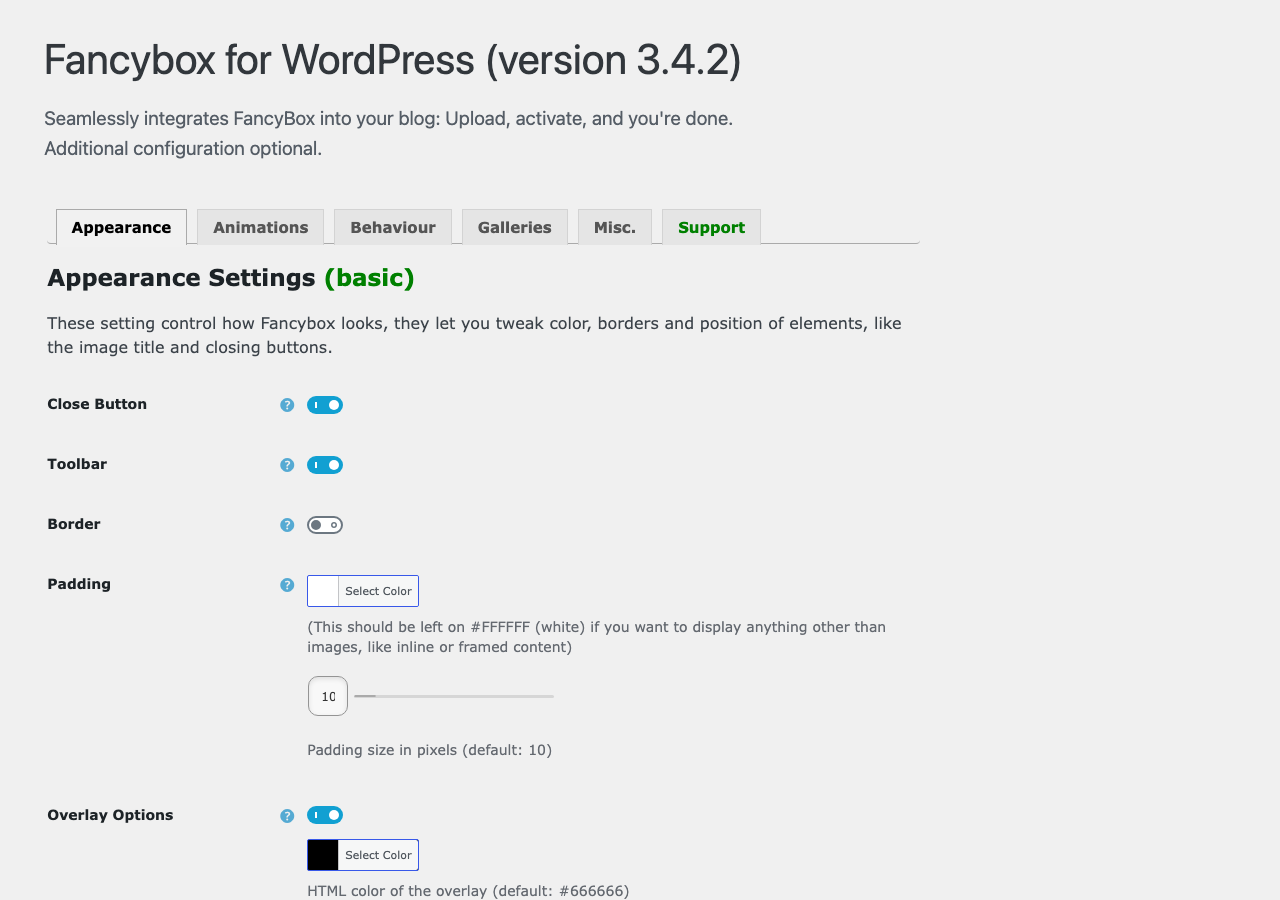
- Overlay colour and opacity, padding, border, background colour
- Caption position (inside the frame, over the image, or below it), size and colour
- Opening and transition animations, and their speed
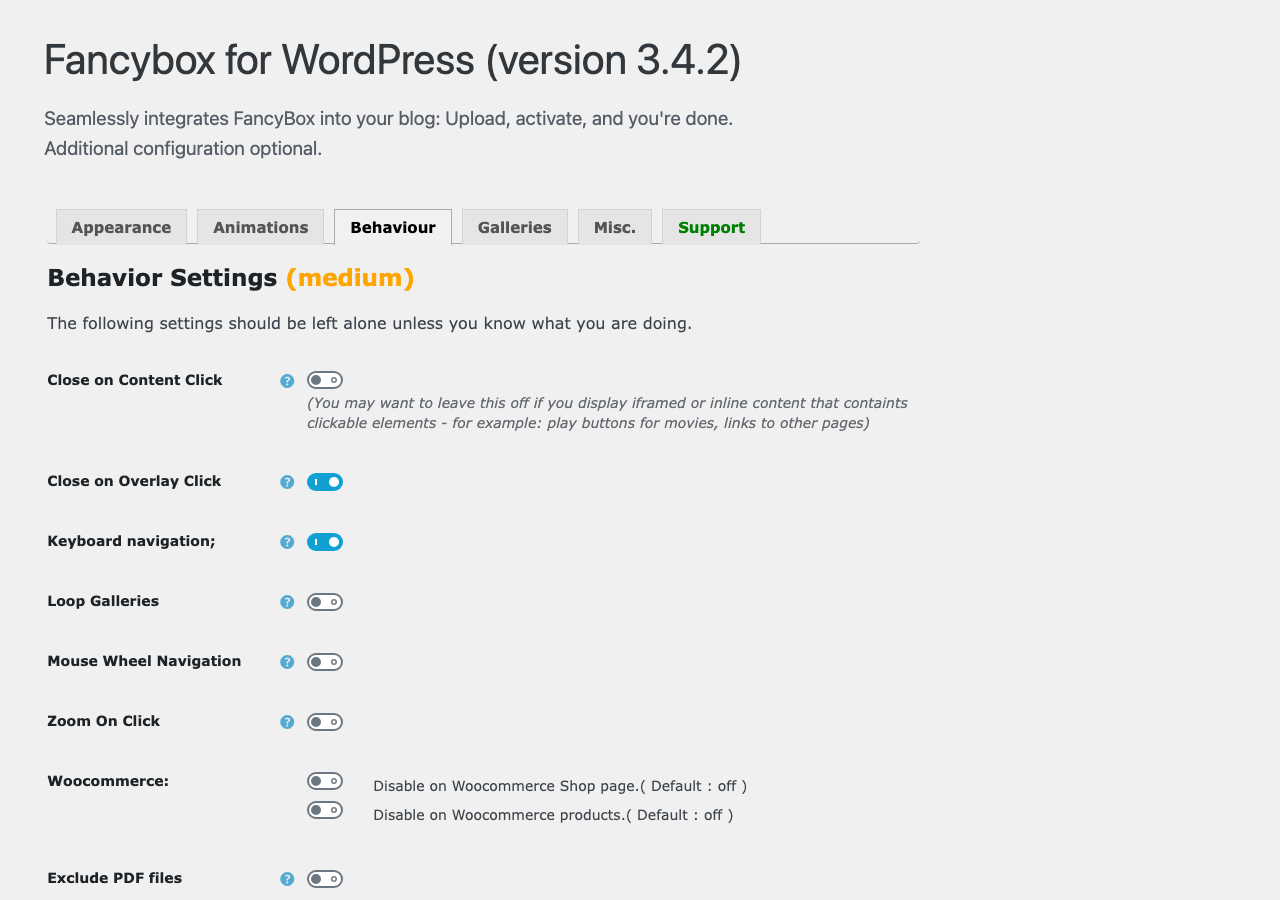
- Close on overlay click, close on image click, zoom on click, mouse-wheel navigation, looping
- Turn the lightbox off on mobile, on WooCommerce shop pages, or on product pages
- Exclude PDF links, or exclude individual images with
class="nolightbox" - A custom jQuery expression if you want to decide exactly which links are affected
fancyboxforwp) so it will not collide with a FancyBox that your theme or another plugin already loads.
Translations
Available in your language through WordPress.org language packs. Translations are contributed by the community at translate.wordpress.org — help for your locale is very welcome.
Contributing
Development happens on GitHub. Bug reports and pull requests are welcome.
This plugin is developed and maintained by Colorlib, who also make free WordPress themes.
If it is useful to you, a review genuinely helps.
安装:
- Upload the
fancybox-for-wordpressfolder to the/wp-content/plugins/directory - Activate the plugin through the 'Plugins' menu in WordPress
- That's it, FancyBox will be automatically applied to all your image links and galleries.
- If you want to customize a bit the look and feel of FancyBox, go to the Options Page under General Options in the WordPress Admin panel
屏幕截图:
常见问题:
How do I add a caption?
Three ways, and they stack:
- Set the image's Title in the media library or block settings — it appears under the image.
- Add a caption in the block editor — it is picked up automatically.
- Add
data-captionto the link for longer or formatted text:
<a href="big.jpg" data-caption="Marble, 2019<br>120 × 60 cm"><img src="thumb.jpg"></a>
Basic HTML such as <br>, <em> and <a> is allowed. Captions are sanitised before display, so scripts and event handlers are stripped.
How do I stop one image opening in the lightbox?
Add class="nolightbox" to the link. Links from Envira Gallery and NextGen Gallery are skipped automatically so the two lightboxes do not fight.
The lightbox looks wrong — the image is cut off, stretched, or barely visible
Almost always another plugin or theme loading its own copy of FancyBox. Two stylesheets defining the same class names will fight, because FancyBox's CSS class names are shared.
To check, open your browser's developer tools, look at the Network tab, and search for fancybox. If you see a .css file from anywhere other than /plugins/fancybox-for-wordpress/, that is the conflict. Disabling the other lightbox, or the option in your theme that loads it, resolves it.
3.4.2 fixed the worst version of this, where the image collapsed to a thin sliver and videos played sound with no picture.
Images loaded by infinite scroll or lazy loading do not open
Fixed in 3.4.1. Thumbnails added after the page has finished loading — infinite scroll, lazy loading, AJAX filters — are now detected and bound automatically. Update if you are on an older version.
Can I load the lightbox only on certain pages?
Yes, with a filter. Put this in your theme's functions.php or a site-specific plugin:
add_filter( 'mfbfw_is_enabled', function ( $enabled ) { return is_page( array( 'portfolio', 'gallery' ) ); } );
Returning false means nothing loads at all — no CSS, no JavaScript. There are also built-in switches for mobile, WooCommerce shop pages and product pages under Behaviour.
PDFs open in the lightbox. How do I stop that?
Turn on Exclude PDF files under Behaviour and PDF links will open normally. Note that iOS Safari cannot display a PDF inside an overlay at all. If your visitors are mostly on iPhones or iPads, excluding PDFs is the more reliable choice.
How do I group images into galleries?
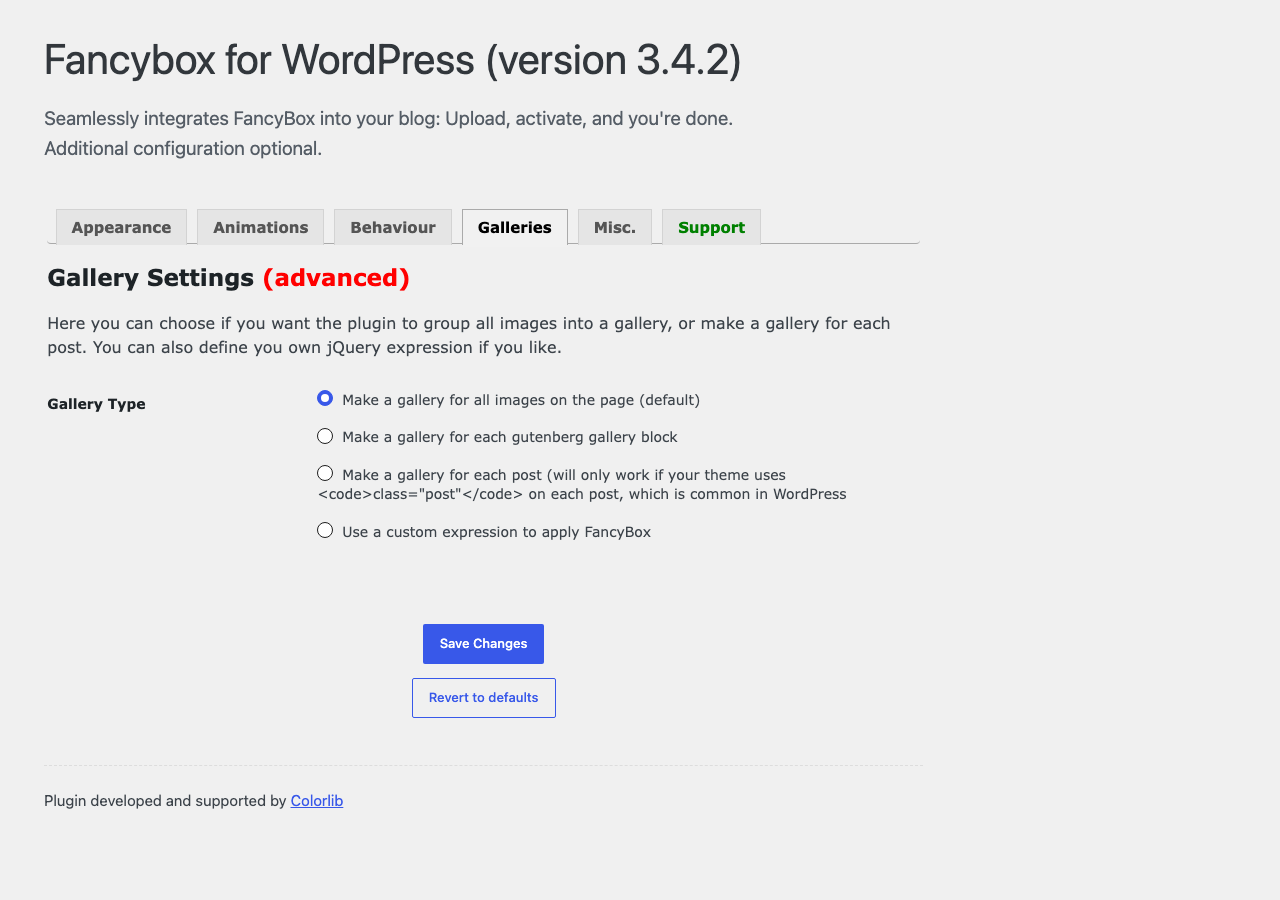
Under Galleries, choose how links are grouped:
- All images on the page — one gallery for everything (default)
- Each gallery block — one gallery per block editor gallery
- Each post — one gallery per post on archive pages
- No galleries — every image opens on its own
- Custom expression — write your own jQuery selector
Does it work with WooCommerce, Elementor or other page builders?
WooCommerce has its own product image zoom, so there are switches under Behaviour to turn the lightbox off on shop and product pages. Page builders vary. The plugin looks for links pointing at an image file, so builders that output normal image links work. Builders that render their own lightbox usually need theirs disabled first.
Is it available in my language?
Translations come from WordPress.org language packs and install automatically. If your language is missing or incomplete, you can help at translate.wordpress.org.
Will it slow my site down?
It adds roughly 82 KB of minified JavaScript and 14 KB of CSS. Nothing is loaded from an external server. Define SCRIPT_DEBUG in wp-config.php if you need the unminified sources for debugging.
If you only need the lightbox on a few pages, the mfbfw_is_enabled filter above avoids loading anything elsewhere.
Where do I report a bug?
The support forum or GitHub. A link to a page showing the problem makes it far quicker to diagnose.
更新日志:
javascript: are refused, and HTML or Ajax content opened from a link is sanitized.
Security: Captions and HTML opened from a link can no longer contain styles or form fields.
Security: The custom JavaScript settings now require the unfiltered_html capability, so a site administrator on multisite can no longer change them or switch them on.
Security: A URL can no longer open another site's page in the lightbox without a click.
Security: Updated DOMPurify to 3.4.17.
Changed: Links can now set only a fixed list of per-link options through data-* attributes: type, source, caption, thumbnail, size and on/off switches. Options that accept templates or markup must be passed through the JavaScript API.
Changed: Smilies, emoji and comment avatars no longer open the lightbox.
Changed: The plugin's inline CSS and JavaScript are now added through WordPress's script and style queues. Code that removed the mfbfw_init action should use the mfbfw_is_enabled filter instead.
Fixed: With "load at footer" on and jQuery also in the footer, the lightbox did not start.
Tested with WordPress 7.1.
3.4.2
Fixed: The lightbox could collapse to a thin sliver instead of showing the image, and videos played sound with no picture. The plugin's stylesheet carried a height: auto !important rule that overrode the height FancyBox calculates for each slide. On its own it happened to work, but as soon as a second copy of FancyBox's CSS was on the page - any theme or plugin bundling its own - the content box collapsed to nothing. The rule was added in 3.2.5 for a problem that no longer exists, and has been removed.
Changed: Rewrote the plugin description and replaced the FAQ, which had answered only a question about a 2015 security release. It now covers captions, excluding images, gallery grouping, loading the lightbox on selected pages, PDFs, page builders and diagnosing conflicts with other lightboxes.
Changed: New screenshots, taken on WordPress 7.0. The previous ones were from 2016 and showed an interface that no longer exists.
Changed: Screenshots are served from the plugin directory rather than bundled in the download, which cuts the download size by about two thirds.
3.4.1
Fixed: The Title size setting had no effect. With the title positioned Inside or Over - the two positions most sites use - the caption you actually see is drawn inside the image frame, while the font-size rule was applied to a different, hidden element. (#87)
Fixed: Hovering a thumbnail showed a browser tooltip repeating the caption. The plugin copied each image's title onto its link so the lightbox could read it, and browsers render that as a tooltip. The text is now carried in a data attribute instead. A title you set yourself is left alone. (#84)
Fixed: Images loaded after the page finished rendering - infinite scroll, lazy loading, AJAX filters - were never picked up by the lightbox. New thumbnails are now detected and bound automatically. (#25, #69)
Fixed: With Zoom On Click enabled, releasing the mouse after panning a zoomed image counted as a click and zoomed it straight back out. (#105)
Fixed: The lightbox announced itself to screen readers as an unnamed dialog. It now carries an accessible name and is marked as a modal. (#104)
Fixed: Removed a dead demo link from the plugin description. (#85)
3.4.0
Fixed: Translations never loaded. The plugin declared Text Domain: mfbfw while its WordPress.org slug is fancybox-for-wordpress, and WordPress looks for language packs under the slug - so none of the community translations on translate.wordpress.org ever reached anyone. The text domain now matches the slug, which switches on the six existing language packs (es_CL, es_ES, es_VE, nl_NL, ru_RU, tr_TR) and every future one. 63 locales have translation work waiting on translate.wordpress.org.
Changed: The bundled translations were migrated onto the current strings and renamed to the new domain. German, Japanese and Polish ship in the plugin because no language pack exists for them yet; Spanish and Turkish were dropped because their WordPress.org packs are more complete and take precedence anyway.
Added: Translations now also ship as .l10n.php files, the faster format WordPress 6.5 and newer prefer, with the .mo files kept as a fallback.
Added: Regenerated languages/fancybox-for-wordpress.pot from the current source - the old template was written in 2015 and had drifted badly.
Security: Updated the bundled DOMPurify from 3.1.6 to 3.4.13, picking up the fix for the nesting-based mXSS bypass (CVE-2025-26791) in the sanitizer the plugin relies on for captions and titles.
Security: Fixed a CSS injection in the generated stylesheet. Colour and size settings were escaped with esc_html(), which only blocks "<", so a value such as blue}body{display:none} could close its own declaration block and inject arbitrary site-wide CSS. Colours are now validated as hex and sizes as integers.
Security: Fixed a potential JavaScript injection via the animation speed setting, which was written into the option object unquoted.
Security: The options sanitizer is now an allow-list. It previously started from the raw submitted array, so any key it did not explicitly name was stored untouched.
Security: Added ABSPATH guards to every PHP file, a capability check on the settings screen and the reset action, and an uninstall.php so settings are removed on delete (not only on deactivate) when that option is enabled.
Security: Removed the jQuery UI stylesheet loaded from code.jquery.com. It is now bundled, which also stops leaking admin IP addresses to a third party. The bundled copy's references to jQuery UI theme images were removed - they only ever resolved on the CDN - so the settings screen no longer fires five 404s per load.
Fixed: Missing text domain on four strings on the Support tab, and a missing translators comment, so they can now be translated.
Fixed: PHP 8 compatibility. On the first page view after activation, and on any front-end request following an update, the settings array was used before it was populated, producing a wall of "Undefined array key" warnings, an "Automatic conversion of false to array" deprecation (a fatal error under PHP 9), and a fatal TypeError if the option row was not an array. Settings are now resolved and type-normalized through a single schema before use. Verified clean on PHP 8.5.
Fixed: The settings migration only ran inside wp-admin, so a site whose first request after an update was a front-end hit rendered against an incomplete settings array.
Fixed: The Overlay, Title and Zoom On Click toggles had no effect - they were tested with isset() alone, which is always true once the key exists. They now behave as labelled.
Fixed: "Make a gallery for each Gutenberg gallery block" matched nothing on WordPress 5.9 and newer, where the gallery block renders as figure.wp-block-gallery rather than ul.wp-block-gallery.
Fixed: Zoom On Click attached a new click handler on every slide without removing the previous one.
Fixed: load_plugin_textdomain() was called with the deprecated second argument.
Fixed: Script and style versions were hardcoded to "1.3.4", so browsers kept serving stale assets after a plugin update.
Fixed: Malformed markup on the settings screen - the reset form was never closed.
Fixed: Callback and custom-expression textareas were escaped with esc_attr()/wp_kses_post() instead of esc_textarea().
Fixed: Legacy border-radius and shadow settings from FancyBox 1.x era installs are no longer discarded the first time the settings are saved.
Changed: Assets are now minified - the FancyBox script drops from 162 KB to 68 KB and the stylesheet from 18 KB to 14 KB. Define SCRIPT_DEBUG to load the readable sources.
Changed: Removed 22 unused FancyBox 1.x image files from the plugin package.
Changed: The unprefixed PLUGIN_NAME constant is no longer redefined if another plugin already declared it.
Added: mfbfw_settings and mfbfw_is_enabled filters for customizing settings and disabling the lightbox per request.
Deprecated: hexTorgba() - use mfbfw_hex_to_rgba() instead. The old function still works.
3.3.7 - 07.05.2025
Fixed: Issue with text domain loading too early (translations now load properly on the init hook)
Fixed: Improved HTML sanitization in captions with DOMPurify to prevent XSS while preserving valid HTML formatting
3.3.6 - 02.05.2025
Fixed: Security issue - Fixed XSS vulnerability in caption and title handling
3.3.5 - 12.11.2024
Fixed: Security issue
3.3.4 - 22.03.2024
Fixed: Security issue
3.3.3 - 11.05.2021
Fixed : Issue with padding and border ( https://github.com/ColorlibHQ/fancybox-for-wordpress/issues/86 )
3.3.2 - 05.03.2021
Changed: Upgrade Fancybox to latest version ( https://github.com/ColorlibHQ/fancybox-for-wordpress/issues/95 )
Fixed: Close button not showing up although option is enabled
3.3.1
Compatibility with jQuery 3.0
3.3.0
Fixed compatibility issue with WordPress 5.6
3.2.9
- Added Zoom on Click functionality
- Fix property 'title' of undefined when using newer versions of jQuery
- Add option to disable FancyBox on mobile view
- Fix for separate gutenberg blocks
- Personalize script handles
- Review dismiss fix
- Admin bar overfloat fix
- Tooltip description bug fix
- Add option for caption hide/show
- Fix title hide/show option
- Fix extra height on lightbox image wrapper
- Removed dashboard news widget
- Fix for mobile close on content click
- Fix for mobile close on overlay click
- Fix for padding issue when title inside position
- Fix for title color when title is set to inside position
- Update toggles
- Added new option to make a gallery for each gutenberg gallery block
- Admin UI minor update
- Removed unneeded ie css file
- Added option in Behaviour tab to exclude links that target .pdf files from being displayed in the lightbox
- Replace $.fancebox with $.fancyboxforwp.
- Fixed "Click to Hide on Overlay only works with Images"
- Fixed "The requested content cannot be loaded" when trying to view page/post in fancybox
- Fixed incompatibilty with Envira Gallery
- Fixed incompatibilty with NextGen Gallery
- Removed rollback functionality
- Added support for mp4 and webp files
- Made it work with query string and without query strings.
- Fixed "Parse error" - https://wordpress.org/support/topic/no-backend-after-fancybox-update/
- Fixed "Breaks on query strings" - https://wordpress.org/support/topic/url-with-ssl1-fancybox-doesnt-open/
- Fixed "Caption problems" - https://wordpress.org/support/topic/border-not-fitting-and-strange-white-line/
- Fixed "All links get the fancybox class"
- Removed print_r from fancybox.php
- Updated FancyBox library to the latest version
- Changed Admin UI
- Updated Fancybox library
- Updated other libraries this plugins depends on such as jQuery easing and jQuery Mousewheel
- Tested plugin with WordPress 4.6
- Fixes to JavaScript code for showing and hiding elements as they are needed in Settings page. (Thanks to jono55 for reporting)
- Fixed the Revert Options button.
- Fixed wrong version number being shown on the plugin's settings page.
- Updated plugin and author links in readme and settings page.
- Updated localization catalog (POT file).
- Updated Spanish translation with minor updates.
- Updated Frequently Asked Questions in readme file.
- Removed version number from printed html source code.
- Removed outdated/incomplete translation binaries.
- Renamed the setting affected by the security issue mentioned in 3.0.3. This should stop the malicious code from appearing on sites where the plugin is updated without removing the malicious code.
- Fixed a security issue. (Thanks to mickaelb for reporting and Konstantin Kovshenin for providing the fix)
- Added support for disabling fancybox on individual hyperlinked images by adding class='nolightbox'. (Thanks to Artem Russakovskii)
- Added a link to the github project page in the info tab in the settings page.
- Fixed and cleaned the installation code, new installations of the plugin should work now without need to go to the settings page.
- Fixed false positives in filenames. (Thanks to Artem Russakovskii)
- Fixed incompatibility with wordpress installations where the wp-content directory had been renamed.
- Fixed an issue that could cause the version of the plugin to be removed from settings when deactivating the plugin.
- Improved HTTPS support by using better code to retrieve the plugin url and load files.
- Removed legacy code to suport upgrading settings from 2.x versions of the plugin. This was done to avoid possible issues with clean installations of the plugin.
- Updated some CSS rules in jQuery UI
- Some minor reformatting and cleanup of code (PHP comments, empty lines, )
- Updated: Localization catalog updated.
- Updated: Spanish localization.
- Fixed: Minor change in settings page that may fix options page being invisible in some cases.
- New: Fancybox v1.3.4 support This includes many new options, like title position.
- New: Additional FancyBox Calls option that lets the user write their own additional code to use FancyBox on specific areas of the blog, like email subscription buttons, login, etc.
- New: Revert settings button added to options page. When pressed, a confirmation dialog will appear.
- New: Improvements in options page, irrelevant settings (settings that depend on a disabled setting) will hide on real time, meaning a cleaner look in the options page.
- Updated: New cleaner code to select thumbnails on which to apply the fancbox script.
- Updated: Many parts of plugins rewriten with many improvements in code.
- Updated: Options are now serialized into a single row in the database.
- Fixed: Plugin should be SSL friendly from now on.
- Fixed: Do not call jQuery option in troubleshooting section didn't work if easing was enabled.
- Fixed: Load at footer options should work better now.
- Fixed: CSS external files now addded with wp_enqueue_style().
- Fixed: has_cap error: User level value for options page removed, using role now instead. Thanks to vonkanehoffen.
- Removed: jQuery "noConflict" Mode option removed bacause jQuery bundled with WordPress always used noConflict.
- Removed: Base64 data ("data:image/gif;base64,AAAA") in left and right fancybox link's backgrounds: It didn't seem to be working and it is usually regarded as suspicious code, so it has been removed.
- Fixed: Callback arguments are no longer added as "null" when they are not set in options page.
- Fixed: Little error tagging 2.7.3, a file didn't upload and broke options page.
- Update: Language POT file
- Fixed: Settings not saving in some browsers. Thanks to supertomate
- Fixed: JS being added to other plugins' configuration pages. Thanks to Brandon Dove
- Added: Support section in options page with better information
- Fixed: Layout problem in options page in WordPress 2.9
- Fixed: Z-index issue was left out in previus release
- Fixed: Setting to close fancybox when clicking on the overlay wasn't available in the menu
- Fixed: Frame width and height options are now in the "Other" tab
- Fixed: Tabs now translated in Spanish localization
- New: Fancybox v1.2.6 support
- New: New Admin page with tabs for better organization of all the options
- Added: Setting to change the speed of the animation when changing gallery items
- Added: Setting to enable or disable Escape key to close Fancybox
- Added: Setting to show or hide close button
- Added: Setting to close fancybox when clicking on the overlay
- Added: Setting to enable or disable callback function on start, show and close events
- Added: Italian translation
- Added: Russian translation
- Added: "Load JS at Footer" option
- Added: New Changelog tab in Wordpress Plugin Directory
- Fixed: Some typos in Spanish translation
- Fixed: FancyBox not showing above some elements (those with zindex higher than 90)
- Fixed: JavaScript code being included in all admin pages instead of just the plugin's options page.
- Fixed: noClonflict preventing frames to work in Fancybox
- Fixed: Custom frame width and height not being applied
- Updated: Japanese translation
- Updated: JS is now Minified instead of Packed
- Optimized the JavaScript code used to apply FancyBox
- Updated Custom Expression section in Options Page
- Fixed uppercase image extensions not being recognized
- CSS is now loaded before the JavaScript for better parallelization
- jquery.easing.1.3.js compressed (from 8,10kb to 3,47kb) and renamed to jquery.easing.1.3.pack.js
- Added Turkish translation (some strings missing)
- Added Japanese translation (some strings missing)
- Updated Spanish translation
- Updated to use new Plugin API in WP2.7 for better forward compatibility
- Removed /wp-content/ reference in fancybox.php for better WP2.8 support
- Optimized some code readability
- Fixed the plugin not working when selecting Gallery Type "By Post"
- Fixed a bug that would prevent the title in the IMG tag from being copied to the A tag in some cases
- Fixed the Custom Expression showing in the Admin panel when other gallery types are selected
- Support for localizations (Spanish and German localizations included)
- Some parts of the code completely rewritten
- Fixed fancybox files being loaded on the admin pages
- New options for close button position, custom jquery expressions, iframe content
- Options page mostly rewritten, better organized
- Medium/advanced, troubleshooting/uninstall options collapsable, hidden by default
- Better support guidelines and links on options page
- Settings link on the Manage plugins page
- Custom expression hidden when not used
- Title atribute on IMG tags is now copied to its parent A tag for better caption support
- New uninstall options and better handling of new options when installing/updating
- Cleans any old options no longer needed when plugin is activated/updated
- Updated to FancyBox 1.2.1
- Added new settings to Options Page: Easing, padding size, border color
- Tweaked CSS to prevent some themes from adding unwanted styles to fancybox (especially background colors and link outlines)
- Options Page reorganized in three sections: Appearance, Behaviour and Troubleshooting Settings, to make settings easier to find
- Fixed a new bug introduced in 2.1 that prevented options from being saved. Sorry about the mess :(
- Fixed a major bug in 2.0 that prevented it from working until plugin's options page was visited
- Added two options for troubleshooting that might help in some cases if the plugin doesn't work: disable jQuery noConflict and skip jQuery call
- Additional fixes to caption CSS: Captions should look better now in Hybrid theme, child themes, and other situations where general table elements are improperly styled
- Brand new Options Page in Admin Panel lets you easely customize many options: fancybox auto apply, image resize to fit, opacity fade while zooming, zoom speed, overlay on/off, overlay color, overlay opacity, close fancybox on image click, keep fancybox centered while scrolling
- CSS completely updated for FancyBox 1.2.0
- Captions fixed in IE
- Shadows and Close button should be fixed now
- Updated to FancyBox 1.2.0
- Uses packed version of the JavaScript file (8kb instead of 14kb)
- Fixed FancyBox not being applied to .jpeg files
- Fixed "Click to close" overlay text
- Moved images to /img/ folder