
Faultline – Error Log Assistant
| 开发者 | riseofweb |
|---|---|
| 更新时间 | 2026年11月1日 03:13 |
| PHP版本: | 7.4 及以上 |
| WordPress版本: | 7.1 |
| 版权: | GPLv2 or later |
| 版权网址: | 版权信息 |
详情介绍:
WP_DEBUG, found an error in the log, and had no idea which plugin caused it or what to do about it, this plugin is for you.
Find the cause
- Caused by - every error is matched to the plugin or theme behind it, with a link to that plugin's WordPress.org support forum.
- Source code - open the file at the exact line that failed, highlighted.
- Draft forum post - a ready-to-post support request with the error and your site details filled in, and private details removed.
- Ask AI - open a copy of the error, private details removed, in Claude, ChatGPT or Perplexity. See "External services" below.
- Fatal error alerts - a banner in your dashboard, an email, or both, as soon as a fatal error happens. The alert says where it happened: the front end, the admin, a scheduled task, WP-CLI or an AJAX call, and on which page. The email also names the plugin or theme that caused it. On the Log tab, each fatal error lists every page it happened on.
- Public access check - debug.log often sits where anyone can download it, and it contains server paths and plugin details. Faultline tests this the way a stranger would. If your log is exposed, one click moves it to a private file name that bots cannot guess, keeping every entry, and you get the blocking rule for your web server (Apache, LiteSpeed, nginx or IIS).
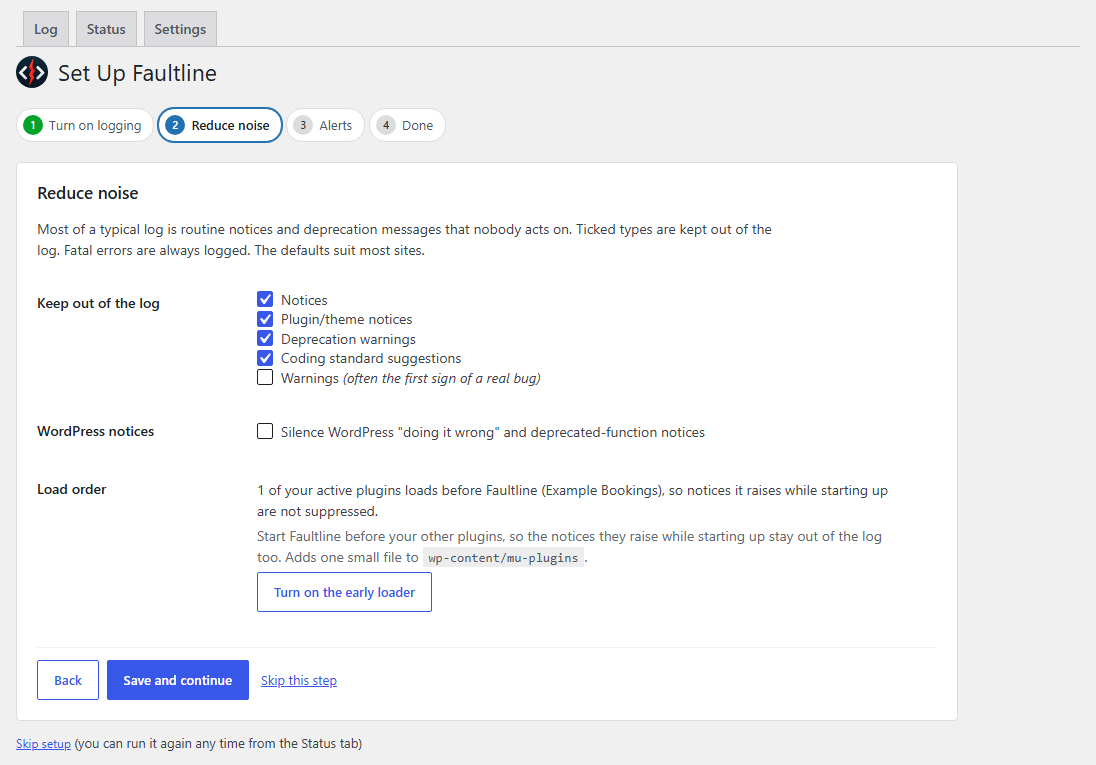
- Stop routine messages being written - notices, deprecation warnings and coding-standard suggestions never reach the log, so there is nothing to clean up later. Other debugging tools still see every error. An optional early loader starts Faultline before your other plugins, so the notices they raise while starting up are caught too.
- Ignore patterns - hide one chatty message without hiding its whole category. A live preview shows what will match before you save.
- Filter and bulk delete - show only the entries one plugin or theme caused, then tick entries and delete them together. Shift-click selects a range.
- Automatic cleanup - remove noise, trim repeated entries to the first and newest copies, delete old entries and cap the file size, so a runaway error never fills your disk.
- Fatal errors are always logged. They cannot be switched off.
- Previous logs - if your site already had a PHP error log, its recent entries are copied in. The old file is not changed.
- Turn on logging - one click turns on the error log, without showing errors to visitors. Faultline backs up
wp-config.phpfirst, and you can undo it with one click. - Reduce noise and Alerts - already set up for you.
- Done - Faultline checks that logging works and that no one else can download your log.
- Write to
.htaccess. One bad rule there can take the whole site down, so you get the rule to add yourself. - Change
wp-config.phpwithout asking. It adds the lines that are missing. It changes an existing line in only two cases, each confirmed by you: correcting a single wrongtrue/falsevalue, and giving the log a private file name. If a setting is defined more than once, it explains the problem instead of guessing. A backup is taken before every change. - Hide a fatal error. Fatal errors, parse errors and uncaught exceptions are always logged.
- Claude (Anthropic) - Terms of Service, Privacy Policy
- ChatGPT (OpenAI) - Terms of Use, Privacy Policy
- Perplexity - Terms of Service, Privacy Policy
安装:
- In your WordPress admin, go to Plugins > Add New Plugin, search for "Faultline" and install it. Or upload the
faultline-error-log-assistantfolder to/wp-content/plugins/. - Activate the plugin on the Plugins screen.
- Go to Tools > Faultline and click through Setup. It takes under a minute, and Faultline makes the changes for you.
- After Setup, the same menu item opens the Log tab. Setup can be run again from the Status tab.
屏幕截图:


常见问题:
How do I view my WordPress error log?
Activate Faultline and go to Tools > Faultline. If logging is off, Setup turns it on for you. The Log tab then shows every entry with its severity, the plugin or theme that caused it, and a link to the source code.
Which plugin is causing this PHP error?
Each entry on the Log tab has a "Caused by" label naming the plugin or theme, with a link to that plugin's WordPress.org support forum. "Draft forum post" writes a support request with the error and your site details filled in.
How do I turn on WP_DEBUG safely?
Use Setup: it is one click. Three settings have to be right together (WP_DEBUG, WP_DEBUG_LOG and WP_DEBUG_DISPLAY), or either nothing is logged or errors are shown to your visitors. Faultline sets all three in wp-config.php for you, with a backup first. If your host does not allow that, it gives you the lines to paste in.
How do I stop WordPress from filling up debug.log with notices?
Under Settings, tick the types to suppress: notices, deprecation warnings, coding-standard suggestions and, if you choose, warnings. Suppressed messages are never written, so there is nothing to clean up.
How do I stop debug.log from getting too big?
Faultline keeps it small in four ways: suppressed messages are never written, repeated entries are trimmed to the first and newest 10 copies each day, old entries are removed after 30 days (14 for notices and deprecations), and the file is capped at 50 MB. All four can be changed under Settings.
Can I leave error logging on all the time?
Yes. Faultline keeps the log from ballooning: routine messages are never written, repeats are trimmed, old entries are removed and the file size is capped. Setup keeps errors hidden from your visitors, and Faultline warns you if the log can be read from the web.
Is my debug.log file publicly accessible to anyone on the internet?
It may be. debug.log usually sits in a folder your web server serves, and it contains server paths and stack traces. Faultline requests your log over the web the way a stranger would and tells you whether it could be read. Setup runs this check at the end, and you can repeat it on the Status tab. If the log can be read, a warning shows on every admin screen until it is fixed. There are two fixes: move the log to a private file name that bots cannot guess (one click, works on any server, keeps every entry), or add a blocking rule for Apache, LiteSpeed, nginx or IIS. On nginx only your host can usually add the rule, so Faultline writes the message to send them.
I used to have a PHP error log from my host. Will I lose it?
No. Setup looks for the PHP error logs your site was writing before, such as the error_log files hosting control panels create, and offers to copy their recent entries into the new log. The original files are only read, never edited, moved or deleted. Automatic cleanup also waits until you finish or skip Setup.
Does this replace my existing log viewer plugin?
It can. Faultline shows every log entry with its severity, the plugin or theme that caused it and the source code, alerts you to fatal errors, and keeps routine notices out of debug.log.
What makes this different from other WordPress debug log plugins?
Faultline is built for acting on errors, not only reading them. It names the plugin or theme behind each error, opens the line of code that failed, drafts a support request, and links to AI help with private details removed. It can also stop routine notices and deprecation warnings being written in the first place. All of this is free.
Will this plugin ever show PHP errors to my site visitors?
No. Faultline only ever keeps messages out of the log. It never changes PHP's error reporting level and never turns on WP_DEBUG_DISPLAY, the setting that prints errors on screen. Setup sets WP_DEBUG_DISPLAY to false.
Can it guarantee it loads before every other plugin?
Not completely, but close. Turn on the early loader under Settings and Faultline starts before all of your regular plugins. The early loader is one small file in your must-use plugins folder (wp-content/mu-plugins). It is only added when you click the button, and it does nothing unless Faultline is active. Faultline still cannot start before WordPress itself, or before a must-use plugin whose file name sorts earlier. The Status tab shows what is in effect.
If your host does not let WordPress write to that folder, Settings shows which file to copy there yourself. It also offers "Load Faultline first", which moves Faultline to the front of your plugin list instead.
What happens to wp-config.php if I deactivate or delete the plugin?
When you deactivate, Faultline asks whether to undo its wp-config.php changes first, and removes its early loader file if you turned that on. If it cannot remove that file, it tells you which file to delete before you deactivate. Deleting the plugin removes its settings and stored data. It does not touch wp-config.php or your log file.
Does this work on WordPress multisite?
Yes, site by site. On a network, Faultline does not add the early loader file for you, because one file affects every site. Settings shows the file to copy yourself. When the plugin is network-activated, the "Load Faultline first" setting does nothing, because WordPress stores network-wide plugins differently.
Will suppressing notices hide bugs from me?
It hides the types of message you choose, and nothing else. Fatal errors, parse errors and uncaught exceptions are always logged. Warnings are logged unless you turn them off. Notices, deprecation warnings and coding-standard suggestions are suppressed by default because they are rarely something you can act on in someone else's plugin.
更新日志:
- "Translation loading triggered too early" notices now name the plugin or theme responsible, not WordPress core.
- Fatal error emails name the plugin or theme that caused the error and mention WordPress recovery mode.
- New Log link on the Plugins screen.
- Repeated entries are trimmed daily to 10 copies: the first and the newest. Change this under Settings, Cleanup.
- New button under the Log tab list shows suppressed entries without reloading the page.
- Daily cleanup no longer starts while you are using Faultline's screens.
- All text on the Log tab can now be translated.
- Where each fatal error happened is now shown inside that error on the Log tab, not as separate entries.
- Deleting an error also deletes its request details, and leftover ones are cleaned up automatically.
- Select several entries and delete them at once. Shift-click selects a range.
- New filter on the Log tab for the plugin or theme that caused an entry.
- Deleting an entry with grouping off now removes only that entry.
- "Ignore these" is no longer offered on fatal errors.
- Support and review links on the Plugins screen.
- Faultline warns before deactivation if it cannot remove its early loader file.
- New optional early loader: starts Faultline before your other plugins, so their start-up notices are kept out of the log too.
- "Load Faultline first" is now only offered where the early loader cannot be used.
- Log tab hides entries of types you now suppress, with links to show or delete them.
- Site Health no longer warns about a public log file once Faultline has confirmed the log cannot be reached.
- New Faultline box on the Tools screen.
- Setup shows the value each logging setting should have.
- Shorter, plainer wording throughout.
- Setup is now a step-by-step wizard, and can copy in the PHP error logs your site already had.
- One-click fix for a log that can be downloaded from the web, plus server rules for Apache, LiteSpeed, nginx and IIS.
- Automatic cleanup waits until setup is finished or skipped.
- Log entries show WordPress formatting (bold, code, links) instead of raw HTML tags.
- Status tab trimmed to live facts.
- A custom WP_DEBUG_LOG path is no longer reported as wrong.
- Faultline actions no longer fail when a theme or plugin prints PHP warnings on screen.
- Faultline icon in the page heading and Tools menu.
- Initial release.