
Reviews Widgets for Google, TripAdvisor, Yelp & Recommendations
| 开发者 |
richplugins
Trust.reviews trust.reviews widgetpack |
|---|---|
| 更新时间 | 2026年9月27日 03:55 |
| PHP版本: | 6.0 及以上 |
| WordPress版本: | 7.1 |
| 版权: | GPLv2 or later |
| 版权网址: | 版权信息 |
标签
下载
2.7.3
2.8
2.0
1.2.7
1.2.9
1.3
1.4
1.4.1
1.4.2
1.4.3
1.4.4
1.4.5
1.4.6
1.4.7
1.5
1.5.2
1.5.3
1.5.4
1.5.5
1.5.6
1.5.7
1.5.8
1.6
1.6.2
1.6.3
1.6.4
1.6.5
1.6.6
1.6.7
1.6.8
1.6.9
1.7.1
1.7.2
1.4.9
1.5.9
1.7.3
1.7.5
2.4
2.9
2.3
1.2.4
1.2.6
1.2.8
1.4.8
1.7
1.7.4
1.7.6
1.7.7
2.1
2.2
1.2.1
1.5.1
1.7.8
2.2.1
1.1
2.5
2.6
1.2
1.2.3
1.2.5
1.6.1
1.7.9
2.7
2.7.1
2.7.2
详情介绍:
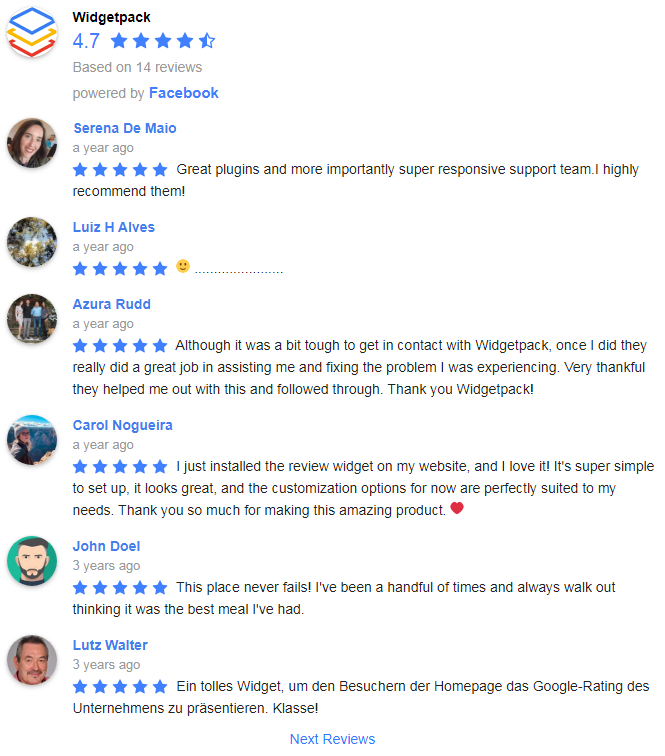
⭐ Reviews Widgets for Google, TripAdvisor, Yelp & Recommendations is a simple and powerful WordPress plugin that displays real customer reviews from Google, TripAdvisor and Yelp, together with Facebook recommendations, in a combined feed.
⭐ Unified feed — Facebook + Google + TripAdvisor + Yelp together!
📌 This plugin brings together reviews from Facebook Recommendations, Google, TripAdvisor and Yelp into a single combined feed.
📌 You no longer need separate plugins for each platform — everything is managed in one place using one widget, one shortcode and one settings panel.
📌 This reduces setup time, avoids plugin conflicts and keeps your site lighter and easier to manage.
⭐ Unlimited business locations & unlimited widgets
📍 Unlimited locations — connect any number of Google places, TripAdvisor listings, Yelp listings or Facebook Pages.
🗂️ Unlimited widgets — each widget can use its own layout and source selection.
🔧 Each widget can display a different location, different platform or any custom combination of Google, TripAdvisor, Yelp and Facebook recommendations.
There are no limits on:
- number of locations
- number of widgets
- number of shortcodes
- number of pages where you display reviews
- List
- Grid
- Slider (carousel)
- Lightweight and optimized
- Improves engagement
- Clean HTML markup (SEO-friendly)
- Compatible with caching plugins
- Lazy-loading for images
- Fully responsive on all screens
- Facebook — all Recommendations available through the official Graph API (no limits)
- Google — up to 10 reviews via public API, more synced manually every 3 days using the “Refresh” option
- TripAdvisor — displays available TripAdvisor reviews supported by the connection source
- Yelp — up to 3 reviews via public API, more synced manually every 3 days using the “Refresh” option
安装:
- Upload plugin files to
/wp-content/plugins/or install via the Plugins screen. - Activate Reviews Widgets for Google, TripAdvisor, Yelp & Recommendations.
- Go to Social Reviews in wp-admin.
- Connect your Google places, TripAdvisor listings, Yelp listings and Facebook Pages.
- Add the widget, shortcode or block anywhere.
屏幕截图:
常见问题:
❓ How many reviews can I display?
Google: up to 10, via public API. Yelp: up to 3, via public API. Facebook: all Recommendations for your own Pages.
❓ Does the plugin use official APIs?
Yes. Google and Yelp use public endpoints. Facebook requires login authorization and uses the official Graph API.
❓ How many business locations can I connect?
Unlimited — you can connect any number of locations.
❓ How many widgets can I create?
Unlimited — each widget can have its own layout and source combination.
❓ Can I hide specific reviews manually?
Yes. You can hide or show any review.
❓ What layouts are supported?
List, grid and slider (carousel).
❓ Can I combine different platforms into one feed?
Yes — Google + Facebook + TripAdvisor + Yelp in any combination.
❓ Do I need a Facebook app?
No. Simply authorize with your Facebook account.
❓ Is JavaScript required?
Only for “Read more”, slider and pagination.
更新日志:
2.9
- Reviews can now be connected in WordPress Playground.
- The connection wizard pre-selects the review language from the place's country.
- Keyboard focus is now visible on the review button and on reviewer names.
- The slider arrows and 'read more' now work from the keyboard.
- Screen readers now announce star ratings.
- The 'Reviews count adder' connection option now accepts negative values, for pages where Facebook returns more reviews than the page itself shows.
- Review texts, reviewer names and place names are always shown as plain text.
- Fixed the reviews count showing a wrong tiny number (such as 1 above a list of dozens of reviews) when Facebook reports an incorrect count for the page - the number of actually loaded reviews now takes precedence.
- Fixed connecting TripAdvisor reviews.
- Fixed connecting Yelp and TripAdvisor places when a Google API key is saved.
- Fixed 'read more' when a Google reviews widget is on the same page.
- Connection errors are now shown in the builder, and the Save & Update button stays active after a failed connection.
- Longer timeout for connecting reviews on slow hosts.
- Tested and updated to WordPress 7.1.
- Security fixes: added output escaping across the widget, shortcode and builder.
- Fixed a database collation mismatch issue that could prevent reviews from loading on some installations.
- Improved compatibility with multilingual review text storage for existing installations.
- Fixed review rendering when reviewer avatars are hidden.
- Improved handling of missing or unavailable connected review sources.
- Minor hardening and stability improvements.
- Tested and updated for WordPress 7.0.
- Improved asset loading by adding version to file path URLs
- Added option to disable inline CSS
- Fixed incorrect inline CSS output
- Fixed star icon conflicts
- Fixed Google rating and star icons
- Improved Facebook recommendation icons
- Fixed Facebook rating and stars
- Fixed "Rate Us" popup after first widget creation
- UI and style enhancements
- Major rewrite of the plugin architecture
- New Google reviews connection wizard
- Added support for Facebook recommendations with platform icons
- Improved and stabilized Yelp reviews integration
- Added support for TripAdvisor reviews
- Ability to combine reviews from multiple platforms into a single feed or separately
- Fully redesigned reviews data structure with multilingual text support
- Complete refactor of frontend styles
- Performance improvements
- Major bug fixes
- Updated star icons for better clarity and consistency
- Added proper escaping on the Overview page.
- Tested and updated for WordPress 6.9.
- Minor style adjustments
- Security fixes (added escaping in overall views)
- Bugfix: fixed Yelp reviews connector
- Update to WordPress 6.8
- Security fix: check nonce in rate us and overview controllers
- Improve: possibility to connect up to 10 Google reviews
- Update to WordPress 6.7
- Some style fixes
- Improve: added own Yelp API key field on the Settings page
- Update to WordPress 6.6
- Bugfix: twice CSS file in Remove Unused CSS safelist for WP Rocket plugin
- Improve: added main style file to Remove Unused CSS safelist for WP Rocket plugin
- Improve: added Lithuanian language
- Bugfix: rename Widget js lib to Plugin to avoid conflict with cloud version
- Bugfix: remove double quotes in shortcode for ID attribute
- Bugfix: correctly save Google API key in settings
- Fully architecture redesign
- Reviews feeds
- Reviews stats
- Slider, Grid layouts
- Google and Yelp platforms
- GDPR support
- Update to WordPress 6.4
- Improve: added 'Reviews count adder' parameter to correcting reviews count
- Improve: contrast (Based on, powered, User links, reviews time, Next Reviews)
- Update to WordPress 6.2
- Update FB API to version 14
- Added Czech language
- Added Hungarian language
- Added Portugal language
- Update to WordPress 6.1
- Improve description
- Added Polish language
- Bugfix: removed cookie usage in FB connection
- Bugfix: next reviews button does not work with wp paragraph wrapper
- Update to WordPress 5.9
- Update to WordPress 5.8
- Updated readme
- Improve: added Estonian language
- Bugfix: FB API attribute 'rating_count' bug
- Bugfix: removed deprecated manage_pages FB right
- Changed deprecated manage_pages permission of Facebook Graph API to the current ones
- Improve: added Ukrainian language
- Bugfix: little fixes in Swedish translation
- Improve: RTL support
- Bugfix: 'read more' supports UTF
- Improve: Added Slovenian language
- Tested WP 5.6
- Improve: Added Hebrew
- Improve: Added Greek
- Improve: Added Russian
- Tested WP 5.5
- Improve: Upgrade Facebook API to v7.0
- Improve: Added 'Based on ...' translation for Italian
- Bugfix: W3C compatibility
- Improve: Facebook connection without cross-site cookies
- Improve: Facebook Rating API has updated
- Improve: added new locale sk_SK
- Improve: added new locale de_AT
- Improve: update installation video, readme and screenshots
- Bugfix: Yoast XML plugin makes 'Class not found' error
- Improve: added 'Based on ... reviews' feature
- Improve: added hide reviews option
- Update to WordPress 5.3
- Improve: added dots for read more link
- Improve: added width, height, title for img elements (SEO)
- Improve: added rel="noopener" option
- Bugfix: is_admin checks for notice
- Improve: shortcode support bugfix
- Improve: upload page photo bugfix
- Bugfix: remove undefined grw_i function
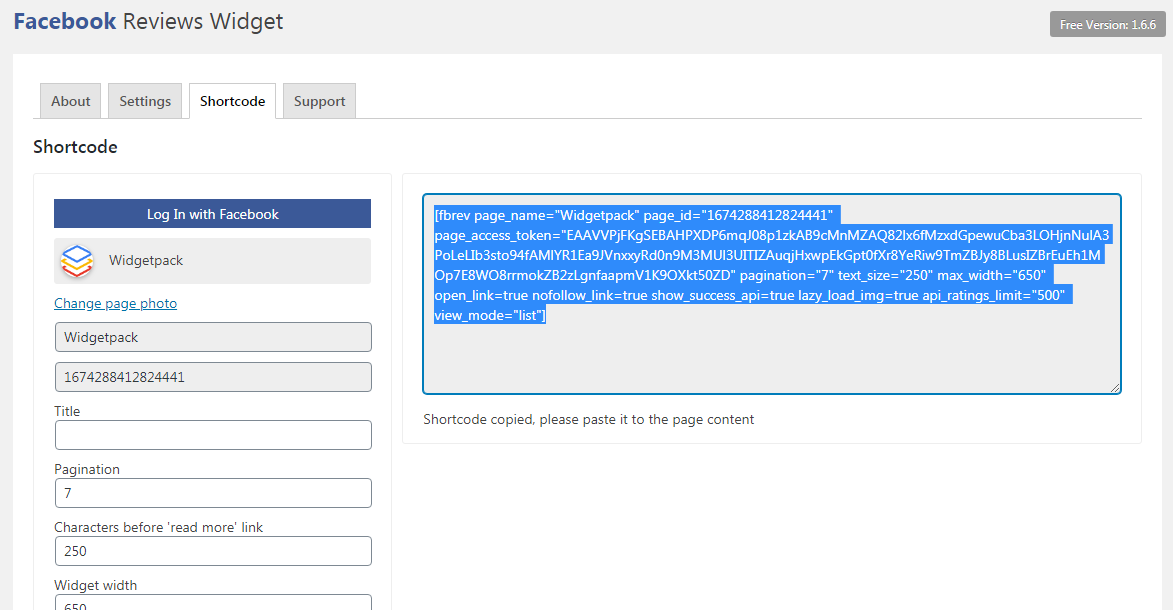
- Improve: shortcode support
- Improve: upload page photo
- Improve: added new locale bg_BG
- Improve: admin notie
- Bugfix: undefined widget property in Elementor
- Bugfix: some style fixes
- Bugfix: escape GET parameters for a setting page
- Plugin's name changed
- Plugin's logo changed
- Bugfix: sanitize POST parameters
- Plugin description and images changes
- Check and fix all translations
- Bugfix: fix French translation
- Bugfix: fix German translation
- Bugfix: css max-width photo conflict
- Update to WordPress 5.2
- Bugfix: conflict with a Bootstrap css in the widget
- Update readme and links to the business version
- Improve: update user picture dimension to 120x120
- Improve: use Graph API with picture and open_graph_story
- Improve: option for image lazy loading
- Bugfix: fixed problem with duplicate image function
- Improve: Facebook avatars lazy loading
- Bugfix: fixed problem with Facebook avatars
- Improve: 'read more' link feature
- Improve: added centered option
- Improve: update widget design
- Improve: update setting page design
- Update plugin to WordPress 5.0
- Improve: the single Facebook page selected by default after connection in the widget
- Bugfix: fixed the issues with working on site builders (SiteOrigin, Elementor, Beaver Builder and etc)
- Important note: introduced support of Facebook recommendations, negative is considered as 1 star, positive recommendation 5 stars
- Bugfix: remove checking of App ID and App Secure in the widget
- Important note: Facebook has returned the right to get page reviews for our application while verification is in progress. The verification process can take up to several weeks and you can use the plugin in this time without any issues. Please re-install all widgets: make 'Log In with Facebook' again, select the page and save each widget.
- Improve: new option in the 'Advance Options' panel, if Facebook returns error, the plugin can show the latest success response
- Important note: Facebook still does not review our application to get page reviews and we introduced a workaround: now you need to create Facebook application yourself, save 'App ID' and 'App Secret' keys on the setting page and make 'Connect to Facebook' again in the widget to restore the reviews
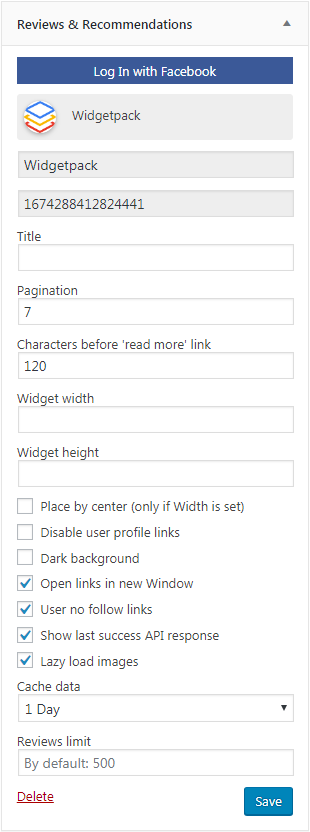
- Feature: added option to disable user profile links
- Improve: the default number of reviews has increased to 250
- Bugfix: fixed broken FB profile links
- Bugfix: remove deprecated function create_function()
- Improve: support of SiteOrigin builder
- Update plugin's icon
- Bugfix: remove incorrect div from the theme
- Feature: Added pagination
- Feature: Added maximum width and height options
- Bugfix: replace http_build_query to string concatenation in API response
- Bugfix: triggered change event in the widget to enable save button
- Bugfix: corrected time ago messages
- Fixes incorrect release 1.2.9
- Improve: some fixes of Facebook Ratings API
- Bugfix: incorrect dates in the Safari browser
- Update plugin to WP 4.9
- Bugfix: widget caching
- Added Swedish language (sv_SE)
- Widget options description corrected
- Bugfix: time translation for Danish language
- Bugfix: Facebook account's page limit expanded
- Improve: Added Facebook Page Ratings API limit parameter in advance options
- Bugfix: cURL proxy fix
- Bugfix: CURLOPT_FOLLOWLOCATION for curl used only with open_basedir and safe_mode disable
- Improve: change permission from activate_plugins to manage_options for the plugin's settings
- Improve: extract inline init script of widget to separate js file (rplg.js), common for plugins
- Tested up to WordPress 4.8
- Added French language (fr_FR)
- Added Colombia language (es_CO)
- Bugfix: Cannot redeclare rplg_json_decode
- Bugfix: Cache plain API response instead of JSON
- Full refactoring of widget code
- Bugfix: widget options check
- Bugfix: SSL unverify connection
- Added debug information
- Added Danish language (da_DK)
- Added Dutch language (nl_NL)
- Added Turkish language (tr_TR)
- Added Italian language (it_IT)
- Bugfix: review text can be empty
- Bugfix: 'NaN undefined' date/time in IE and Safari
- Bugfix: time-ago on English by default, update readme