AC's Auto Loan Calculator
| 开发者 |
financialcalculators
accuratecalculators |
|---|---|
| 更新时间 | 2026年10月19日 22:22 |
| PHP版本: | 5.8 及以上 |
| WordPress版本: | 7.1 |
| 版权: | GNU General Public License |
| 版权网址: | 版权信息 |
详情介绍:
Now includes native WordPress block editor support.
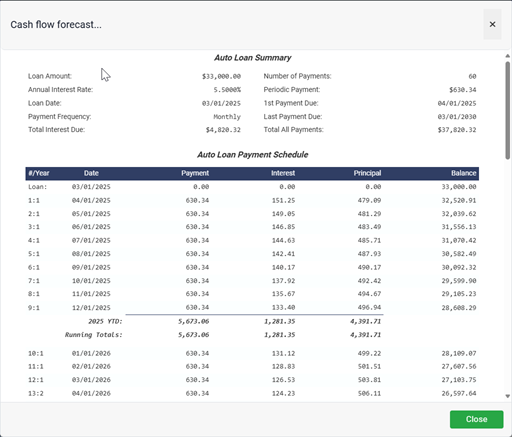
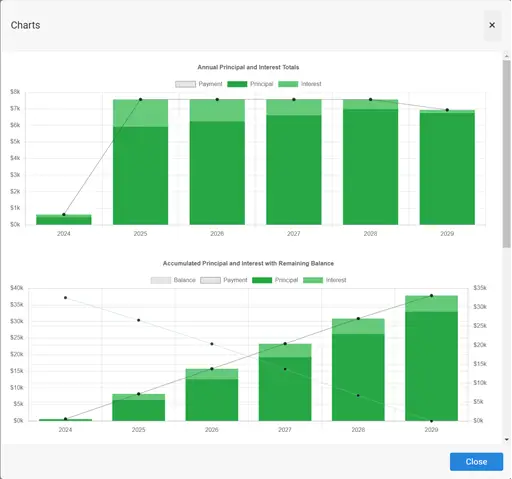
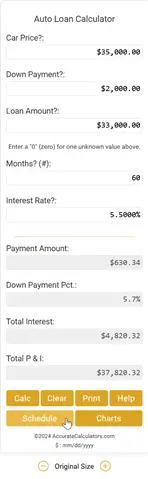
The AC Auto Loan Calculator Plugin (live demo) with support for down payments, date-based payment schedules, and interactive charts. The calculator helps users estimate monthly payments, affordable car price, required down payment, or loan amount.
Supports 90 currencies, seven date formats, and 15 languages.
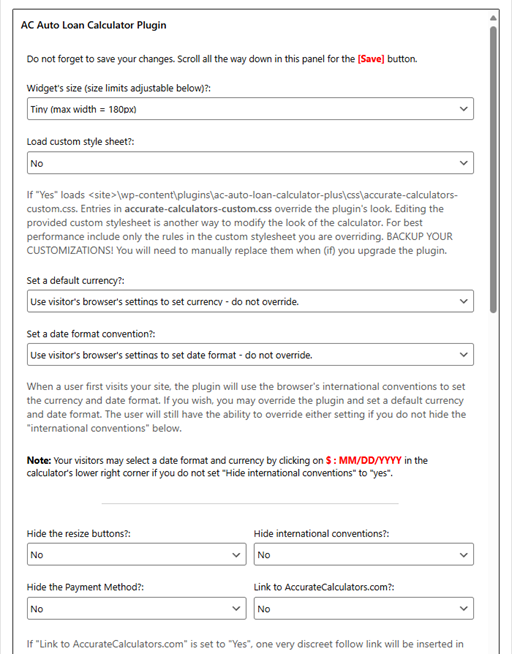
Now highly customizable via extensive configuration options.
Choose from four predefined sizes or customize via the configuration options. Fully responsive with touch support.
Rebranding with your site's name is supported and encouraged.
The plugin works via:\
(a) Shortcode in posts/pages\
(b) Widget area\
(c) Template file\
(d) NEW: Native WordPress block (WordPress 6.3+)
See usage under installation for details.
NEW: Upgrade to the free AC Auto Loan Calculator Plus v2.0 for a printable schedule.
安装:
Either (a) upload the fc-auto-loan-calculator folder with all its files to the /wp-content/plugins/ folder or (b) unzip the plugin's zip file in the /wp-content/plugins/ directory.
Activate the plugin through the Plugins -> Installed Plugins menu in the WordPress admin dashboard.
Upgrading
Version 3.0 adds optional native Blocks. Existing v2.x shortcode, template, and sidebar placements and saved settings continue to work without site changes. No automatic conversion is performed. Older WordPress versions retain the existing insertion methods.
Usage
There are four ways to add the calculator to a page. Use only one auto loan calculator per page, including calculators placed in templates or sidebars. You can use different methods on different pages within a site:
- In the block editor (WordPress 6.3 or later), insert the AC Auto Loan Calculator block and configure it using the block settings sidebar, as described below.
- Add the shortcode [fcautoloanplugin] in the content area of your page or post and optionally configure the shortcode parameters. In a block editor, you can also paste the shortcode into a Shortcode block.
- Add the following code <?php show_fcautoloan_plugin(); ?> to your template where you want the calculator to appear. See below for options.
- If your theme supports widgets, add the plugin to a widget area through the Appearance -> Widgets menu in WordPress.
- Open a page or post in the WordPress block editor. Click +, search for AC Auto Loan Calculator, and select it. You can also find it in the Widgets category.
- Select the calculator block. Open the editor's settings sidebar if it is hidden, then select the Block tab.
- Under Loan values, set the initial price, down payment, loan amount, number of months, and interest rate. Leave one of price, down payment, or loan amount at zero for the calculator to determine it, or supply consistent values.
- Use Layout and visibility to choose a size and which controls to show. Under Branding, enable Link to and enter your brand name if desired. Use Currency and date to choose the default conventions, and Style options. to customize colors, fonts, and widths.
- Each setting's Reset button restores that setting's shortcode default. The preview updates as you change settings, including all five inputs and four populated, disabled result fields. Use the page preview to calculate or open schedules, charts, and dialogs.
- Save or update the page to publish your settings. Move the calculator between other blocks using the editor's normal move or drag controls.
- sc_size="tiny" | "small" | "medium" | "large"
- sc_custom_style="No" | "Yes"
- sc_add_link="No" | "Yes"
- sc_brand_name=""
- sc_hide_resize="No" | "Yes"
- sc_price="35000.0"
- sc_dwn_pmt="2000.0"
- sc_loan_amt="0.0"
- sc_n_months="48"
- sc_rate="5.5"
- sc_currency="999" (see: the file currency_and_date_conventions.txt)
- sc_date_mask="999" (see: the file currency_and_date_conventions.txt)
- sc_theme_base_font_size="16px"
- sc_theme_primary_color="#28a745"
- sc_theme_primary_color_hover="#218838"
- sc_theme_primary_color_light="#30c853"
- sc_theme_primary_color_text="#fff"
- sc_theme_primary_color_text_inverse="#fff"
- sc_theme_background_muted="#f7f7f7"
- sc_theme_background_color_disabled="#efefef"
- sc_theme_background_calculator_color="#fff"
- sc_theme_background_modal_color="#fff"
- sc_theme_border_color="#dee2e6"
- sc_theme_text_color="#333333"
- sc_theme_tooltip_text_color="#fff"
- sc_theme_shadow_color="rgba(0, 0, 0, 0.1)"
- sc_theme_primary_font_family_stack="Roboto, 'Helvetica Neue', Helvetica, Arial, sans-serif"
- sc_theme_mono_font_family_stack="'Roboto Mono', 'Source Code Pro', ui-monospace, monospace"
- sc_calculator_min_width_tiny="150px"
- sc_calculator_max_width_tiny="250px"
- sc_calculator_min_width_small="200px"
- sc_calculator_max_width_small="300px"
- sc_calculator_min_width_medium="200px"
- sc_calculator_max_width_medium="400px"
- sc_calculator_min_width_large="200px"
- sc_calculator_max_width_large="440px"
- sc_hide_intl_conventions="No" | "Yes"
- sc_hide_payment_method="No" | "Yes"
[fcautoloanplugin sc_size="large" sc_custom_style="No" sc_add_link="No" sc_brand_name="" sc_hide_resize="No" sc_price="35000.0" sc_dwn_pmt="2000.0" sc_loan_amt="0.0" sc_n_months="48" sc_rate="5.5" sc_currency="999" sc_date_mask="999" sc_theme_base_font_size="16px" sc_theme_primary_color="#28a745" sc_theme_primary_color_hover="#218838" sc_theme_primary_color_light="#30c853" sc_theme_primary_color_text="#fff" sc_theme_primary_color_text_inverse="#fff" sc_theme_background_muted="#f7f7f7" sc_theme_background_color_disabled="#efefef" sc_theme_background_calculator_color="#fff" sc_theme_background_modal_color="#fff" sc_theme_border_color="#dee2e6" sc_theme_text_color="#333333" sc_theme_tooltip_text_color="#fff" sc_theme_shadow_color="rgba(0, 0, 0, 0.1)" sc_theme_primary_font_family_stack="Roboto, 'Helvetica Neue', Helvetica, Arial, sans-serif" sc_theme_mono_font_family_stack="'Roboto Mono', 'Source Code Pro', ui-monospace, monospace" sc_calculator_min_width_tiny="150px" sc_calculator_max_width_tiny="250px" sc_calculator_min_width_small="200px" sc_calculator_max_width_small="300px" sc_calculator_min_width_medium="200px" sc_calculator_max_width_medium="400px" sc_calculator_min_width_large="200px" sc_calculator_max_width_large="440px" sc_hide_intl_conventions="No" sc_hide_payment_method="No"]
[fcautoloanplugin sc_size="small" sc_custom_style="Yes" sc_hide_resize="Yes" sc_currency="83" sc_date_mask="2"]
[fcautoloanplugin sc_custom_style="No" sc_add_link="Yes" sc_brand_name="Friendly Mortgage" sc_hide_resize="Yes" sc_price="0" sc_loan_amt="30000" sc_n_months="60" sc_rate="5.5"]
NOTE: Include only the shortcode options you want to change. Leave one of price, down payment, or loan amount at zero for the calculator to determine it, or supply three consistent values (price minus down payment equals loan amount).
Optional array parameter passed to show_fcautoloan_plugin()
The values available for template options are the same as the shortcodes above except you must change "sc_" to "op_".
"large",
'op_custom_style' => "No",
'op_add_link' => "No",
'op_brand_name' => "",
'op_hide_resize' => "No",
'op_price' => "35000.0",
'op_dwn_pmt' => "2000.0",
'op_loan_amt' => "0.0",
'op_n_months' => "48",
'op_rate' => "5.5",
'op_currency' => "999",
'op_date_mask' => "999",
'op_theme_base_font_size' => "16px",
'op_theme_primary_color' => "#28a745",
'op_theme_primary_color_hover' => "#218838",
'op_theme_primary_color_light' => "#30c853",
'op_theme_primary_color_text' => "#fff",
'op_theme_primary_color_text_inverse' => "#fff",
'op_theme_background_muted' => "#f7f7f7",
'op_theme_background_color_disabled' => "#efefef",
'op_theme_background_calculator_color' => "#fff",
'op_theme_background_modal_color' => "#fff",
'op_theme_border_color' => "#dee2e6",
'op_theme_text_color' => "#333333",
'op_theme_tooltip_text_color' => "#fff",
'op_theme_shadow_color' => "rgba(0, 0, 0, 0.1)",
'op_theme_primary_font_family_stack' => "Roboto, 'Helvetica Neue', Helvetica, Arial, sans-serif",
'op_theme_mono_font_family_stack' => "'Roboto Mono', 'Source Code Pro', ui-monospace, monospace",
'op_calculator_min_width_tiny' => "150px",
'op_calculator_max_width_tiny' => "250px",
'op_calculator_min_width_small' => "200px",
'op_calculator_max_width_small' => "300px",
'op_calculator_min_width_medium' => "200px",
'op_calculator_max_width_medium' => "400px",
'op_calculator_min_width_large' => "200px",
'op_calculator_max_width_large' => "440px",
'op_hide_intl_conventions' => "No",
'op_hide_payment_method' => "No"
)); ?>
Notes:
- If you want to add your brand to the calculator, the *_add_link option must be set to "Yes" (i.e. create a subtle follow link to AccurateCalculators.com).
- When branding, the brand name will be added before "Auto Loan Calculator".
- If _custom_style is set to "Yes", the plugin will load
dist/css/accurate-calculators-custom.csswithin the plugin folder. You can modify the styles as needed. I suggest that you only include CSS selectors in this file that you actually change. - The plugin is built and tested on HTML5/CSS3 pages.
- size (min-width): tiny: 150px, small: 200px, medium: 200px, large: 200px
- size (max-width): tiny: 250px, small: 300px, medium: 400px, large: 440px
- The modals used for showing the schedule, currency select, help, etc are Bootstrap 5 modals. If your site uses an earlier Bootstrap version, you may have issues. Please contact me.
- Website developers can set a default currency sign and preferred date format by setting _currency and _date_mask respectively. Set one or both to an integer value. For the list of integers to support 90 plus currency symbols and 7 date format options, see the file currency_and_date_conventions.txt in the plugin's root folder. (example: India, Indian Rupee: ₹1,23,45,678.99 = 83)
- The plugin first uses saved user preferences from the browser's local storage, if present. Hiding the conventions control does not erase previously saved preferences.
- Otherwise, a website default for currency or date format (a value other than 999) is used.
- Otherwise, the plugin maps the browser's locale to supported currency and date conventions.
- If no supported convention is found, the plugin defaults to U.S. dollar formatting and MM/DD/YYYY. Currency and date preferences are resolved independently. Language Translations
- da – Dansk – Danish
- de – Deutsch – German
- es - Español – Spanish
- fi – Suomalainen – Finnish
- fr – Français – French
- hu - Magyar – Hungarian
- it - Italiano – Italian
- lt - Lietuvių – Lithuanian
- nl – Nederlands – Dutch
- pl - Polski – Polish
- pt - Português – Portuguese
- ro - Românesc – Romanian
- ru - Русский – Russian
- sv - Svenska – Swedish Notes:
-
The plugin loads translations for the site's "Site Language" setting in WordPress when matching language files are available. PHP interface text uses
.MOfiles; JavaScript text uses.JSONfiles. - Example: The included Portuguese translation uses
pt_PT(Portugal). To adapt it for Brazilian Portuguese, copy the.POtranslation, set its locale topt_BR, and regenerate both the.MOand JavaScript.JSONcatalogs. Retain the plugin prefix in filenames:fc-auto-loan-calculator-pt_BR.moandfc-auto-loan-calculator-pt_BR-fc-i18n-auto-loan.json. Renaming only the.MOfile does not update JavaScript translations. - A translation template file (
.POT) is included in the languages folder. Website owners can use a POT/PO file editor to translate the plugin into any WordPress-supported language. A fluent speaker can also edit an included.POfile and regenerate the.MOand JavaScript.JSONfiles to alter a current translation. - Contribute Your Edits!
- If you enhance a translation and would like to share it, I will regenerate the
.MOand, if needed, the.JSONfiles for you. Support
- Specify whether you're using the original plugin or the "Plus" version.
- Provide a link to the page where the plugin is installed. Including a direct link to the affected page can help me diagnose and resolve the issue more quickly.
- Auto Loan Calculator - solves for several unknowns and creates a payment schedule.
- Loan Calculator - a general purpose loan calculator with amortization schedule and charts.
- Mortgage Calculator - optionally incorporates points and insurance and creates a payment schedule
- Retirement Age Calculator - answers, at what age will I be able to retire given my investment plan?
- Retirement Nest Egg Calculator - answers, what will be the value of my retirement fund when I retire?
- Retirement Savings Calculator - how much do I have to invest periodically to reach my retirement goal?
- Savings Calculator - calculates the results of regular savings and investing
屏幕截图:
更新日志:
3.0
- Added optional native WordPress block support, with sidebar controls for auto loan defaults, layout, branding, currency/date conventions, and appearance. Requires WordPress 6.3 or later.
- Fixed legacy widget/settings form field names and security-token validation so default values, branding, and appearance settings save correctly.
- Fixed dialog initialization in browsers without requestIdleCallback: the fallback now preserves calculator callback context and initialization callbacks.
- Added translation support for block editor controls and messages using the existing translation text domain.
- Corrected the plugin homepage URL in structured metadata to point to the base Auto Loan Calculator rather than Auto Loan Calculator Plus.
- Removed obsolete commented-out code and unused update-check constants; corrected GPL license notices in source and generated assets.
- Enhancement: Improved compatibility with page builders - specifically Elementor and Avada Builder (formerly Fusion Builder).
- Enhancement: Improved screen reader accessibility.
- Enhancement: A few CSS style tweaks.
- Improved design responsiveness, particularly at smaller screen sizes.
- Added dozens of easily configurable display and style options. No programming required.
- Added support to hide the "payment method" via an option setting.
- Many technical changes (dropped jQuery, Featherlight, updated to Bootstrap 5).
- Improved the overall quality of all the language translations. Supported and updated continuously since 2016. See: changelog.txt