
Feel Accessibility
| 开发者 | feelhospitality |
|---|---|
| 更新时间 | 2026年11月14日 02:34 |
| 捐献地址: | 去捐款 |
| PHP版本: | 7.4 及以上 |
| WordPress版本: | 7.1 |
| 版权: | GPLv2 or later |
| 版权网址: | 版权信息 |
详情介绍:
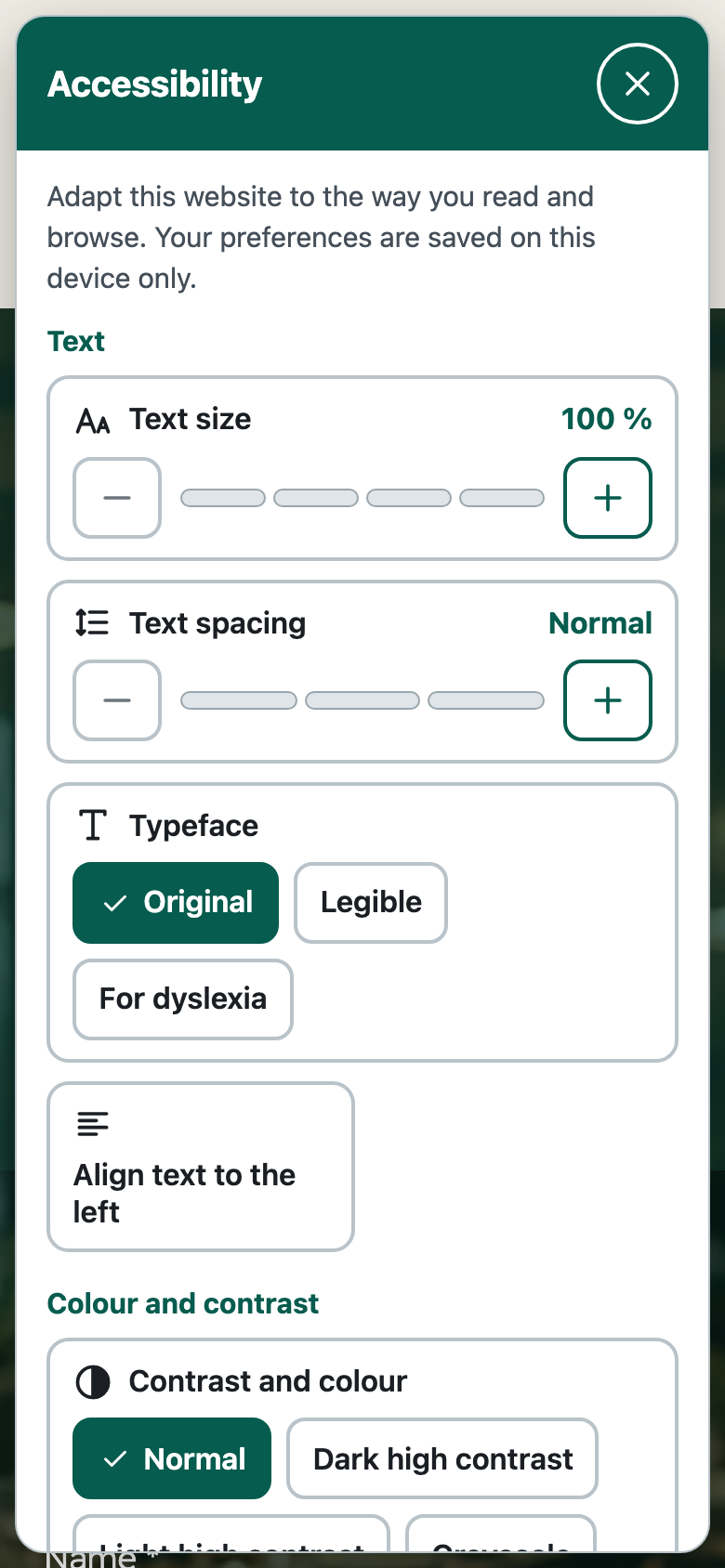
- Text: enlarge it up to 150%, increase letter, word and line spacing (level 2 meets the WCAG 1.4.12 values), choose a legible typeface (Atkinson Hyperlegible) or one designed for dyslexia (OpenDyslexic), align text to the left.
- Colour and contrast: dark or light high contrast, or greyscale.
- Reading and content: highlight links and headings, a reading guide (a line or a mask that follows the mouse, the finger or the keyboard focus), hide images, read aloud (selection or main content, using the browser's own voices).
- Motion and navigation: pause animations and autoplaying videos (turned on automatically if the device asks for reduced motion), large cursor, very visible keyboard focus.
data-feel-acc-open. Preferences are saved in the visitor's browser (localStorage) and can be reset with one click.
Built to be accessible itself
- Native buttons and radio inputs with accessible names; touch targets of at least 44 px.
- Keyboard: it opens, Esc closes it and returns focus to where you were. It never traps the keyboard.
- State is never conveyed by colour alone. It respects reduced motion and forced colours.
- The floating button moves above fixed bottom banners (cookie notices, chat bubbles) instead of covering them.
- Built in a Shadow DOM, so your theme's CSS does not break it and it does not break your theme.
- It does not add alternative text to images, labels to forms or an ordered heading structure.
- It does not make a site work with a keyboard or a screen reader if it did not already.
- It does not pause carousels built with JavaScript or embedded third-party content (it does pause CSS animations, autoplaying videos and marquees).
- It is not a screen reader: read aloud uses the voices of the visitor's browser, and for some languages there are few or none.
- It does not protect you from a complaint, and it does not make your site "compliant".
assets/fonts/LICENSE-FONTS.txt. There are no other third-party libraries: the plugin has no JavaScript dependencies and no build step, so the code you read is the code that runs.
Tested
Tested with automated browsers and axe-core against a real WordPress, including the widget open, closed, on mobile (320 px) and with every option on. Not yet tested with real screen readers on real devices. If you use one every day and find a problem, please tell us.
安装:
- Upload the
feel-accessibilityfolder to/wp-content/plugins/, or install it from the Plugins screen. - Activate the plugin. The button appears at the bottom right.
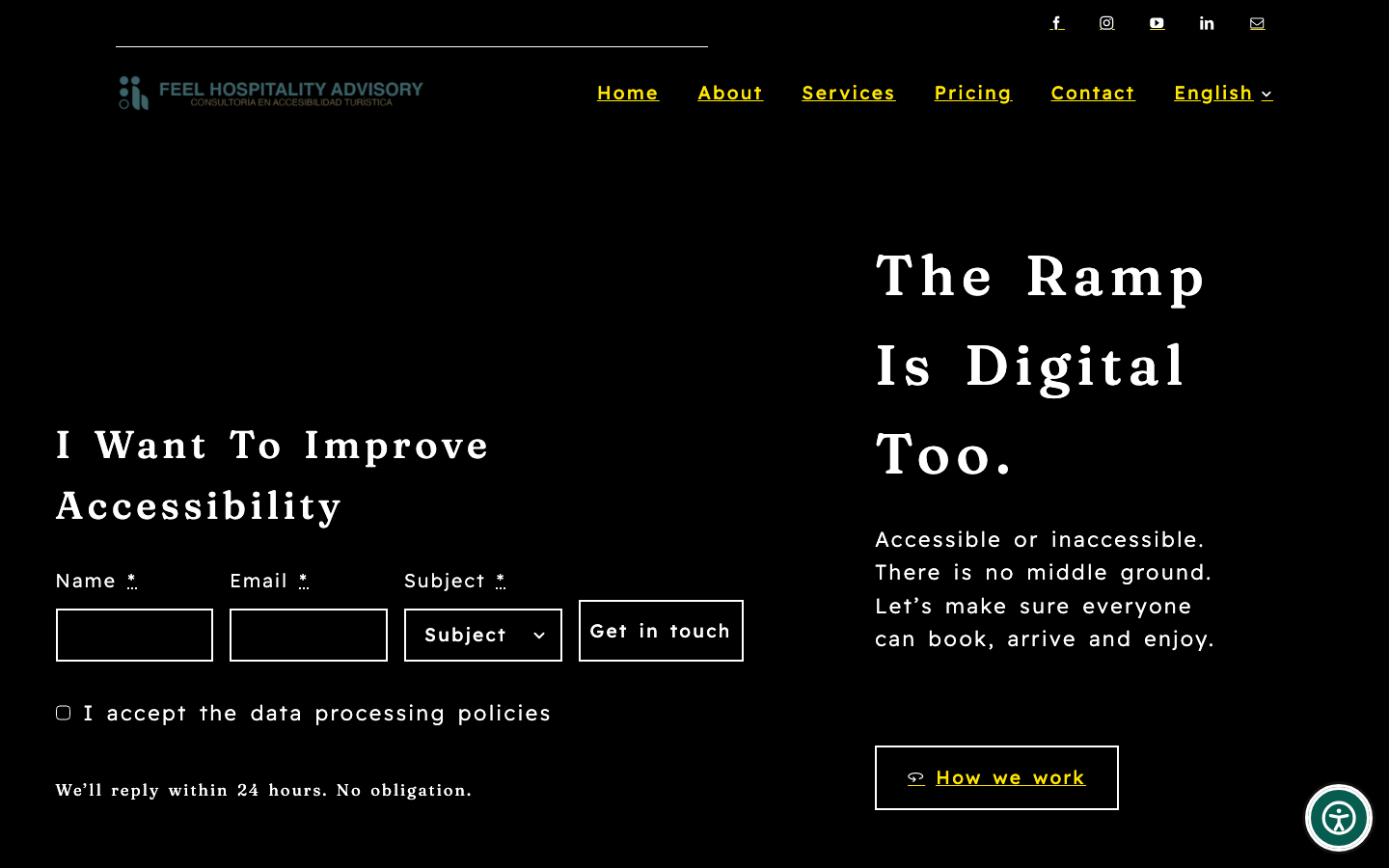
- Go to Settings → Feel Accessibility to choose the position, size, colour, which options visitors see, and a link to your accessibility statement.
屏幕截图:


常见问题:
Does it make my website accessible or compliant with WCAG?
No. It gives your visitors reading preferences. Real accessibility comes from how the site is designed, built and written. Treat this as a complement, never as a substitute.
Does it use cookies or send data to third parties?
No. The visitor's choices are stored in their own browser (localStorage) and are not sent to any server. We still recommend mentioning it in your privacy policy; check with your adviser.
Does it work with my theme or page builder?
The panel lives in an isolated Shadow DOM, so it should work with any theme. The effects it applies to the page (contrast, text size…) should be checked on each site. It does not load inside the Avada, Elementor, Divi, Oxygen or Bricks visual editors.
Can I hide it on some pages?
Yes. Return false from the feel_accessibility_enabled filter, for example: add_filter( 'feel_accessibility_enabled', function ( $on ) { return is_page( 'landing' ) ? false : $on; } );
Can I open the panel from my own link?
Yes. Add the attribute data-feel-acc-open to any link or button, or link to #feel-accessibility. You can also hide the floating button in the settings.
Why is the contact block off by default?
An optional block at the bottom of the panel can link to Feel Hospitality Advisory ("Interested in this plugin? Contact us"), and an optional credit line can say "Accessibility by Feel". Both are off by default: you decide whether to show them to your visitors.
Is it free?
Yes. The plugin is free and fully functional. If you need real accessibility work on your site (audit, fixes, content), Feel Hospitality Advisory offers it as a service.
更新日志:
- The admin screen now shows a small, unobtrusive note instead of a highlighted contact card.
- Plugin header description in English. Licences of the bundled typefaces are now listed in the readme.
- The contact block ("Interested in this plugin?") and the "Accessibility by Feel" credit line are now off by default and can be turned on in the settings.
- Banner, icon and screenshots for the plugin directory.
- The floating button now hides only when a fixed element leaves no room above it, so it stays reachable above large banners.
- Fix: the high-contrast modes (and every other effect) could lose against site rules with higher specificity. All page rules now carry extra specificity.
- The floating button hides while a fixed dialog covers almost the whole screen instead of covering its controls. Alt + Shift + A still opens the panel.
- The floating button moves above fixed bottom banners (cookie notices, chat bubbles) instead of covering them.
- Fix: "Hide images" no longer leaves light text on a light background.
- The panel only slides in (no opacity fade, which passed through low-contrast frames).
- The accessibility statement link follows the visitor's language (Polylang).
- First version.