
FetchWire — Remote News Feed for Elementor
| 开发者 |
thehopemonger
laurencebahiirwa |
|---|---|
| 更新时间 | 2026年7月29日 18:04 |
| 捐献地址: | 去捐款 |
| PHP版本: | 7.4 及以上 |
| WordPress版本: | 7.0 |
| 版权: | GPLv2 or later |
| 版权网址: | 版权信息 |
详情介绍:
- Category name resolved automatically from the source REST API — no manual ID lookup needed for display
- Optional category badge, date, section heading, subheading, and "View All" link
- Per-widget accent colour override, falling back to the active theme's
--color-accentCSS variable - No-image fallback placeholder showing the post title's first two initials on a dark gradient background
- Outgoing links open in a new tab with
rel="noopener" - Fully keyboard-navigable anchor elements
- Responses are cached using the WordPress Transients API (configurable from 15 minutes to 24 hours per widget)
- The plugin stylesheet is registered but only enqueued on pages that actually contain the widget, via Elementor's
get_style_depends()API - No JavaScript — all interactivity is pure CSS transitions
- CSS custom properties (
--fw-accent,--fw-radius,--fw-gap,--fw-shadow) on the widget wrapper make theme integration straightforward - Follows WordPress coding standards throughout:
esc_html(),esc_url(),esc_attr(),wp_kses_post(),absint(), andsanitize_text_field()on all inputs and outputs uninstall.phpcleans all plugin transients fromwp_optionson deletion
安装:
- Go to Plugins → Add New in your WordPress dashboard.
- Search for FetchWire.
- Click Install Now, then Activate.
- Open any page in Elementor, search for FetchWire News in the widget panel, and drag it onto the canvas.
- Download the plugin ZIP from WordPress.org.
- Go to Plugins → Add New → Upload Plugin.
- Upload the ZIP and click Install Now, then Activate.
- Extract the ZIP and upload the
fetchwirefolder to/wp-content/plugins/. - Activate via Plugins → Installed Plugins.
屏幕截图:
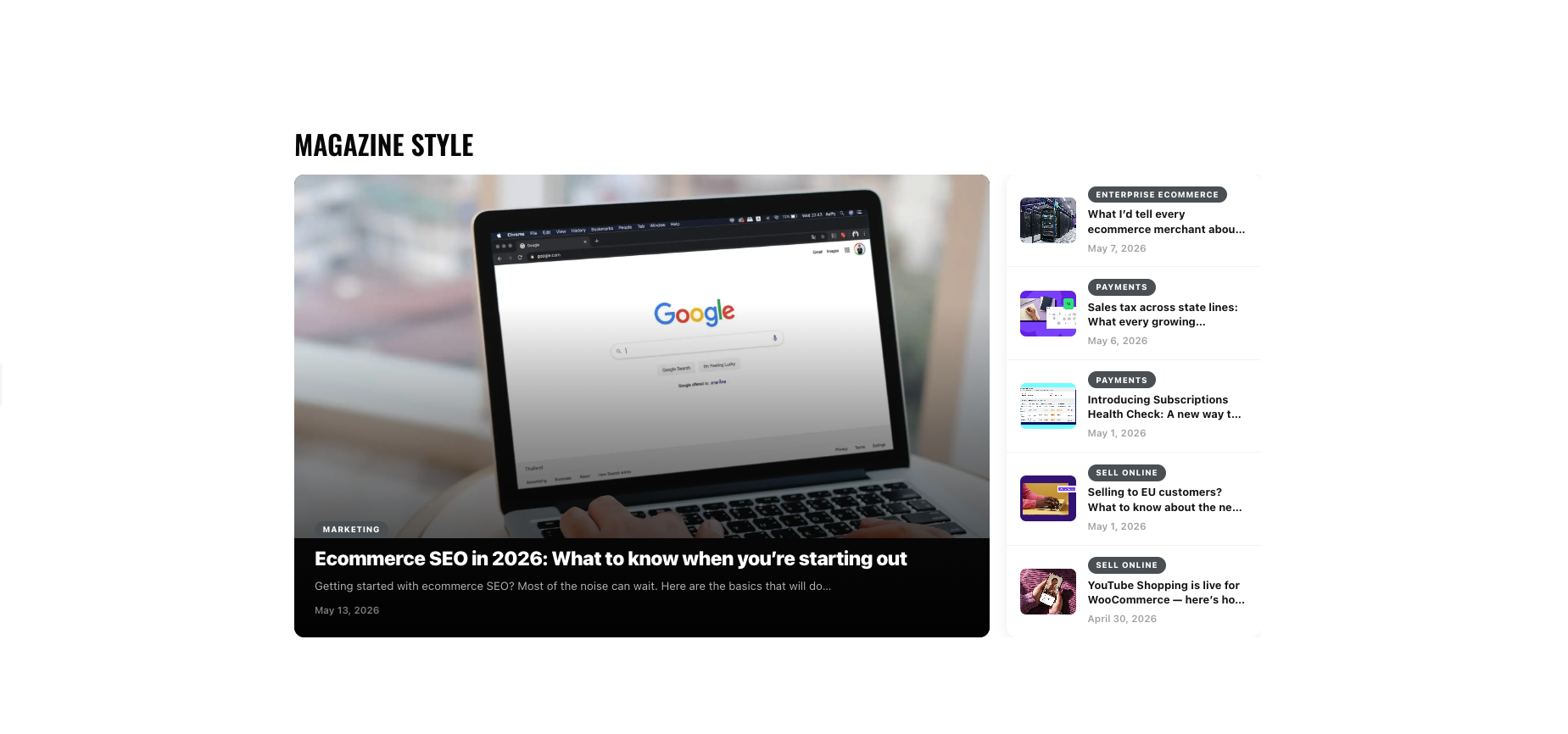
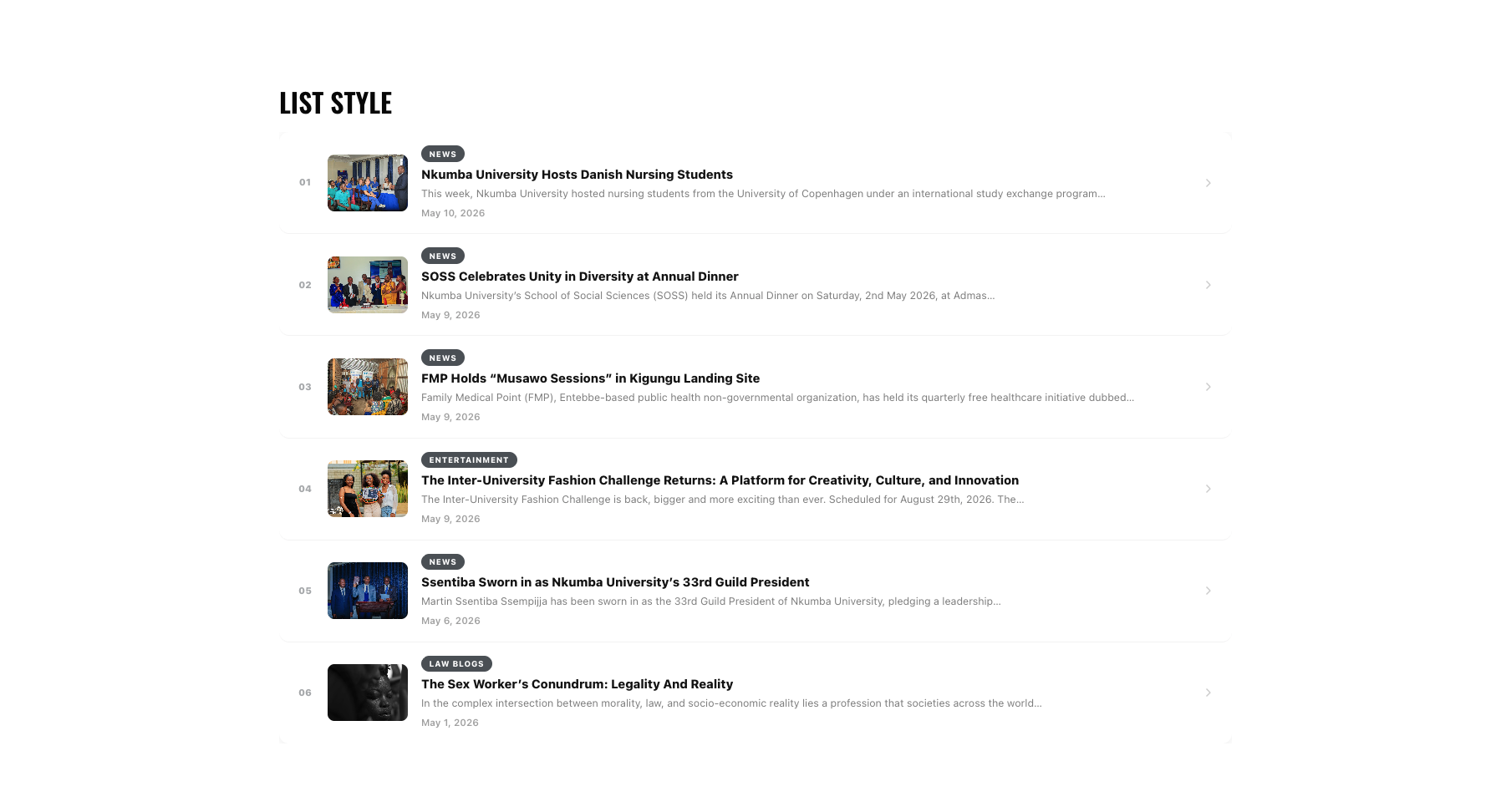

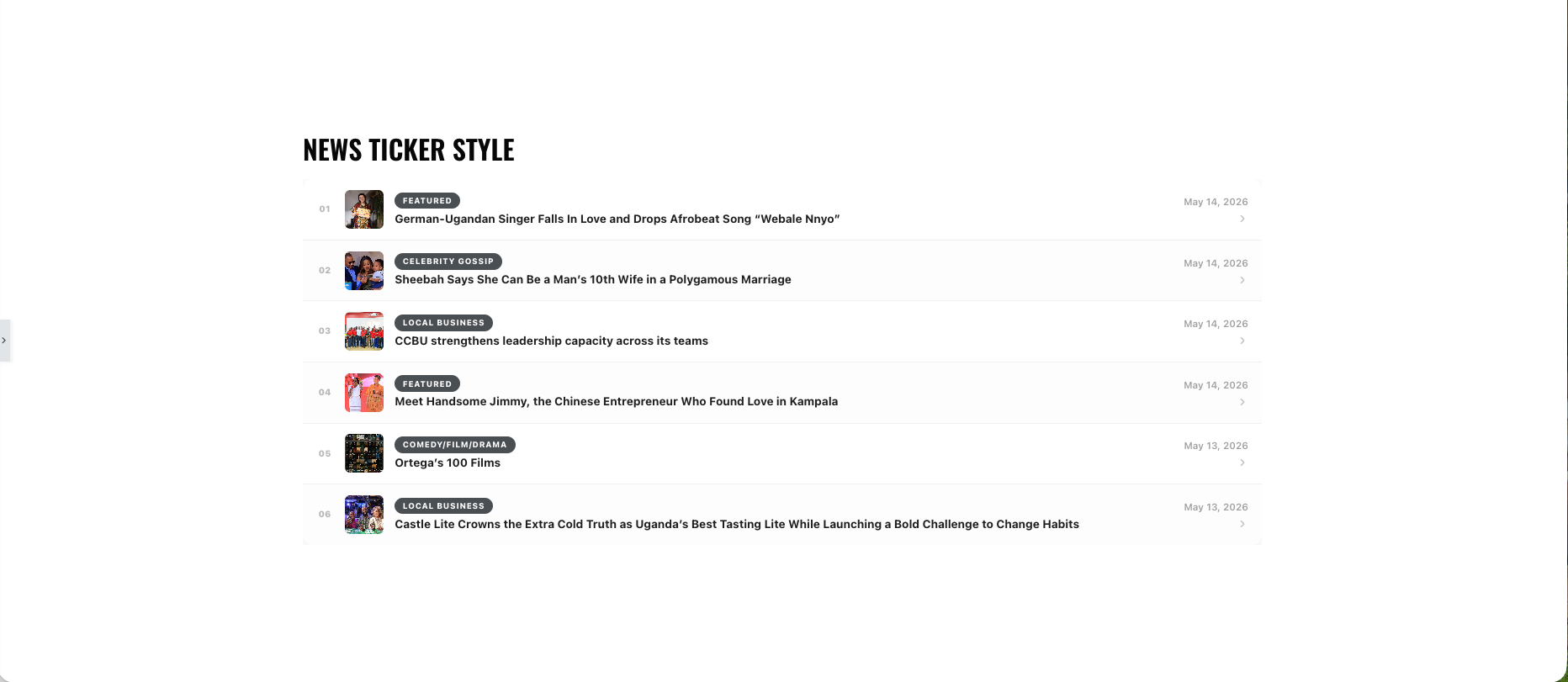
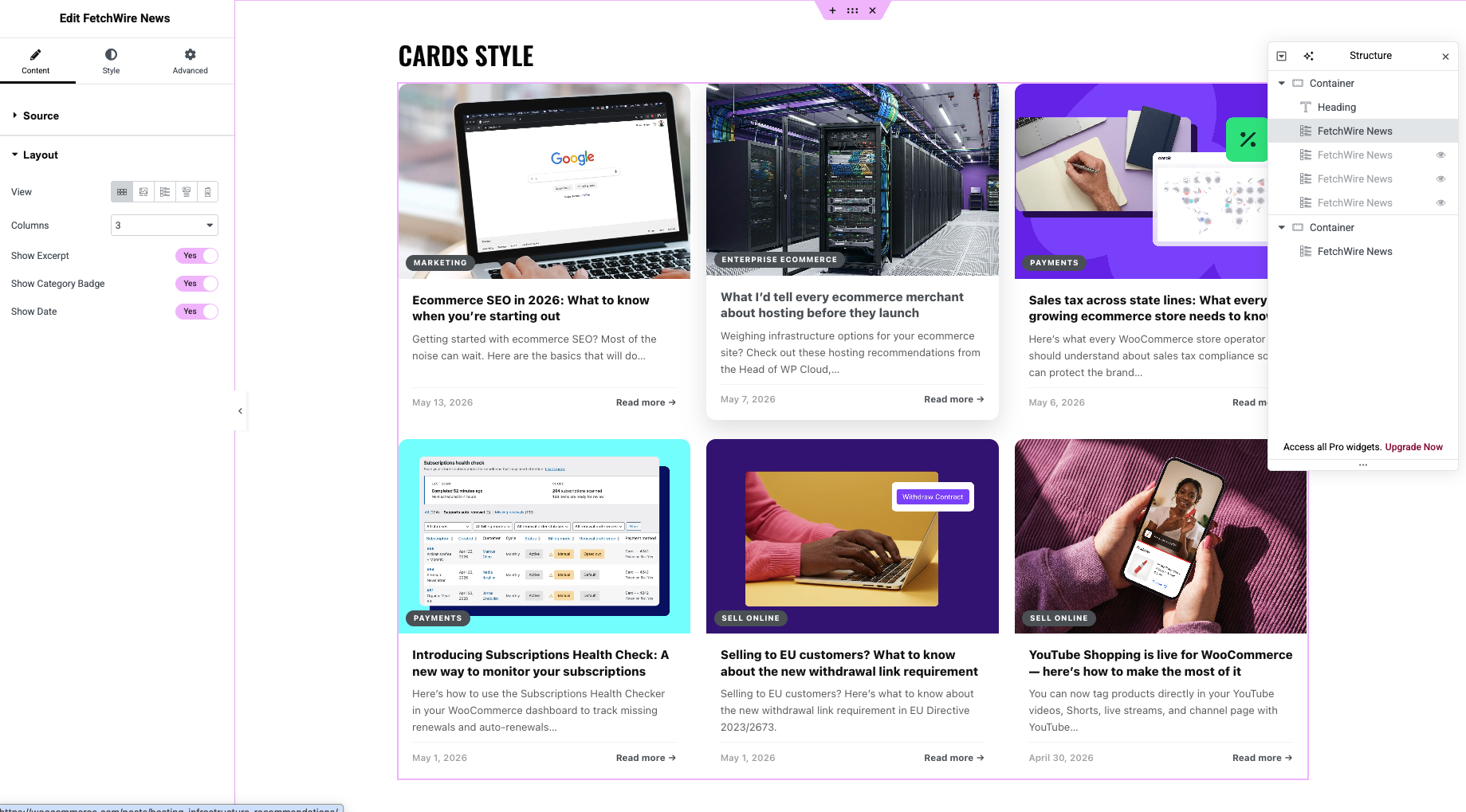
常见问题:
Does the source WordPress site need to install anything?
No. FetchWire works with the WordPress REST API, which has been enabled by default since WordPress 4.7. As long as the source site has not deliberately disabled its REST API, FetchWire will work without any changes on their end.
How do I find a category ID or tag ID on the source site?
Log in to the source site's WordPress dashboard and go to Posts → Categories (or Posts → Tags). Click the item you want to edit — the numeric ID appears in the browser address bar as tag_ID=123. Alternatively, hover over the category name in the list and the ID will appear in the status bar link.
The feed shows "No posts found". What should I check?
- Confirm the source URL is a live WordPress site with the REST API active by visiting
https://example.com/wp-json/wp/v2/postsdirectly in a browser — you should see JSON output. - Check that the category or tag ID you entered exists on the source site and has published posts.
- Some security or caching plugins on the source site block REST API requests from external domains. Contact the source site's administrator to whitelist external REST API access.
How do I clear the cached data immediately?
Change any widget setting (e.g. toggle the section heading on and off) and save the page. This generates a new transient key and triggers a fresh fetch on the next page load.
Can I display posts from multiple different sites on the same page?
Yes. Each FetchWire widget instance maintains its own source URL and its own cache. Drop as many instances as you need and point each at a different source.
Does FetchWire support custom post types?
Not yet. The current version fetches standard posts via /wp-json/wp/v2/posts. Custom post type support is planned for a future release.
Will it work with a headless or REST-API-only WordPress setup?
Yes, as long as the /wp-json/wp/v2/posts endpoint is publicly accessible and returns the standard WP REST API response format with _embed support.
Does FetchWire collect any data from my visitors?
No. FetchWire makes server-side requests from your WordPress install to the source site — no visitor data is involved, and no third-party scripts are loaded on your frontend.
Can I use FetchWire without Elementor?
Yes. As of version 1.3.0, FetchWire includes a native Gutenberg block that works in the standard WordPress block editor — no Elementor needed. Search for "FetchWire News" in the block inserter.
What happens when the source site is unreachable?
If the remote request fails and no cached data exists, FetchWire renders an empty state notice in place of the feed. If cached data exists, it will continue to display until it expires.
更新日志:
- Fixed a server-side request forgery issue: the source URL is now validated before every outbound request, and any host resolving to a loopback, private, link-local, carrier-grade NAT, multicast, or otherwise reserved address is rejected. Cloud instance-metadata addresses and IPv4-mapped/tunnelled IPv6 forms of those ranges are covered.
- Requests are restricted to the http and https schemes on ports 80 and 443. URLs containing embedded credentials are rejected.
- Removed the fallback that retried a failed request with TLS certificate verification disabled. A source site with an invalid certificate now reports a clear error instead of being contacted insecurely.
- Redirects are followed manually, to a maximum of three hops, and every hop is re-validated against the same policy before it is contacted.
- Responses are capped at 2 MB, and requests use
wp_safe_remote_get()withreject_unsafe_urls. - Raw network error text is no longer shown to logged-out visitors; it is now visible only to users who can edit posts.
fetchwire_allowed_hostsfilter — restrict sources to an explicit host allowlist (empty by default, meaning any public host).fetchwire_allowed_portsfilter — adjust the permitted port list.fetchwire_allow_private_hostsfilter — opt back in to private or internal sources on intranet installations.
- Native Gutenberg block (fetchwire/news-feed) — FetchWire News now works in the WordPress block editor without Elementor. Search for "FetchWire News" in the block inserter.
- All 5 layouts available in the block: Cards Grid, Magazine, List, Overlay, and Ticker — identical output to the Elementor widget.
- Visual icon-based layout picker in the block sidebar with tooltips — no text labels to scroll past.
- Full sidebar controls: source URL, post count, excerpt length, cache duration, category ID, tag ID, section heading, subheading, "View All" URL, column count (Cards and Overlay), show/hide excerpt, category badge, and date toggles, and accent colour picker.
- Supports wide and full alignment via the block toolbar.
- Server-side rendered — no JavaScript on the frontend, consistent with the Elementor widget.
- Block stylesheet reuses the existing fetchwire-style handle — no extra CSS loaded.
- Six responsive breakpoints at 1200 px, 1024 px, 900 px, 768 px, 520 px, and 380 px, covering every major device class from small Android phones to 4K desktops.
- CSS custom properties on
.fw-wrap:--fw-accent,--fw-radius,--fw-gap, and--fw-shadow, making per-widget and per-theme overrides cleaner and more predictable. box-sizing: border-boxscoped to the widget wrapper so padding cannot break card dimensions inside themes that still usecontent-boxglobally.overflow-x: hiddenandmax-width: 100%on.fw-wrapto prevent any internal layout from causing page-level horizontal scroll.min-widthconstraints on thumbnail images to prevent flex containers from collapsing them.min-width: 0on grid items (.fw-card,.fw-overlay-card) to preventmin-contentblowout in CSS Grid.minmax(0, 1fr)column tracks replacing plain1fr, permanently fixing the overflow scrollbar that appeared when 4 cards exceeded their container width.- Fluid typography via
clamp()on post titles across all layouts, scaling smoothly between breakpoints without hard pixel jumps. - Minimum touch-target heights: 60 px on Ticker rows, 88 px on List rows, meeting WCAG 2.5.5 guidelines.
- Magazine layout — secondary sidebar switches to a 2-column strip below the featured post at 900 px; collapses to single column at 600 px. Sidebar column width narrows to 260 px at 1024 px.
- Overlay layout — aspect ratio transitions from portrait
2/3→3/4at 768 px →4/3at 520 px so cards remain a comfortable height on small screens. - List layout — excerpt hidden at 520 px; both row number and excerpt hidden at 380 px to keep rows uncluttered.
- Ticker layout — row number hidden at 520 px; thumbnail shrinks to 38 px at 380 px so the row stays on one line.
- Cards layout — featured image now uses
position: absolute; inset: 0withobject-fit: coverrather than the percentage padding-top trick, giving sharper rendering and simpler theming. - Plugin stylesheet now registered on both
wp_enqueue_scriptsandelementor/frontend/after_register_stylesso Elementor's asset manager can always resolve it regardless of page-load hook order. readme.txtfully restructured for WordPress.org reviewer requirements: complete widget reference, Privacy Policy section, Screenshots list, and Upgrade Notice entries.- Plugin file header updated with all required fields:
Requires at least,Requires PHP,Domain Path.
- Category badge (
.fw-cat) was stretching full-width inside flex column containers. Fixed withalign-self: flex-startandwidth: fit-content. - Magazine secondary grid:
border-bottomwas incorrectly stripped from all penultimate items in 2-column state. Now only the true last row loses its separator. - Overlay no-image placeholder did not fill the card height without a
background-image. Fixed withposition: absolute; inset: 0on the inner element. - Horizontal overflow scrollbar on 4-column Overlay and Cards grids caused by
1frinheritingmin-width: autofrom grid children. Fixed withminmax(0, 1fr)tracks andmin-width: 0on all grid items.
- Five display layouts selectable from the Elementor widget panel via a visual icon chooser: Cards Grid, Magazine, List, Overlay, Ticker.
- Automatic category name resolution from
_embedded['wp:term']in the REST API response — no manual ID lookup needed for display. - Section heading, subheading, and "View All" URL controls.
- Per-widget accent colour override, falling back to the active theme's
--color-accentCSS custom property, then#c8102e. - No-image fallback placeholder for all five layouts, showing the post title's first two initials on a dark gradient.
Show Excerpt,Show Category Badge, andShow Datetoggle controls.- Card border radius slider with Elementor
selectorsbinding. get_style_depends()on the Elementor widget class — the plugin stylesheet is loaded only on pages that contain the widget.uninstall.php— deletes all_transient_fetchwire_*and_transient_timeout_fetchwire_*rows fromwp_optionswhen the plugin is removed.- Author name extracted from
_embedded['author'][0]['name']and stored in the post array for future layout use.
class-fetchwire-logic.phprefactored: excerpt cleaner now strips…HTML entities and trims whitespace before splitting by word count.- Transient key now factors in
excerpt_lengthso changing the word count correctly busts the cache. wp_strip_all_tags()applied to post titles before storage to prevent HTML entities from leaking into layout markup.
- Initial public release.
- Single grid layout with 1–4 column options.
- WordPress Transients API caching with a configurable duration.
- Category and tag filtering by numeric ID.
- Elementor widget with source URL, post count, excerpt length, and image aspect ratio controls.