
FICTBASE
| 开发者 | fictbase09 |
|---|---|
| 更新时间 | 2026年10月15日 05:41 |
| PHP版本: | 8.0 及以上 |
| WordPress版本: | 7.1 |
| 版权: | GPLv2 or later |
| 版权网址: | 版权信息 |
详情介绍:
- You own your audience — collect email subscribers directly on your story pages
- You own the SEO — Google ranks your domain, not the platform's
- You control monetization — Patreon, subscriptions, ads, or anything else
- You set the rules — no content policy changes, no sudden demonetization
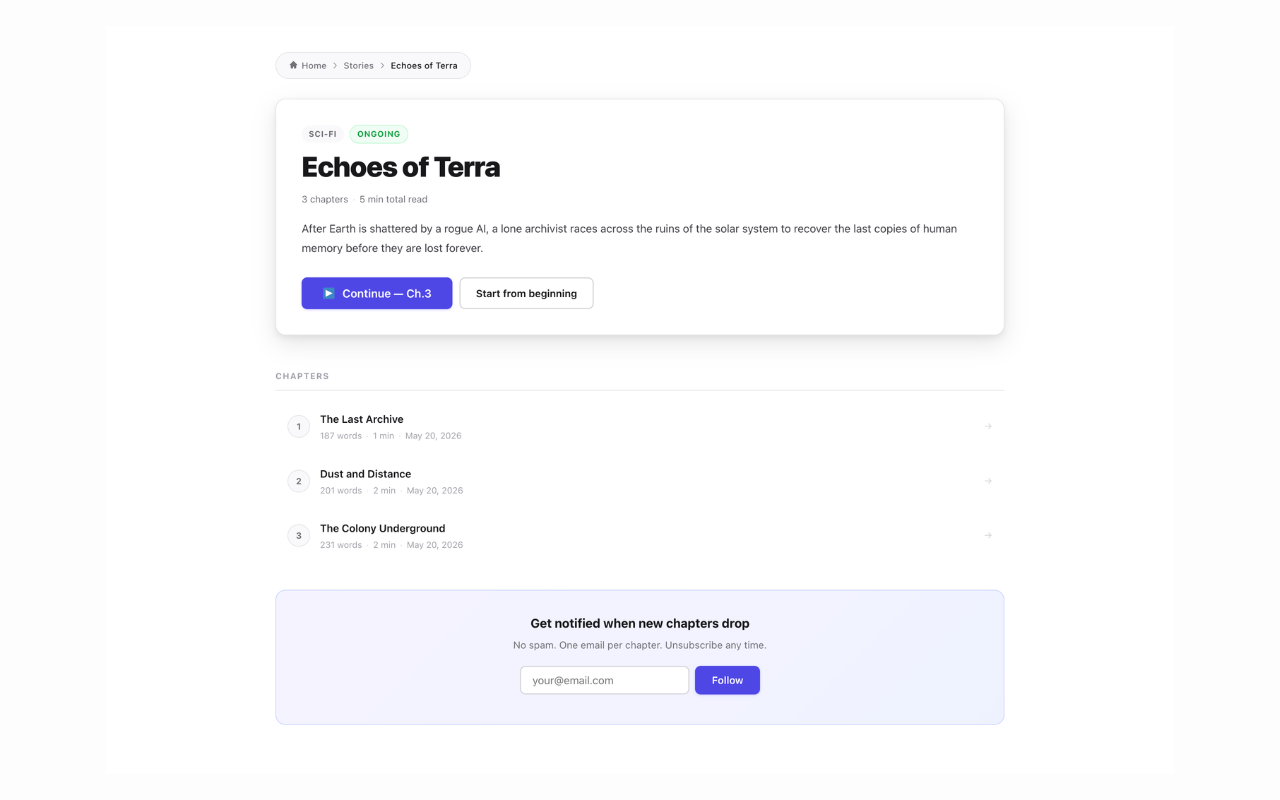
- Create and manage stories with title, cover image, description, genre, and status
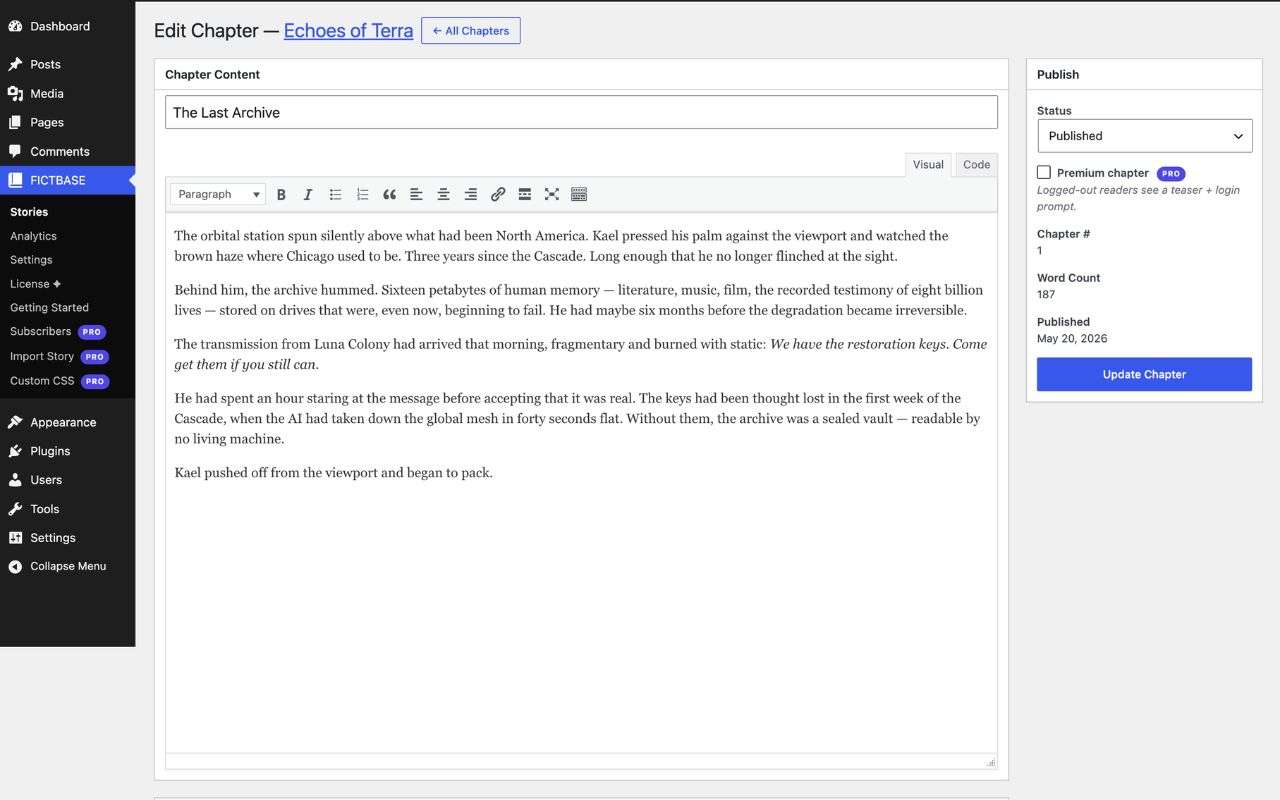
- Add chapters with a full rich-text editor
- Automatic word count and estimated read time per chapter
- Chapter reading page with scroll-based progress bar
- Previous / Next chapter navigation
- Author bio block at the end of each chapter
- Clean URLs:
/story/my-story/,/story/my-story/chapter/1/
- Light, Dark, and Auto (follows OS) reader themes
- Adjustable font size and reading width
- Story archive at
/stories/with genre and status filters - Content rating and content warnings shown before the blurb and before chapter one
- RSS feed per story at
/story/my-story/feed/— readers follow new chapters in any reader app - Site-wide feed of your latest chapters at
/stories/feed/ - Discovered automatically by browsers and reader apps, no configuration
- Members-only and paid chapters appear as a teaser and a link, never as full text
- Search your stories and chapters at
/stories/search/— a search box sits on the story archive - Finds stories by title and blurb, chapters by title and by the words inside them
- Results show the matching sentence with your term highlighted
- Members-only and paid chapters are found by title only — their text is never quoted in results
- Uses a MySQL full-text index where the server supports one, and works without it either way
- A theme search that finds nothing sends the reader here instead of to an empty page
- Tag a story with as many labels as fit it — "slow burn", "found family", "enemies to lovers"
- Every tag gets its own page at
/stories/tag/slow-burn/listing the stories that carry it - Tags are typed into the story editor; ones you have already used are offered as one-click chips
- Spelling does not fork the tag — "Slow Burn", "slow burn" and "Slow-Burn" are the same one
- Tag pages are in your sitemap and are meant to be indexed, so readers can find you by what you write
- Rename a tag anywhere it is used from the Tags screen; the web address never changes, so nothing breaks
- Readers discuss a chapter under the chapter itself, using WordPress comments
- Moderation, spam filtering, threading and email notifications work exactly as they do on posts — Akismet included
- Off until you switch them on, site-wide, from FICTBASE → Settings
- Any single story can override the site setting: always on, always off, or follow the site
- Comments on members-only and paid chapters are visible only to readers who can read the chapter — they stay out of feeds, the REST API and search
- Closing comments keeps the conversation that is already there; it just stops new replies
- Shortcodes:
[fictbase_list],[fictbase_story id="5"],[fictbase_chapters story_id="5"] - REST API: GET stories, GET chapters, POST view tracking
- Works with any WordPress theme — injects CSS only on fiction pages
- Optional switch to drop sidebars and footer widgets on fiction pages only
- A
fictbase-pagebody class on every page FICTBASE renders, for your own CSS
- Drip scheduling — write chapters in advance and release them on an automatic schedule
- Reader bookmarks — logged-in users save their exact reading position across devices
- Analytics dashboard — total chapter views, 30-day chart, top chapters by reads
- Email notifications — subscribers receive an email the moment a new chapter publishes
- .docx import — bulk-import a Word manuscript; chapters detected automatically from headings
- Custom CSS editor — per-page scoped CSS for story listing, story landing page, and chapter reader
安装:
- Upload the
fictbasefolder to/wp-content/plugins/ - Activate the plugin through the Plugins menu in WordPress
- Go to FICTBASE → Stories to create your first story
- Add chapters via FICTBASE → Stories → Chapters
- Your story is live at
/story/your-story-slug/
屏幕截图:


常见问题:
Is this a Wattpad alternative?
Yes. FICTBASE gives you the same chapter-by-chapter reading experience as Wattpad — story pages, chapter navigation, genre filters, reader themes — but hosted on your own WordPress site. You keep your audience data, your SEO, and 100% of your revenue.
Can I use this for web novels?
Yes. FICTBASE is designed for web novels and serialized fiction of any genre: fantasy, LitRPG, romance, progression fantasy, sci-fi, thriller, and more. Each story gets its own landing page and chapter list, and readers can filter by genre on the public archive at /stories/.
Do I need to create any WordPress pages?
No. FICTBASE uses its own URL routing. Stories and chapters are available at /story/{slug}/ automatically after plugin activation. If your URLs return 404, go to Settings → Permalinks and click Save.
Where do I put the shortcodes?
Use [fictbase_list] on any page to show all your stories in a grid. Use [fictbase_story id="5"] to embed a single story card. Use [fictbase_chapters story_id="5"] to embed a chapter list.
What is the Pro version?
Pro is an optional paid add-on (from $9.99/month or $99/year) that unlocks drip scheduling, reader bookmarks, analytics, email notifications, .docx import, and a per-page Custom CSS editor. It is purchased at fictbase.com. The free plugin is fully functional without it.
Does this work with any theme?
Yes. FICTBASE injects its own CSS only on story and chapter pages. Your existing theme header and footer continue to wrap reader pages.
How do I change the look of chapter pages?
Go to FICTBASE → Settings. You can choose light/dark/auto theme, font size and reading width. For your own CSS, every page FICTBASE renders carries a fictbase-page body class, and the chapter reader also carries fictbase-reader-page. For deeper changes, copy the template files from the plugin's public/views/ folder into a fictbase/ subfolder in your theme. Pro adds a Custom CSS editor with separate boxes per page type.
Can I style fiction pages differently from the rest of my site?
Yes. Target the fictbase-page body class, which is present on your story list, story pages, chapter reader, tag, search and bookmarks pages and nowhere else. If what you want is to drop the sidebar and footer widgets on those pages while keeping them everywhere else, there is a switch for it under FICTBASE → Settings → Page Layout, no CSS needed.
Is this GDPR-friendly?
The free plugin stores no visitor data and sends nothing anywhere. Licence key validation is performed by the separate Pro add-on, not by this plugin. Pro's email subscriber feature stores email addresses in your own WordPress database.
更新日志:
- New: a switch to hide sidebars and footer widgets on fiction pages only, under FICTBASE → Settings → Page Layout. Off by default. It stops your theme printing those blocks rather than hiding them, so you are not left with empty containers and their spacing. The rest of your site keeps its widgets, and nothing is deleted: untick it and they come straight back.
- New: a
fictbase-pagebody class on every page FICTBASE renders, not just the chapter reader. Previously the story list, story pages, tag, search and bookmarks pages had nothing reliable to hook your own CSS onto. - Fixed: the FAQ said this plugin's Settings screen had a custom CSS field. It does not; that is part of Pro. Corrected.
- New: comments on chapters. Readers reply under the chapter they just read, using WordPress's own comment system — so moderation, threading, spam filtering and the notification emails you already know all work unchanged, and Akismet works too.
- New: comments are off until you turn them on. FICTBASE → Settings has the site-wide switch, and each story's edit screen can override it — always on, always off, or follow the site.
- New: a chapter that is members-only or paid keeps its discussion private too. Only readers who can read the chapter see the thread; it stays out of your comment feed, the REST API and anywhere else comments are listed.
- Note: turning comments off on a story does not delete anything. The conversation stays on the page; it just stops taking new replies.
- Note: existing chapters are linked up in the background the first time you load the site after upgrading. Nothing to run, and nothing to click.
- Fix: the bar above a chapter ran the story title straight into the chapter label — "The Lighthouse at Vessel BayChapter 1" — with no space between them. It now spaces them properly, shortens a very long story title instead of pushing the buttons off the row, and drops the buttons onto their own line on a narrow screen.
- Fix: the bookmark button now switches off as well as on. Clicking it a second time removes the bookmark instead of doing nothing, it says which way it just went, and it shows a marker while a place is saved. Signed-in readers see the right state on a chapter they bookmarked from another device.
- New: tags. Give a story as many tags as fit it — "slow burn", "found family", "enemies to lovers" — from a field in the story editor. Tags you have already used are offered as chips, so you click rather than retype them.
- New: every tag gets its own page at /stories/tag/slow-burn/ listing the stories that carry it, and those pages are in your sitemap. Readers looking for what you write can now land on you directly.
- New: a story page shows its tags under the blurb, so a reader who liked one story has somewhere to go next.
- New: a Tags screen under FICTBASE for renaming a tag everywhere it is used, or removing one. Renaming changes the label only — the web address of the tag page stays put, so nothing that already links to it breaks.
- Note: different spellings of the same tag are one tag. "Slow Burn", "slow burn" and "Slow-Burn" all land on the same page rather than splitting your stories across three near-identical archives.
- Fix: removed two taxonomy registrations, fb_genre and fb_tag, that could never hold anything. They were attached to a post type this plugin does not create, so both were empty on every install; nothing read from them and nothing is lost.
- New: search. Readers can search your stories and chapters at /stories/search/, and a search box now sits at the top of the story archive. Chapters are searched by their full text, not just their titles, so a reader who remembers a line can find the chapter it is in.
- New: results show the sentence the term was found in, with the term highlighted, so a reader can tell which hit is the one they meant.
- New: if your theme's own search box finds nothing, the reader is sent to the FICTBASE results instead of to an empty page. WordPress search only looks at posts and pages, and your chapters are not posts.
- Security: members-only and paid chapters are found by their title and never by their text, and results never quote a locked chapter. This does not change based on who is searching, so a results page cached for one reader is safe to serve to the next.
- Note: search uses a MySQL full-text index when the server supports one and falls back to a slower plain match when it does not. The index is built once, on upgrade, and nothing is required from you either way.
- New: RSS feeds. Every story now has a feed at /story/your-story/feed/, and your latest chapters across every story are at /stories/feed/. Readers follow you in any reader app, browsers and apps find the feed on their own, and both URLs are shown on every FICTBASE admin screen.
- New: content ratings. Every story carries a rating -- General audiences, Teen and up, Mature, or Explicit -- shown to readers above the blurb and again at the top of every chapter. Existing stories are rated General audiences, so nothing changes on your site until you change it.
- New: content warnings. Tick the ones that apply from a starting list, or type your own. They appear next to the rating for readers who want to know what they are walking into.
- Note: a rating is a label, not a lock. It tells readers what is in the story; it does not hide anything from anyone. Enforcing an age check on top of the label is a Pro feature.
- Security: feeds resolve access as a logged-out visitor, always, whoever fetched them. A members-only or paid chapter is a teaser and a link in the feed even when the author is signed in -- which matters because feeds are cached and re-served to strangers.
- Fix: upgrading the plugin no longer leaves story and chapter URLs 404ing until Settings > Permalinks is re-saved by hand. The rewrite rules were being flushed before they were registered.
- New: reading access levels. Every story and chapter now carries an access level -- Public, Members only, or Paid -- set from a single dropdown in the editor. A chapter can inherit its story's level, so a whole story is opened or closed in one place. Existing content is migrated to Public, so nothing changes on your site until you choose to change it.
- New: members-only chapters. A chapter set to Members only shows a teaser and a sign-in prompt to logged-out readers, and the full text to anyone with an account. This works with no add-on and no payment provider.
- New: reader entitlements. What a reader has unlocked is recorded on your own site rather than only at the payment provider, so access survives a refund window, a provider outage, or a move between providers.
- New: order records. Every purchase attempt is written to your database, so an abandoned checkout can be told apart from a failed payment.
- Note: charging for a chapter requires the FICTBASE Pro add-on on the Author plan. Without it the Paid level is not offered, and Public and Members only work exactly as described above.
- Security: the access level is validated on save against what the site is actually entitled to offer. A submission that asks for a level the site cannot grant leaves the stored level untouched instead of falling back to Public, so a members-only story cannot be forced open by editing the form.
- Security: the REST API and the chapter templates now share one access check, closing a path where a restricted chapter could be read through the API.
- Fix: draft stories are no longer readable by the public. A story still marked
as a draft could be reached through the REST API, through its own URL, through
the
[fictbase_story]and[fictbase_chapters]shortcodes, and it was listed on the stories archive. Drafts are now visible only to users who can edit content, and a draft answers 404 exactly as an unknown address does. Chapters are checked against their parent story too, so a published chapter of a draft story is no longer served. - Fix: deleting the plugin now removes everything it created. The Genres table and several licence-related settings, including your stored Pro licence key, were being left behind in the database, and a scheduled task kept running with nothing to run.
- Fix: the licence-key helper the Pro add-on reads always returned an empty string, so a licensed site could look unlicensed to the code that asked.
- Fix: the REST stories list only ever returned ongoing stories, so a completed or paused story was missing from it. It now returns every publicly visible story, and the sitemap uses the same rule, so a paused story is no longer silently left out of both.
- Fix: a helper function declared by the stories archive template used a short
fb_prefix; renamed tofictbase_. - Fix: a chapter with a custom label ("Prologue", "Chapter One") broke the chapter list. The label was drawn into the small round badge sized for a chapter number, so the text spilled out over the row. A labelled chapter now gets a pill that grows to fit its label.
- Compatibility: tested against WordPress 7.1. The plugin no longer calls load_plugin_textdomain() -- WordPress has loaded a plugin's own translations automatically since 4.6, and the call ran early enough to trip the 6.7 "translation loading triggered too early" notice.
- Housekeeping: development files (test suite, build script, Composer metadata) are excluded from the release package. Note: 2.3.4 and 2.3.5 were never published here; their applicable fixes are folded into this release.
- Fix: theme header and footer now render correctly on sites using Pagelayer — page-builder global header/footer conditions require a real WordPress post object; we now attach the front page (or any published page) as the queried object on all FICTBASE virtual pages so condition matching works
- Fix: Genres admin page layout corrected — genre list now appears on the left, Add/Edit form on the right; Blade-style comment syntax was being output as literal text and collapsing both panels into the right column
- Fix: sitemap now outputs at /fictbase-sitemap.xml independently of any SEO plugin — submit that URL directly to Google Search Console; the previous approach registered with WP core's sitemap which SiteSEO and similar plugins replace entirely
- Fix: theme header and footer now render correctly on all FICTBASE pages (stories archive, story page, chapter reader) — page-builder themes like PopularFX and Elementor check is_singular() before rendering their designed header/footer templates; we now set that flag on all our virtual pages
- Fix: story and chapter pages are now indexed by Google — registered a sitemap provider so all published stories and chapters appear in /wp-sitemap.xml and are picked up by SEO plugins (SiteSEO, Yoast, RankMath)
- Feature: custom genres — admins can now add, edit, and delete genres from FICTBASE → Genres; Werewolf, Vampire, and any other category can be added; story edit screen loads genres dynamically
- Feature: chapter label override — authors can set a custom label (e.g. Prologue, Author's Note, Chapter 3 Part 2) on any chapter; label appears in the chapter nav bar, breadcrumb, and table of contents instead of the default "Chapter N"
- Fix: chapter reader pages now render the theme's full header and footer (including site navigation, branding, footer widgets, and social links) instead of a bare standalone HTML page
- Improvement: chapter list now shows 15 chapters by default with a "Show X more chapters" button — keeps story pages clean for stories with large chapter counts
- Fix: "Start from beginning" and other outline buttons now display correctly in auto dark mode (text was invisible due to missing dark mode overrides)
- Fix: chapter navigation now appears below chapter content instead of alongside it when using themes that apply float or inline-block to the HTML main element (e.g. PopularFX)
- Fix: chapter navigation buttons on mobile no longer overflow the page when chapter titles are long — buttons now wrap text correctly and stay within the viewport on all screen sizes
- Fix: mobile chapter navigation bar (Previous / Contents / Next) now stacks vertically on small screens instead of staying side-by-side and forcing horizontal scroll
- Fix: chapter content stored as plain text (typed/pasted in Code tab) now renders with correct paragraph spacing — wpautop() applied at display time so all existing chapters are fixed without re-saving
- Fix: placeholder paragraphs stripped at display time for all chapters
- Fix: chapter count in admin story list now shows published / total (e.g. "1 / 2") so draft chapters are not mistaken for published ones
- Fix: paragraphs from Word paste now separate correctly — double line breaks converted to paragraph tags on save; empty paragraphs containing also stripped
- Fix: chapter reader CSS now uses ID selector (#fb-reader-content) to beat any theme .entry-content override
- Fix: extra spaces within chapter text from Word paste (multiple collapsed to single space on save)
- Fix: paragraph spacing in chapter reader now overrides aggressive theme CSS using higher-specificity selectors
- Fix: empty paragraphs from Word/Google Docs paste are stripped on save so they no longer create double spacing in the chapter editor
- Fix: paragraph spacing now renders correctly on published chapters regardless of theme CSS
- Fix: cover image now displays correctly on story preview pages — inline styles applied so WordPress theme CSS (e.g. height:auto) cannot override the portrait ratio
- Fix: cover images on archive/grid pages also protected from theme CSS overrides
- Fix: cover image preview in story editor now shows a correct 2:3 portrait box instead of a wide landscape crop
- Fix: story page cover image given explicit pixel height so WordPress theme CSS cannot override the portrait ratio
- New: Premium chapter gate — mark any chapter as Premium; non-logged-in readers see a 200-word teaser with fade-out and a login prompt instead of the full content
- Fix: remove license key input and external API call from free plugin; Pro page now links to fictbase.com with manual install instructions (WP.org Guideline 6)
- Fix: remove
assets/folder (banners, icons, screenshots) from plugin zip — these are uploaded to SVN assets/ separately after approval
- Fix: move all inline
<style>and<script>blocks towp_enqueue_style/wp_add_inline_style/wp_add_inline_scriptper WP.org guidelines - Fix: change story/chapter management capability from
manage_optionstoedit_posts; authors may only edit their own stories - Fix: remove
Plugin_Upgraderauto-install andactivate_pluginfrom free plugin to comply with WP.org guideline 8 - Fix: remove custom CSS setting from free plugin (use WP Customizer for site-wide CSS)
- Fix: REST
track_viewendpoint now rejects unpublished chapters - Fix: admin menu position moved to 58 (below all core WP items)
- Improvement: update plugin description and tags for clarity
- Fix: add missing translators comments to all plural/placeholder i18n strings
- Fix: wrap all printf() integer arguments with absint() to satisfy output escaping requirements
- Fix: use %i placeholder for table name in SQL query to avoid string interpolation
- Fix: escape emoji icon output with esc_html() in story and status grids
- Security: HMAC-sign license data stored in the database to detect direct tampering
- Security: remove development bypass — FICTBASE_API_URL must be configured for license checks
- Fix: PHP 8 compatibility for WP REST API
validate_callback(ArgumentCountError on PHP 8 when using native function strings) - Fix: Pro gate enforced on all bookmark REST endpoints
- Fix: IDOR validation added to bookmark save endpoint (chapter must belong to the requested story)
- Fix: story delete now uses
$wpdb->prepare()with placeholders for chapter_views cleanup - Fix: wrap
fb_stories_filter_url()infunction_existsto prevent fatal on pages with multiple shortcodes - Improvement: license grace period (72h offline) now also verifies HMAC of cached data
- Add reader bookmarks (Pro) — save and resume reading position
- Add
.docximport (Pro) — bulk-import manuscripts, chapters detected from headings - Add story archive page at
/stories/with genre and status filters - Add
[fictbase_chapters]shortcode - REST API: add bookmark endpoints (POST, GET, DELETE)
- Improvement: chapter reading page now tracks scroll position for bookmark auto-save
- Add drip scheduling (Pro) — release chapters on a date/time schedule
- Add analytics dashboard (Pro) — total views, 30-day chart, top chapters
- Add email notifications (Pro) — subscriber opt-in form on story pages; new chapter sends email
- Add licence key field and FICTBASE API validation
- Add 72-hour offline grace period for licence checks
- Add custom CSS field in plugin settings
- REST API: add
/chapters/{id}/viewendpoint for view tracking
- Add light/dark/auto reader themes
- Add adjustable font size and reading width settings
- Add author bio block at end of chapter pages
- Add
[fictbase_story id=""]shortcode for embedding story cards - Add uninstall.php to clean up database tables and options on uninstall
- Initial release
- Story and chapter CRUD in WP admin
- Chapter reading page with scroll-based progress bar
- Previous / Next chapter navigation
- Clean URLs:
/story/{slug}/,/story/{slug}/chapter/{n}/ - REST API: GET stories, GET story chapters, GET chapter
- Shortcode:
[fictbase_list] - Plugin settings: font size, reading width, theme