
Fieldwright Checkout Fields for WooCommerce
| 开发者 |
methodical
khairul89 |
|---|---|
| 更新时间 | 2026年9月24日 04:17 |
| PHP版本: | 7.4 及以上 |
| WordPress版本: | 7.1 |
| 版权: | GPLv2 or later |
| 版权网址: | 版权信息 |
详情介绍:
安装:
- Install and activate WooCommerce 10.0 or newer.
- Install and activate this plugin.
- Go to WooCommerce → Fieldwright.
屏幕截图:


常见问题:
Does this work with the classic (shortcode) checkout?
No. Fieldwright uses WooCommerce's Additional Checkout Fields API, which only works with the Checkout block. Every display path in WooCommerce for these fields (the order confirmation page, the emails and the admin order screen) only runs for orders placed through the Checkout block.
Will the free plugin nag me?
No. Nothing of it appears outside its own screen: no admin notices, no banners on your dashboard, no popups and no review prompts. Inside the builder, the paid add-on is named in four places, each of them part of a screen you are already reading:
- One line above the field list, with a close button. Closing it keeps it closed for you, for good.
- A Pro tab, last of the builder's own tabs, which says what the add-on is. Installing the add-on replaces that tab with its own License screen.
- One line at the foot of the field type picker.
- Under a field's settings, a sentence for each section the add-on would add to a field of that type. They are sentences, not controls: nothing is drawn as a switch you cannot use.
Is anything in this plugin limited?
No. The builder holds up to 50 fields, the same in the free plugin and the add-on; a checkout wants far fewer than that, and the ceiling keeps every checkout request quick. Every field type, every position, every setting and every display surface described on this page works in full. The paid add-on adds things this plugin does not have; it does not switch on anything this plugin already has.
Does it work with WPML or Polylang?
Yes. Every word you type into the builder is handed to the translator: field labels, placeholders, help text, option labels, error messages, starting values, headings, paragraphs and the names you give WooCommerce's own fields. They appear under the string group "fieldwright-checkout-fields" and are translated on the checkout for the language of the request. Both plugins are covered by the same pair of hooks, and neither has to be installed for Fieldwright to work. TranslatePress needs no registration, because it translates the rendered page, and nothing Fieldwright renders carries an attribute it would translate by mistake.
What happens to my saved values if I remove the plugin?
They stay on your orders as order meta. Only the plugin's own configuration and the values remembered against customer accounts are removed on uninstall, and only if you turn on "Remove all data on uninstall" in the Settings tab.
Can I change a field's key after customers have used it?
No, and that is deliberate. The field key is the order meta key, so changing it would orphan every value already saved against it.
Do I have to edit my checkout page?
No. Fieldwright places its fields on the rendered checkout itself, so a page you have never opened in the editor gets them all.
Two of us edit the checkout. Can we overwrite each other?
No. Every save carries the revision of the configuration it was made against. If someone else has saved since your screen loaded, yours is refused and you are offered a reload, so nobody's work disappears without being told.
更新日志:
- The field count above the outline reads as a count of what you have built. The ceiling of 50 fields is named only once you are within ten of it, where it is something you can act on.
- A warning above the field list on a store whose checkout page still uses the classic checkout shortcode, saying that the fields built here will not appear until the page is switched, and opening the Compatibility tab.
- The answer to "Is anything in this plugin limited?" now names that ceiling and says it is the same in the free plugin and the add-on.
- A Pro tab in the builder, after the plugin's own three, saying what the paid add-on adds and how it is sold. Installing the add-on puts its own License screen in that tab's place.
- One line above the field list naming the add-on, with a close button. Closing it keeps it closed for that user, for good. It is not an admin notice and it is on no other screen.
- Under a field's settings, a sentence for each section the add-on would add to a field of that type. Sentences, not controls: nothing is drawn as a switch that cannot be used.
- None of the three appears on a store that has the add-on installed.
- For developers:
projoinsfields,compatibilityandsettingsas a tab keycbwb.tabswill not hand out, andPOST /cbwb/v1/pro-linerecords that a user closed the line. See "For developers".
- Checkbox group, date and time fields are part of the plugin, and there is no longer a count of fields that collect an answer.
- An add-on can register field types of its own, and a field whose add-on is not running stays in the builder untouched until it is. See "For developers".
- The one link to the paid add-on is a line at the foot of the field type picker; the Plugins screen row action and the panels that described it are gone.
- First release.
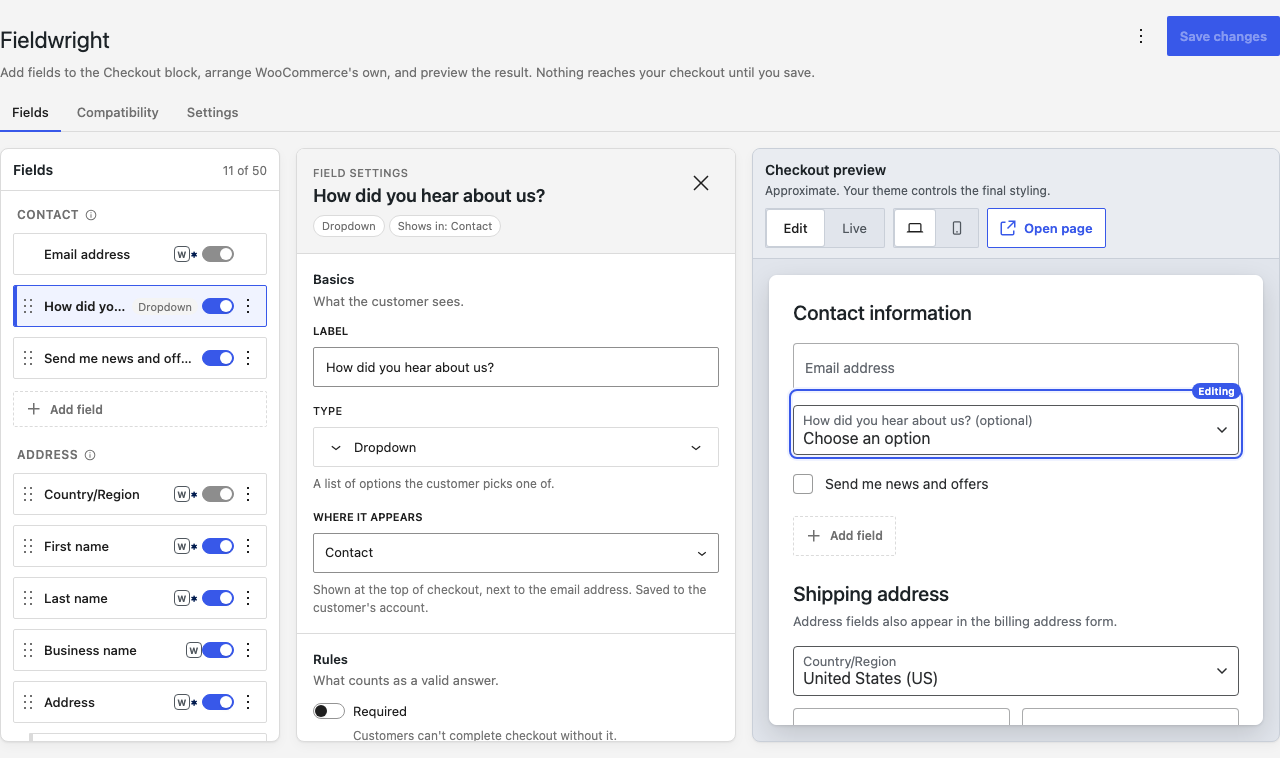
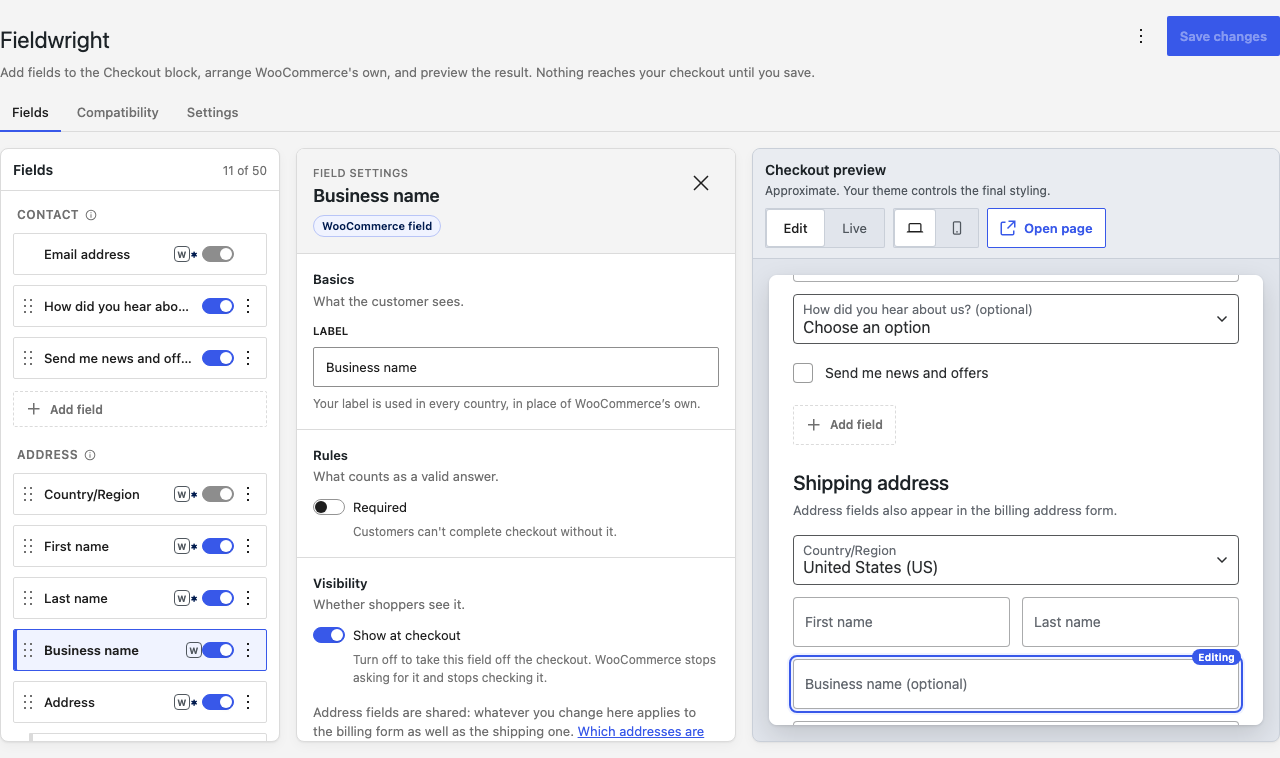
- A visual builder for the WooCommerce Checkout block, under WooCommerce → Fieldwright: every field on the checkout in one outline, the settings for the field you picked, and a live preview of the page beside them.
- WooCommerce's own checkout fields in the same outline. Rename them, switch them off, make them optional or required, and drag them into any order; the change reaches the browser, every country's address rules and the Store API.
- Eleven field types (text, email address, phone number, web address, number, dropdown, checkbox, long text, radio buttons, heading and paragraph), in nine positions on the checkout page, each with help text, a starting value, a half width layout and, where it applies, a format rule with your own message.
- Answers on the admin order screen, where they can be edited, in the order emails, on the order confirmation page and in the customer's order history, each switchable per field; a field can also remember its answer against the customer's account for next time.
- Translations: every merchant-entered string is registered with WPML and Polylang, and the checkout, the confirmation page, the order history and the emails read in the customer's language.
- Personal data tooling: an exporter and an eraser for WordPress's own privacy tools, and support for WooCommerce's "Remove personal data" bulk action, its retention schedule and its customer erasure.
- A Compatibility tab that says which checkout the store renders today, names the plugins that only work with the classic one, and offers a draft copy of the checkout page to try the Checkout block on.
- Import and export of the configuration as JSON, ten ready made fields in the builder's empty state, and a save that refuses to overwrite a change somebody else made since your screen loaded.
- No banners on your dashboard, no popups, no tracking and no requests to any server of ours. Built on WooCommerce's Additional Checkout Fields API wherever that API can carry a field.
- Every hook, filter, JavaScript API and REST route is a public contract, documented for developers: see "For developers".