
FileDeck – Document Library & Download Manager
| 开发者 | josephlines |
|---|---|
| 更新时间 | 2026年10月24日 05:00 |
| PHP版本: | 7.4 及以上 |
| WordPress版本: | 7.1 |
| 版权: | GPLv2 or later |
| 版权网址: | 版权信息 |
标签
下载
详情介绍:
- Safety data sheets and product documentation – SDS, manuals and spec sheets searchable by product code, with a QR code per sheet. SDS library
- Meeting minutes, agendas and newsletters – filed by year, with a free year filter. Minutes archive
- School policies and forms – for parents, with the library's interface in nine languages. For schools
- Staff policies and procedures – an intranet policy library; Pro limits it to staff and tracks review dates.
- Client portals and secure file sharing – Pro gives each client a private document area. Client portal guide
- Annual reports and public documents – reports, public notices and tender documents.
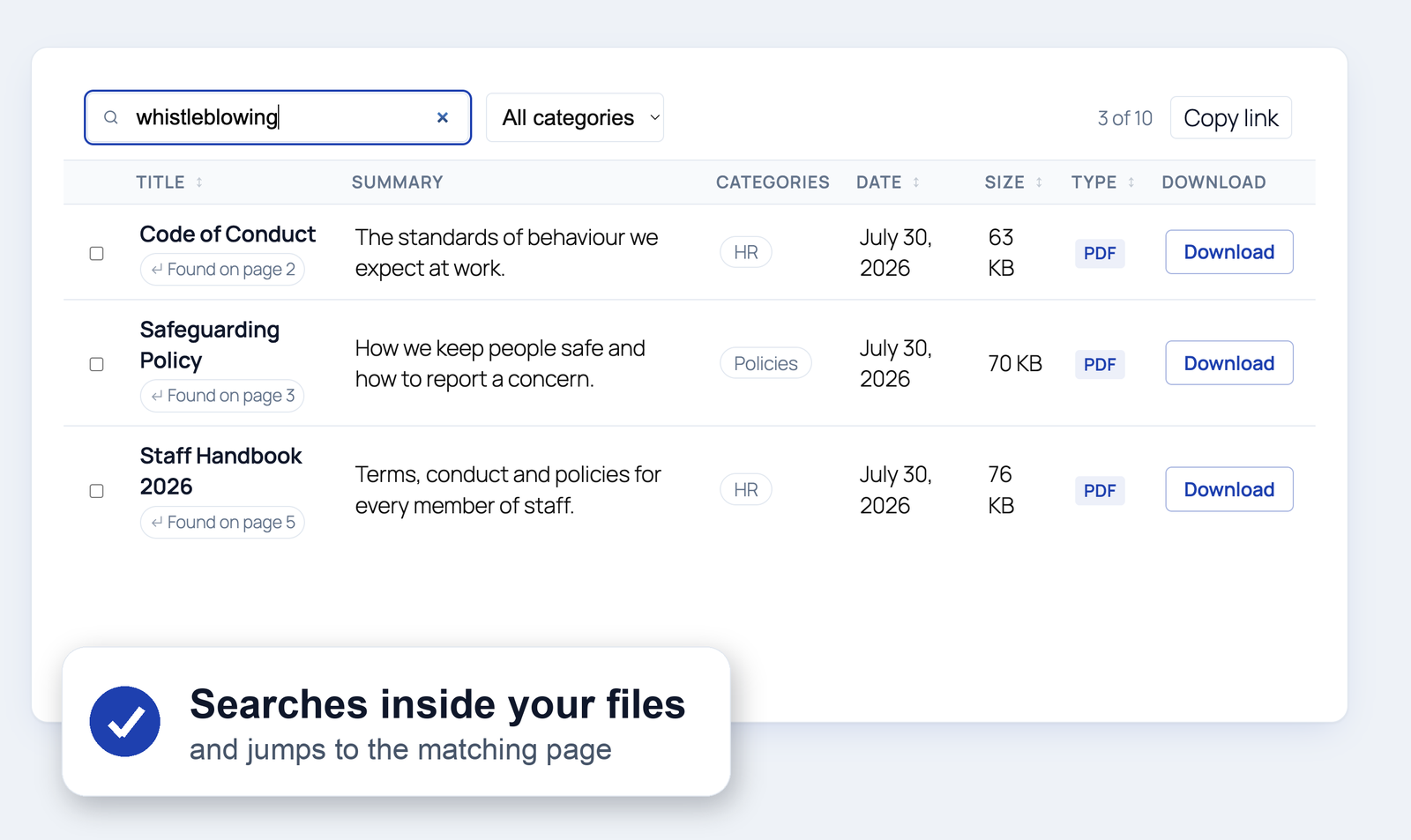
- Full-text document search – Pro searches inside your PDFs, Office and text files — text is extracted on your own server; only the optional OCR for scanned documents sends files off-site, and only when you switch it on
- One-click migration – switching plugins? FileDeck imports the whole library, files and all (see below)
- Large file uploads – drawings, scans and video upload in resumable chunks, so your host's upload limit is no longer the ceiling and a dropped connection resumes instead of restarting
- Library event webhooks – a signed JSON POST when a document is published, updated, retired or deleted; point Zapier, Make or your own system at it
- Client areas – give each client a private document portal with uploads and email notifications
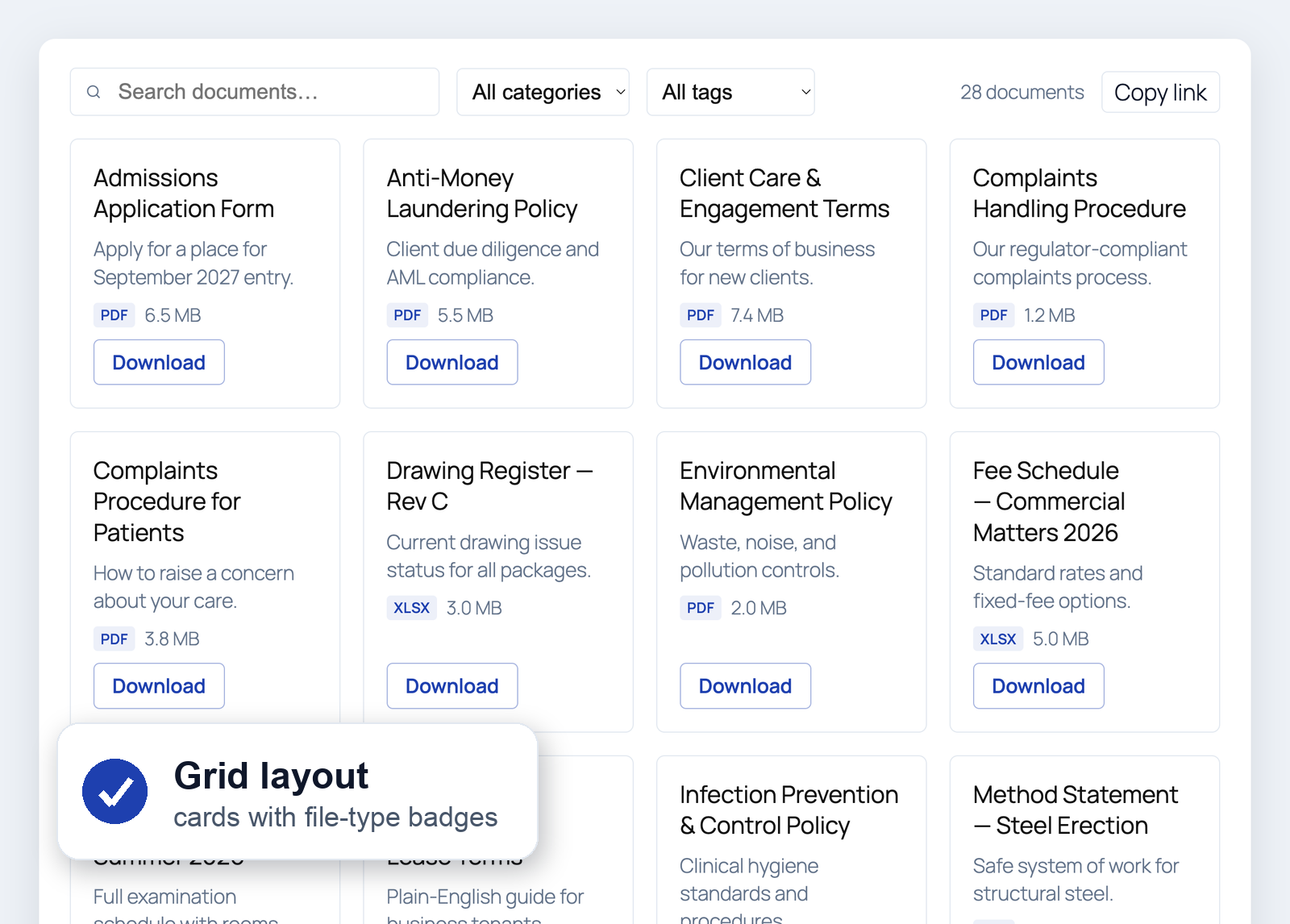
- Four layouts – searchable table, responsive card grid, a thumbnail-forward document gallery, or collapsible folders that follow your category hierarchy, sub-folders and all, in the order you choose
- Instant search – filters as you type, no page reloads
- Date-added filter – narrow a library to the past week, month or year (optional)
- Year filter – a dropdown of the years the library's documents span, read from their dates, for minutes, newsletters and reports filed by year (optional);
year="2025"pins a library to one year - Reference number – a part number, document code or form number on every document: searchable, and a sortable column
- Group by category – one library rendered as a titled section per category, with one search box across all of them, instead of a stacked library per category
- AI-agent ready – read-only abilities for WordPress 6.9's Abilities API, so agents can search the library through MCP
- Sortable columns – title, date, size, type, downloads, and more
- Unlimited documents – no cap; search scales automatically as your library grows
- Download tracking – per-document download counts
- Force download or open in browser – choose per document whether the button saves the file or opens it in the browser
- Library builder – design a library with a live preview on your own site, in your theme, then create the page in one click or copy its shortcode
- Gutenberg block + shortcode + six page builders – a native block, the
[filedeck]shortcode, and elements for Elementor (Library, Document Embed — also findable as "PDF Viewer" — and Search), Bricks, Divi, WPBakery (Visual Composer), Avada (Fusion Builder) and Beaver Builder - Translation-ready, nine languages bundled – the library's front end ships translated into Hungarian, Slovak, Spanish (Spain and Mexico), German, French (France and Canada), Italian, Polish, Brazilian Portuguese and Simplified Chinese, with a
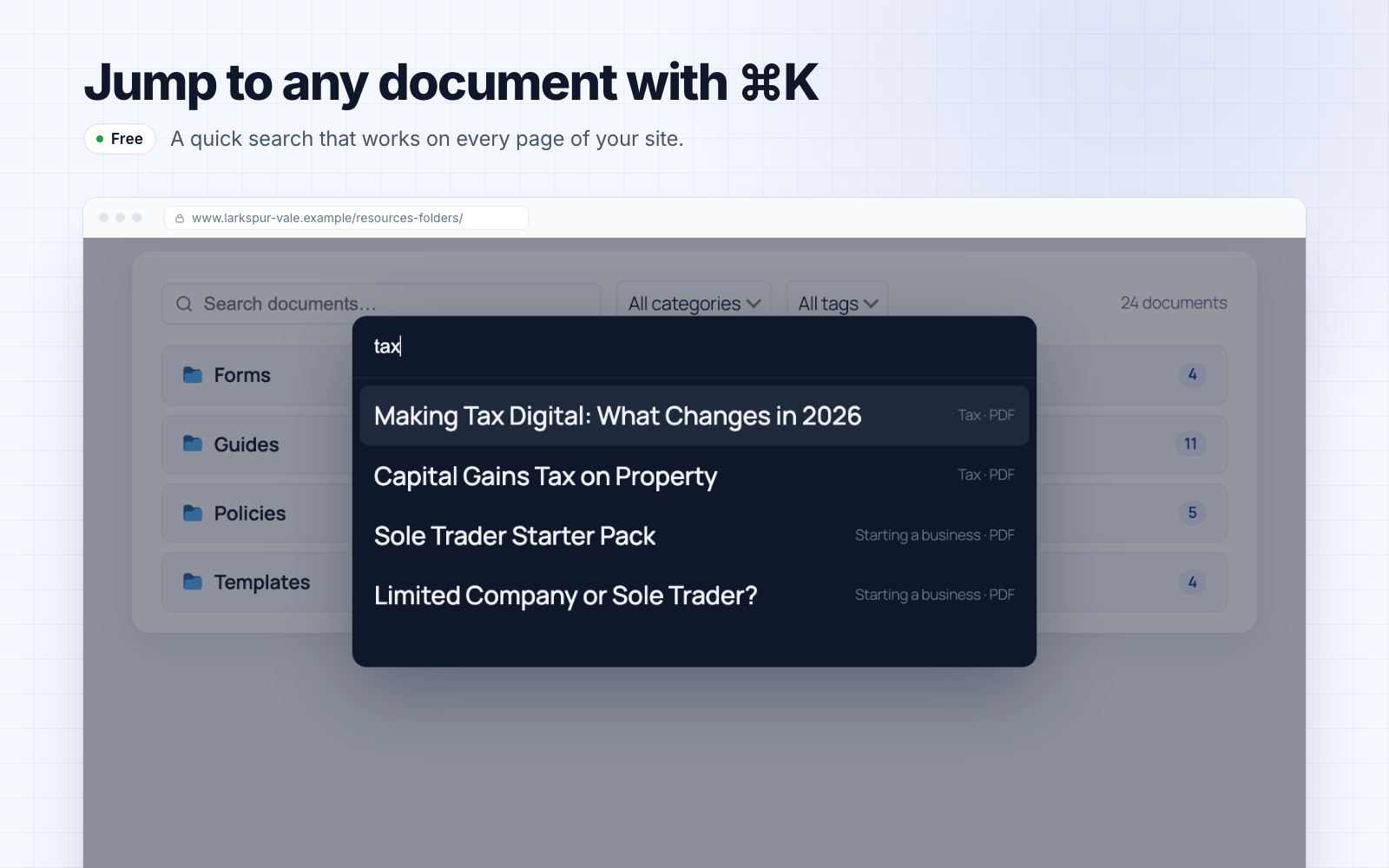
.pottemplate for translating it into any other language; documents and categories translate with WPML, Polylang and compatible plugins, and a bundledwpml-config.xmldeclares how document data behaves - ⌘K command palette – site-wide quick-search overlay that jumps straight to any document
- Sidebar widgets & Popular Documents block – Recent Documents and Top Downloads widgets for any sidebar, plus a Popular Documents block that puts the most-downloaded (or newest) list on any page; access-aware, so restricted documents never show to someone who cannot open them
- QR codes – generate a printable QR for any document (offline, nothing leaves your site) for noticeboards and posters
- Multi-select filters with counts – pick several categories or tags at once, see how many documents sit behind every option before you click, and drop any single one from the active-filter bar; put the filters above the library or under the column headings, and click a category in the table to filter by it
- Multi-column sorting – click a heading to sort, shift-click a second to break the ties (file type, then newest first)
- Shareable filtered views – search, filters, sort order and page all live in the URL with a one-click “copy link”; hover previews show a thumbnail and file details
- Pagination your way – page numbers, a Load more button or infinite scroll, plus an optional fixed library height that scrolls the documents in place
- External links – list documents hosted on Google Drive, Dropbox, SharePoint, or any URL — pasted Google Docs, Sheets, Slides and Drive links embed as live previews
- Custom field & taxonomy columns – add any post meta (cf:field) or taxonomy (tax:slug) as a column; Pro adds the field builder that defines those fields, fields that apply only to chosen categories, and one-click import of your existing ACF field groups
- Document previews – lightbox preview for PDFs and images, and featured images open in a lightbox from the image column
- Inline document embed – embed a single document as an always-visible viewer on any page with the
[filedeck_embed]shortcode, the Document Embed block or the Elementor widget: PDFs, images and Google links, with width and height controls, an optional download link and a full-screen button - Single document pages – a page per document listing its reference, dates, categories and tags (you pick which), with a download button
- Standalone search & links –
[filedeck_search],[filedeck_login], and[filedeck_download]shortcodes - Styles to match any theme – a full design-token system: a "Match my theme" preset that inherits your theme's colours, Minimal/Bordered/Compact presets, a built-in light/dark/auto colour scheme, accent + surface + text colours, plus link styles, custom download-button text, empty messages and pagination — no CSS required, and every element is a
--fdk-*variable when you want to go further - Any file type – PDF, Word, Excel, PowerPoint, OpenDocument, images, audio, video, and more
- Lightweight – no jQuery on the frontend; assets load only where a library appears
- Old links keep working – after a migration, old download links, item pages and shortcodes open your FileDeck documents, even if Pro lapses
- Theme template overrides – copy a template into your theme's
filedeck/directory to replace library markup without forking the plugin - Accessible – keyboard-sortable columns, ARIA labels, screen-reader friendly
- Full-text search inside files – search the text inside PDFs, Office documents and text files (optional OCR makes scanned PDFs searchable too); extraction runs on your own server, and results tell you which page of a PDF the match is on so you can jump straight to it
- Access control – role restrictions on categories, password protection on a category or any single document, plus assigning a document to specific named people or to a group you define once and reuse — an assigned document is hidden from everyone else, not padlocked. Site-wide IP rules can limit downloads to your own networks, and a refused visitor can be sent to a page of your own instead of a dead end
- Protected files – restricted files move to a deny-all vault and stream only after an access check, so direct file URLs stop working; optional signed links expire, for sharing with someone who can't log in, and a single-use link works for exactly one download and then stops. Optional hotlink protection refuses downloads requested from other sites' pages
- Share button on every document – copy the link, open the device share sheet, or send it by email, X, Facebook, LinkedIn or WhatsApp; shares the document page, never the file, and loads nothing from any network until a visitor picks one
- Client portal – add a client and FileDeck creates their account, a private client area and an emailed invitation. Clients sign in on your site, not the WordPress dashboard, to their documents, uploads and account page. Admit people by name, by group, by email domain, or by membership plan (MemberPress, Paid Memberships Pro, WooCommerce Memberships, Restrict Content Pro, s2Member) — plan access ends when the membership lapses. Plus download history, new/already-downloaded markers and favourites
- One-click migration – from the plugins listed in the FAQ, read straight from your own database
- Import a server folder – point FileDeck at a folder in your uploads directory and every file becomes a document, with sub-folders becoming nested categories; an optional daily re-scan imports new files on their own, so SFTP-ing a file in is enough to publish it
- Automatic PDF thumbnails – plus Office, audio and video previews and inline embeds on top of the free PDF/image lightbox and embed
- Self-hosted PDF viewer – embedded PDFs render from your own server with zoom, in-document find, print and full screen; because no external viewer service is involved, protected files, signed links and watermarked documents all display. Popup mode opens any embed in an overlay that loads only when clicked
- Document lifecycle – version history, supersede with evergreen links, review cycles, approval workflow and auto-expiry, plus a public document changelog (a block or the
[filedeck_changelog]shortcode) that lists published and updated documents newest first, grouped by month - Check-out & editing locks – claim a document while you prepare its next revision, so nobody else can replace the attached file until you check it back in
- Downloads toolkit – email/webhook download notifications, daily quotas, per-document download limits (expire after N downloads), optional CAPTCHA bot friction (Cloudflare Turnstile or Google reCAPTCHA), lead capture with Mailchimp/Brevo sync, multi-select zip downloads with a select-all control in the table header, and Download all on a folder
- Require a form before download – gate downloads behind Gravity Forms, Ninja Forms, WPForms, Contact Form 7 or any other form plugin you already use
- Attach documents to a post – tick documents in the post editor and they list automatically at the end of the page
- Terms before download – require readers to accept licence conditions or a disclaimer first, with every acceptance recorded in the activity log
- Analytics & audit – activity log with per-document history (with country, referrer and user agent), a per-document view count (also as a library column), analytics dashboard, optional GA4 events, CSV export
- Search synonyms & spelling tolerance – teach the library your own shorthand so "PO" finds "purchase order", and let a search that returned no results retry against the closest spelling in your titles and categories, saying which word it used
- Search analytics – popular searches and a content-gap report of searches that found nothing, fed by every search box: library search, the command palette, full-text and AI search
- Document feedback – anonymous "Was this helpful?" votes on document pages, with a least-helpful report (off until you enable it)
- Cloud storage – browse and attach files from Amazon S3 or any S3-compatible service (Cloudflare R2, Wasabi, DigitalOcean Spaces), plus Dropbox, Google Drive, OneDrive, SharePoint document libraries and Box
- Vault offload – mirror protected files into an S3-compatible bucket and serve downloads by short-lived presigned link, so the bucket carries the bandwidth while every access check still runs first
- Multisite shared libraries – render one site's library on any other site of a WordPress network, with the source site's access rules still enforcing
- Publish & embed – put your whole library on any other website (Wix, Squarespace, Shopify, Webflow, Framer, or a custom front end) with one line of code; embeds show public documents only
安装:
- Upload the plugin to
wp-content/plugins/filedeck, or install it from Plugins → Add New in your WordPress admin. - Activate the plugin. A Document Library page is created automatically.
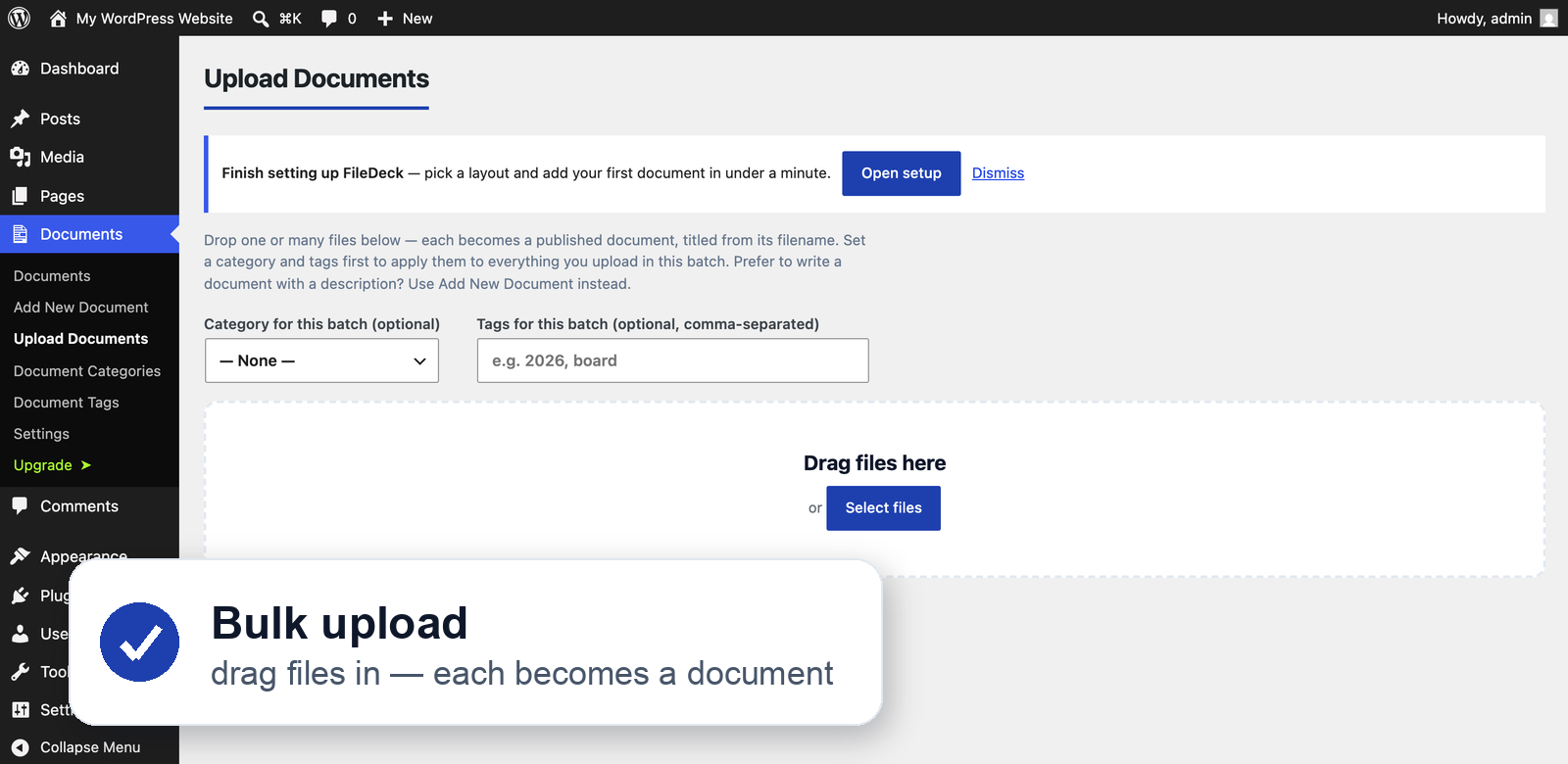
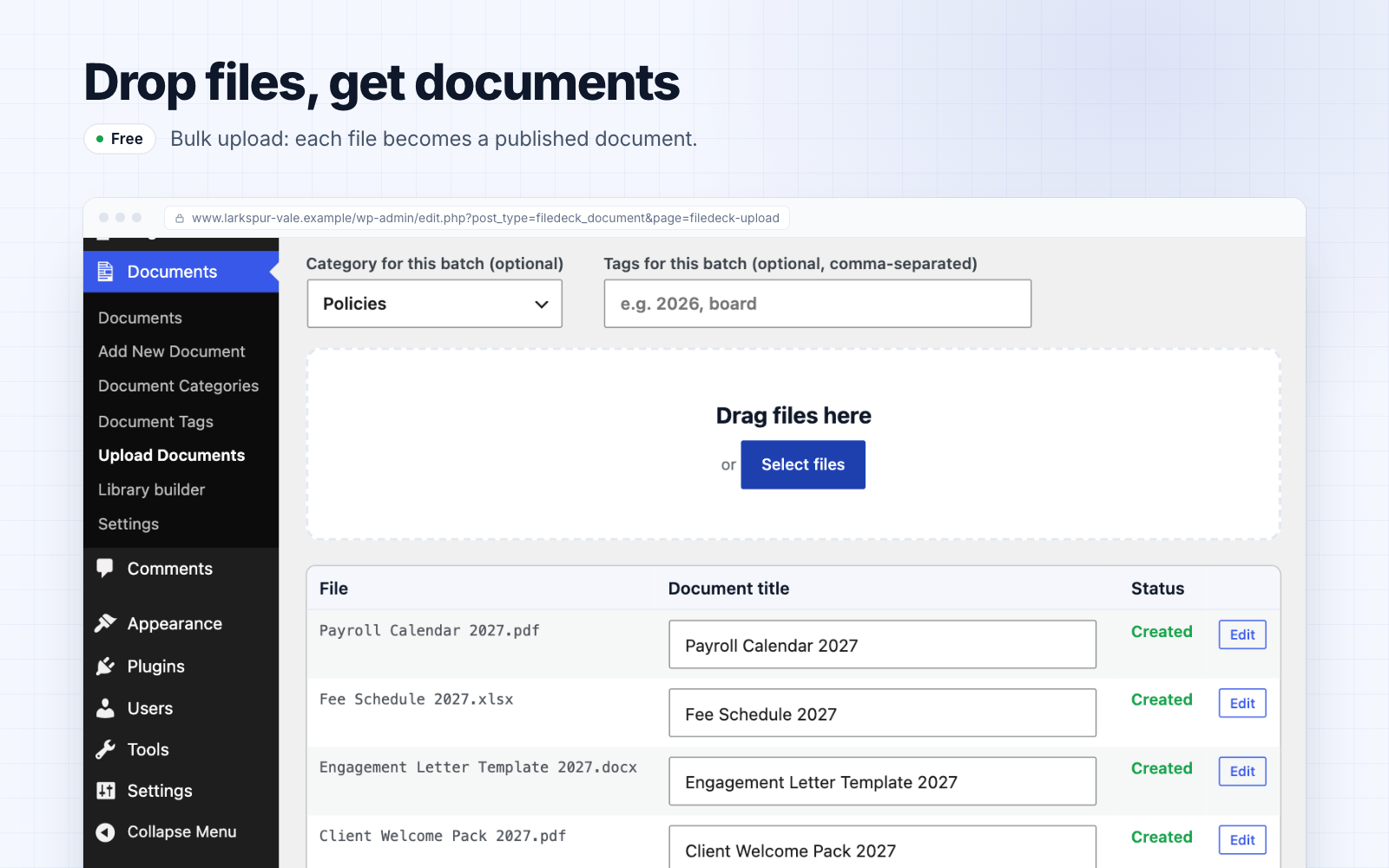
- Go to Documents → Add New, add a title, and attach a file (from the Media Library, or paste an external URL). It appears in your library instantly; organize documents with categories and tags.
- Add the Document Library block to any page or post — or use the
[filedeck]shortcode, e.g.[filedeck layout="grid" category="policies" columns="title,excerpt,size,link" per_page="20"]— to display your library. The FAQ lists the shortcode options. - Adjust layouts, columns, and styling under Documents → Settings.
屏幕截图:


常见问题:
Is there a document limit?
No. The frontend automatically handles large libraries: small libraries get a zero-round-trip inline search index; larger ones paginate efficiently.
Can I link to files hosted elsewhere?
Yes — each document can use an uploaded file or an external URL (Google Drive, Dropbox, SharePoint, S3, YouTube, etc.).
Does it track downloads?
Yes, every document shows a running download count (visible in the admin list and optionally as a frontend column).
Does it work with my theme?
FileDeck uses minimal, namespaced styles designed to inherit your theme's typography, and works with any properly-coded theme.
What do I get in the free version?
Every layout — table, grid, gallery and folders — plus instant search, sortable columns, multi-select filters with counts, the Gutenberg block, shortcodes, native Elementor, Bricks and Divi elements, download tracking, and no cap on how many documents you can list. Pro adds full-text search inside your files, access control, version history and one-click migration from other plugins.
Can visitors search inside my PDFs and Word documents?
With Pro, yes. Full-text search reads the contents of your PDFs, Office and text files — with optional OCR for scanned documents — and it runs on your own server, so your documents stay on your site.
Can I restrict documents to certain people?
With Pro, yes. Restrict a whole category or a single document by role, by password, to logged-in users, to named people, to a group you define once and reuse, or to everyone with an email address at a given domain. Restricted files move into a protected folder and are streamed through FileDeck rather than served from a guessable URL. Site-wide IP rules can additionally limit downloads to chosen networks.
Does it work with Elementor, Bricks or Divi?
Yes, and in the free version. FileDeck ships native Elementor widgets — Library, Document Embed (also listed as "PDF Viewer") and Search — plus Library and Document Embed elements for Bricks and Divi. They set the common options directly; for anything else, design the library in the Library builder and paste its shortcode into your page builder's shortcode element.
Can I move my library over from another plugin?
With Pro, yes — in one click, read straight from your own database, with no export files and no column mapping. Supported sources include Download Monitor, WordPress Download Manager, Document Library Lite and Pro, Shared Files, Simple Download Monitor, Simple File List, FileBird, BSK PDF Manager, Download Attachments, WP Customer Area and Advanced File Manager. The import is safe to re-run. Once you deactivate Download Monitor, WordPress Download Manager, Simple Download Monitor, Shared Files or Simple File List, the free plugin keeps their old download links, item pages and shortcodes working, and BSK PDF Manager's old shortcodes too.
I use Simple File List — can I still install or update it?
Not from the directory: its wordpress.org listing has been closed since 23 July 2026 (the directory gives the reason as a security issue). If you'd rather move, FileDeck imports your entire Simple File List library in one click — files, folders and descriptions — straight from your own database.
What shortcode options are there?
layout– table, grid, gallery, or folderscolumns– comma-separated: id, image, title, excerpt, content, categories, tags, date, modified, author, size, type, filename, downloads, views, preview, link (viewsneeds Pro activity logging)category– limit to category slugs (comma-separated)per_page– documents per pagesort_by– title, date, modified, menu_ordersort_order– asc or desclink_style– button, button_icon, button_icon_only, icon, icon_text, textdl_text– custom text for the download button/link (default "Download")image_lightbox– set to 0 to stop featured images opening in a lightboxwrap– set to 0 to keep every document on a single truncated rowscroll_offset– pixel offset for pagination jumps, for themes with a sticky headerstable_columns– set to 0 to let table columns resize to whatever rows are showing (on by default: columns keep their width while visitors search)stable_height– set to 1 to also keep a table library at its first-page height while visitors search
I'm on nginx — how do I protect restricted files?
FileDeck moves restricted documents' files into wp-content/uploads/filedeck-protected/ and drops in an .htaccess deny rule. Apache honours that automatically. nginx ignores .htaccess, so add one location block to your server config and reload nginx:
location ^~ /wp-content/uploads/filedeck-protected/ { deny all; return 403; }
Until that rule is in place, authorised downloads still work (they are streamed through FileDeck), but the raw files in that folder remain directly reachable. On Apache (and most managed WordPress hosts), no action is needed.
What external services does FileDeck connect to?
This plugin can connect to these external services, all only with your opt-in:
Freemius — FileDeck uses Freemius to deliver plugin updates, and (for Pro customers) to activate licenses. On activation you are asked to opt in; if you decline, no data is sent and only anonymous update checks are made. If you opt in, Freemius receives basic environment data (site URL, WordPress/PHP versions, active theme/plugins) to power update delivery and diagnostics. This happens when you activate the plugin, opt in, activate a license, or check for updates.
Freemius terms: https://freemius.com/terms/ — privacy policy: https://freemius.com/privacy/
FileDeck usage ping — only if you opted in to usage tracking above (and never otherwise), FileDeck sends a small anonymous ping to https://in.getfiledeck.com/telemetry once a week, plus once on days 1, 3 and 8 after a new install, to guide the product roadmap. It contains only which ping it is (weekly, or day 1, 3 or 8), the plugin/PHP/WordPress versions, the plan tier, a bucketed count of published documents (e.g. "11–50"), a handful of feature flags — on, off, or not-applicable when the feature isn't in this build (search index, OCR, AI mode, subscriptions, sample library used), how far the setup wizard got (completed, skipped, dismissed, or not finished), how far the library builder was used (opened, a shortcode loaded, a page created), the dates (day only, no times) the plugin was installed and your first document was added and published — sample documents never count — whether an import in the last week had items that failed, a bucketed count of documents whose OCR stopped on an error, and a random identifier created on your site (not derived from your address, email or account) so that several pings from one site are counted once. It never includes document contents, file names, URLs, emails, IP-based profiles, or any personal data, and uninstalling FileDeck deletes the identifier. Declining or opting out of Freemius tracking disables it completely, and developers can switch it off with the filedeck_telemetry_enabled filter.
FileDeck privacy policy: https://www.getfiledeck.com/privacy/
Cloud storage (Pro, optional) — if you connect a cloud provider under Documents → Cloud storage, FileDeck contacts that provider's API using credentials you supply, only to list folders and fetch files you choose. Amazon S3 (*.amazonaws.com, or the S3-compatible endpoint you configure), Dropbox (api.dropboxapi.com, OAuth via dropbox.com), Google Drive (googleapis.com, OAuth via accounts.google.com), and Microsoft OneDrive and SharePoint Online (graph.microsoft.com, OAuth via login.microsoftonline.com), and Box (api.box.com, OAuth via account.box.com; terms: https://www.box.com/legal/termsofservice). Nothing is sent to these services unless you set up a connection.
Amazon S3 terms: https://aws.amazon.com/service-terms/ — Dropbox: https://www.dropbox.com/terms — Google: https://policies.google.com/terms — Microsoft: https://www.microsoft.com/servicesagreement
Scanned-PDF OCR (Pro, optional) — off by default. When you enable it, FileDeck sends PDFs that have no text layer to the FileDeck OCR service (https://filedeck-ocr-production.up.railway.app, or a Service URL you set): each one you publish, or give a document as its new file, while OCR is on; and scans already in your library, or added on the Import & Export screen, when you press Send on the Search Index tab. Each file is sent with its name and your site's Freemius install ID, which the service uses to confirm your license with Freemius. The service extracts the text and discards the file.
FileDeck privacy policy: https://www.getfiledeck.com/privacy/
Bot protection & mailing lists (Pro, optional) — if you add CAPTCHA keys, the token from a completed check is verified against the service you selected: challenges.cloudflare.com for Cloudflare Turnstile (terms: https://www.cloudflare.com/website-terms/) or www.google.com for Google reCAPTCHA (terms: https://policies.google.com/terms). If you connect a mailing-list provider, captured lead names and emails are sent to the provider you chose — Mailchimp (api.mailchimp.com, https://mailchimp.com/legal/) or Brevo (api.brevo.com, https://www.brevo.com/legal/termsofuse/). Both are off until you configure them.
In-dashboard help (Pro) — FileDeck's admin screens show administrators a Help button. Only when you send a question (one you type, or a suggested one you click) does your site send the question, up to six earlier messages of that conversation, your site's address and the FileDeck version to getfiledeck.com (https://www.getfiledeck.com/wp-json/filedeck-site/v1/help/), where an AI model (Anthropic) writes an answer from the FileDeck documentation. If you choose "Talk to a person", it also sends the email address and optional name you enter, with up to twelve messages of the conversation, so that a person can reply by email. The conversation is kept on getfiledeck.com for 90 days after its last message, so you can pick it up later and see when a person has replied by email. It is linked to a random reference stored with your WordPress user account, which your site sends with each question and with "Talk to a person", and again when a FileDeck screen loads, when you open the panel, or when the conversation changes in another tab, to show the conversation and whether a person has replied. "New conversation" ends it and deletes the reference.
FileDeck privacy policy: https://www.getfiledeck.com/privacy/
The optional AI tier features (semantic search and Ask this library) are not part of this free plugin, and are not included in Pro. If you buy the AI tier and enable them with your own API key, the document text you choose to index is sent to the AI provider you pick (OpenAI, Anthropic, Voyage or Fireworks AI) to create embeddings and answers. They are off by default and never active in the free version.
更新日志:
- Pro: the in-dashboard Help panel keeps your conversation for 90 days, so it is there in another tab or when you come back, and it lets you know when a person has replied to you by email. The Help button shows when a reply is waiting, and New conversation ends it.
- AI tier: on OpenAI, Ask this library and AI summary suggestions now default to gpt-6-luna, ahead of OpenAI retiring the old default (gpt-4o-mini) on 14 January 2027, and work with OpenAI's newer reasoning models.
- AI tier: on Anthropic, Ask this library and AI summary suggestions now default to Claude Haiku 5.5, at a tenth of the per-token price of the previous default on your own API key. If you chose a model yourself, it is kept. Both also work with the newest Claude models, which think before they answer.
- AI tier: when an Ask this library answer or an AI summary suggestion fails, the Ask AI settings tab now shows the provider's own error until a request succeeds again.
- AI tier: after your first scan, the accessibility report screens new and replaced PDFs automatically, and it says a scan is in progress only while one is scheduled.
- Pro: a Help button for administrators on FileDeck's screens in wp-admin. An AI assistant answers questions from the FileDeck documentation, and passes a question to a person by email when the documentation doesn't cover it.
- Deactivating FileDeck because it wasn't what you were looking for? The feedback form now lets you pick what you were after in one click, and says so when FileDeck already does it.
- Access-rule improvements in wp-admin.
- Pro: on sites where WordPress's scheduled tasks don't run, documents you add or edit are now indexed for content search as you save them, instead of waiting for a background task that doesn't run there. A large batch at once, such as an import, starts a rebuild you can finish from the Search Index tab, and index work left waiting from before is picked up as you use the admin. The Search Index tab says when it is working this way.
- Pro: a search-index rebuild that has stopped moving can finish from your browser. On hosts that switch off WordPress's scheduled tasks, a rebuild could sit at "0 of N documents processed" indefinitely; the Search Index tab now says when a rebuild has stalled, and "Continue in this browser" runs it from the page with live progress. A file too large or damaged to read in time no longer stops a rebuild: the document is indexed by title and description and listed on the tab.
wp filedeck reindexalso ends any queued rebuild.
- Dates show on sites whose theme or a plugin hides post dates. A library's Date and Updated columns, its date filter and year grouping, and a document page's Published and Updated lines were empty there; they now show each document's own date. Pro: review reminders, retention and transmittals take the document's date on those sites too.
- Pro: a client portal. Add a client under Documents → Clients and FileDeck creates their account, a private area and your portal page, and emails them an invitation to choose their own password. Clients sign in on your site rather than the WordPress dashboard, see only their own documents with what is new since their last visit, and manage their own details. The Clients screen shows who has accepted and when each client last visited, and lets you resend invitations, import clients from a spreadsheet and preview the documents a client sees. Add it to any page with the Client portal block or the [filedeck_client_portal] shortcode.
- AI agents can reach your library. On WordPress 6.9 and later, FileDeck's search, document lookup and category list show up for agents through the MCP Adapter or WordPress's REST API; before, they did not. Agent searches leave out expired documents and, in Pro, superseded ones.
- Switched from BSK PDF Manager? Its shortcodes already in your pages now show your FileDeck library, document link or viewer once the old plugin is deactivated.
- Documents with a file attached from another plugin's private folder (Memphis Documents' uploads/mdocs, for example) now download and preview; before, the server refused them on most hosts.
- Pro: OneDrive and SharePoint connections accept the app's Directory (tenant) ID, so an app registered for one organization (Entra's default) can connect, and the SharePoint browser lists every site, not only the first 50.
- Pro: an existing [filedeck_my_documents] page shows signed-out visitors the portal's sign-in card, with password reset, instead of a link to the WordPress login. Emails about new documents link through your portal page once you have one, and clients can turn them off on their Account tab.
- Pro: Library Health's "Attach them now" works through large libraries without getting stuck. It takes only the documents it can attach and lists the rest apart, with what to do about them. Its scan also finds local links written with %20 for spaces.
- Columns that keep their width in the library table no longer break a word such as "Download" across two lines.
- Access-rule and reliability improvements in wp-admin and the media library.
- Pro: a CSV import recognises a Media Library file whose name contains spaces and attaches it, so the document shows its size and type. Before, such rows were kept as links. Documents → Settings → Health → Attach them now attaches the ones an earlier import left as links. One whose file is in another plugin's private folder stays a link: move those documents to the Trash first, then import those rows again, and a file in your Media Library is attached.
- Access-rule and reliability improvements in wp-admin. If your authors or contributors attach files to restricted documents, those files no longer appear in their Media Library or media picker; each one stays attached and is shown in its document's editor.
- The opt-in usage ping dates a library imported from another plugin from its import, or from the day FileDeck was installed if that is later, not from the original items' dates.
- Pro: when a one-click import can't bring an item across, the Migrate screen names it and says why (its file is missing, it is in the old plugin's trash, and so on), with an Import again button. Documents → Settings → Health shows the same list. Stopping an import keeps what it had done so far, that list included.
- The "Added in the last…" filter now works on large libraries too.
- The Elementor Library widget offers your custom-field and taxonomy columns.
- Pro: share buttons switch off with the rest of Pro when a licence lapses.
- Pro: duplicating an imported document no longer carries over its link to the old plugin's item.
- The opt-in usage ping (sent only if you opted in) now carries the install, first-upload and first-publish dates (day only), whether last week's import had failures, a bucketed count of documents whose text recognition stopped on an error, and a random identifier for the site. The External services FAQ lists every field.
- Updated Freemius SDK to the latest version.
- The opt-in and pricing screens show the FileDeck icon.
- Access-rule and reliability improvements in wp-admin.
- New: the Library builder (Documents → Library builder) designs a library with a live preview on your own site, in your theme, as a visitor or as you. Create the page in one click or copy its shortcode; paste an existing shortcode to keep editing it. The Document Library block opens the same builder, and its preview in the editor now uses FileDeck's styles.
- After a one-click import from Download Monitor, WordPress Download Manager, Simple Download Monitor, Shared Files or Simple File List, the old plugin's download links, item pages and shortcodes (where it had them) keep working once you switch it off — in the free plugin.
- Document pages list a document's reference, published and updated dates, categories and tags above the Download button; choose which under Documents → Settings → Display → Document pages, including an optional download count.
- Pro: importing from Download Monitor brings older versions into each document's version history; importing from WordPress Download Manager brings every file in a multi-file package. Run an import again to fill in what an earlier one left out.
- Pro: client-area emails reach the people who can open a new document (up to 200 per document) — named people, group members and email-domain matches — including batch uploads, block-editor publishing, scheduled documents and sub-folders. Imports stay quiet.
- The default-columns setting keeps the Reference and Views columns on save.
- Security and reliability improvements.
- The wordpress.org listing shows the full description and the external-services disclosure; both had been cut short.
- The plugin's description on wordpress.org fits the directory's length limit again, so the whole of it shows; it had been cut short. Older changelog entries moved to changelog.txt in the plugin folder. This release changes the listing only; the plugin works as before.
- The plugin's description on wordpress.org now says what FileDeck is used for: safety data sheets and product documentation, meeting minutes and newsletters by year, school and staff policies, client file sharing and public reports. This release changes the description; the plugin works as before.
- Pro: a "Test connection" button on the Scanned OCR settings tab checks that the saved Service URL reaches an OCR service, and says why when it doesn't.
- Pro: pasting an email redirect link as the OCR Service URL (the long google.com/url?q= or Outlook Safe Links form an email client can turn a link into) now saves the address inside it. A Service URL with a query string, or one that isn't https or points at a private network, is refused with a message saying why. Until now such a URL was either saved as-is, sending scans to the wrong address, or silently not saved.
- Instant search finds titles written in your site's language. On a Danish site, "møde", "bestyrelsesmøde" and "ø" now find "Bestyrelsesmøde"; on a German site, "prüfung" and "pruefung" both find "Prüfungsordnung", and "strasse" finds "Straße". Letters such as ø, æ, å, ß and umlauts could make a search miss, because the library and the search box spelled them differently.
- Instant search finds titles in Cyrillic, Greek, Korean and Japanese as you type them. Letters such as й and ё, accented Greek vowels, Korean syllables, Japanese kana with voicing marks, and capital Cyrillic and Greek letters could make a search miss.
- Pro: one-click imports bring across a password set with WordPress's own Password protected visibility. The imported document asks for the same password before its file can be downloaded, and FileDeck protects its own copy of the file. For documents imported before this release, the Migrate screen lists any that don't yet ask for their item's password, with a button to add the same passwords.
- Pro: Settings → Health lists documents that use the same file as a restricted document without the same restrictions, with a link to edit each, so you can decide whether the file should stay private.
- Security and reliability improvements across the library, document pages, imports, exports and embeds, in the free plugin and Pro. If your site uses a page cache, clear it once after updating.
- Pro: on sites that run WordPress on SQLite (for example WordPress Playground, Studio by WordPress.com, or the SQLite Database Integration plugin), search could match words a document no longer contains. Updating fixes this, re-indexing in the background where needed.
- Pro: on a server missing a PHP extension FileDeck needs to read PDFs (zlib, iconv or mbstring), PDFs are no longer counted as scans or sent for OCR, including PDFs an earlier version had already counted: there, a PDF with a text layer can't be told apart from a scan. The Search Index tab names the missing extensions. On every server, each PDF is now checked again just before it is sent, and one that turns out to have a text layer stays on your site.
- Pro: a document moved to a byte-identical copy of its file keeps its OCR text instead of dropping it.
- Pro: switching scanned-PDF OCR back on no longer sends scans that were still waiting for room in the queue when it was switched off, including when it was switched off while the license had lapsed.
- Pro: Settings → Health lists restricted documents whose imported original is still public. A one-click import gives a restricted document its own protected copy and leaves the original where the old plugin keeps it, so anyone with a direct link to that original can still open it. Each row names the file and offers to delete it, or to move it into protected storage if you'd rather keep it. Deleting is offered only when the file isn't used by another document and isn't linked from a post, page or menu (in its content, a custom menu link, Elementor's page data or as its featured image), and isn't your site icon or logo; links kept anywhere else aren't checked, so look before you delete. Either way, the old plugin's link to that file stops working.
- Pro: Settings → Health also lists restricted documents whose file could not be moved into protected storage, and imported documents that arrived without their file. These checks include drafts, and the weekly Health email reports them. An import that leaves a restricted file unprotected says so in its summary, with a link to Health.
- Pro: running a WP Customer Area import again finishes a document that an interrupted run left without its file. The document stays a draft for you to publish.
- Pro: re-running a WP Customer Area import leaves the client areas it made earlier, and the people you've added to them, as they are.
- Pro: a Download Monitor download whose file is in Download Monitor's protected
dlm_uploadsfolder gets its own copy in FileDeck, so its Download button works. It used to link the file where Download Monitor keeps it, which the server refuses to serve. - Security and reliability improvements to the one-click importers.
- Pro: signed-in members get the restricted documents they're allowed to have when lead capture or terms acceptance is switched on. Leaving their details or accepting the terms used to end in an error instead of the file.
- Pro: a member's zip includes the restricted documents they selected, and searching inside documents finds text in restricted documents they're allowed to read. Both used to leave those documents out.
- Pro: daily download limits, terms acceptance, lead capture and the form and bot checks apply to restricted documents' Download buttons the same way they apply to every other document. Share links you create yourself (single-use links and transmittals) still skip them. If you set daily download limits, downloads of restricted documents now count towards them, whether by members or by visitors who unlocked a password-protected category.
- Pro: the
[filedeck_download]button and an embedded document's download link show the lead form, terms or check when one is switched on, instead of an error. - AI plan: a view-only restricted document opens for the people it's shared with, from the library and from its own page. A view-only document's own page shows the lead form, terms or check when one is switched on, and with lead capture on, a view-only document opens after the form instead of showing an error.
- Security and reliability improvements.
- Pro: with scanned-PDF OCR switched on, each scanned PDF you publish is now sent for OCR automatically, so it becomes searchable without anyone going back to the Search Index tab. Before, a scan added after OCR was switched on waited until someone pressed Send again. Scans that were already in your library when you switched OCR on, and scans added on the Import & Export screen (bulk add, including files dropped there, a CSV import or a migration), still wait for you to press Send. New scans go one at a time in the background, within the same 100-a-day fair-use limit as before.
- Pro: replacing a scanned document's file with a new scan now makes the new file searchable. Before, the old scan's OCR text stayed in the search index for the new file, and the new scan wasn't sent. This also holds when the file is replaced while the old scan is still being read.
- Pro: a scanned PDF that you unpublish or move to the trash before its turn in the OCR queue is no longer sent.
- Pro: a one-click import keeps the old plugin working alongside FileDeck, restricted files included. A restricted document gets its own copy of its file in FileDeck's protected storage, and the old plugin's original stays where it was, so its download links keep working while you check the new library, whether you publish the import or bring it in as drafts. This applies to files kept on this site; a file linked from another site stays a link. Access you add in FileDeck after the import still moves that document's file into protected storage, so the old plugin's link to it stops working from then on. Once you've switched, delete the originals that no page or other document still uses: until then they're only as private as the old plugin kept them. The import summary says how many documents got their own copy. If a copy can't be made, the original is protected instead, and the summary says how many files that affected.
- Pro: a WP Customer Area file that FileDeck can't match to an owner, including one with no owner at all, arrives as a draft for logged-in users only, ready for you to assign to a client area. Files that were private or unpublished in WP Customer Area arrive as drafts too.
- Pro: a Download Attachments file that wasn't listed on any published post arrives as a draft.
- Security and reliability improvements to the one-click importers and to attaching files from the Library Health screen.
- Pro: signed-in visitors can download a restricted document whose file is a link to another site. The people it was shared with (logged-in users, named people, groups, membership plans, restricted categories, client areas) saw it in the library, but its Download button gave them an error instead of the file. The same fix covers the occasional restricted uploaded file that showed that error. Visitors without access still get no link. No setting needs changing: the fix takes effect the next time the page loads. On the AI plan, a view-only document whose file is a link to another site no longer shows a Download button.
- The table layout keeps its shape while visitors search, filter, sort or page. Each column holds the width it had when the library first appeared, instead of re-flowing to fit whatever rows match. A table too wide for its space keeps its horizontal scroll, with its columns held too; phones, where rows stack as cards, are unchanged. To let columns resize as before, use
stable_columns="0". - New
stable_height="1"shortcode option: the library also keeps its first-page height, so a search with few or no matches doesn't shrink it and move the rest of the page up.
- Pro: a scanned PDF whose OCR attempt fails is now retried. If the OCR service timed out or was briefly unavailable, the document used to stay queued with no retry scheduled. Failed attempts now retry automatically with increasing gaps, a large scan has five minutes instead of two to finish, and the queue is spaced out so one background run isn't handed the whole backlog at once.
- Pro: the Search Index tab now shows how many scanned PDFs are queued for OCR, and when OCR has stopped on a document it says why (for example, the service didn't answer in time or didn't accept the key). Pressing Send tries those documents again.
- Pro: scanned-PDF OCR is included with your license. Tick "Enable OCR" under Documents → Settings → Scanned OCR and it works; there is no OCR key to request or paste. Sites that already use a site key or their own OCR service keep working unchanged.
- Translations now work alongside a wordpress.org language pack. A language pack for your language used to replace FileDeck's bundled translations, and because a pack covers only the free plugin, Pro and AI tier text would have gone back to English. The pack now keeps priority for the strings it translates, and the bundled translations supply the rest.
- The "Document Library" page FileDeck creates when it is first activated is titled in the site's language when FileDeck has a translation for it.
- AI tier: the PDF watermark footer is translated. It is printed in plain ASCII, so accented letters become plain ones where the server can transliterate them; otherwise, and for languages such as Chinese, the footer stays in English.
- AI tier: the Smart Collections list shows when each collection was refreshed in the word order of your language ("vor 3 Stunden", "il y a 3 heures").
- Security and reliability improvements.
- The bundled translations now cover the "Document Category" and "Document Tag" names at the top of category and tag archive pages, the Documents menu's own labels, and the Bricks document embed element's settings and its prompt to pick a document.
- Pro: the "This document has been superseded" notice, the "Attached documents" heading, the empty document changelog message and the placeholder choice at the top of dropdown document fields on the front-end submission form now use the bundled translations. They stayed in English on translated sites before.
- AI tier: the read-and-confirm prompt with its button and confirmation messages, the "Related documents" heading and the empty collection message now use the bundled translations too.
- Pro and AI tier: when the admin language is one of the nine, the Document Fields, Acknowledgments, Smart Collections and AI Index screens and the Supersede, Attached documents and Read & confirm boxes are translated as well. Other admin screens stay in English.
- Fixed: on a fresh install the setup wizard opened before the opt-in question could appear, and while that question stayed unanswered the Documents menu held only the question and screens such as Upload Documents and Settings said "Sorry, you are not allowed to access this page." The question now comes first, answering it (Allow or Skip) opens the setup wizard, and FileDeck works normally while it is still unanswered.
- Uninstalling FileDeck moves the auto-created "Document Library" page to the trash when its title and content are still exactly as FileDeck created them, instead of leaving it published with a bare [filedeck] shortcode. It stays if it was edited, is the homepage, is in a menu or has child pages; on sites with the trash turned off it is set to draft.
- The deactivation form's "The plugin didn't work", "The plugin broke my site" and "The plugin suddenly stopped working" answers now offer an optional box for what happened, plus a link to tell us directly.
- The setup wizard's browser tab now reads "FileDeck Setup".
- The library's "Copy link" button and its "Copied!" confirmation, "Load more", the Previous, Next and page-number buttons, and the search palette's label and messages now use the site's translation. They stayed in English on translated sites before.
- A translation template,
languages/filedeck.pot, ships with the plugin, so Loco Translate, Poedit and similar tools list the plugin's strings from the start instead of scanning its files (Loco skips large files by default, which left its list incomplete). - Canadian French (fr_CA) sites now get the bundled French translation.
- FileDeck's blocks now use a translation of their block editor labels when one is installed — a wordpress.org language pack or your own. The bundled translations cover the front end.
- The bundled translations now also cover the year filter and the Reference column.
- Pro: the preview window's accessible name, the zip download's error message, the embedded library's frame title, the embed's PDF loading message and the Bulk Add file picker are translatable too.
- Fixed: on a phone, a document the visitor cannot open showed a padlock and a dash on its card with no label beside them to say what they were. They now carry their Download and Preview labels, laid out like the rest of the card.
- Fixed: on a phone, a category name too long to sit beside its label ran off the edge of the document's card. Categories that do not fit now move onto their own line, and a name longer than the whole card wraps inside its tag.
- The deactivation form's most common answer, "Expected something else", now offers an optional box for what you were hoping FileDeck would do, plus a link to tell us directly. "Great, but I need a specific feature" asks which feature, and "Didn't work as expected" asks what it did instead. All optional.
- Year filter: an optional dropdown listing the years a library's documents span, read from their dates — for minutes, newsletters and reports filed by year.
show_year_filter="1"per library, or site-wide under Settings → Features;year="2025"pins a library to one year. - Reference number: a new field on every document for a part number, document code or form number. Searchable in the library and in content search, and available as a sortable "Reference" column. Included in the Pro CSV import and export.
- Group by category:
group_by="category"renders one library as a titled section per category (Folder order, then alphabetical; "Other" last) with one search box and one set of filters across all of them. Also on the Elementor widget and as a site-wide default. - Fixed: the date-added filter compared the displayed date against the cutoff in libraries with an inline index, so it could let old documents through. Both date filters now compare machine dates.
- Fixed (Pro): a search the library matched by title, reference, category or tag was recorded as a content gap whenever the file text did not also match. The content-gaps report now records a gap only when nothing matched at all.
- Sample documents now show only to logged-in editors (badged "Sample"); visitors, subscribers and embedded libraries do not see them — in any layout, on a document's own page, or in the REST listing.
- Trashing or deleting the last sample by hand now removes the empty sample categories, the same as the Remove button does.
- The starter "Document Library" page unpublishes itself (it becomes a draft and is not deleted) once another published page renders a library — only if it is still exactly as activation wrote it. A notice says which page superseded it, with one-click restore.
- Bundled translations of the library's front end for Hungarian, Slovak, Spanish, German, French, Italian, Polish, Brazilian Portuguese and Simplified Chinese. A wordpress.org language pack still takes precedence.
- An empty folders or grid library now says "No documents found" instead of rendering an empty frame.
- The Document Categories screen notes how many categories hold no published documents, directly or in a sub-category.
- The licence screen calls the paid build "Pro version".
- Sites five or more releases behind see a reminder on FileDeck's own screens, with the release count and an update link. Older releases are listed in changelog.txt.