
5bucks – Loyalty Points & Rewards, Affiliates and Discounts for WooCommerce
| 开发者 | kmakris |
|---|---|
| 更新时间 | 2026年10月25日 16:23 |
| PHP版本: | 8.2 及以上 |
| WordPress版本: | 7.1 |
| 版权: | GPL-2.0-or-later |
| 版权网址: | 版权信息 |
详情介绍:
?ref=maria) and, if you like, a coupon
of yours, a start and an end. A visitor who follows the link and buys within the days you set, or uses the coupon, on
the classic or the block checkout, places an order that names the affiliate.
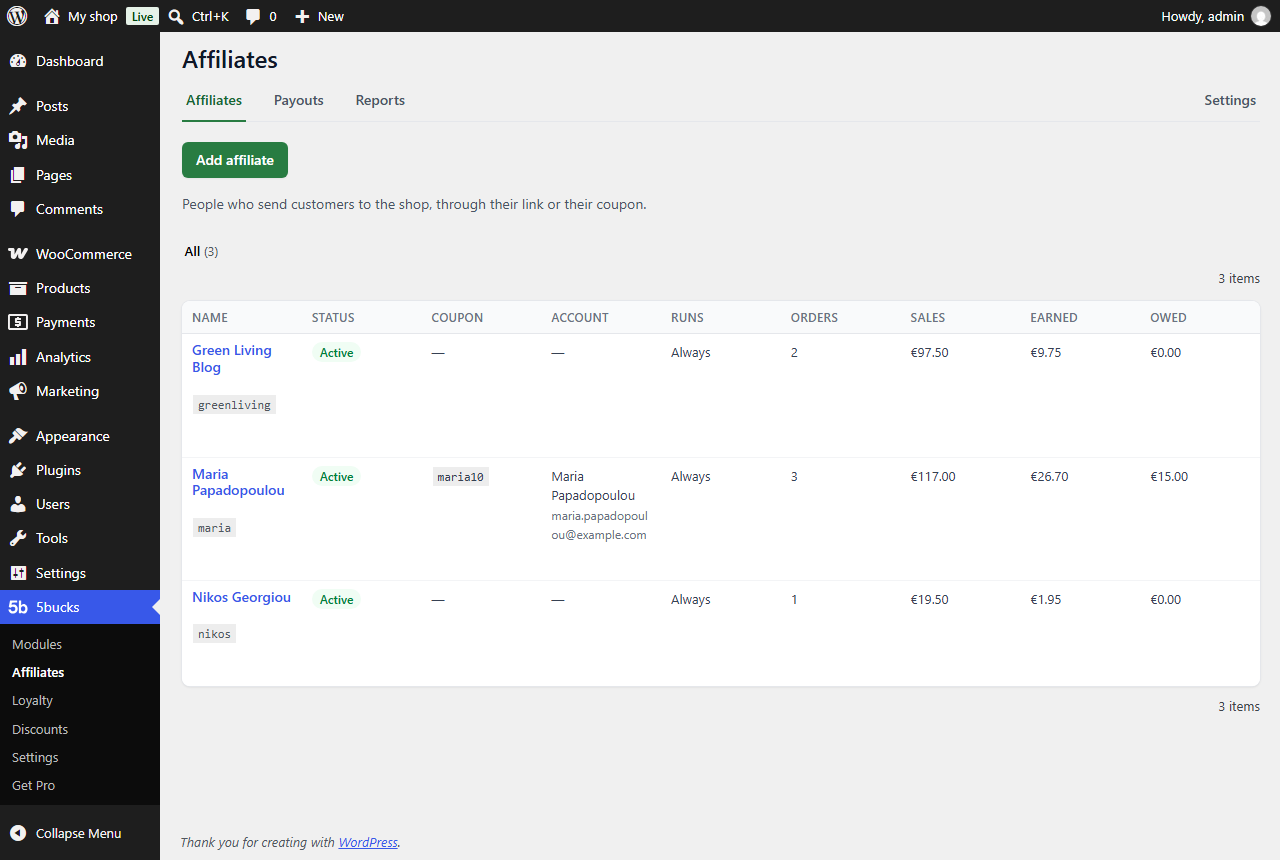
Each affiliate has their own terms: a percentage of the order or an amount per order, what a percentage is taken of,
and whether their own orders and a customer's later ones count. Once the order is paid it earns them a commission,
owed after the order is completed and a holding period for returns; cancellations and refunds take their share back.
The Payouts tab lists what each affiliate is owed with their payment details: you pay them yourself, mark it paid with
the transfer's reference, undo a mistake and export the list as CSV. Reports show their visits, orders, sales and
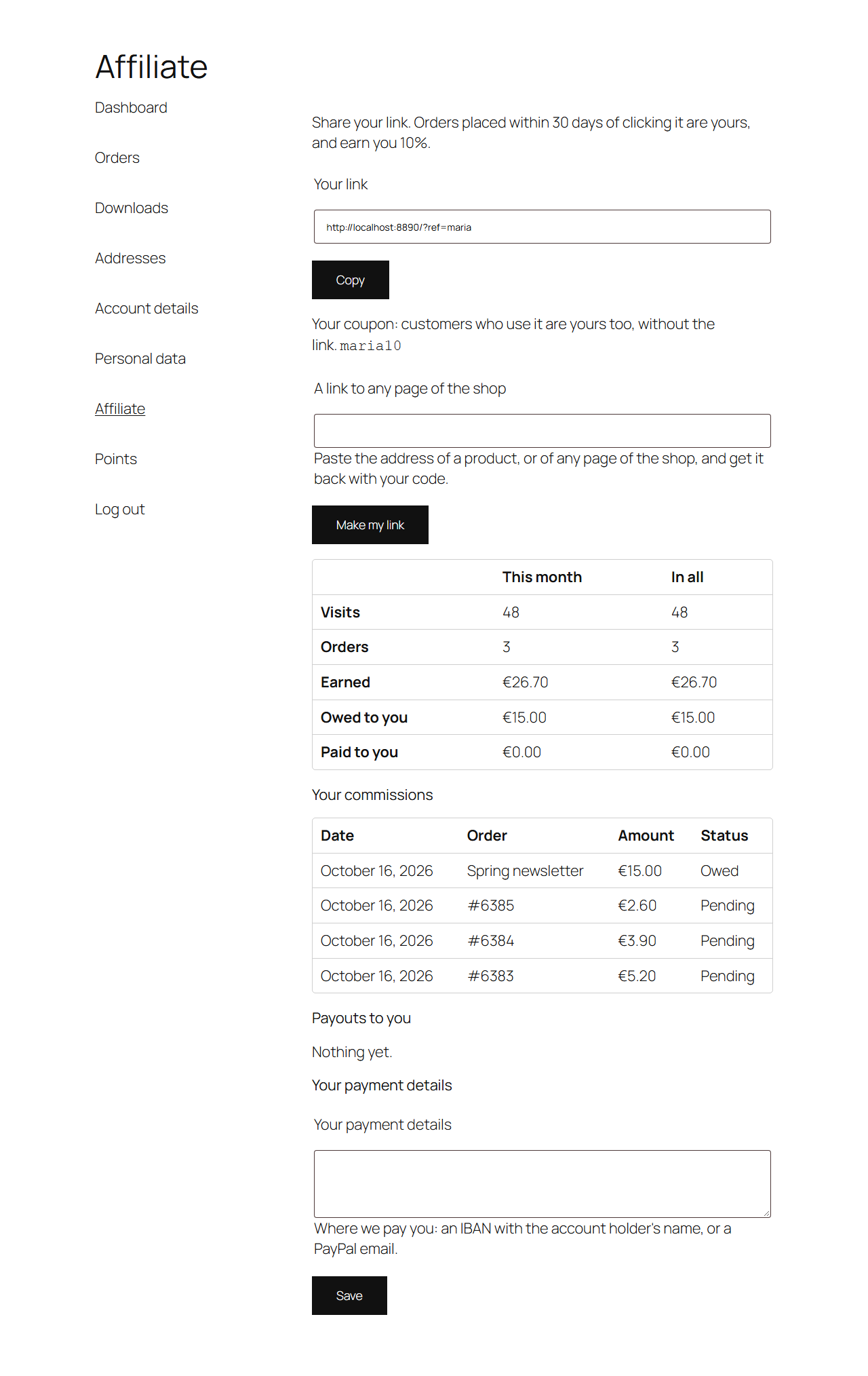
commissions over a period. An affiliate with a customer account sees their link, a link builder, their numbers and
commissions under My Account, and types their payment details there.
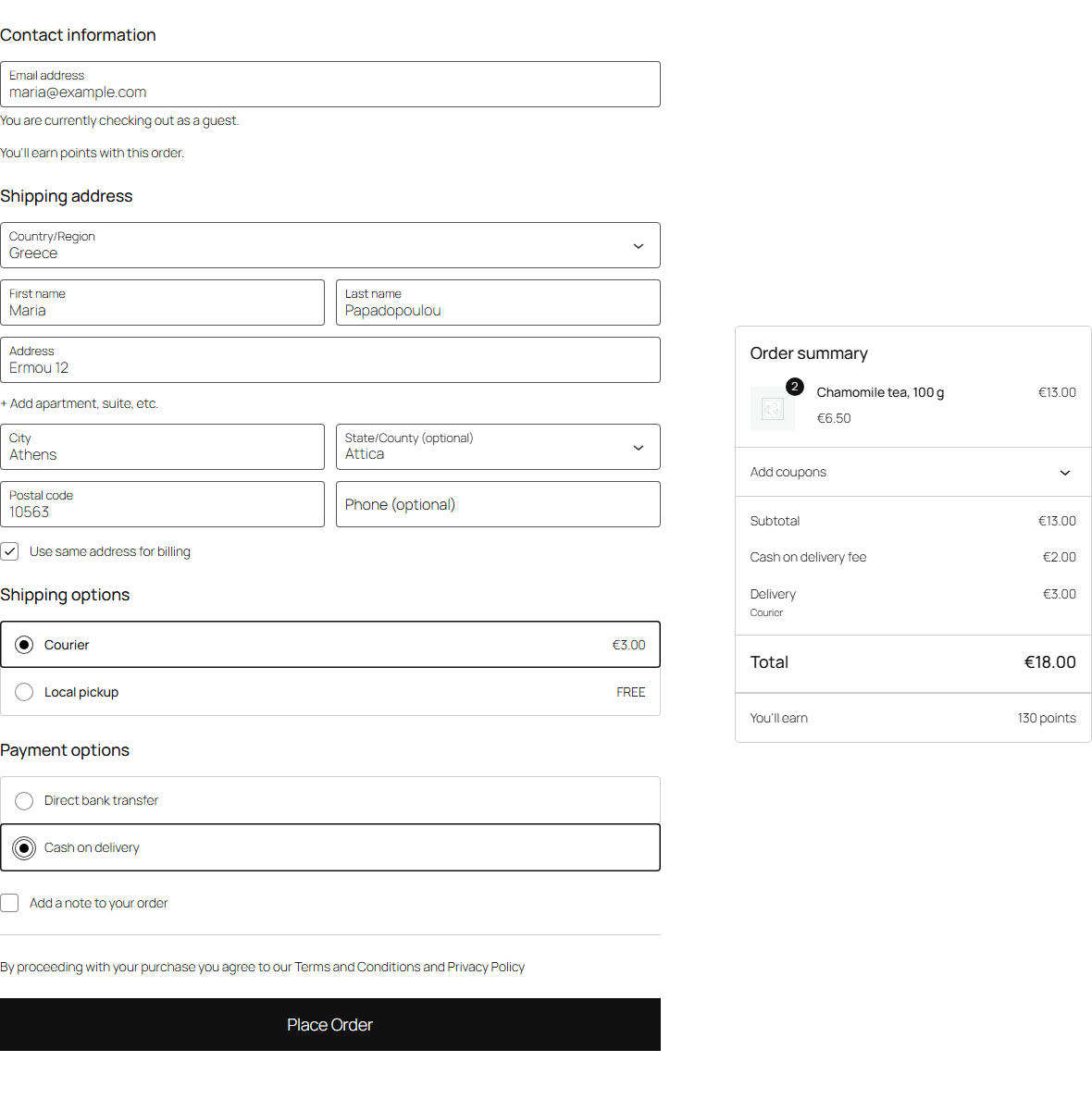
Cash on delivery fee
Charge a fee when the customer pays cash on delivery with one of the shipping methods you tick on your site's
list, leaving out store pickup or parcel lockers, say. The fee appears the moment cash on delivery is chosen and
goes when another method is, on the classic checkout and on the block checkout alike, and it is charged exactly
when the order is paid cash on delivery. You choose the amount, its label, whether VAT is added, or whether the
amount already includes it. It works with WooCommerce's own Cash on delivery method. A cart with nothing to ship
gets no fee, and neither do orders created or edited in wp-admin, or one paid later from its payment page.
Privacy requests
A tab in the customer's My Account area where they ask for a copy of their personal data or for its erasure,
as the GDPR allows them to. No forms to build and no email addresses to check: the request is for the logged-in
customer's own account, confirmed by email, and handled with WordPress's own privacy tools. Every text is
yours to write.
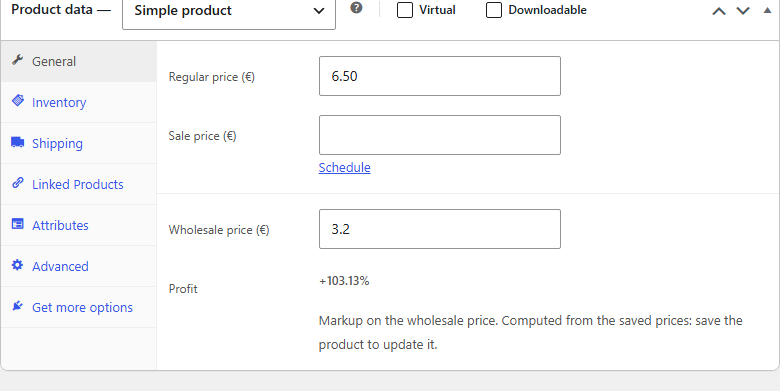
Product costs
Record what you pay for each product: a wholesale price and a supplier SKU, on simple products and on every
variation. The product editor shows the profit (as a markup on cost, or a margin on price, with or without
VAT). Already keep these values from a theme or another tool? Point the module at their field names and it
reads them as they are, with nothing copied.
Built to stay out of the way
- A module that is off costs nothing: its code does not run at all.
- A failing module is contained. An error in a module never takes the shop down: it is logged, and a module that keeps failing switches itself off and tells you, with a Re-enable button.
- No calls to outside services from your shop's pages. Nothing is sent anywhere.
- Classic and block checkout, both tested, on the default WordPress theme and a popular commercial one.
- Your menu, your way: rename the 5bucks menu item, move it, change its icon or its colour under 5bucks > Settings.
- Loyalty: more for the loyalty programme above. Earning rules, such as a first-order bonus, points per category, product or date, or multipliers; rewards, claimed or issued as codes and emailed; points that expire after the months you choose, with warnings first; a reminder to customers who have gone quiet; guests who earn less than account holders and spend their points with a code emailed to them; past orders credited; and reports.
- Discounts: more kinds of discount, including buy one get one (BOGO). Cart weighs at least an amount, for what you sell by weight: 500 g or more, 15% off. Multi-buys: buy 2 get 1 free or the second at half price on one product, or 3 for 2 across the products you choose, the cheapest ones first.
- Affiliates: more for the affiliate program above. Emails to your affiliates, through Messages: their link, coupon and terms when you add them, each commission or a weekly summary (their choice, and they can stop it), each payout with its note, and a notice to them and to you when their payment details change. Each affiliate's own commission rates per product and category (cosmetics 15%, gift cards 0%), which they see on their page.
- Messages: the emails 5bucks modules send, done right. Listed with WooCommerce's own emails, to edit, preview or switch off; sent from a background queue that tries again, with a log of what went to whom. Marketing goes only to past customers, with a one-click unsubscribe.
- Margin report: what your discounts really cost. The margin each coupon and discount gave away, from the wholesale prices you enter with Product costs, with each new order's costs recorded, so a later price change never rewrites the past.
- PostHog analytics: see what shoppers do, step by step. Your shop's WooCommerce events, from product views to completed orders, with the discount and the affiliate behind each sale, session replay and feature flags.
- Invoice or receipt: let business customers ask for an invoice, on the classic and the block checkout. An invoice needs a company name and a VAT ID, and Greek VAT IDs are checked.
- Order columns: columns in the orders list from any field your orders store, such as where each was placed, with your own labels for its values.
- eMAG feed: your margins in the eMAG marketplace feed. A price markup, and your supplier SKUs as MPN, in the product feed your eMAG feed plugin builds.
assets/dist/, which are built with
Tailwind CSS 4 from assets/src/ and the class names in src/ and templates/. To rebuild them from the plugin's
folder: npx @tailwindcss/cli -i assets/src/admin.css -o assets/dist/admin.css --minify (and the same for
menu.css, loyalty.css and promotions.css). The scripts in assets/js/ are shipped as written, with no build
step.
安装:
- In wp-admin, go to Plugins > Add New, search for 5bucks, and click Install Now, then Activate.
- Open 5bucks in the admin menu. The sections menu on the left lists every module.
- Open a module, check its settings, switch Enabled on and click Save changes.
屏幕截图:




常见问题:
Does a module that is off slow my shop down?
No. A module that is off is never loaded, and a module that is on only loads its settings and scripts on the pages that use them.
What happens if a module breaks?
It is stopped, never the shop. Each error is logged (WooCommerce > Status > Logs) and listed on 5bucks > Modules. If a module fails five times in ten minutes it is switched off automatically, and a notice in wp-admin says so, with a Re-enable button once you have fixed the cause.
Does it work with the block checkout?
Yes. The cash on delivery fee and loyalty points work on both WooCommerce's classic checkout and the block checkout that a new WooCommerce installation creates. The privacy requests tab works with any theme, since it uses WooCommerce's own My Account styles.
Does it send any data anywhere?
No. The plugin makes no calls to outside services from your shop's pages, and collects nothing.
Can I change where the menu item is, or what it looks like?
Yes, under 5bucks > Settings: its label, its icon, its colour and its position (after Settings, at the top, or any position you choose).
What does 5bucks Pro add?
Earning rules, rewards, expiry and reminders for the loyalty programme, more kinds of discount, the emails 5bucks modules send, analytics, a margin report and more: see 5bucks Pro above. Without it, or without its license, the loyalty programme and the discounts keep running as this plugin has them, except discounts of 5bucks Pro's kinds. It is an add-on: this plugin keeps working the same with or without it.
Where do I get help?
On this plugin's support forum. 5bucks is looked after by one person, so answers come as time allows, without a promised response time. Bugs are fixed in updates. Please include your WordPress, WooCommerce and PHP versions, and what you expected to happen. Questions about 5bucks Pro go through 5bucks > Contact Us, which 5bucks Pro adds, not this forum.
更新日志:
- 0.11.0 was never released; this version ships its changes.
- Affiliates: an affiliate's own commission can be 0 while another plugin gives products rates of their own, and an order that earns nothing is no longer announced to other plugins nor shown on the affiliate's page.
- Loyalty: points taken off the order on the classic checkout could now and then be gone again when it was placed.
- Now called 5bucks – Loyalty Points & Rewards, Affiliates and Discounts for WooCommerce.
- Affiliates: other plugins can give products commission rates of their own, add tabs to the Affiliates page and sections to the affiliate's page in their account.
- Affiliates and Loyalty: the screen of one affiliate or member shows a Back button instead of the page's tabs, and tabs of its own: Details, Commissions and Payouts for an affiliate, Details and Points history for a member.
- Affiliates: payouts are marked paid through the list's bulk actions, and undone by a link under the payout.
- Affiliates: a deleted affiliate's code can be given again, at once when their link was never used, or once the days it was remembered have passed.
- Affiliates: other plugins can hear when an affiliate is added, earns a commission or is paid, or changes their payment details, ask for an affiliate's commissions over a period, and add to the affiliate's page, its form and My Account's affiliate page.
- Greek, every text customers and staff see, and a Language setting under 5bucks > Settings: the site's language, English or Greek, whatever WordPress's own.
- Affiliates: analytics tools can learn which affiliate an order came from, and when a visitor follows an affiliate's link.
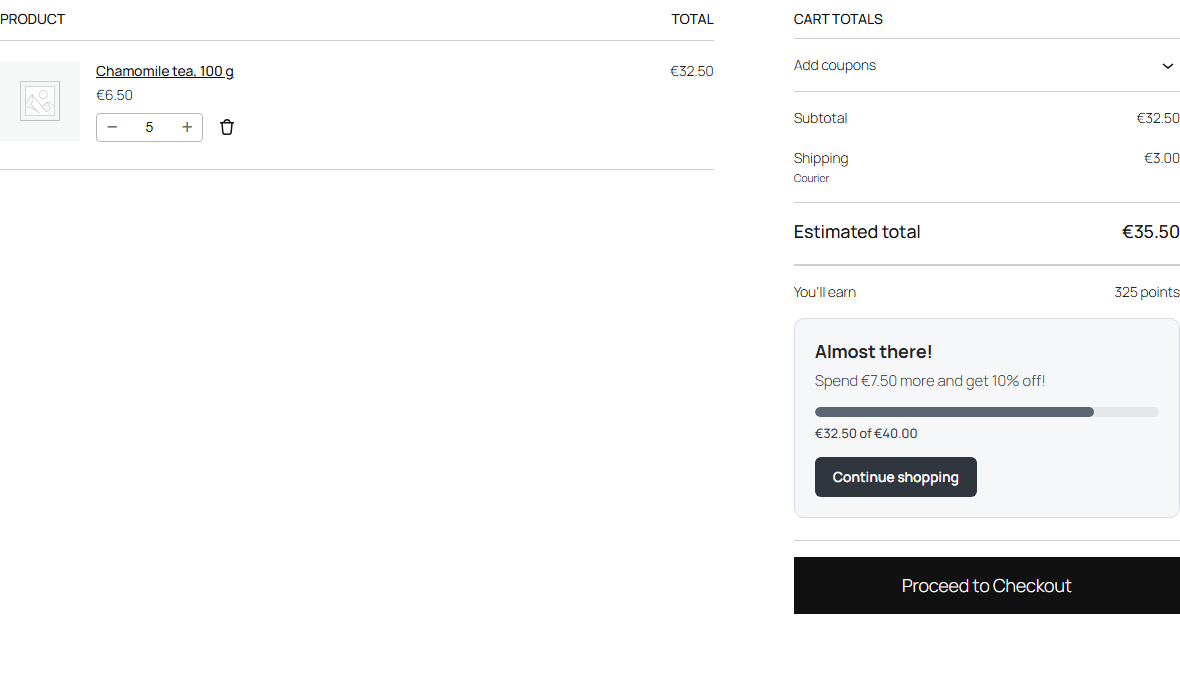
- Discounts: tell customers how much more to spend for WooCommerce's Free shipping, in the cart and checkout (classic and block) and the theme's side cart, and in a top bar with your own text.
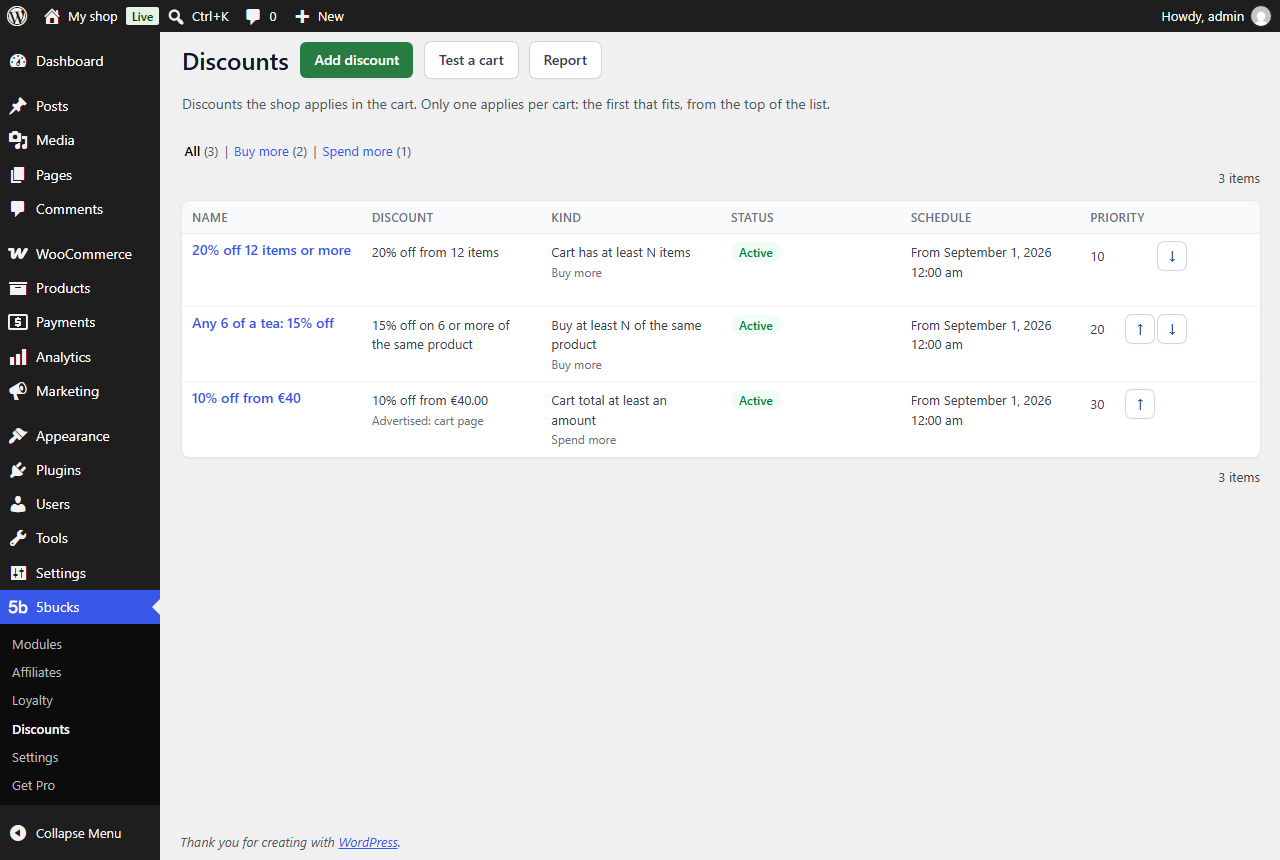
- Discounts: steps in one discount, such as 5% from 4 items, 10% from 6 and 15% from 8; the cart's box names the next step, and product pages list them.
- Discounts: a discount can be taken off some items of a line, as "buy 2, get 1 free" does; Test a cart says how many, texts can say {deal}, the cart's box counts to getting it again, and each such line says what it got.
- Affiliates: add the people who send customers to your shop, each with a link and, if you like, a coupon, a start and an end; pause or stop them. Orders through their link or coupon name them, on the classic and the block checkout, and earn them a commission once paid, owed after the order is completed and a holding period; refunds take it back. Mark what you pay them on the Payouts tab, and export it as CSV. Reports show their visits, orders, sales and commissions over a period. Affiliates with an account see their link, numbers and commissions under My Account.
- Loyalty's order box and member page use plain words for shadow points.
- The screens spell "license" as WordPress does.
- Discounts: for a number of items or a cart total, with a box in the cart telling customers how much more reaches the discount, a bar across the top of the shop and a line on product pages, Shadow mode and Test a cart. Off until you switch it on. The 5bucks Pro panel no longer lists them. With 5bucks Pro, update this plugin first: 5bucks Pro hands its discounts over to it.
- Add discount marks each kind of discount Free or Pro.
- Now called 5bucks – Loyalty Points, Discounts, Affiliates and More for WooCommerce.
- Now called 5bucks – Loyalty Points and More for WooCommerce.
- The 5bucks Pro panel says it costs 5 bucks a year.
- Loyalty points: every customer earns on paid orders, guests included, and members spend their points at checkout, with a balance page, My Account > Points and a members screen for staff. Customers can stop earning from their points pages. A few figures from your points, worked out every night, on its settings page. Off until you switch it on.
- Settings export and import on 5bucks > Settings: every setting in one file.
- A support report: Copy for support on 5bucks > Modules, and a 5bucks section in Site Health and WooCommerce > Status.
- Says which WooCommerce versions it works with: 9.0 or later, tested up to 11.1.
- Settings screens: each setting's name and description on the left, the setting itself on the right.
- Loyalty's settings speak plainly: short names, an example in each help, a line on what each tab is for, and what customers see grouped by where they read it.
- A module's page shows the plugins it needs as badges beside its status.
- The Loyalty and Product costs pages end with a card saying what 5bucks Pro adds to them, until it runs with its licence.
- The plugin's wordpress.org page shows a changelog of its own.
- First release on wordpress.org.
- Cash on delivery fee: tick the shipping methods that get the fee, zone by zone, from your site's own list, instead of typing the IDs of those without it. Settings saved the old way are moved on the first wp-admin visit, so every fee stays as it was.
- Every 5bucks screen draws its tables, tabs, buttons and badges the same way.
- The menu's first page is called Modules, and Settings is always in the menu.
- The 5bucks Pro panel on the Modules page lists everything 5bucks Pro adds, a card each for selling more, knowing your numbers and running the shop.
- Saving a module's page while switching it on or off shows one notice, not two.
- Fix: a number setting stored outside its bounds some other way than its form (WP-CLI, an import) reads as its default.
- The Overview's 5bucks Pro panel gives its price, $5, and says the money back is within 30 days.
- What modules and add-ons put on the 5bucks screens is printed through an allowlist of admin HTML: no scripts, style elements or event handlers.
- The 5bucks menu always lists its first page first, also once a module adds a page of its own.
- The Overview's 5bucks Pro panel has a Get 5bucks Pro button.
- Fixes: a settings error quoting what was typed shows it as text, and a module error recorded late in a page load no longer drops the errors recorded meanwhile.
- Fixes and hardening: Product costs refuses a meta key WooCommerce keeps its own product data under; no cash on delivery fee on a cart with nothing to ship, and a sturdier fee on the block checkout; a module that fails while starting stays off and says why, and one that cannot describe its settings no longer locks wp-admin; the sections menu marks the modules that are on.
- First release as 5bucks: the cash on delivery fee (classic and block checkout), privacy requests and product costs modules, a sections menu, 5bucks > Settings for the menu item, and a translation template. A module that needs WooCommerce can no longer be switched on without it.